In the News


We’re devoted to revolutionizing the way our clients do business. Sometimes that gets us noticed.

No big deal.

Posts about Accounting (7):

Top Firm-Wide and Project Performance Metrics for Project-based Firms

Posted by Brian McNamara on Jul 24, 2013

Red tape measure 008In order to truly gain a holistic view of the organization, there are key financial ratios and indicators that project-based firms should focus upon at regular intervals. Some key project performance metrics need to be monitored on a real-time basis, or at least weekly, while others are more relevant on a monthly basis. Also, because firms must first win projects and engage in other activities that do not directly produce revenue, project-based firms should also regularly monitor firm-wide metrics.

We should not focus on a single metric but rather, should adopt a more comprehensive view and monitor a handful of key metrics. For example, firms might reach the target for their Net Effective Multiplier (NEM) and yet have too few revenue producing projects, too much overhead, and poor utilization rates.

Key Project Performance Metrics for Management

At a minimum, firms should monitor their Net Effective Multiplier (NEM) on a monthly basis. The NEM is calculated by dividing net services revenue by direct labor, which is the cost of labor charged to projects. Net service revenue is total revenue less direct cost (i.e., Direct and Reimbursable Consultants and Expenses).

Most firms would like to see a multiplier that is better than 3 times direct labor. In its recent AE Clarity Report for 2012, Deltek reported an average of 2.9 with top performing firms reporting 3.43.

One way higher performing firms achieve a better NEM is by assigning appropriate resources to their projects. More experienced resources are typically very productive, but their higher labor cost drives the NEM downward. Thus, it is important to assign the resources with the right level of expertise to complete the task at hand.

Some firms prefer to report and monitor the Realization Ratio in lieu of the NEM. The Realization Ratio is calculated by dividing net services revenue by direct labor at billing rates instead of cost rates. A target Realization Ratio would be greater than 1.

On at least a weekly basis, if not real-time, firms should monitor Project Estimate-to-Complete (ETC) and Estimate-at-Completion (EAC) values. ETC amounts are how much additional money must be spent from tomorrow through the end of the project to complete the work. EAC amounts are how much total money you expect to have spent at the end of the project. This is calculated as the job-to-date costs plus the estimate-to-complete costs. ETC amounts can be calculated simply by maintaining schedules. With a timeline defined, ETC amounts are simply future scheduled amounts at either cost or billing rates.

Best Practices Tips: To monitor ETC and EAC amounts in real-time, it’s a best practice to complete timesheets on a daily basis. Additionally, to establish a proper Project Work Breakdown Structure, subdivide a project into smaller more manageable components (e.g., phases and tasks) to maintain schedules and monitor these amounts. Ideally, EAC amounts will not exceed budgets but by monitoring these calculations weekly, firms are better able to keep projects on track and the work within scope. 

Key Firm-Wide Management Metrics

Firms should monitor their utilization and overhead rates on a monthly basis, at a minimum. The Utilization Rate is calculated by dividing the cost of labor charged to projects by the total labor cost of the firm. In the early referenced Deltek's 2012 AE Clarity Report, the average employee utilization rate was reported as 59.8%. Excluding vacation, holiday, and sick time it was 65.4%.

Firms can improve employee utilization by setting realistic utilization targets, properly allocating resources, managing client expectations, and having employees monitor their performance against their target, real-time, while completing timesheets each day. The Overhead Rate is calculated by dividing total overhead (before distributions) by total direct labor expense. Typically, bonuses are excluded from overhead for this calculation.

Schedule a Deltek Vision DemoAn interesting finding from Deltek’s AE Clarity Report was the average overhead rate for 2012 which was 161.6% with bonuses excluded and 175.7% with bonuses. Rates were not significantly different for higher performing firms suggesting they had achieved higher project profitability with better NEMs and better utilization rates.

The bottom line is that there is no magic bullet but rather a handful of key project performance metrics firms should monitor at regular intervals to maintain profitability. Does your firm have a global view of your firm metrics? Schedule a demo today to see how Deltek Vision is an ERP specifically designed to provide access to these key metrics and many more. 

 

To Adjust Salary Job Cost or Not...the Debate Rages On

Posted by Scott Gailhouse on Jul 23, 2013

Adjust Salary Job CostEveryone seems to have an opinion on how labor cost should be charged to projects. In Vision, there are two ways to charge labor cost to your projects. Some firms prefer to load an hourly rate for both hourly and salaried employees. And some firms prefer to load a salary rate for salaried employees and an hourly rate for hourly employees and use the Adjust Salary Job Cost utility (ASJC) in Vision.

The Adjust Salary Job Cost utility is Vision's way of taking the employee’s salary rate and calculating a cost rate based on the hours worked (instead of standard hours in a period). The ASJC utility is run after timesheets are posted and adjusts the posting so that the costs posted agrees to what is being paid to the employee.

So what does this mean?

First, let’s discuss those firms that load an hourly rate for salaried employees.  Assume that this firm has bi-weekly timesheet and pay periods. Let's look at an example without ASJC:

Example: Mike Jones is a salaried employee and is paid $3,000.00 bi-weekly, and he has an hourly cost rate in the Employee Info center of $37.50/hour ($3,000.00/80 hours). When timesheets are posted, Vision multiplies the actual number of hours worked by the hourly rate from the employee info center record. Vision will post a debit to the direct and/or indirect labor account and credit the Job Cost Variance (JCV) account. Mike’s hours are applied at a cost rate of $37.50 for every hour he works regardless of how many hours he works.  

When payroll is posted, we would see a debit to the JCV account for Mike’s bi-weekly salary - $3,000.00. If Mike had worked 85 hours in an 80 hour timesheet period, the JCV account would be ($187.50) because the credit posted to JCV was $3,187.50 at the time of timesheet posting and the debit posted for payroll is $3,000.00. If Mike had only worked 75 hours during the timesheet period, the JCV account would be a positive $187.00.

Now let’s talk about those firms that load a salary amount in the Employee Info Center. We will use the same bi-weekly timesheet and pay period frequencies as in the first example. When a salaried employee works more or less than 80 hours, Vision handles the cost exactly the same way it does as if an hourly rate was loaded in the Employee Info Center at the time of time sheet posting. To get the cost rate, Vision looks at the salary rate in the employee info center, divides that by the frequency (in this case 80 hours) and multiplies that by the number of hours on the timesheet.

This is where Adjust Salary Job Cost comes into play. Once run, AJSC takes the salary rate and divides it by actual number of hours worked and multiplies the number of hours worked.

Example:  Mary Smith has a bi-weekly salary of $3,000.00 and she has 85 hours on her timesheet. When timesheets are posted, Vision takes her salary rate and divides it by 80 (bi-weekly frequency) and multiplies the result by the actual number of hours on her timesheet.  You would see a debit to direct/indirect labor account and a credit to the JCV account for $3,187.50. Just like the firm using an hourly rate in the employee info center.

Now when ASJC is run, Vision takes the salary rate, divides it by the actual number of hours worked ($3,000.00/85 = $35.29411) and applies the result to the actual number of hours worked ($35.29411 * 85 = $3,000.00). Vision makes an adjustment to the original timesheet posting to credit the direct/indirect labor account and to debit the JCV account in the amount of $187.50.  Since Mary is paid $3,000.00 per pay period, the JCV account would not show a balance when payroll is posted.

How cost rates are loaded in Vision affects the way labor costs are reported on the projects and the General Ledger. Here are some of the differences:

    • Load Hourly Rate in Employee Info Center:

      • Time posts to projects at hours worked at standard hourly rate.
      • No additional steps by accounting.
      • Costs posted to direct projects are not consistent with actual payroll paid when employees work more/less than standard hours.  Over/Under balances are carried in the JCV project.
      • Project managers have stable costs to track project performance.
      • General Ledger carries a balance in the JCV account that is reflective of the amount paid to employees over/under the actual hours worked.
         
    • Load Salary Rate in Employee Info Center and use ASJC:
      • Time posts to projects at hours worked at variable hourly rates for Salaried employees (hourly rate changes on hours worked in any given period).
      • Accounting must run the ASJC utility after time sheet postings for salary job costing to occur.
      • Costs posted to direct projects are consistent with actual payroll paid when employees work more/less than standard hours.  No balances are carried in the JCV project.
      • Project managers have to manage variable costs over which they have no control.
      • General Ledger does not carry in the JCV account that is reflective of the amount paid to employees over/under the actual hours worked.

As you can see, both choices have pros and cons, but having a clear understanding of how the ASJC utility works in Vision will help you make the right choice for your firm. Ready to learn more? Empower yourself and your firm by conducting a Navigational Analysis.


The Importance of Benchmarking in Measuring Business Growth

Posted by Admin on Jul 17, 2013

business growthAt its most basic level, the practice of benchmarking provides perspective into why some companies perform better than others. As a result, it helps business leaders find and exploit opportunities for improving operations and results. 


Another aspect of the importance of benchmarking is that it can stamp out incorrect assumptions that lead to complacency. For example, for some business owners, the easy (and convenient) takeaway from the recent Great Recession is that its pain was spread more or less evenly within each industry sector. 

The problem is, this often wasn’t the case. In fact, in almost every sector you examine, there was a small group of firms that made it through the recession in better shape than their peers, as measured by the most relevant metrics. 

Was it just luck, or were they doing things differently? This is where effective benchmarking can really pay off. 

How to get started

A good place to begin is understanding the most relevant key performance indicators (KPIs) in one’s industry. For example, our work with clients in project-based industries has put a spotlight on the importance of benchmarking such metrics as: 

    • Utilization Rate
    • Net Labor Multiplier
    • Operating Profit
    • Current Ratio
    • Employee Turnover
    • And various others 

The next step is to systematically track and monitor these KPIs. Hopefully, you’re already doing this; but if not, there are a number of financial/accounting software packages that can do so. (At Full Sail Partners, we offer an alternative solution that tracks this data: Deltek Vision. It also streamlines project management, improves visibility throughout the project life cycle, and … okay, that’s a topic for another blog!) 

Finding a good yardstick

Once you have sufficient data on your KPIs, the next step is to find external data to compare it to. This is not easy or simple — but still very doable. 

Of course, one solution is to hire a consultant to analyze the relevant competitors and metrics. But a far less expensive approach is to find the data you need on the web — preferably in the form of third-party studies of your industry. 

As a case in point, Deltek publishes an annual performance study of firms in the architecture and engineering field that examines all of the most relevant KPIs for that industry. More importantly, the study mines through the data to isolate some very interesting differences between the highest performing firms and the rest. 

Among other observations, the most recent study found that overhead and utilization rates were basically the same at all the firms studied. But the high performing firms were unique in sharing several key characteristics, including that they had improved efficiencies in their project lifecycle and had developed a defined set of company standards. 

Other types of freely available studies can inform the benchmarking process as well. For instance, the marketing firm Hinge has produced a series of reports that examine high-growth firms in a variety of professional services industries. Like the Deltek study, Hinge’s study found interesting lessons in how the most successful firms are doing things differently. It also exploded some myths along the way — like the widely-held belief that a tendency toward high growth among certain smaller firms is a statistical fluke. 

The key is, do a little digging, and you can readily find some metrics of the top-performing firms to compare your firm to — and more importantly, take lessons from. 

Add benchmarking to your management mix

Of course, the importance of benchmarking is not that it’s a silver bullet for growth. It’s more of a management philosophy and commitment that emphasizes keeping an eye on the most important KPIs within one’s firm and industry, finding meaningful comparisons among top-performing competitors, and adopting proven strategies for improving growth and financial performance.

Interested to learn how Professional Services firms position themselves for future growth and meet the challenges of potential ownership transitions? Read expert opinions from Deltek, Rusk O’Brien Gido + Partners and DiCicco Gulman and Company (DCG).  

 Template CTA Whitepaper

Advantages of ERP Systems... and Their Bottom Line Impact

Posted by Full Sail Partners on May 29, 2013

Advantages of ERP Systems and the Bottom LineI was talking recently with a prospective client who observed that his firm had outgrown QuickBooks (QB). The conversation eventually led to a discussion of the advantages of ERP systems over back office accounting systems — which include not only efficiency gains, but strategic improvements as well. 

Being in the ERP implementation business, we hear a lot of customers express frustration over outgrowing QB, so I asked my prospect what it meant specifically for his firm. Off the top of his head, he named several pain points:

  • First, their QB systems were disconnected, so there was no particular place where management could view financial performance overall, let alone broken out by project manager or client. 
  • QB could display AR for a specific client, but offered little in the way of project information regarding specific services or deliverables. 
  • Last but not least, correspondence for each client was buried in various public folders on the firm’s file server. To make matters worse, the correspondence trail was incomplete due to users’ not following the correspondence logging protocol. 

After hearing these insights, plenty of examples came to mind of ways that even a small- to mid-size firm like his could benefit from an ERP system. I mentioned a few of the most basic advantages of ERP systems over back office accounting: the value of integrated data, open architecture and user customizations.  

I also pointed out that thanks to the evolution of niche ERP systems, small firms CAN get the type of functionality that used to be available only to firms with deep pockets. In fact, it’s now quite easy to implement an ERP system that not only addresses the accounting function, but also facilitates the firm’s core processes and way of doing business. 

The Need For Visibility

My colleague next mentioned how his firm actually had strong AR, and good visibility into its cash and cash management. The problem, he said, was that the organization lacked the visibility needed to help back office management play a more significant role in decisions affecting the firm as a whole. By the same token, it was difficult to get project managers more involved in the fiscal responsibility that goes with managing client expectations. 

I pointed out that there were several other major advantages of ERP systems over basic accounting packages. The ERP concept excels at addressing the front end of the project life cycle, by facilitating tracking of projects and providing visibility. Specific examples include:

  • Managing data obtained through the business development process
  • Generating opportunity notifications and creating process flow through workflows and alerts to improve efficiencies and win rate
  • Forecasting for opportunities and already-awarded projects regarding not only revenue, but staffing requirements as well
  • Providing for audit trails of communication with clients, contacts and opportunities and supporting technical staff in the delivery of services under specific projects
  • Facilitating communication with accounting early in the business development phase regarding terms, rates, related documents and specific contract requirements
  • Integrating with desktop tools like Outlook, Word and PowerPoint to facilitate email communication and automate creation of proposal, estimating and contracting documents 

I then suggested we establish a value proposition for the level of investment that would be needed at this critical juncture in the firm’s transition from QuickBooks. This is where my prospect’s eyes started to get big, as he saw how much time, factored by associated hourly costs, was being spent on efforts that an ERP system could automate. 

We assessed values for each of the existing manual processes, and compared them with the reduced time and effort involved using the ERP approach. The resulting savings would go right to the firm’s bottom line. But as significant as those savings would be, I added, the real impact would come from the improved quality of the work environment, better communication with clients, and most importantly, increased opportunities for success. 

See how today’s success-minded firms require a laser-like focus on strong project and financial management practices by downloading the whitepaper on Growth and Transition Strategies.

What Does ERP Mean - Jargon Buster

Posted by Wendy Gustafson on Apr 24, 2013

SaaS, ERP, CRM, LOL blah, blah, blah. Today everything seems to be reduced down to acronyms, to fit into our fast paced instant message, text, and Twitter world.  However, many times we can be left out of the story because we don’t know what they mean.  So, what does ERP mean and what are some of the common related terms? To help you decipher this business jargon, let’s discuss what it is and how it can help firms.

What does ERP meanERP – Enterprise Resource Planning is a system facilitating the flow of information between all business functions, from your Finance and Management Accounting to Project management, Client Relationship Management (CRM – see more below), Human Resources, Inventory and Purchasing. 

The benefit of an ERP is your business efficiency can improve dramatically as all your business processes are automatically synchronized.  The real-time functionality allows for upper management to react quickly to changing dynamics in the company and the economy. 

Some of the characteristics to look for in a “good” ERP solution are:

  • Operates in “Real-Time”, reflecting what is going on with your business now
  • Database that supports all applications and allows for minimal duplication of efforts
  • Consistent interface throughout the system for ease in training staff

SaaS – Software as a Service is a software model where the software and data are centrally located on the “cloud” (see below).  SaaS solutions are typically accessed via a web browser allowing access from any location.  SaaS solutions have become popular over the last several years.

Some of the benefits of a SasS model are:

  • Easier administration at the client level as all updates, and patches are handled by the provider on a timely basis
  • Management of the data back-ups
  • Subscription feel providing a lower up-front investment compared to traditional software models

CRM - Customer Relationship Management is a model for managing a company’s interactions with current and future customers.  A typical CRM system will synchronize sales, marketing, customer service and technical support (if applicable).

Some benefits of a CRM system are:

  • Identification of top clients allowing for better customer service focus
  • Increasing information sharing between employees
  • Allowing systems to track client contacts
  • Providing visibility into sales and marketing efforts

SQL – Structured Query Language is a programming language that allows access to and management of large amounts of data. The data is stored in a relational database and offers the user the ability to manipulate and view the data in various ways. Efficiency is the main benefit of a relational database as the data can be easily formatted providing ease of grouping and comparison.

Cloud refers to using the internet to access programs and data.  Operating in the cloud has some real advantages in that you can access your data anywhere at any time and the cost of maintaining local hardware and operating systems are reduced (somewhat replaced by the cost of the cloud operations).  Some concerns are ensuring data integrity and security, reliability, limited customization and latency.  Be sure to check out this whitepaper for more information about the cloud.

Project-Based ERP is an ERP system built to meet the needs of project-based industries.  Project-based industries generate most of their business via individual projects (as opposed to producing widgets).  A project-based ERP will allow managers to track the life-cycle of individual projects from the initial proposal through project close-out.  This allows management analysis of the success (or challenges) of individual efforts, apply best practices and come up with a company policies and procedures.

Open Architecture refers to the ability to add-on, customize or upgrade components of existing system software.  Software that has open architecture publishes or makes available its structure allowing for developers to access and manipulate.  In some cases this allows direct access via an OBDC (yet another acronym meaning Open Database Connectivity) connection or information sharing via an API (Application Programming Interface). 

Of course this is only a snapshot of what you hear out there. Hopefully it will serve as a starting point so you expand your research ERP.  New terms are created daily (just check any 15 year olds text messages to see) so this may be obsolete by the time it is published.  However, it does help you get a handle on the terms you have heard on the news, business reports, and around the office.  And now when someone asks you ‘What does ERP mean,’ you’ll have the answer!

Confessions of a Timesheet Procrastinator

Posted by Scott Gailhouse on Mar 29, 2013


Okay, here goes…I actually love doing my timesheet on a daily basis.  There, I said it and I feel so much better. But hold on, let me back up a little.  Maybe “love” is too strong.  Let’s go with “like”.  I actually like doing my timesheet on a daily basis.

However this was not always the case.  Like most of you, the idea of filling out a timesheet was akin to having a root canal, but only worse.  In our firm, timesheets are due on a semi-monthly basis, but we have a policy that timesheets must to be completed daily.  I know, right?

This policy was easy to ignore until one day, much to my surprise, I received an e-mail alert that my timesheet had not been completed the day before.  AN ALERT!  It turns out that not only did I receive an alert, but a notation was made in my Employee Info Center record of my violation.  The powers that be had sunk to a new low and now I’m faced with two options; continue ignoring the policy and get an annoying alert on a daily basis, or start doing my timesheet every day.

Being the flexible guy that I am (this is sarcasm for those of you who don’t know me), I started doing my timesheet after each completed task.  And much to my chagrin (read surprise), it wasn’t that bad!  First of all my utilization went up.  Some of those short, billable items that fell through the cracks when I was doing my timesheet at the last minute were now being captured. 

Another plus to filling out my timesheet daily is that my comments are more descriptive.  No longer am I putting “call with so-and-so” in the comments field.  I am actually able to put what was discussed in the comment.  This has made reviewing my draft invoices so much easier because I am no longer second guessing the hours I billed to my projects or having to go back to e-mails hoping I find some clue about what was discussed. 

Also, my projects are easier to manage.  I know at any given time how many hours have been charged to my projects so there are no surprises when it comes time to review my draft invoices.

I am also amazed at how little time it takes.  What seemed like hours before, my timesheet now just takes a few minutes each day to complete.

And as if it couldn’t get any better, there is now a timesheet app for iPhone, iPad, Android and other smart devices.  Now I can do my timesheet on the go.  This has come in handy on many occasions when I’m out of the office but still conducting business.

I think the key here is that my timesheet is always up on my desktop.  Even if I open it up in another window, I always have access to it so that I can record my time as soon as I complete a task.

I challenge anyone to give this a shot!  You’ll save time and alerts popping up on your dashboard or in your e-mail box will become a thing of the past.

Interested in learning more about how firms are getting their employees to submit timesheets daily? Click here.

Are you a Deltek Vision user? Check out the newest custom solution from Full Sail Partners and start getting your staff to complete timesheets daily:

Deltek Vision Tips: De-Mystifying Cash Basis Accounting

Posted by Rick Childs on Mar 29, 2013

Cash Basis AccountingFor many of us, the mere mention of cash basis is not unlike the old “fingernails on a chalkboard” – not something we want to hear.  However, cash basis accounting need not be something that is left only to your CPA.  Your Deltek Vision system can be set to easily track your transactions and financials on both an accrual basis and on a cash basis with minimal effort. 

What is Cash Basis Accounting?

Cash basis accounting is the process of recognizing revenue and expense at the time that you actually receive and disburse cash in your accounting system.  Accrual basis accounting, on the other hand, recognizes revenue when you produce invoices (creating accounts receivable) and recognizes expense when you enter vendor invoices (creating accounts payable).  For firms utilizing Vision’s Revenue Generation feature, revenue can be generated when time and expense is posted to the system – prior to invoicing the client.  Most firms that we consult for maintain their day-to-day books on an accrual basis and leave cash basis for their CPA to calculate at year-end for filing of tax returns. 

How and when should I get started with cash basis accounting?

To start using cash basis accounting in Vision, you will need to get with your CPA and make a plan.  It is generally best to enable cash basis at the beginning of your fiscal year, however, it can be enabled at any time.   You will also need to get copies of your year-end accrual and cash-basis financials from your CPA to ensure that your beginning balances for both methods are correct in Vision.  Most firms get accrual based closing entries from their CPA, but may not be getting cash-based closing entries.  Talk with your CPA and setup a time to bring your Vision accounting system up to date as of your most recent fiscal year end. 

The next thing you will need to do is to map your Accounts Receivable account(s) to the proper Revenue account(s) in the Chart of Accounts Info Center.  This setting lets Vision know which Revenue account(s) to credit when you record a Cash Receipt transaction in the transaction center.  The following illustration shows the process of recognizing both accrual and cash basis revenue in Vision:

Cash Basis Accounting, Deltek Vision Finance

Taking Cash Basis accounting to the next level:

  • You and your CPA may want to recognize cash basis revenue using multiple revenue accounts.  This can easily be accomplished by creating multiple AR accounts – one for each type of revenue.  Your AR reporting does not need to change and you and your CPA will have better detail
  • Many options are available for cash-basis reporting regarding timesheet postings and payroll.  Ask your Full Sail Partners Consultant when you are ready to explore these options, including the use of a Payroll Payable liability account as opposed to your Job Cost Variance expense account.

Has your firm implemented cash-basis accounting? Leave a comment and let us know your experience.

Be sure to check out other articles written by Rick Childs

Deltek Vision Tips: Multi-company – Do I need it and how does it work?

Posted by Scott Gailhouse on Mar 11, 2013

Many firms are not familiar with what the multi-company feature in Vision does or that it even exists.  Therefore they are not certain if multi-company needs to be enabled in their database. As a consultant that specializes in multi-company implementations for more than four years, I wanted to pass on some tips for firms considering this feature.    

What is multi-company?
Multi-company is part of the Vision Core Financial Application.  Vision multi-company allows a firm to manage more than one company in a single database and streamlines the process of managing accounting functions between companies when resources are shared.  There is no limit to the number of companies that can be maintained in Vision.  By utilizing multi-company, each company operates as a separate entity but data sources such as clients and contacts can be shared across the enterprise.   However, other data sources such as employees are company specific.  Projects can be set up so that phases are owned by certain companies.  Multi-company also makes it easier to switch from one company to another without having to log in and out of the Vision database. 

Should my company enable multi-company?
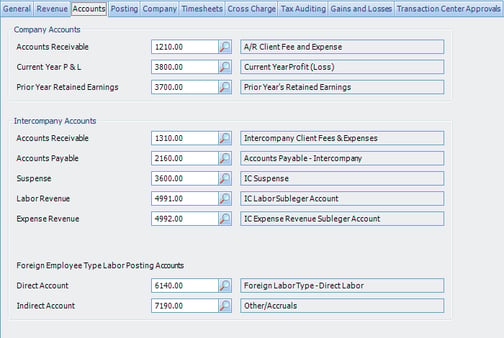
There are several factors to consider before enabling the multi-company feature.  One primary factor to consider is how will your companies interact with one another?  When resources are shared, how will the company loaning their staff or paying expense on other company’s behalf be compensated?  There are several approaches to intercompany billing and should be part of the planning discussion during the implementation process.  Do any of these companies Deltek Vision Multicompany Chart of Accountsconduct business in a currency other than US dollars?  These and other questions should be addressed during the planning process and will help you determine if multi-company is a good fit your firm. 

This topic is discussed during the initial planning meeting. Some firms determine that multi-company is not an option and instead opt to explore alternatives.  Organization reporting within Vision is a great alternative.  In Organization reporting, the companies would be included in the organization structure.   The “maintain separate balance sheets” feature in Vision would also be used as well as the labor cross charge feature to move revenue, labor and cost between companies. 

What are the implications of turning on multi-company?
Once you turn on multi-company, it cannot be turned off. So before enabling multi-company, a well thought out, carefully planned implementation of this feature should be discussed. Additionally, the creation of a test multi-company environment will go a long way in preparing your finance staff and all of your employees for all of the new features a multi-company database has to offer. Even if companies don’t interact with each other, the database still has to be configured as if they do. 

What new multi-company features are available in Vision 7.0?
In earlier versions of Vision, there were two rate methods to choose from in intercompany billing, cost plus a multiplier or the billing rate established in the project’s billing terms.  A new feature in version 7, allows you to establish rate tables between companies.  This new feature gives you more flexibility when charging the other companies in your enterprise for borrowing resources. 

Has your firm implemented multi-company? Leave a comment and let us know your experience and be sure to check out our other "Tips & Tricks" articles.

Deltek Vision Tips: Custom Info Center for Human Resources

Posted by Ryan Felkel on Mar 11, 2013

Many of us in Accounting have to wear a dual hat of the HR manager.  Somehow it is assumed that accounting experience qualifies you to manage the HR process.  Why?  Perhaps it is due to the portion of HR that involves risk (employment laws are everywhere) or perhaps it is the crossover between HR and payroll. 

Outside of payroll, there isn’t much crossover between the two jobs. Further blurring the issue, an increasing amount of firms are utilizing third party payroll services.

For the true HR part of the job, we create spreadsheets to track and review timelines and employment metrics.  We struggle to keep track of employee initiatives and job metrics.  Most employee reviews are a reflection of their performance over the last couple months at best as managers often forget successes or failures earlier in the year.  Job descriptions are vague and associated with metrics that are difficult, if not impossible, to measure objectively. Employees are often dissatisfied if they receive a positive or neutral review without an increase in compensation. 

So what is the answer?  We can use our Deltek Vision System to assist us.  

Some items are relatively simple.  Utilize user defined fields to track the next review date and have a scheduled workflow send a reminder to the manager and yourself.  You can set up a user defined grid to allow tracking of an employee’s pay/position history so that it is easy to track the changes through the years.  All of this is helpful, but it really doesn’t solve the full problem.

With the advent of Vision 7.0 and User Defined Info Centers, you can go many steps further.   Utilize a combination of User Defined Info Centers, User Defined fields, standard workflows and scheduled workflows, to set up HR, and review tracking system managed from within your existing Vision system. 

How would something like this work?

You can create a user defined info center to house your employee job descriptions.  These job descriptions can contain the measurable metrics for the job along with overall core competencies.

You then create a “review form” using user defined fields in the employee info center.   A stored procedure will allow you to pull the employee metrics and competencies into the employee review tab.

After the review is complete, results can be stored in Vision and reviewed later. 

Stored procedures can update a tracking grid for the employee so that historical review scores can be seen at a glance.  You can also use grids to provide places for managers to track employee’s progress throughout the year.

User defined fields, grids, workflows & stored procedures - Is all that really necessary?  Not really.  All this can continue to be managed in various worksheets, word documents and calendars. 

The system above simply allows all of the disparate parts of an employee review/compensation/current and long term history to be maintained in one place.  Also, the beauty of using Vision and User Defined elements is the ability to customize your HR procedures to your company needs.  I mean it IS by definition “User Defined”.

 Deltek Vision Custom Info Center for HR


So what are some tips for an effective HR process?

Whether you decide to automate your HR, or keep up the use of spreadsheets,  there are some things you can do to make your HR processes more effective:

  • Create well defined job descriptions and make them available to employees.
  • Within the job descriptions, define the metrics by which employees will be measured.  Ensure the metrics are specific. For example, the Project Managers will ensure work authorizations for every additional service provided to clients.
  • Have a well-defined review policy.
  • Separate the review schedule from the schedule for raises.  Raises are given, not only on performance, but on budgetary restrictions.  This removes one level of angst from the reviews.
  • Provide managers a place to keep track of employee successes and failures.  Allow employees to update their successes and failures also.  This allows the employees to be more active participants in the process.

Has your firm utilized the Custom Info Center? If so, in what ways? Leave us a comment.  Not on Deltek Vision 7.0 yet? See how our firm can help you transition to 7.0.


Don't Forget Your Deltek Vision Year End Processes

Posted by Wendy Gustafson on Nov 30, 2012

Deltek Vision, Year End ProcessAs we come into the holiday season many of us in accounting face the coming season, not only with the joy of family and friends coming together, but with a sense of impending dread – YEAR END and TAX SEASON are looming – ugh - have another drink.

W-2s- 1099s- journal entries- checking and double checking each number!  Auditors- shareholder meetings- endless explanations’ of what the results mean (even though you have been saying for the past 6 months)  - Oh the joy of the season.

As we go through the year end process there are mistakes we (and others) make that are easy to recover from like entering the 15 page depreciation journal entry “backwards” at midnight sitting in your semi dark office chugging your 15th pot of coffee.  Some are more difficult – like removing all the lower levels of your work break-down structure (did that once – glad our backups worked). So outside of deleting the database, what are some of the items in Vision year end processing that are hard to recover from:

1099 Initialization


When to run
After the final check run for the current year, but before the first check run of the next year.  Also, this utility SHOULD BE RUN before you process your 1099s.

What the process does
This utility in Deltek Vision “resets” your 1099 tracking for the next year.  This utility is run from the Utilities menu item in Navigation.   As you process payments for current year, Vision stores the sum of these payments in a field called “Paid This Year”.  This process takes the amount in this field and stores it in a separate field called “Paid Last Year” (both fields can be found in the Vendor Info Center).   When you run 1099s for the year (for example 2012 1099s must be mailed before January 31, 2013), Vision pulls the 1099 amount from the “Paid-Last-Year” field.

Implications
If you fail to run this process correctly, the amount paid recorded on your 1099s for the prior year and the current year will need to be updated – manually

Open New W-2 Quarter


2015_deltek_payroll.pngWhen to run
After the final payroll run for the current year, but before the first payroll run of the next year.  Also, this utility SHOULD BE RUN before you process your W-2.

What the process does
For companies using Vision to process payroll ‘in-house’, opening a new W-2 quarter changes where Vision stores payroll information for payrolls processed after opening the quarter.  This one is easier to remember as you are already in the process of opening a new quarter
during the year.  Opening the quarter at year end is JUST like what you do every quarter, except the warning message appears scarier.     

Implications
If you fail to run this process correctly, the amount paid for the quarter/year will be incorrect for the last year and the current one.  You will have to manually adjust employees’ payroll history to correct the error for each item paid and withheld.  This meets my definition of a “bad time”.

Deltek Vision Payroll Update (Software update)


When to INSTALL
After the final payroll run for the current year, but before the first payroll run of the next year.  Also, this utility SHOULD BE RUN before you process your W-2s.

What the process does
For companies using Vision to process payroll ‘in-house’,  the Year-End payroll update updates the tax tables for the new year.   This is a system update.  You will need to work with your IT staff to ensure this update is run at the appropriate time

Implications
If you fail to install this prior to running the first the payroll in the new year, it isn’t a huge deal (believe it or not). Deltek Vision calculates the tax due on the year to date earnings and subtracts what has been withheld in prior payrolls to come up with the current withholding amount.  HOWEVER, while you do not have to manually adjust each person’s withholding, it is NOT fun to explain to your staff why their withholdings varied from payroll to payroll.

Open New Benefit Year


When to run
After the last Timesheet has been posted and Benefit Accrual has been run for the prior year, but BEFORE the first Timesheet posting and benefit Accrual has been run for the current period.

What the process does
Running this changes where the accrual information is stored for PTO, Vacation, sick, etc. – any “time” related benefit provided to your employees.  Every month/timesheet/payroll (depending on your policy) you run an accrual for your “time” related benefits.  You see this accrual as “current year accrued” on reports.  As you post timesheets, time taken against the accruals show as “Current Year Taken”.  Running this utility resets the system to -0- for the current year. If you do NOT track your PTO/Sick/Vacation etc. in Vision – this utility does NOT need to be run. This utility is run from the Utilities menu item in Navigation.  

Implications
If you fail to run this process correctly, the current year Taken and Accrued will not show correctly.  You will need to manually modify the current year taken/accrued for each employee. 

Open New Period

When to run
Before you process the first transaction for the new year.

What the process does
This opens a new period for processing. You typically do this every month. The only difference between your period opening during the year and the opening at year-end is the scary message. After opening the period,  you will still be able to process transactions in the prior year (assuming you have the appropriate security) or the new year - you just have to be careful to select the correct period.   This utility is also run from the Utilities menu item in Navigation.  

Implications
Failing to open a new period causes you to not be able to process transactions
in the new year.  If you process transactions in the prior period you can either un-post them (depending on the transaction) and repost them in the correct period or manually reverse the
entries and reenter them in the new period.  Not great fun, but it could be worse.
If you fail to run any or all of the above utilities, you can recover by manually updating the system. However, with all the other things going on in January with tax filings, audits, year-end financial presentations, who has the time to spare?  Here are some tips that will help to remove some of the worry:

  • Ensure each employee in the accounting/payroll department understands these processes and what they do and the implications – They will help you remember as they often are the ones that have to do the tedious time consuming recovery process
  • Set a calendar with the date of the last processing of the prior year, the date the above utilities should be run and the date of the process of the new year.  Review this calendar with the accounting/payroll staff
  • Assign a person to run the utility and a person to help them remember. 
  • Share the calendar with your IT staff and let them know when you must have the payroll update installed and running
So, plan ahead, set your calendar, train the staff now, sit back and have another cup of eggnog and smile – you have set yourself up for a less stressful January.

For more information regarding a stress free year end, please check out our recorded webinar sessionon this topic.


Most Recent News Mentions

We’re changing the way project-based firms operate.

People can’t help but notice.
Who will be next?

Check out our latest newsworthy work: