In the News


We’re devoted to revolutionizing the way our clients do business. Sometimes that gets us noticed.

No big deal.

Posts by Full Sail Partners:

Preparing Your Firm for the Future with Succession Planning
Posted by Full Sail Partners on Aug 22, 2018


Succession Planning Change is inevitable but planning for change can certainly alleviate its impact. If you’re the owner or leader of a professional services firm, you know that senior level personnel are eventually going to retire or might simply move on to new challenges. With this in mind, your firm can be prepared by having a succession plan in place for when employees leave.

What is Succession Planning?

Stated simply, succession planning is the process whereby an organization ensures that all key roles can be replaced by competent new employees. As part of the succession plan, employees that are going to eventually fill these high-level vacancies will participate in a training and mentoring program to prepare them to become future firm leaders. The succession plan should also include replacing lower level employees as they move to higher positions within the firm.  

The succession plan should be presented to employees as a professional development and training opportunity. It should provide a map to employees on where the firm believes their individual skills will benefit the organization in the future. In an effort to plan for staff leaving, the process actually encourages retention of other high-quality employees.

Developing a Succession Plan

Creating a succession plan requires firm leaders to take a hard and honest look at their current financial situation and where they predict themselves to be in the future. Additionally, they will need to determine when certain employees will retire, and which employees are appropriate to develop as future replacements. Each role no matter where it is in the firm will require a different training program that includes a mix of activities to ensure the skills required to be successful are learned in advance of any departure.

Common Challenges of a Quality Succession Plan

Creating and maintaining a quality succession plan is challenging. Here are some common issues firms face with succession planning that must be considered:

  • Smaller firms have fewer positions which makes it difficult for advancement
  • Tapped succession employees may leave for better salaries at other firms
  • Project-based firms can experience ups and downs to the number of contracts/jobs they manage and deliver which affects staffing
  • Senior leaders may stay in their position rather than leave when planned
  • Chosen succession employees may lack motivation to advance
  • Plan falters due to poor communication or the lack of clear development and training taking place

Investing into the Future of Your Firm

A succession plan is an investment into the future of your firm. The time and effort required for a successful succession plan is costly, but the plan can also create future savings. Having a great succession plan in place will encourage retention since employees will feel valued, but it will also prevent the negative impact of change if someone unexpectedly leaves.
 

Top Characteristics of Powerful Key Performance Indicators

Posted by Full Sail Partners on Aug 15, 2018

KPIs Almost all businesses utilize key performance indicators (KPIs) to identify trends and to measure performance against set goals. KPIs can fall into one of two categories: drivers and outcomes. Drivers measure current and future activity whereas outcomes measure the success of past activity. Furthermore, powerful KPIs should have some key characteristics to ensure they are clear and easily measurable.

Characteristics of Powerful Key Performance Indicators

  1. Simple – KPIs should be simple to understand and to measure. It is extremely important that employees know what a KPI is measuring and how it is being calculated. KPIs should also be concise so that are manageable and do not overwhelm employees with too much information.
  2. Relevant – KPIs need to be relevant to the organization. This can be done by making the KPIs for employees relate to the strategic goals and objectives of the company.
  3. Measurable – Employees need to be able to analyze their performance which is the goal of using KPIs. Therefore, KPIs must be measurable but not all will have a quantitative goal.
  4. Actionable – KPIs should prompt decisions and not create more questions. In other words, KPIs cannot be effective if employees are unsure of what to do with the information.
  5. Timely – KPIs should be reported frequently enough to allow employees to make timely decisions. However, avoid having the reporting too frequent as this can overwhelm employees with too much information.
  6. Visible – KPIs should be visible across the entire organization. This allows employees to see how their work is helping achieve the goals of the entire organization. It also provides incentives to employees to work harder and be more productive.

Using Key Performance Indicators to Drive Success

For a business to be successful, it must have goals it wants to achieve. These goals are a way to measure the performance of the company and its employees. Lastly and most importantly, a KPI is useless if the objective and the result cannot be reported on. Thus, KPIs must be meaningful to be powerful.


Do More with Deltek Vision Workflows

Posted by Full Sail Partners on Jul 18, 2018

Deltek Vision WorkflowsMany Deltek Vision users are unaware of the vast capabilities of workflows. From managing repetitive tasks to ensuring information is updated, workflows are extremely versatile and easy to setup. Let’s take a look at some Vision CRM workflows.

Workflow Examples for Deltek Vision CRM Users

Contacts - Track companies where your contacts have previously worked and automatically update a user defined grid when the Client field is changed on the contact record allowing information to stay up-to-date.

Marketing Campaigns – Automatically add predefined activities for Marketing Campaign follow-ups to ensure follow-through on your marketing efforts.

Opportunities – Make sure the business development team is following up on opportunities by creating Actions and Alerts that are prompted when an Opportunity is opened, a stage is changed and when the Opportunity is closed.

Warning Notifications - Give a gentle reminder to fill in a field value using a workflow to display a warning message. When a user changes the value of one field, a workflow can trigger a warning to indicate another field requires more information only when a specific value is chosen.

Error Notification - Use a workflow to display an error message instead of making all fields required. When a user changes the value of one field, a workflow can trigger an error message requiring an update to another field before being able to save when a specific value is chosen.

Contact Record Verification - Provide employees further insight on the validity of contact information by creating a workflow using custom fields. Employees simply check a checkbox, and through a workflow, the modified user and the date the checkbox was checked can populate reducing the number of fields the end user has to fill in.

Let Deltek Vision Workflows Work for You

These are just a few examples of things you can do with CRM workflows in Deltek Vision. Setting these workflows up is actually easier than you think and will save you and your firm lots of time. Checkout “Navigating Workflows: Standard and Advanced” and “Oh the Places You Can Go with Workflows, Alerts, and Stored Procedures” to learn more about workflows!


Reasons to Automate the Accounts Payable Process

Posted by Full Sail Partners on Jun 27, 2018

Invoice AutomationThe accounts payable (AP) process is one of the most important tasks a firm performs daily. Although accounts payable automation is not new technology, it has come a long way over the years. It’s surprising that so many firms have not embraced this technology to improve the AP process. Maybe it’s because they feel doing it manually will be more accurate, or they think their current process is efficient and cost-effective? So, let’s take a look at the benefits of automating the AP process and see if these preconceived notions have merit.

Going Paperless and Reducing Error

Accounts payable is a paper-intensive process that requires printing, copying, storing and retrieving papers. Additionally, manual processes are slow and are prone to human error rather than being more accurate as one may think.  With AP automation, invoices are stored digitally, and both paper costs and manual entry are eliminated saving money and ensuring accuracy.

Improving Employee Productivity

The AP process is a repetitive and time-consuming manual task. For instance, processing an invoice manually requires a person to copy information from an invoice and add it to the accounting books. When a firm automates the AP process, employees are relieved of doing these tasks and can focus their efforts on more profitable pursuits. 

Getting Insight into Your Firm’s Finances

It’s difficult to manage your firm’s finances if you can’t see them. Solutions like spreadsheets or pen and paper hinder your firm’s ability to generate accurate financial reports. Furthermore, being able to see who you owe money to allows you to predict future firm spending and avoid late payment fees and penalties. With AP Automation, your firm’s financial picture is easily accessible and therefore manageable.

Gaining Control of the Procurement Process

Procurement policies are hard to enforce if you do not have a way to approve a purchase before it’s made. Using an automated AP solution allows firms to setup an approval process that ensures purchases are in compliance with firm policy. Firms can gain control of their spending by knowing when a purchase is made prior to being issued an invoice which promotes transparency.

Automate Your Firm’s AP Process

With actual reduction in error, cost savings and a clear view of firm finances, the preconceived notions of not using AP automation are certainly without merit. And there’s even more benefit to automation. An automated AP solution allows vendors to submit invoices to a designated email address or webpage which reduces the risk of losing invoices. It also ensures you pay your vendors on time which makes them happier to work with your firm. Is your firm ready to automate?


Getting to Know Marketing Campaigns in Deltek Vision

Posted by Full Sail Partners on Jun 13, 2018

Digital MarketingIf you’re a marketing professional that uses Deltek Vision, you should definitely be taking advantage of the marketing campaigns Info Center available in Vision. First and foremost, any marketing effort from email blasts to clients to attending a conference can and should be tracked in a marketing campaign. Also, marketing campaigns in Vision provide visibility into the success of your marketing efforts and people within your firm can see prospects that were targeted for a specific campaign. Here are some ways you can use marketing campaigns to improve your firm’s marketing efforts.

Targeted Marketing Campaigns

Let’s say you have a segment of an industry you want to market your services to - how does Deltek Vision and the marketing campaigns help you? Using Vision’s advanced search functionality, you can drill down in your CRM system to identify prospects you want to reach with your campaign. Even more, you can associate them to a marketing campaign in Vision to allow you to track these prospects and easily create lists.

Want to create an email blast to send to your identified prospects to promote your services? If you use marketing campaigns in Vision and a third-party email marketing platform like Constant Contact or MailChimp, there’s an integration to make this happen. You create the email in the automated marketing platform you use and then quickly associate the targets in your Vision marketing campaign to the email you created. The need to export and import contacts is eliminated.

Furthermore, in the Vision marketing campaign, you can see your email stats such as clicks, bounces and unsubscribes. All of this data allows you to evaluate the success of your effort. If it sounds too good to be true, learn more here.

Industry Conferences

At industry conferences, you’re likely to attend educational seminars and social events in the expo hall. You’ll have many opportunities to network with existing clients and prospects, as well as find new leads. So, what do you do with all those notes and new business cards? If you created a marketing campaign prior to the conference, you can simply add these people with notes to the marketing campaign in your spare time at the conference.

Additionally, if you attend the same conferences every year, marketing campaigns can track who was there in prior years. The campaign notes also show which people are consistently spoken to at each event. This allows you to preplan who you want to target and what you want to talk to them about next time.

Wait, there’s more! If you are an event sponsor, you may also be able to get a list of who is registered for the conference. These people can be added to the marketing campaign prior to the event which makes adding notes on the targets easier since they are already associated to the campaign you created. You can also choose your targets knowing with near certainty that they are attending the conference.  

Event Hosting

Does your firm host webinars or client events? If the answer is yes, you probably target a specific segment of your clients and prospects to market your events. Like the targeted campaigns mentioned above, you can quickly segment your contacts to identify who you want to invite to your event. When using a marketing campaign in Deltek Vision to assist you, you can easily add these contacts to your campaign and track who attended. This information will help your firm evaluate the success of the events you do.

More Benefits to Using Deltek Vision Marketing Campaigns

By using Deltek Vision marketing campaigns, you’ve seen that you can easily track touchpoints with leads, prospects and clients to gain visibility into the entire lifecycle of developing business. Furthermore, you can learn what works and what doesn’t work when marketing to contacts to create more business. However, once you create a marketing campaign, you can also create a project in Vision for that marketing campaign. You can bill your time and expenses associated with it to better improve your ability to track the ROI of your marketing efforts. So, what are you waiting for? Start using marketing campaigns in Vision today to show the success of your marketing efforts.


How to Measure a Project’s Financial Health

Posted by Full Sail Partners on Jun 6, 2018

Project HealthFor many firms, measuring the financial health of their projects requires them to utilize a variety of different analytics and statistics. However, firms often use project invoices as the primary and only measurement to determine the financial health of a project. Although project invoices are an important element in both a project and firm’s concern, they aren’t necessarily a measure of success. 

Besides key performance indicators (KPIs), which are leading indicators geared toward firm management, there are other statistics firms need to consider. These include measurements at specific milestones to help evaluate a project’s financial position and make proactive decisions to keep a project on track or facilitate corrective actions.

The Essentials to Determining a Project’s Financial Health 

For starters, some key components of the evaluation entail every project being documented with: 

  • A current and accurate fee
  • A work breakdown structure (WBS) reflective of fee and scope
  • The proper revenue recognition method 

Understanding the Components of a Project’s Financial Health 

To best focus on the financial success of a project, firms should use job-to-date (JTD) as the measurement of time. Here are some key stats that can be found or created in Deltek Vision’s Project Earnings Report: 

  • Profit or Variance – This provides a comparison between revenue/earnings and spent at either cost or burden. For projects billed on time and materials (T&M), the project profit should be built into billing rates and therefore a zero variance is an indication of profitability. A negative variance is the result of the writing off time charged. For fixed fee/lump sum work, the goal is to incur the minimal amount of cost while still executing the scope and not compromising the quality. 
  • Projected Profit or Variance – In order to calculate this metric, an estimate to complete (ETC) needs to be updated and managed. Using the ETC plus the JTD cost results in an estimate at completion (EAC). By comparing the EAC to the Fee, we can establish how healthy the project will be when complete. This can also be a good indicator of scope creep. Additionally, using actual and projected profit in tandem provides 4 scenarios and a matrix approach can be developed for the review of a project’s financial health: 
  1. JTD is showing a profit but projecting a reduction in that profit moving forward
  2. JTD is showing a profit and continued or increased profit is forecasted
  3. JTD is showing a loss but some or all that loss can be mitigated moving forward
  4. JTD is showing a loss that will continue or grow 
  • Direct Labor Multiplier – How much revenue is being generated per labor dollar charged is key to managing a specific project and beneficial to measuring against the firm’s overall metric and the goals set. At the inception of a project, the budget will provide the estimated multiplier. Keep in mind that a statistic requires having something to compare it to.
  • Work in Process (WIP) – This is calculated as the difference between project revenue and the amount invoiced. Furthermore, this will help mitigate any at risk to earnings from a project. If revenue is accrued, we must be mindful of the time associated with it being billed and collected. Deferring revenue can minimize or mitigate the risk. 
  • Backlog – Indicates what is left to be earned. In other words, it is the future available revenue stream. When combined with all projects, it provides one of the lines on a KPI graph. In addition, it reflects the required full time equivalent man hours to complete and deliver contracted work. 

It is important to note that all the above work in tandem. For example, backlog can be derived from the ETC. 

Make Your Project Profitable 

Measuring the financial health of a project requires using several metrics. Additionally, projects should be monitored during the entire cycle from inception to completion. This will allow project managers to foresee possible shortcomings and take corrective action.


Reasons Why You Should Attend a Professional Conference

Posted by Full Sail Partners on May 30, 2018

Get IdeasAttending a professional conference is a great way to learn solutions to obstacles you currently face, new ways to challenge yourself, and learn about trends in your industry. Additionally, you should never hesitate to ask your employer to allow you to attend a good and relevant conference on their dollar. Furthermore, managers should require employees to go to professional conferences to get out of the office and learn new things they can bring back to share with their coworkers. So, what are the benefits of attending a professional conference?

Network with Likeminded People

Sure, your LinkedIn network is huge. However, when was the last time you spoke to someone in your network face to face, or have you ever met them face to face? Professional conferences attract people from all different geographies from different continents to regional or smaller local conferences. In other words, conferences bring people together in one place in an environment that promotes talking to others. So, don’t be shy! Get out there and meet new people.

Get Fresh Ideas

In reality, you sit in our workspace and either not talk to coworkers about your ideas and their ideas because you are the only person in that role, or you’re talking to the same people about the same ideas every day. As a result, you tend to grow stale on the subject that you’re respected as an authority upon. Therefore, this is probably the number one reason to attend a professional conference.

When attending a conference, you get to attend seminars and panel discussions led by respected industry leaders and take part in roundtable sessions. Here you can get fresh ideas on challenges others are facing industry trends. Remember, you’re going to be inundated with a lot of information, so make sure to stay attentive and take notes.

Present Your Ideas to Others

In today’s age, your company’s brand is built on the brand of its employees. Prospects and clients are more likely to make a purchase from a company that they know, and trust employs thought leaders in their respected industry. This means employees must build their personal brand by showing they are a thought leader in their industry.

Becoming a thought leader requires making presentations about your ideas to peers to develop your “authority” reputation. It will also give you confidence in your work. Here’s a tip, make your presentation fun and interactive to keep the audience’s attention.  

Meet an Expert

You read their blogs and books, and if they have a television show or podcast, you probably tune into that too. Even more, their a mentor to you, but you’ve never talked or corresponded. However, that doesn’t have to be the case anymore.

Industry experts attend the conferences you should want to attend. They give presentations about their ideas, you know…the ones you read about, but now you can easily interact with your mentor and ask questions while attending a conference. Most importantly, experts also attend the conference social events, giving you a chance to have a face to face conversation. Keep in mind, they’re humans too. So, don’t get nervous when having your one on one time.

Make the Most of Every Professional Conference You Attend

Last tip! Keep a pen handy and remember your business cards at all times! Conferences are short, and you’ll be having a lot of fun. Remembering what you talked to someone about and having them remember you isn’t easy. With your pen, write notes other people’s business cards about what you talked about and make sure you have your cards, so they can do the same. There are so many benefits to attending a conference, but it’s up to you to make the most out of it.

Tips and Tricks for Deltek Vision Users

Posted by Full Sail Partners on May 16, 2018


Deltek_Vision_Logo_16Deltek Vision is a powerful tool with many capabilities to ensure the success of project-based businesses. Despite the availability, users often overlook or simply just don’t know some of the things Vision can do to make their jobs easier. Let’s take a look at some tips and tricks to learn how to get more out of your Vision system.

10 Tips and Tricks for Deltek Vision Users

  1. You can create a Web dash part that links to a web site, a file, a report, or a Web Outlook site. Unlike the Links dash part, which can list many links, the Web dash part displays the content associated with a single link. To display a website on your dashboard, navigate to the Dashboard. Click on Configure > Add Web Dash part. In the Address Type choose HTTP to display a website. Then provide a Web Part Name and add the URL and click save.
  2. A UDIC or a User Defined Info Center can be created to track custom information in a separate Info Center. To create a UDIC, go to Configuration > General > User Defined Components, and click the New Info Center button at the top. Then name the Info Center and select Activities Grid or Files Grid to add those tabs. As with any Info Center, now add custom tabs, grids and tabs. 
  3. Display settings were introduced in Vision 7.0. You can find them in User Options. From here, you can change the color scheme of Vision. Each element has its own display setting. For example, you can make required fields a particular color such as yellow.  
  4. The Record Access tab of the Security roles now contains a checkbox called "Enable Self Service in Employee Review." To display the Employee Review form, click Human Resources from the Vision Navigation menu and then click on Employee Review.
  5. You can now edit Activities fields directly in the grid that is located in any Info Center. Previously, the fields in the grid were display-only and could only be edited by clicking the Edit option on the grid toolbar. 
  6. An Equipment Info Center comes with the addition of the Purchasing or Asset Management modules. It stores two types of items, asset items and equipment items.
  7. You can create a Client record from a Vendor record. Under the Vision Navigation Tree, click on Utilities > Advanced Utilities > Create Client from Vendor.  
  8. You can email or run a report at a later time. Use the Schedule dialog box which is available in applications where you can use the process servers, such as Reporting. The Schedule button also allows you to set-up reoccurring activities. For example, you could send a report every Monday to project managers.
  9. You can now exclude projects on a resume by the number of hours worked on a project in the Custom Proposals module. This new feature can be accessed when adding new Projects to a resume by checking "Only include Projects where this Employee worked more than this many hours" and inputting the number of hours. For example, you can exclude any projects that have less than 20 hours associated to an employee from showing up in your search criteria. 
  10. Each department head can enter their own General Ledger budgets and submit them through an approval process in Vision. Those budgets can then be combined into a company-wide General Ledger budget.

Do More with Deltek Vision

These tips and tricks should help you get more value from a tool like Deltek Vision. Remember, there are always ways to explore how your firm can better utilize Vision. Contact Full Sail Partners, and we will be happy to assist you in this endeavor.


Spend Management Reporting Made Easy

Posted by Full Sail Partners on May 9, 2018

Spend Management ReportingFinancial reports are essential to every organization for providing information about the health of a business to internal stakeholders as well as interested outside parties. For many firms, this is a manual process which requires significant time and resources to collect expense and invoice details, code them to the ledger, and then organize high-level summary information. Your accounting staff shouldn’t be spending their time organizing data, but instead analyzing the data to help your firm make better business decisions.
What’s the Solution?

To get started, SAP Concur has organized the key information into many standard dashboards, tiles and over 180 reports available in the standard report catalog. Many of the standard dashboards include the bulk of information your teams need, but they can also be personalized to meet specific requirements or preferences. These dashboards, tiles, and reports can be used to assist managers in tracking budgets and forecasting for future cashflow management. Tracking elements include spend by expense type, time-period, and project or department.

Why SAP Concur Reporting?

To budget for future spending and forecast future cash needs, you need to understand what you have spent in the past and what spend is still outstanding. Firms often use the processed spend data from within their financial or enterprise resource planning (ERP) system. However, the challenge firms face is real time access to spend and accrual data that hasn’t yet been submitted into their ERP system. Concur Analytics Data is available in real time and is available before the expense report or invoice is submitted for payment.

Get to Know Tiles

Tiles in Concur can be used by themselves or pulled into dashboards for a more comprehensive view of spend.

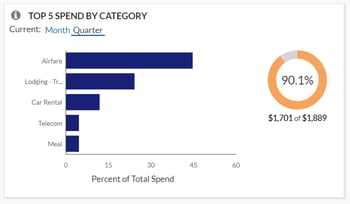
  • Top 5 Spend by Category allows users to easily view where your spend has been incurred. This lets you quickly determine if it is incurred in the expected categories, if spending needs to be reduced, and where might make the greatest impact. Accountants can then utilize the Spend Analysis dashboard or Expense Entry Analysis Details report to drill further into the categories and spend by vendor to help negotiate better pricing with your top vendors.

Concur 1

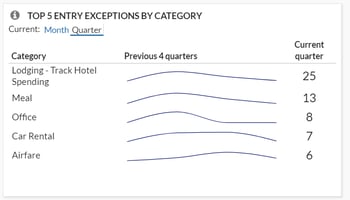
  • Top 5 Entry Exceptions by Category enables users to easily view exceptions. This allows your team to identify the impact of any policy changes and see the policies with the most violations that should be investigated further. For even more visibility, they can then drill down into the Policy Exception Detail or Spend Analysis dashboard as well as the Expense Exception Analysis for both Report Level and Report Entry Level reports.Top 5 Entry Exceptions by Category
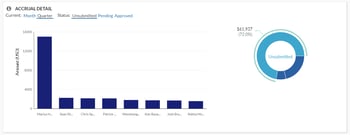
  • Accrual Detail lets you identify the largest opportunity to take action on with outstanding spend, and specifically which individuals carry the largest value of outstanding spend. Your managers can either find training opportunities with these top individuals or focused spending cuts. For your accounting staff, this tile will help you determine the impact to future cashflow during tight budget cycles.

Accrual Detail

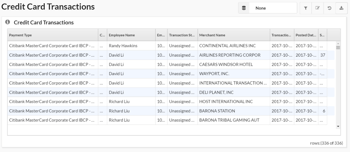
  • Credit Card Transaction Report is one of the best features since it enables you to easily regain hours or even days’ worth of your accounting staff’s time. Although it may not be the sexiest feature, it is critical for keeping your data in compliance. This report lists all credit card transaction details imported into Concur. It can be used as a comprehensive listing or as an ad hoc exception report to look at certain subsets of credit card transactions. Organizations with a corporate card program need to reconcile their credit card transactions with the card statement to ensure all expenses are being processed, and this report can assist with that reconciliation. Also, this report can be grouped by Employee, then sorted by Posted Date to mirror the format of the credit card statement for simplified reconciliation. Another version of this report, the Unassigned Credit Card Transaction report, can help you quickly find those expenses which have been accrued are not yet assigned to an expense report.

Credit Card Transactions

Take a Deep Dive with Reports

For more in-depth analysis and details, reports can help streamline your workflows and drill down into the data you need. Custom reports can also be created by the Concur team if your requirements fall outside of the standard options.

Quick Access with Dashboards

You can start with one of many pre-built dashboards or create your own from scratch by adding tiles and reports to existing templates. While there are many dashboards available, some of the top ones include the Expense Overview dashboard and Policy Compliance dashboard. 

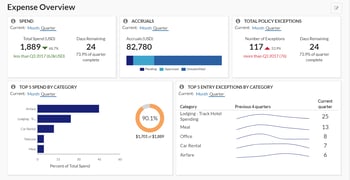
The Expense Overview dashboard is a perfect starting point for budget, cashflow management, and policy compliance all in one place. This dashboard can be used as a starting point to create a new custom “Spend Management” dashboard. Managers can use this detail for budget and forecasting purposes. Personalization recommendations are to retain the Spend, Accruals, and Top 5 Spend by Category tiles as well as adding additional tiles: Spend Summary Trends, Spend Change by Category, and Accrual Detail.

Expense Overview

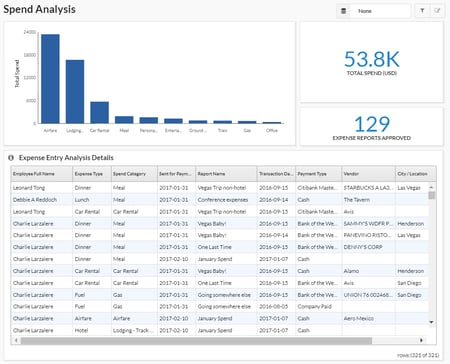
The Spend Analysis dashboard is an incredibly functional dashboard that offers users an in-depth analysis on total spend for a given period along with a summary breakdown of that spend by Expense Type and associated detail. This dashboard can be easily filtered to show specific Spend Categories, Expense Types, or Employees for total spend analysis or grouped and sorted in ways that are meaningful for specific tasks. It allows leaders to identify what their teams have spent in a given period. They can even track individual spending patterns to identify specific areas for follow-up or track improvements in spending behaviors. This report is versatile in that it can be filtered to show trends in spending patterns or behaviors. If more detailed analysis is required, use the Expense Entry Analysis Detail report.

It is recommended that an organization review their travel policy once a year and adjust as needed. It is important to consider the potential impact of a policy change before one is implemented. If an organization does not have a limit on cell phone reimbursement, but needs to create a policy on this expense, the Spend Analysis dashboard can be reviewed to identify average reimbursement rates to establish a baseline for a new policy. This dashboard can also be used to assess the impact of such a policy change to identify how many individuals would have been out of policy if the value was changed.

Spend Analysis

SAP Concur is a Complete Spend Management Solution

With over 180 reports available in the standard report catalog, Concur can help you quickly and easily analyze your Travel, Expense, and AP automation program to gain valuable insight into how to proactively manage all aspects of your business’s finances. It’s been said that knowledge is power, but having too much information can be as bad as not having enough. You need to be able to see spend clearly so you have more time to run your business. As your business and reporting needs evolve, let Concur and Full Sail Partners help you capture and monitor the data you need.

Enhancing the Client Experience - Tough Questions You May Want to Ask Sooner than Later

Posted by Full Sail Partners on May 2, 2018

Ask the Tough Questions Your clients need you to be successful. Think about it – would the alternative be a great experience for them? Relationships in the professional services industry are interesting animals that need specific care and feeding to fully develop. It’s not easy, and I certainly don’t claim to have it all figured out. However, you can be certain that your client relationships are getting stronger when asking hard questions doesn’t seem so nerve-racking. So, when the relationship IS there, you can ask almost anything. Here are a few questions that come to mind – and please paraphrase if using them in client discussions.

Are you REALLY ready to commit funding for professional help?

Mama always said, “Don’t talk about your money,” and per Kenny Rogers, “You never count your money while you’re sittin’ at the table.” While money is a very sensitive topic, we know from economics class, that business transactions involve the exchange of goods or services for compensation. Without the compensation part, it’s no longer a business transaction. In that context, we must recognize both the sensitivity AND the importance of money in our client relationships. We can treat it carefully, but we certainly can’t shove it under a mattress. Sorry, Mama.

Some potential clients truly aren’t ready to pay for your help. And that’s OK! Regardless of the reason, you can still give those prospects a wonderful experience. Getting to know your firm and helping them understand the value you bring with your paid expertise offers the chance to keep in touch for future initiatives/challenges/projects.

When the timing and value equation IS a match, keeping your client projects and relationships in good financial health is imperative for all parties involved. The client has expectations about your service delivery and outcomes, and your firm has expectations about meeting its cost obligations and returns on the owners’ equity. Getting that value equation right will reward your clients AND your firm.

How can we best serve you in conjunction with your internal resources?

Part of the mystique of developing business in professional services is finding the right match between the client’s ongoing business challenges and “how much” of your expertise to throw at them. We’ve all been in those situations where the outcome felt like we did too little/too much. Most professionals in their area of practice, of course, are pretty good at assessing whether clients have [no/some/significant] internal expertise of their own. Whatever the case, we can’t just assume no expertise, or worse, stop the pursuit because they seem to have more experts than we do.

Figuring out where and how your firm’s knowledge and capabilities fit in is crucial! You’ll find the need to address this balance in all kinds of professional disciplines – the built environment, accounting, legal, information technology, and many more. One example might be when your client must manage the replacement of a key employee whose role is involved in your area of expertise.

Your engagement with this client might be more focused and short-term, but if you are able to strategically line up a handful of clients who consider you “first call” for that situation, the experience can be very rewarding. Some clients choose to not maintain a certain expertise on payroll. The outside professional may desire an expanding scope, but he or she should still proceed cautiously to make sure there is clarity with the client’s reasoning and expectations of our delivery. As you’ve heard many times, seek to understand before needing to be understood.

What outcomes from our work would cause you to laud us among your closest peers?

This question is more common, and maybe even more uncomfortable, but very important. The professional’s best client development tools are the references, referrals, and introductions from other extremely satisfied clients. While it’s helpful to promote the “50 times we’ve done that before on other projects,” it’s preferable to have a solid group of existing clients who will happily describe HOW you did it for them.

Having cheerleaders for your awesomeness are indispensable. Yet, professionals often struggle with the challenging work of developing a process to nurture, catalogue and leverage them. Starting with the important questions will help. Remember, your clients are also motivated to see successful outcomes from your work together.

Ask, Ask Away

You can probably come up with other important questions that you wish had been asked earlier in certain client relationships. Like with most skills, practice makes perfect. Think of several of your best existing clients and seek their input on how to address the tough topics in new relationships. They’ll likely be honored to help, and you’ll be making that relationship even stronger.

Most Recent News Mentions

We’re changing the way project-based firms operate.

People can’t help but notice.
Who will be next?

Check out our latest newsworthy work:

Recent Posts