In the News


We’re devoted to revolutionizing the way our clients do business. Sometimes that gets us noticed.

No big deal.

Posts by Rana Blair:

Management of Change Series – Finance

Posted by Rana Blair on Jul 24, 2025

2025-07-24 Management of Change Finance_banner

You’re the numbers person. The ROI rockstar. The keeper of KPIs, margins, and forecasts. And when it comes to change management, your superpower isn’t rah-rah motivation or lofty vision—it’s proof. Cold, hard, data-backed proof.

In this updated installment of our Management of Change series, we’re looking at what change really means through a finance lens. Spoiler alert: it’s not just about tracking revenue. It’s about aligning financial metrics with strategic goals—and making sure the dollars actually make sense.

So how do you measure success during change?

Great question. Executives may define the “what” and “why” of a change initiative, but you, finance friend, bring the “how do we know it’s working?” That starts with a clear measurement framework.

Here’s a modern 3-step playbook to measure the financial impact of change:

Step 1: Start with a Real Baseline

This isn’t just pulling numbers from last quarter’s P&L. Your baseline should be intentional and aligned to your firm’s specific goals. Want to shorten your billing cycle? Improve backlog reporting? Increase win rate on proposals? Get clear on what you’re measuring—then gather the numbers that show where you are today.

Think: “What’s the story our current data tells—and what plot twist are we hoping this change will deliver?”

Step 2: Set Checkpoints, Not Just Finish Lines

Change isn’t a one-and-done event. It’s a project in and of itself—one that deserves (and demands) ongoing financial monitoring. Regular check-ins on key indicators will help you manage scope creep, track adoption, and avoid unwelcome surprises at go-live.

Pro tip: Treat your change initiative like any major project. Build out milestone reviews with accompanying financial check-ins, and use Vantagepoint tools (like dashboards, custom hubs, or budget trackers) to make sure everyone’s aligned and in the loop.

Step 3: Define What Success Really Looks Like

We all love a good ROI percentage. But success isn’t always about hitting an exact number—it’s about hitting a range that proves the effort was worth it. (Because let’s face it, humans are involved, and that means change is never 100% predictable.)

Set a tolerance range. Define what “good enough” looks like in terms of improved efficiency, savings, or output. And yes, make room for measuring user adoption—because even the best system changes will fall flat without employee buy-in.

According to “The ‘harder’ side of change. The What, Why and How of change management’” The consequence of not managing the people side of change, i.e. employees and customers, has “tangible and real financial impact on the health of the organization and the project.” Therefore, set an acceptable level of success and celebrate when you’re within a good range of your numbers.

Bonus: Build in time to reflect on the financial impact of not making the change. That opportunity cost is real—and it deserves just as much attention. 

Tools That Help You Track It All

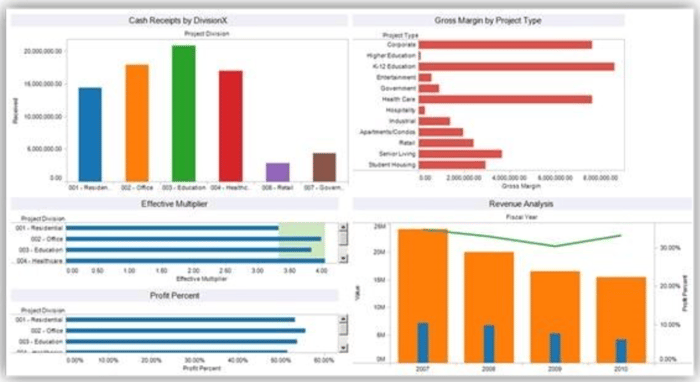
You don’t have to do this alone. Leverage your ERP (hello, Deltek Vantagepoint 👋), real-time dashboards, and reporting automations to keep data flowing and decisions grounded. Pair that with strategic support—whether it’s from your internal team or a partner like us—and you’ll move from reactive to proactive change management.
DVP_Dashboard_7-24-25

Even More Than Numbers

Management of change for “finance types” is unquestionably about the numbers. But all good number crunchers know that numbers reflect all sorts of things: More than just bottom line profit/loss, percentage increase, or improved customer satisfaction numbers.

Financial repercussions also must be measured for change that doesn’t occur to account for potential adverse effect of not making a necessary change.  Therefore, numbers have to be analyzed reflecting the “opportunity and efficiency costs of NOT making the change both of which also directly impact ROI” as we discussed in our introductory piece to this series.   

Bottom line

Bottom Line?

Financial oversight isn’t just about crunching numbers after the fact. It’s about steering the ship during change and helping the organization make smarter, data-backed decisions along the way.

So go ahead, own the role of financial change champion. Just remember: the goal isn’t perfection—it’s progress, backed by proof.

Up next in our series? Project managers, it’s your turn to shine. 🎬
8 Reasons an ERP System Implementation Succeeds

Posted by Rana Blair on Feb 20, 2025

02-19 8 Reasons an ERP System Implementation Succeeds - Banner

Implementing an ERP system is no small feat. It takes strategic planning, collaboration, and a commitment to long-term success. But here’s the good news: firms that get it right share several common traits. These winning strategies focus on gathering and sharing information, keeping users engaged, and continuously improving the system post-go-live.

So, what sets successful ERP implementations apart from the rest? Let’s dive in!

1. Define Objectives and Prioritize Requirements

The foundation of a successful ERP implementation starts with a crystal-clear understanding of your firm’s objectives. Companies that take the time to define their goals and align them with business needs are more likely to see success down the road. Think of it like building a house—if the blueprint isn’t solid, you’re going to run into major issues later. Prioritize your requirements early and use them as your guiding light through system selection, implementation, and beyond.

Without clear objectives, firms risk implementing a system that doesn't align with their business needs, leading to wasted resources and frustration. Unclear priorities can result in feature overload or neglecting critical functionalities.

Pro tip: Share these goals with stakeholders at all levels to ensure buy-in and alignment throughout the organization.

2. Conduct Thorough Research

Knowledge is power, and when it comes to ERP systems, firms that do their homework make better choices. Beyond evaluating core features and pricing, successful firms dig deeper into long-term scalability, vendor support, and user community strength. Choosing an ERP based on current needs alone can be a costly mistake. The best implementations come from firms that look ahead and ensure the system can grow with them. Firms that skip comprehensive research often find themselves stuck with an ERP that lacks flexibility, resulting in additional costs for upgrades or workarounds later.

What to do: Explore case studies, attend demos, and talk to other firms about their experiences to get a well-rounded view of potential ERP solutions.

3. Manage Change Effectively

Let’s face it—change can be tough. But firms that put people first during an ERP implementation are the ones that thrive. Addressing the human factor with a strong change management strategy is key. This includes training, support, and listening to feedback from users at all stages of adoption. When employees feel supported, they’re more likely to embrace the system rather than resist it.

Ignoring change management can lead to user resistance, low adoption rates, and inefficient workarounds that bypass the system entirely.

Remember: Change management isn’t just a one-time effort; it’s an ongoing process that evolves with your business.

4. Communicate Clearly and Consistently

Nobody likes being left in the dark, especially during a major technology change. Effective communication can make or break your ERP rollout. Successful firms create a structured communication plan that considers different learning styles and provides clear, timely updates. The goal? Keep everyone informed and engaged without overwhelming them.

Poor communication can result in confusion, fear of the new system, and decreased productivity during transition periods.

Insider tip: Leverage a mix of channels such as email updates, training videos, and town hall meetings to reach your audience effectively.

5. Protect and Retain Knowledge

ERP knowledge isn’t something you want walking out the door when employees leave. Firms that succeed in the long run invest in cross-training, documentation, and super-user programs to safeguard their knowledge base. Think of it as an insurance policy against turnover and skill gaps.

Without a knowledge retention strategy, firms risk costly mistakes and inefficiencies due to a lack of system understanding.

Proactive approach: Regularly update your ERP documentation and encourage knowledge sharing across departments to ensure continuity.

6. Encourage Continuous Learning and Innovation

Your ERP system is more than just a tool—it’s an opportunity to innovate. The most successful firms foster a culture of continuous learning, encouraging users to explore new features and processes. Regular engagement with vendor updates, training sessions, and ERP user groups keeps the system fresh and exciting.

Firms that become complacent with their ERP usage often miss opportunities to improve processes and stay competitive.

Keep it fresh: Schedule quarterly lunch-and-learns to explore underutilized features and brainstorm new ways to leverage the ERP.

7. Stay Up-to-Date with System Enhancements

ERP software isn’t static; it evolves just like your business. Firms that stay on top of system updates and enhancements enjoy greater efficiency and fewer frustrations. New features can streamline workflows, boost productivity, and keep your ERP aligned with your business needs.

Neglecting updates can lead to outdated processes and increased security vulnerabilities.

Quick win: Designate an ERP champion to monitor updates and evaluate their impact on your operations.

8. Re-Evaluate and Adapt Business Processes

An ERP system should work for your business, not the other way around. As your firm grows and changes, it’s crucial to periodically review your processes to ensure they still align with the system. Failing to do so can lead to inefficiencies, manual workarounds, and frustration.

If your ERP isn’t keeping up with evolving needs, employees may revert to spreadsheets and other external tools, ultimately defeating the purpose of the system.

Pro tip: Conduct annual ERP health checks with key stakeholders to identify process improvements and areas for optimization.

Get Your ERP Implementation Right the First Time

By following these proven strategies, your firm can ensure that your ERP system continues to deliver value long after the initial implementation. Success isn’t just about hitting the go-live date; it’s about continuously adapting, communicating, and innovating to make the system an integral part of your business operations.

Need a little extra help? Our team at Full Sail Partners specializes in guiding firms through every step of their ERP journey—from planning to optimization. Let’s talk about how we can help your firm sail smoothly through your ERP implementation and beyond!

10 Most Common Resource Management Problems

Posted by Rana Blair on May 18, 2023

05-18-23 10 Most Common Mistakes Resource Management_Banner rev

Hey there, professional services firms! We need to talk about something important. No, it's not about who has the best coffee in the office (although that's important too). We need to address the top ten resource management problems that could make or break your success. Don't worry, I'm here to give you the low-down.  

Problem #1: Missed Project Deliverables and Deadlines 

Picture this: a client is eagerly waiting for their project to be completed, but the deadline passes, and there's no sight of the deliverables. Chaos ensues as the client starts breathing down your neck, and you realize you don't have sound processes in place. Good luck getting out of that one! 

Getting the work done on time sounds simple, but it’s not. It’s a complex balancing act involving creativity, quality control, resource management, and much more. If you don’t have sound processes in place, all the best thinking in the world won’t mean a thing. 

Problem #2: Ineffective Documentation on Billable Hours 

So, you've been working tirelessly on a project, but when it's time to bill the client, you realize you don't have accurate documentation of the billable hours. Cue the client disputing your bill and leaving you with an empty wallet.  

What creative person wants to hear that their success might rely in part on basic accounting skills? For professional services firms, effectively managing billable hours is one of the biggest factors in profitability, and thus, lasting success. Need help with billing effectively? Watch our mini demo now! 

Problem #3: Lack of Project Resource Visibility 

Now, let's talk about visibility. Your firm’s management needs to quickly understand which projects are underway for which clients. This means having visibility of progress on milestones, technical issues, and how, when, and where resources have been allocated. It's time to get your head out of the clouds and start paying attention to the details. 

Problem #4: Assigning the Wrong People to Teams 

You've got a project that requires specialized knowledge, but instead of assigning the right people to the team, you just throw some random folks in there. The project turns into a hot mess, and the client is none too pleased. Looks like you just lost a customer, honey! 

Each project requires a team with the right insights, talents, and other qualities. Assigning the wrong people to a project can have a negative impact on profitability and success. So, let's stop playing musical chairs and put the right people in the right seats! 

Problem #5: Accounting and Project Management Disconnect 

Let's address the accounting and project management disconnect. Using multiple tracking systems for financial and project data can lead to errors and make it difficult to respond to issues. Consolidate your tracking systems, and make it rain with those profits. 

Problem #6: Inefficient Cash Forecasting 

You've got a project that requires a lot of resources, and you're not sure how much cash you'll need. You don't allocate resources to a timeline, and now you're in a cash flow crisis. Better start penny-pinching, sugar! 

Cash forecasting can be a complicated process, but it's essential for successful resource management. Allocate resources to a timeline for efficient cash forecasting. Your wallet will thank you later. 

Problem #7: One-off Spreadsheets and Workarounds 

Spreadsheets and workarounds are so 2005. Silos across a firm can lead to duplicated efforts, incomplete solutions, missed opportunities, and unprofitable projects.  

Picture this: you've got a project that requires a lot of data, and you decide to use a spreadsheet to keep track of everything. But then, someone else on the team creates their own spreadsheet to keep track of something else, and before you know it, there are spreadsheets and workarounds all over the place. 

Now, you've got a mess on your hands. Data is duplicated, incomplete solutions are everywhere, and you're constantly missing opportunities. You're wasting valuable time on duplicated efforts, and you're not making the profits you should be. 

So, what's the solution? It's simple, really. You need to get everyone on the same page. You need a centralized system that everyone can use to track data, projects, and resources. No more one-off spreadsheets or workarounds - it's time to get serious about your business. Read our article on The Best BI Tool for Deltek Vantagepoint Users and find out what application is right for you! 

Problem #8: Under-Informed Decision-Making 

It's all about the information, baby. Resource management problems involve information regarding projects, teams, or human and other resources. Management must have a large dataset at their fingertips before making big decisions. Failing to do so can result in under-informed decision-making, and ain't nobody got time for that. 

Problem #9: Failure to Meet Financial Reporting Standards 

We're getting close to the end, but we can't forget about compliance. Professional services firms often need to comply with various reporting regulations such as Earned Value Management (EVM). So, let's make sure we're crossing our T's and dotting our I's, and getting paid for our hard work. 

Problem #10: Missed Business Opportunities 

You've got a business development team that's not managed effectively, and you're missing out on potential opportunities. Your ROI and profitability suffer, and you're left wondering why you're not making any money. Time to start taking business development seriously, sweetie! 

Organizing and managing the work of business development teams is complex and high-stakes. Effective management can optimize ROI and profitability and ensure just-in-time hiring or business development. Let's do this! 

In conclusion, don't let these resource management problems drag you down. Get your head in the game and address these issues head-on. Whether you manage them in-house using ERP software and other solutions or outsource them all together, make sure to handle them properly. And remember, nothing screams success like a firm that's got its resource management problems in check! 


The Value of Vantagepoint for Project Managers

Posted by Rana Blair on Nov 18, 2020

Project management view

Project success is vital to any professional services organization, so project managers must be given every resource to ensure their projects are done on time and within budget. In Deltek Vantagepoint, there are numerous dashboards and ways to view information easily so project managers can access what they need to ensure that projects run smoothly and are on target. Let’s check out the benefits of Vantagepoint for project managers.

Greater Visibility

Deltek Vantagepoint offers enhanced visibility to all users. Vantagepoint provides a major way to engage people with the system, specifically non-accounting users like project managers. With built in dashboards showing important numbers and graphs, plus a more intuitive reporting interface, every role in the project team can participate with the details regarding projects to ensure they are managed efficiently.

Focus on Project Health

The planning application itself is the most efficient tool to review project health and activity. Here, users can review profitability or billing multipliers with instant feedback while updating resource assignments. Additionally, Vantagepoint has detailed reports as well as a variety of standard dashparts to provide relevant information.

Flexible Project Management

Resource forecasting is all in the same house with Vantagepoint. With the resource view, project managers can control the resources for each project. In addition, with the Vantagepoint heat map, utilization of staff can be evaluated, and action can be taken based on those utilizations. Now there is a whole new interface for resource planning, and resources can be added from several different places. For example, resources can be added using the Resource view or the Project view. With these flexible options, project managers can easily see all details and can focus on resources and proper management of those resources.

Future Forward

Resource planning early in the process allows for better forecasts for resource allocation. With Deltek Vantagepoint, project managers can look at resources in line with awarded projects and pursuit projects out six or eight or even ten months. Also, there is a redesigned project review which is easier to read and has KPIs with calculations that make sense. Project managers have a one stop shop where they can see the performance of their projects which can be done in Project View.

Improve Collaboration with Deltek Vantagepoint

Deltek Vantagepoint has been designed to be more approachable, with simplified processes, enhanced visibility, and improved accessibility which has created a new willingness to contribute by all users. With a variety of dashboards and different ways to access important data regarding projects, project managers now have a much easier time keeping an eye on their projects. They can quickly see the results of their contributions to project management and rest assured that their projects will be successful.

Simplify Project Controls with Deltek iAccess for Vision

Posted by Rana Blair on Jan 3, 2018

Deltek iAccess for Project Management “Project Controls” are formidable words, ones that are necessary for successful project outcomes. Those of you who have used Deltek Vision for many years may recall that “project controls” remain at the core of the Vision system and are the datacenter for all other Vision applications such as billing, CRM, proposals, resource planning, and time and expense. Fortunately for Vision users, accessing project controls has gotten a lot easier with Deltek iAccess.

What are Project Controls? 

There is no industry jargon in the name project controls. They do exactly what the name implies. They allow you to manage and control your projects. Furthermore, a complete project control system such as Vision, allows users to: 

  • Document project attributes
  • Coordinate project activities
  • Track employee time and expense
  • Apply direct and overhead costs
  • Monitor project progress
  • Generate project reports
  • Maintain project budgets 

Controlling projects requires understanding and making decisions based on the information collected. This can be a challenge if data is not updated in a timely fashion or there is too much information to absorb. So, how can Vision users make these processes simpler? 

Enter Deltek iAccess for Project Management 

With the addition of iAccess for Deltek Vision, visibility into and ease of digesting information has enjoyed a renaissance. The iAccess interface allows firms to proactively manage and track projects from creation through closeout. The real-time connection to Vision, graphical views, and simple interactive tools for planning and managing the budget make quick work of understanding the status of the project. As a result, users can efficiently manage project future costs and review the expected outcomes. 

Gain Better Control of Your Projects with Deltek iAccess 

The ability to drive your projects with a full understanding of the past and predictions for the future is the ultimate control. With iAccess for Deltek Vision, this becomes possible. So, what are you waiting for? Take control of your projects, and extend the capabilities of Vision project controls with iAccess.

Hiring Smarter in a Competitive Workforce Market

Posted by Rana Blair on Jun 17, 2016

Hiring SmarterFinding and hiring the right talent is a lengthy and administratively burdensome process. The amount of time and money spent announcing job openings and qualifying applicants is barely quantifiable, but we all understand that the price is high. Add in the tasks created by legal requirements and corporate responsibility, and the process becomes crushing for even the most seasoned and organized recruiter. Therefore, hiring smarter in a competitive workforce market is critical to lowering costs of recruiting the top talent.

The Hiring Team

Businesses of all sizes use teams to conduct the hiring cycle. The decision makers on the teams are often professional staff whose primary role is to produce. The cost of time spent by these members can be massive and results in reduced attention to mentorship, production, or development. Having a portal that allows managers to see the progress of the hiring cycle and quickly identify their own action items is an integral to saving time.

The Job

Even if the job announcements are fully standardized, they must still be posted to each site of choice. Each site has its own format and requirements, forcing recruiters to take the same actions multiple times.

Using a tool that allows for automated posting to multiple sites and tracking of non-automated postings is an important time saving device. Having visibility into the applicant pipeline and notification alerts that action is needed helps streamline the requisition process.

The Applicants

There is a shortage of talent. There is no shortage of applicants.

Qualifying applicants and moving them through the hiring process is a time-intensive effort often plagued by manual processes. The mechanics of receiving an application, reviewing the data, and ranking the applicants are most often conducted via email or paper and creates risk legal risks without clear and objective criteria and measurement.

The ability to build a database of applicants who do, may, or do not meet the hiring criteria is highly valuable for this and the next hiring cycle. Hiring smarter requires retaining past applicants’ information so your firm has a deep pool of possible talent for future positions.

The Communications

The hiring process is full of action items for the recruiter. Traditional tools used to communicate with applicants and candidates often force recruiters to create a physical paper trail and allows important communications to slip through the cracks. Scheduling interviews and tracking the stage of candidates as well as memorializing the results, can become overwhelming in a multiple interview process. Leveraging the use of the database, automation, and tacking abilities, including bulk letter submissions, allows recruiters to save time and provides a reference for later use.

Hiring Smarter With the Right Tool

Every role in a firm is best served by having the right tools in place. Hiring smarter requires investing in a tool designed for the recruiting function that allows for not only time savings, but also optimization of the process, risk reduction, and increased satisfaction by hiring team members and applicants alike.


Topics:  
HR

Why Project-Based Firms Should Utilize the Deltek Vision Contract Management Feature

Posted by Rana Blair on May 6, 2015

contract managementI don’t know of a single Professional Service firm without a formal contract management process. Firms spend significant dollars purchasing contract templates and some even retain legal counsel for review. Everyone knows that the contract is an important document in any project undertaking.



Nevertheless, those same firms often begin work without getting the document signed!

Does the importance of the document cease once work has begun? Of course not. But what happens is that the production machine must and does begin before the administration machine can catch up. The contract seems to be subjugated to more pressing needs and the team begins operating on ‘Good Faith’.

External stakeholders have a vested interest in the firm’s contract habits. Professional Liability Insurance applications have at least a few questions relating to whether or not a contract is required, how much work is performed without a contract, and so on. Even the bank wants to know about the status of firm’s contracts and the processes employed. Banks analyze aging or large Accounts Receivable (AR) and next ask about the project’s contracts status. Both want to assess the risk inherent in providing their products to the firm.

It’s All About the Risk

Business is risky. There is no way to eliminate it, only to reduce. Written contracts certainly mitigate risks. Signed ones reduce it further.

Having a signed contract doesn’t guarantee against litigation. There are always competing interpretations of the language after the fact. Better contracts decrease collection time and reduce disputes.

Not having a signed contract does not mean that the firm will not be paid. As long as it is clear that money was to be exchanged for services, there will be some value exchanged. However, the firm might have to perform more work than intended for the stated amount. Additionally, it might mean considerable expense or time attempting to get those dollars.

The truth is, all Professional Services firms have a tendency to do some work without a contract. How much, how often, and with whom is important information that should be assembled and available for review by stakeholders to stay informed about the risks of the firm.

Leveraging the Deltek Vision Contract Management Feature

The Contract Management feature included in Deltek Vision’s Finance Core is one such tool that can be used to assist in accumulating information on this risk factor in the firm. The tool and system are designed specifically with project-based firms in mind. Let’s take a look at how this feature can help:

Track It

Deltek Vision Contract Management allows users to track multiple contract documents, their origination and approval dates, status, and fees requested per document. Because the information is entered on each project, it makes a variety of reports and workflows available allowing for efficient and integrated contract tracking. Optionally, information can be extended neatly into the Project’s Work Breakdown Structure which will allow users to easily see which documents created and amended the fee on each level.

Identify It

By using the Contract Management area of the Project Info Center, users can add the information to reports already in use. Both the Project Summary and Office Earnings allow the Contract Management fields to be selected as columns to appear along-side the existing data on firm reports. Contract statistical data can also be used as a filter on other reports.

Manage It

Integrating project contract information into Deltek Vision allows users to employ the powerful workflow engine in the software. Vision Workflows enables Contract Management users to automate the reporting and informing process around Contracts.

Consider these workflows:

    • Notify Project Manager and/or Principal when a contract has been marked as Approved
    • Remind a user of special handling when a contract exceeding $XXX,XXX has been created
    • Update a column on the Project record when a contract record has been inserted

Use It

Deltek Vision Contract Management users can leverage the information about contract status in other organizational processes. The Contract Management fields are available as filters on any project-based report. This allows the contract status to become a part of the firm’s management process.

Consider using Contract Management data and filters in these activities:

    • Client Management – Create a Project List report for active projects and sorted by Client. Include Contract creation date and status as columns to get the most from the client check-in call.
    • Collections Management – Create a scheduled report for outstanding AR where contract documents are in ‘Pending’ status. Create an AR alert for projects with certain contract status’.
    • Employee Management – Use the Optional Sales Credit feature to measure employees’ participation on specific contract documents. Use in reviews or statistical reporting.

Know the Risk and Accept It

None of us live in a perfect world where a single project meeting hasn’t been had until the contract is signed. However, our focus should turn to understanding and measuring the risk that will be taken on. Firm management should be well informed of the status of the firm’s contracts and have the necessary information on hand should they need to intervene. To support this, contract tracking and management should be integrated with the projects to which they relate. Your Vision software is already well equipped to assist you in the mechanics.

To get started today you can:

  • Review our technical webinar on the Contract Management feature
  • Enter a test contract or two to understand how the feature works
Later you can:
  • Identify how your current process can improve with automation, integration and reporting
  • Backfill existing contract data
  • Contact a Full Sail Partners consultant for more advanced training to customize menus, write workflows and complex reports.

Management of Change: The Project Manager's Perspective

Posted by Rana Blair on Oct 29, 2014

management of change pmThis series has been exploring how change management is viewed by a variety of perspectives: executives and finance to date with marketing, HR and IT yet to come.  We’ve advocated that change must be understood and handled differently from each department’s “normal” day to day activities.  However, for our focus on project management, this series will take a somewhat different turn.  Project Managers already have, in their very work DNA, the ability to see, to scope, and to manage change.  It’s what they do on a daily, weekly, and yearly basis: it’s what project management is all about.  

The specifics

Let’s first take a closer look at our terms – project management and change management – in order to make the clear connection.  Tim Creasey, Director of Research and Development for Prosci Research takes us through this process.  

change management

From these terms, he offers next the vital connecting visual and description.

change management2

“As shown in this image, both project management and change management support moving an organization from a current state (how things are done today), through a transition state to a desired future state (the new processes, systems, organization structures or job roles defined by 'the change'). Project management focuses on the tasks to achieve the project requirements. Change management focuses on the people impacted by the change.

Any change to processes, systems, organization structures and/or job roles will have a 'technical' side and a 'people' side that must be managed. Project management and change management have evolved as disciplines to provide both the structure and the tools needed to realize change successfully on [both] the technical and people side[s].” 

But there’s more

In our first piece, we offered a definitions of change management with user adoption as the important second step in the management of change.  Once again, project managers are well positioned to ensure that not only are the processes of change implemented correctly, but that the people involved in the change are empowered to take full advantage.   

As we’ve discussed, both project management and change management have as their leading characteristic, a specific focus on the people involved in the change.  Also we stated in beginning of our series, user adoption requires a clearly defined and financially measured goal with training, clear communication/marketing and leadership buy-in as necessary parts to be successful.  Each of these attributes is an important part of ensuring that the people part of change is not only smooth but wholly embraced:  there is, after all, good reason that the company utilized valuable energy scoping out the change that will take your company from its present state to its future, more desired, state.  And since a company is really the embodiment of the sum of its employees,   

The company will only change

 when the individuals fully and entirely

commit to the change.

Final phase

No project would be complete without this all-important final phase - project review.  We all well know that no project would be complete without really looking at those phases which were well executed and which were not:  it is here in the post-mortem where real learning occurs and where there is a final determination of success and of change. 


Deltek Kona: 'Spaces' for all Shapes and Sizes!

Posted by Rana Blair on Aug 26, 2014

Deltek Kona Spaces"The road to hell is paved with good intentions." This saying could never be truer than when talking about collaboration. We as humans have an intrinsic need to work together. Unfortunately it seems that at times as humans we also have a  need to butt heads! More often than not in the business world, this butting of heads is a result of how we communicate. Luckily, Deltek has recognized these faults with collaboration and has introduced a solution that you may or may not of heard of by now – Deltek Kona!

Since the release of Kona there have been many upgrades to the platform. If you are a long time user, you have probably recognized some of these changes. Well, now it is time to identify some of the most important changes made to Kona spaces, and how these changes impact your professional services firm:

Organizing Deltek Kona Spaces

If you’re reading this, chances are you are using Deltek Kona frequently and have been added to a number of Kona spaces. 

The Deltek Kona team has developed some tools that allow you to categorize your spaces.  You can then use the classifications you’ve created just for you to adjust what you see and what content is emailed to you.

Space Categories

After assessing the types of spaces you are involved in, you may find that there are multiple spaces for different objectives such as Billable projects, Internal Work Groups, or Company Initiatives. Create a category for multiple spaces so they can be grouped together and used as filters.  The categories you create are just for you and can be changed any time.   

To create categories, go to Manage under the Spaces pane and then Add Category.  To assign spaces to the new category, simply enter the space and choose edit, then assign it to the desired category.

$5 Tip:  Don’t go make categories now.  Read on to find alternative thought processes on creating categories.

Space Favorites

With or without using Space Categories, you can also use the Favorite tool to mark one or more spaces as a Favorite.  This is helpful for spaces where there is a lot of activity or information that you refer to frequently.  Like categories, the list of Favorites can be used as a filter to narrow what you see in your Deltek Kona session.

To mark a Kona space as a favorite, go to the space in the list of spaces and click the down arrow to the right of the space name and choose Favorite.

$10 Tip:  You can also hide spaces.  The only way to find the hidden spaces is to use the filter drop-down.  (See below.)

Positioning Spaces

Spaces are natively organized first by Network, then Favorites, then everything else alphabetically.  Perhaps there is a space that you don’t want to mark as a favorite, but would like to see in your space view without scrolling or you have spaces that are at the top of the list but don’t need to be seen immediately.  This is often helpful for personal or reference spaces that don’t have a lot of new conversation content but need to be easily accessed

To reposition a space, simply click in the middle of the space name and drag it to its new position

Filtering Space Views

Once you’ve assigned spaces to categories or have marked them as favorites, you can begin to use the Space Filter tool in a more advanced way.  To access the filters, look for the down arrow just below the space search box and above the first space.  The dropdown will reveal the standard categories, favorites, and categories you’ve created. 

$25 Tip:  The filter selection remains even after you log out of Deltek Kona.  If upon logging in again, you cannot find the space you’re looking for, go to the filters and reset to All.

Using Categories and Favorites in Email Settings

Once you’ve organized your Deltek Kona spaces on a more granular level, you might want to revisit the Notifications area in your profile.  One of the most exciting features in Deltek Kona this summer, is the ability to turn on the Conversation Digest for only one category or only for Favorites.  Furthermore, you can choose to mark the conversations as read once they are emailed in the Digest.

$1,000 Tip:  If you are not inclined to choose just one category for your Deltek Kona spaces, considering creating a category for spaces that you just don’t care that much about.  Then, tell Kona that you’d like to receive a periodic Conversation Digest for that category and that you’d like to mark the conversations as read.  This will still let you know what you’ve missed in a compact format, but will also keep your Kona view cleaner for all that you do wish to digest from within the application. 

If the ability to filter your Deltek Kona spaces doesn’t seem useful to you, then you have not been properly introduced to the “Kona Life”, let us help you discover how Kona can make yours and the lives of your group members easier:
 

If you are intrigued by the mention of Billable Projects as a space filter, ask about Kona business and integration with Deltek Vision Projects and Opportunities, and with Project Navigator


Join the 21st Century and Get More Social with Deltek Kona

Posted by Rana Blair on May 28, 2014

In the last 200 years we’ve developed a variety of methods for communicating with one another.  We’ve taken the journey from individual letters delivered by horse to instant mass communication.  How can things get any more social than that? Deltek Kona, that's how!

Being ‘social’ involves more than just communicating and working together. Merriam-Webster defines social as relating to or involving activities in which people spend time talking to each other or doing enjoyable things with each other”. 

The key phrases “talking to” and “doing enjoyable things with” only seem to reference something outside of the workplace.  In the 1980s, the focus was on output and productivity.  In the decades that followed, we labored to attain the ever elusive ‘work-life balance’.  In the new millennium, we strive toward contributing fully in our work and personal lives without restrictions of time and space.  We want to enjoy ALL of our life.

get more social, deltek konaDeltek Kona, released in spring 2012, combines all that we know about working together with the best methods of communication.  It presents that blend to us allowing us to talk to each other AND do enjoyable things with each other across our work and personal lives.  Guided by the principles of confluence, immersion, accessibility, and digestibility; the innovators at Deltek Kona have found a way to leverage the best of all the communication tools developed in the past 50 centuries (not a typo: we still draw on walls to convey our thoughts) to help us interact in a more social and enjoyable way today. 

How does Deltek Kona help us get more social?

Use Deltek Kona to Create a Hometown

Kona is organized around context specific spaces or groups.  Each space is formed with a level of focus appropriate for its purpose.  There are no limits to the number of spaces an individual can belong to or the number of members in any one space.  Each space landing page is the “hometown” for the group allowing members to participate in and view interactions that are taking place.  Over time, users begin to become acquainted with each other’s concerns, thought processes, and involvements.

Enhancing Personal Interaction

Individual users may have more than one group in common across work and personal interests.  Knowing more about what you have in common with others allows you to get more social with them as individuals.  The ability to create and store one-on-one conversations with people in your Kona network allows users continuity and privacy even when time and distance are barriers to traditional communication methods.

There are times when we are having a conversation in a group but need to direct our comments to a particular person.  Deltek Kona incorporates “@mention” functionality to expand the personal contact in the context specific discussion. Nothing encourages us to communicate more than feeling like we are being listened to and understood.

Eliminating Polarization

Deltek Kona was built to be free.  Users can enhance their organizational experience with an upgraded account.  Regardless of the type of account, the experience and interaction is the same. This removes the barriers of participation across all members of the group and continues the social experience as no one is barred from participation because they must pay.  This allows us to use Kona for all sorts of purposes, from family reunions, to political organizations, to multi-firm business projects.

Deltek Kona further removes barriers by elimination of platform dependencies.  The Kona software works the same on any operating system and internet browser.  The accessibility extends to the mobile platform where users continue to get more social from wherever they are and whenever they want to. 

Increasing Personal choice

One of the favored features of the Deltek Kona product is its flexibility with the individual users’ need to digest information and connect on in his or her own time.  From the moment one opens the Kona product, it is clear which items take priority.  A user can access a conversation with 20 unviewed in-line comments and get a clear picture within minutes.  This is the first step in creating an enjoyable social experience when working with a group.

Because the Kona team recognizes that email has its merits, they’ve enabled the individual to decide how much or little Kona activity is transferred to email.  The possibilities to limit but not eliminate are almost endless for the individual user.  Being able to choose which groups to get more social with enhances the interactions that are wanted.

With much of our productivity arising from collaborative efforts conducted across vast geographic spaces, we meet and interact with more people than ever.  The Deltek Kona tool allows us to stay informed and control the inflow of information leading to a more relaxed experience.  When we remove unnecessary stressors, we naturally take time to get more social and find common ground with those around us.  Sign-up for Deltek Kona today and join the 21st Century’s answer to communicating, socializing, and getting things done.


Most Recent News Mentions

We’re changing the way project-based firms operate.

People can’t help but notice.
Who will be next?

Check out our latest newsworthy work: