In the News


We’re devoted to revolutionizing the way our clients do business. Sometimes that gets us noticed.

No big deal.

Posts about Finance:

Management of Change Series – Finance
Posted by Rana Blair on Jul 24, 2025

2025-07-24 Management of Change Finance_banner

You’re the numbers person. The ROI rockstar. The keeper of KPIs, margins, and forecasts. And when it comes to change management, your superpower isn’t rah-rah motivation or lofty vision—it’s proof. Cold, hard, data-backed proof.

In this updated installment of our Management of Change series, we’re looking at what change really means through a finance lens. Spoiler alert: it’s not just about tracking revenue. It’s about aligning financial metrics with strategic goals—and making sure the dollars actually make sense.

So how do you measure success during change?

Great question. Executives may define the “what” and “why” of a change initiative, but you, finance friend, bring the “how do we know it’s working?” That starts with a clear measurement framework.

Here’s a modern 3-step playbook to measure the financial impact of change:

Step 1: Start with a Real Baseline

This isn’t just pulling numbers from last quarter’s P&L. Your baseline should be intentional and aligned to your firm’s specific goals. Want to shorten your billing cycle? Improve backlog reporting? Increase win rate on proposals? Get clear on what you’re measuring—then gather the numbers that show where you are today.

Think: “What’s the story our current data tells—and what plot twist are we hoping this change will deliver?”

Step 2: Set Checkpoints, Not Just Finish Lines

Change isn’t a one-and-done event. It’s a project in and of itself—one that deserves (and demands) ongoing financial monitoring. Regular check-ins on key indicators will help you manage scope creep, track adoption, and avoid unwelcome surprises at go-live.

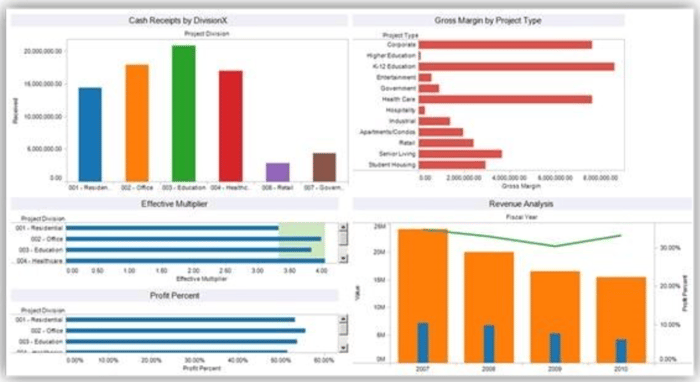
Pro tip: Treat your change initiative like any major project. Build out milestone reviews with accompanying financial check-ins, and use Vantagepoint tools (like dashboards, custom hubs, or budget trackers) to make sure everyone’s aligned and in the loop.

Step 3: Define What Success Really Looks Like

We all love a good ROI percentage. But success isn’t always about hitting an exact number—it’s about hitting a range that proves the effort was worth it. (Because let’s face it, humans are involved, and that means change is never 100% predictable.)

Set a tolerance range. Define what “good enough” looks like in terms of improved efficiency, savings, or output. And yes, make room for measuring user adoption—because even the best system changes will fall flat without employee buy-in.

According to “The ‘harder’ side of change. The What, Why and How of change management’” The consequence of not managing the people side of change, i.e. employees and customers, has “tangible and real financial impact on the health of the organization and the project.” Therefore, set an acceptable level of success and celebrate when you’re within a good range of your numbers.

Bonus: Build in time to reflect on the financial impact of not making the change. That opportunity cost is real—and it deserves just as much attention. 

Tools That Help You Track It All

You don’t have to do this alone. Leverage your ERP (hello, Deltek Vantagepoint 👋), real-time dashboards, and reporting automations to keep data flowing and decisions grounded. Pair that with strategic support—whether it’s from your internal team or a partner like us—and you’ll move from reactive to proactive change management.
DVP_Dashboard_7-24-25

Even More Than Numbers

Management of change for “finance types” is unquestionably about the numbers. But all good number crunchers know that numbers reflect all sorts of things: More than just bottom line profit/loss, percentage increase, or improved customer satisfaction numbers.

Financial repercussions also must be measured for change that doesn’t occur to account for potential adverse effect of not making a necessary change.  Therefore, numbers have to be analyzed reflecting the “opportunity and efficiency costs of NOT making the change both of which also directly impact ROI” as we discussed in our introductory piece to this series.   

Bottom line

Bottom Line?

Financial oversight isn’t just about crunching numbers after the fact. It’s about steering the ship during change and helping the organization make smarter, data-backed decisions along the way.

So go ahead, own the role of financial change champion. Just remember: the goal isn’t perfection—it’s progress, backed by proof.

Up next in our series? Project managers, it’s your turn to shine. 🎬
Should I Migrate? 6 ERP Data Migration Considerations

Posted by Sparsha Muppidi on Nov 25, 2024

11-14-24 Should You Migrate_Banner rev

When evaluating a CRM or ERP system, a critical component of the decision-making process is assessing the data migration effort. Beyond the software and consulting costs, data migration presents its own set of challenges and expenses. As organizations move to the latest ERP systems, such as Deltek or similar ones, understanding the migration process becomes key to ensuring a smooth transition.

So, when you're asking yourself, "Should I migrate my existing data to a new ERP system?", here are the 6 essential questions you should ask:

#1 How Valuable is the Data?

One of the first steps in the data migration process is to understand how valuable the data is to your current and future business operations. In today’s world of data-driven decision-making, your data is likely more valuable than ever.

With the rise of the latest software development, high-quality, accurate data has become a business asset. Data that isn’t frequently updated or no longer relevant might not be worth migrating. However, real-time data on sales, finance, and customer interactions should be prioritized. In some cases, you may need to archive historical data rather than fully migrate it.

When considering whether to bring data to the new system, consider these four questions:

  1. Is the data frequently updated and is it accurate? 
  2. How often is the data accessed/needed? 
  3. Do you use the data in reports? 
  4. Do you need the data to make business decisions?
  5. If your answer to these questions is rare or never, then the data is probably not worth migrating to the new system.

#2 How Organized is the Data? 

Organized data is essential for smooth ERP migration. Data that isn’t structured properly or with inaccuracies will cause significant roadblocks during migration. ERP migrations should be focused on data cleanliness and consistency.

Some existing data that is being considered for migration may not be consistent across a given data field in a database record. For instance, inconsistencies in key fields (e.g., a phone number field containing text instead of numbers) will need to be corrected before data is moved. Migrating to any latest ERP system requires standardizing data fields to ensure compatibility.

So, evaluating the amount of manual clean-up required can help determine if the information is worth migrating. 

#3 How Long Would It Take Someone to Manually Enter the Data? 

One of the main concerns in an ERP migration is the sheer volume of data that needs to be transferred. As mentioned earlier, certain data is more efficiently entered manually into the new system. It is crucial to evaluate the effort versus the cost. Small data sets or data fields with only a few records may be better handled manually, but large-scale migrations benefit significantly from automation.

If a particular field contains only 50 data records, is it worth the cost of migrating it programmatically to the new system? On the flip side, underestimating the time and effort required for manual data entry can significantly extend the implementation timeline. Our experience has shown that when a firm opts out of a recommended data migration based on analysis, the success rate of the overall implementation tends to decrease substantially.

#4 Is A Conversion Utility Available for my Data?

In today’s ERP landscape, conversion utilities are often available to help automate and simplify the data migration process. These tools can significantly reduce costs and time, especially when migrating to popular ERP systems like Deltek. If a conversion utility is not available, working with a data migration expert who can create custom scripts may be necessary. Be sure you evaluate the cost of these custom tools before starting your migration process. 

#5 What is the Data Migration Vendor’s Migration Process? 

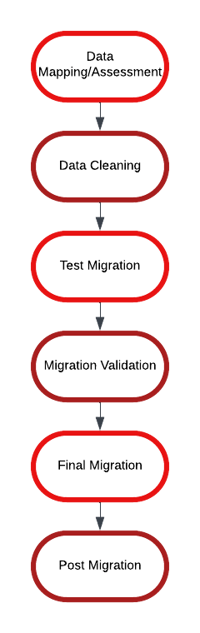
Selecting a vendor with a well-defined and proven migration methodology that addresses the preservation, security, and speed of migrating your business data is key to a successful ERP migration. As an example, below is Full Sail Partners’ migration methodology: 

  1. Data Mapping/Assessment – This step involves defining the scope, outlining the migration strategy and approach, and establishing the desired timeline. A proposal will be provided, detailing the costs involved.
  2. Data Cleansing – During the mapping phase, data that needs cleansing will be identified. The necessary data will be cleaned and organized in the current system to prepare it for migration. The data migration expert will also analyze the existing data and ask relevant questions to assess its quality. Improving the quality of source data in the current system enhances the success of automated data conversion.
  3. Test Migration – Once the migration scripts are created and the data is verified with the client, a test database will be set up for review.
  4. Migration Validation – After receiving the test database, the client will examine the data in the new system to confirm it has migrated as expected.
  5. Final Migration – After the data is validated, a final migration date is scheduled. Typically, all data is backed up based on the timing of a firm's billing cycle or payroll cycle. The final migration is performed over a couple-day period. Once the final migration is complete and reconciled the system is ready for use, minimizing downtime between the old and new systems.
  6. Post Migration – If any issues with the data are discovered after the final migration, occasional post-migration updates may be required to address those issues.

#6 How Experienced is the Migration Expert? 

ERP migrations are complex projects, and the expertise of the migration team can make or break the process. Experienced ERP consultants and migration specialists focus on data strategy and digital transformation.

Most data migrations require a mapping document. This defines the scope and ensures that the data will be imported correctly. An experienced data migration consultant provides this mapping document as well as valuable insight on potential issues that might occur during the data migration process. Before proceeding with data migration, it's important to understand the role and expertise of the data migration specialist within the firm.

Is their primary responsibility focused on data migration, or are they handling multiple tasks? Do they have experience migrating data like yours? A seasoned migration expert typically specializes in this area, dedicating most of their time to migration. Selecting the right expert is crucial, as it can minimize post-migration cleanup and ensure the data is accurately and efficiently transferred to the new system. be necessary. Be sure you evaluate the cost of these custom tools before starting your migration process. 

Data Migration Success Involves a Well-Thought-Out Plan

In many cases, migrating data is a must when implementing a new ERP system. However, by considering these 6 critical factors—data value, organization, manual entry requirements, available conversion utilities, vendor process, and expert experience—you can ensure a smoother transition and get the most out of your new system.

Data migration has evolved significantly over the years. Still, the key to success lies in a well-thought-out plan, comprehensive data assessments, and collaboration with experienced vendors and experts. If you're still unsure about your data migration process, then see how Full Sail Partners can help you with personalized migration strategies tailored to your specific needs by clicking the image below.

Most Recent News Mentions

We’re changing the way project-based firms operate.

People can’t help but notice.
Who will be next?

Check out our latest newsworthy work: