Deltek Vision and Adobe InDesign: Stop Focusing on the Boilerplate
I think by now we can all agree: The ability to automate proposals with InDesign and Deltek Vision is the greatest thing to happen to proposal creation since the copy and paste function! In this blog we are going to dive deeper in to the realm of automating information out of Vision in to InDesign and take a look at the two coolest ‘outside of the box’ features currently available. If you are just looking to get started with automating information from Vision to InDesign be sure to check out this previous blog.
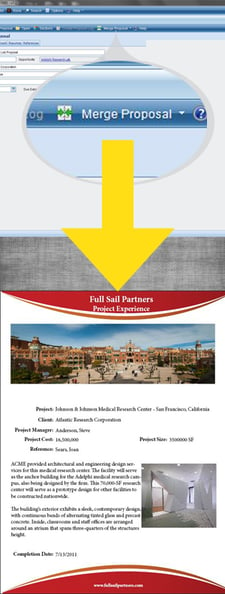
It is important to continue looking at ways to increase efficiency throughout the entire procurement process. From proposals to the short-list interview, integrating Deltek Vision and Adobe InDesign can give your firm the competitive advantage needed to wow the client. Answer in days, not weeks. Spend less time on boilerplate material and more time on compelling, tailored responses that will further set your firm apart from the competition.
So, how can we use the Adobe InDesign and Deltek Vision integration in new powerful ways? Let’s get started with my two favorite outside of the box features:
1. Create new, customized, cover sheets while preserving your firm branding.
Utilize the power of integration to create customized cover sheets for each new proposal. By utilizing the powerful template system created by Deltek you are able to wow the client by creating a beautiful combination of your firm branding and project specific information. This marriage of project-specific information and targeted marketing media will allow you to quickly separate your firm from the competition with the first thing the client sees – the proposal cover!
2. Stand above the rest and break away from the chains of PowerPoint
You’ve landed that ever elusive short-list presentation. Congratulations! Now you have to win it, or all of the work that you did was for naught. This is your opportunity to separate yourself from the competition. You can basically guarantee that the other short-listed firms are going to present a boring old standardized PowerPoint presentation. This is your chance to stand out and relate to the client on a personal level.
How does the Adobe InDesign and Deltek Vision integration help your presentations stand out from the rest? Simple:
- First impressions are everything | Too many professional services firms fail to differentiate their firm from the competition and let the client mistakenly believe that the decision boils down to price. By creating your presentation in InDesign, you are able to break away from the design restrictions of PowerPoint and instantly differentiate yourself from the competition.
- Eliminate mistakes | How embarrassing is it when our proposals and presentations reflect two different sets of data? Avoid this pitfall by automating all client and project specific information directly from your Deltek Vision system.
- Reinforce your firm branding | Your firm spent countless combined man hours putting together a proposal that got you to the short-list stage. At this point the client likely feels like they know your firm on a basic level. So why change your overall branding now, and start anew? By creating your proposal and presentation from the same set of templates and data-sources, you reinforce your firm branding at every stage of the sales process.
These are two of my favorite ways to use the Adobe InDesign and Deltek Vision integration to make my life easier. Are you thinking outside of the box and using this functionality in any neat ways? We would love to hear - please comment below.
Not currently integrating your Deltek Vision system with Adobe InDesign? Click below to learn how to begin:
 To thrive in the professional services industry, client satisfaction must always remain a top concern. All successful project-based firms have the resources and ability to deliver high quality projects. This ability does not separate truly successful firms – it is the bare minimum needed to enter the conversation.
 My momma was always full of advice. Some I took with great results, but others … well let’s just say I had to learn the lesson the hard way. At this stage in our lives, we’ve all moved on from those tender years where momma was our greatest guide, but we are all still attuned to receiving advice from those more experienced. Or at least we should be. Take for example, the ERP Implementation process:
 It’s that time again: year end. No, not year-end resolutions, but the time of the year finance is stressing about year-end close and emphasizing that a 2015 marketing budget is needed.
 In our Management of Change series, we have focused on a variety of perspectives including executive, financial and project management. This week, we will take a look at change from the perspective of the marketing professional. In most companies, marketing plays multiple roles: it is 1) the external research department, 2) the positioner/communicator of key public messaging and 3) the business driver with the executive team.
 Have you ever had a moment in your life that stands out as a teaching moment that has made you who you are today? My moment transformed and prepared me as a Project Manager and Owner to tackle difficult conversations. Let’s face it, whether personal or in the workplace, we are constantly faced with resolving conflict. At the same time, I have learned (or found) that not everyone is comfortable with expressing what needs to be said. So, it really resonated with me when a couple years ago I discovered a tool that has made conflict resolution easier. More about that in a minute.
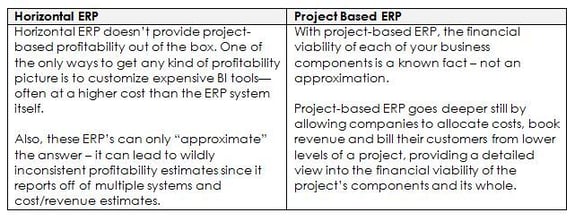
  Project based ERP. You’re probably wondering to yourself, “what is this anyway?” We’ve all heard of Enterprise Resource Planning (ERP) systems, but now the industry added the words “project based.” It probably feels like they are just layering more words … and difficulty. So let me make some sense out of this for you.