In the News


We’re devoted to revolutionizing the way our clients do business. Sometimes that gets us noticed.

No big deal.

Posts by Ryan Felkel:

The Unknown Features of Timesheets in Deltek Vision

Posted by Ryan Felkel on Mar 22, 2017

Timesheets It is a mystery why we deal with time management so badly. This is our commodity which we sell to our clients. However, we treat it like a curse, as if it’s an evil process that accounting forces on us. It somehow escapes us that this is the lifeblood of our business, and without it, we are out of business. So why don’t we manage this better and how can we improve our firm’s practices? 

Well, to begin with, the timesheet function in Deltek Vision is incredibly easy to use. You just need to know what features to focus on. Let’s take a look at timesheets and what is offered in Deltek Vision regarding time management.

Timesheet Best Practices

Project management best practices always include sound timesheet management processes. First of all, timesheets should be entered daily and submitted timely. Secondly, project manager review is mandatory. Timesheets should be corrected before they are posted to our projects and the billing system in Deltek Vision.

Poor timesheet management inherently leads to inefficient processes later. Timesheet miscodes cause incorrect project reporting and erroneous invoices. Additionally, transferring time entries in the billing system is time consuming. This slows down billing, involves the project manager, employee and accounting. Worst of all, this directly affects cash flow because of the delay in processing client invoices.

Features of Timesheets in Deltek Vision

We need sound, efficient and thorough timesheet management policies and procedures. They need to be incorporated into our culture. Along with daily entry and strict deadlines for timesheet submission, Deltek Vision has a number of tools to assist project managers with this process:

Floor Check was introduced in Version 7.2 and is a powerful tool that lets timesheet administrators see if employees are doing their timesheets. It shows the employee’s expected hours and the actual hours entered. Additionally, floor check has email functionality, so you can email employees directly and tell them, “DO YOUR TIMESHEET,” or you can also create pre-defined messages.

Unposted Labor Report is a standard project report that only shows unposted time sheets. This is the ideal tool for project managers to use in order to see what has been charged to their projects before they are posted. This is the perfect opportunity to fix timesheets before they are charged to our projects.

Project Reports with Unposted Time reports can be included in project reports by using the unposted time option. As a result, project managers can see labor being charged to their projects during the timesheet period.

Line Item Approval allows project managers to use line item approvals to put their final approval on time charged to their projects once timesheets are submitted. Line item approvals link to project ownership, so project managers will only see their projects.

Timesheet Audit Trail tracks changes to timesheets after they have been saved or submitted. You can require the employee enter a comment, or just track changes without explanation. Audit trails can also track billing transfers. This is the “where did it go” and “where did it come from” report. A timesheet audit trail report is available in employee reporting.

Get Your Timesheets Done!

With all of these tools within Deltek Vision at your disposal, timesheet management is within your grasp. You can simply start with daily timesheet reminders. Eventually, you will develop a plan that makes timesheet management best practices part of your firm’s culture. 

 

Using Multicurrency in Deltek Vision

Posted by Ryan Felkel on Mar 8, 2017

Deltek Vision MulticurrencyDoes your firm work internationally and deal with multiple currencies? Did you know there is a way to automate the tracking and conversion data? Within Deltek Vision is the Multicurrency function which holds the key to simplifying this process for your firm.

Vision Multicurrency allows you to:

  • Manage multiple currencies for transactions, accounting and financial reporting
  • Enter and manage exchange rates which can be done manually or can be automated to pull in exchange rates (XE.com has an auto feed subscription for this)
  • Support daily and periodic exchange rate changes
  • Revalue foreign currency accounts and automatically identify a gain or loss due to currency fluctuations

Considerations when Using Deltek Vision Multicurrency

With any changes to your standard accounting practices, there are always some items that need to be taken into consideration:

Revenue Considerations: Revenue generation will now use the billing currency fields in the project info center.

Project Considerations: Once you set a project to a currency and the project has data on it, the currency code cannot be changed on the project. It is very important to set the project to the correct currency upon initial setup. All lower levels of the work breakdown structure (WBS) must also be set to the same currency as the project. Optionally, a billing currency can be set differently than the project currency, but all lower levels will need to match.

General Ledger Account Considerations: In Vision Multicurrency accounts can be left without a specific currency or set to a single currency. In some situations, the company might set a bank account to a specific functional currency. For example, a bank account is set to USD for use by only the USD company. You might leave other accounts open to be used across companies with different currencies. Once an account is set to a currency that is different than the functional currency, it is then considered a foreign denominated account.

Unit Considerations: You must specify both a project and billing currency.

Vendor Considerations: Vendor records are stored in the functional currency of the active company. Additionally, there are several details to note for vendor records:

  • Functional Currency – the home currency or the currency in which the company operates
  • Transactional Currency – the currency in which a transaction is entered into Vision
  • Presentation Currency - used in reporting to generate a report with all amounts expressed in a single currency
  • Billing Currency - the currency used to generate invoices and billing reports for specific projects and their WBS
  • Project Currency – the currency in which the project is managed which can be different than the functional currency when needed (this currency should be used for all project management purposes including reporting)
  • Payment Currency – the currency in which the payments are made
  • Consolidated Reporting Currency – only available in a Multicompany environment and is used to create consolidated financial statements for multiple companies that are using different functional currencies
  • Account Currencies – each account setup for use as a bank account and mapped to a GL code can be set to a specific currency directly through the account setup of the GL (if you specify an account currency that is different from the company’s functional currency, the account is then considered a foreign-denominated account)
  • Tax Currency – if tax auditing is enabled then a currency must be set for each tax code (this is generally the currency in which you report and pay the tax amounts to the proper tax authority)

Generally Accepted Accounting Practices in Deltek Vision Multicurrency

Deltek Vision Multicurrency is in accordance with the Accounting Standards Codification (ASC) sections ASC-830-10-55-10 and 11. In section 55-10, the guideline states that it is acceptable to use averages or other methods of approximation. Accordingly, it is recommended to use a weighted average of the exchange rate for a period rather than applying actual day-to-day fluctuations.

Furthermore, section 55-11 states that average rates used shall be appropriately weighted by the volume of functional currency transactions occurring during an accounting period. In other words, to translate revenue and expense accounts for an annual period, individual revenue and expense accounts for each quarter or month may be translated at that quarter's or that month's average rate. The translated amounts for each quarter or month should then be combined for the annual totals.

Why Use Multicurrency in Deltek Vision?

Multicurrency can be used for tracking currency exchange gains and losses. Having foreign-denominated accounts creates the need to track gains and losses based on fluctuating exchange rates. For example, if a European company has a bank account denominated in United States dollars and the value of the euro rises against the United States dollar, the value in euros of that bank account balance drops. This results in an unrealized loss to the European company. Using Multicurrency allows you to use the Gains/Losses and Revaluations process in Vision to calculate and post these types of currency exchange gains and losses. As a result, they appear on your financial statements per the generally accepted accounting practices under which you operate.


Understanding and Effectively Using Cross Charge in Deltek Vision

Posted by Ryan Felkel on Mar 1, 2017

Cross Charge BlogIn a previous blog, we reviewed multi-company functionality in Deltek Vision and learned how it serves as a tool for sharing and accounting for resources across the companies within an enterprise. Cross charge capabilities in Vision are based on similar theories as multi-company, but are focused on the interaction within a company and its organizational breakdown structure (OBS). Before we dive deeper, here are some links to blogs about multi-company functionality and OBS in case you are unfamiliar with these topics.

High Level Insight into Cross Charge in Deltek Vision 

It is important to understand that cross charging is a financial tool and is based on the general ledger. It is not an attribute of project reporting since time charged to a project remains on the project for billing and reporting purposes. Cross charge is labor focused and occurs after the timesheet is posted. 

By default, Vision is built to be project centric, which simply means that the process of entering and posting timesheets determines where the labor charges are assigned. If the cross charge process is not configured or run, the cost will remain on the “books” of the organization where the project is assigned. 

Why Use Cross Charge? 

As financial and operational managers, we must always remember that revenue can only be earned once and a cost incurred once. For this reason, cross charge allows businesses to move these elements in and out of various “buckets” within their organization. When a combined income statement is run, all cross charge entries will zero out and the original revenue and cost will remain. 

The cross charge process is used when firms loan and borrow labor at the lowest OBS level, which could be: 

  • Office
  • Department
  • Discipline
  • Market Sector 

A good example is a civil engineer where projects live in the various disciplines. The survey department would loan their staff to the engineering projects and cross charge would be the financial component to drive and manage the accounting for the labor. 

There are two internal pricing options to choose from when configuring cross charge: 

  1. Project Centric – This is when labor remains on the books of the organization where the project resides. A multiplier is then used to account for some portion of operational/overhead (OH) costs. This factor could be limited to a fringe benefit rate, could represent a breakeven OH rate or even include some profit. The purpose is to ensure that the loaning organization has an incentive to keep their staff busy, but they also need to be careful as to not over extend their resources. 
  1. Employee Centric – This works by adjusting labor back to the employee’s organization. Using typical billing rates, although a multiplier can be used, the revenue is moved from the projects to the employee’s organization. The purpose again is to ensure the loaning organization doesn’t lose the ability to show a profit by sharing their staff. 

Real-life Application of Cross Charge in Deltek Vision 

Here is a success story where the operational process and projects are built on the premise that fee and scope drives work breakdown structure (WBS) in a clients’ Deltek Vision database. Under this model, high accountability becomes the first option where phases and tasks within a project are assigned to different organizations based on the portion of the work. Employees then charge the phase/task that is assigned to the organization they “live” in. This results in more closely managed projects because the profit accountability is shifted back to the organization supplying the labor. This process eliminates the need for cross charge. 

But wait…realizing that in order to run successful projects, there is a necessity to anticipate unplanned needs. This means that the firm must have the ability to borrow an employee from another department for a short-term assignment or a last minute need. For example, the base building studio decides it needs input from the interiors studio. In this scenario, the client falls back on the project centric method noted above as a mechanism to facilitate resource sharing and not impede project progress. Furthermore, this is a prime example of a need for cross charge. 

Gain Control of Resources with Cross Charge 

Whether your current OBS is solid or you are considering a change, cross charge can provide the functionality required to ensure an open and smooth process of resource sharing. With a thorough understanding and effective implementation, cross charge can provide another dimension in managing your business.


Maximizing Organizational Breakdown Structure and Work Breakdown Structure in Deltek Vision

Posted by Ryan Felkel on Feb 10, 2017


Organizational Breakdown Structure and Work Breakdown Structure As Deltek Vision systems are implemented and processes are written, the common denominator is most often the connection between the Organizational Breakdown Structure (OBS) and the Work Breakdown Structure (WBS). Whether it be the uniqueness of each or the relationship between the two, the attention paid to these early stages of development is instrumental in the flow and reporting of information in your Vision database. In the following, we’ll explore some areas to consider when designing the structure of your database.

Company Structure and the Organizational Breakdown Structure in Deltek Vision 

The OBS can take on many different builds from the very simple to extremely detailed. Various example options include: 

  • Location approach
  • Discipline/department approach
  • Market sector BD driven 

When designing the OBS in Deltek Vision, the system allows for up to five hierarchical levels and allocation of overhead requirements to be incorporated into the structure of the database. If you are using a multi-company database, then level one needs to be reserved for the different companies in your enterprise. Learn more about Vision Multi-Company in this article

Additionally, when building the OBS it is most important to be aware of financial accountability in your organization. For example, if you are using two levels, such as office and department, each combination will produce an income statement. As a result, someone within the organization is responsible for these statements. 

Furthermore, various cross sections can be extracted for combined financial reporting. For instance, if you have mechanical department in three offices, firms can create a mechanical income statement. A structure such as this allows for: 

  • Office accountability
  • Office/Department accountability
  • Overall Department accountability 

Projects and the Work Breakdown Structure in Deltek Vision 

The WBS specifically relates to how a project will be organized and the firm’s preference for the flow of revenue and costs. The majority of firms find it to be most effective if they build their WBS based on project budgets. Generally, this should be driven by the fee and scope using a bottom up approach. 

Deltek Vision allows for three levels in the WBS, which are commonly labeled, Project, Phase and Task. However, this can be tailored to your firm’s preference. Even more, accountability within a project can be assigned through the WBS. As a result, the entire project can have a manager and/or phase and task managers, which can be assigned based on the scope and budget responsibility. 

It is important to note that project builds and WBS don’t have to be the same across all projects. While not all firms are the same, it is highly recommended for most firms to let every project have at least one WBS 2. In other words, another WBS variation. Additionally, projects can be built with no WBS 3 or only some parts of the WBS 2 extending into the WBS 3. 

Team Work Makes the Dream Work 

Like the players on any type of team, the OBS and WBS need to play their roles both individually and in tandem to support the greater good of the team. The WBS at its lowest level drives how revenue and cost post to the lowest level of the OBS. Here are additional items to consider: 

  • “Mirroring” the OBS in WBS for overhead projects
  • The combinations of cross charge, intercompany billing and high accountability you plan to build into WBS
  • The division of financial and operational accountability

Final Thoughts 

In today’s robust business environment, many firms are evaluating and updating both their OBS and WBS in Deltek Vision. A popular build methodology is using both geography and market sectors to build and operate under a 3D matrix solution. When considering changes to your current structures, the help of both functional and data consultants can result in a new and more productive Vision system. Timing and cutover planning is essential to success. Now is the time to get creative and strive to get the most out of your operations.  

The Truth Behind Why Your CRM System Sucks!

Posted by Ryan Felkel on Feb 1, 2017

CRM“I can’t find anything in our CRM system.”

“Our CRM system isn’t user friendly.”

“Our CRM system doesn’t provide me the data I need.”

The statements above can apply to any Client Relationship Management (CRM) system. Yep, you heard me right. These comments are shared with me daily by prospects and clients alike. These complaints may seem valid, but the truth behind why your CRM system sucks is much harder to swallow and admit. Deep down inside, you know the real reasons. Today I’m going to share with you why your CRM system doesn’t work and what you can do about it.

The main reason why CRM implementations usually fail isn’t because of the system, it’s because of you. I told you this was going to be hard to swallow. A CRM system is meant to provide a place to house all of the important information about your clients and opportunities. However, many firms purchase a CRM system thinking it will miraculously do the work for them with no effort required. 

A CRM system can work for you, but not if you haven’t set it up or implemented it with forethought. More importantly, it can’t work for you if you don’t actually touch or use it. So stop pointing your finger at the CRM system and placing the blame. As the saying goes, when you point one finger, there are three fingers pointing back at you. 

If you want a successful CRM implementation, here are some things to consider. 

Stop Focusing on the Wrong Things about Your CRM 

Your CRM system should focus on a few reports to make sure sales people are generating business for your firm. Each of those reports need to be automatically sent to you at the same time every week, month or quarter. As a Sales Manager, you need to know: 

  1. Do we have enough pipeline?
  2. What opportunities require follow-up?
  3. How are we getting new deals?
  4. Why are we losing deals?
  5. Who previously spoke with the client?

No system in the world can save you if you haven’t set up a way of monitoring these core activities. No bells and whistles of a new system will accomplish this essential task. Stop whining and making excuses. The fact is, if you don’t have these key reports, you haven’t established your processes. Take a step back and identify what really matters first.

Whip It! Whip it Good!

Every system needs someone dedicated to managing it. In the AEC industry, QA/QC is a must with projects to avoid potential failure. Your CRM system is no different. Make sure each area of the system has someone that “owns” it to ensure there is integrity with the data. Give these people some whipping power! Management must stand behind them, it is expected that everyone will update their own clients, contacts and opportunities. Above all, these system “owners” should know the system inside and out and take full responsibility for its success.

Making Excuses, Excuses, Excuses

Firms that are successful at CRM make it a part of their culture. It’s not an option to use the system, but rather a requirement. Don’t let excuses stop your team from using the system. Provide them training and support to learn the system and expect in return that employees use the system as designed. Anyone can find a reason why they can’t or won’t. However, accepting excuses won’t provide your firm the information needed to make informed decisions about sales pursuits.

Don’t Let Your CRM Suck

So what are you going to do? Are you going to keep making excuses and blaming the system or are you going to take the necessary steps to whip your system into shape? We at Full Sail Partners are available to help firms successfully implement their CRM. We expect all of our employees to practice what we preach and will work hard with you to ensure that your CRM no longer sucks.


Michael Kessler, Principal Consultant with Full Sail Partners, Has Achieved PMP Certification

Posted by Ryan Felkel on Jan 31, 2017


Michael Kessler Full Sail Partners, a Deltek Premier Partner, is proud to announce that Michael Kessler, Principal Consultant, successfully completed the Project Management Professional (PMP) Certification. As a result of this achievement, Michael will be able assist clients with identifying areas of opportunity for improvement in their project management process. Additionally, he will now incorporate PMP best practices to help firms increase the earning potential from their projects.

PMP Certification is a globally recognized project management certification based on principles established by the Project Management Institute. The PMP Certification demonstrates that a person has mastered the global language of project management.  

“I found the training and studies as I prepared for the certification test valuable in gaining a better understanding of the project management process beyond the numbers I have often focused on,” said Michael. “I have become more aware of the spoken language, which will facilitate improved communication with my client base. I also believe I now have the ability to push the software just a bit harder to produce the output that will add value to my clients’ operational analysis.”

Prior to joining Full Sail Partners in 2015, Michael spent nearly a decade involved in the Deltek community as a consultant for Deltek. While working for Deltek, he helped firms of all sizes with implementing and maximizing the capabilities of Deltek Vision. With his PMP Certification, Michael has garnered additional knowledge he can leverage when working with Full Sail Partners’ clients.

“Michael is always seeking out ways to provide clients with increased knowledge to improve their business processes,” explained Scott Seal, Vice President of Consulting. “With this certification, Michael has added another tool to his arsenal that he can utilize to assist clients with improving their processes.”

For more information, please contact Full Sail Partners’ Marketing and Communications Department. Interested in learning more about the Full Sail Partners' team? Check out our crew!


New Year’s Resolutions for Deltek Vision Users

Posted by Ryan Felkel on Jan 4, 2017

As the New Year starts, many people find it the perfect time to identify areas of opportunity to improve themselves. In addition to making resolutions for their personal lives, many people also focus on creating resolutions for the workplace. To support this process, our team of Deltek Vision experts at Full Sail Partners has put together a list of New Year’s Resolutions for Vision users.  

New Year's ResolutionsTop Resolutions for Vision Users

  1. Make sure your firm is using the most current version of Deltek Vision. The latest version is 7.6 and is full of new enhancements. Learn more about Vision 7.6 in this article.
  2. Clean up duplicate records in your Vision database, specifically the Vendor and Client records, to prevent billing errors and other problems.
  3. Go paperless for Accounts Payable (AP) Invoice Approvals that require consultant/project manager sign-off.
  4. Setup a yearly reminder for the accounting department to run the 1099 Initialization process after all AP checks have been processed for the year and before any AP checks are processed in the next year. It can be run in either period since it is not period specific. This process transfers the “Paid This Year” amount to the “Paid Last Year” field on the Miscellaneous tab in the Vendor Table Maintenance and resets all vendor “Paid This Year” values to zero.
  5. Start using Revenue Generation in Vision to allow for recognizing project revenue as it is earned, matching revenue with expenses incurred to data. Without this, Vision recognizes revenue only as it is billed.
  6. Stop printing reports for directors and project managers. Instead, have them use the Vision Dashboard. Custom Dashparts can be created to give each user individualized information that is relevant to them.
  7. Remember to never un-post or create journal entries to control accounts. This is more about accounting best practices.
  8. Login to Vision more often than timesheet completion requires and manage your timesheet frequently to avoid over or under billing clients.
  9. Take the time to understand and implement standard functions in Vision such as Expense Report Approvals, using Benefits Accruals, and Account Groups for General Ledger Reporting to decrease workload.
  10. Plan to attend more Full Sail Partners’ webinars to learn helpful tips and new tricks in order to fully harness the power of Deltek Vision. Check out our past webinars here.   

Do More with Deltek Vision this New Year

With each New Year comes both potential opportunities as well as challenges. Begin this New Year by following these resolutions. Do more with Vision and save your firm much wasted time.

By the way, as you are closing up last year, check out our recent article about Year-End processes for Deltek Vision users here.

Do you have a tip of your own? Comment below with your New Year’s Resolutions for other Vision Users.

Full Sail Partners Strengthens Development Team with Addition of Tim Burns, SQL Developer

Posted by Ryan Felkel on Dec 8, 2016


Tim BurnsFull Sail Partners, a Deltek Premier Partner, is pleased to announce that Tim Burns has joined the firm as a SQL Developer. With the hire of Mr. Burns, Full Sail Partners continues to strengthen its development team enabling the firm to meet its clients’ growing needs. In this role, Tim will work closely with clients and key stakeholders to ensure they have proper insight into the data that affects their businesses.
Tim brings his extensive experience in SQL development and database management to his new position with Full Sail Partners. Additionally, Tim has in-depth knowledge of how Deltek Vision supports the unique challenges of the professional services industry.

Deltek is an amazing tool with the standard features. However, Vision’s true power is in the wide-ranging customization it allows,” said Tim Burns. “I truly enjoy working with clients to identify their unique business requirements to make Vision work for them.”

With an enormous skill set including programming, reporting, product development and process automation, Tim will be able to provide valuable expertise to Deltek Vision users by assisting them with workflows, SQL stored procedures, and custom reports and invoices.

“Tim has extensive experience as a developer, and also a natural affinity for translating complex business requirements into streamlined and automated routines,” said Pete Nuffer, Full Sail Partners’ Director of Product Development. “With Tim on board, we will significantly extend our ability to provide our clients greater efficiency in their operations surrounding Deltek Vision and their broader technology ecosystems.”

For more information, please contact Full Sail Partners’ Marketing Communications Department. Interested in learning more about the Full Sail Partners' team? Check out our crew!

Why Your Firm Should Be Using Earned Value Management

Posted by Ryan Felkel on Nov 10, 2016

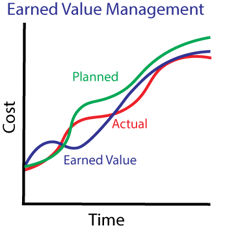
Earned Value Management For project-based firms, measuring current firm performance is the most significant indicator of future firm performance. Furthermore, by using trend data, firms can forecast cost and schedule variances in the early stage of a project. A preferred method by project managers to factor this trend data is the earned value management technique.     

Using Earned Value Management

Earned value management allows firms to evaluate cost and schedule variances in both dollars and percentages on projects. These factors are derived by considering planned value, actual cost and earned value over time.

A common way of looking at earned value is by using both the financial percent complete job to date (JTD) and the estimate too complete (ETC) by using the formula, JTD/(JTD + ETC) and the project managers reported physical percent complete. These two factors when equated provide a quick and easy comparison. For example, the financial percent complete on construction documents may be at 75% when the reported percent complete on construction documents is 50%. There are several possible explanations for these variances, such as:

  • There were many revisions that were client driven and not in scope
  • The complexity of the work was under estimated
  • We have just been very inefficient

Keep in mind, there are a number of other scenarios that can also explain these factors as well.

Factoring Earned Value Management

Getting the information above is actually simple. It requires holding project managers to a high level of accountability. Project managers need to evaluate the amount of hours budgeted, hours burned (JTD), and the effort required to finish the scope of work (ETC).

As a result, this will produce the financial percent complete. Project managers then need to record where the project is from a physical percent complete, which should tie to progress on the project schedule.

Much like a crossover episode of two TV shows, this is where EVM crosses over with a previous blog about FASB 606. EVM will ultimately meet the requirements that in turn will keep the accounting team compliant with FASB 606.

Enter Deltek Vision

The Resource Planning module in Deltek Vision addresses EVM by:

  • Allowing the financial percent complete to be calculated
  • Providing a physical percent complete plan in the form of an EV%
  • A default report in the Resource Planning module known as the Earned Value Chart, which represents the S Curve

By maintaining a project plan in the Resource Planning module, firms can be successful in developing a project report that shows cost and schedule variances in both the dollars and percent (CV, SV, CPI and SPI). If your firm has a benchmark or standard range, you can then compare the actual to that standard to identify anomalies in your projects performance.

The title of this blog is, “Why Your Firm Should Use Earned Value Management” and the answers are:

  1. It’s an industry standard and proven method for project management and project accounting
  2. It’s a common language among project managers across industries
  3. It provides quick visibility into a projects performance
  4. It brings firms closer to compliance with FASB 606

Learn more about Michael Kessler and his more than 30 years of experience of working in and around project-based accounting here.


Streamline Processes with Credit Card Enhancements in Deltek Vision 7.6

Posted by Ryan Felkel on Nov 2, 2016

Vision 7.6 Credit CardsDeltek is at it again! With the introduction of Deltek Vision version 7.6, professional services firms are now able to streamline their credit card processes thanks to several new key enhancements. Providing some background, the introduction of credit cards was one of the many improvements to Vision in version 7.3. When 7.3 was released, firms gained efficiency with employee expense reporting as employees could import charges from the credit card company. This feature allowed employees to associate those charges within their expense reports. Now, based on user feedback, credit card functionality has been expanded.

Review and Reconcile Credit Card Expenses with Ease

Deltek has enhanced the Credit Card Review application in Vision 7.6 which now allows users to easily review, filter and analyze credit card charges. This updated Credit Card Review offers additional information such as the expense report or voucher details and the General Ledger account number for each charge. Furthermore, any user-defined fields imported to help the employee categorize the charge can now be displayed in both the Credit Card Review and Credit Card Reconciliation screens.

More Functionality than just Company-Paid Credit Card 

When credit cards were initially introduced, the focus was on cards paid by the company. In Vision 7.6, purchases made by employee paid credit cards are now included. These charges are treated like typical expenses that are reimbursed to the employee.

As with the company paid credit cards, these charges can be uploaded and made available for the employee to associate with the matching expense within expense reports. Additionally, the Merchant/Description from the imported credit card charge now appears in the expense report description field. This option is available for selection when setting up credit cards in Vision.  

Do More with Deltek Vision 7.6 

Deltek has been listening to Vision users over the years. With each new version, Vision becomes more robust in order to meet the growing needs of professional services firms. If your firm is on Vision 7.6, make sure to activate Credit Cards and begin to streamline your expense report process.

Most Recent News Mentions

We’re changing the way project-based firms operate.

People can’t help but notice.
Who will be next?

Check out our latest newsworthy work: