In the News


We’re devoted to revolutionizing the way our clients do business. Sometimes that gets us noticed.

No big deal.

How My Life Teaching Moment Helped with Client Conflict Resolution

Posted by Sarah Gonnella on Oct 3, 2014

conflict resolutionHave you ever had a moment in your life that stands out as a teaching moment that has made you who you are today? My moment transformed and prepared me as a Project Manager and Owner to tackle difficult conversations. Let’s face it, whether personal or in the workplace, we are constantly faced with resolving conflict.  At the same time, I have learned (or found) that not everyone is comfortable with expressing what needs to be said. So, it really resonated with me when a couple years ago I discovered a tool that has made conflict resolution easier. More about that in a minute. 

My Story

My teaching moment was when I was in sixth grade.  I had a teacher I felt was not being fair. I expressed to my mother my frustration to see if she could help. She told me that she could go to this teacher and have a conversation, but that the teacher would probably respond better if I addressed the issue head on. She coached me on how to have the conversation so I had the tools to handle the conversation on my own.

I was nervous as I entered her classroom. I asked the teacher if she had a moment that we could step outside of the class and talk. I told her how I felt and wanted to bring it to her attention to see how we could resolve the issue. The teacher was impressed and happy that I brought it to her attention. We came up with a solution and each day after I felt that I was respected and developed a better relationship with that teacher.  Each day I look back at that experience, I realize that was the moment I learned to speak up about concerns and not fear the hard conversation to resolve conflict.

Resolving Conflict

By no means am I an expert at resolving conflict. However, I have learned that avoiding the subject and hoping it goes away rarely works. Additionally, conflict doesn’t have to be looked at as negative. Sometimes opportunities flourish from conflict. The other person might be feeling the same way and because you took the time to say something your relationship improved.  A great resource for learning more about conflict resolution is Mindtools. Below are some tips I have learned throughout the years to help resolve client issues:

  1. Perception is Reality - The definition of conflict is to be incompatible. So in order to resolve conflict, the first step is to listen and understand the other person’s or group’s point of view.  We all come from different experiences that influence us and can lead us to make assumptions. So it’s important to understand that someone else’s views may have nothing to do with you, but be based on their past experience.  So with that, we must also realize that perception is the truth no matter if you think it’s true or not. Once you put your mind around that fact you can begin to focus on what can be done to resolve the issue.
     
  2. Managing Expectations Managing expectations with a client requires being proactive vs. reactive. Once a client is frustrated with multiple things that have built up over time, it takes a lot more work to resolve the issue and sometimes is too late. For professional services firms that need to manage clients, a great tool to help with this is the Client Feedback Tool. The only way you can really know what a client is thinking is to ask. This tool allows a firm to check-in with their clients using two minute surveys throughout the project. When you do this, you uncover things your firm has done that your clients love (so you can continue to do more of the same) as well as things that your client would like you to change if only slightly. This doesn’t remove the need for picking up the phone and calling, but it is great for letting you know there is an issue before it gets unmanageable. And, it is very comfortable for clients to let you know things you might not think to ask on the phone and that they might feel were perhaps not worth mentioning on a project call. However, knowing allows you to adjust your service delivery and make you even more valuable to them.
     
  3. Take Action – When a person does speak up about an issue, it’s important to follow-up, follow-up, follow-up and take action! Keep in mind that this doesn’t mean that you go against best practices or things you know are not in the best interest of the client or your firm. The feedback just brings out in the open something that matters to your client. It gives everybody a moment to collect their thoughts and then have a discussion. When you do, it’s important to communicate concerns you have and any consequences after fully understanding the client.  At the end of the discussion and meetings, a recap of action items, who is responsible and due dates can help you get back on track.

So the next time you encounter an issue with a client, I hope my story and tips help you think about ways you can deal with conflict resolution. Be sure to share your conflict resolution tips or stories. Should you want to provide your employees a way to manage expectations, we invite you to take a tour of the Client Feedback Tool. 

 

Project Based ERP: It’s Time to Tackle This

Posted by Full Sail Partners on Sep 17, 2014

Project Based ERP TackleProject based ERP.  You’re probably wondering to yourself, “what is this anyway?”  We’ve all heard of Enterprise Resource Planning (ERP) systems, but now the industry added the words “project based.”  It probably feels like they are just layering more words … and difficulty.  So let me make some sense out of this for you. 
Project Based ERP Straight Talk

Traditionally, ERP’s have primarily been associated with companies manufacturing products: a key factor in ERP is the merging of IT, HR, Finance, and Marketing data with product operations and inventory management. 

In services firms and consulting businesses like yours, however, some alterations must be made for the ERP system to show the data they need to achieve their goal – high profit and high revenue in a skills based environment – hence the addition of “project based” to our discussion about ERP systems.  Your services business deals with a model where intellectual property is what you produce.  You don’t have the evils of shelf life, production lines, or parts departments.  Instead, your lives are geared toward a consistent evaluation of process, of skill, and of running the perfect project.   

Get Down to Business

Project based firms are exceedingly good at running projects.  They can create a GANNT chart that’s a thing of beauty, they can set achievable deliverables, and they meet or exceed every deadline.  But finding an ERP system that’s attuned especially to services and not manufacturing – now that’s tougher.  It takes dedication, knowledge and the focused energy of the right team to get it all together.  

  • An ERP Consultant whose job is to master-mind all the necessary pieces to banish redundant, useless old processes and make your project’s business goals a realty.

  • A Project Manager focused solely on gathering and maneuvering all the professionals to make achieving your project goals a success.

  • Your IT, HR, Marketing/Sales, Finance as the true heroes to making things happen.

So What Are You Going To Get Out Of It?

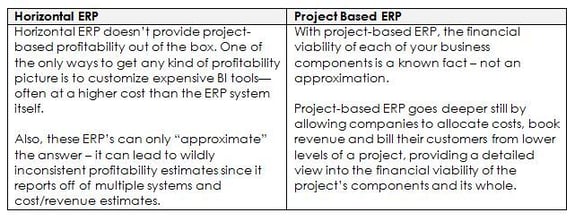
I know, I know.  “It’s expensive to add new software.”  “It’s a lot of work and we’re already pretty busy.”  I’ve heard this and more.  But let me tell you – you can’t afford NOT to add a project based ERP system!  The table below details those differences:

blog2

Brass Tacks

Still need more?  Here’s the slam-dunk.  According to “Managing Your Consulting Firm for Growth,” an IDC Info-doc, ERP systems built from the ground up with projects as a core process give firms the tools to make the most effective decisions in these critical areas:

Lifecycle process across customers, projects and employees.

Details on projects that help optimize profitability and lower risks.

• Manage and optimize an integrated portfolio of services – using data to learn how to do more of what “works” and eliminate what isn’t “working” (i.e. what’s not profitable).

• Find the “right” customers and have the data to eliminate unprofitable customers.

• Manage the future by understanding the past and using data to make fast, accurate course corrections.

A project based ERP system will combine the
strengths of 
Marketing/Sales, IT, HR, Finance together with
project management software 
to help eliminate project waste.

Bottom Line

Your dedicated employees joined with the support of organizations like Full Sail Partners, Inc.  will make your project based firm as successful as possible by using your greatest resource – a specifically designed project based ERP system.  And while it’s rad here in California to just “ride the waves,” when it comes to running your project based firm, using a project based ERP is your best choice.  Dude. 


Top 5 Ways to Get the Most Out of Your Deltek Vision System

Posted by Sarah Gonnella on Sep 12, 2014

changeIt’s not so much that firms don’t already know they aren’t taking advantage of their Deltek Vision system as much as they sometimes just don’t know where to start. I hear it almost every time I’m at a conference talking to clients. “We aren’t utilizing the system to its full potential”. Knowing you aren’t is half the battle. The harder part is figuring out what to focus on and getting the buy-in to do something about it. Below are five tips on how to get the most out of your Deltek Vision system. 

  1. Make it a Priority – We see it every day, firms deal with inefficiencies causing them to lose money each day they are not addressed. If you don’t make it a priority, who will?  Make a list of all of the things keeping you from focusing on your job, i.e. inefficiencies, duplication, lack of report, insight on trends, etc.  Then go to each role within the firm and make the same list from them. This is where you start. By applying the 80/20 rule you can reduce that list down to your priority list.
     
  2. Take Advantage of New Technology – Is your firm guilty of ignoring technological enhancements? Businesses that stay with the “old way” of doing things fall behind their competition. But change is so hard!  You know what they say, the only thing constant is change. New tools like mobile access to timesheets, expense reports, and CRM are available. Not to mention InDesign integration, expense receipt attachments and so many more enhancements of Deltek Vision. Yet, has your firm taken advantage of these new features? Fear of change, lack of understanding what’s available, inadequate IT support are some of the reasons we tend to hear despite their employees saying they need these new features. To learn about the latest enhancements and take advantage of them. Check out our What’s New in Vision webinar and be sure to read our monthly newsletter. Not receiving it? Contact us.
     
  3. Collaborate as a Team – Do you have teammates or are you dealing with the isolation effect? The modern business world is reliant on teams. Ultimately the success of your business is impacted by your teams ability to be productive together.  There is no “I” in team. You have to rely on others while they rely on you and that includes providing accessibility throughout the company. Collaboration can only happen with trust. So identifying where the trust issue sits and resolving it is key. Seek out new and innovative ways to work as team. Contact our collaboration queen for more information. 
     
  4. Improve Employee Skills – How can someone learn if you don’t edumacate ‘em? Through Osmosis! Employees typically want to do the right thing, but without the right tools or training, it makes it hard and sometimes impossible. Does your staff have access to the right metrics or information to make quick decisions? Do you know what is included and have you been trained on the latest enhancements? Full Sail Partners can help you train your employees by utilizing the priority list identified in item #1. You don’t know what you don’t know and that sometimes it is a firm’s worst enemy. To learn on demand, view our past archive section or contact us.
     
  5. Push the Envelope – Wish there was a feature or way to do something in Vision? You might just find that it’s been tackled before. Your consultant can provide great insight on the possibilities as they have worked with hundreds of firms. It seems every day I run into a client that discovers the awesome power of workflows to accomplish there challenge. Workflows can save time to free you up for more productive activities. They can automate repetitive tasks, alert users of record changes, and enable your firm to streamline process through automation. When something isn’t possible with stored procedures or workflows, there is still an option. In Customer Care, you can also submit a “new idea”. The more people that submit on a topic, the higher up on the priority list is goes.

Put on your walking shoes and “just do it”. Just like you do with a project or a marketing plan, you have to plan out what is needed and the results you expect to see. You don’t have to do it alone. Full Sail Partners is here to help guide you so your firm can get the most out of your Deltek Vision system. 

 

Putting Yourself on a Shelf: Marketing Services Based Businesses

Posted by Admin on Aug 28, 2014

Consumers. Buyers. Clients. Users. Customers. You want ‘em, you need ‘em! and it doesn’t matter what kind of business you own.  Or does it? Marketing services based businesses can be a tricky task. 

Identifying and marketing to your consumers

is both formulaic and highly individual,

because what you’re marketing makes all the difference.

In other words, if you’re a product based firm or a services based firm, your marketing efforts will certainly have some similarities but marketing to each of these audiences will also have their own needs.

Let’s first start with definitions.  

marketing services based businesses

Product based firm – you’re an organization with a solid, tangible product to offer its customers:  you can package it and put it on a “shelf.” Marketing is pretty easy – you might even say it’s “textbook” (taught in every marketing class across the country).

Services based firm – an organization that has people as its primary offering, i.e. a process or an expertise.  And since you can’t package people or put a process on a shelf, you have to market differently. 

A bit of both – Sometimes you’re some sort of hybrid between a products business and services firm.  Maybe you sell a product and offer services to back up that product.  Maybe you offer services with some ancillary products.  Whatever your mix of products and services, your marketing efforts will have to vary depending on your target market for each.

Who says it best?

So let’s get down to business and start marketing.   

When you’re marketing a product, you let your product speak for itself, tell its own story of how buying the product will solve the customers’ problems.  You can do things like show your product in action - think cars careening down the highway or a newly cleaned floor.

With marketing services based businesses, it’s a bit different.  Yet still much the same.

Like products, services solve problems.  Marketing your services business will still show problems being solved but as told by the current clients of your services: as the old adage says, people buy from people.  Think of a company like “Angie’s List” which sells services of professionals as told by the users of those services.  With services, your biggest marketing tool is your clients.  In services, you can’t parade your product for your potential customers, but you can show those who have successfully used your services. 

Client Feedback Tool. The key to marketing services based businesses.

But how do you know the stories of your clients?  You ask them.  And in the services world, your best friend is client surveys, specifically, a Client Feedback Tool which companies like Full Sail Partners use to periodically and regularly gather information from clients about engagements.

Sometimes customers need a voice (other than just talking with a project manager) through which to offer their feedback.  A Client Feedback Tool offers survey questions which your clients can use to offer their thoughts on the engagement:  these can either be constructive points as to areas for improvement or compliments on the engagement which are really helping their work lives.  And, with the right marketing professional, both can be used to your services business’ advantage, because once you know how your customers are feeling, you can take action.  In marketing, no news is not necessarily good news; the more information you are armed with, the better marketing can do its job.

Never underestimate the value of retention

Marketing your services business is a bit different but can be better once you find your audience because of one word – RETENTION.  If you have happy customers, not only can they contribute to your marketing efforts, but keeping these same happy customers is the real boon to your bottom line.  According to Forbes.com “Five Customer Retention Tips for Entrepreneurs” 

For those who feel that customer retention plays a relatively minor role in helping a company grow a healthy bottom line, here are a few statistics you might be interested in. According to Bain and Co., a 5% increase in customer retention can increase a company’s profitability by 75%. And if those numbers don’t impress you, Gartner Group statistics tell us that 80% of your company’s future revenue will come from just 20% of your existing customers. Still not sold on customer retention? One final statistic provided by Lee Resource Inc. should give you plenty to think about: Attracting new customers will cost your company 5 times more than keeping an existing customer.   

When it comes to marketing services based businesses, happy clients are your secret weapon

Marketing your services business requires some tweaks to your marketing that differ slightly from product businesses.  Your chief marketing tool is your current customers as they proselytize your message.  Not only are they reaching new customers, but if they are happy enough to share your good work, it looks like you will have a long-term relationship making your bottom line even that much happier. 

Yes, it may be a bit daunting to come up with different marketing styles for your potentially varied target audiences. To accomplish this, check out the Client Feedback Tool - a tool designed to help you target your marketing efforts.


Deltek Kona: 'Spaces' for all Shapes and Sizes!

Posted by Rana Blair on Aug 26, 2014

Deltek Kona Spaces"The road to hell is paved with good intentions." This saying could never be truer than when talking about collaboration. We as humans have an intrinsic need to work together. Unfortunately it seems that at times as humans we also have a  need to butt heads! More often than not in the business world, this butting of heads is a result of how we communicate. Luckily, Deltek has recognized these faults with collaboration and has introduced a solution that you may or may not of heard of by now – Deltek Kona!

Since the release of Kona there have been many upgrades to the platform. If you are a long time user, you have probably recognized some of these changes. Well, now it is time to identify some of the most important changes made to Kona spaces, and how these changes impact your professional services firm:

Organizing Deltek Kona Spaces

If you’re reading this, chances are you are using Deltek Kona frequently and have been added to a number of Kona spaces. 

The Deltek Kona team has developed some tools that allow you to categorize your spaces.  You can then use the classifications you’ve created just for you to adjust what you see and what content is emailed to you.

Space Categories

After assessing the types of spaces you are involved in, you may find that there are multiple spaces for different objectives such as Billable projects, Internal Work Groups, or Company Initiatives. Create a category for multiple spaces so they can be grouped together and used as filters.  The categories you create are just for you and can be changed any time.   

To create categories, go to Manage under the Spaces pane and then Add Category.  To assign spaces to the new category, simply enter the space and choose edit, then assign it to the desired category.

$5 Tip:  Don’t go make categories now.  Read on to find alternative thought processes on creating categories.

Space Favorites

With or without using Space Categories, you can also use the Favorite tool to mark one or more spaces as a Favorite.  This is helpful for spaces where there is a lot of activity or information that you refer to frequently.  Like categories, the list of Favorites can be used as a filter to narrow what you see in your Deltek Kona session.

To mark a Kona space as a favorite, go to the space in the list of spaces and click the down arrow to the right of the space name and choose Favorite.

$10 Tip:  You can also hide spaces.  The only way to find the hidden spaces is to use the filter drop-down.  (See below.)

Positioning Spaces

Spaces are natively organized first by Network, then Favorites, then everything else alphabetically.  Perhaps there is a space that you don’t want to mark as a favorite, but would like to see in your space view without scrolling or you have spaces that are at the top of the list but don’t need to be seen immediately.  This is often helpful for personal or reference spaces that don’t have a lot of new conversation content but need to be easily accessed

To reposition a space, simply click in the middle of the space name and drag it to its new position

Filtering Space Views

Once you’ve assigned spaces to categories or have marked them as favorites, you can begin to use the Space Filter tool in a more advanced way.  To access the filters, look for the down arrow just below the space search box and above the first space.  The dropdown will reveal the standard categories, favorites, and categories you’ve created. 

$25 Tip:  The filter selection remains even after you log out of Deltek Kona.  If upon logging in again, you cannot find the space you’re looking for, go to the filters and reset to All.

Using Categories and Favorites in Email Settings

Once you’ve organized your Deltek Kona spaces on a more granular level, you might want to revisit the Notifications area in your profile.  One of the most exciting features in Deltek Kona this summer, is the ability to turn on the Conversation Digest for only one category or only for Favorites.  Furthermore, you can choose to mark the conversations as read once they are emailed in the Digest.

$1,000 Tip:  If you are not inclined to choose just one category for your Deltek Kona spaces, considering creating a category for spaces that you just don’t care that much about.  Then, tell Kona that you’d like to receive a periodic Conversation Digest for that category and that you’d like to mark the conversations as read.  This will still let you know what you’ve missed in a compact format, but will also keep your Kona view cleaner for all that you do wish to digest from within the application. 

If the ability to filter your Deltek Kona spaces doesn’t seem useful to you, then you have not been properly introduced to the “Kona Life”, let us help you discover how Kona can make yours and the lives of your group members easier:
 

If you are intrigued by the mention of Billable Projects as a space filter, ask about Kona business and integration with Deltek Vision Projects and Opportunities, and with Project Navigator


What Do Soccer and ERP Consulting Have in Common?

Posted by Scott Seal on Aug 14, 2014

Here in the United States, our sports zealots perform crazy antics like going shirtless in freezing weather or painting their faces in support of their teams.  But it’s more than the individual antics; the real difference is in the scale of extremism that soccer fans exhibit – a literal global exuberance all in support of their beloved sport.  But wait, isn’t this an article on ERP Consulting? 

Well, believe it or not, soccer and ERP consulting have quite a lot in common: 

  • They both strive to achieve a very specific GOAL.
  • They require coordination among the various efforts of serious talent to make it all happen.
  • True fans are enthusiastic about the team winning.

Breaking it down: Are Soccer and ERP Consulting that Similar?

ERP

First, let’s talk about and define ERP.  Enterprise Resource Planning (ERP) is the name given to the compilation of software products and/or modules.  According to “Could Your Firm Benefit From an Enterprise Resource Planning Solution

The original Enterprise Resource Planning (ERP) solutions, introduced in the 1990s, were primarily designed for and used by manufacturers. Today , ERP solutions have evolved and serve as a tool to manage the project life cycle for professional services firms. These include firms involved in IT services, architectural and engineering, design and planning, system integration, and management consulting, to name a few.
 
Furthermore, according to CIO.com’s “ ERP Definition and Solutions
 
ERP’s must serve “the needs of people in finance as well as it does the people in human resources [and other departments which typically have their] own computer system optimized for the particular ways that the department does its work. But ERP combines them all together into a single, integrated software program that runs off a single database so that the various departments can more easily share information and communicate with each other .” 
 

This sharing and communicating of information is all geared toward one, single purpose – achieving business goals. 

Putting them together

Next, let’s get back to one of my favorite subjects, soccer.  Soccer is a game requiring the coordination of individual players, each with their own proficiency; sometimes it involves players from different nationalities, or differences in a position focus like a goalie or halfback or a variations in specific skillsets like juggling or dribbling the ball. The players rely on the communicating and sharing of information during a game to one single, purpose – putting the ball into the net for a GOAL, a win.

So, like the soccer team with different players, ERP consulting requires synchronization of dissimilar needs, processes, and indeed functions of the software of different departments, so that the business can achieve its business GOALS, its win.

It takes the right coach to win

ERP ConsultingIn soccer, while the right players, good equipment, and positive fan support are unquestionably important parts of the team’s success, the keystone to an effective soccer team is, in fact, the coach.  The coach’s job is to balance each player’s strengths against the combined team’s goal of winning.

The coach in ERP is the ERP Consultant.  Having the right individual department software is important, but the keystone to implementing a system, evaluating business processes, and bringing all that information together in a meaningful way is the ERP Consultant.  This person, like the coach, has to balance all the individual parts, i.e. departmental needs, in order to reach the business GOALS of the entire organization. 

How to find the right ERP Consultant

Choosing the right ERP Coach, er, Consultant is your important first step.  This person can help you determine the scope of your ERP project – including costs, size, structure, business process evaluation, and ERP goals as well as help you research and find the right ERP solution for your business.  Full Sail Partners, Inc., for example, specializes in identifying the critical resources to create a faster, more efficient, and cohesive business infrastructure for professional services firms looking at ERP solutions.  Ultimately, you need a consultant who

  • listens to you
  • knows your industry
  • understands needs beyond the tool
  • understands your company culture, and
  • knows the ERP industry.

Don’t get a red card

redcardChoosing the wrong ERP consultant or software solution can lead to significant issues penalizing you in dollars, time and public relations.  Following are only two examples of many instances of what happens when ERP implementations fail:
… Knight Capital, [a financial services firm,] recently lost over $400 million in a matter of minutes because of a glitch in its trading software — trading software that wasn’t fully tested and properly deployed prior to production. In addition to the immediate impact of lost cash and profits, the software failure also caused the company’s stock to drop 68-percent the day following the glitch. 

SAP and AxonCity of San DiegoThe city of San Diego, CA terminated its software implementation contract with services provider, Axon, citing “systematically deficient project management practices” and a project that was running $11 million over budget.

But be aware, an ERP Consultant cannot entirely save you from these “red card” losses.  Like the soccer coach, their real purpose is more about setting realistic expectations and sound goals, as well as offering their expertise for avoiding potential issues before they occur.   

In the end

Although analogous in many ways, the reality is that soccer is purely a game to most of us while ERP consultants help you achieve your GOAL – a more efficiently run business resulting in greater success for all your employees.  Calling Full Sail Partners as your ERP consulting expert is your first step in achieving your WIN.  

And while going shirtless in below freezing weather or being painted the colors of your favorite ERP vendor is one way to show your support, it’s not necessary.  But then again…a Full Sail Partners logo on my chest would make me stand out in the crowd. 


Get Mobile with Touch Time & Expense and Touch CRM 1.3!

Posted by Full Sail Partners on Aug 6, 2014

mobile deltek touchIt’s time to break away from the chains of your desk, and get mobile with Deltek Touch Time & Expense, and Touch CRM 1.3. With these apps, both available in iTunes and in the Play Store, it is now easier than ever to research (and update) contact records, as well as capture expenses and track time on the go. Take advantage of the following features, and provide your staff with the most powerful remote tools and utilities to do their jobs to the fullest:

Deltek Touch Time & Expense 1.3:

  • New Name, New Features, Same Reliability | In this release, expenses were added to the Touch Time application, and the application name has officially changed to ‘Touch Time and Expense’. No more waiting to manage timesheets and create expense reports. Avoid forgetting the details or losing receipts by entering as you go. Wherever your mobile device is, Touch Time & Expense follows.

  • A Picture is Worth a Thousand Words | Touch Time and Expense allows you to create a new report, and then associate expense with that report. Take pictures of receipts, and upload them directly!

  • Numerous User Experience and User Interface Upgrades | A number of improvements have been made to the application to improve your experience. Upgrades include:

    • A sliding menu to replace all tabs and provide quick access to Help and Log Out.
       
    • A menu button to allow you to perform specific tasks for timesheets and expense reports.

  • Math is Hard, Let Your Apps Figure it Out | Touch Time & Expense allows you to select or update default transaction currency and exchange rate for an expense report. This screen, however, only displays if Multicurrency is enabled in Vision core.

Deltek Touch CRM 1.3:

  • Touch Knows How to Push Your Buttons | Touch CRM now has buttons, with icons, to replace labels on certain screens. Examples of new buttons include:

    • ‘List Button’ - Tap this button to display options specific for the contacts, clients, and opportunities screens.
       
    • ‘Pen Button’ – Tapping this button allows you to edit contact, client, and opportunity information.

  • No Mobile Limitations | Touch CRM allows you to search, edit, and add clients on the go. In addition, add or update Opportunities with the touch of a button.
     
  • Syncing Made Easy | Touch CRM automatically syncs up with your Deltek Vision system, and allows you to create activities and calendar events on the desktop, and access them on your mobile device.
     
  • Full Visibility | See user defined fields in contacts, clients, and opportunities. Additionally, Touch CRM 1.3 gives you the ability to view activities!
     
  • It’s All One Touch Away | Make a phone call, send an email, or map an address with the touch of a button.

  • And more | Interested in learning more about the features and functionality included in Touch 1.3? Reach out to us today for a demo, and start operating better!

Are you currently using the Touch applications? If so, respond below and let us know what your experience has been like so far.


Higher Utilization Yields Higher Revenues – Myth or Reality?

Posted by Scott Gailhouse on Jul 30, 2014

Myth or Reality: Higher utilization yields higher revenues? Well, both actually.  But before I explain, I’m going to start with this quote from Zig Zigler,

“Success is the maximum utilization of the ability that you have.”

This is the perfect quote to start our discussion regarding utilization, because it specifies that success (i.e. defined by higher revenues for most companies) comes from utilization of ability and NOT from a higher utilization of time.  

The time utilization myth

describe the imageToo many professional services firms looking to improve revenue and profit numbers are chasing this goal a bit myopically.  Their logic sounds reasonable but comes up against a “theory vs. reality” wall:  more money comes from higher utilization of resources, i.e. their consultants.  So they put into place incentive programs that encourage their consultants to work more.  Consequently, these consultants put in high numbers per week leading, too often, to burnout and turnover coupled with the often very ugly effect of lowering customer satisfaction, because the consultant has lower motivation for solving and higher interest in billing.  

The balance with reality

Luckily, these days, more and more professional services firms are wise to this “higher utilization brings higher dollars” fallacy.  They understand that chasing the utilization dollar by itself is a delusion.  Here are the steps of the real logic:

  1. Greater financial rewards for companies come from happy, prepared, challenged and respected employees, because
  2. These employees do what’s best for their customer, while still balancing the number of hours it took to solve their customer’s problem, and
  3. Then, customers who have had previous problems solved, use your company’s consultants again thereby generating even more revenue.   

This brings us back to our initial quote –business success comes from utilizing employees’ abilities and not just their time. 

But how?  How does a company go from making employees focus on utilization to their being self-motivated to be happy and work more, successfully?  Here are three suggestions.

  1. Know, really know, where your consultants strengths are.  Why is that important to utilization, you ask?  For two reasons:  1) it’s not the number of consultants you use; it’s the right consultants, and 2) happy employees who are on project they are good at work harder simply because they are happy.  A circular logic that is, indeed, true.  If you know what your consultants are good at and organize projects accordingly, your happy employees will continuously work a) harder because they enjoy it and b) smarter because they are good at it. 
  2. Get rid of “high utilization” numbers as the sole focus of employee incentive plans.  Sure, it’s okay to keep a facet of utilization in the verbiage of their incentive programs, but balance that with another positively motivating focus like customer satisfaction, so that employees get the message that they need to work hard to solve customer issues and not just bill high numbers.
  3. Better utilization comes from better processes. Take a close look at the work your consultants are doing.  Are they overwhelmed with administrative and/or manual processes (e.g. filling out project planning forms, expense reimbursement processes, or dealing with emails/directives which constantly impact work week schedules)?  Now, take a close look at how many of these could be automated or even switched to a different employee whose job is NOT consulting with customers.

Utilization is not just about improving your professional services firm’s revenue and profit numbers; it’s really about

  • Automating processes to make not only your consultants but also your entire company more efficient
  • Shifting administrative work to non-utilization based employees
  • Balancing utilization incentives with more employee and/or customer focused incentives
  • Focusing on your consultants’ strengths

But you don’t have to do this alone.  Reach out to us to take a look at your utilization and see, first hand, how making these small changes will yield big results. 


What to Look for in a CRM Consultant

Posted by Sarah Gonnella on Jul 24, 2014

describe the imageThe other day I had a prospect call looking for a CRM (Client Relationship Management) software, but what he found was a CRM Consultant vs. a “salesperson”. Don’t get me wrong, I absolutely want to sell software…to the right fitting firm. As with most calls, the caller wanted to set-up a time for a demonstration. The issue with immediately showing the software without a discovery is that it tends to be a waste of the client's time and mine. Without understanding the prospect's challenges, and ultimately how the software will help the client’s marketing strategy, a demonstration is futile. A CRM system isn’t a magic bullet. So when you are looking for a new CRM software, it’s important to also evaluate who will assist you beyond the sale. Below is what to look for in a CRM Consultant:

1. A Results-Oriented CRM Consultant Identifies Firm Needs

When speaking to a client or potential client, a CRM Consultant asks probing questions to evaluate the firm’s current processes, their challenges, and ultimately what they were looking to accomplish. As a CRM Consultant, it’s important to understand the firm’s level of sophistication related to marketing processes and measurement. Just like a growing baby, each firm is at a different growth stage. A baby must learn to roll over, crawl, stand, walk, and then run and so must a firm. You can’t expect to immediately start running. Some firms’ processes are advanced despite the fact that they have no CRM system. Others have no processes at all. A firm must start somewhere. So as a consultant, it’s important to understand the firm’s marketing maturity before establishing a CRM implementation for that firm. 

During the above mentioned call, the prospect was a little taken back when I told him that our system wasn’t the right fit for his needs. Ultimately, he was looking for another type of software. Although it ended up not being a lead, the prospect was thankful for my honesty as I took the time to understand what his firm needed and helped guide him down a better search path.

2. A Vigilant CRM Consultant Engages Key Players Throughout Implementation

After establishing needs, it’s important to make sure you have the right players. As outlined in this previous blog article, 8 Reasons for a Successful Implementation, it’s important to ensure executive buy-in during the sales process. Just as important is having the right CRM champion and with an ERP (Enterprise Resource Planning) system it’s important to get finance involved. All of these key players must be a part of not only the implementation, but also the sales process. When involvement from any of these roles is lacking, the likelihood of success is lessened. It is the role of the CRM Consultant to make sure that these key players are established from the beginning, and play their part through the implementation. These key roles play a huge part in the roll out of the system and must also engage other end users to ensure all departments, divisions, markets, and offices are represented.

3. It is the Duty of a CRM Consultant to Look to the Future

When going through an implementation, a misconception that many firms have is that once the implementation is complete, so is the development of your CRM. What worked today won’t necessarily work tomorrow. As your marketing strategy and the competitive landscape changes, your CRM system must continue to evolve. Your CRM Consultant should look to resolve short-term and long-term needs, as well as, think about strategic marketing plans. For example, do you plan to open a new office, go into a new market or start a new service line?  A CRM Consultant is there to guide your firm on metrics that would be valuable to access your marketing traction.

4. Your CRM Consultant Should Be a Strategic Partner

A CRM Consultant should be more than a trainer or a vendor. Treating one as such is a common mistake made by firms seeking to hire a CRM Consultant. So how do you know if you have a consultant or a vendor? If we look at the basic definition of a vendor, “a person or company offering something for sale”, we can see there is no value-added beyond the sale. Whereas a consultant is “a person who provides expert advice professionally”. A value-added CRM Consultant should have a background in marketing and be able to help your firm adapt the system to your marketing strategy. A consultant will:

  • Ask strategic questions to better understand your business needs
  • Provide best practices and facilitate your company in adapting the system to gain insight on metrics that matter
  • Go beyond showing you how to just use the system
  • Help you understand how to increase user adoption
  • Look at ways to improve your business and your clients

Ultimately, your CRM Consultant should be a partner that understands your business needs whom you can rely on to help you as new needs arise. If your firm is looking to improve your CRM processes or looking for a CRM, be sure to check out Full Sail Partners’ webinar on Managing Your CRM System and Beyond! The webinar provides insight on CRM objectives, clean-up, set-up of your system, metrics that matter, and how to engage finance.


Be sure to add a comment to let us know if this article and webinar were helpful or reach out to us personally via email, phone or LinkedIn

Have you Seen Vision Lately? Check out Deltek Vision 7.3!

Posted by Full Sail Partners on Jul 15, 2014

vision 7.3The newest version of Deltek Vision (7.3) has been released, and along with it comes a new slew of powerful features and functionality. As always, operating on the newest version of Vision gives your firm the ability to manage better, achieve more, and improve your ability to better track your projects and efforts. Let’s take an overview glance of the new benefits.

Vision 7.3 Product Enhancement Synopsis

  • Manage company paid credit cards | 7.3’s new credit card functionality streamlines cost accounting. Features include the ability to setup credit cards, import credit card charges, and reconcile credit cards.
  • Expanded internationalization and localization features | New globalization functionality included in 7.3 gives your firm the tools needed to expand into new markets, and win more work!
  • Improved compensation break out | Gain additional insights into fee structures with detailed compensation breakouts.
  • Dashpart enhancements | Users can now choose which columns to include in info center dashparts; including user defined info center dashparts. Additionally, the dashpart can be populated with work breakdown structure level two or three record data.  Lastly, users can create an Invoice Review dashpart; providing a quick summary of outstanding receivables for chosen projects.
  • Core CRM | Users can now edit activities directly in the grid. Many new text editor features have been improved; including highlighting misspelled words and the ability to add words to the spelling dictionary.  Enhancements to the Opportunity Forecast Report; including revenue allocation for fiscal years.
  • And more | Interested in learning more about the features and functionality included in 7.3? Reach out to us today for a demo, and start operating better!

Is Your Firm Prepared for Deltek Vision 7.3?

Because of Microsoft’s de-support of Windows XP in April 2014, Deltek can no longer support the Windows XP client operating system beginning with Vision 7.3 and extending to future releases.

The following client operating systems will be supported for Vision 7.3:

  • Windows 8 or 8.1
  • Windows 7
  • Windows Vista

Additionally, to use this new version you must ensure that .NET Framework 4.5 or 4.5.1 is installed. For more information on the .NET Framework and to determine how best to deploy the 4.5 or 4.5.1 release within your organization, please refer to the Microsoft web site at http://www.microsoft.com/net.

Most Recent News Mentions

We’re changing the way project-based firms operate.

People can’t help but notice.
Who will be next?

Check out our latest newsworthy work:

Recent Posts