In the News


We’re devoted to revolutionizing the way our clients do business. Sometimes that gets us noticed.

No big deal.

Posts about Deltek Vision (8):

Deltek Vision Year-End Reminders and Resources

Posted by Dale Busbey on Dec 3, 2014

Are you ready? Year-end is upon us. As part of a yearly tradition, we are providing you with resources and reminders to assist your firm with year-end processing. Check out the information below, and let us know if you have any questions.

Don't Forget Your Deltek Vision Year-End Processes

2014yearend

As we come into the holiday season many of us in accounting face the coming season, not only with the joy of family and friends coming together, but with a sense of impending dread – YEAR-END and TAX SEASON are looming – ugh - have another drink.

W-2s - 1099s - journal entries - checking and double checking each number!  Auditors - shareholder meetings - endless explanations’ of what the results mean (even though you have been saying for the past 6 months) - Oh the joy of the season!

As we go through the year-end process there are mistakes we (and others) make that are easy to recover from like entering the 15 page depreciation journal entry “backwards” at midnight sitting in your semi dark office chugging your 15th pot of coffee.  Some are more difficult – like removing all the lower levels of your work break-down structure (did that once – glad our backups worked). So outside of deleting the database, what are some of the items in Vision year end processing that are hard to recover from?

>> Learn more

Is Your Deltek Vision System Year-End Process Stress Free?

Year-end is always a stressful time of year, but it doesn’t have to be.  As with everything else in the world of Accounting, planning and preparation is the key to a successful and stress-free year end. Check out this article talk provides a few tips to make your year-end close just a little easier.

>> Prepare more

Webinar: Stress Free Year-End Process - Yes You Can!

Join our on-demand webinar to see how you can make your year-end stress free.  Our panel will provide insight into best practices, tips to close your books with ease, and focus on those “gotchas” on year-end processes. See what our panel says about the following year-end items:

  1. How to make your process efficient
  2. Avoid disruption to production
  3. Communication topics to provide your staff and management
  4. Saving money by evading closing obstacles

>> View more

Deltek’s Year End Resources

Deltek Customer Care is working to assist you with year-end activities. You can now take advantage of year-end resources:

  • Year-End Forums
  • Phone Menu Guidance
  • Year-End Info Center
  • Quick Chat Guidance
  • Year-End Guides & Videos

>> Know more

We hope these resources serve as good reminder. Best wishes from the Full Sail Partners' staff! Wishing you a prosperous 2014.

It’s Time to Upgrade! Regulatory and Year-end Updates Available ONLY on Vision 7.2 or 7.3

Working in the most recent release of your Deltek solution ensures your firm is benefiting from all the features and enhancements engineered into the latest versions of Vision. Your support and maintenance plan entitles your firm to download the latest version of your product here if you're not up-to-date!

Important Note Regarding Year-End Regulatory Updates in 2014

Year-end updates in 2014 will be supported only on Vision 7.2 and Vision 7.3. Regulatory updates for releases prior to Vision 7.2 will not be delivered.

Check out the Deltek Support Assurance Product Lifecycle on the Deltek Customer Care Connect website for the latest information on your product's status and definitions of the support delivered in the Active, Maintenance, and Sustaining phases.

Is Your Firm Prepared for Deltek Vision 7.3?

Because of Microsoft’s de-support of Windows XP in April 2014, Deltek can no longer support the Windows XP client operating system beginning with Vision 7.3 and extending to future releases. 

The following client operating systems will be supported for Vision 7.3:

  • Windows 8 or 8.1
  • Windows 7
  • Windows Vista

Additionally, to use this new version you must ensure that .NET Framework 4.5 or 4.5.1 is installed. For more information on the .NET Framework and to determine how best to deploy the 4.5 or 4.5.1 release within your organization, please refer to the Microsoft web site at http://www.microsoft.com/net.

Top 5 Ways to Get the Most Out of Your Deltek Vision System

Posted by Sarah Gonnella on Sep 12, 2014

changeIt’s not so much that firms don’t already know they aren’t taking advantage of their Deltek Vision system as much as they sometimes just don’t know where to start. I hear it almost every time I’m at a conference talking to clients. “We aren’t utilizing the system to its full potential”. Knowing you aren’t is half the battle. The harder part is figuring out what to focus on and getting the buy-in to do something about it. Below are five tips on how to get the most out of your Deltek Vision system. 

  1. Make it a Priority – We see it every day, firms deal with inefficiencies causing them to lose money each day they are not addressed. If you don’t make it a priority, who will?  Make a list of all of the things keeping you from focusing on your job, i.e. inefficiencies, duplication, lack of report, insight on trends, etc.  Then go to each role within the firm and make the same list from them. This is where you start. By applying the 80/20 rule you can reduce that list down to your priority list.
     
  2. Take Advantage of New Technology – Is your firm guilty of ignoring technological enhancements? Businesses that stay with the “old way” of doing things fall behind their competition. But change is so hard!  You know what they say, the only thing constant is change. New tools like mobile access to timesheets, expense reports, and CRM are available. Not to mention InDesign integration, expense receipt attachments and so many more enhancements of Deltek Vision. Yet, has your firm taken advantage of these new features? Fear of change, lack of understanding what’s available, inadequate IT support are some of the reasons we tend to hear despite their employees saying they need these new features. To learn about the latest enhancements and take advantage of them. Check out our What’s New in Vision webinar and be sure to read our monthly newsletter. Not receiving it? Contact us.
     
  3. Collaborate as a Team – Do you have teammates or are you dealing with the isolation effect? The modern business world is reliant on teams. Ultimately the success of your business is impacted by your teams ability to be productive together.  There is no “I” in team. You have to rely on others while they rely on you and that includes providing accessibility throughout the company. Collaboration can only happen with trust. So identifying where the trust issue sits and resolving it is key. Seek out new and innovative ways to work as team. Contact our collaboration queen for more information. 
     
  4. Improve Employee Skills – How can someone learn if you don’t edumacate ‘em? Through Osmosis! Employees typically want to do the right thing, but without the right tools or training, it makes it hard and sometimes impossible. Does your staff have access to the right metrics or information to make quick decisions? Do you know what is included and have you been trained on the latest enhancements? Full Sail Partners can help you train your employees by utilizing the priority list identified in item #1. You don’t know what you don’t know and that sometimes it is a firm’s worst enemy. To learn on demand, view our past archive section or contact us.
     
  5. Push the Envelope – Wish there was a feature or way to do something in Vision? You might just find that it’s been tackled before. Your consultant can provide great insight on the possibilities as they have worked with hundreds of firms. It seems every day I run into a client that discovers the awesome power of workflows to accomplish there challenge. Workflows can save time to free you up for more productive activities. They can automate repetitive tasks, alert users of record changes, and enable your firm to streamline process through automation. When something isn’t possible with stored procedures or workflows, there is still an option. In Customer Care, you can also submit a “new idea”. The more people that submit on a topic, the higher up on the priority list is goes.

Put on your walking shoes and “just do it”. Just like you do with a project or a marketing plan, you have to plan out what is needed and the results you expect to see. You don’t have to do it alone. Full Sail Partners is here to help guide you so your firm can get the most out of your Deltek Vision system. 


Have you Seen Vision Lately? Check out Deltek Vision 7.3!

Posted by Full Sail Partners on Jul 15, 2014

vision 7.3The newest version of Deltek Vision (7.3) has been released, and along with it comes a new slew of powerful features and functionality. As always, operating on the newest version of Vision gives your firm the ability to manage better, achieve more, and improve your ability to better track your projects and efforts. Let’s take an overview glance of the new benefits.

Vision 7.3 Product Enhancement Synopsis

  • Manage company paid credit cards | 7.3’s new credit card functionality streamlines cost accounting. Features include the ability to setup credit cards, import credit card charges, and reconcile credit cards.
  • Expanded internationalization and localization features | New globalization functionality included in 7.3 gives your firm the tools needed to expand into new markets, and win more work!
  • Improved compensation break out | Gain additional insights into fee structures with detailed compensation breakouts.
  • Dashpart enhancements | Users can now choose which columns to include in info center dashparts; including user defined info center dashparts. Additionally, the dashpart can be populated with work breakdown structure level two or three record data.  Lastly, users can create an Invoice Review dashpart; providing a quick summary of outstanding receivables for chosen projects.
  • Core CRM | Users can now edit activities directly in the grid. Many new text editor features have been improved; including highlighting misspelled words and the ability to add words to the spelling dictionary.  Enhancements to the Opportunity Forecast Report; including revenue allocation for fiscal years.
  • And more | Interested in learning more about the features and functionality included in 7.3? Reach out to us today for a demo, and start operating better!

Is Your Firm Prepared for Deltek Vision 7.3?

Because of Microsoft’s de-support of Windows XP in April 2014, Deltek can no longer support the Windows XP client operating system beginning with Vision 7.3 and extending to future releases.

The following client operating systems will be supported for Vision 7.3:

  • Windows 8 or 8.1
  • Windows 7
  • Windows Vista

Additionally, to use this new version you must ensure that .NET Framework 4.5 or 4.5.1 is installed. For more information on the .NET Framework and to determine how best to deploy the 4.5 or 4.5.1 release within your organization, please refer to the Microsoft web site at http://www.microsoft.com/net.

Eleven Reasons Deltek Vision’s Project Accounting Software is Right for Your SMB Firm

Posted by Nicole Temple on Jun 11, 2014

Project accounting softwareHow do you know when to move to a Project Accounting Software? There are many factors to consider in your decision. Although you may have looked at Deltek Vision in the past, you might be surprised at all of its new capabilities. Not to mention Deltek Vision's cloud pricing and out of box options can't be beat by any of its competitors. Outlined below are eleven important items to think about when looking at new project accounting software for your business. 

1) Work Breakdown Structure

Project accounting software becomes a must have for firms that want to track detailed information around deliverables. How do you know if it is right for your firm? Your firm may need the ability to: 

  • Break down a project into manageable work elements by separating out the deliverables for the project
  • Identify start and end time of each deliverable
  • Define the overall budget for the deliverables as well as the entire project
  • Attach key persons to the project for reporting
  • Set-up work breakdown structures to show effort required to achieve an objective

By having the right software for your firm, you gain the ability to track detailed cost estimating and provide guidance for future development and controls. The ability to break a project into manageable work elements, and track the elements, allows firms to better estimate future projects while maintaining the projects that exist today. 

2) Accrual and Cash Capabilities

Many firms want the ability to run cash books alongside the accrual books to get the most accurate view of where the business stands with income and debts. Income and expense tracking is integral to a project accounting software. While cash basis may give you a better idea of where the firm stands with actual cash, the accrual method can show the ebb and flow of the overall business income and debts for the most accurate view of the overall organization and long term profitability. 

3) Robust Reporting

To get the most out of your software,  you need the ability to report on the data for your firm. Your software should be able to pull the data you have entered to allow you to analyze the overall business performance, and plan for future engagements (with data to back your decisions). Reporting should have the capability and flexibility of pulling the data you need without requiring customization from a programmer, and should be visible to key players in the firm. 

4) Mobile Access

If you have employees that work in the field, and have little access to computers, you may want to be able to give them access through non-traditional means. Mobile access becomes valuable, and keeps data flowing in the system to quickly and accurately maintain the data in the system on a real-time basis. Access via Touch Time, Touch Expense, Touch CRM, and Navigator are available with Vision and they allow remote employees to enter their time and expense data right from their phone or tablet rather than having to get on a computer and access the system directly. 

5) Flexibility

What core modules are available to you when you purchase? Do you have the flexibility to configure the software for your needs? Do you need User Defined fields for tracking? Are you currently tracking outside information in excel? Vision allows the flexibility to add new fields for tracking and to create fields directly in the software to pull data in from outside sources such as Excel. 

The advantage of Vision as a high end solution is the flexibility to configure for company specific processes and exact business processes, pulling all data into the system without the need for multiple solutions. 

6) Automation

Workflows, streamline processes…A good project accounting software will give you the ability to automate many of the processes and functions on a daily, weekly, monthly, or as needed basis. Vision has the ability to create workflows directly through the front end to send emails, alerts, update fields, and run processes or reports automatically. In addition, stored procedures can be customized to automate non-standard processes on the back-end. 

7) Real-Time Data

Project Managers need to plan, manage, and monitor their projects. Without real time data Project Managers are not getting the data they need to manage their projects.  Real-time data allows your marketing team to accurately evaluate business development efforts to ensure the firm is pursuing the right kind of work by measuring marketing effectiveness.   

8) Audit Trail

Many firms require modifications that fit their project-based firm. In QuickBooks and other software, excel workarounds with manual manipulation are required outside of the software. This can impact the firm’s audit trail. Vision has the capability of running reports for changes made in key records as well as the ability to see the financial audit trail, which is important for the firm to be compliant for GAAP, IFRS/FASB, or any other requirements. 

9) Security

Security is one of the most important features of a program because it either allows, or restricts, employees from seeing sensitive information such as costs or other employee sensitive information. Your firm will need to be able to provide access to the system for many roles in the company to work holistically with the organization’s needs. Without this ability there is no visibility, and management of the system and processes becomes very difficult. It is important for all players to have access to the information they require to manage their duties and keep the business running smoothly. 

10) Low IT Maintenance

Cloud based software is a new industry buzzword. The reason for this is that by having your software on the cloud it is maintained by the hosting agency and updated following the testing of new versions and updates. Without requiring an internal IT team to manage Vision, your team is freed up to do more important business tasks. 

11) Integration

Many firms have data silos with disparate systems. This separation between team members can increase inefficiencies and keep the firm from reporting on one truth for the company. Since Deltek Vision’s cloud software comes bundled with 5 Customer Relationship Management, Custom Proposals, SF330 License and Resource Planning license, firms can work as a team and build upon each other's data to gain a holistic view of the company and processes. 

Best Project-based ERP Software for SMBs

If it's been a year or two or even more since you've looked at Deltek Vision. It's time to talk to a partner like Full Sail Partners to see why SMBs are turning to Deltek Vision's cloud option. Even if you’re a 10-person firm, Deltek Vision is the best project accounting software for project-based firms because of its flexibility and economical price. 

Payroll Software: Pain in the A$$ or Necessary Evil

Posted by Wendy Gustafson on May 14, 2014

PAYROLL SOFTWAREPayroll, the reason we drag ourselves out of bed and into the office.  Payday!!  Everyone’s favorite day – it is especially nice when it is on a Friday.  As happy as payday makes us, if you are the one stuck processing your payroll software can be a total PITA.
Utilize In-House Payroll Software vs. Out Sourced Payroll

So why process payroll in-house?  Why not just hire a service?  In many cases a service is exactly what you would use.  However, payroll services have their own set of challenges:

  • Rigid deadlines that may cause you to process payroll days before your pay date (in some cases before the pay period ends)
  • Inability to add non-payroll items (like expense reimbursement) to the payroll
  • Can be a bit more “pricey”

When looking at a way to process payroll in-house, a system that integrates with your existing ERP system, such as Deltek’s Vision, is priceless.  You can have a one stop shop for employee set up, employees can enter their time and it is automatically available in payroll when posted.   Since everyone is already used to the system, the basic information is already there.

Some of the other benefits of having payroll in-house and integrated with your ERP are:

  • Employees will have access to see their vacation and sick time remaining
  • Access to see and print copies of their paychecks (Meaning you don’t have to provide their last 5 paychecks)
  • Accounting can control deadlines
  • Can sometimes be less expensive

What to Look for in Payroll Software

If you determine that in-house is the way to go, it’s important to make sure your payroll software is flexible and provides the features that matter.  So what type of flexibility should you look for in your payroll software? A couple features include the ability to add codes when you need it or to track your company contribution to the employee benefits.

An example of an additional code is the ability to add an after tax code to reimburse your employees for expenses.  This allows you to provide your employees one check for payroll and expenses.

An example of a contribution code would be if you offer a 401K plan, the company match is your company contribution.  If you offer health care, the portion covered by the company is the company contribution.  Tracking this information on each payroll can simplify your accounting process (getting the costs into the right “bucket”) but can also allow you to easily create a total compensation report at the end of the year showing the employee the total value of their compensation package including benefits (not every service offers this either).

Either way you go, an in-house payroll software or outside payroll service, look for the process that will provide you the most flexibility and integration with your current ERP to make your life easier!

Deltek Vision and Adobe InDesign Integration

Posted by Full Sail Partners on Feb 28, 2014

Vision InDesignFor years marketing professionals have been clamoring for a way to directly merge information from their Deltek Vision system to an InDesign template. For firms with Deltek Vision version 7.1 and higher, the wait is over! Creating InDesign Templates and merging information directly from Deltek Vision is simple, and is very similar to merging from Word, with some usability enhancement.  

Before we begin, you might be asking yourself, ‘What kind of functionality will InDesign merging include?’ To answer your question, we have highlighted some of the major areas below:

  • Add fields and grids (including user defined!) to an InDesign template
  • Format number, currency (projects only), and date fields in a template
  • Merge data directly from an info center record into InDesign
  • New ‘Select Projects’ function for Employee Resumes allows for more precise formatting of project examples on resumes within InDesign

So as you can see by the functionality, the ability to merge data directly from your Deltek Vision system to Adobe InDesign is going to allow your firm to easily deliver accurate, more consistent proposals through the industry standard desktop publishing software.

What exactly will we be able to merge?

If your information is in Vision, you can now export it out allowing your firm to merge the following documents from Deltek Vision to Adobe InDesign:

  • Resumes
  • Cover letters
  • Project cut sheets
  • References
  • and much more from your Vision system 

Merge functionality includes the ability to pull information from tables, grids, custom Info Centers, and user defined fields.

What technical requirements are required?

In order to run a Deltek Vision merge to Adobe InDesign, you will need to be running a copy of Adobe InDesign CS5.5 or newer, installed on your local user directory. You will also need to be running a copy of Deltek Vision 7.1 or newer, with TDM enabled.

So what are the steps?

Setting up Deltek Vision to Adobe InDesign merge capabilities is surprisingly easy! The process requires five major steps, highlighted below.

  1. Access the ‘Merge Templates’ section in Deltek Vision (Configuration>General>Merge Templates), this step may require you requesting additional privileges from your Vision administrator
  2. Select the Info Center you would like this template to be associated to
  3. Create or upload a new template. If creating a new template, please be aware that you will need to insert merge codes from the Vision Merge Code window
  4. Open the ‘Custom Proposals’ Info Center, select the proposal you want to merge information out of, and link the new template to the merge function
  5. Merge your information out of Vision!

So now that you know the basics of what Deltek Vision Adobe InDesign merge integration offers, we encourage you to get started. Should you or your team need further information, reach out to our team of CRM experts to assist. 

Deltek Vision Year-End Reminder and Resources

Posted by Dale Busbey on Dec 17, 2013

Are you ready? Year-end is upon us. We thought we would highlight some resources to assist firms with year-end processing.


describe the image

Don't Forget Your Deltek Vision Year End Processes

As we come into the holiday season many of us in accounting face the coming season, not only with the joy of family and friends coming together, but with a sense of impending dread – YEAR-END and TAX SEASON are looming – ugh - have another drink.

W-2s - 1099s - journal entries - checking and double checking each number!  Auditors - shareholder meetings - endless explanations’ of what the results mean (even though you have been saying for the past 6 months) - Oh the joy of the season!

As we go through the year-end process there are mistakes we (and others) make that are easy to recover from like entering the 15 page depreciation journal entry “backwards” at midnight sitting in your semi dark office chugging your 15th pot of coffee.  Some are more difficult – like removing all the lower levels of your work break-down structure (did that once – glad our backups worked). So outside of deleting the database, what are some of the items in Vision year end processing that are hard to recover from?

>> Learn more

Is Your Deltek Vision System Year End Process Stress Free?

Year-end is always a stressful time of year, but it doesn’t have to be.  As with everything else in the world of Accounting, planning and preparation is the key to a successful and stress-free year end. Check out this article talk provides a few tips to make your year-end close just a little easier.

>> Prepare more

Webinar: Stress Free Year-End Process - Yes You Can!

Join our on-demand webinar to see how you can make your year-end stress free.  Our panel will provide insight into best practices, tips to close your books with ease, and focus on those “gotchas” on year-end processes. See what our panel says about the following year-end items:

  1. How to make your process efficient
  2. Avoid disruption to production
  3. Communication topics to provide your staff and management
  4. Saving money by evading closing obstacles

>> View more

Deltek’s Year End Resources

Deltek Customer Care is working to assist you with year-end activities. You can now take advantage of year-end resources:

  • Year-End Forums

  • Phone Menu Guidance

  • Year-End Info Center

  • Quick Chat Guidance

  • Year-End Guides & Videos

>> Know more

We hope these resources serve as good reminder. Best wishes from the Full Sail Partners' staff! Wishing you a prosperous 2014.

Lessons Learned: Business Performance Metrics

Posted by Brian McNamara on Sep 11, 2013
Business Performance MetricsYou might be tempted to think that the hardest part of using business performance metrics to guide your business is gathering and analyzing the metrics. 
But equally important — maybe even more so — is selecting the right metrics to begin with. Of course, there are some people who observe that there are no “bad metrics.” The argument goes that a metric itself is neither good nor bad; it could be just as likely that your data is wrong, or possibly that the metric is simply not a good fit for your needs or your organization. 

But even though the metric itself is neither good nor bad, there are other ways that business performance metrics can be failing you. Let me describe three of the most common problems. 

1. Inconsistency. One of the most common ways a metric can go south is inconsistency. Granted, some people think consistency is overrated: the philosopher Ralph Waldo Emerson once railed in his classic essay, Self-Reliance, that “A foolish consistency is the hobgoblin of little minds.” (It’s good stuff — look it up!)

2. Unintended consequences. Another problem is if your metrics are somehow incentivizing your employees to do the wrong thing. For example, imagine your firm has put a recent focus on customer service. Unfortunately, last year you notified all employees that their pay raises will be based on employee utilization rates. The longer your employees spend keeping your clients happy (non-billable work), the lower their utilization rate. You are telling your employees one thing, but your actions are saying the complete opposite.

Although it should go without saying, it’s absolutely critical to make sure that the math and logic that feed into your business performance metrics remain consistent, regardless of the timeframe or operating unit being analyzed. 

So in this example, a better metric would be to incentivize your employees on a combination of utilization rate and customer satisfaction — more complicated to gather, but ultimately closer to what you want to reward and encourage. What’s more, a great reason to plan your metrics with care! 

3. Understanding Lagging vs. Leading Indicators. To be most effective, you need business performance metrics in as close to real-time as possible. Understanding the difference between lagging vs leading indicators can often be the defining factor for setting your firm on the correct course. Lagging indicators help your firm indentify historical trend information, while leading indicators provide predictive information that can allow you to make data-driven decisions to change future outcomes.

QuickBooks, Excel and other office applications can help in collecting and analyzing data, but lacks the sophistication to provide real-time insight. A purpose built ERP, like Deltek Vision, provides front and back office functions insight into historical and predictive information. Whatever tools you use to gather your metrics, be sure to automate the process as much as possible to provide your team with the ability to make the best data-driven decisions.

Start measuring!

So how does one avoid the pitfalls of metric management? A great starting point is to understand your business and what your version of success looks like. For example, is it total revenue, net profits, other measures, or a weighted combination? 

At Full Sail Partners, we work with a large number of professional services firms — especially those that are project-based. As a result, we have a lot of insight and experience into the metrics that are most telling for them. To learn more, keep exploring our blogs, or contact us.


Project KPI, Project Management KPI

Deltek Vision Timesheet Activity Automation

Posted by Wes Renfroe on Aug 20, 2013

Activities provide a greater way to gain visibility into communication efforts across the firm about a client. They provide a detailed view of what is going on with a project/firm/opportunity and are critical for providing team backup and covering your backside.  You are probably aware of three main ways to create activities in Deltek Vision – Manually (slow), Using MODI (faster but limited), and CMO (even faster but costs more $$).  The innovation team here at Full Sail Partners has developed a fourth way, the fastest, easiest, most convenient way to create activities so far:  Just do your timesheet and let the activities be created for you! 

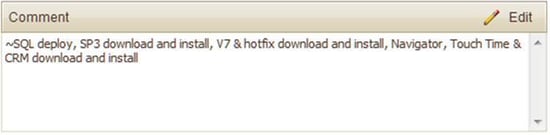
The way it works is quite simple, just enter your hours, as well as, a detailed comment regarding work done for a project on your timesheet and make sure the first character in the comment is a tilde symbol (~).  Save your entry and close your Deltek Vision timesheet.  Overnight all the timesheets will be scanned and those that start with the special character will have activities generated for them.  Additionally the leading character will be changed from the tilde to a carot (^) to signal that an activity has been created for this entry.  Once your Deltek Vision timesheets are closed out and before billing is run all special characters are removed. 

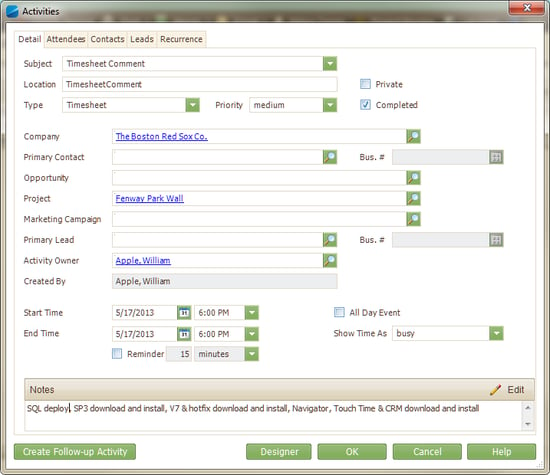
So just by adding one additional character to my timesheet, this: 

Deltek Vision Timesheet

Becomes this:

Deltek Vision Activity 

This is a great way for you to “kill two birds with one stone” (well maim them maybe) – Keeping your timesheet up-to-date and relevant (making accounting happy) and providing the CYA and team insight into your progress on the project (making management happy). Want to learn more about this and other Full Sail Partners solutions?

What is a Workflow: Automate Your Deltek Vision System

Posted by Wendy Gustafson on Jul 30, 2013

deltek visionHere we are ½ way through the year, and yet my ‘to-do’ list has kept growing.  In today’s economy we have all been asked to do more with less help.  This often requires us to take on more responsibility and daily tasks - which causes us more stress, longer hours and greater chances to ‘mess up’ -  so to speak.

What to do? What to do?  Through workflows, Deltek Vision offers us an opportunity to automate many of the repetitive tasks we have to do every day – that quite often fall through the cracks of our busy, busy days (and hopefully not too many nights).

What is a workflow? 

You might ask, what is a workflow? Workflows are actions that your Deltek Vision system will carry out for you based on events that occur within specific Info Centers.  An example of this is sending an email to an employee when their name is added as the Project Manager on a project.

Can I do this?

In many cases you can do a lot of the automation on your own.   Deltek's intuitive design allows “non-programmers” to create workflows and actions for many repetitive task. 

To do this, you will need to know a couple of things.  First – where are workflows found?  They are found in Configuration --> Workflows (guess that wasn’t too hard).

Next you need to understand the different options under workflows. Watch this highlight video to better understand the options under workflows, and the actions that can be performed: 


So you see that using the standard workflows in Vision can help you with many repetitive tasks that are triggered from actions taken within Vision.  Making these automated will free you and your staff up to pursue more productive workdays and more fun nights.

But wait you say, how do I actually set up these workflows? That's a great question!  If you still are asking, what is a workflow, watch the full length video on Workflows and Stored Procedures. Learn how to set up workflows in your Deltek Vision system today! 


Most Recent News Mentions

We’re changing the way project-based firms operate.

People can’t help but notice.
Who will be next?

Check out our latest newsworthy work: