In the News


We’re devoted to revolutionizing the way our clients do business. Sometimes that gets us noticed.

No big deal.

Posts about Deltek Vision (9):

Top Firm-Wide and Project Performance Metrics for Project-based Firms

Posted by Brian McNamara on Jul 24, 2013

Red tape measure 008In order to truly gain a holistic view of the organization, there are key financial ratios and indicators that project-based firms should focus upon at regular intervals. Some key project performance metrics need to be monitored on a real-time basis, or at least weekly, while others are more relevant on a monthly basis. Also, because firms must first win projects and engage in other activities that do not directly produce revenue, project-based firms should also regularly monitor firm-wide metrics.

We should not focus on a single metric but rather, should adopt a more comprehensive view and monitor a handful of key metrics. For example, firms might reach the target for their Net Effective Multiplier (NEM) and yet have too few revenue producing projects, too much overhead, and poor utilization rates.

Key Project Performance Metrics for Management

At a minimum, firms should monitor their Net Effective Multiplier (NEM) on a monthly basis. The NEM is calculated by dividing net services revenue by direct labor, which is the cost of labor charged to projects. Net service revenue is total revenue less direct cost (i.e., Direct and Reimbursable Consultants and Expenses).

Most firms would like to see a multiplier that is better than 3 times direct labor. In its recent AE Clarity Report for 2012, Deltek reported an average of 2.9 with top performing firms reporting 3.43.

One way higher performing firms achieve a better NEM is by assigning appropriate resources to their projects. More experienced resources are typically very productive, but their higher labor cost drives the NEM downward. Thus, it is important to assign the resources with the right level of expertise to complete the task at hand.

Some firms prefer to report and monitor the Realization Ratio in lieu of the NEM. The Realization Ratio is calculated by dividing net services revenue by direct labor at billing rates instead of cost rates. A target Realization Ratio would be greater than 1.

On at least a weekly basis, if not real-time, firms should monitor Project Estimate-to-Complete (ETC) and Estimate-at-Completion (EAC) values. ETC amounts are how much additional money must be spent from tomorrow through the end of the project to complete the work. EAC amounts are how much total money you expect to have spent at the end of the project. This is calculated as the job-to-date costs plus the estimate-to-complete costs. ETC amounts can be calculated simply by maintaining schedules. With a timeline defined, ETC amounts are simply future scheduled amounts at either cost or billing rates.

Best Practices Tips: To monitor ETC and EAC amounts in real-time, it’s a best practice to complete timesheets on a daily basis. Additionally, to establish a proper Project Work Breakdown Structure, subdivide a project into smaller more manageable components (e.g., phases and tasks) to maintain schedules and monitor these amounts. Ideally, EAC amounts will not exceed budgets but by monitoring these calculations weekly, firms are better able to keep projects on track and the work within scope. 

Key Firm-Wide Management Metrics

Firms should monitor their utilization and overhead rates on a monthly basis, at a minimum. The Utilization Rate is calculated by dividing the cost of labor charged to projects by the total labor cost of the firm. In the early referenced Deltek's 2012 AE Clarity Report, the average employee utilization rate was reported as 59.8%. Excluding vacation, holiday, and sick time it was 65.4%.

Firms can improve employee utilization by setting realistic utilization targets, properly allocating resources, managing client expectations, and having employees monitor their performance against their target, real-time, while completing timesheets each day. The Overhead Rate is calculated by dividing total overhead (before distributions) by total direct labor expense. Typically, bonuses are excluded from overhead for this calculation.

Schedule a Deltek Vision DemoAn interesting finding from Deltek’s AE Clarity Report was the average overhead rate for 2012 which was 161.6% with bonuses excluded and 175.7% with bonuses. Rates were not significantly different for higher performing firms suggesting they had achieved higher project profitability with better NEMs and better utilization rates.

The bottom line is that there is no magic bullet but rather a handful of key project performance metrics firms should monitor at regular intervals to maintain profitability. Does your firm have a global view of your firm metrics? Schedule a demo today to see how Deltek Vision is an ERP specifically designed to provide access to these key metrics and many more. 

 

To Adjust Salary Job Cost or Not...the Debate Rages On

Posted by Scott Gailhouse on Jul 23, 2013

Adjust Salary Job CostEveryone seems to have an opinion on how labor cost should be charged to projects. In Vision, there are two ways to charge labor cost to your projects. Some firms prefer to load an hourly rate for both hourly and salaried employees. And some firms prefer to load a salary rate for salaried employees and an hourly rate for hourly employees and use the Adjust Salary Job Cost utility (ASJC) in Vision.

The Adjust Salary Job Cost utility is Vision's way of taking the employee’s salary rate and calculating a cost rate based on the hours worked (instead of standard hours in a period). The ASJC utility is run after timesheets are posted and adjusts the posting so that the costs posted agrees to what is being paid to the employee.

So what does this mean?

First, let’s discuss those firms that load an hourly rate for salaried employees.  Assume that this firm has bi-weekly timesheet and pay periods. Let's look at an example without ASJC:

Example: Mike Jones is a salaried employee and is paid $3,000.00 bi-weekly, and he has an hourly cost rate in the Employee Info center of $37.50/hour ($3,000.00/80 hours). When timesheets are posted, Vision multiplies the actual number of hours worked by the hourly rate from the employee info center record. Vision will post a debit to the direct and/or indirect labor account and credit the Job Cost Variance (JCV) account. Mike’s hours are applied at a cost rate of $37.50 for every hour he works regardless of how many hours he works.  

When payroll is posted, we would see a debit to the JCV account for Mike’s bi-weekly salary - $3,000.00. If Mike had worked 85 hours in an 80 hour timesheet period, the JCV account would be ($187.50) because the credit posted to JCV was $3,187.50 at the time of timesheet posting and the debit posted for payroll is $3,000.00. If Mike had only worked 75 hours during the timesheet period, the JCV account would be a positive $187.00.

Now let’s talk about those firms that load a salary amount in the Employee Info Center. We will use the same bi-weekly timesheet and pay period frequencies as in the first example. When a salaried employee works more or less than 80 hours, Vision handles the cost exactly the same way it does as if an hourly rate was loaded in the Employee Info Center at the time of time sheet posting. To get the cost rate, Vision looks at the salary rate in the employee info center, divides that by the frequency (in this case 80 hours) and multiplies that by the number of hours on the timesheet.

This is where Adjust Salary Job Cost comes into play. Once run, AJSC takes the salary rate and divides it by actual number of hours worked and multiplies the number of hours worked.

Example:  Mary Smith has a bi-weekly salary of $3,000.00 and she has 85 hours on her timesheet. When timesheets are posted, Vision takes her salary rate and divides it by 80 (bi-weekly frequency) and multiplies the result by the actual number of hours on her timesheet.  You would see a debit to direct/indirect labor account and a credit to the JCV account for $3,187.50. Just like the firm using an hourly rate in the employee info center.

Now when ASJC is run, Vision takes the salary rate, divides it by the actual number of hours worked ($3,000.00/85 = $35.29411) and applies the result to the actual number of hours worked ($35.29411 * 85 = $3,000.00). Vision makes an adjustment to the original timesheet posting to credit the direct/indirect labor account and to debit the JCV account in the amount of $187.50.  Since Mary is paid $3,000.00 per pay period, the JCV account would not show a balance when payroll is posted.

How cost rates are loaded in Vision affects the way labor costs are reported on the projects and the General Ledger. Here are some of the differences:

    • Load Hourly Rate in Employee Info Center:

      • Time posts to projects at hours worked at standard hourly rate.
      • No additional steps by accounting.
      • Costs posted to direct projects are not consistent with actual payroll paid when employees work more/less than standard hours.  Over/Under balances are carried in the JCV project.
      • Project managers have stable costs to track project performance.
      • General Ledger carries a balance in the JCV account that is reflective of the amount paid to employees over/under the actual hours worked.
         
    • Load Salary Rate in Employee Info Center and use ASJC:
      • Time posts to projects at hours worked at variable hourly rates for Salaried employees (hourly rate changes on hours worked in any given period).
      • Accounting must run the ASJC utility after time sheet postings for salary job costing to occur.
      • Costs posted to direct projects are consistent with actual payroll paid when employees work more/less than standard hours.  No balances are carried in the JCV project.
      • Project managers have to manage variable costs over which they have no control.
      • General Ledger does not carry in the JCV account that is reflective of the amount paid to employees over/under the actual hours worked.

As you can see, both choices have pros and cons, but having a clear understanding of how the ASJC utility works in Vision will help you make the right choice for your firm. Ready to learn more? Empower yourself and your firm by conducting a Navigational Analysis.


Lead Management in Deltek Vision: From Qualifying to Closing the Deal

Posted by Dale Busbey on Jun 21, 2013

One of the most important tasks within any organization is lead management.  It is vital for the sales staff to have the most comprehensive and up to date information available on a new lead.  With this information the sales or marketing team can seamlessly follow the Lead qualification processes established by your firm.  Once it has been established that a Lead is a qualified prospect, it is time to convert the lead into a company, opportunity and/or contact.

Did you know that you don’t have to create each record in the respective info centers and enter the same information over and over?  Vision can use the information from the Leads Info Center to create the Company, Opportunity and Contacts records in a few easy steps.  Here is how it works… In the lead info center menu, there is a “Convert” option. 

Deltek Vision CRM Lead Management 

By choosing this option, you will receive a dialogue box that is defaulted to qualify the lead.  There is also the option to disqualify a lead if need be, but we will focus on lead qualification. 

Within the dialogue box you will have the option to convert the information entered into the Leads info center over to a company, contact or opportunity.  You may only want to convert this lead to a contact or maybe you only want to have them set up in the company and contact info centers, you can do so by checking only the radial button next to those options. 

Deltek Vision CRM Lead Management Conversion 

You may also want to associate this lead with the corresponding Marketing Campaign that brought you the Lead.   The appropriate campaign may be selected from the drop down box at the bottom of the dialogue box. 

Once you have checked the appropriate options and associated the Lead with a marketing campaign (if appropriate), you will select the ok button.  Vision will create a new Company, Contact and Opportunity for this Lead.  All the corresponding information such as Company name, address, phone number, e-mail address, company  type, etc for this Lead will be copied into the fields in the new records created in the Company, Contacts and/or Opportunity info centers you have selected. 

Your company now has all of the lead management information necessary to track this client in the Client Info Center, including associating the new contact record with the company.  Within the newly created opportunity is all the vital data your sales team will need to engage and move forward with the sales process.  The transfer of this information has been done without the need to manually copy and paste between the info centers.  Vision has copied the information for you within seconds and the focus can now turn from qualifying the Lead to managing the sales process and closing the deal.  

Learn more about Deltek Vision CRM.

5 Tips to Win Projects with Deltek Vision CRM to Kona

Posted by Full Sail Partners on Jun 12, 2013

Deltek Kona, Deltek Vision, Win ProjectsIn today’s day and age of fast changing technology, firms must stay abreast of all available solutions to better compete with competition, and win work. Since the ‘great recession’ of 2009, competition on winning work has increased exponentially. Successful firms have combated this increased competition by staying current with technology, and using well thought out techniques to win projects. Included below are five tips that will help your firm better impress clients, and ultimately win more work.

  1. Collaboratively share information with your project team. When responding to a client request / RFP, sharing data can become a cumbersome task in itself when working with remote teaming partners or staff. Often, the ability to seamlessly coordinate tasks/assignments, or share large files amongst your team can be the difference in winning or losing the work. To avoid these types of hiccups, leverage collaborative sharing tools such as Deltek Kona to keep your project team on the same page. Deltek Kona allows users to share files, and schedule important dates, seamlessly as though the users were all working in the same centralized office. You will be amazed at how Kona will empower your project team!
     
  2. Hasten your proposals process through the use of templates. Unfortunately, many times firms will find out a about a project that they are a perfect fit for days before the due date. These time restrictions can ensnare the proposal process and make it difficult to respond sufficiently. Empower your marketing/business development department by creating templates that will allow you to export your information from Deltek Vision CRM to Microsoft Word or InDesign. This will allow you to streamline the proposal process, and concentrate on the areas of the proposal that require custom attention.
     
  3. Avoid boring old PowerPoint presentation. Many firms make it to the short-list process only to utterly disappoint the client through the use of a boring, stale PowerPoint presentation. If you are unable to separate yourself from your competition, you are not doing your best to win projects. PowerPoint has been around since the late 1990’s, and sadly a large majority of presentations look like they came out of that same era. By using presentation software such as Prezi or PreZentit, your firm can immediately stand apart from your competition. With that said, don’t forget the importance of impressing the client by being personable and demonstrating your understanding the project. Overly relying on the use of presentation software is one of the quickest ways to lose a client’s attention.
     
  4. Use a CRM solution to track relationships. We have all heard the saying, “It’s not what you know, but who you know!” This begs the question; does your firm know who it knows? If you are not tracking your relationships through CRM software such as Deltek Vision, then you are simply throwing darts at a board, blindfolded. A CRM solution will allow you to track who you know, recent conversations, and other important relationship data such as birthdays or anniversaries. This type of knowledge insight is important for creating meaningful relationships between your company, and your clients.
     
  5. Optimize information for smart devices. If you own a smart device, and you have not optimized your marketing contact the device, you are not working smart! You never know when, or where, you might bump in to a perspective client. If you are unable to demonstrate your firms expertise at the drop of a hat, expect to lose out on a lot of potential work. Your firms website should be optimized for smart devices (iPhones, Androids, Tablets, Everything!) allowing you to be ready to show off how great your firm is, at a moment’s notice! In addition to optimizing your website for these smart devices, take the initiative to pre-load content on to your smart phone, in case you are unable to get internet service! By doing this, you will not only impress the client with all of your great works, but you will also demonstrate your ability to think ahead and be ready for the unexpected.

    If your firm is utilizing Deltek Vision CRM, make sure to check out Vision Unleashed. Vision Unleashed will allow you to access your full Vision system on teh go, from a mobile device. It also allows MAC users to access Vision without the need for running parallels or bootcamp. This allows MAC users to utilize their workstation to it maximum potential without dedicating resources to addition process just to access Vision!

I hope you learned something from this blog. Some of these technologies or techniques might seem obvious, but unfortunately many times it’s the obvious omissions that cause us to lose out on winning new work. If you use any of the concepts highlighted in this blog, make sure to comment below and let us know. We love to hear success stories!

Once you win your next project, make sure to review these project management concepts.

Advantages of ERP Systems... and Their Bottom Line Impact

Posted by Full Sail Partners on May 29, 2013

Advantages of ERP Systems and the Bottom LineI was talking recently with a prospective client who observed that his firm had outgrown QuickBooks (QB). The conversation eventually led to a discussion of the advantages of ERP systems over back office accounting systems — which include not only efficiency gains, but strategic improvements as well. 
Being in the ERP implementation business, we hear a lot of customers express frustration over outgrowing QB, so I asked my prospect what it meant specifically for his firm. Off the top of his head, he named several pain points:

  • First, their QB systems were disconnected, so there was no particular place where management could view financial performance overall, let alone broken out by project manager or client. 
  • QB could display AR for a specific client, but offered little in the way of project information regarding specific services or deliverables. 
  • Last but not least, correspondence for each client was buried in various public folders on the firm’s file server. To make matters worse, the correspondence trail was incomplete due to users’ not following the correspondence logging protocol. 

After hearing these insights, plenty of examples came to mind of ways that even a small- to mid-size firm like his could benefit from an ERP system. I mentioned a few of the most basic advantages of ERP systems over back office accounting: the value of integrated data, open architecture and user customizations.  

I also pointed out that thanks to the evolution of niche ERP systems, small firms CAN get the type of functionality that used to be available only to firms with deep pockets. In fact, it’s now quite easy to implement an ERP system that not only addresses the accounting function, but also facilitates the firm’s core processes and way of doing business. 

The Need For Visibility

My colleague next mentioned how his firm actually had strong AR, and good visibility into its cash and cash management. The problem, he said, was that the organization lacked the visibility needed to help back office management play a more significant role in decisions affecting the firm as a whole. By the same token, it was difficult to get project managers more involved in the fiscal responsibility that goes with managing client expectations. 

I pointed out that there were several other major advantages of ERP systems over basic accounting packages. The ERP concept excels at addressing the front end of the project life cycle, by facilitating tracking of projects and providing visibility. Specific examples include:

  • Managing data obtained through the business development process
  • Generating opportunity notifications and creating process flow through workflows and alerts to improve efficiencies and win rate
  • Forecasting for opportunities and already-awarded projects regarding not only revenue, but staffing requirements as well
  • Providing for audit trails of communication with clients, contacts and opportunities and supporting technical staff in the delivery of services under specific projects
  • Facilitating communication with accounting early in the business development phase regarding terms, rates, related documents and specific contract requirements
  • Integrating with desktop tools like Outlook, Word and PowerPoint to facilitate email communication and automate creation of proposal, estimating and contracting documents 

I then suggested we establish a value proposition for the level of investment that would be needed at this critical juncture in the firm’s transition from QuickBooks. This is where my prospect’s eyes started to get big, as he saw how much time, factored by associated hourly costs, was being spent on efforts that an ERP system could automate. 

We assessed values for each of the existing manual processes, and compared them with the reduced time and effort involved using the ERP approach. The resulting savings would go right to the firm’s bottom line. But as significant as those savings would be, I added, the real impact would come from the improved quality of the work environment, better communication with clients, and most importantly, increased opportunities for success. 

See how today’s success-minded firms require a laser-like focus on strong project and financial management practices by downloading the whitepaper on Growth and Transition Strategies.

Resource Search Tips in Deltek Vision for Project Managers

Posted by Full Sail Partners on May 24, 2013
Deltek Vision Resource Planning

Last week I was working on my plans for a few upcoming implementations (yes, I have to do plans just like you do).  As I was using the “Resource Search” feature, I thought it would be helpful to demonstrate some of the features of this powerful tool for fellow project managers.  So for those that are thinking about using Deltek Vision's Resource Planning tool and those that need a refresher, here are some great features of the tool.  

What Is Resource Search Option?
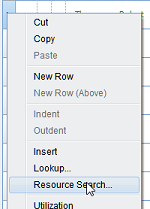
The Resource Search option allows you to see who is available to work and when they are available. It allows users to quickly assign resources and respond to client needs. This feature is accessed when working on the Labor Tab of the Planning module.  To search for resources, right click on the left side bar to search for a resource. Then select “Resource Search.”   

Who Has Skills?  
If you are like me, you are already familiar with your team’s skill set because we have a smaller team. Depending on the size of your firm, you may or may not need this feature. However, as your firm grows (that's the purpose of tool, right?) knowing the skills available can be very helpful. The resource search has the capability to search for resource skills. To take advantage of this feature, your organization must simply take the time to enter data within the Experience Tab. The skills feature is also used by marketing as a part of the government SF330 form. The skill and level of expertise is customizable to your firms needs.

Deltek Vision Resource Planning

Who is Available?  
In addition to searching for skills, the resource search allows you to identify resource availability and commitment. The commitment search allows me to search for over and under usage, as well as, a specific percentage of utilization for a specific date range. This feature in combination of the skills search allows me to narrow down the person that fits my criteria.

An Alternative to Resource Search
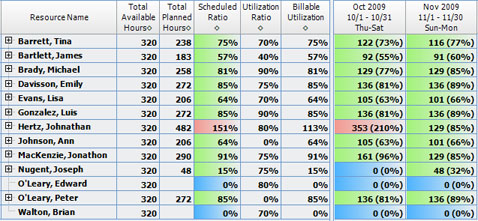
I noticed I kept switching back and forth from the Planning module to Resource Management.  Once I've narrowed down my search on the employees I'm looking for, I like to use the Resource Management module.  For me, the coloring provides a quick visual of those that are over, under, or on target for a specific time period.

Deltek Vision Resource Allocation for Project Managers

Deltek Vision Resource Planning

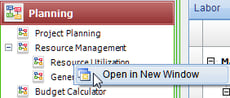
To simplify this process, lets pull up the Resource Utilization screen in a separate window (Right Click on ‘Resource Utilization’, click ‘Open in New Window’).  Now by simply moving the plan to the left hand side and the Resource Utilization screen on the right hand side, I'm now able to show the available resources.  In the Deltek Vision ERP system, this side by side comparison provides a quick view of our team members availability next to our project plan. This is simple, easy and saves me at least 3 mouse clicks.

More Resources
Are your Project Managers using these tools?  Searching by skills, commitment, and availability are only a few of the features in Deltek Vision's project-based ERP.

Be sure to view our Resource Planning Demo to learn more.

For those using Deltek Vision Resource Planning, try out these tip and let me know how they work for you. If you have any tips and tricks you've learned, please add a comment.

Be sure to check other Project Management articles.

Deltek Vision Tips: Setting Up Remote Access for Deltek Touch

Posted by Wes Renfroe on Apr 19, 2013

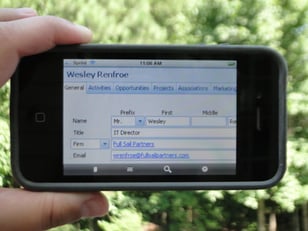
Vision UnleashedSo, you’ve heard about the new Vision Unleashed, Deltek Touch Time and CRM mobile applications and want your smartphone users to be able to utilize these applications to access Vision offsite. Perhaps you like the idea of your Vision users having the ability to work from home or abroad or maybe you think the new Navigator interface would be really helpful for project managers out in the field.  However, you feel opening up Vision access from the web sounds kind of scary and you have questions. Is it safe? Is it expensive to set up? Is it hard to configure? 

Well, let’s take a look!  

Is it safe?

Yes it is!  When properly deployed using Secure HTTP and a strong password policy, accessing your Vision data from anywhere is as safe as accessing your banking information. 

Is it expensive?

Only in the time to set up (generally an hour or two) and the purchase of a security certificate. The certificate is good for several years and costs only a few hundred dollars. 

Is it hard to configure?

For a single server install the process is simple and can be completed with very little downtime or afterhours with proper planning.  Multi-tier installs offer a bit more complexity and should be discussed to ensure all the nuances are covered before beginning.  Full Sail Partners has assisted many firms with the transition. Feel free to reach out to us for support.  

Here are the steps to open Deltek Vision to the internet to allow your firm access to new features like Deltek Touch.

  1. Configure a Fully Qualified Domain Name (FQDN) that you will use to reach Vision from offsite. ‘Vision.yourcompanyname.com’ is a common format.
  2. Purchase and install a SSL security certificate for your new FQDN on your Vision server.
  3. Modify your firewall rules to allow port 443 (secure http) traffic to be forwarded to your Vision server. Note: This is a good time to try visiting your Vision login page to see if everything is on the right track, in Internet Explorer. Visit HTTPS://Vision.yourcompanyname.com and make sure it loads.
  4. Verify the FQDN is also reachable internally, DNS may need tweaking.
  5. In Reporting Services Configuration Manager, under the Web Service URL tab, add the SSL identities now available since applying the new security certificate.
  6. In the Vision Weblink, on the reporting tab, change the Server URL to your new FQDN/reportserver. For example: https://vision.yourcompanyname.com/reportserver. Note: Be sure to click the Test button to verify you have it right!
  7. Voila! You should now be able to log in from both onsite and offsite and successfully run reports.  Once verified, you can notify all of your users to use the new link for their Vision needs. 

iAccess, Deltek Touch, and Vision Unleashed can now be deployed.  Enjoy safely and securely accessing Vision, anywhere, anytime! Let us know your experience.

Most Recent News Mentions

We’re changing the way project-based firms operate.

People can’t help but notice.
Who will be next?

Check out our latest newsworthy work: