
In the News


We’re devoted to revolutionizing the way our clients do business. Sometimes that gets us noticed.

No big deal.

Posts about Deltek Vision (5):

Deltek Vision 7.6 is Full of Enhancements

Posted by Scott Gailhouse on Jul 20, 2016

Deltek Vision 7.6You asked and Deltek listened. There are a number of new and exciting updates and features in Vision Version 7.6. Let’s see how Deltek Vision just got better!

Employee Expense Approval

In addition to Purchase Requisitions, Request for Price Quotes, Purchase Orders, Inventory Item Requests, Absence Requests, AP Invoice Approvals and General Ledger Budgets, Employee Expense Reports are now included in Approval Work Flows. Approval workflows are user designed for specific applications in Vision. All lines of the expense report can be set up for approval and/or just specific line items in a given report can be set up for approval. The workflow defines the approval process, approvers, allowable actions and alerts for a record.

Purchasing

Vendor Response enhancements were made in purchasing. As a result, Vision can be configured with up to 10 user-defined labels. When you are in RFQ or Purchase Requisition by line item, you can select from one of the user-defined labels and apply a response to that label.

For RFQ’s and purchase requisitions, you have the option to Show Suggested Vendors and Show Vendor Responses. The new Bid Evaluation report gives you the selected vendors for comparison purposes.

Also new in purchasing is a new Comments tab in Purchases Orders. The comments are for internal use only. Comments can be added even after the PO has been finalized and printed. These notes can be included on the Purchase Order Detail Report.

A PO column has been added to Vendor Review. Once you select a voucher, you can see the PO Number column on the Voucher Line Items grid. You can drill down on the PO number to display the PO and add notes if you choose to.

Benefit Accrual

Deltek didn’t forget about Benefit Accruals enhancements. Sick and vacation time can now be calculated on hours worked. This enhancement is in response to states that require firms to earn 1 hour of sick time for each 30 hours worked.

Billing

Deltek added a Retainer Ledger Report. This new report displays complete details associated with retainers by either project and/or by client. General options for this report can be set to display retainer amounts for specific time frames, i.e. last year, first quarter.

Invoices and the invoice backup report can now display the Labor Category description, Title, Labor Code description and timesheet detail.

AR Statements just got a little more personal. Similar to invoice templates created in the Invoice Template Editor, you can now add your firm’s logo to AR Statements. Margins can be defined for information printed in the heading and the Project Long Name can now be used.

Deltek also streamlined the Invoice Approval process. In the past, invoices submitted for approval would have to be un-submitted one invoice at a time. In version 7.6, invoices can now be un-submitted in batch.

Billing Invoices and Backup Reports are more flexible. On the Invoice and billing backup reports, the employee name can now be replaced with the Labor Category Description, Labor Code Description or Title while displaying the date and comments. These selections have been added to the Labor tab and the Billing Backup tab in Billing Terms.

Also new in Billing is a feature that allows you to show Fee Total and Add-on on the Final and Draft Invoice Backup Report. This selection is also available on the Billing Backup tab in Billing Terms.

Another useful feature in billing is the ability to show expenses in the billing backup report on draft invoices. The selection for this option has been added to the Billing Backup tab in Billing Terms.

Breakdown compensation in User Defined Revenue Methods. Currently in Deltek Vision, Direct Labor, Direct Expenses, Direct Consultant, Reimbursable Expense and Reimbursable Consultant can break out by compensation. In version 7.6, there are now fields available for the compensation breakout to be used in the User Defined Revenue Methods.

Credit Cards

In Credit Card Review, you can now see the Expense Report, Voucher and Chart of Account Number in the Credit Card Transactions grid. You can also perform a search by Expense Report and/or Voucher.

The User Defined Fields that are created in credit card configuration can also can also be displayed on the Credit Card Review, Credit Card Transactions tab and the Credit Card Statement Reconciliation, and the Credit Card Charges tab.

In version 7.6, you can now add employee paid credit cards. Charges paid by the employee can be marked as “Add to Expense Report” so that the employee will be reimbursed. Charges can also be marked as personal. Personal charges will not be included on the expense report.

There is also a new credit card mapping available in credit card configuration that will map the description of the credit card statement to the employee’s expense report.

Info Center Attachments

The Info Centers have a new tab called “Attachments”. Instead of entering a link in the Info Centers referencing the path where documents are stored, you can now load an actual image of the document. Info Center Attachments use the same technology as the Transaction Document Management feature.

Once uploaded, documents can be viewed by simply clicking on the view button on the attachments tab of the info center record.

Are You Excited about Deltek Vision 7.6?

Deltek Vision continues to improve with every new version, and with these enhancements, lives are made easier and firms are able make smarter decisions. What enhancements can help you and your firm? Contact us and let us know!


Debunking Myths about Deltek Vision

Posted by Ryan Felkel on Jun 30, 2016

Deltek Vision Myths Are you thinking about needing a new accounting system or ERP? If your firm is still on Deltek Advantage, Sema4, or FMS or even on Quickbooks, Protrax or another system, you might be evaluating options to figure out which solution is right for you. We receive questions from prospects asking about the differences between Deltek Vision and some other product. Additionally, during our conversations over the years, we have heard many myths about Deltek Vision and we thought it was time to set the record straight, as we see it.

To start, what we have found is some software providers say they have a feature, but the quality and capabilities are completely different. Some people might say we are biased. You know what, we probably are, but for good reason:

  1. We use the product we sell. We know Deltek Vision inside and out. Can our competitors say that? Ask them.
  2. We aren’t just sales people. We care about the success of our clients and that’s not just rhetoric. We’d rather turn a sale away then have an unhappy client.
  3. We have done extensive migrations of all kinds of software. What we have found is many of our competitor’s software are done on the cheap or just completely leave out industry standard capabilities.

Below are the top 4 Deltek Vision myths:

Myth #1 - Deltek Vision is only for large firms.

Fact #1 – The numbers don’t support this claim. As a Deltek Premier Partner, the majority of the firms we serve are under 50 employees. Of those firms on Deltek Vision, 57% are under 50 employees; 33% are 25 employees or under; and 17% are 15 employees and under. Most importantly, the size of your firm should have no bearing on the solution you choose. What is more important is choosing a solution that fits your staff’s needs, the information you need to make business decisions and your firm’s growth plans. Deltek Vision fits firms of any size. Additionally, in 2012, Deltek came out with a cloud option (SaaS) for Deltek Vision that made Vision simpler to deploy at a lower entry price for any size firm. Check out this 10-person firm’s story.

Myth #2 – Deltek Vision is so expensive. 

Fact #2 - A recent 20-person firm looking at another AE ERP product was surprised to find that Deltek Vision’s cloud software option was less expensive. In fact, Deltek Vision has had a very comparable software pricing for small firms ever since the SaaS option became available. Additionally, the basic package of Deltek Vision’s SaaS offering includes 5 users of CRM for marketing and business developers and 5 users of Resource Planning for operations. The choice for us seems simple. For about the same price you get a much more robust system with Deltek Vision. Where the differences in pricing may come is with the services that are provided. Here are some key items to keep in mind when receiving an implementation quote to ensure you are getting the same level of service: 

  1. Does the quote include migration? Our experts have been doing migrations for almost 30 years and we are proud to say we probably have some of the best in the business. When it comes to migrating your data, we highly recommend importing your historical data. The level of import can vary, but it’s important to make sure you are comparing apples to apples. Will bringing over the beginning balances be enough? This is only a question you can answer, but our experience has been firms rarely want this option unless that is their only option. Do you really want to lose all of your historical information?  
  2. This is more than a transaction. You are not just buying software, you are buying a solution that needs to address the specific capabilities your firm’s needs. More importantly, you are buying into a relationship. From our perspective, we aim to make sure the software is the right fit. If it isn’t Deltek Vision, then we will raise our hand and tell you. That is why we take a consultative sales approach and conduct a discovery to uncover what is working well and identify if there are bottlenecks or inefficiencies that could help you improve your business. The discovery process should identify the output needed. More specifically, what data (reports, alerts, dashboards, etc.) is needed to make business decisions? These specific capabilities should drive what you are looking for. Make sure you are talking to a consultant during the process, not just a sales person and take time to establish a relationship. We are here to help you today and tomorrow as your firm grows. 

Myth #3 - Vision is complicated. 

Fact #3 – This fact is easily debatable. Driving a stick shift is difficult for some people, but for others it is simple. So the word itself is relative. We argue that Vision is not complicated, but rather it’s scalable. What can’t be debated is that Deltek Vision is great for growing businesses. Businesses are constantly changing and no one has a magic ball to predict when these changes will occur. Here are some key points to keep in mind if you are a growing firm looking for a new solution: 

  1. Firm Evolution - Should your firm have different contract work types; need to expand your business; or face evolutionary life cycle challenges, like ownership transition and retirement scenarios, Deltek Vision can easily accommodate growing firms. It has all the utilities, under the hood to handle these contingencies.
  2. Acquisitions – Should you acquire a new firm, all of the data can be accommodated in Deltek Vision. The same cannot be said about our AE ERP competitors. In fact, in addition to a push button conversion for Advantage users, Full Sail Partners has created push button conversion tool for Ajera. Additionally, we have a very streamlined process and economical migration price for Quickbooks. The same cannot be said of our AE ERP competitors. Because Deltek Vision has the ability to create custom fields, tabs, grids, and User Defined Info Centers (UDIC), all data can be represented. To put it simply, Deltek Vision can represent all data from other databases. However, if a firm was on Deltek Vision and tried to migrate to our competitor’s software, you would in fact lose data.

Myth #4 – Other AE ERP Solutions have the same capabilities as Deltek Vision.

Fact #4 – The differences between Deltek Vision and other AE ERP software are vast and go beyond just multi-currency capabilities. Here is a breakdown of some of those differences: 

  1. Audit Trail - Deltek Vision has an audit trail. When changes are made in Deltek Vision, all changes are tracked and you know who made the change and when. This is not only important from an accounting perspective, but very important for firms that have government compliance requirements.
  2. Multi-Company - If this capability is needed, Deltek Vision allows the set-up of multiple companies including reporting with a single sign-in. One financial report can be run to see how each company is doing. Other solutions have tried to resolve this issue on the cheap by creating separate database instances requiring multiple logins. Keep in mind, you will not be able to share financial reporting for all companies and there is no automated Inter-company billing process, therefore, each company reporting is separate.
  3. CRM - If this capability is needed, Deltek Vision has an integrated, seamless CRM and proposal automation module that has a single sign-in. Additionally, Deltek Vision integrates into other marketing tools, including Constant Contact, MailChimp and Hubspot. Other AE ERP solutions may integrate with other CRM solutions. Because of that you will have a separate system that requires two separate logins. The process is far from seamless and none of them integrate with other marketing tools.
  4. Security – Deltek Vision provides the ability to lock down any field in the system and make it read only. Unfortunately, security in other AE ERP solutions are not as robust as Deltek Vision.
  5. Built-in Capabilities – Deltek Vision contains tools that provide flexibility and allows users to streamline processes and clean up data on the fly without any programming knowledge. Because of the open architecture, the system is built to grow with your firm. Here are some examples of some of the built-in capabilities that can be utilized:
    • Custom Fields – Deltek Vision provides the ability to create user defined fields, tabs, grids and info centers as your firm sees fit. As your firm grows, you may need to track further information.
    • Workflows – Deltek Vision provides the ability to streamline processes through workflows. For example, sometimes data needs to be represented in two locations. However, you never want to a have dual entry process. In Vision, you can have data entered into one location and the data flows to the other location. View this webinar, to learn more about the power of workflows.
    • Utilities – Vision has built-in utilities to handle contingencies to easily clean-up and move data without a migration or custom expert.  
      • Need to move billed time to a new phase? There’s a button for that.
      • Need to combine two clients together? There’s a simple to use conversion tool to do that in seconds.
      • Need to move data from one location to another? There’s search and replace utility that is simple to use.
      • Have more than 999 projects and need to add another digit to your project number structure? There’s key formats for that.

Choosing the Right ERP 

Finding the right ERP solution for your business is not an easy process and is full of misguided information. Therefore, asking the right questions is imperative to get clear answers. Formulate your questions based on the needs of your firm. Then find out and compare how each ERP solution manages these requirements. Make sure there is substance. Those shiny features might just be an illusion to distract you from the lack of robust capabilities. Some AE ERP solutions try to act like Vision, but they don’t perform like Deltek Vision.  


Fascinating Facts about Timesheets in Deltek Vision

Posted by Michael Kessler, PMP on Jun 8, 2016

Timesheets, Timeclock For project-based firms, timesheets are essential to ensure that an employee’s time is reflected to a specific project. I’m sure you already knew this, but do you manage timesheets correctly in Deltek Vision? Here are some facts and best practices for different scenarios to help you better manage timesheets in Deltek Vision.

Intro to Timesheets in Deltek Vision

Hopefully, one of the first things your Deltek Vision Consultant explained to you about timekeeping is that timesheets create payroll cost not payroll. As a “nuts and bolts” accountant, at least one side of our brain struggles with processing this information. So let’s break it down: 

  1. The employee’s job cost rate on the accounting tab of their info center should represent their rate of pay. If they are true hourly, this is quite easy to determine. On the other hand, if they are salaried the hourly rate should reflect their annual salary divided by 2080 hours.
  2. If adjusted salary job costing is used, the amount should reflect their salary based on the configured interval. For example, weekly, biweekly or a set number of days.

How Timesheets Work

When a timesheet is posted an amount based on the hourly rate multiplied by the hours charged is applied to the selected projects. Thereby creating direct or indirect (overhead) labor/payroll cost in the General Ledger. The credit created by the timesheet can go to either one of two places: 

  1. The Income Statement as job cost or payroll variance - This account is an overhead line item used to adjust the total of the timesheet posting to the actual payroll distributed. Furthermore, amounts that remain in this account after the payroll journal entry has been entered reflect a net of uncompensated overtime (OT) for salary staff (negative amounts), and based on this process, the premium portion of OT for hourly staff (positive amounts).
  2. The Balance Sheet as a payroll liability - After the payroll journal entry has been entered, the remaining amount needs to be reclassified to the Income Statement as stated above.

Accounting Tip for Paid Time Off

Have you ever noticed your Paid Time Off (PTO) balance not being relieved even during peak vacation periods? You might want to consider booking PTO taken to the Balance Sheet. To do this, you need to configure timesheet postings for PTO to go to a PTO liability account. Then when time off is taken and posted, the debit entry reduces the liability. Based on a true computed liability, an entry can be made on a pre-determined interval to accrue additional PTO and book the expense. If you are using benefit accruals in Vision, the entry can be taken from that report.

Handling Leave without Pay

Many firms fail to account for leave without pay (LWOP) properly. Sure, there is a need to track hours for statutory purposes when employees are on leave, however, no payroll cost should be recorded. The simple fix is to enable cost rate tables and attach one to LWOP projects. The table should contain either a labor code(s) or a list of employees with a ZERO job cost rate. This will override the employees default job cost rate and avoid any recording of payroll costs.

Punch the Clock

Some of this might seem complicated at first, but these best practices should help keep your books in order. I hope that this has taken the mystery out of Deltek Vision timesheets. Now punch the clock and update your timesheets.


Full Sail Partners Recognized as a 2016 Premier Partner

Posted by Amy Balassone on Apr 11, 2016

Deltek_Premier_Partner_Black-1.pngFull Sail Partners Named as a Deltek Business Partner – Focused on Extending the Deltek Vision Product to Support Future Growth.

Full Sail Partners has been recognized by Deltek as member of the Million Dollar Club and a Premier Partner for 2016.  As a Premier Partner, Full Sail Partners is not only required to meet and maintain a number of standards for sales and marketing goals, but also provides implementation, consulting, support and customization services for project-focused Professional Services organizations. 

Deltek is the leading global provider of enterprise software and information solutions for government contractors, professional services firms and other project- and people-based businesses. Deltek Vision is a leading enterprise software solution designed for project-based professional services firms to improve business performance, streamline operations and win new business. Deltek Vision uniquely integrates end-to-end business processes by automating the marketing, financial management, planning, tracking and administration of resources and projects.

“We are proud to represent Deltek products,” said Sarah Gonnella, VP of Marketing and Sales from Full Sail Partners. “We believe this year will be even more successful with the release of our BlackBox Connectors, focused on connecting Deltek Vision to the outside world. This new connection tool allows firms to extend Deltek Vision’s already robust ERP solution, to maximize our client’s investment.”

In 2016 Full Sail Partners will continue to partner with Deltek to help businesses integrate their process in to one singular system, better understand and retain current customers, increase market share, and differentiate through targeted relevant and consistent conversations across systems and channels.

Measure Your AEC Firms Performance with the Deltek AE Clarity Report

Posted by Ryan Felkel on Apr 6, 2016


Deltek AE Clarity Report.pngHow did your firm perform last year? Did you do better than the prior year? I’m sure the majority, if not all AEC firms, evaluate their performance in comparison to prior years, but do they evaluate how they performed against similar firms within their industry? Fortunately, the Deltek AE Clarity Report provides unique insights into the AEC industry that make an accurate comparison possible.

Each year, Deltek working in conjunction with ACEC, ACEC Canada, and SMPS, conducts an industry study that draws from over 250,000 data points provided by more than 350 US and Canadian firms of all sizes. This one of a kind study provides real insight into the AEC industry to enable firm leaders to make strategic decisions to increase their competitiveness and help their firm’s growth. As part of this study, Deltek takes an in-depth look and analyzes participants’ financial condition and market outlook, including:

  • Operating Profit
  • Net Labor Multiplier
  • Staff Growth Rates
  • Backlog
  • Utilization Rate
  • Net Revenue Per Employee
  • Current Ratio
  • Other Key Financial Metrics

Real Results Your AEC Firm Needs to Know

Prior results from AE Clarity Reports provided industry-specific insights about the most profitable trends in the AEC industry. Some key findings from the 36th Deltek AE Clarity Report were:

  • Firms that work on water, wastewater, and storm water projects, expect their work in the market to grow by 59%, the highest percentage of all surveyed markets. Additionally, markets in which more than half of respondents work in expect their business to grow. These include commercial sector respondents who expect a 58% increase, roads and bridges markets with an increase of 57%, and surveying and GIS sector with an increase of 55%.
  • Markets in which respondents are least optimistic for growth are public facilities with an increase of 38.4%, the hospitality sector with an increase of 38.5%, and a 45.4% increase in the residential sector. Nonetheless, these are still encouraging numbers!                                                                                                                                                        
  • AE firm leaders reported that the top three factors influencing the success of their companies are the right people, which was cited by 75.7% of respondents, long-term relationships with clients was by cited by 74.7%, and 65.5% of respondents said their firm reputation influenced their firm’s growth. How does client retention affect your profits? Learn the formula to calculate this here!
  • There’s even more positive news in last year’s AE Clarity Report. Of the AE firms that participated in the survey, they responded that they had a proposal win rate of nearly 50%. Further positive news is that 42.9% of respondents reported that their win rate has increased either slightly or significantly in the past two years. On the other hand, 12.3% reported that they experienced a drop in their win rate during the same period.
  • The top choices for business development responsibility were the executive team that drove 84.7% of their efforts and project managers who drove 68.6% of the business development efforts. One might suspect this comes from developing meaningful relationships with existing clients.
  • Overall, about 60% of AE firms said they employ a go/no-go process in at least some situations. Of these, 29.2% said the employ process for all opportunities, and 30.6% for specific cases, especially “strategic” opportunities.
  • Top ranked project management challenges included accurate project cost forecasting, and difficulties with collaboration and communication. On the other hand, one statistic showed that 75% of projects were currently on or under budget for the majority or survey respondents.

So how did your firm stack up against these results from the 36th Deltek AE Clarity Report?

What’s New in the 37th Annual Deltek AE Clarity Report?

Great question! But just as important, what do you do with this information? Learn what Deltek experts think and how they use this information at an upcoming AE Clarity Tour stop near you. The 37th Annual AE Clarity Report will be out soon!

Timesheets for Independent Contractors in Deltek Vision

Posted by Michael Kessler, PMP on Mar 23, 2016

TIMESH1.pngMost firms that I work with utilize independent contractors to supplement their workforce. This isn’t a blog about “walks and talks like an employee, must be an employee.” For that, I recommend a good labor attorney. However, what I am going to clue you in on is about the proper way to track and account for independent contractor’s time in Deltek Vision.
Processing Contractor Time in Deltek Vision

In most situations, the desire is for the contractor to complete a timesheet and submit an invoice for processing by Accounts Payable (AP). There are two prevailing methods within Deltek Vision to process these types of situations:

  1. Zero Job Cost Rate

The contractor is set up as an employee, but doesn’t have a job cost rate only a billing rate. When time is posted there is no entry to the General Ledger (GL), but both the Time and Materials (T&M) invoice and project ledger reflect a billing dollar value. As a result, the AP invoice creates the GL entry reflective of the true cost of the contactors time

  1. Job Cost Variance

For this option, setup the contractor as an employee with a job cost rate. When the timesheet posts, the cost gets booked to a unique GL code reflective of contract labor. Additionally, this cost can also be included in the base for an overhead calculation. The credit end of the timesheet posting goes to Job Cost Variance similar to all other timesheets. As a result, the AP invoice is booked to an overhead project using the Job Cost Variance Account and thereby clearing it.

That Seems Simple…Right?

This is where the accounting can start to go awry. If method one is used and care isn’t taken to ensure the AP doesn’t also create a bill extension (effort) then the potential for exposure can be:

  1. Double counting of effort in project reporting leading to an understatement of profit or positive variance.
  2. Double earnings of revenue if the method is associated to effort.

To alleviate these concerns, apply the following workaround in Deltek Vision:

  1. Create an expense GL code table under Billing/Billing Rate Tables.
  2. Enter the AP GL code used above and attach a “0” multiplier.

By following these steps, the AP billing value will not be included in project reporting and you will not experience the effects of doubling down on your effort.

Deltek Vision How-To Series: Search and Replace Utility

Posted by Sarah Gonnella on Feb 24, 2016

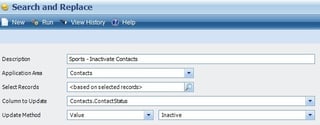
Deltek Vision Search and ReplaceDid you know you can quickly update data in seconds with Deltek Vision’s Search & Replace feature? The search and replace utility makes it possible for you to update fields globally for multiple records. Some examples of using the search and replace utility might be:


  • Making project records dormant on all levels
  • Inactivating contacts that have bounced emails 
  • Moving data from one field to another

The possibilities are endless and great for data clean-up. Be sure to check out our video demonstrating an example of using the Search and Replace Utility in Deltek Vision.

Handling Write-Offs the Right Way with Deltek Vision

Posted by Ryan Felkel on Feb 17, 2016

WRITE-1.png

A common misconception for professional services firms is how to handle and manage write-offs of billable time and project expenses. For starters, understanding why write-offs (also known as "loses") occur is important. A common reason write-offs occur is the inefficient use of a person’s time and resources. You might ask, why do we not charge these expenses to the client if the time was spent or a resource was utilized for a specific project? Assuming these excesses were the result of your own firm’s inefficiencies and not a result of the client, absorbing these costs is fair to the client and also a good way to win more business from them. Additionally, if your firm is using Deltek Vision, handling write-offs is a simple process.

Write-Offs in Deltek Vision

Within Deltek Vision, write-offs will occur when a transaction posts. This will be identified for regular charge type projects as the following:

  1. Not earned in a revenue generation calculation
  2. Not invoiced either by:
    • leaving the transaction in B or to be billed status
    • leaving the transaction in H or held status
    • placing the transaction in W or to be written off status
    • placing the transaction in D or to be deleted status
In either case, the action of not billing or earning doesn’t remove the cost or burn value of the transaction from the project. This results in no matching revenue recognition, and let’s admit it, there is no way to delay the inevitable.

Tracking Losses in Deltek Vision
Now that the loss has occurred, it’s time to track them. Write-offs will appear in several places:

  1. As negative profit on a Project or Office Earning Report when run at “cost”
  2. As a negative variance on the above reports when run at “billing”
  3. On the Project Review screen (cost and billing tab) in the profit/variance box
  4. As a contributor to the Profit/Loss row on the Income Statement

Over the years, I have learned that not only best practice, but in many cases, statutory practice is to ensure when losses become apparent they must be addressed and accrued for in total. Using the functionality and reporting capabilities of Deltek Vision will provide the avenue to accomplish this.


Where Has All My Labor Gone? – The Mystery of Non-billable Labor for AEC Firms

Posted by Michael Kessler, PMP on Feb 3, 2016

Where_Did_My_Labor_Go-Blog-01.pngYou know you have spent your whole workweek devoted to a specific project, but you’re only showing 35 hours being billed/charged to the project. Where did the value of those 5 hours go? In many cases, these missing hours can be attributed to non-billable labor, and many AEC firms overlook the importance of documenting how this time is spent. However, accurately accounting for non-billable labor is extremely important to track accurate project performance.

How Can My AEC Firm Track Non-billable Labor?

If your AEC firm utilizes Deltek Vision, then tracking non-billable labor is relatively simple. Before we get started, it is important to make a distinction between the labor we are billing clients and the labor that contributes to the cost of our project. With cost in this case being the “burn” or “retail” value of this labor. Within Vision, users are able to remove the labor from both the invoice and the project ledger in two ways:

  1. A non-billable labor code under billing configuration
  2. A zero billing rate attached to a person, code or category in the billing tables

Keep in mind that best practice states that the only time we would use either of the above is if the labor is invoiced and costed through a Unit for activities such as surveying or lab testing.

What Are Reasons for Non-billable Labor?

There are several possible scenarios that would warrant not invoicing a client for time charged to a project such as:

  1. On-the-job training
  2. Rework
  3. Discounts

While all of these are valid reasons, the costs associated with this effort should be included in the project sub ledger. This is missed opportunity cost or potential lost revenue. If labor cost is nullified using any of the above, the true performance of the project becomes misstated. When reviewing project financial reports the missing cost is not there to net against revenue thereby creating a false and overstated profit amount.

What Happens to Non-billable Labor?

Ah ha, the Million Dollar question and you won’t even need to phone a friend. There are actually at least two ways to accomplish removing time from an invoice while ensuring it remains as cost for project metric measurement:

  1. Write-off the hours/cost in Interactive Billing. This removes it from the invoice, but appears on the billing status in the Project Detail Report. This allows missed opportunity cost to be valued into the overall project profitability or more commonly known as a loss.
  2. Allow the labor hours/cost to be included on the invoice. Then using an Add-On, create a discount to remove the amount. This will provide your client with the visibility of the benefit you are providing them. Additionally, it will ultimately be reflected accurately in project reporting since the overall impact is a reduction in revenue.

Following these simple rules will create accurate reporting and prevent any misunderstanding in regards to the projects true performance.

Most Recent News Mentions

We’re changing the way project-based firms operate.

People can’t help but notice.
Who will be next?

Check out our latest newsworthy work: