In the News


We’re devoted to revolutionizing the way our clients do business. Sometimes that gets us noticed.

No big deal.

Posts about Deltek Vision (6):

Deltek Vision Multi-Company Just Got a lot Better!

Posted by Scott Gailhouse on Jan 27, 2016

Multi-Company_7.5.pngSometimes it’s the simple things in life that excite me, but the improvements to the Multi-company feature in Deltek Vision 7.5 are exciting. If you’re not familiar with Vision Multi-company, let me provide you some background and here’s a link for more information. Multi-company is part of the Vision Core Financial Application. Vision Multi-company allows a firm to manage more than one company in a single database and streamlines the process of managing accounting functions between companies when resources are shared. By utilizing Multi-company, each company operates as a separate entity, but data sources such as clients and contacts can be shared across the enterprise.

However, employee data was managed differently in prior versions of Vision. If an employee belonged to one company and moved to another company, a new employee record with a unique employee number would need to be created and assigned to each company the employee was associated with. This made record keeping and reporting cumbersome and time consuming. The good news is that with version 7.5 this is no longer the case!

What Changed in Deltek Vision 7.5?

In version 7.5, a single employee record can now be associated with multiple companies. As a result, associating an employee record to other companies in the enterprise is now easier with the addition of the “Associate with New Company” option in “New” dropdown on the toolbar of the employee info center.

How Does This Work?

When a new employee record is created, the employee is assigned to a home company, which is the current active company. You can then associate the employee record with other companies. There are a number of fields in the employee record that are company specific and can be modified on a company-by-company basis. For example, an employee may have a different cost rate, pay rate or may accrue PTO hours at a different rate in each company. Additionally, you can change the home company and the status of an employee if they transfer to a new company and terminate in another.

There are also fields that are non-company specific such as the employee’s name, licenses, experience, and resumes – just to name a few. Therefore, this information is shared across all companies and can be used by the CRM and Proposal functions within Vision.

Even more, a list of companies the employee is associated will display after an employee’s user name and password is entered. The employee can then select the company they will be working in at the time of log in. If an employee is associated with more than one company, timesheet and expense reports can be processed for the active company. If an employee needs to complete a timesheet and expense report for another company, they can switch between companies under Utilities by selecting “Change Company.”

Why Is This So Great?

Aside from the additional functionality of Multi-company, employee reporting is now easier in version 7.5. Prior to Employee Multi-company, reports for one employee would have to be run by selecting all of a single employee’s records across the enterprise. This is no longer the case in version 7.5. In addition to running reports for an employee in a single company, like the accrued time report or time analysis report, an employee record for multiple companies can also be selected. When sorted by company, the data can be displayed on the report by company. Furthermore, Deltek also added additional operator filters to reporting to reduce customization for unique reporting needs.

Sometimes just making life simpler is exciting and the new features in Vision 7.5 are designed to increase productivity and make your life simpler! This just happens to be one of my favorites. 
Inventory Management and Fixed Asset Management – One and the Same?

Posted by Nicole Temple on Jan 6, 2016

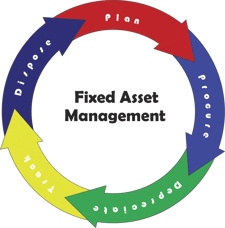
Asset ManagementProfessional service firms don’t traditionally sell products; rather they sell their time and expertise. Increasingly, they ARE selling products and time, and are spending a great deal of capital on tools to deliver both.

A common problem is that many firms can easily see the profits generated from their services, but overlook the contribution (or lack thereof) of the inventory AND fixed assets used to deliver the service by not managing both.  Even worse, they frequently manage and track them in the same manner.

Inventory management and fixed asset management are not one and the same. Read on to learn the difference between the two and understand the importance of utilizing proper accounting for fixed asset management.

Inventory Management

In the professional services world, inventory management is only slightly different from the retail and the production world. Inventory assets represent the items sold or the materials used to create a final product that will be sold. Inventory assets in professional services firms represent the intangible or intangible assets sold along with the service. This could include software or equipment. This is not to be confused with immaterial items, which are usually expensed as overhead. For most professional service firms, the inventory asset is a relatively small percentage of total firm assets.

Most importantly, unsold inventory appears on the balance sheet as an inventory asset and sold inventory appears in the Cost of Goods Sold on the income statement. This is an important standard of Generally Accepted Accounting Practices (GAAP).

Chances are, if you are selling goods as a part of your service offering, you are likely following the standards and hopefully using the Vision Purchasing module for tracking and control. But what about Fixed Assets?

Fixed Asset Management

Like Inventory, fixed assets exist and have specific accounting treatments for professional services firms, retailers, and other types of businesses.

Fixed assets are purchased assets of the firm for long-term use to support ongoing business operations. For example, fixed assets are laptops, desks, software, and vehicles, just to name a few. Since fixed assets are transferable within the company and will be used for multiple projects and multiple accounting periods, GAAP dictates a different accounting treatment than would be used for inventory management. More importantly, fixed assets in professional services firms are typically a large percentage of the total firm assets. In today’s world, the computer, machine, and installed software are the main tools used in delivering the services and often are given the least attention in the firm.

Why Is This Important?

Inventory management is a relatively simple task, but fixed asset management presents several challenges such as:

  • Knowing the location of an asset to ensure you can deliver your projects on time
  • Maximizing the usage of an asset to ensure the maximum ROI is gained from the asset
  • Knowing the history of similar assets to make informed about purchases of new assets
  • Tracking the depreciated value of an asset for tax and insurance purposes
  • Keeping the Balance Sheet clean and free of historical errors to provide accurate ROI and other metrics

Overcoming these challenges doesn’t have to be difficult and can be easily accomplished by deploying an asset management tracking system. When choosing to implement an asset tracking system, it’s important that the system is integrated with your project management, purchasing, and accounting systems to ensure information about the asset is accurately maintained and easily accessible. 

Deltek Vision Year End 2015

Posted by Gina Stamper on Dec 17, 2015

year_end_2015.pngIt’s that time again! Year-end is here and it is time to close out your Deltek Vision system. This blog will provide you with resources and reminders to ensure a successful year-end close out of your Deltek Vision system. Check out the information below, and let us know if you have any questions.

Don't Forget Your Deltek Vision Year-End Processes

As we go through the year-end process there are mistakes we (and others) make that are easy to recover from like entering the 15 page depreciation journal entry “backwards” at midnight sitting in your semi dark office chugging your 15th pot of coffee.  Some are more difficult – like removing all the lower levels of your work break-down structure (did that once – glad our backups worked). So outside of deleting the database, what are some of the items in Vision year end processing that are hard to recover from?

>> Learn more

Stress Free Year-End Process - Yes You Can!

Year-end is always a stressful time of year, but it doesn’t have to be.  As with everything else in the world of Accounting, planning and preparation is the key to a successful and stress-free year end. Check out this article talk provides a few tips to make your year-end close just a little easier.

>> Prepare more

Additionally, check out our on-demand webinar to see how you can make your year-end stress free.  Our panel will provide insight into best practices, tips to close your books with ease, and focus on those “gotchas” on year-end processes. See what our panel says about the following year-end items:

  1. How to make your process efficient
  2. Avoid disruption to production
  3. Communication topics to provide your staff and management
  4. Saving money by evading closing obstacles

>> View more

Year-End Resources Available

It is that time of the year and Deltek Customer Care is working to assist you with year-end activities. You can now take advantage of these year-end resources:

Year-End Forums
Deltek Vision has a dedicated board for Year-End Questions. Access the Deltek Customer Care Forums and connect with your peers to ask questions, exchange ideas and share knowledge about Year-End.

Phone Menu
For complex questions, call Customer Care at 1-877-HLP-PROJ with your questions. At the voice prompts, simply select your product's year-end option to get to a Subject Matter Expert immediately.

Year-End Info Center
This is your one-stop shop for easy access to all year-end related knowledge base articles, videos and special offerings during year-end.

Quick Chat
Access Quick Chat for quick questions regarding Year-End. Chat hours are available Monday - Friday from 7:00 AM - 10:00 PM ET.

Additional Year-End Guides and Videos

All Year-End Guides, documents and Frequently Asked Questions are available. To access this year-end information, visit the Year-End Info Center on the Deltek Customer Care Connect website. There you'll find valuable information with step-by-step instructions for closing your year-end.

We hope these resources serve as good reminder. Best wishes from the Full Sail Partners' staff! Wishing you a prosperous 2016.

Important Note Regarding Year-End Regulatory Updates in 2015

Year-end updates in 2015 will be supported only on Vision 7.3, Vision 7.4 and Vision 7.5. Regulatory updates for releases prior to Vision 7.3 will not be delivered.

Check out the Deltek Support Assurance Product Lifecycle on the Deltek Customer Care Connect website for the latest information on your product's status and definitions of the support delivered in the Active, Maintenance, and Sustaining phases.

It’s Time to Upgrade! 

Working in the most recent release of your Deltek solution ensures your firm is benefiting from all the features and enhancements engineered into the latest versions of Vision. Your support and maintenance plan entitles your firm to download the latest version of your product here if you're not up-to-date!

Is Your Firm Prepared for Deltek Vision 7.5?

Are you ready for Deltek Vision 7.5? Don’t worry, our team of experts are here to get you up to speed! Deltek Vision 7.5 includes features and enhancements that are a direct result of your input. Optimize your organization with Vision 7.5 and provide your teams the latest tools and resources to win more, manage more and do more! 

Register to join us for this free virtual webinar as we review the latest enhancements and features introduced with Deltek Vision 7.5.

Introducing the Deltek Vision Constant Contact Connector

Posted by Sarah Gonnella on Nov 19, 2015

constant-contact-share-logo-1.gifIntroducing the Deltek Vision Constant Contact Connector! Full Sail Partners unveiled a new breed of Deltek Vision connectivity at the Deltek Insight Conference.These ready-to-go solutions included an integration to Constant Contact. This cutting edge technology allows firms to integrate to Constant Contact at a fraction of the development time and cost needed to build out a similar solution from scratch. Any Deltek Vision user can utilize this solution no matter if they are in the cloud or on-premise. 

When developing the solution, our own team was challenged by the manual process we had to go through on almost a weekly basis and heard of many other Deltek Vision users faced with the same challenge. During the development of the solution the Full Sail Partners team sought to: 

  • Allow users to utilize the existing Marketing Campaign functionality to associate contacts and leads
  • Eliminate the manual push of contact and lead data to Constant Contact
  • Provide visibility and searching capabilities to unsubscribe, open, clicks, forwards and bounce data in Vision
  • Report on single email lists in one Marketing Campaign for all email mailings or single mailings, i.e. newsletters
  • Weed out duplicates and poorly formatted email addresses prior to mailings 

We invite you to view our video to learn more about our Deltek Vision Constant Contact Connector. Additionally, Full Sail Partners has partnered with Constant Contact to also offer new Constant Contact clients a discount off your subscription. Happy marketing!   


Interested in Connecting Your Deltek Vision System to the Outside World?

Want to learn more about this new breed of API connection tool that can be used on-premise and in the cloud? Full Sail Partners the first and only solution provider to bring you applications that can immediately connect to your Deltek Vision product with little to no effort from your IT department. Start doing more with your Deltek Vision system!


Anderson Hallas Architects Selected as a Finalist for a 2015 Deltek Project Excellence Award

Posted by Admin on Nov 13, 2015


Full Sail Partners is proud to announce that Anderson Hallas Architects, PC was a finalist for a 2015 Deltek Project Excellence Award in the Biggest Business Impact Category. Deltek specializes in providing project-focused enterprise software and information solutions for professional services firms and government contractors.  

Deltek’s annual Project Excellence Awards recognizes firms that use Deltek products to achieve remarkable success in various categories. This year, Deltek honored selected firms for five categories, and Anderson Hallas Architects was a finalist for the Biggest Business Impact award. This award recognizes organizations who received the biggest benefits and ROI using a Deltek solution.

During 2014 and 2015, Anderson Hallas Architects migrated to Deltek Vision with the assistance of Full Sail Partners. This migration from their existing disparate systems to Deltek Vision allowed them to centralize and integrate their financial, operations, marketing and business development, project data, and human resources into one system.

“We used to track everything in separate places (timesheets, marketing, labor utilization, weekly status, personal project memories, etc.). Each category of information had its own ‘home’ – a custom program, an Excel spreadsheet, a Word document or our individual brains – there was a lot of time, effort and duplication in updating and retrieving information. Now, it’s literally the click of a button,” explained Nan Anderson, FAIA, LEED AP, Principal with Anderson Hallas Architects.

As a result, Anderson Hallas Architects now has increased visibility into firm-wide metrics, improved cost control and resource planning, and delivers more projects on time and on budget. The implementation of Deltek Vision has influenced their thinking about how to approach marketing and business development and provided a centralized and integrated business better able to serve and respond to clients. 

“For a firm their size, Anderson Hallas aimed for massive transformation in information management, and achieved it,” stated Sr. CRM Consultant, Kevin Hebblethwaite, FSMPS, CPSM. “They demonstrated what is possible with unified goals and commitment - working with them was a blast.”

Preparing for a Merger or Acquisition with Deltek Vision Multi-Company

Posted by Scott Gailhouse on Oct 21, 2015

DELTEK MULTICOMPANYAccording to PWC, “M&A activity accelerated sharply in the second quarter of 2015 with substantial increases relative to the prior quarter in both volume and value of transactions.” As consultants assisting firms with merging their databases, we have seen this up tick too and firms involved in mergers or acquisitions are finding great value out of Deltek Vision’s Multi-Company feature. Some firms don’t know that Multi-Company is included with their Vision Core Finance application. It just needs to be enabled and configured when your firm is ready to add another
company to your current Vision database. 

What is Multi-Company?

Vision Multi-Company allows a firm to manage multiple legal entities in a single Vision database.  There is no limit to the number of companies that can be maintained in Vision. Multi-Company streamlines the process of managing accounting functions between companies when resources are shared. Once Multi-Company is enabled, it is easy to switch between companies. Just like changing periods in Vision, a simple utility selection will move you between companies. 

Each company operates as a separate entity. Info Center records, such as clients and contacts, can be shared across the enterprise (the “enterprise” encompasses all companies managed in Vision). However, other Info Center records, such as employees, are company specific. Projects and phases can be owned by a single company or set up so that individual phases can be owned by different companies.  

Before Enabling Multi-Company

There are several factors to consider before enabling the Multi-Company feature.  One primary factor to consider is how your companies will interact with one another. When resources are shared, how will the company loaning their staff or paying expense on behalf of another company be compensated? This is done through intercompany billing. 

Definition: Intercompany billing is defined as, internal transactions between two associated companies who file a consolidated tax return or financial statement. 

There are several approaches to intercompany billing that should be a part of the planning discussion during the implementation process. These and other questions should be addressed during the planning process and will help you determine if Multi-Company is a good fit for your firm. 

Considerations When Setting Up a New Company in Deltek Vision

When acquiring a company to be added to your Vision database as a separate company, there are a number of enterprise-wide requirements to consider. For example, the fiscal calendar, work breakdown structure and organization structure must be the same across all companies, as well as, key formats such as project numbers, vendor numbers, employee numbers, etc. All of these items must be consistent across all companies.

After the initial planning meeting, if your firm determines that Multi-Company is not an option, you can always explore the alternative of using Organization reporting within Vision. Organization reporting gives you the ability to manage separate business units within a single company environment. The “maintain separate balance sheets” feature in Vision could also be used if needed, as well as, the labor cross charge feature to move revenue, labor and cost between organizations.

Final Thoughts

A well thought out, carefully planned implementation is essential to a successful Multi-Company implementation. Once the final implementation plan is in place, the creation of a test Multi-Company environment before the final configuration in your live Vision database will go a long way in preparing your finance staff and the rest of your employees for the new Multi-Company environment and all of the new features a Multi-Company database has to offer. For more information on Multi-Company check out this previous blog on how it works.


3 Ways Deltek Touch CRM Gives Your Firm a Strategic Advantage

Posted by Full Sail Partners on Sep 2, 2015

Touch CRM LogoWith Deltek Touch CRM for Vision, Deltek Vision CRM customers have access to the critical business information they need, through their iOS or Android devices — anywhere, anytime! See how Touch CRM gives your firm the strategic advantage to do more.

Deltek Touch CRM: 3 Strategic Advantages

1) Access to Crucial Information While On-The-Go

Deltek Touch CRM provides out of office employees with immediate access to important information such as account history, contact information and much more!

Just a few short years ago, being away from the office meant being completely blocked out from your company’s competitive intelligence. Not anymore! With Deltek Touch CRM your employees have full access to your Deltek Vision CRM system from their mobile device. Boost your road-warrior’s productivity by providing them with the tools needed to keep in touch with a higher number of prospects

2) Collect Information at the Source

Deltek Touch CRM is designed to help your employees gather information at the source. Improve data accuracy by giving your out-of-office team the ability to instantly update Vision data from a mobile device, anywhere in the world!

3) Improve Company Insight

Deltek Touch CRM allows all of your employees access to the most up-to-date real-time information. Have you ever reached out to a customer, only to find out that one of your co-workers had already spoken with them the day before? This situation is not only embarrassing, but it makes your entire organization appear inept. Reduce the amount of information lag in your organization by enabling mobile CRM.

Instead of waiting for weekly, monthly or quarterly reports, decision makers can access on-demand information and address any problems before they arise.

Mobile CRM is No Longer Optional

You already take your smart phone everywhere, so why not take your Vision data with you? Today’s market place is a dog-eat-dog world, and you need every competitive advantage you can get. See how your firm can start doing more with Deltek Touch CRM:


Deltek Releases New User-Friend Vision iAccess for Mobile Users

Posted by Sarah Gonnella on Aug 27, 2015

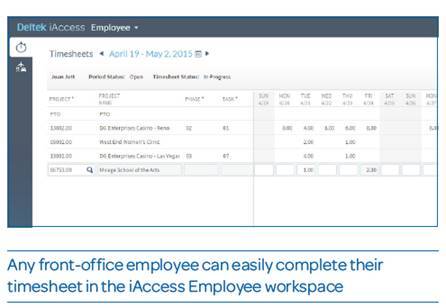
Deltek_iAccess.pngIn June Deltek announced iAccess. So what is iAccess? Deltek’s iAccess is a new, user-friendly interface that gives front office employees access to Deltek Vision information on-the-go. Users can access information from anywhere, anytime and the new interface is specifically built for tablets and mobile devices. 
I recently went on a trip and didn’t have internet access to my laptop, but I had cellular service on my iPad. I found the new interface a life saver as I needed to quickly access client data. Portions of the new feature may look familiar because iAccess was formerly called Navigator, but has received new and improved capabilities. It now also includes CRM related information. Best of all iAccess is free for all users. The Business Development component does require a CRM license. 

The new interface now provides users the ability to access three critical areas of Vision: 

  • Employee Workspace: View, create and submit timesheets anywhere, anytime an employee has internet access. Provides a simplified way to manage and submit expenses with the ability to upload receipts from any mobile device.
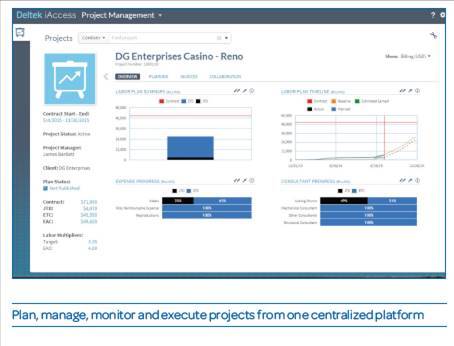
  • Project Management Workspace: Plan, manage, monitor and execute project in a centralized, easy-to-use tool. Quickly and simply view key project metrics and view alerts and warnings when projects are at risk.  
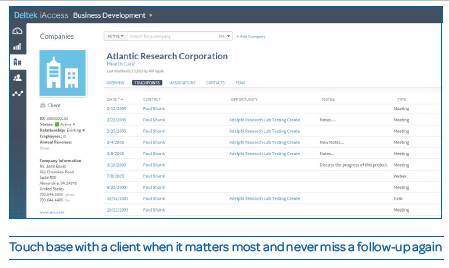
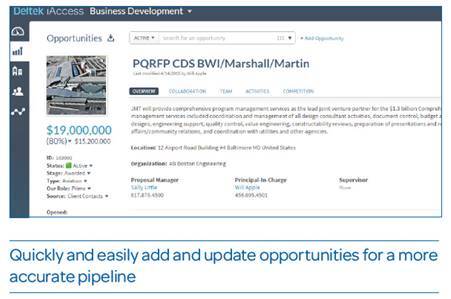
  • Business Development Workspace: Manage clients, contacts and opportunities on-the-go. Business Development teams can review, add and update critical client data and add touchpoints after client meetings or calls.

iaccess employees

iaccess project management

iaccess business development

iaccess business development2

As you can see, the tool is really intuitive and the sleek new interface provides a more modern look and feel. Vision iAccess does have to be set-up by your IT staff just like the Deltek Touch products. Users must have remote access capabilities. For more information, be sure to download the product sheet or view Full Sail Partners’ iAccess webinar. 


Full Sail Partners Selected to Accounting Today's 2015 Top Value-Added Reseller (VAR) List

Posted by Full Sail Partners on Aug 10, 2015


Accounting_Today_2015.jpgFull Sail Partners, a Client Feedback Tool and Deltek Premier Partner, recently announced it has earned a spot on Accounting Today’s 2015 Top Value-Added Reseller (VAR) List. Accounting Today is a leading provider of online business news for the tax and accounting community, offering breaking news, in-depth features, insightful editorial analysis, and a host of web-related resources and services.

Each year a select group of 100 organizations are honored for their accomplishments as VARs. The top VARs are selected from organizations focused on sales and implementation of accounting and Enterprise Resource Planning (ERP) software. Criteria used to determine the winners include 2014 revenue, number of offices, and staff size.

According to Seth Fineberg, Technology Editor of Accounting Today, “The Accounting Today VAR 100 list is comprised of top accounting and ERP software resellers throughout the country, ranked by revenue. This select group represents those in the world of accounting software resellers that are truly ahead of the pack and we are pleased to honor them in this special report.”

Full Sail Partners provides on-premise and cloud-based solutions for architects and engineers, energy and environmental consultants, and professional service firms across the United States. Full Sail Partners' team, collectively, brings more than 200 years of experience with Deltek solutions. The firm represents unique technology solutions that integrate with Deltek Vision including Deltek’s Kona social collaboration platform, the Client Feedback Tool, and Vision Unleashed.

"Last year Full Sail Partners was listed as one of the VARs to watch and we are extremely honored to make our return to the Value-Added Reseller Top 100 List," said Sarah Gonnella, Vice President of Marketing and Sales of Full Sail Partners. "Our firm continues to deepen our bench strength with Deltek Vision experts, allowing us to be the go-to firm for consulting, customization and integration. Jumping to number 85 in Accounting Today’s Top 100 Value Added Reseller list is a great accomplishment and demonstrates our ability to engage our existing client base, as well as, target new project-based firms beyond the AEC industry.”


Most Recent News Mentions

We’re changing the way project-based firms operate.

People can’t help but notice.
Who will be next?

Check out our latest newsworthy work: