In the News


We’re devoted to revolutionizing the way our clients do business. Sometimes that gets us noticed.

No big deal.

Posts about Technology Solutions (10):

5 Fundamentals for Success When Approaching Software Customization

Posted by Admin on Nov 10, 2015

When implementing or seeking a new software system, our philosophy is that the solution should get you at least 80% of the way. Of course the goal is to have a solution that completely matches all of your needs, but that sometimes just isn’t possible. Luckily Deltek Vision’s open architecture allows you to quickly add fields with a click of the button. Sometimes firms need to take it a bit further and with the addition of User Defined Info Centers (UDICs) firms can do even more. One thing to keep in mind is before any revisions are made it’s important your project is built on a foundation for success. Let’s take a look at the five critical elements when approaching software customization that will enable you to go beyond with your Deltek Vision system! 

The Five Fundamental Tips for Successful Customizations: 

Gather Key Stakeholders | Making a software customization change for your business needs can often feel like being lost in the land of the unknown. Your key project stakeholders are your ultimate end users – identify, cultivate and leverage their needs and expectations. Identify priorities early in the project to develop an actionable game plan that enables your development team to make the most impact on the organization.  

Assign a Project Owner | Identifying a primary project owner will allow you to have the eyes and ears on the ground needed to guide your project to success. Be a Leader of Change” in your organization by identifying the right captain to steer your ship on the correct course. Although the project owner is a stakeholder by definition, this person generally acts as a representative for the overall stakeholders; giving the group visibility in to day-to-day developments. Increased visibility helps impediments to be identified & solved quickly. It also helps developers and stakeholders to understand each other's constraints & expectations. The Project Owner is a vital link between the needs of the stakeholders and the development team  

Document User Stories | For many software customization projects, the subject matter experts do not know what information technology could and should do for them, yet the IT team needs to know what to deliver. One of the biggest challenges development efforts face is overcoming the IT - subject matter communications gap. How can you deal with these difficulties early, and not waste valuable development time and effort? A user story complements business analysis techniques that you are using and will make identifying project requirements easier and more complete without adding an extra burden of effort. 

Focus on stakeholder requirements, needs, and goals for the solution. Avoid the trap of trying to get the users to define technical specifications. Start with an approach to capture, in business language, the goals, objectives, or wants for the business system in the form of very short stories. You can then add details over time as needed to document each story. Business-driven test scenarios foster a common understanding of each requirement. 

Rough It Up | Don’t be afraid to rough things up a little bit – your end users certainly won’t be afraid to take the shine off of the new toy. Try to think outside of the box and attack your solution from every angle possible. End users do crazy things – you’ll thank yourself later for being one step ahead! 

4 Type of Tests | Before releasing development efforts, your software customization should undergo a thorough testing process to ensure that the solution is working as intended. There are four main stages of testing that need to be completed before a solution can be cleared for use: unit testing, integration testing, system testing, and acceptance testing. The breadth of these tests is just another reason why keeping your key stakeholders active and engaged is important. When a program is more thoroughly tested, a greater number of bugs will be detected; this ultimately results in higher quality software. Test it once, test it twice… and then test it some more! Eat your own dog food. Allow internal testing, on your own system, to ensure that bugs and system flaws are identified as early as possible from real-world testing. 

Is your firm considering utilizing Deltek Vision's UDICs? See how real Deltek Vision users are creating richer and more connected business environments in this on-demand webinar:

 

5 Elements for Effective Knowledge Sharing

Posted by Jennifer Renfroe on Sep 10, 2015

Knowledge Sharing GraphicAs white-collar professionals, our individual skillsets are built upon our cognitive abilities. We spend years adding new skills and competencies to our wheelhouse by absorbing tidbits of information from every facet of our daily lives. Think hard enough and I am sure you can identify personal, professional and communal experiences that have factored in to your eventual expertise. So how do we capture this intellectual information and pass it on to our coworkers? This knowledge sharing conundrum stumps many firms.

The simple fact that you are reading this blog, and have identified the challenges of knowledge sharing within your organization, gives you an advantage over the average professional.

The Contributing Factors for Effective Knowledge Sharing

  1. Expression: Knowledge is power. However, to convey this power to our cohorts, we need to be able to describe the information clearly and accurately.
  2. Awareness: The recipient must be aware that the knowledge is available and be willing to make an active effort to absorb the information and seek clarification where needed.
  3. Availability: The knowledge recipient and the knowledge provider must have availability to work together to clarify and provide further explanation to complex issues.
  4. Direction: The wealth of knowledge being shared was likely gathered over a long productive career. With that said, do not underestimate the importance of transferring this data in clearly defined, differentiated, segments that allow the recipient to comprehend the information accurately and completely. Avoiding information overload will allow this entire process to be less intrusive and run smoother.
  5. Completeness: This knowledge is often complex and multifaceted. In order to convey this knowledge accurately, it is vital to provide a complete and holistic picture. Often the ‘why’ is just as important as the ‘what.’   

Applying Knowledge Sharing Concepts to Your Business

I challenge each reader of this blog to self-examine and ask yourself: is your organization doing everything possible to foster a culture of collaboration and knowledge sharing? If not, why? If so, what impact has this knowledge sharing had on your firm growth? The reality of this question can often be hard to come to terms with.

Social collaboration requires buy-in from the entire organization. Understanding the factors in play here can be as rudimentary as examining the makeup of our organization and understanding the different generational values in play.


Deltek Releases New User-Friend Vision iAccess for Mobile Users

Posted by Sarah Gonnella on Aug 27, 2015

Deltek_iAccess.pngIn June Deltek announced iAccess. So what is iAccess? Deltek’s iAccess is a new, user-friendly interface that gives front office employees access to Deltek Vision information on-the-go. Users can access information from anywhere, anytime and the new interface is specifically built for tablets and mobile devices. 
I recently went on a trip and didn’t have internet access to my laptop, but I had cellular service on my iPad. I found the new interface a life saver as I needed to quickly access client data. Portions of the new feature may look familiar because iAccess was formerly called Navigator, but has received new and improved capabilities. It now also includes CRM related information. Best of all iAccess is free for all users. The Business Development component does require a CRM license. 

The new interface now provides users the ability to access three critical areas of Vision: 

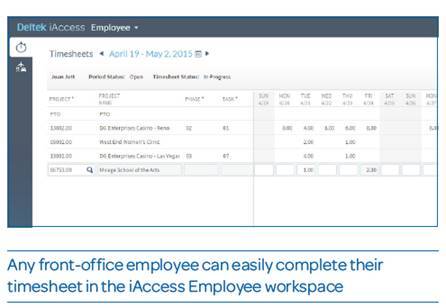
  • Employee Workspace: View, create and submit timesheets anywhere, anytime an employee has internet access. Provides a simplified way to manage and submit expenses with the ability to upload receipts from any mobile device.
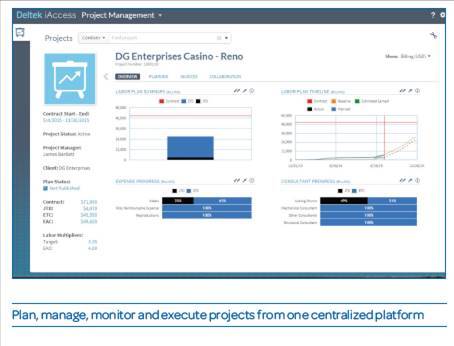
  • Project Management Workspace: Plan, manage, monitor and execute project in a centralized, easy-to-use tool. Quickly and simply view key project metrics and view alerts and warnings when projects are at risk.  
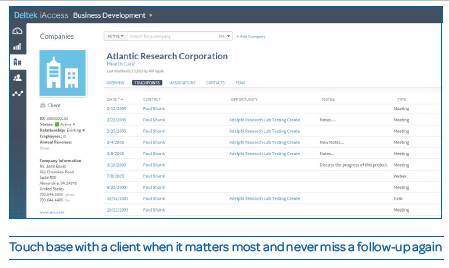
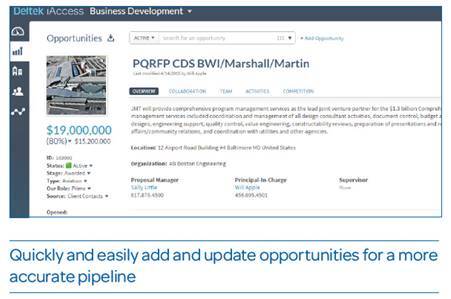
  • Business Development Workspace: Manage clients, contacts and opportunities on-the-go. Business Development teams can review, add and update critical client data and add touchpoints after client meetings or calls.

iaccess employees

iaccess project management

iaccess business development

iaccess business development2

As you can see, the tool is really intuitive and the sleek new interface provides a more modern look and feel. Vision iAccess does have to be set-up by your IT staff just like the Deltek Touch products. Users must have remote access capabilities. For more information, be sure to download the product sheet or view Full Sail Partners’ iAccess webinar. 


Understanding How Deltek Vision Utilizes FILESTREAM and TDM

Posted by Heath Harris on Jul 16, 2015

As a Deltek Vision client, you may have heard the terms FILESTREAM and TDM thrown around and may be wondering what they are. To clarify, FILESTREAM and TDM are two different things but work hand in hand to provide the desired functionality in Vision.

describe the image

FILESTREAM is a SQL technology introduced in SQL Server 2008 to facilitate the storing and management of unstructured or Binary Large OBject (BLOB) data (image files, word documents, pdf documents, etc.), and ensures transactional consistency between the unstructured data stored in the network file system and the structured data stored in the tables.

Transactional Document Management is a Deltek Vision feature that facilitates the uploading of supporting documents (Expense Receipts, Vendor and Sub-Consultant invoices, etc.) and the ability to attach those supporting documents to transactions within Vision. With supporting documents uploaded to Vision it also gives the ability to easily review and print those supporting documents automatically when processing expenses or invoices. You can also attach several supporting documents to a single transaction or a single supporting document to multiple transactions for more flexibility.

So How DO I Get Started with TDM?

The basics of getting TDM enabled in your Vision database are as follows and take about an hour to setup:

  1. Enable FILESTREAM on the Vision SQL Server
  2. Create the Vision FILES database to store the uploaded documents
  3. Enable the FILESTREAM functionality for Vision
  4. Start using TDM inside Vision

Benefits of TDM

By enabling TDM you can:

  • Reduce the work of keeping track of your supporting documents in the typical Folder/File structure on your network
  • Streamline the process (especially for multi office firms) of allowing employees to scan and upload expense receipts directly to their Expense Reports in Vision instead of the typical procedure of scanning and emailing them to the main office or storing them in the Folder/File network
  • A/P and Interactive Billing also allow the uploading of supporting documents to be attached to invoices, again saving the time and hassle of navigating the File/Folder network structure to find the associated documents

To go a step further when supporting documents have been attached to client invoices they can now be viewed by the appropriate project team members easily and also printed with the invoices as they go out to the client. TDM creates efficiency for accounting as well as staff by having the relevant project accounting documents easily accessible in a consistent location that is available to everyone that has access to the project. 

Caveats of TDM Implementation?

There are a few things to remember if you implement TDM in Deltek Vision:

  1. Backup the FILES database at the same time as your Vision production database. So if you ever need to restore Vision to an earlier time you will also need to restore the FILES database from the same backup to maintain consistency between the two databases.
  2. The other consideration is the size of the FILES database. Although there is no limit to the size of the database, if it grows too large you may start to experience performance issues. As of now there is no known way to archive or reduce the size of the FILES database. This can be somewhat mitigated by making clear that the files uploaded to TDM need to meet a certain criteria (e.g. All documents uploaded to Vision must be in a PDF format and no more than 200 dpi greyscale scans). Unfortunately there is no way to set limits on the files at this time that can be uploaded to TDM. So clearly stating some criteria will help.
For more information on the use of TDM please review the following article from Deltek: 


Managing Talent with ERP

Posted by Ryan Felkel on Jul 8, 2015

iMac Monitor v2Sometimes life’s not fair. We’ve all been told this before, and if you are part of the human resources (HR) department, I’m sure you hear about fairness all the time. But what about you - the HR professional performing manual processes and navigating through a sea of paper work. Why do the accounting and operations departments have sophisticated software to make their lives easier? It’s just another one of life’s injustices, but it doesn’t have to be. That’s right, talent management systems are now being integrated into those awesome Enterprise Resource Planning (ERP) solutions your counterparts in other departments are using and are changing the way companies manage their human capital.


So how does managing talent with an ERP benefit your company? Let me explain. The purpose of a talent management system is to attract, retain, and develop a skilled workforce to ensure a company has the talent needed in order to grow in the future. More specifically, these systems are integrated software suites that address the three core areas of managing talent: recruitment, performance tracking, and employee development. Let’s look at how a talent management system can ease headaches for the HR department and can increase workforce engagement. 

Recruitment – Talent Acquisition

Admit it, the recruitment process is a daunting task and selecting the best candidate isn’t easy. One job posting can generate hundreds of responses from candidates with varying levels of skills, and reviewing all those resumes is a time consuming process. Why continue spending precious hours on the tedious recruitment process when a talent management system can reduce these headaches.

Talent management systems can eliminate several of the time consuming and tedious tasks related to the recruitment process. For starters, advertising new positions over multiple job board sites and social media sites happens with just one click, therefore reducing the time to advertise new positions. Speaking of saving time, the most time consuming component of the recruitment process is reviewing numerous cover letters and resumes. Quickly reduce the resume review time by eliminating underqualified candidates using pre-screening questions, and using standardized resume templates to enable an apples-to-apples comparison of qualified candidates.

Performance Tracking – Employee Acknowledgement and Engagement

When a company has an inconsistent appraisal processes, employees have a tendency to lose motivation. It’s human nature to desire to achieve goals and receive recognition for their accomplishments. Even worse, no one likes giving or receiving an unexpected poor review. Put an end to the inconsistent appraisal processes and create a process that motivates employee improvement.

By utilizing a talent management solution, the employee performance tracking program can increase accountability and the entire process is documented within one system, which ensures that the appraisal process is consistent across all departments. Talent management solutions are also designed to make sure the business goals align with employee goals and these individual impacts on the company bottom line are measured. Additionally, goals are tracked throughout the year enabling a multistage approach to the appraisal process so employees are aware their performance throughout the year.     

Employee Development – Succession Planning and Workforce Motivation

There’s nothing more demotivating at work than feeling pigeon-holed into a position. Sure, that recent raise was nice and even the bonus. But let’s get real, no one wants to be doing the same task day-in and day-out for an eternity and employees have aspirations of climbing the corporate ladder. Furthermore, employee development is a critical factor in succession planning. How does senior management identify the skills and talents of individual employees in rapidly growing organizations?  

The employee development component of a talent management system is critical for identifying top performing talent. For starters, these systems allow employees to build individual talent profiles where they add their skills and career goals to ensure alignment with their development plan. These profiles allow managers to create individual development plans based on the employee’s personal goals, strengths and weaknesses. As a result, employee learning and development are tracked within one centralized database where the employee and management can see their progress.  

Conclusion – Managing Talent by the Numbers

How important is it to have an effective talent management system in place? According to Josh Bersin, “Organizations with superior talent management practices generate 26% higher revenue per employee, 40% lower turnover among high potential employees and 29% higher employee engagement than their peers.” (Bersin by Deloitte 2013) Based on these stats, it only seems fair for HR to have a sophisticated ERP system. 


Learn Why SharedHR Selected a Project-based ERP for Human Resources Consulting

Posted by Ryan Felkel on Jun 17, 2015


Full Sail Partners
' VP of Sales and Marketing, Sarah Gonnella, spoke with Cathy Cushing, Office Manager; Malcolm Whyte, Executive Vice President; and Saul Macias, Vice President of Professional Services from SharedHR to discuss the human resources consulting services they provide to small- to medium-sized business and how having a project-based ERP system is critical to their success. 

--------------------------------------------------------------------------------------------------------

SharedHR logo

--------------------------------------------------------------------------------------------------------

SharedHR is an experienced management consulting and human resource services firm. They believe the essence of an organization’s success rests with attracting, developing, and retaining the right talent. SharedHR takes the time to learn about your company and its culture in order to provide customized, service-orient- ed support to foster your success. SharedHR can supplement your payroll, benefits, and HR team or fully outsource your HR function. The SharedHR methodology streamlines your administrative processes using our cloud-based HR platform. Their approach offers flexible solutions to match the needs of your small to mid-sized business. They pair each client with a dedicated and experienced associate who offers access to the combined knowledge and resources of our entire knowledge base and senior team. SharedHR leverages paperless, cloud-based technology to integrate and optimize your HR and administrative processes so you can focus on high-value business priorities. 


Deltek Touch Time and Expense: Confessions of a Serial Conference Attendee

Posted by Full Sail Partners on Apr 15, 2015

deltek touch time and expense appAs a virtual employee I often have a computer within arm’s reach. The need to access Deltek Vision on a mobile device has largely been non-existent for my work situation. However, recently I attended back-to-back conferences and I quickly found myself behind on my timesheets and desperately needing to submit an expense report. So one afternoon, as traffic died down while manning a tradeshow booth, I decided to install the Deltek Touch Time and Expense app on my phone.

The following blog outlines my thoughts and experiences using the app!

Deltek Touch Time and Expense:  What’s All the Buzz About?

This app is really easy to use! No seriously, it is. The clean smooth detailed design of the user experience shines through immediately. I quickly found myself navigating the menus and feeling a sense of insight regarding where I stood on past, present, and current timesheets and expense reports.

Expense reports have never been less of a hassle. I typically experience a lot of anxiety when it comes to doing expense reports. The idea of managing multiple, high value, expenses can be stressful to say the least. For me, Deltek’s Touch Time and Expense app took the stress out. I was able to quickly take a photo of my receipts with my smart phone, attach them to my expense report in Touch T&E, and voila – expense complete!

After long stints out of the office timesheets are no longer something I dread. Nothing sucks worse than being out of the office for days at a time. Oh wait – you know what sucks more? Trying to figure out how to bill all that time that you spent out of the office!

Managing my time on-site at these conferences with Deltek Touch Time and Expense could not have been easier. During down times I found myself quickly plugging my time in to Vision from my mobile device. No more sticky notes or emails to myself with logs of my time. This process was so easy that I now find myself using the application to log my day-to- day time after work while watching TV with my wife.

Like any application on a mobile device, Wi-Fi helps! The conference I was at had so many people using their phones that the 4G networks were basically useless. I quickly found a Wi-Fi hotspot and connected up and noticed a considerable increase in performance. Stay aware of the environment you are in and the technology you have available and make the most out of it!

This Deltek Touch Time and Expense App is Pretty Cool!

Overall I was extremely impressed with this application. The ability to instantly access my timesheets and expense reports on a mobile device was a life saver!  I’d encourage you to try the app out for yourself and let me know what you think.

Ready to start using the app? Watch this Deltek Touch Time and Expense Application tutorial and start doing more with your Vision system from a mobile device:


Have a cool story about how Deltek Touch Time and Expense has saved you time or frustrations? Respond to this blog and share your stories!

Open Architecture - Why It's Good for Professional Services Firms.

Posted by Wendy Gustafson on Mar 4, 2015

open architectureAmong many things, today’s professional service firm managers are constantly striving for the most effective and efficient way to operate their business. They are inundated with data and, while reviewing latest financial results, finding the right business indicators for planning, understanding modern marketing trends and, of course, keep up with technology – simply managing the business can fall through the cracks. If your business is thriving, then it is evolving, and you need technology that can keep up with it and keep your business moving ahead. Enter open architecture (OA).

What is Open Architecture?

Open Architecture is when a systems specifications are accessible and allows further system development. Additionally, systems that allow an application programming interface (API), new system features can be developed and integrated with other software.

How Can I Benefit?

  • Flexibility – Your business is unique. Although you may perform similar functions as other professional services firms, how you conduct business is uniquely – you. The reality is there is not one system “out of the box” that completely provides everything for your very individual business needs. Finding a system that gets you most of a specific functionality is one thing. Finding a system with an open architecture allows you to meet the specific functionality and meet the special needs of YOUR business is quite another. A system with open architecture will allow you to customize the design (both in processes and fields for data collection) to meet your specific needs
  • Efficiency – Time is precious (not to mention expensive). Open architecture systems allow you to reduce duplicate entry and incomplete processes – reducing errors and omissions. When your software systems “talk” to each other (for example the information from your opportunity system automatically converts to a project when awarded) the data is automatically transferred between the systems eliminating the needs for staff to duplicate entry and reducing errors. You can also build in validation requirements to ensure YOUR business process is followed.
  • Connectivity – Access is important. You need your data regardless of which system you’re looking at or when you need it. An open architecture system will share your data with other systems and allow you seamless access to it. For example, when you are awarded a project that meets certain requirements that project information can be automatically uploaded to your website – keeping your site relevant to YOUR business.

Don’t take our word for it

Now that we know what open architecture is, let’s talk specifically about how an OA will help your professional services firm. An ERP like Deltek Vision allows even those with limited IT knowledge to customize and build business intelligence processes through the use of workflows

Let’s say during your sales cycle when you change the stage to “Awarded” you typically have a series of other fields and processes you have to go through. A workflow can trigger those processes:

  • Change Status to Sold
  • Change Probability to 100%
  • Change the Date Closed to Today’s Date
  • E-mail Accounting to open a project (or even allow the system open up a project)
  • E-mail Marketing to advise a new project was won

Duplicated or unnecessary efforts equates to lost time. Alternatively business processes that are not followed can spin cycles down the road (that is why the process is there in the first place – right?). Many of these items are easily resolved through workflows where some can take advantage of the flexible software solution already available, while others may need to take it to a higher level to tailor to their unique requirements. The possibilities for innovation are limitless with a system that has an open architecture.

Don’t Go at It Alone

While technology fads come and go, it can be hard to tell which ones you should ignore and which you should embrace. The benefits of open architecture are clear – flexibility, efficiency and connectivity. But don’t go at it alone – you have better things to do with your time then sifting through mounds of technical documents – reach out to your friends at Full Sail Partners to consult on how open architecture can make you shine.


Technology service offerings continue to grow as Heath Harris & Wayne Johnstone Join Full Sail Partners

Posted by Full Sail Partners on Feb 17, 2015

Full Sail Partners, a Deltek Premier Partner, is pleased to announce that Heath Harris, and Wayne Johnstone, have joined the Full Sail Partners’ team. These new hires highlight a continuing effort to further bolster the information technology service offerings of the firm. Both of these employees have the skills and knowledge to help clients optimize their IT solution systems to grow and enhance their operations.

Heath Harris is a well-rounded network specialist with 10 years of experience focused on providing Deltek Vision installations, data migrations, upgrades, and customization for small to medium sized firms. As an IT Consultant, Heath will help firms leverage their investments in the Deltek Vision platform by ensuring that systems are optimized for efficiency and advising clients on how to use technology solutions to meet their business objectives.

“I am thrilled to be joining the Full Sail Partners’ team," said Heath Harris. “I am excited to join a company with the passion for helping clients utilize technology to drive and manage profitable growth. I look forward to collaborating with clients and implementing the right solution for their needs.”

As a Product Developer, Wayne Johnstone assists in the development of custom solutions to automate critical business processes for professional services firms. His extensive background in .NET development, SQL programming, and solution architecture surrounding Web based development technologies provides Full Sail Partners with the expertise required to provide solutions that will bridge the gap between independent silos of information.

"Becoming a part of the Full Sail Partners’ team is a wonderful opportunity," said Wayne Johnstone. "In both the professional services industry and the technology community, the Full Sail Partners’ team is known for developing innovative technology solutions to assist professional service firms optimize their business. I'm really looking forward to working with the talented product development group to advance our offerings and continue to deliver solutions that help our customers grow their firms, and get better business results."

As business continues to grow for professional services firms, these recent hiring’s are indicative of Full Sail Partners’ commitment to helping clients excel in today’s quickly-changing economic environment

“Historically, automation has focused on the reduction of manual processes internal to Deltek Vision,” said Wes Renfroe, VP of Technology, “but many of our clients are embracing next generation solutions in the cloud to further augment their processes. With the addition of Wayne and Heath, Full Sail Partners’ development efforts are focusing on enabling clients to integrate their data in Deltek Vision to and from other disparate sources.”

Interested in meeting the rest of the crew? Check out are updated staff page!


Deltek Kona: 'Spaces' for all Shapes and Sizes!

Posted by Rana Blair on Aug 26, 2014

Deltek Kona Spaces"The road to hell is paved with good intentions." This saying could never be truer than when talking about collaboration. We as humans have an intrinsic need to work together. Unfortunately it seems that at times as humans we also have a  need to butt heads! More often than not in the business world, this butting of heads is a result of how we communicate. Luckily, Deltek has recognized these faults with collaboration and has introduced a solution that you may or may not of heard of by now – Deltek Kona!

Since the release of Kona there have been many upgrades to the platform. If you are a long time user, you have probably recognized some of these changes. Well, now it is time to identify some of the most important changes made to Kona spaces, and how these changes impact your professional services firm:

Organizing Deltek Kona Spaces

If you’re reading this, chances are you are using Deltek Kona frequently and have been added to a number of Kona spaces. 

The Deltek Kona team has developed some tools that allow you to categorize your spaces.  You can then use the classifications you’ve created just for you to adjust what you see and what content is emailed to you.

Space Categories

After assessing the types of spaces you are involved in, you may find that there are multiple spaces for different objectives such as Billable projects, Internal Work Groups, or Company Initiatives. Create a category for multiple spaces so they can be grouped together and used as filters.  The categories you create are just for you and can be changed any time.   

To create categories, go to Manage under the Spaces pane and then Add Category.  To assign spaces to the new category, simply enter the space and choose edit, then assign it to the desired category.

$5 Tip:  Don’t go make categories now.  Read on to find alternative thought processes on creating categories.

Space Favorites

With or without using Space Categories, you can also use the Favorite tool to mark one or more spaces as a Favorite.  This is helpful for spaces where there is a lot of activity or information that you refer to frequently.  Like categories, the list of Favorites can be used as a filter to narrow what you see in your Deltek Kona session.

To mark a Kona space as a favorite, go to the space in the list of spaces and click the down arrow to the right of the space name and choose Favorite.

$10 Tip:  You can also hide spaces.  The only way to find the hidden spaces is to use the filter drop-down.  (See below.)

Positioning Spaces

Spaces are natively organized first by Network, then Favorites, then everything else alphabetically.  Perhaps there is a space that you don’t want to mark as a favorite, but would like to see in your space view without scrolling or you have spaces that are at the top of the list but don’t need to be seen immediately.  This is often helpful for personal or reference spaces that don’t have a lot of new conversation content but need to be easily accessed

To reposition a space, simply click in the middle of the space name and drag it to its new position

Filtering Space Views

Once you’ve assigned spaces to categories or have marked them as favorites, you can begin to use the Space Filter tool in a more advanced way.  To access the filters, look for the down arrow just below the space search box and above the first space.  The dropdown will reveal the standard categories, favorites, and categories you’ve created. 

$25 Tip:  The filter selection remains even after you log out of Deltek Kona.  If upon logging in again, you cannot find the space you’re looking for, go to the filters and reset to All.

Using Categories and Favorites in Email Settings

Once you’ve organized your Deltek Kona spaces on a more granular level, you might want to revisit the Notifications area in your profile.  One of the most exciting features in Deltek Kona this summer, is the ability to turn on the Conversation Digest for only one category or only for Favorites.  Furthermore, you can choose to mark the conversations as read once they are emailed in the Digest.

$1,000 Tip:  If you are not inclined to choose just one category for your Deltek Kona spaces, considering creating a category for spaces that you just don’t care that much about.  Then, tell Kona that you’d like to receive a periodic Conversation Digest for that category and that you’d like to mark the conversations as read.  This will still let you know what you’ve missed in a compact format, but will also keep your Kona view cleaner for all that you do wish to digest from within the application. 

If the ability to filter your Deltek Kona spaces doesn’t seem useful to you, then you have not been properly introduced to the “Kona Life”, let us help you discover how Kona can make yours and the lives of your group members easier:
 

If you are intrigued by the mention of Billable Projects as a space filter, ask about Kona business and integration with Deltek Vision Projects and Opportunities, and with Project Navigator


Most Recent News Mentions

We’re changing the way project-based firms operate.

People can’t help but notice.
Who will be next?

Check out our latest newsworthy work: