In the News


We’re devoted to revolutionizing the way our clients do business. Sometimes that gets us noticed.

No big deal.

Posts by Full Sail Partners:

Ashley Jabalera Joins Full Sail Partners to Strengthen Consulting Services

Posted by Full Sail Partners on Apr 28, 2017

Ashley_Jabalera.jpgFull Sail Partners, a Deltek Platinum Partner and Client Feedback Tool Premier Partner, is pleased to announce the addition of Ashely Jabalera to the consulting services team. Ashley has joined the firm as a Deltek Vision CRM consultant. In this position, she will work with clients to implement Deltek Vision’s CRM, Custom Proposal, and SF330 modules, as well as, the Client Feedback Tool and Blackbox Connector tools.

Ashley has over 17 years of experience in the A/E/C industry with an extensive background in business development and leadership within an extremely competitive and product based service environments. Her work history includes the procurement of projects ranging from $10 million to over $1 billion, with a focus on healthcare, commercial, retail, industrial, higher education, government and military clients.

"In the ever-changing world of technology choices – Full Sail Partners offers the stability of Deltek Vision, and a history of successful implementations that will allow you to spend your time and resources on what’s important to you – your clients," said Ashley.

The Full Sail Partners CRM consultant acts as a trusted advisor for all clients and their focus is to evaluate the client's existing software solution and develop a training strategy that is unique to each client experience. In this role, Ashley will leverage her knowledge to ensure our clients continue to be successful long into the future.  

“Our team will be strengthened by adding Ashley, and our clients will benefit from her strong marketing, business development and consulting experience,” stated Sarah Gonnella, VP of Marketing & Sales. “Her background combined with her keen ability to identify customer needs will provide highly responsive solutions for our clients. We are thrilled to have her join Full Sail Partners.”

For more information, please contact Full Sail Partners’ Marketing and Communications Department. Interested in learning more about the Full Sail Partners' team? Check out our crew!  

Why Aren’t Project Managers Taking Responsibility for Their Projects?

Posted by Full Sail Partners on Apr 12, 2017

iAccess for Project Management It wasn’t long ago that firm management took a “need-to-know” approach with sharing project performance information with staff. Today, most firms have changed their attitude about access to project information. Firm managers want project managers to be engaged with the financial results of their projects and have taken great steps to train them to use the Deltek Vision reporting tools and dashboards. Still, project managers are intimidated and paralyzed by the information they receive.

So why are project managers not taking responsibility for their projects?

  • Budgets are not easy to access or review against actual performance
  • Reports are complex and rely heavily upon the accounting cycle that many project managers don’t understand
  • Too much information in reports makes it difficult to focus on what is important
  • Analyzing data requires pulling information into Excel for What-If scenarios
  • Access to information “on-the-go” is not available 

How Can We Change This? 

Enter iAccess. The tool built for project managers to provide them the information they need at their fingertips to successfully manage projects. Even more, it’s ready to go right out of the box. Sure, that sounds too good to be true and one might wonder what you get with iAccess’ standard configuration. 

Here’s a high-level summary. An iAccess core feature that requires no configuration provides a simple project review tool that allows users to quickly review, analyze, and focus on projects needing attention. Any project accessed will appear with current contract, labor, and expense information in graphical and tabular formats at the project or lower levels. This removes the need of having complicated reports and performing What-If scenarios. 

Can iAccess Do More? 

iAccess, like Deltek Vision has the flexibility to meet the different and complex needs of each individual firm. From simple custom configuration of reports to in-depth configuration of projects, iAccess provides the same information that’s stored within Deltek Vision to project managers from anywhere they have an internet connection.   

With just some minimal configuration, project managers can use iAccess as a comprehensive project management tool from the beginning of the project through closeout by using the planning functionality. Starting with an original budget, project managers can interact with their projects as needed to review actual data and then provide estimates of additional effort required to complete the project. 

Stay Connected with iAccess 

The real-time connection to your Deltek Vision database and the mobile accessibility of the iAccess tool may be the missing link in motivating your project managers to take more control over their project financial management responsibilities. The use of iAccess allows them to absorb data in a friendly format while creating a platform for predictive information entry and sharing across the firm. Stop giving project managers an easy excuse for not taking responsibility.


Why Your Firm Needs Proposal Automation

Posted by Full Sail Partners on Mar 29, 2017

Proposal AutomationMany professional services organizations are under the false impression that proposal automation is not worth the investment. While copying and pasting previous Request for Proposal (RFP) submissions may seem expedient, it is not really the case as firms must tailor them to the unique needs of each new proposal. Let’s review a few reasons why proposal automation will benefit your firm if it is incorporated into the bidding process.

Firms Shouldn’t Depend on Previous RFP Content

Relying on past proposals as your content library is a bad move. Far too often, though, professional services firms fall into the trap of utilizing past RFPs in this way. There are a litany of reasons to avoid copying and pasting past proposal content:

  • A higher rate of human error
  • Past content typically contains other companies branding and imagery
  • A generic approach leads to a generic response
  • Lack of focus on the needs of the individual client

Proposal automation will eliminate human error. It will also create a consistent proposal format that contains details suited for each individual client and ensures proper branding.

Accurate Technical and Background Answers Are Necessary

Proposal teams can expect a list of common questions during the RFP process. RFP questionnaires typically contain background questions (founding date, partnerships, administrative information) and technical questions (performance KPIs, background details, etc.) As a result, copying previous proposals can lead to submitting inaccurate information.

With proposal automation, your firm can make sure that these frequently used answers are accurately reflected and are available for quick reference in your proposal content library.

Review Your Content!

Content reviews are an essential element in differentiating winners from losers. Your firm’s content library needs to be continually refined. Each piece of content should be relevant and error free. Additionally, your proposal team must be notified of pertinent changes so outdated content doesn’t spread into future proposals.

Using proposal automation, common content can be managed in a central location. Whoever is managing the content can ensure that the proposal team has only the most up to date information.

It should be evident now why proposal automation is worth the investment. Check out how Deltek Vision firms are implementing proposal automation to win more projects! 


The Unknown Features of Timesheets in Deltek Vision

Posted by Full Sail Partners on Mar 22, 2017

Timesheets It is a mystery why we deal with time management so badly. This is our commodity which we sell to our clients. However, we treat it like a curse, as if it’s an evil process that accounting forces on us. It somehow escapes us that this is the lifeblood of our business, and without it, we are out of business. So why don’t we manage this better and how can we improve our firm’s practices? 
Well, to begin with, the timesheet function in Deltek Vision is incredibly easy to use. You just need to know what features to focus on. Let’s take a look at timesheets and what is offered in Deltek Vision regarding time management.

Timesheet Best Practices

Project management best practices always include sound timesheet management processes. First of all, timesheets should be entered daily and submitted timely. Secondly, project manager review is mandatory. Timesheets should be corrected before they are posted to our projects and the billing system in Deltek Vision.

Poor timesheet management inherently leads to inefficient processes later. Timesheet miscodes cause incorrect project reporting and erroneous invoices. Additionally, transferring time entries in the billing system is time consuming. This slows down billing, involves the project manager, employee and accounting. Worst of all, this directly affects cash flow because of the delay in processing client invoices.

Features of Timesheets in Deltek Vision

We need sound, efficient and thorough timesheet management policies and procedures. They need to be incorporated into our culture. Along with daily entry and strict deadlines for timesheet submission, Deltek Vision has a number of tools to assist project managers with this process:

Floor Check was introduced in Version 7.2 and is a powerful tool that lets timesheet administrators see if employees are doing their timesheets. It shows the employee’s expected hours and the actual hours entered. Additionally, floor check has email functionality, so you can email employees directly and tell them, “DO YOUR TIMESHEET,” or you can also create pre-defined messages.

Unposted Labor Report is a standard project report that only shows unposted time sheets. This is the ideal tool for project managers to use in order to see what has been charged to their projects before they are posted. This is the perfect opportunity to fix timesheets before they are charged to our projects.

Project Reports with Unposted Time reports can be included in project reports by using the unposted time option. As a result, project managers can see labor being charged to their projects during the timesheet period.

Line Item Approval allows project managers to use line item approvals to put their final approval on time charged to their projects once timesheets are submitted. Line item approvals link to project ownership, so project managers will only see their projects.

Timesheet Audit Trail tracks changes to timesheets after they have been saved or submitted. You can require the employee enter a comment, or just track changes without explanation. Audit trails can also track billing transfers. This is the “where did it go” and “where did it come from” report. A timesheet audit trail report is available in employee reporting.

Get Your Timesheets Done!

With all of these tools within Deltek Vision at your disposal, timesheet management is within your grasp. You can simply start with daily timesheet reminders. Eventually, you will develop a plan that makes timesheet management best practices part of your firm’s culture. 


6 Key Statistics that Fuel the Competition for Talent Management

Posted by Full Sail Partners on Mar 15, 2017

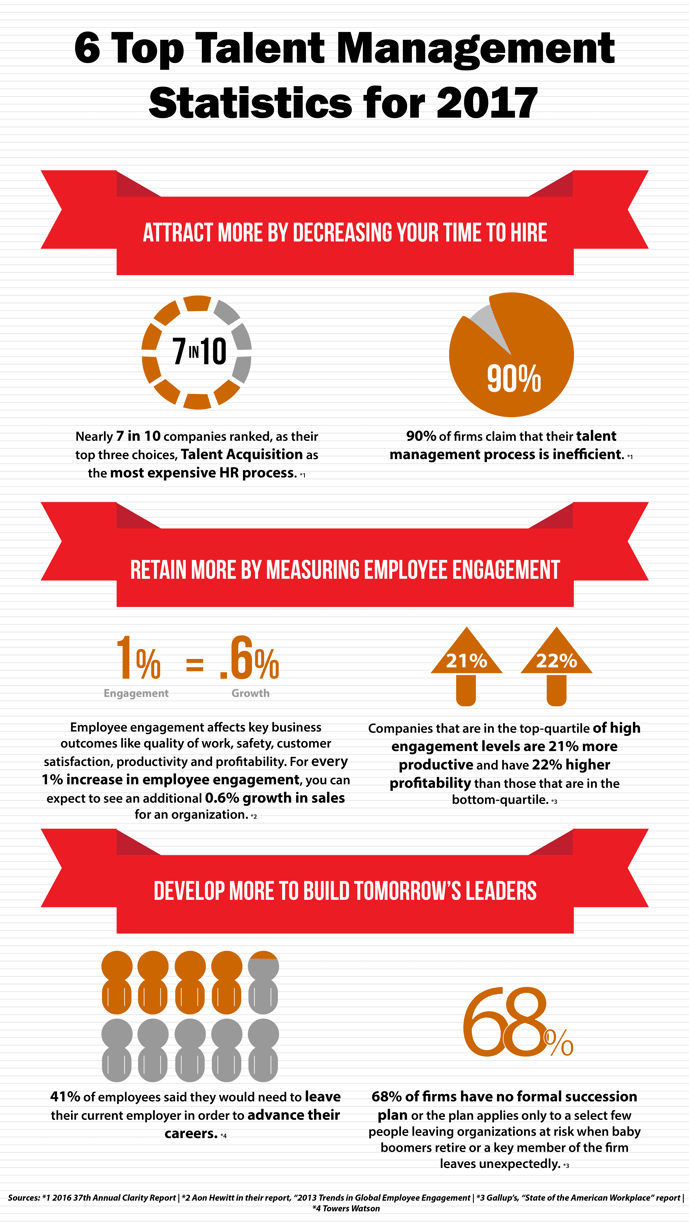
Organizations with antiquated talent management philosophies will struggle to attract, nurture and retain top talent in 2017. Many HR teams make the common mistake of having decentralized or ineffective systems and processes. This infographic illustrates six key statistics that demonstrate why HR teams can no longer be reactionary and should evaluate their talent management processes and systems.

Deltek-Talent-Infographic-Final.png

Learn More about the Challenges of Talent Management

Interested in learning more about how to overcome the increased competition for talent in 2017? Join our webinar where we will discuss how HR can overcome the top five challenges with talent acquisition.

Topics:  
HR

Using Multicurrency in Deltek Vision

Posted by Full Sail Partners on Mar 8, 2017

Deltek Vision MulticurrencyDoes your firm work internationally and deal with multiple currencies? Did you know there is a way to automate the tracking and conversion data? Within Deltek Vision is the Multicurrency function which holds the key to simplifying this process for your firm.

Vision Multicurrency allows you to:

  • Manage multiple currencies for transactions, accounting and financial reporting
  • Enter and manage exchange rates which can be done manually or can be automated to pull in exchange rates (XE.com has an auto feed subscription for this)
  • Support daily and periodic exchange rate changes
  • Revalue foreign currency accounts and automatically identify a gain or loss due to currency fluctuations

Considerations when Using Deltek Vision Multicurrency

With any changes to your standard accounting practices, there are always some items that need to be taken into consideration:

Revenue Considerations: Revenue generation will now use the billing currency fields in the project info center.

Project Considerations: Once you set a project to a currency and the project has data on it, the currency code cannot be changed on the project. It is very important to set the project to the correct currency upon initial setup. All lower levels of the work breakdown structure (WBS) must also be set to the same currency as the project. Optionally, a billing currency can be set differently than the project currency, but all lower levels will need to match.

General Ledger Account Considerations: In Vision Multicurrency accounts can be left without a specific currency or set to a single currency. In some situations, the company might set a bank account to a specific functional currency. For example, a bank account is set to USD for use by only the USD company. You might leave other accounts open to be used across companies with different currencies. Once an account is set to a currency that is different than the functional currency, it is then considered a foreign denominated account.

Unit Considerations: You must specify both a project and billing currency.

Vendor Considerations: Vendor records are stored in the functional currency of the active company. Additionally, there are several details to note for vendor records:

  • Functional Currency – the home currency or the currency in which the company operates
  • Transactional Currency – the currency in which a transaction is entered into Vision
  • Presentation Currency - used in reporting to generate a report with all amounts expressed in a single currency
  • Billing Currency - the currency used to generate invoices and billing reports for specific projects and their WBS
  • Project Currency – the currency in which the project is managed which can be different than the functional currency when needed (this currency should be used for all project management purposes including reporting)
  • Payment Currency – the currency in which the payments are made
  • Consolidated Reporting Currency – only available in a Multicompany environment and is used to create consolidated financial statements for multiple companies that are using different functional currencies
  • Account Currencies – each account setup for use as a bank account and mapped to a GL code can be set to a specific currency directly through the account setup of the GL (if you specify an account currency that is different from the company’s functional currency, the account is then considered a foreign-denominated account)
  • Tax Currency – if tax auditing is enabled then a currency must be set for each tax code (this is generally the currency in which you report and pay the tax amounts to the proper tax authority)

Generally Accepted Accounting Practices in Deltek Vision Multicurrency

Deltek Vision Multicurrency is in accordance with the Accounting Standards Codification (ASC) sections ASC-830-10-55-10 and 11. In section 55-10, the guideline states that it is acceptable to use averages or other methods of approximation. Accordingly, it is recommended to use a weighted average of the exchange rate for a period rather than applying actual day-to-day fluctuations.

Furthermore, section 55-11 states that average rates used shall be appropriately weighted by the volume of functional currency transactions occurring during an accounting period. In other words, to translate revenue and expense accounts for an annual period, individual revenue and expense accounts for each quarter or month may be translated at that quarter's or that month's average rate. The translated amounts for each quarter or month should then be combined for the annual totals.

Why Use Multicurrency in Deltek Vision?

Multicurrency can be used for tracking currency exchange gains and losses. Having foreign-denominated accounts creates the need to track gains and losses based on fluctuating exchange rates. For example, if a European company has a bank account denominated in United States dollars and the value of the euro rises against the United States dollar, the value in euros of that bank account balance drops. This results in an unrealized loss to the European company. Using Multicurrency allows you to use the Gains/Losses and Revaluations process in Vision to calculate and post these types of currency exchange gains and losses. As a result, they appear on your financial statements per the generally accepted accounting practices under which you operate.


Adobe Creative Cloud

Posted by Full Sail Partners on Mar 1, 2017

Last year Adobe released their comprehensive new cloud offering, Adobe Creative Cloud’. The Adobe Creative Cloud provides users full access to all of Adobe’s creative offerings, in addition to exclusive features and products only available to subscribers. With this new bundle, companies are able to take their design capabilities to a new level!    

Many small A/E firms struggle with the decision to empower their marketing team with the various Adobe offerings. This usually is not a decision based on product functionality, but rather a decision based on economics. Let’s be honest, Adobe products are not cheap! But like many things in life, you get what you pay for.

Adobe has realized this hurdle that many small business face, and they answered with the Creative Cloud! Rather than outright purchasing an Adobe license (Photoshop, Illustrator, etc.), a large one-time expense, Cloud members pay a monthly fee of $49.99 – yearly costs are about equal to purchasing one Adobe product outright. This is a pretty fair deal if you ask me: You are ensured to always have the most up to date software, you gain access to every Adobe product, and you avoid costly upgrades!

In addition to limiting your company’s investment, the Adobe Creative Cloud also provides the following features and offerings:

  1. Creative Cloud users get 20 gigs of online storage.  This space is great for sharing files with clients, storing files while on the go, and creating online backups of critical design files.  Many times designers are working in off-site locations and collaborating over the web.  Use this storage space to share important project files like font types, swatches, templates and more!
  2. In addition to acting like a storage locker, the Creative Cloud also acts as an information desk.  Upload files from Photoshop, InDesign or Illustrator and get important file information not provided in other browsers.  Quickly see what font types are used, color schemes and layers.  The cloud interface even allows users to turn off layers, previewing the changes without having to open Adobe!  This is a great way of sharing file previews with someone that does not have Adobe!
  3. Host and manage your websites!  That’s right; Creative Cloud membership comes with hosting for five websites.  This is a great feature for small firms that are trying to optimize their marketing efforts, on a restricted budget.
  4. Training library.  Adobe has always been known to have great training resources via their website.  Creative Cloud members gain access to additional valuable training content from industry experts at Kelby Training, video2brain, Attain & Adobe.  Training material is broken down in to three main categories:  Adobe products, specific workflows, and creative fields.
  5. Install your Adobe products on more than one computer!  A major complaint from business development professionals is that they simply cannot afford to put Adobe on their home machine.  Unless your company has provided you with a laptop, you must be in the office to work on that proposal with an upcoming deadline.  Not with Adobe Creative Suite!  Install the products on two computers, MAC or PC, and use the programs freely as long as the computers are not running at the same time. 

Marketers are constantly looking for more ways to get value out of their tools and efforts. These ancillary features from the Adobe Creative Cloud better help professional services firms tackle day to day functions.

If your firm is looking to take proposals to the next level -- or if you have already made the transition to Adobe and its time to upgrade -- check out the Creative Suite.

Topics:  

Understanding and Effectively Using Cross Charge in Deltek Vision

Posted by Full Sail Partners on Mar 1, 2017

Cross Charge BlogIn a previous blog, we reviewed multi-company functionality in Deltek Vision and learned how it serves as a tool for sharing and accounting for resources across the companies within an enterprise. Cross charge capabilities in Vision are based on similar theories as multi-company, but are focused on the interaction within a company and its organizational breakdown structure (OBS). Before we dive deeper, here are some links to blogs about multi-company functionality and OBS in case you are unfamiliar with these topics.

High Level Insight into Cross Charge in Deltek Vision 

It is important to understand that cross charging is a financial tool and is based on the general ledger. It is not an attribute of project reporting since time charged to a project remains on the project for billing and reporting purposes. Cross charge is labor focused and occurs after the timesheet is posted. 

By default, Vision is built to be project centric, which simply means that the process of entering and posting timesheets determines where the labor charges are assigned. If the cross charge process is not configured or run, the cost will remain on the “books” of the organization where the project is assigned. 

Why Use Cross Charge? 

As financial and operational managers, we must always remember that revenue can only be earned once and a cost incurred once. For this reason, cross charge allows businesses to move these elements in and out of various “buckets” within their organization. When a combined income statement is run, all cross charge entries will zero out and the original revenue and cost will remain. 

The cross charge process is used when firms loan and borrow labor at the lowest OBS level, which could be: 

  • Office
  • Department
  • Discipline
  • Market Sector 

A good example is a civil engineer where projects live in the various disciplines. The survey department would loan their staff to the engineering projects and cross charge would be the financial component to drive and manage the accounting for the labor. 

There are two internal pricing options to choose from when configuring cross charge: 

  1. Project Centric – This is when labor remains on the books of the organization where the project resides. A multiplier is then used to account for some portion of operational/overhead (OH) costs. This factor could be limited to a fringe benefit rate, could represent a breakeven OH rate or even include some profit. The purpose is to ensure that the loaning organization has an incentive to keep their staff busy, but they also need to be careful as to not over extend their resources. 
  1. Employee Centric – This works by adjusting labor back to the employee’s organization. Using typical billing rates, although a multiplier can be used, the revenue is moved from the projects to the employee’s organization. The purpose again is to ensure the loaning organization doesn’t lose the ability to show a profit by sharing their staff. 

Real-life Application of Cross Charge in Deltek Vision 

Here is a success story where the operational process and projects are built on the premise that fee and scope drives work breakdown structure (WBS) in a clients’ Deltek Vision database. Under this model, high accountability becomes the first option where phases and tasks within a project are assigned to different organizations based on the portion of the work. Employees then charge the phase/task that is assigned to the organization they “live” in. This results in more closely managed projects because the profit accountability is shifted back to the organization supplying the labor. This process eliminates the need for cross charge. 

But wait…realizing that in order to run successful projects, there is a necessity to anticipate unplanned needs. This means that the firm must have the ability to borrow an employee from another department for a short-term assignment or a last minute need. For example, the base building studio decides it needs input from the interiors studio. In this scenario, the client falls back on the project centric method noted above as a mechanism to facilitate resource sharing and not impede project progress. Furthermore, this is a prime example of a need for cross charge. 

Gain Control of Resources with Cross Charge 

Whether your current OBS is solid or you are considering a change, cross charge can provide the functionality required to ensure an open and smooth process of resource sharing. With a thorough understanding and effective implementation, cross charge can provide another dimension in managing your business.


Bid / No Bid – When to Decide During the Proposal Process

Posted by Full Sail Partners on Feb 15, 2017

Deltek Kona, Deltek Vision, Win ProjectsIn today’s day and age of fast changing technology, firms must stay abreast of all available solutions to better compete with competition, and win work. Since the ‘great recession’ of 2009, competition on winning work has increased exponentially. Successful firms have combated this increased competition by staying current with technology, and using well thought out techniques to win projects. Included below are five tips that will help your firm better impress clients, and ultimately win more work.

  1. Collaboratively share information with your project team. When responding to a client request / RFP, sharing data can become a cumbersome task in itself when working with remote teaming partners or staff. Often, the ability to seamlessly coordinate tasks/assignments, or share large files amongst your team can be the difference in winning or losing the work. To avoid these types of hiccups, leverage collaborative sharing tools such as Deltek Kona to keep your project team on the same page. Deltek Kona allows users to share files, and schedule important dates, seamlessly as though the users were all working in the same centralized office. You will be amazed at how Kona will empower your project team!
     
  2. Hasten your proposals process through the use of templates. Unfortunately, many times firms will find out a about a project that they are a perfect fit for days before the due date. These time restrictions can ensnare the proposal process and make it difficult to respond sufficiently. Empower your marketing/business development department by creating templates that will allow you to export your information from Deltek Vision CRM to Microsoft Word or InDesign. This will allow you to streamline the proposal process, and concentrate on the areas of the proposal that require custom attention.
     
  3. Avoid boring old PowerPoint presentation. Many firms make it to the short-list process only to utterly disappoint the client through the use of a boring, stale PowerPoint presentation. If you are unable to separate yourself from your competition, you are not doing your best to win projects. PowerPoint has been around since the late 1990’s, and sadly a large majority of presentations look like they came out of that same era. By using presentation software such as Prezi or PreZentit, your firm can immediately stand apart from your competition. With that said, don’t forget the importance of impressing the client by being personable and demonstrating your understanding the project. Overly relying on the use of presentation software is one of the quickest ways to lose a client’s attention.
     
  4. Use a CRM solution to track relationships. We have all heard the saying, “It’s not what you know, but who you know!” This begs the question; does your firm know who it knows? If you are not tracking your relationships through CRM software such as Deltek Vision, then you are simply throwing darts at a board, blindfolded. A CRM solution will allow you to track who you know, recent conversations, and other important relationship data such as birthdays or anniversaries. This type of knowledge insight is important for creating meaningful relationships between your company, and your clients.
     
  5. Optimize information for smart devices. If you own a smart device, and you have not optimized your marketing contact the device, you are not working smart! You never know when, or where, you might bump in to a perspective client. If you are unable to demonstrate your firms expertise at the drop of a hat, expect to lose out on a lot of potential work. Your firms website should be optimized for smart devices (iPhones, Androids, Tablets, Everything!) allowing you to be ready to show off how great your firm is, at a moment’s notice! In addition to optimizing your website for these smart devices, take the initiative to pre-load content on to your smart phone, in case you are unable to get internet service! By doing this, you will not only impress the client with all of your great works, but you will also demonstrate your ability to think ahead and be ready for the unexpected.

    If your firm is utilizing Deltek Vision CRM, make sure to check out Vision Unleashed. Vision Unleashed will allow you to access your full Vision system on teh go, from a mobile device. It also allows MAC users to access Vision without the need for running parallels or bootcamp. This allows MAC users to utilize their workstation to it maximum potential without dedicating resources to addition process just to access Vision!

I hope you learned something from this blog. Some of these technologies or techniques might seem obvious, but unfortunately many times it’s the obvious omissions that cause us to lose out on winning new work. If you use any of the concepts highlighted in this blog, make sure to comment below and let us know. We love to hear success stories!

Once you win your next project, make sure to review these project management concepts.

Maximizing Organizational Breakdown Structure and Work Breakdown Structure in Deltek Vision

Posted by Full Sail Partners on Feb 10, 2017


Organizational Breakdown Structure and Work Breakdown Structure As Deltek Vision systems are implemented and processes are written, the common denominator is most often the connection between the Organizational Breakdown Structure (OBS) and the Work Breakdown Structure (WBS). Whether it be the uniqueness of each or the relationship between the two, the attention paid to these early stages of development is instrumental in the flow and reporting of information in your Vision database. In the following, we’ll explore some areas to consider when designing the structure of your database.

Company Structure and the Organizational Breakdown Structure in Deltek Vision 

The OBS can take on many different builds from the very simple to extremely detailed. Various example options include: 

  • Location approach
  • Discipline/department approach
  • Market sector BD driven 

When designing the OBS in Deltek Vision, the system allows for up to five hierarchical levels and allocation of overhead requirements to be incorporated into the structure of the database. If you are using a multi-company database, then level one needs to be reserved for the different companies in your enterprise. Learn more about Vision Multi-Company in this article

Additionally, when building the OBS it is most important to be aware of financial accountability in your organization. For example, if you are using two levels, such as office and department, each combination will produce an income statement. As a result, someone within the organization is responsible for these statements. 

Furthermore, various cross sections can be extracted for combined financial reporting. For instance, if you have mechanical department in three offices, firms can create a mechanical income statement. A structure such as this allows for: 

  • Office accountability
  • Office/Department accountability
  • Overall Department accountability 

Projects and the Work Breakdown Structure in Deltek Vision 

The WBS specifically relates to how a project will be organized and the firm’s preference for the flow of revenue and costs. The majority of firms find it to be most effective if they build their WBS based on project budgets. Generally, this should be driven by the fee and scope using a bottom up approach. 

Deltek Vision allows for three levels in the WBS, which are commonly labeled, Project, Phase and Task. However, this can be tailored to your firm’s preference. Even more, accountability within a project can be assigned through the WBS. As a result, the entire project can have a manager and/or phase and task managers, which can be assigned based on the scope and budget responsibility. 

It is important to note that project builds and WBS don’t have to be the same across all projects. While not all firms are the same, it is highly recommended for most firms to let every project have at least one WBS 2. In other words, another WBS variation. Additionally, projects can be built with no WBS 3 or only some parts of the WBS 2 extending into the WBS 3. 

Team Work Makes the Dream Work 

Like the players on any type of team, the OBS and WBS need to play their roles both individually and in tandem to support the greater good of the team. The WBS at its lowest level drives how revenue and cost post to the lowest level of the OBS. Here are additional items to consider: 

  • “Mirroring” the OBS in WBS for overhead projects
  • The combinations of cross charge, intercompany billing and high accountability you plan to build into WBS
  • The division of financial and operational accountability

Final Thoughts 

In today’s robust business environment, many firms are evaluating and updating both their OBS and WBS in Deltek Vision. A popular build methodology is using both geography and market sectors to build and operate under a 3D matrix solution. When considering changes to your current structures, the help of both functional and data consultants can result in a new and more productive Vision system. Timing and cutover planning is essential to success. Now is the time to get creative and strive to get the most out of your operations.  

Most Recent News Mentions

We’re changing the way project-based firms operate.

People can’t help but notice.
Who will be next?

Check out our latest newsworthy work:

Recent Posts