In the News


We’re devoted to revolutionizing the way our clients do business. Sometimes that gets us noticed.

No big deal.

Reasons Why You Should Attend a Professional Conference

Posted by Ryan Felkel on May 30, 2018

Get IdeasAttending a professional conference is a great way to learn solutions to obstacles you currently face, new ways to challenge yourself, and learn about trends in your industry. Additionally, you should never hesitate to ask your employer to allow you to attend a good and relevant conference on their dollar. Furthermore, managers should require employees to go to professional conferences to get out of the office and learn new things they can bring back to share with their coworkers. So, what are the benefits of attending a professional conference?

Network with Likeminded People

Sure, your LinkedIn network is huge. However, when was the last time you spoke to someone in your network face to face, or have you ever met them face to face? Professional conferences attract people from all different geographies from different continents to regional or smaller local conferences. In other words, conferences bring people together in one place in an environment that promotes talking to others. So, don’t be shy! Get out there and meet new people.

Get Fresh Ideas

In reality, you sit in our workspace and either not talk to coworkers about your ideas and their ideas because you are the only person in that role, or you’re talking to the same people about the same ideas every day. As a result, you tend to grow stale on the subject that you’re respected as an authority upon. Therefore, this is probably the number one reason to attend a professional conference.

When attending a conference, you get to attend seminars and panel discussions led by respected industry leaders and take part in roundtable sessions. Here you can get fresh ideas on challenges others are facing industry trends. Remember, you’re going to be inundated with a lot of information, so make sure to stay attentive and take notes.

Present Your Ideas to Others

In today’s age, your company’s brand is built on the brand of its employees. Prospects and clients are more likely to make a purchase from a company that they know, and trust employs thought leaders in their respected industry. This means employees must build their personal brand by showing they are a thought leader in their industry.

Becoming a thought leader requires making presentations about your ideas to peers to develop your “authority” reputation. It will also give you confidence in your work. Here’s a tip, make your presentation fun and interactive to keep the audience’s attention.  

Meet an Expert

You read their blogs and books, and if they have a television show or podcast, you probably tune into that too. Even more, their a mentor to you, but you’ve never talked or corresponded. However, that doesn’t have to be the case anymore.

Industry experts attend the conferences you should want to attend. They give presentations about their ideas, you know…the ones you read about, but now you can easily interact with your mentor and ask questions while attending a conference. Most importantly, experts also attend the conference social events, giving you a chance to have a face to face conversation. Keep in mind, they’re humans too. So, don’t get nervous when having your one on one time.

Make the Most of Every Professional Conference You Attend

Last tip! Keep a pen handy and remember your business cards at all times! Conferences are short, and you’ll be having a lot of fun. Remembering what you talked to someone about and having them remember you isn’t easy. With your pen, write notes other people’s business cards about what you talked about and make sure you have your cards, so they can do the same. There are so many benefits to attending a conference, but it’s up to you to make the most out of it.

Tips and Tricks for Deltek Vision Users

Posted by Ryan Felkel on May 16, 2018


Deltek_Vision_Logo_16Deltek Vision is a powerful tool with many capabilities to ensure the success of project-based businesses. Despite the availability, users often overlook or simply just don’t know some of the things Vision can do to make their jobs easier. Let’s take a look at some tips and tricks to learn how to get more out of your Vision system.

10 Tips and Tricks for Deltek Vision Users

  1. You can create a Web dash part that links to a web site, a file, a report, or a Web Outlook site. Unlike the Links dash part, which can list many links, the Web dash part displays the content associated with a single link. To display a website on your dashboard, navigate to the Dashboard. Click on Configure > Add Web Dash part. In the Address Type choose HTTP to display a website. Then provide a Web Part Name and add the URL and click save.
  2. A UDIC or a User Defined Info Center can be created to track custom information in a separate Info Center. To create a UDIC, go to Configuration > General > User Defined Components, and click the New Info Center button at the top. Then name the Info Center and select Activities Grid or Files Grid to add those tabs. As with any Info Center, now add custom tabs, grids and tabs. 
  3. Display settings were introduced in Vision 7.0. You can find them in User Options. From here, you can change the color scheme of Vision. Each element has its own display setting. For example, you can make required fields a particular color such as yellow.  
  4. The Record Access tab of the Security roles now contains a checkbox called "Enable Self Service in Employee Review." To display the Employee Review form, click Human Resources from the Vision Navigation menu and then click on Employee Review.
  5. You can now edit Activities fields directly in the grid that is located in any Info Center. Previously, the fields in the grid were display-only and could only be edited by clicking the Edit option on the grid toolbar. 
  6. An Equipment Info Center comes with the addition of the Purchasing or Asset Management modules. It stores two types of items, asset items and equipment items.
  7. You can create a Client record from a Vendor record. Under the Vision Navigation Tree, click on Utilities > Advanced Utilities > Create Client from Vendor.  
  8. You can email or run a report at a later time. Use the Schedule dialog box which is available in applications where you can use the process servers, such as Reporting. The Schedule button also allows you to set-up reoccurring activities. For example, you could send a report every Monday to project managers.
  9. You can now exclude projects on a resume by the number of hours worked on a project in the Custom Proposals module. This new feature can be accessed when adding new Projects to a resume by checking "Only include Projects where this Employee worked more than this many hours" and inputting the number of hours. For example, you can exclude any projects that have less than 20 hours associated to an employee from showing up in your search criteria. 
  10. Each department head can enter their own General Ledger budgets and submit them through an approval process in Vision. Those budgets can then be combined into a company-wide General Ledger budget.

Do More with Deltek Vision

These tips and tricks should help you get more value from a tool like Deltek Vision. Remember, there are always ways to explore how your firm can better utilize Vision. Contact Full Sail Partners, and we will be happy to assist you in this endeavor.


Spend Management Reporting Made Easy

Posted by Full Sail Partners on May 9, 2018

Spend Management ReportingFinancial reports are essential to every organization for providing information about the health of a business to internal stakeholders as well as interested outside parties. For many firms, this is a manual process which requires significant time and resources to collect expense and invoice details, code them to the ledger, and then organize high-level summary information. Your accounting staff shouldn’t be spending their time organizing data, but instead analyzing the data to help your firm make better business decisions.
What’s the Solution?

To get started, SAP Concur has organized the key information into many standard dashboards, tiles and over 180 reports available in the standard report catalog. Many of the standard dashboards include the bulk of information your teams need, but they can also be personalized to meet specific requirements or preferences. These dashboards, tiles, and reports can be used to assist managers in tracking budgets and forecasting for future cashflow management. Tracking elements include spend by expense type, time-period, and project or department.

Why SAP Concur Reporting?

To budget for future spending and forecast future cash needs, you need to understand what you have spent in the past and what spend is still outstanding. Firms often use the processed spend data from within their financial or enterprise resource planning (ERP) system. However, the challenge firms face is real time access to spend and accrual data that hasn’t yet been submitted into their ERP system. Concur Analytics Data is available in real time and is available before the expense report or invoice is submitted for payment.

Get to Know Tiles

Tiles in Concur can be used by themselves or pulled into dashboards for a more comprehensive view of spend.

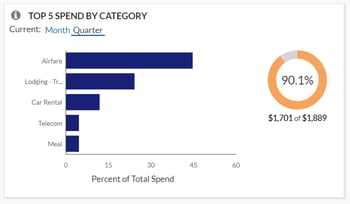
  • Top 5 Spend by Category allows users to easily view where your spend has been incurred. This lets you quickly determine if it is incurred in the expected categories, if spending needs to be reduced, and where might make the greatest impact. Accountants can then utilize the Spend Analysis dashboard or Expense Entry Analysis Details report to drill further into the categories and spend by vendor to help negotiate better pricing with your top vendors.

Concur 1

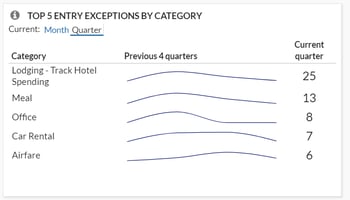
  • Top 5 Entry Exceptions by Category enables users to easily view exceptions. This allows your team to identify the impact of any policy changes and see the policies with the most violations that should be investigated further. For even more visibility, they can then drill down into the Policy Exception Detail or Spend Analysis dashboard as well as the Expense Exception Analysis for both Report Level and Report Entry Level reports.Top 5 Entry Exceptions by Category
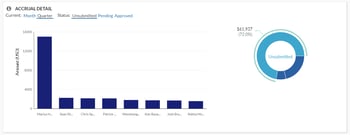
  • Accrual Detail lets you identify the largest opportunity to take action on with outstanding spend, and specifically which individuals carry the largest value of outstanding spend. Your managers can either find training opportunities with these top individuals or focused spending cuts. For your accounting staff, this tile will help you determine the impact to future cashflow during tight budget cycles.

Accrual Detail

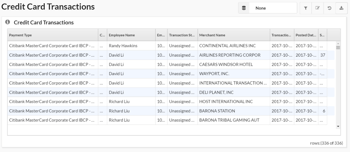
  • Credit Card Transaction Report is one of the best features since it enables you to easily regain hours or even days’ worth of your accounting staff’s time. Although it may not be the sexiest feature, it is critical for keeping your data in compliance. This report lists all credit card transaction details imported into Concur. It can be used as a comprehensive listing or as an ad hoc exception report to look at certain subsets of credit card transactions. Organizations with a corporate card program need to reconcile their credit card transactions with the card statement to ensure all expenses are being processed, and this report can assist with that reconciliation. Also, this report can be grouped by Employee, then sorted by Posted Date to mirror the format of the credit card statement for simplified reconciliation. Another version of this report, the Unassigned Credit Card Transaction report, can help you quickly find those expenses which have been accrued are not yet assigned to an expense report.

Credit Card Transactions

Take a Deep Dive with Reports

For more in-depth analysis and details, reports can help streamline your workflows and drill down into the data you need. Custom reports can also be created by the Concur team if your requirements fall outside of the standard options.

Quick Access with Dashboards

You can start with one of many pre-built dashboards or create your own from scratch by adding tiles and reports to existing templates. While there are many dashboards available, some of the top ones include the Expense Overview dashboard and Policy Compliance dashboard. 

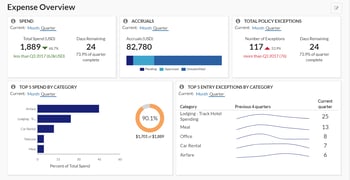
The Expense Overview dashboard is a perfect starting point for budget, cashflow management, and policy compliance all in one place. This dashboard can be used as a starting point to create a new custom “Spend Management” dashboard. Managers can use this detail for budget and forecasting purposes. Personalization recommendations are to retain the Spend, Accruals, and Top 5 Spend by Category tiles as well as adding additional tiles: Spend Summary Trends, Spend Change by Category, and Accrual Detail.

Expense Overview

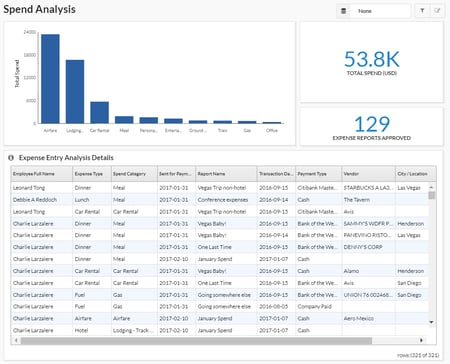
The Spend Analysis dashboard is an incredibly functional dashboard that offers users an in-depth analysis on total spend for a given period along with a summary breakdown of that spend by Expense Type and associated detail. This dashboard can be easily filtered to show specific Spend Categories, Expense Types, or Employees for total spend analysis or grouped and sorted in ways that are meaningful for specific tasks. It allows leaders to identify what their teams have spent in a given period. They can even track individual spending patterns to identify specific areas for follow-up or track improvements in spending behaviors. This report is versatile in that it can be filtered to show trends in spending patterns or behaviors. If more detailed analysis is required, use the Expense Entry Analysis Detail report.

It is recommended that an organization review their travel policy once a year and adjust as needed. It is important to consider the potential impact of a policy change before one is implemented. If an organization does not have a limit on cell phone reimbursement, but needs to create a policy on this expense, the Spend Analysis dashboard can be reviewed to identify average reimbursement rates to establish a baseline for a new policy. This dashboard can also be used to assess the impact of such a policy change to identify how many individuals would have been out of policy if the value was changed.

Spend Analysis

SAP Concur is a Complete Spend Management Solution

With over 180 reports available in the standard report catalog, Concur can help you quickly and easily analyze your Travel, Expense, and AP automation program to gain valuable insight into how to proactively manage all aspects of your business’s finances. It’s been said that knowledge is power, but having too much information can be as bad as not having enough. You need to be able to see spend clearly so you have more time to run your business. As your business and reporting needs evolve, let Concur and Full Sail Partners help you capture and monitor the data you need.

Enhancing the Client Experience - Tough Questions You May Want to Ask Sooner than Later

Posted by Kevin Hebblethwaite on May 2, 2018

Ask the Tough Questions Your clients need you to be successful. Think about it – would the alternative be a great experience for them? Relationships in the professional services industry are interesting animals that need specific care and feeding to fully develop. It’s not easy, and I certainly don’t claim to have it all figured out. However, you can be certain that your client relationships are getting stronger when asking hard questions doesn’t seem so nerve-racking. So, when the relationship IS there, you can ask almost anything. Here are a few questions that come to mind – and please paraphrase if using them in client discussions.

Are you REALLY ready to commit funding for professional help?

Mama always said, “Don’t talk about your money,” and per Kenny Rogers, “You never count your money while you’re sittin’ at the table.” While money is a very sensitive topic, we know from economics class, that business transactions involve the exchange of goods or services for compensation. Without the compensation part, it’s no longer a business transaction. In that context, we must recognize both the sensitivity AND the importance of money in our client relationships. We can treat it carefully, but we certainly can’t shove it under a mattress. Sorry, Mama.

Some potential clients truly aren’t ready to pay for your help. And that’s OK! Regardless of the reason, you can still give those prospects a wonderful experience. Getting to know your firm and helping them understand the value you bring with your paid expertise offers the chance to keep in touch for future initiatives/challenges/projects.

When the timing and value equation IS a match, keeping your client projects and relationships in good financial health is imperative for all parties involved. The client has expectations about your service delivery and outcomes, and your firm has expectations about meeting its cost obligations and returns on the owners’ equity. Getting that value equation right will reward your clients AND your firm.

How can we best serve you in conjunction with your internal resources?

Part of the mystique of developing business in professional services is finding the right match between the client’s ongoing business challenges and “how much” of your expertise to throw at them. We’ve all been in those situations where the outcome felt like we did too little/too much. Most professionals in their area of practice, of course, are pretty good at assessing whether clients have [no/some/significant] internal expertise of their own. Whatever the case, we can’t just assume no expertise, or worse, stop the pursuit because they seem to have more experts than we do.

Figuring out where and how your firm’s knowledge and capabilities fit in is crucial! You’ll find the need to address this balance in all kinds of professional disciplines – the built environment, accounting, legal, information technology, and many more. One example might be when your client must manage the replacement of a key employee whose role is involved in your area of expertise.

Your engagement with this client might be more focused and short-term, but if you are able to strategically line up a handful of clients who consider you “first call” for that situation, the experience can be very rewarding. Some clients choose to not maintain a certain expertise on payroll. The outside professional may desire an expanding scope, but he or she should still proceed cautiously to make sure there is clarity with the client’s reasoning and expectations of our delivery. As you’ve heard many times, seek to understand before needing to be understood.

What outcomes from our work would cause you to laud us among your closest peers?

This question is more common, and maybe even more uncomfortable, but very important. The professional’s best client development tools are the references, referrals, and introductions from other extremely satisfied clients. While it’s helpful to promote the “50 times we’ve done that before on other projects,” it’s preferable to have a solid group of existing clients who will happily describe HOW you did it for them.

Having cheerleaders for your awesomeness are indispensable. Yet, professionals often struggle with the challenging work of developing a process to nurture, catalogue and leverage them. Starting with the important questions will help. Remember, your clients are also motivated to see successful outcomes from your work together.

Ask, Ask Away

You can probably come up with other important questions that you wish had been asked earlier in certain client relationships. Like with most skills, practice makes perfect. Think of several of your best existing clients and seek their input on how to address the tough topics in new relationships. They’ll likely be honored to help, and you’ll be making that relationship even stronger.

How Do You Measure the Success of Your Firm’s Talent Management?

Posted by Ryan Felkel on Apr 18, 2018


Talent Management Many people don’t realize that talent management is a key business strategy and is vital to a firm’s success. It begins with recruiting potential hires and follows employees throughout their entire life cycles with a firm. Since talent management has such a great financial impact on a firm, talent metrics should be used to show return on investment and to make informed business decisions. So, which metrics are the most significant?

5 Important Talent Management Metrics 

  1. Cost to Hire

It is very expensive to hire a new employee. Up front, you have ad placement and sourcing costs. Additionally, there is the time spent by the recruiter and managers to interview and determine the best candidate from the pool. As much effort and time will be put into selecting and onboarding the right match for a position at your firm, you want to ensure the new hire is a good return on investment. You also want to assess whether your ad placements and sourcing tools are getting you the quality candidates you desire. 

  1. Time to Full Productivity

Every new hire needs some time to become acquainted with the new position and learn the ropes. Generally, it requires several months before a new hire can be fully productive. However, it is imperative that your firm has an effective onboarding and training program to get new hires up to speed as fast as possible. The quicker a new hire moves to full productivity, the faster there is the return on investment. 

  1. High Potential Talent

As part of your talent management plan, you should hire a percentage of people that you expect to provide more value down the road for the organization. This talent should be the best of the best. These employees will be the ones you pull from for future succession into higher-level roles. Making sure you hire talent with potential is necessary to avoid more costs of hiring. 

  1. Talent Mobility

Retention of talent is another important factor to consider, especially when concerned with the financial impact of hiring a replacement. Employees need to know that there are opportunities for them to move within the firm, so they don’t stagnate in the same position after several years. Your firm should offer career paths for upward mobility for top performers who seek new challenges. 

  1. Talent Turnover

Turnover is probably the most relevant metric of all. Your firm will want to keep this number as low as possible to reduce its financial impact. With turnover, you have the cost of replacing the position with a new hire and the loss of the knowledge gleaned during the years of service. Additionally, turnover stops the cohesive flow of business and causes efficiency to wane.

Manage Your Talent Well

Of course, there are cases where turnover cannot be prevented no matter what the firm does. Overall though, your talent should be chosen wisely, trained properly and given opportunities for mobility. When you manage your talent well, you will in fact reduce your costs because word of mouth is free and high potential talent will come to you.

Make Smarter Decisions with the Informer 5 Business Intelligence Tool

Posted by Ryan Felkel on Apr 11, 2018

Informer 5Business analytics has become increasingly important for professional services firms. However, finding a business intelligence (BI) tool that works with Deltek Vision and gives us the analytics we want has been challenging. We need flexibility, customization and ease of use to answer important questions about our firms yet often we find that this type of analysis is not accessible in Vision. Thus, we are faced with the export/import/number crunch process in an external tool like Excel plus countless hours spent doing the calculations over and over. We need a better solution, instant access, and easy updates.


Enter Informer 5

Introducing Informer 5, the BI tool which works with Deltek Vision to make instant analytics readily available. Informer 5 is an integrated customizable interface to Vision data for use in various analytical scenarios. Using the Blackbox Connector, direct integration with Vision is now a reality.  

You simply select the data fields you want in your database including standard Vision fields, User Defined Fields, and User Defined Info Centers, and you’ll quickly be able to visually see project metrics, employee measurements, marketing results, and firm forecasting. You’ll be able to answer questions such as: 

  • How are my projects performing?
  • How is that new branch office doing?
  • Are my employees billing enough hours?
  • How is the firm doing compared to the last three years?

Also, remember those spreadsheets with all that data we built over the past years? Informer 5 can integrate this data with your Vision data. No need to reinvent the wheel, we can use it as a data source. Other data sources? Informer 5 can access those too.

Visualize Your Data with Informer 5

Are you interested in where your work is being done and where the profits are made? Well, Informer 5 also includes geographical presentations including maps. You can easily visualize and determine these specifics with Informer 5.

You can even find the numbers behind the pictures. Informer 5 has built in drill down capabilities that can take you directly to the detail data. From Profit Center to Project Manager, Project Manager to Project, and all the way down to line item detail, data can be acquired with Informer 5, and all of this can be gathered from the same graph with no need to run additional reports.

Make Smarter Decisions with Informer 5

On a final note, the Informer 5 package includes set calculations for many of our industry standard metrics. Additional calculations can be added to customize this solution for any firm. Also, firm data can be updated regularly on schedule or updated on demand from Vision. It is up to you. So, with all of these awesome features of Informer 5 and its integration with Vision, isn’t it time for your firm to start making smarter decisions?

How to Know if Your Email Marketing is Successful

Posted by Ryan Felkel on Feb 27, 2018

Email Marketing Image.png

You’ve just spent hours creating a clever email with an enticing subject line to send your clients and prospects. As you prepare to push the button to send this email, you hope for a positive outcome of your campaign. Over the next 24 to 72 hours, you will log into your email marketing platform, such as Constant Contact or MailChimp, to check the performance of this email. But, which numbers really determine the success of an email marketing campaign? Let’s take a look.

Open Rate

The open rate is simple to understand but quite important. This is the percentage of the recipients that opened the email. Knowing how many people opened your email is significant because it will show you if your subject line drew enough attention to make opening it worth their time. Of course, the higher the open rate, the better.

Click-through Rate

Here’s probably the most important metric that allows you to know how successful your email marketing campaign has been. The click-through rate lets you know who actually read your email and took action by clicking on the included link. Seeing who clicked on the email allows you to know who’s interested in your content. This tells you who to target in the next stage of your marketing campaign. In other words, the more click- throughs, the more potential leads that have moved further into your marketing funnel.  

Bounce Rate

The bounce rate tells you how many of the intended recipients did not receive the email at all. There are two types of bounces, a soft bounce and a hard bounce. A soft bounce happens when the recipient’s mailbox is full, the server is down, or the email is too large for the inbox. On the other hand, a hard bounce means the message is permanently rejected because the email address is invalid or doesn’t exist. Obviously, the more bounces, the less potential for exposure to the email content.    

Unsubscribes

Like click-through rates, unsubscribes allow you to assess the quality of your content. If a person signs up to receive your emails and newsletters but unsubscribes, it is usually because the content is not what they expected. So, unsubscribes can show you how many recipients have determined that the content is not valuable or interesting.

Spam Reports

While unsubscribes are bad, being reported as spam is worse. This usually happens for one of two reasons. Either you send emails to people that never signed up to receive them or you send emails to people with irrelevant content. Email marketing platforms can and will suspend accounts that have a high spam rate. Therefore, not spamming is a priority in your email marketing campaign.

Refining Your Email Marketing Campaigns

Using A/B testing is a great way to improve your email marketing campaigns. This is a controlled experiment that compares two versions of the same content to determine which messaging improves your email marketing success rates. There can be a variation of the subject lines, the messaging in the email and the verbiage used in the call-to-action. Remember, in the end, the main goal is to get your email marketing campaign through to its intended audience and have it be well received. How you accomplish this is up to you.


Why Your Firm Should Be Using the Deltek Vision Payroll Module

Posted by Scott Gailhouse on Feb 21, 2018

Payroll It is amazing that so many people aren’t even aware of the numerous benefits of using the Deltek Vision Payroll module. For starters, the Payroll module in Vision is a robust application that gives you control over your payroll process that you otherwise wouldn’t have if you used an outside payroll company. It allows you to meet the increasingly complex regulatory requirements by defining taxable wages based on any withholding codes that you create. You can also define how other pay wages impact a withholding calculation. All of this can be done from Payroll Withholding Setup. 

How the Deltek Vision Payroll Module Works

If your firm is using the Payroll module to process your payroll, Deltek Vision will use information from the Employee Info Center, the Project Info Center, the Transaction Center, and Accounting Cost/Pay Rate tables to process payroll.

Some of the main features of the Vision Payroll module are:

  • 2 overtime multipliers – There are some firms that are required to pay overtime (OT) to hourly employees. For example, you may have to pay time and a half for some OT hours worked and maybe double time for other OT hours worked. Vision can be configured to accomplish this. For added flexibility, you also have the option to bill these overtime hours at a higher billing rate in billing terms.
  • User-defined other pay fields – In addition to an employee’s regular salary, you can also add payments for other items. Some firms will use these fields to record bonus payments, moving allowance payments, allowances for fitness club memberships, public transit passes, etc.
  • Contribution codes – If you make payments on behalf of your employees, i.e. state unemployment or 401k matches, you can track those payments using contribution codes. Contribution codes can record those amounts by employee. Vision will also post the entry to the balance sheet liability account.
  • Withholding codes – In addition to the standard federal, FICA, and state withholding codes, users can create their own user-defined withholding codes to suite your firm’s needs. You can create withholding codes for medical insurance, cafeteria plans, wage garnishments and Roth IRA plans to name a few.
  • Direct deposit – Vision supports the direct deposit of funds directly into an employee’s bank account(s).
  • Payroll types – Most payroll runs processed in Vision are for your regular weekly, biweekly or semimonthly or monthly payrolls. You can also process adjustment payrolls to make changes to a payroll that has already been processed. Furthermore, you can use this feature to adjust pay, withholdings, regular, overtime, and secondary overtime pay hours, and accrued benefit hours. A bonus payroll run automates the process of giving your employees bonuses.
  • Payroll reporting – Using Vision payroll reporting, you can generate worksheets that help you fill out state unemployment insurance reports, quarterly state income tax reports, and federal Forms 940 and 941.
  • W-2 forms - The Payroll module prints a W-2 for each employee who was paid during the calendar year. You can print W-2s on W-2 forms that are specially designed for use on computer printers.

Integrate with Outside Payroll Companies

If, however, you decide that your firm would rather use an outside payroll company to process payroll, despite the benefits of using the Deltek Vision Payroll Module, Vision offers an interface option that can export timesheet data to most large payroll companies including ADP, Paychex and Ceridian. With this integration, a third party will be able to manage the complex areas of payroll processing such as tax withholdings.

Do More with the Deltek Vision Payroll Module

It should now be evident to most people that the Deltek Vision Payroll module is an extremely flexible tool that can be used to help your firm streamline the payroll process. The Payroll module additionally provides a wide-range of detailed reports based on the information stored in your Vision database. So, start realizing the benefits of using the Vision Payroll module and improve your firm’s payroll process today.


Using Proper Data Analysis to Drive Business Development Decisions

Posted by Ryan Felkel on Jan 31, 2018

Analyze Data Many firms have a plethora of data regarding existing clients, prospects, and wins and losses just sitting around being underutilized or possibly not being used at all.  So, what should these firms be doing with all this data? Well, this significant information needs to be analyzed to create actionable insights which will help drive business development decisions. Here are some thoughts to ensure a proper data analysis.

Reports Don’t Equal Analysis

Reports are pretty and give you an easy view of your data. The line goes up and you smile, the line goes down and you frown. However, quickly glancing over these reports doesn’t actually answer why these are the results you see?

Analyzing means taking those results to the next level and learning why these are the trends your firm is experiencing. You must ask the right questions to find answers in your data and then form a hypothesis to test your data against. This will allow you to find the reason behind your numbers.  

Using Analysis to Achieve the Real Goals

As simple as this sounds, getting the right information from your data analysis can affect achieving your firm’s goals. To make actionable decisions, the goals of the business must be what drives your measurement strategy. Using the correct data analysis technique requires that you know what questions you’re trying to answer.

Think about it, generic questions tend to lead to generic answers. To determine what you’re trying to figure out from your data analysis, you’ll need to have clear objectives provided by the firm’s stakeholders. Without having a specific question to answer, you won’t get a clear answer.     

Creating Metrics That Promote Action

Communicating the results of your analysis in a way to create actionable insights can often be difficult. It doesn’t have to be when the results of your analysis answer the questions that have been established by the business objectives. Therefore, communicating actionable insights requires being able to quantitatively measure the success of the plan you recommend.

The findings of the analysis should drive the development of key performance indicators (KPIs). With these KPIs, the company knows what quantifiable objectives determine the success of the business. Keep in mind, your KPIs need to be realistic based on your data. 

Good Data in Equals Good Data out

Collecting the right data and maintaining it is the most important part of data analysis. For project-based firms, projects are the lifeblood of the business. Winning more projects is essential to generating more revenue. As a result, discovering key project related data from your analysis is integral to creating compelling proposals that win new business. 

Making Data Work for Your Firm

To learn more about project data collection and maintenance best practices, make sure to attend this year’s SMPS Pacific Regional Conference and the Southeast Regional Conference. Lindsay Diven, Full Sail Partners’ Senior Consultant, will be presenting a session titled, “Develop Your Data Collection & Maintenance Program – No CRM Needed” to address this specific topic. Let your data work for you.


The Top 10 Read Full Sail Partners’ Blogs of 2017

Posted by Jennifer Renfroe on Jan 17, 2018

2017 Most Read Blogs With all the hot topics of last year, we thought it would be interesting to see which ones were valued the most by Deltek Users. To figure this out, we compiled a list of the top 10 read Full Sail Partners’ blogs of 2017. From finance, to marketing, to HR, to project managers, it seems that we offered a little something for everyone. Let’s check them out:

  1. The Unknown Features of Timesheets in Deltek Vision

It is a mystery why we deal with time management so badly. This is our commodity which we sell to our clients. However, we treat it like a curse, as if it’s an evil process that accounting forces on us. It somehow escapes us that this is the lifeblood of our business, and without it, we are out of business. So why don’t we manage this better and how can we improve our firm’s practices? Find out now! 

  1. Maximizing Organizational Breakdown Structure and Work Breakdown Structure in Deltek Vision

As Deltek Vision systems are implemented and processes are written, the common denominator is most often the connection between the Organizational Breakdown Structure (OBS) and the Work Breakdown Structure (WBS). Whether it be the uniqueness of each or the relationship between the two, the attention paid to these early stages of development is instrumental in the flow and reporting of information in your Vision database. Click here to explore some areas to consider when designing the structure of your database. 

  1. Is This the End of Deltek Vision's Revenue Method B?

Revenue Method B is the most widely used revenue method in Deltek Vision. In fairness, this is Vision’s default method for projects whose charge type is Regular. As a result, most firms use it since it’s easy to deploy and seems to work, or so we think. Learn more about Revenue Method B here. 

  1. The Truth Behind Why Your CRM System Sucks!

The main reason why CRM implementations usually fail isn’t because of the system, it’s because of you. I told you this was going to be hard to swallow. A CRM system is meant to provide a place to house all of the important information about your clients and opportunities. However, many firms purchase a CRM system thinking it will miraculously do the work for them with no effort required. Find out what your firm needs to know to have a successful CRM system. 

  1. 6 Key Statistics that Fuel the Competition for Talent Management

Organizations with antiquated talent management philosophies will struggle to attract, nurture and retain top talent in 2017. Many HR teams make the common mistake of having decentralized or ineffective systems and processes. Check out six key statistics that demonstrate why HR teams can no longer be reactionary and should evaluate their talent management processes and systems. 

  1. Using Multi-Company in Deltek Vision: The When, Why and How

Within Deltek Vision lies a very handy tool which enables a firm to have multi-company functionality. However, the benefits of this multi-company functionality feature seem to elude many firms that would greatly appreciate its capabilities. So, let’s talk in detail about multi-company functionality and the why, when and how firms should use this fantastic feature. 

  1. Ten Firm Initiatives to Improve Deltek Vision

Although it is easy to accept the status quo, there is always room for improvement. Once improvements are made, it is hard to believe that we operated the way we did before. So, there it is, the continuous cycle of breaking the status quo to improve our firm processes which ultimately ensures future success. As Deltek Vision users, we should focus on initiatives which enhance our Vision systems and allow us to remain efficient and effective in business. Find out which initiatives your firm can take on in 2018. 

  1. Why You Should Be Using Deltek Dashboards

Are you maximizing your time by taking advantage of a dashboard? Dashboards are one of the most beneficial and functional parts of a system and yet are often the most underutilized. Dashboards are comprised of dashparts, or widgets, which are used as a portal into your Deltek database. For firms using Deltek Vision or Deltek Talent, the dashparts are extensive and include reports, metrics, links, alerts, tips and more. Find out why your firm should be using dashboards. 

  1. Understanding and Effectively Using Cross Charge in Deltek Vision

Cross charge capabilities in Vision are based on similar theories as multi-company but are focused on the interaction within a company and its organizational breakdown structure (OBS). It is important to understand that cross charging is a financial tool and is based on the general ledger. It is not an attribute of project reporting since time charged to a project remains on the project for billing and reporting purposes. Cross charge is labor focused and occurs after the timesheet is posted. Still confused? Learn what you need to know to effectively use cross charge. 

  1. Introducing Deltek for Professional Services

Welcome to Deltek for Professional Services (DPS), the next generation solution for professional services automation (PSA). If PSA is a new term for you, think of it as a specialized system like an enterprise resource planning (ERP) solution except specifically designed for the professional services industry. So, what can DPS do for your firm? Let’s see how this new cutting-edge solution will add value.

The Full Sail Partners’ team strives to provide our clients with useful resources that add value to their Vision systems. We hope that these widely read blogs from 2017 did just that. If you haven’t had the chance to review them yet, we hope you’ll do so now. Also, remember to keep an eye out for what’s coming in 2018!


Most Recent News Mentions

We’re changing the way project-based firms operate.

People can’t help but notice.
Who will be next?

Check out our latest newsworthy work:

Recent Posts