In the News


We’re devoted to revolutionizing the way our clients do business. Sometimes that gets us noticed.

No big deal.

Posts about Accounting:

Management of Change Series – Finance

Posted by Rana Blair on Jul 24, 2025

2025-07-24 Management of Change Finance_banner

You’re the numbers person. The ROI rockstar. The keeper of KPIs, margins, and forecasts. And when it comes to change management, your superpower isn’t rah-rah motivation or lofty vision—it’s proof. Cold, hard, data-backed proof.

In this updated installment of our Management of Change series, we’re looking at what change really means through a finance lens. Spoiler alert: it’s not just about tracking revenue. It’s about aligning financial metrics with strategic goals—and making sure the dollars actually make sense.

So how do you measure success during change?

Great question. Executives may define the “what” and “why” of a change initiative, but you, finance friend, bring the “how do we know it’s working?” That starts with a clear measurement framework.

Here’s a modern 3-step playbook to measure the financial impact of change:

Step 1: Start with a Real Baseline

This isn’t just pulling numbers from last quarter’s P&L. Your baseline should be intentional and aligned to your firm’s specific goals. Want to shorten your billing cycle? Improve backlog reporting? Increase win rate on proposals? Get clear on what you’re measuring—then gather the numbers that show where you are today.

Think: “What’s the story our current data tells—and what plot twist are we hoping this change will deliver?”

Step 2: Set Checkpoints, Not Just Finish Lines

Change isn’t a one-and-done event. It’s a project in and of itself—one that deserves (and demands) ongoing financial monitoring. Regular check-ins on key indicators will help you manage scope creep, track adoption, and avoid unwelcome surprises at go-live.

Pro tip: Treat your change initiative like any major project. Build out milestone reviews with accompanying financial check-ins, and use Vantagepoint tools (like dashboards, custom hubs, or budget trackers) to make sure everyone’s aligned and in the loop.

Step 3: Define What Success Really Looks Like

We all love a good ROI percentage. But success isn’t always about hitting an exact number—it’s about hitting a range that proves the effort was worth it. (Because let’s face it, humans are involved, and that means change is never 100% predictable.)

Set a tolerance range. Define what “good enough” looks like in terms of improved efficiency, savings, or output. And yes, make room for measuring user adoption—because even the best system changes will fall flat without employee buy-in.

According to “The ‘harder’ side of change. The What, Why and How of change management’” The consequence of not managing the people side of change, i.e. employees and customers, has “tangible and real financial impact on the health of the organization and the project.” Therefore, set an acceptable level of success and celebrate when you’re within a good range of your numbers.

Bonus: Build in time to reflect on the financial impact of not making the change. That opportunity cost is real—and it deserves just as much attention. 

Tools That Help You Track It All

You don’t have to do this alone. Leverage your ERP (hello, Deltek Vantagepoint 👋), real-time dashboards, and reporting automations to keep data flowing and decisions grounded. Pair that with strategic support—whether it’s from your internal team or a partner like us—and you’ll move from reactive to proactive change management.
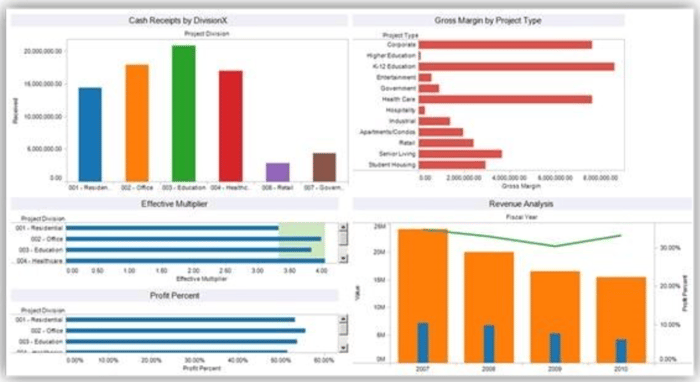
DVP_Dashboard_7-24-25

Even More Than Numbers

Management of change for “finance types” is unquestionably about the numbers. But all good number crunchers know that numbers reflect all sorts of things: More than just bottom line profit/loss, percentage increase, or improved customer satisfaction numbers.

Financial repercussions also must be measured for change that doesn’t occur to account for potential adverse effect of not making a necessary change.  Therefore, numbers have to be analyzed reflecting the “opportunity and efficiency costs of NOT making the change both of which also directly impact ROI” as we discussed in our introductory piece to this series.   

Bottom line

Bottom Line?

Financial oversight isn’t just about crunching numbers after the fact. It’s about steering the ship during change and helping the organization make smarter, data-backed decisions along the way.

So go ahead, own the role of financial change champion. Just remember: the goal isn’t perfection—it’s progress, backed by proof.

Up next in our series? Project managers, it’s your turn to shine. 🎬
What You Need to Know About OCR and ICR Technologies

Posted by Evan Creech-Pritchett on Apr 25, 2024

04-25-24 OCR and ICR Technologies - Banner

Without efficient document management, project-based firms would fall to pieces. The advent of advanced technologies, particularly in scanning and document processing, helped firms streamline this crucial aspect of their operations. Traditional scanning methods often fall short, only capturing document images without extracting crucial metadata such as client names, dates, or invoice amounts, unless manually inputted by associates.

What is OCR?

Optical Character Recognition (OCR) technology, also referred to as optical character reader, plays a pivotal role in modern document management systems. It involves the conversion of images containing typed, handwritten, or printed text into machine-encoded text. Various sources can be converted such as scanned documents, photographs of documents, scene photos capturing text on signs or billboards, or even subtitled text overlaid on images from television broadcasts.

OCR technology was developed by Emanuel Goldberg, making its debut in 1914. Initially, it was developed to aid the visually impaired in reading characters. Over time, OCR capabilities have evolved significantly, becoming useful in various everyday applications such as airport processes, mail handling, and banking.

Early iterations of OCR systems required training with images of individual characters and were limited to working with one font at a time. However, advancements in technology, and most notably in AI, have led to the development of sophisticated systems capable of achieving high accuracy across a wide range of fonts. Modern OCR systems can support various image file formats as inputs, enhancing their versatility and applicability.

Some OCR systems can even reproduce formatted output closely resembling the original document layout, including images, columns, and other non-textual components. This capability ensures that the digitized documents retain their visual integrity and readability, further enhancing the utility of OCR in document management and data processing tasks.

OCR engines have evolved into specialized software applications tailored to specific subjects such as receipts, invoices, checks, and legal billing documents. These applications offer a multitude of functionalities, including:

  • Entering data for business documents like checks, invoices, and receipts
  • Extracting business card information and integrating it into contact lists
  • Creating digital versions of printed documents
  • Enhancing document searchability by converting scanned documents into searchable PDFs

These applications show off the versatility and significance of OCR technology in modern-day document management. The adoption of OCR solutions is poised to become increasingly integral to firms’ operational workflows, driving efficiency, accuracy, and overall productivity.

What is ICR?

Intelligent Character Recognition (ICR) software goes a step further than OCR, recognizing various fonts and handwriting styles. This distinction is crucial for grasping the nuances of modern document processing. ICR swiftly extracts information from scanned paper documents, digitally storing it for analytical reporting and seamless integration into business processes. Its self-learning systems continuously update recognition databases, achieving accuracy rates exceeding 97% for structured forms.

An important application is Automated Forms Processing, pioneered in 1993, streamlining data extraction from real-world forms. While OCR focuses on machine-printed text, ICR excels in deciphering hand-printed characters, though it faces some challenges with cursive handwriting. As businesses embrace digital transformation, ICR's adoption promises enhanced efficiency and accuracy in document management, revolutionizing data processing workflows.

Benefits of ICR

While OCR remains a cost-effective solution for basic document management needs, ICR offers advanced features tailored to the requirements of project-based firms. Not only does the ability to decipher handwritten notes and diverse fonts expand its utility beyond OCR, but the automatic retrieval of relevant data mitigates the risk of human input errors, a common challenge with manual data entry processes.

ICR in Accounting

In the realm of accounting, ICR proves particularly invaluable, streamlining the processing of various financial documents such as accounts payable, invoices, purchase orders, and payroll forms. For larger firms handling a high volume of documents monthly, ICR significantly reduces the time and effort expended on manual data entry tasks, thereby enhancing operational efficiency.

Mobile Expense Retrieval with Deltek Vantagepoint

Leading ERP systems provider Deltek has embraced ICR technology within its flagship solution, Deltek Vantagepoint. Leveraging ICR capabilities, Vantagepoint's mobile expense feature enables users to capture receipts via photographs, with the software automatically extracting relevant text and populating fields. This eliminates the need for manual data entry, empowering accounting teams to track project budgets seamlessly throughout the project lifecycle.

Looking Ahead

As technology continues to evolve, Deltek remains at the forefront of innovation, exploring additional applications of ICR to further streamline business operations. Stay updated as Deltek continues to test and integrate ICR capabilities into various facets of its ERP system, promising even greater efficiency gains for project-based firms.


Manage Your Employee Expenses Like A Pro

Posted by Theresa Depew on Jun 3, 2020

Expense management

When employees seek reimbursement for employee-paid expenses, chances are good that far too much time is spent looking for receipts. Often, there is also the question of limits, processes, and details around submitting an expense report. Wouldn’t it be great if there was a software that could manage employee expenses with a seamless process, helping you navigate expenses like a pro? Fear not, as such automation is possible with SAP Concur. Even more, SAP Concur integrates with Deltek Vision and Vantagepoint through the Blackbox Connector to simplify your expense reporting processes.

With SAP Concur, you can see all expense data in one place, offering the big financial picture while making the process easier for your employees. Yes, it can be a win-win for all. Let us look at some of the advantages an automated and integrated expense management tool can offer.  

Makes the Process Easier for Users

While submitting an expense report can be a very frustrating task, it is a necessary business process that cannot be overlooked or eliminated. Usually, it does take administrative or overhead time for some often-extensive searching. Fortunately, SAP Concur can give employees an easier method of submitting expenses on a routine basis with the following features: 

  • Mobile Tools – Users have full access to expense report functions via a mobile device, allowing employees to submit, review, and approve on the go. Having full expense functions on a mobile device makes submitting expenses quick and easy. There is no more waiting until you are back at your desk to complete expense tasks.
  • Receipt Capture – SAP Concur removes the need for a scanner, and never having to use a scanner to upload receipts one by one is priceless. Simply snap a picture of a receipt using your mobile phone camera and start a report from your mobile device, saving processing time.
  • E-Receipts – Transaction data from airlines, hotels, restaurants, and car companies can be automatically captured to create accurate, detailed expense reports. Receipts can be sent directly to your SAP Concur profile, allowing you to quickly add the expense details without having to organize receipts. As soon as the receipt is emailed, it appears on the home expense screen.
  • Credit Card Feeds – Your corporate or travel card transactions are directly fed into SAP Concur for expense processing. This functionality is marvelous; firms no longer need to manually import charges into an ERP or expense program for users to expense or for reconciliation. When a charge is made, the bank sends the transaction to SAP Concur. From there, users will see it on their home expense screen, and it is ready for expensing.

As you can see, the expense management process can be more efficient for employees, allowing them to focus their efforts on earning new business, serving the client, or working on current business. With an easier process, employees can submit their information timelier, and accounting can invoice clients sooner on billable expenses, helping to shorten the invoicing cycle.

Even Accounting Thinks This is Snazzy

Accounting teams are often the ones tracking down the missing details or having to reject submissions for details that were overlooked. By automating expense management and integrating it with your accounting system, SAP Concur can be implemented with workflows, ultimately helping everything flow more smoothly. Here are some of the features that accounting teams can look forward to:

  • Automated Travel Policy – Workflows can be set to warn or stop expenses from being submitted based on your company’s expense/travel policy. Using the audit rules takes the guess work out of policies. Workflows allow the expense audit/approval process to move quickly and efficiently. Auditors and approvers do not need to spend hours verifying every policy detail; most can be set up as a rule and not allowed.
  • Reporting – SAP Concur offers simple spend monitoring, schedule reports, and customizable reporting. The software offers out-of-the-box reporting, which is quick and easy to use. Reports can also be downloaded in different formats – Excel, Word, PDF. If the report needed is not available, it can typically be created and saved for future use.
  • Integration – A comprehensive financial picture and reliable reporting can be gained by connecting to your enterprise resource planning system (ERP), Deltek Vision/Vantagepoint. Integrating SAP Concur with Deltek Vision/Vantagepoint allows a constant and consistent flow of financial data. New or changed employees and projects can be pushed into SAP Concur through an automated feed. Also, expense reports that are approved/processed in SAP Concur will be fed into Deltek Vision/Vantagepoint nightly and be ready for posting. So, no more need for double entry at many levels.

Wins All Around

As you can see from the highlighted features, SAP Concur can eliminate many pain points that come with expense reporting. The right expense management software creates a smoother process for firms, which benefits the employees, supervisors, and accounting team alike. We can all agree that any process that can be automated and ultimately improve a business should be given consideration. Everyone will be pleased with timely expense reimbursement so start managing your expenses like a pro with SAP Concur.

Preparing for 2019 Year-End

Posted by Jennifer Renfroe on Nov 27, 2019

Year End 2019

Year-End is coming! Don’t let year-end bring you down - create a plan and stick to it. A great way to start is by creating a checklist and calendar. Make sure your calendar includes all year-end deadlines: final AP and Expense payment processing, final timesheets due, and final bank reconciliation are all important items to include. Deltek issues a checklist yearly, and this is an excellent starting point to create the plan for your company. Once issued, it will be available on the Support Center site.

Top Items to Consider Adding to Your Year-End Checklist

  • Reconcile all cash accounts – Post all transactions in Deltek Vantagepoint or Vision. Verify your general ledger balances match your bank statements. Make all adjustments as needed.
  • Final Invoicing – Process all client invoices for the fiscal year.
  • Review outstanding Accounts Receivables – Follow-up with clients who have outstanding accounts receivables beyond 30 days. Send past due statements and/or simply give them a call. Enter the results of your collection efforts in the comments section of Deltek Vantagepoint or Vision Invoice Review. Year-end is an excellent time to collect your outstanding receivables. If you determine there is uncollectable AR, be sure to write those invoices off.
  • Review Unbilled detail - Time and expense transactions that cannot be invoiced to clients should be written off at this time.
  • Fixed Assets – Fixed Assets are larger purchases that are made throughout the year (i.e. equipment, automobiles, furniture, computers, etc.). This is the time to make sure all fixed assets are reported on the balance sheet if they are still owned. If not, record the sale or disposal of these fixed assets. Additionally, verify the depreciation on your fixed assets as well and make any necessary adjustments.
  • Employee Expenses and AP - Verify that all accounts payable vouchers have been recorded in Deltek Vantagepoint or Vision. Make your 401(k), SEP IRA, and Simple IRA contributions have been made, if you have not done so. Try and pay all your vendors and employee expense reports by year-end.
  • Notes Payable - Verify notes payable (i.e. loans) amounts on your balance sheet match the statements from your lenders and make all adjustments as needed.
  • W-9s – Order 1099 forms as soon as possible. Furthermore, make sure all W-9s from your vendors and/or contractors that have been paid $600 or more to throughout the year are on file. Don’t forget 1099s should be mailed on January 31st. 1099 forms can be purchased from most office supply stores, or you can order them for free from the IRS.
  • W-2s – If you run payroll in Deltek Vantagepoint or Vision, order W-2 forms. W-2s should be mailed by January 31st. W-2s can be purchased from most office supply stores.
  • Budget for next year - Create your GL budget for 2019.

Communication and Organization is Key to Success

Make sure all in the firm know what their role is for year-end, i.e. when final timesheets and expense reports are due. Put a year-end process in place, create a manual and checklist to use yearly, and you’ll be ahead of the game next year! Please note: Deltek will be issuing year-end updates for Vision 7.6 and Vantagepoint. If you are on 7.5 or older, you must upgrade to a supported version to receive a 2019 year-end update. If you are still on Vision 7.5 or an older version, contact Full Sail Partners if you have questions about upgrading to Vision 7.6.

Now is the Time to Move to the Cloud

Posted by Wes Renfroe on Jan 2, 2019


Move to the Cloud

As a small to medium business owner, IT management can be a big headache. Your real work is often disrupted by IT issues such as adding new employees, getting your staff’s machines and apps running, and updating software and support. Moving to the cloud with hosted apps and desktops is the best solution for your firm. Let’s look at the benefits of cloud hosting.

Mobilize the Workforce

With a hosted virtual desktop service, employees have access to apps, documents and other resources from anywhere. All that is necessary is an internet connection and an end point device. Employees can get work done on the go and feel like they never left their workstations.

Business Continuity

Data is safe and always available with a hosted service. If there is a power outage or natural disaster, the offsite data center provides firms with no disruption of service. Data is always secure in the virtual data center which ensures protection with built-in data encryption.

Reduced IT Costs

With a hosted solution, no IT expertise is needed by the firm. Firms will end up spending less on licensing fees and off-site data storage and backup. Anti-spam and virus management is also provided in addition to 24x7 help desk support.

Focus on Growing Your Business

Moving to the cloud with hosted apps and desktops leaves time for your firm to focus on your real work and growing your business. Using the cloud solution, the days of having to manage apps, desktops and servers are in the past. Instead, all the updates and patches are handled for you. Are you ready to move to the cloud?


Introducing Deltek Vantagepoint

Posted by Ryan Felkel on Sep 5, 2018


Deltek VantagepointWhen Deltek for Professional Services (DPS) 2.0 is released, it will have a new name - Deltek Vantagepoint. In addition to the name change, there will be several enhancements to improve the user experience for both back office and front office users. Here is a sneak peek of how Deltek plans to take the breadth and depth of the Vantagepoint solution to the next level.

Say Goodbye to the Smart Client

With the release of Vantagepoint 2.0, Deltek will begin to push users away from the smart client and direct them to the web browser version. Using this version, they will be able to access Vantagepoint from any device that is connected to the internet using any browser they desire. Think of it this way - Vision is the smart client and iAccess is the web-based version. Keep in mind that if your firm is still using Vision, you may want to consider using iAccess more to get comfortable with the look and feel of Vantagepoint.

Proposals Engine

The proposals engine is now being introduced to Vantagepoint, and it is a great feature. For marketing, the proposal process can be extremely time consuming. With the proposals engine, a person creating a proposal can go through and check off boxes based on the requirements of the RFP, and Vantagepoint will automatically create the proposal. It can include images and pictures, employee resumes, past work examples, references and more.

Combined Opportunities and Projects

The opportunities hub is going away and is now being combined with projects. This has a huge upside for business development. By tracking an opportunity as a project, time and associated costs can be captured to help determine the price of pursuing new work. Additionally, a timeline with milestones and reminders can be developed to ensure business development is staying on top of winning the opportunity.

Simplified Transactions

Moving forward, transactions will be managed within a single location. Users will go to one place within Vantagepoint to enter, edit, report, post and approve transactions. Additionally, you will have the option to enter transactions without files and to post on entry. The line item detailed view will still be available.

Project Information Management Integration  

Deltek Project Information Management (PIM) will now be integrated with Vantagepoint. It will be easy to find since it will be a tab in the project record. By using PIM, firms can easily share project related documents and information within one platform.

Expanded Dashpart Designer

The new improved dashpart designer allows users to create custom dashboards with information that is important to them. They can select bar and line graphs, pie charts, or other graphics as part of their dashboards. Additionally, users will have enhanced control for grouping, sorting, filtering and totaling data all within the dashpart.

Improved Reporting

The reporting screen will now have a preview menu. When users create a report, the multiple clicks required in the past will be eliminated. The reporting tool will also include charts and graphs.

What Deltek Vantagepoint 2.0 Means to Your Firm

One thing is for sure - 2018 to 2019 will be a transitional time for Deltek Vantagepoint. As Deltek continues to further develop Vantagepoint, more features will be added to further enhance this solution. The most important take away for users is that they need to be aware of the changes coming and they need to be ready to embrace them.


Reasons to Automate the Accounts Payable Process

Posted by Ryan Felkel on Jun 27, 2018

Invoice AutomationThe accounts payable (AP) process is one of the most important tasks a firm performs daily. Although accounts payable automation is not new technology, it has come a long way over the years. It’s surprising that so many firms have not embraced this technology to improve the AP process. Maybe it’s because they feel doing it manually will be more accurate, or they think their current process is efficient and cost-effective? So, let’s take a look at the benefits of automating the AP process and see if these preconceived notions have merit.

Going Paperless and Reducing Error

Accounts payable is a paper-intensive process that requires printing, copying, storing and retrieving papers. Additionally, manual processes are slow and are prone to human error rather than being more accurate as one may think.  With AP automation, invoices are stored digitally, and both paper costs and manual entry are eliminated saving money and ensuring accuracy.

Improving Employee Productivity

The AP process is a repetitive and time-consuming manual task. For instance, processing an invoice manually requires a person to copy information from an invoice and add it to the accounting books. When a firm automates the AP process, employees are relieved of doing these tasks and can focus their efforts on more profitable pursuits. 

Getting Insight into Your Firm’s Finances

It’s difficult to manage your firm’s finances if you can’t see them. Solutions like spreadsheets or pen and paper hinder your firm’s ability to generate accurate financial reports. Furthermore, being able to see who you owe money to allows you to predict future firm spending and avoid late payment fees and penalties. With AP Automation, your firm’s financial picture is easily accessible and therefore manageable.

Gaining Control of the Procurement Process

Procurement policies are hard to enforce if you do not have a way to approve a purchase before it’s made. Using an automated AP solution allows firms to setup an approval process that ensures purchases are in compliance with firm policy. Firms can gain control of their spending by knowing when a purchase is made prior to being issued an invoice which promotes transparency.

Automate Your Firm’s AP Process

With actual reduction in error, cost savings and a clear view of firm finances, the preconceived notions of not using AP automation are certainly without merit. And there’s even more benefit to automation. An automated AP solution allows vendors to submit invoices to a designated email address or webpage which reduces the risk of losing invoices. It also ensures you pay your vendors on time which makes them happier to work with your firm. Is your firm ready to automate?


How to Measure a Project’s Financial Health

Posted by Ryan Felkel on Jun 6, 2018

Project HealthFor many firms, measuring the financial health of their projects requires them to utilize a variety of different analytics and statistics. However, firms often use project invoices as the primary and only measurement to determine the financial health of a project. Although project invoices are an important element in both a project and firm’s concern, they aren’t necessarily a measure of success. 

Besides key performance indicators (KPIs), which are leading indicators geared toward firm management, there are other statistics firms need to consider. These include measurements at specific milestones to help evaluate a project’s financial position and make proactive decisions to keep a project on track or facilitate corrective actions.

The Essentials to Determining a Project’s Financial Health 

For starters, some key components of the evaluation entail every project being documented with: 

  • A current and accurate fee
  • A work breakdown structure (WBS) reflective of fee and scope
  • The proper revenue recognition method 

Understanding the Components of a Project’s Financial Health 

To best focus on the financial success of a project, firms should use job-to-date (JTD) as the measurement of time. Here are some key stats that can be found or created in Deltek Vision’s Project Earnings Report: 

  • Profit or Variance – This provides a comparison between revenue/earnings and spent at either cost or burden. For projects billed on time and materials (T&M), the project profit should be built into billing rates and therefore a zero variance is an indication of profitability. A negative variance is the result of the writing off time charged. For fixed fee/lump sum work, the goal is to incur the minimal amount of cost while still executing the scope and not compromising the quality. 
  • Projected Profit or Variance – In order to calculate this metric, an estimate to complete (ETC) needs to be updated and managed. Using the ETC plus the JTD cost results in an estimate at completion (EAC). By comparing the EAC to the Fee, we can establish how healthy the project will be when complete. This can also be a good indicator of scope creep. Additionally, using actual and projected profit in tandem provides 4 scenarios and a matrix approach can be developed for the review of a project’s financial health: 
  1. JTD is showing a profit but projecting a reduction in that profit moving forward
  2. JTD is showing a profit and continued or increased profit is forecasted
  3. JTD is showing a loss but some or all that loss can be mitigated moving forward
  4. JTD is showing a loss that will continue or grow 
  • Direct Labor Multiplier – How much revenue is being generated per labor dollar charged is key to managing a specific project and beneficial to measuring against the firm’s overall metric and the goals set. At the inception of a project, the budget will provide the estimated multiplier. Keep in mind that a statistic requires having something to compare it to.
  • Work in Process (WIP) – This is calculated as the difference between project revenue and the amount invoiced. Furthermore, this will help mitigate any at risk to earnings from a project. If revenue is accrued, we must be mindful of the time associated with it being billed and collected. Deferring revenue can minimize or mitigate the risk. 
  • Backlog – Indicates what is left to be earned. In other words, it is the future available revenue stream. When combined with all projects, it provides one of the lines on a KPI graph. In addition, it reflects the required full time equivalent man hours to complete and deliver contracted work. 

It is important to note that all the above work in tandem. For example, backlog can be derived from the ETC. 

Make Your Project Profitable 

Measuring the financial health of a project requires using several metrics. Additionally, projects should be monitored during the entire cycle from inception to completion. This will allow project managers to foresee possible shortcomings and take corrective action.


Spend Management Reporting Made Easy

Posted by Full Sail Partners on May 9, 2018

Spend Management ReportingFinancial reports are essential to every organization for providing information about the health of a business to internal stakeholders as well as interested outside parties. For many firms, this is a manual process which requires significant time and resources to collect expense and invoice details, code them to the ledger, and then organize high-level summary information. Your accounting staff shouldn’t be spending their time organizing data, but instead analyzing the data to help your firm make better business decisions.
What’s the Solution?

To get started, SAP Concur has organized the key information into many standard dashboards, tiles and over 180 reports available in the standard report catalog. Many of the standard dashboards include the bulk of information your teams need, but they can also be personalized to meet specific requirements or preferences. These dashboards, tiles, and reports can be used to assist managers in tracking budgets and forecasting for future cashflow management. Tracking elements include spend by expense type, time-period, and project or department.

Why SAP Concur Reporting?

To budget for future spending and forecast future cash needs, you need to understand what you have spent in the past and what spend is still outstanding. Firms often use the processed spend data from within their financial or enterprise resource planning (ERP) system. However, the challenge firms face is real time access to spend and accrual data that hasn’t yet been submitted into their ERP system. Concur Analytics Data is available in real time and is available before the expense report or invoice is submitted for payment.

Get to Know Tiles

Tiles in Concur can be used by themselves or pulled into dashboards for a more comprehensive view of spend.

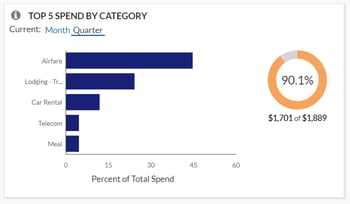
  • Top 5 Spend by Category allows users to easily view where your spend has been incurred. This lets you quickly determine if it is incurred in the expected categories, if spending needs to be reduced, and where might make the greatest impact. Accountants can then utilize the Spend Analysis dashboard or Expense Entry Analysis Details report to drill further into the categories and spend by vendor to help negotiate better pricing with your top vendors.

Concur 1

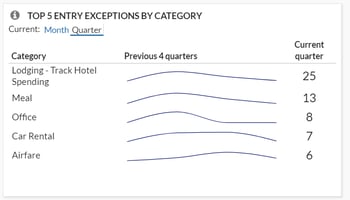
  • Top 5 Entry Exceptions by Category enables users to easily view exceptions. This allows your team to identify the impact of any policy changes and see the policies with the most violations that should be investigated further. For even more visibility, they can then drill down into the Policy Exception Detail or Spend Analysis dashboard as well as the Expense Exception Analysis for both Report Level and Report Entry Level reports.Top 5 Entry Exceptions by Category
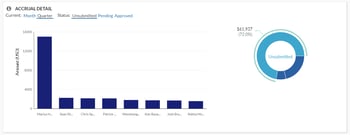
  • Accrual Detail lets you identify the largest opportunity to take action on with outstanding spend, and specifically which individuals carry the largest value of outstanding spend. Your managers can either find training opportunities with these top individuals or focused spending cuts. For your accounting staff, this tile will help you determine the impact to future cashflow during tight budget cycles.

Accrual Detail

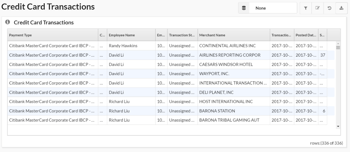
  • Credit Card Transaction Report is one of the best features since it enables you to easily regain hours or even days’ worth of your accounting staff’s time. Although it may not be the sexiest feature, it is critical for keeping your data in compliance. This report lists all credit card transaction details imported into Concur. It can be used as a comprehensive listing or as an ad hoc exception report to look at certain subsets of credit card transactions. Organizations with a corporate card program need to reconcile their credit card transactions with the card statement to ensure all expenses are being processed, and this report can assist with that reconciliation. Also, this report can be grouped by Employee, then sorted by Posted Date to mirror the format of the credit card statement for simplified reconciliation. Another version of this report, the Unassigned Credit Card Transaction report, can help you quickly find those expenses which have been accrued are not yet assigned to an expense report.

Credit Card Transactions

Take a Deep Dive with Reports

For more in-depth analysis and details, reports can help streamline your workflows and drill down into the data you need. Custom reports can also be created by the Concur team if your requirements fall outside of the standard options.

Quick Access with Dashboards

You can start with one of many pre-built dashboards or create your own from scratch by adding tiles and reports to existing templates. While there are many dashboards available, some of the top ones include the Expense Overview dashboard and Policy Compliance dashboard. 

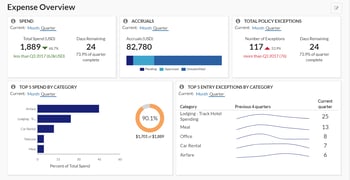
The Expense Overview dashboard is a perfect starting point for budget, cashflow management, and policy compliance all in one place. This dashboard can be used as a starting point to create a new custom “Spend Management” dashboard. Managers can use this detail for budget and forecasting purposes. Personalization recommendations are to retain the Spend, Accruals, and Top 5 Spend by Category tiles as well as adding additional tiles: Spend Summary Trends, Spend Change by Category, and Accrual Detail.

Expense Overview

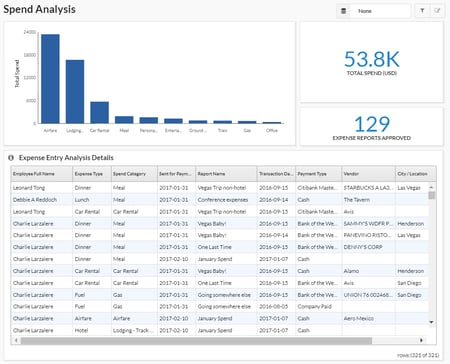
The Spend Analysis dashboard is an incredibly functional dashboard that offers users an in-depth analysis on total spend for a given period along with a summary breakdown of that spend by Expense Type and associated detail. This dashboard can be easily filtered to show specific Spend Categories, Expense Types, or Employees for total spend analysis or grouped and sorted in ways that are meaningful for specific tasks. It allows leaders to identify what their teams have spent in a given period. They can even track individual spending patterns to identify specific areas for follow-up or track improvements in spending behaviors. This report is versatile in that it can be filtered to show trends in spending patterns or behaviors. If more detailed analysis is required, use the Expense Entry Analysis Detail report.

It is recommended that an organization review their travel policy once a year and adjust as needed. It is important to consider the potential impact of a policy change before one is implemented. If an organization does not have a limit on cell phone reimbursement, but needs to create a policy on this expense, the Spend Analysis dashboard can be reviewed to identify average reimbursement rates to establish a baseline for a new policy. This dashboard can also be used to assess the impact of such a policy change to identify how many individuals would have been out of policy if the value was changed.

Spend Analysis

SAP Concur is a Complete Spend Management Solution

With over 180 reports available in the standard report catalog, Concur can help you quickly and easily analyze your Travel, Expense, and AP automation program to gain valuable insight into how to proactively manage all aspects of your business’s finances. It’s been said that knowledge is power, but having too much information can be as bad as not having enough. You need to be able to see spend clearly so you have more time to run your business. As your business and reporting needs evolve, let Concur and Full Sail Partners help you capture and monitor the data you need.

Why Your Firm Should Be Using the Deltek Vision Payroll Module

Posted by Scott Gailhouse on Feb 21, 2018

Payroll It is amazing that so many people aren’t even aware of the numerous benefits of using the Deltek Vision Payroll module. For starters, the Payroll module in Vision is a robust application that gives you control over your payroll process that you otherwise wouldn’t have if you used an outside payroll company. It allows you to meet the increasingly complex regulatory requirements by defining taxable wages based on any withholding codes that you create. You can also define how other pay wages impact a withholding calculation. All of this can be done from Payroll Withholding Setup. 

How the Deltek Vision Payroll Module Works

If your firm is using the Payroll module to process your payroll, Deltek Vision will use information from the Employee Info Center, the Project Info Center, the Transaction Center, and Accounting Cost/Pay Rate tables to process payroll.

Some of the main features of the Vision Payroll module are:

  • 2 overtime multipliers – There are some firms that are required to pay overtime (OT) to hourly employees. For example, you may have to pay time and a half for some OT hours worked and maybe double time for other OT hours worked. Vision can be configured to accomplish this. For added flexibility, you also have the option to bill these overtime hours at a higher billing rate in billing terms.
  • User-defined other pay fields – In addition to an employee’s regular salary, you can also add payments for other items. Some firms will use these fields to record bonus payments, moving allowance payments, allowances for fitness club memberships, public transit passes, etc.
  • Contribution codes – If you make payments on behalf of your employees, i.e. state unemployment or 401k matches, you can track those payments using contribution codes. Contribution codes can record those amounts by employee. Vision will also post the entry to the balance sheet liability account.
  • Withholding codes – In addition to the standard federal, FICA, and state withholding codes, users can create their own user-defined withholding codes to suite your firm’s needs. You can create withholding codes for medical insurance, cafeteria plans, wage garnishments and Roth IRA plans to name a few.
  • Direct deposit – Vision supports the direct deposit of funds directly into an employee’s bank account(s).
  • Payroll types – Most payroll runs processed in Vision are for your regular weekly, biweekly or semimonthly or monthly payrolls. You can also process adjustment payrolls to make changes to a payroll that has already been processed. Furthermore, you can use this feature to adjust pay, withholdings, regular, overtime, and secondary overtime pay hours, and accrued benefit hours. A bonus payroll run automates the process of giving your employees bonuses.
  • Payroll reporting – Using Vision payroll reporting, you can generate worksheets that help you fill out state unemployment insurance reports, quarterly state income tax reports, and federal Forms 940 and 941.
  • W-2 forms - The Payroll module prints a W-2 for each employee who was paid during the calendar year. You can print W-2s on W-2 forms that are specially designed for use on computer printers.

Integrate with Outside Payroll Companies

If, however, you decide that your firm would rather use an outside payroll company to process payroll, despite the benefits of using the Deltek Vision Payroll Module, Vision offers an interface option that can export timesheet data to most large payroll companies including ADP, Paychex and Ceridian. With this integration, a third party will be able to manage the complex areas of payroll processing such as tax withholdings.

Do More with the Deltek Vision Payroll Module

It should now be evident to most people that the Deltek Vision Payroll module is an extremely flexible tool that can be used to help your firm streamline the payroll process. The Payroll module additionally provides a wide-range of detailed reports based on the information stored in your Vision database. So, start realizing the benefits of using the Vision Payroll module and improve your firm’s payroll process today.


Most Recent News Mentions

We’re changing the way project-based firms operate.

People can’t help but notice.
Who will be next?

Check out our latest newsworthy work: