In the News


We’re devoted to revolutionizing the way our clients do business. Sometimes that gets us noticed.

No big deal.

Posts about Technology Solutions (12):

Project Survey - Just Click the Dot for Details!

Posted by Ryan Suydam on Dec 4, 2013

CFT ButtonAs a project manager you have more to do in any given day than you can possibly get done. Sound about right? And, as if you don’t have enough to do, you sit through team meetings, office meetings, and visits from the top leadership where they remind you how important it is to ensure your clients are your top priority while also achieving strong profits. Okay. Now for the big question – how do you balance both priorities?

Do you remember the EASY button? Well I think Staples© was really onto something with that. I can’t tell you how many times I’ve wished I had one of those to handle tasks that I knew were important but that I struggled to get completed. Have you ever wished you had one to measure how things were going with your clients? Wouldn’t it be great to have a one button solution when your supervisor asks you how things are going with your clients?

Well, now you do. The answer – send your clients project surveys!

Client Feedback Tool grew out of an architectural firm so I definitely get it! As strongly as I believe that getting feedback from your clients is essential to building strong and lasting relationships, I am well aware that time is the one thing project managers in the A&E industry have in limited supply!

So you may be wondering, he just acknowledged that project managers have no time for extra steps in the project management process and yet he is suggesting that we send project surveys to our clients? Fair enough. The truth is that it takes less than 2 minutes to send your clients a survey. And, the information you get will save you so much time!
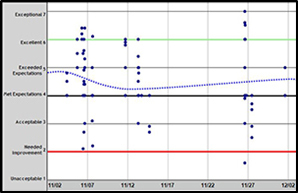
cft plotterEvery time one of our clients sends a survey, their clients’ responses are logged onto a scatter plot like the one in this figure. One of several reporting options, the scatter plot analyzes how well client expectations are being met. It takes less than a minute to run and you can schedule it as a weekly or monthly recurring report. Our clients see a snapshot of what their clients are saying. Are you starting to see how this will give you the information you need?

Each of our surveys consists of about 6 – 8 questions asking how well client expectations in different categories are being met. The blue dots represent individual pieces of feedback from one of those surveys. With a 4.0 indicating that the client’s expectations are being met, this one chart can be your very own EASY button!

With one quick glance you can see that overall you and your team are meeting, or exceeding, your clients’ expectations. But there’s more.

When you click on any of the blue dots, you immediately see:

  • What project that piece of feedback is associated with
  • What question was being asked
  • Who answered the question
  • Any specific comments by the respondent

It’s important to note that using project surveys does not replace the ongoing conversations you have with your clients.  However, with a strong feedback process you can, in about 5 minutes a day, get the details you need and get back to managing your projects. If there are ever any challenging responses, a simple click on the blue dot gives you the information you need to begin finding a resolution before their concerns become problems.

In addition to seeing the results for the clients you manage overall, you will have the ability to see a scatter plot for each individual client as well. Now, with your very own EASY button, the next time you are asked ‘how are things going’, you will have the information at your fingertips!

Interested in learning more about using project surveys?

 

Professional Services Marketing: A Changing Landscape

Posted by Lee Frederiksen on Oct 23, 2013

changinglandscape

Guest blog written by Lee W. Frederiksen, Ph.D.

It’s old news that technology has changed the way we interact – and that includes the way we purchase goods and services. But the professional services industry has largely lagged behind other sectors in reacting to this change, continuing to rely on traditional forms of marketing that are both more expensive and less effective. The small percentage of firms that have embraced online marketing, however, have seen marked success. In our recent study on online marketing, we learned that professional services firms employing online marketing techniques grow 4X faster, and are 2X more profitable than other firms. Why is this so? What is it about online marketing that is so effective? To understand why online marketing works, we need to understand today’s buyers. 

How Buyers Choose Professional Services Firms 

Technology has changed the way that buyers search for and evaluate professional services firms. Based on our research, we know that 71% of buyers still ask their friends and colleagues first when they search for a new professional services firm. At first glance, this seems like the old way of doing business. What’s changed is that, after receiving the referral, these buyers can now go online to do their own research on the firms that were recommended. 

The Internet has allowed buyers to take much more control of their purchasing process. In fact, in their recent study of over 1,400 B2B consumers, the Corporate Executive Board found that 57% of a typical purchasing decision occurs before the buyer ever has a conversation with a service provider. This represents a drastic break from the past. 

Even more notable, the third largest group in our study—11% of professional service buyers—said they skip the referral process altogether, going directly online to search for firms. Combined with the first group of buyers who use the Internet to check up on firms referred from their network, this means that altogether 82% of professional services buyers go online at some point in their buying process to evaluate a firm. 

The Digital Generation 

The Internet has drastically changed the marketing landscape for professional services firms, and we expect that landscape to continue changing. Consider that most workers under the age of 35 have never worked in an office without Internet access. Research shows that for this rising category of leaders, using online resources to evaluate and communicate with firms is second nature. And, as this digital generation ages and takes on increasingly senior leadership positions, they will give technology an expanding role in their buying and decision-making process. 

Putting It All Together 

Technology has forever changed the way that consumers interact with, and purchase, professional services. Those firms that learn to embrace the advantages offered by these new technologies will continue to grow and profit, widening the gap that already exists between technology adopters and non-adopters. For professional services firms, ignoring online marketing means living in the past. 

Read more about the way professional services marketing is changing in Hinge’s new coauthored book, Professional Services Marketing 

About the Author:

Lee W. Frederiksen, Ph.D., is Managing Partner at Hinge, a marketing firm that specializes in branding and marketing for professional services. Hinge is a leader in rebranding firms to help them grow faster and maximize value. Lee can be reached at LFrederiksen@hingemarketing.com or 703-391-8870. 

Interested in implementing an holistic solution to help your marketing team better manage your efforts? Check out Deltek Vision CRM and get a leg up on your competition.

Deltek Vision Timesheet Activity Automation

Posted by Wes Renfroe on Aug 20, 2013

Activities provide a greater way to gain visibility into communication efforts across the firm about a client. They provide a detailed view of what is going on with a project/firm/opportunity and are critical for providing team backup and covering your backside.  You are probably aware of three main ways to create activities in Deltek Vision – Manually (slow), Using MODI (faster but limited), and CMO (even faster but costs more $$).  The innovation team here at Full Sail Partners has developed a fourth way, the fastest, easiest, most convenient way to create activities so far:  Just do your timesheet and let the activities be created for you! 

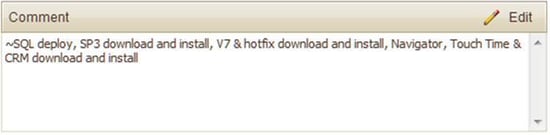
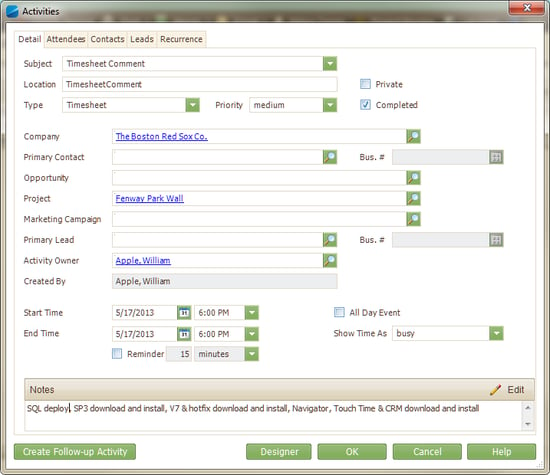
The way it works is quite simple, just enter your hours, as well as, a detailed comment regarding work done for a project on your timesheet and make sure the first character in the comment is a tilde symbol (~).  Save your entry and close your Deltek Vision timesheet.  Overnight all the timesheets will be scanned and those that start with the special character will have activities generated for them.  Additionally the leading character will be changed from the tilde to a carot (^) to signal that an activity has been created for this entry.  Once your Deltek Vision timesheets are closed out and before billing is run all special characters are removed. 

So just by adding one additional character to my timesheet, this: 

Deltek Vision Timesheet

Becomes this:

Deltek Vision Activity 

This is a great way for you to “kill two birds with one stone” (well maim them maybe) – Keeping your timesheet up-to-date and relevant (making accounting happy) and providing the CYA and team insight into your progress on the project (making management happy). Want to learn more about this and other Full Sail Partners solutions?

What is a Workflow: Automate Your Deltek Vision System

Posted by Wendy Gustafson on Jul 30, 2013

deltek visionHere we are ½ way through the year, and yet my ‘to-do’ list has kept growing.  In today’s economy we have all been asked to do more with less help.  This often requires us to take on more responsibility and daily tasks - which causes us more stress, longer hours and greater chances to ‘mess up’ -  so to speak.
What to do? What to do?  Through workflows, Deltek Vision offers us an opportunity to automate many of the repetitive tasks we have to do every day – that quite often fall through the cracks of our busy, busy days (and hopefully not too many nights).

What is a workflow? 

You might ask, what is a workflow? Workflows are actions that your Deltek Vision system will carry out for you based on events that occur within specific Info Centers.  An example of this is sending an email to an employee when their name is added as the Project Manager on a project.

Can I do this?

In many cases you can do a lot of the automation on your own.   Deltek's intuitive design allows “non-programmers” to create workflows and actions for many repetitive task. 

To do this, you will need to know a couple of things.  First – where are workflows found?  They are found in Configuration --> Workflows (guess that wasn’t too hard).

Next you need to understand the different options under workflows. Watch this highlight video to better understand the options under workflows, and the actions that can be performed: 


So you see that using the standard workflows in Vision can help you with many repetitive tasks that are triggered from actions taken within Vision.  Making these automated will free you and your staff up to pursue more productive workdays and more fun nights.

But wait you say, how do I actually set up these workflows? That's a great question!  If you still are asking, what is a workflow, watch the full length video on Workflows and Stored Procedures. Learn how to set up workflows in your Deltek Vision system today! 


Deltek Kona Calendar Integration with Microsoft Outlook

Posted by Sean Keller on Jul 18, 2013

Deltek Kona is a cloud-based social collaboration and productivity platform that empowers individuals and groups to connect, organize and get things done together. Through the use of collaborative spaces, users have the ability to coordinate, share, and schedule events or tasks with teams and groups.

Groups that use Kona vary from companies to individuals. Companies communicate with team members, internal and external, on company initiatives, proposals submissions, and the execution of projects every day.  Individuals involved in organizations and personal groups need a way to coordinate efforts among participants.  You may find yourself in both of these circles.  No matter if you are a company or individual, each find Kona brings the conversation, tasks assignments, and files needed to a centralized space.

Most companies and individuals are already accustom to viewing their calendar in Outlook (Entourage for Mac) or Google. The good news with Kona is you can integrate the Kona web calendar into other calendar applications.  For today's example we will walk you through viewing your Kona calendar in Microsoft Outlook 2013. This allows you to see the Kona calendar along with any calendars you have setup in Outlook to provide a quick visual of all of your Kona spaces. 

Step 1

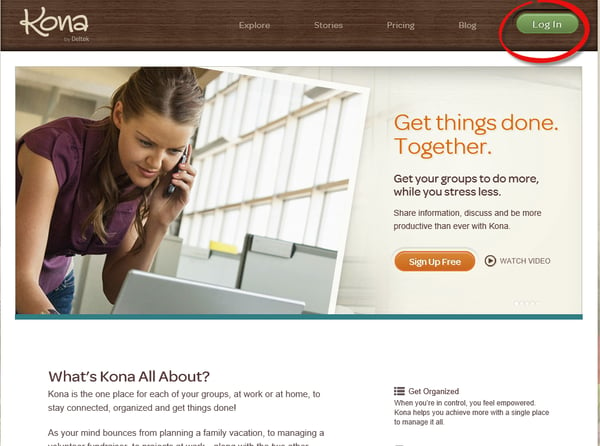
Login to http://www.Kona.com

Deltek Kona 

Step 2

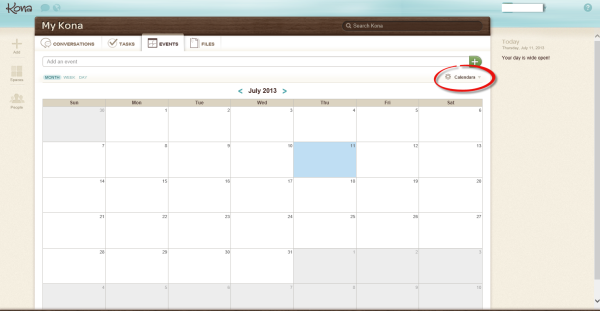
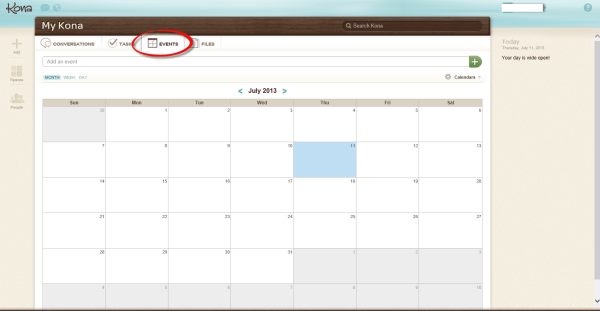
Select the calendar by clicking on the Events tab

Kona Calendar 

Step 3

Click on Calendar

Deltek Kona Calendar

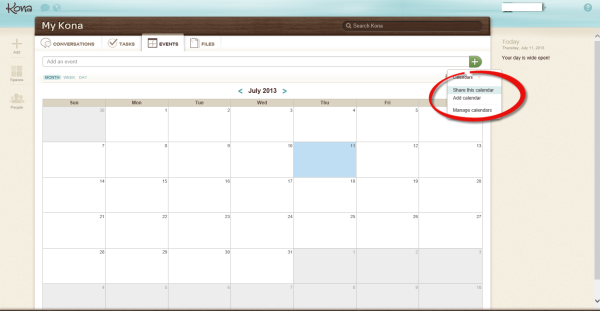
Step 4

Select Share this Calendar from the drop down menu

Deltek Kona Calendar, Instructions 

Step 5

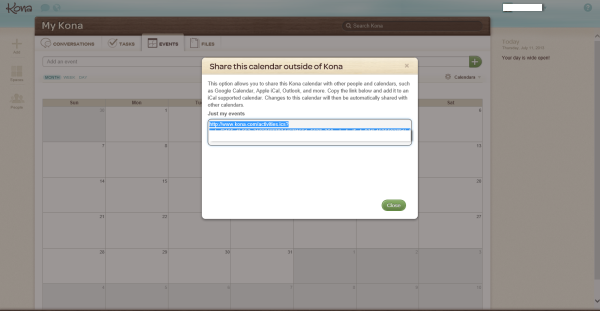
Select the link displayed in the window and copy it.

Deltek Kona, Calendar Integration 

Step 6

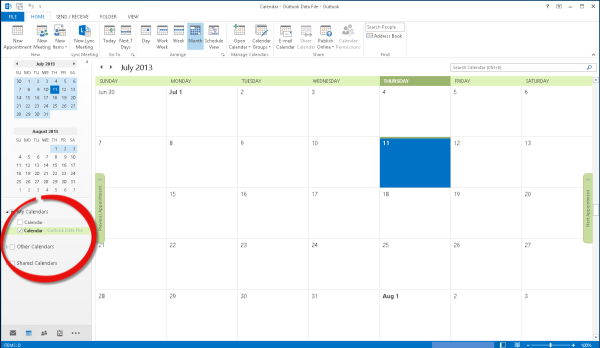
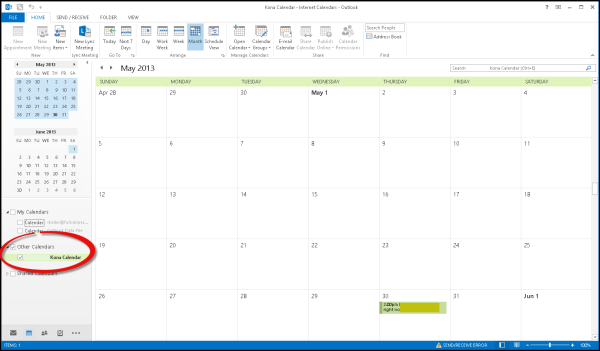
Open outlook and switch to the calendar view. Notice the list of calendars displayed at the bottom left.

Deltek Kona, Kona, Calendar Integration 

Step 7

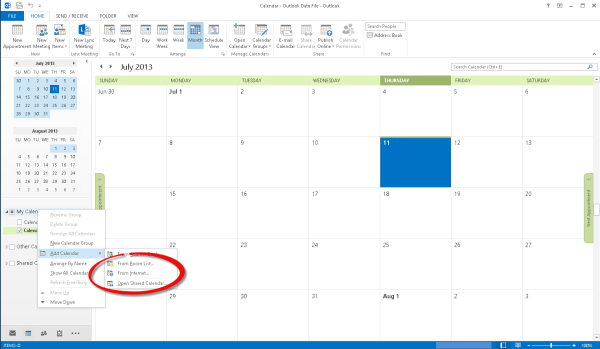
Right click on Other Calendars and select Add Calendar, From Internet

Deltek Kona, Kona, Calendar Integration, Internet Calendar 

Step 8

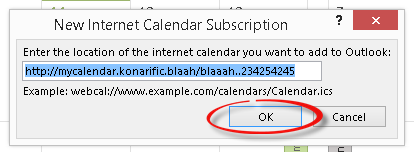
Paste the link from Kona in the New Internet Calendar Subscription box and click on OK.

Deltek Kona, Internet Calendar 

Step 9

Notice the Kona Calendar is now displayed in the bottom left

Kona, Deltek Kona, Outlook Integration 

Step 10

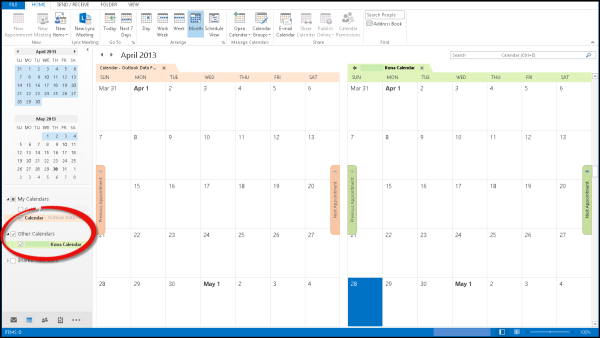
Multiple calendars can are displayed when additional calendars from the list are selected

Outlook Calendar Integration 

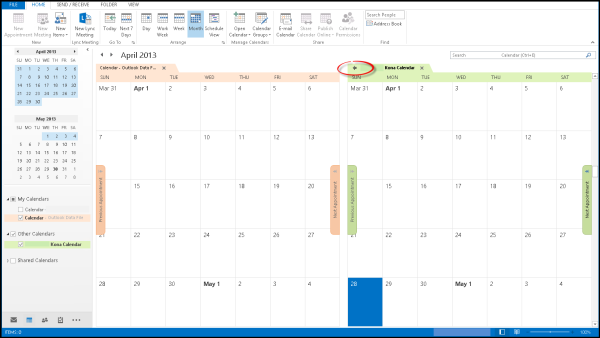
Step 11

Click on the arrow beside a calendar to combine the view.

 Kona, Outlook, Integration

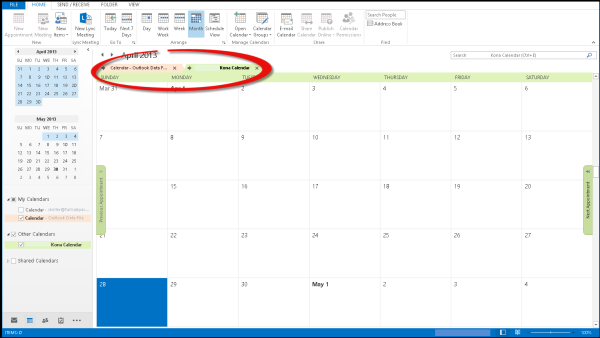
Step 12

Now the Calendars and all appointments are all displayed in a single calendar view

Outlook, Kona, Single Calendar 

Making the Kona calendar viewable in Microsoft Outlook is a great way to boost productivity, social collaboration, and calendar management. You can use similar techniques to attach other Internet based calendars to Outlook as well. The attached calendar is read only and is not editable from Outlook. This is a slight draw back but the ability to see the Kona calendar without switching applications provides a quick and convenient planning in Outlook.

Interested in Kona? Contact us for a demo or to discuss how Kona can help you.

How to Define Success with a Project KPI Dashboard

Posted by Full Sail Partners on Jul 10, 2013

kpi dashboardsAt the core of a project-based firm’s business is the need to monitor the progress of your projects. As Project Manager’s we are busy and we need quick, real-time information to help us steer our projects. Just as a dashboard in a boat identifies and provides feedback regarding the status of our voyage – the speed, the wind angle, the wind force, and the navigational direction – a dashboard can provide the same information about your project.

Specifically, a project KPI dashboard can examine some simple indicators that allow a project manager to gauge which project(s) need more attention.  They should be examined on a regular basis. 

What Project KPIs should I be looking at?

  • Accounts Receivable - Overdue AR can be a warning sign for many problems including:  client dissatisfaction, overall project communication issues, and client insolvency (they can’t pay us if they have no money. . . should we be loaning them more money?).  Make sure your AR is in line with a Summary AR Dashboard Part and one for each individual project.  We recommend examining this Project KPI at least twice every billing cycle.

 Tip to Think About:  What is my outstanding AR?  Not only the amount, but how many days out is it? 

  • Unbilled Labor – A large amount of unbilled labor is a serious risk not only to the project, but to general firm cash flow.  The company cannot get paid for it if it doesn’t get billed.  A Project Manager should monitor this Project KPI closely all the time, but especially after invoicing.  Make sure to avoid carrying large amounts of unbilled labor from billing cycle to billing cycle.

Tip to Think About:  How much labor is sitting on my project that has not been marked as billed?  In other words, have I been billing my project progress correctly?  

  • Estimated to Complete (ETC) and/or Estimate at Completion (EAC) – These schedule based measures will help you determine not only if you are on budget, but if you will finish the project within the overall budget as well.  Compare the EAC to the overall budget and if it is greater, you may decide to either reduce future expenditures or accept the fact that you going to be over budget. 

 Tip to Think About:  How much more do I need to finish this Project?
 When over  budget, confirm that you didn’t forget to send out additional services  contracts. 

  • Summary Key Performance Indicators - Above the project level, the measures are usually about Net Revenue, Utilization and Backlog.  By putting these Project KPIs on your Dashboard, you can improve your performance and make your boss look good too.

Tip to Think About:  What is your Boss being measured on?  How can you manage your   projects better with the use of Project KPIs to improve those Summary Key Performance   Indicators?

There may be other metrics your firm utilizes.  Share with us what you have on your project KPI dashboard.  Also, be sure to check out our past webinar: Get the Work Done.

A Fresh Perspective on Performance and Evaluation

Posted by Ryan Suydam on Jul 9, 2013

Many of us are familiar with the idea of measurement improving outcome. Whether it’s Karl Pearson’s Law: “That which is measured improves” or the concept of losing weight by counting calories, we understand that measuring results is crucial to understanding how to improve results

Performance and Evaluation, Client FeedbackBut it’s not just the act of measuring – it’s measuring the RIGHT things and then utilizing what was learned from the results. When trying to improve the performance and evaluation of your team or team members, what should be measured (and how) become critical questions. 
Professional services organizations are beginning to follow the lead of other industries and explore areas such as Voice of the Customer (VOC), Client Experience Management (CEM), and Enterprise Feedback Management (EFM). And while 86% of organizations across all industries employ some form of customer/client feedback as part of their performance and evaluation strategy, only 5% of professional services firms do so. 

If you are planning to implement a feedback process, consider these three key steps to creating an effective performance and evaluation strategy powered by client feedback. 

  1. Any measurement strategy should promote desired employee performance. Therefore, it’s important to measure things employees can control or greatly influence. If employees feel they are being held accountable for measurements beyond their sphere of control, they may reject the system, game the system, or lose hope. So when capturing client-centered metrics like feedback, don’t focus on the scores provided by clients. If you focus on feedback scores, rather than what employees do with scores, they may avoid feedback in the most critical situations. Instead, measure, monitor, and promote the successes of those who gather the most feedback, maintain the highest response rates, and follow-up most effectively to challenging feedback. 
     
  2. Craft questions that measure improvable actions. Keep personalities out of your surveys. People don’t change quickly or easily. When faced with personal criticism, most people will reject the information. Instead, focus on the processes and practices of delivering the service. Processes are more easily documented, adjusted, and customized to a client. 
     
  3. Measure early, measure often. Monitoring client expectations-the real source of success as a professional service organization-is just as critical as managing your income statement and balance sheet. You look at your financial reports every month, and carefully track progress over time – but when was the last time you looked at metrics from your clients’ perspective? How well are you doing for them? To maximize performance with clients, feedback cannot be a once a year (or once every five years) activity. Track constantly, during projects, when you have time to create better outcomes for your clients.

    The most important way to measure staff performance in a professional service firm is from the clients’ perspective. It’s really the client’s perception of reality that matters most. To summarize, to best measure performance and evaluate it from the client’s perspective:  make it easy and comfortable for the client to offer their feedback, have questions focus how well the process worked for them, and ask them often throughout a project, not just at the end.

    How To: Proper Work Breakdown Structure

    Posted by Full Sail Partners on Jun 26, 2013

    One of the most essential tools in project management is a Work Breakdown Structure, or WBS. The primary function of a WBS is to subdivide a project into more manageable components in terms of size, duration, and responsibility. By breaking a project down into smaller pieces it’s also easier to:

      • Set measurable milestones for the project, and identify deliverables at the end of each phase that match up to the scope
      • Allocate resources, complete scheduling and budgeting, manage procurement, maintain quality control, and manage risk
      • Increase accountability by assigning individual responsibilities for each phase and task
      • Know where you stand in terms of the total project (for example, are you 10% through the whole project, but 50% through the first phase?)

    In short, the Work Breakdown Structure defines how you estimate, manage, and bill the project — and as a result, creating one should be priority one for every project.

    Key design principles for an effective WBS

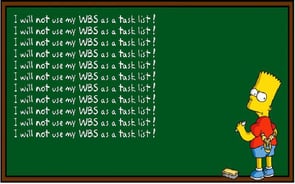
    WBS Bart1. Account for 100% (no more, no less). One of the most important principles is that the WBS must include 100% of the work as defined by the project scope. It must also capture all internal, external, and interim deliverables, including project management, among the work to be completed. The rule applies at all levels within the hierarchy: the sum of the work at the most detailed level must equal 100% of the work represented by the combined total of the categories at the highest level. Another aspect of the rule is that the WBS should not include any work that is outside the actual scope of the project. 

    2. Be mutually exclusive. There should be no overlap between two elements of a WBS in scope definition. Such an overlap could not only result in duplicated work or misunderstanding about responsibility and/or authority, but could also cause confusion in project cost accounting. One technique for avoiding this problem is to develop a WBS dictionary to clarify the differences between WBS elements and describe each in terms of milestones, deliverables, activities, scope, and other factors. 

    3. Focus on outcomes, not actions. The best way to stick to the 100% rule is to define Work Breakdown Structure elements in terms of outcomes, as opposed to actions. This strategy ensures that the WBS is not overly prescriptive in terms of method, and therefore allows for more flexibility and creative thinking on the part of team members. In addition, a WBS that subdivides work by project phases (e.g. preliminary design phase, critical design phase, etc.) must clearly separate the phases by deliverables that define the entry and exit criteria (e.g. an approved preliminary or critical design review). 

    4. Be detailed, but not too detailed. As useful as it is to divide work into smaller and more manageable elements, you also need to know when to stop. There are several ‘rules of thumb’ for determining appropriate activities or group of activities needed to produce a specific deliverable as defined by the WBS. The first is the “80 hour rule,” which cautions that no one activity or group of activities to produce a single deliverable should require more than 80 hours of effort. A second guideline is that no single activity or series of activities should take longer to complete than a reporting period. So, if your project team reports on its progress monthly, then no single activity or series of activities should be longer than one month long. 

    5. Keep it simple. Creating three levels in your WBS hierarchy (e.g., Project, Phase and Task) should be enough. Avoid identifying labor or activity codes as WBS elements, even if you use them to describe labor detail on billing invoices or backup reports. In addition, it’s not necessary to make every phase balanced; just because one phase has a task doesn’t mean that all should.

    Work Breakdown Structure: a blueprint for project management

    When finished, a well-organized WBS resembles a flowchart in which every element is logically connected to another. The primary requirement or objective appears at the top, with increasingly specific elements appearing beneath it. The elements at the bottom of the diagram represent tasks and activities small enough to be easily understood and carried out. An effective WBS avoids redundancy, but at the same time, leaves out no critical elements. 

    The bottom line is that a Work Breakdown Structure divides your project into distinct, manageable work elements. A WBS is useful to various groups within a company, including marketing, business development, accounting, and project management. A well-planned WBS is integral to successful project proposals, planning, scheduling, budgeting, and reporting.

    Ready to learn more? Discover how an ERP system can benefit your firm by downloading our whitepaper.

    Benefits of ERP System

    Photo credit: http://virtualpminabox.com/

    5 Tips to Win Projects with Deltek Vision CRM to Kona

    Posted by Full Sail Partners on Jun 12, 2013

    Deltek Kona, Deltek Vision, Win ProjectsIn today’s day and age of fast changing technology, firms must stay abreast of all available solutions to better compete with competition, and win work. Since the ‘great recession’ of 2009, competition on winning work has increased exponentially. Successful firms have combated this increased competition by staying current with technology, and using well thought out techniques to win projects. Included below are five tips that will help your firm better impress clients, and ultimately win more work.
    1. Collaboratively share information with your project team. When responding to a client request / RFP, sharing data can become a cumbersome task in itself when working with remote teaming partners or staff. Often, the ability to seamlessly coordinate tasks/assignments, or share large files amongst your team can be the difference in winning or losing the work. To avoid these types of hiccups, leverage collaborative sharing tools such as Deltek Kona to keep your project team on the same page. Deltek Kona allows users to share files, and schedule important dates, seamlessly as though the users were all working in the same centralized office. You will be amazed at how Kona will empower your project team!
       
    2. Hasten your proposals process through the use of templates. Unfortunately, many times firms will find out a about a project that they are a perfect fit for days before the due date. These time restrictions can ensnare the proposal process and make it difficult to respond sufficiently. Empower your marketing/business development department by creating templates that will allow you to export your information from Deltek Vision CRM to Microsoft Word or InDesign. This will allow you to streamline the proposal process, and concentrate on the areas of the proposal that require custom attention.
       
    3. Avoid boring old PowerPoint presentation. Many firms make it to the short-list process only to utterly disappoint the client through the use of a boring, stale PowerPoint presentation. If you are unable to separate yourself from your competition, you are not doing your best to win projects. PowerPoint has been around since the late 1990’s, and sadly a large majority of presentations look like they came out of that same era. By using presentation software such as Prezi or PreZentit, your firm can immediately stand apart from your competition. With that said, don’t forget the importance of impressing the client by being personable and demonstrating your understanding the project. Overly relying on the use of presentation software is one of the quickest ways to lose a client’s attention.
       
    4. Use a CRM solution to track relationships. We have all heard the saying, “It’s not what you know, but who you know!” This begs the question; does your firm know who it knows? If you are not tracking your relationships through CRM software such as Deltek Vision, then you are simply throwing darts at a board, blindfolded. A CRM solution will allow you to track who you know, recent conversations, and other important relationship data such as birthdays or anniversaries. This type of knowledge insight is important for creating meaningful relationships between your company, and your clients.
       
    5. Optimize information for smart devices. If you own a smart device, and you have not optimized your marketing contact the device, you are not working smart! You never know when, or where, you might bump in to a perspective client. If you are unable to demonstrate your firms expertise at the drop of a hat, expect to lose out on a lot of potential work. Your firms website should be optimized for smart devices (iPhones, Androids, Tablets, Everything!) allowing you to be ready to show off how great your firm is, at a moment’s notice! In addition to optimizing your website for these smart devices, take the initiative to pre-load content on to your smart phone, in case you are unable to get internet service! By doing this, you will not only impress the client with all of your great works, but you will also demonstrate your ability to think ahead and be ready for the unexpected.

      If your firm is utilizing Deltek Vision CRM, make sure to check out Vision Unleashed. Vision Unleashed will allow you to access your full Vision system on teh go, from a mobile device. It also allows MAC users to access Vision without the need for running parallels or bootcamp. This allows MAC users to utilize their workstation to it maximum potential without dedicating resources to addition process just to access Vision!

    I hope you learned something from this blog. Some of these technologies or techniques might seem obvious, but unfortunately many times it’s the obvious omissions that cause us to lose out on winning new work. If you use any of the concepts highlighted in this blog, make sure to comment below and let us know. We love to hear success stories!

    Once you win your next project, make sure to review these project management concepts.

    Top 10 Feedback Techniques for Project Delivery

    Posted by Ryan Suydam on May 14, 2013
    This guest blog was written by Ryan Suydam.

    Project delivery is all about taking an idea from concept through to production. Firms want their projects completed in the fastest and most cost-efficient manner possible, all without sacrificing quality. Incorporating feedback into a firm’s process helps the team perform at their best, while the very act of asking for feedback shows clients proactive and professional care. To help jumpstart your client feedback process, we’ve listed the top 10 feedback techniques to facilitate project delivery. 

    Feedback Techniques1. Make it Comfortable.

    When requesting feedback make sure the process is comfortable to use for all parties. The more comfortable the process, the more likely both parties are to participate. A comfortable process means clients will not feel put on the spot and concerned about a confrontation. Focus questions on processes, not personalities, and offer a flexible answer scale to capture subtle nuances of perceptions. 

    2. Create Actionable Results.
    An effective feedback technique requires data to enable follow-up. Be sure you are asking questions that allow you to retrieve measurable, actionable data. If the questions are too vague or too open ended, you won’t have the information that you need to take action.  

    3. Process Focused.

    The questions asked should be about process rather than people or products. We aren’t looking to find out how well the client “liked” us, but rather where our process is working great and where it might need some improvement.  

    4. Go Beyond Satisfaction.

    Ask your clients questions focused on their expectations, instead of their satisfaction, because satisfaction is the expected norm. The client’s perception of how you performed compared to their expectations is the key to knowing where to improve your project delivery process. Additionally, you’ll find 500% more exceptionally positive feedback than you will challenging feedback – and we all love to discover good news. 

    5. Reduce Liability.

    When asking for feedback, focus on questions that can reduce liability and encourage positive outcomes. Just by asking for feedback throughout a project, you are creating a record of the service perceptions all along the way, reducing the chance of a lawsuit and increasing your ability to meet their needs. Feedback helps keep you and your client aligned on a common goal - a successful project outcome. 

    6. Don’t Wait.

    Collect feedback throughout the project, not just at the end - when it’s too late to improve that project. Response rates are highest when the client senses his feedback might improve the project outcome. Once the project is over, the incentive to respond is gone. 

    7. Make it Trackable.

    Tracking feedback responses isn’t complicated, but making sure everyone on your team gets the feedback they need, reviews it, and takes appropriate action can be much more challenging. Deploy good tools to capture who is asking for feedback, who’s responding, and who takes what action on each critical response. 

    8. Use Instant Alerts.

    Collect feedback in a way that you can be instantly alerted to new feedback and drive real-time follow-up.  A good system will establish score thresholds that indicate, in real-time, when follow-up is required for exceptional circumstances. Make sure the right people are alerted so nothing falls through the cracks. 

    9. Keep the Client First.

    Structure your feedback techniques so that it is quick and easy for the client to give you feedback. Don’t waste their time with long surveys or questions with answers that only matter to you.  Response rates are higher with multiple short surveys over a period of time, than with one or two long surveys sent less frequently. 

    10. Follow up.

    Don’t neglect the follow up! A survey should always start a conversation, not replace one. Typically, follow-up is simply a personal acknowledgement that you saw and read the response. However, if any special situations were noted (either in scores or comments) be sure you open a dialogue to show how the feedback will change the process and project going forward. 

    Each of these feedback techniques focus on a deliberate approach to your feedback collection efforts. Set your goals to collect actionable feedback in way that is easy for the client. Make understanding the results and following up easy for you too. See feedback as the opportunity that it is to improve your process, reduce your liability and become your client’s expert.

    Interested in learning more about how you can start collecting client feedback?

    Most Recent News Mentions

    We’re changing the way project-based firms operate.

    People can’t help but notice.
    Who will be next?

    Check out our latest newsworthy work: