

Have You Seen What’s New in Deltek Vision 7.5?
 Ready to learn about the much-anticipated release of Deltek Vision 7.5? With each new version of Vision, Deltek strives to include new features and enhancements to help your firm know more to do more! Let’s take a look and see what’s new with Deltek’s newest version of Vision.
Deltek Vision 7.5 Features and Enhancements:
- Focus to Client Nurturing | The new Client Activity Status Report allows users to quickly and visually identify clients that need attention. Add a touch of color! The new feature allows you to highlight your activities by color to easily identify clients that need follow-up.
- Proposals Made Easier | Sometimes it’s the small things that make a big impact. Deltek has made the proposal process easier. The improved proposal module allows users to apply the selection criteria to all projects and employees at the same time. Users can also choose default graphics and have an easy-to-select graphic option. Even more, users can select project experience based on actual hours worked and merge service estimates totals. Lastly, InDesign users now have the ability to display multiple records on one page. All of these little enhancements save time during the proposal creation process.
- Newly Created Asset Management Module | Now all of your fixed assets are in one place to increase tracking and decision-making. The New Vision Asset Management Module is integrated with the purchasing and accounting functions within Vision to enable you to create, track, manage, depreciate, and dispose of your fixed assets in one central location. Be sure to inquire about Q1 2016 incentives.
- Manage Employees with Ease Across Multiple Companies | Vision Multi-Company just got way better! In 7.5, Multi-Company Employees can be associated with more than one company with a designated “home” company. More importantly, employee specific data carries over to each company allowing for company-specific and system-wide reporting. Find out more about the new Multi-company features here.
- Approvals Simplified | Stop with the endless email chains full of approval requests. In the version of Vision, absence requests and accounts payable invoices can be approved by designing simple or complex workflows to automate the approval process.
- Better Forecast Revenue and Expenses | In Vision 7.5, the general ledger (GL) enhancements allow users to consolidate budgeting into a single view allowing for better insight into your business. This new functionality allows you to create, manage, review, edit, and approve multiple GL budgets from a single view. Learn more about these enhancements here.
- Save Time Reconciling Bank Statements | In this latest version of Vision, users can import bank statements, automatically match records, and review records to manually match any remaining transactions.
- Smarter Project Planning | Building on the power of task dependencies in 7.4, project managers now can effectively manage project schedules and closely track a project’s critical path and identify schedule risks. Additionally, color-coded predecessor tasks, expanded right-click functionality, and better integration with iAccess are just a few highlights to enable your project managers to make smarter decisions.
- Keep Up with Project & Business Development On-The-Go | Obtaining the information you need on-the-go just got better. iAccess 2.2 enhancements now provides users the ability to create saved custom searches on any field, including custom fields. With an improved interface and screen designer settings enhancements, iAccess is becoming the go-to tool to access project metrics and business development updates anywhere at any time.
- Improved Touch Capabilities | Deltek Touch now supports iPhones & iPads with iOS 8+, Android Phones and Tablets with OS 4.1+, and Windows Phones with OS 8.1. Building upon timesheet and expense capabilities, users now have timesheet auditing available on their mobile devices.
- Much More | Deltek Vision 7.5 provides even more enhancements for accounting and project management with greater connectivity and better user interfaces.

 You know you have spent your whole workweek devoted to a specific project, but you’re only showing 35 hours being billed/charged to the project. Where did the value of those 5 hours go? In many cases, these missing hours can be attributed to non-billable labor, and many AEC firms overlook the importance of documenting how this time is spent. However, accurately accounting for non-billable labor is extremely important to track accurate project performance.
 Sometimes it’s the simple things in life that excite me, but the improvements to the Multi-company feature in Deltek Vision 7.5 are exciting. If you’re not familiar with Vision Multi-company, let me provide you some background and
 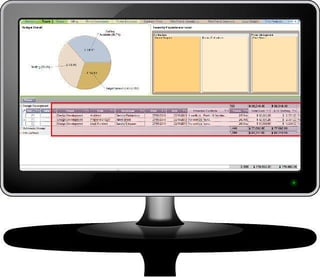 Is your firm still using spreadsheets to plan your projects? The good news is that you’re not alone, recent research from Zweig White found that almost 50% of AE firms are doing the same. The bad news is that using spreadsheets as an enterprise planning tool is very likely costing you time and money. Spreadsheets, while they are familiar to people and easy to customize, lack the many benefits of an integrated planning system. As I meet with Architecture and Engineering firms we hear common complaints and challenges about their spreadsheet planning “solutions”.
  We all regularly receive requests for feedback. I think I received at least 10 emails last week that were seeking my participation in a survey, most of which were post-transaction requests. For example, I received surveys after purchasing a sandwich, changing the oil in my car, and getting my hair cut. While I don’t really mind feedback requests from these businesses I use regularly, I’m just not very motivated to do surveys AFTER the transaction. The sandwich was either good or bad; the oil change was either efficient or not (preferably WiFi was provided in the waiting area). There’s very little any of these businesses can do to change my client experience after it’s over.
 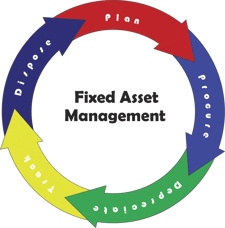 Professional service firms don’t traditionally sell products; rather they sell their time and expertise. Increasingly, they ARE selling products and time, and are spending a great deal of capital on tools to deliver both.
 It’s that time again! Year-end is here and it is time to close out your Deltek Vision system. This blog will provide you with resources and reminders to ensure a successful year-end close out of your Deltek Vision system. Check out the information below, and
 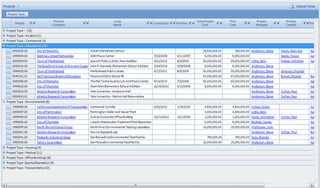 Did you know in Deltek Vision you can view multiple records at one time through a list view? The list view was a featured added in version 7 allowing you the ability to group, filter, organize and quickly export a list. The List View is listed at the top of any Info Center’s top navigation allowing you to view multiple records.
 I came across an article the other day written by
  Introducing the Deltek Vision Constant Contact Connector! Full Sail Partners unveiled a new breed of Deltek Vision connectivity at the Deltek Insight Conference.These ready-to-go solutions included an integration to Constant Contact. This cutting edge technology allows firms to integrate to Constant Contact at a fraction of the development time and cost needed to build out a similar solution from scratch. Any Deltek Vision user can utilize this solution no matter if they are in the cloud or on-premise.