

Task Management Tools: Lessons Learned from Project Management
 My social life is full of Project Management professionals. Engineers, IT people, Construction Managers, and Event Planners. I quizzed a few asking about the task management tools they use and what they liked and disliked. After several hours of phone and instant message conversations, I realized I learned very little about the tools and a lot about the groups they work in.
Stuck on the plan
Z says he loves the Gantt chart. He likes the graphical representation of the timeline. Great!
He spent the next 45 minutes explaining that the chart is created at the beginning of the project and is never updated even when they are clearly lagging behind. Outside factors such as varying commitment to the project and unforeseen challenges move the actual timeline and meetings are held to determine which tasks will not be delivered to make up for the time. Notes are kept, negotiations are executed, and none are memorialized using the task management tool he loves.
Changing the Gantt is really hard with all the different dependencies that were created at the beginning. He keeps his own notes now in a different program that allows for commenting. He’s not the project manager on most of the projects, so he keeps them to himself.
- Tools must be flexible enough to change the plan and allow for the inclusion of data along with the tasks
- Group members should have confidence that the information is located in a place where they can find it
Stuff is everywhere
K works with creative types. He works for a MAC shop, and solutions are fewer for task management tools so they use email, and Lync, and the SharePoint site, etc etc.
His group has differences in communication styles, working schedules, and even location. More time is spent managing the information so that it is visible to the group at large, which takes up as much time as completing the tasks and collaborating on the project. Time is lost forwarding information to people who missed it or weren’t included. At various stages, someone is invariably surprised and disagrees with the actions taken.
- Task management tools should not care what platform you are working on or where you are
- Communications should be easily transparent to team members even when they fall behind
Do you remember if…?
E works on long projects with a great deal of turnover and changes to tasks and timelines. The team is actually composed of clusters from different companies but one group is the document master.
There are several subsets within the group that make decisions for the project. The discussions are held live and communication to the rest of the group on action items is relayed using email. One person updates a spreadsheet that is now too big to email and can only be accessed with a login to a program installed on a workstation.
- The tool should allow new members to get up to speed quickly
- Data should be accessible from anywhere to any team member
Lessons learned about task management tools
After multiple discussions on task management tools, these common themes continued to ring true. Solutions should be:
- Transparent
- Modifiable
- Flexible
- Accessible
Do you have further insight in to the task management tools your company is enabling? Respond in the comments section and let us know!
 What are the major productivity killers for firms in the Professional Services? For most firms, some of the biggest ones revolve around information overload, duplicated effort and other inefficiencies.
  The weather this winter has played havoc with the daily lives of millions of individuals, as well as countless businesses.
  When you improve project collaboration, you improve your organization’s ability to develop innovative products and processes. What are some specific strategies you should employ to get to a more collaborative environment?
  Over the years, I’ve managed or participated in
  The answer is, Edison was not only working on the various inventions for which he’s well-known, but also on the emerging discipline of R&D itself. Even as he and his team were cranking out one technological marvel after another, one of Edison’s ongoing areas of interest was in improving collaboration in the workplace.
 Project Backlog and Project Forecasting are two of the major components that predict current and future profitability of a firm. As firms begin to put together financial budgets for future years they are often looking at these two in conjunction between project backlog and project forecasting. Typically there are two different processes for forecasting future revenue:
 What is forecasting? Forecasting is a tool that many professional services firms use to help management make decisions based on past and current data trends.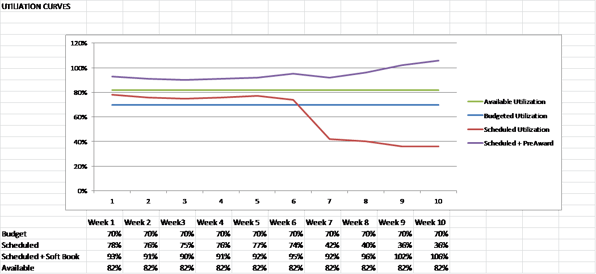
 Achieving consistent project profitability while maintaining strong client relationships is at the top of most firms’ goals and objectives. And, while there are certainly a number of variables that must be integrated to make this happen, asking your clients for feedback during the project plays a valuable role. I’ve identified two scenarios that are common in the A/E industry. Incorporating feedback into your project management process has been demonstrated to have a positive impact on both.