In the News


We’re devoted to revolutionizing the way our clients do business. Sometimes that gets us noticed.

No big deal.

Posts about Professional Services (9):

Where Has All My Labor Gone? – The Mystery of Non-billable Labor for AEC Firms

Posted by Michael Kessler, PMP on Feb 3, 2016

Where_Did_My_Labor_Go-Blog-01.pngYou know you have spent your whole workweek devoted to a specific project, but you’re only showing 35 hours being billed/charged to the project. Where did the value of those 5 hours go? In many cases, these missing hours can be attributed to non-billable labor, and many AEC firms overlook the importance of documenting how this time is spent. However, accurately accounting for non-billable labor is extremely important to track accurate project performance.

How Can My AEC Firm Track Non-billable Labor?

If your AEC firm utilizes Deltek Vision, then tracking non-billable labor is relatively simple. Before we get started, it is important to make a distinction between the labor we are billing clients and the labor that contributes to the cost of our project. With cost in this case being the “burn” or “retail” value of this labor. Within Vision, users are able to remove the labor from both the invoice and the project ledger in two ways:

  1. A non-billable labor code under billing configuration
  2. A zero billing rate attached to a person, code or category in the billing tables

Keep in mind that best practice states that the only time we would use either of the above is if the labor is invoiced and costed through a Unit for activities such as surveying or lab testing.

What Are Reasons for Non-billable Labor?

There are several possible scenarios that would warrant not invoicing a client for time charged to a project such as:

  1. On-the-job training
  2. Rework
  3. Discounts

While all of these are valid reasons, the costs associated with this effort should be included in the project sub ledger. This is missed opportunity cost or potential lost revenue. If labor cost is nullified using any of the above, the true performance of the project becomes misstated. When reviewing project financial reports the missing cost is not there to net against revenue thereby creating a false and overstated profit amount.

What Happens to Non-billable Labor?

Ah ha, the Million Dollar question and you won’t even need to phone a friend. There are actually at least two ways to accomplish removing time from an invoice while ensuring it remains as cost for project metric measurement:

  1. Write-off the hours/cost in Interactive Billing. This removes it from the invoice, but appears on the billing status in the Project Detail Report. This allows missed opportunity cost to be valued into the overall project profitability or more commonly known as a loss.
  2. Allow the labor hours/cost to be included on the invoice. Then using an Add-On, create a discount to remove the amount. This will provide your client with the visibility of the benefit you are providing them. Additionally, it will ultimately be reflected accurately in project reporting since the overall impact is a reduction in revenue.

Following these simple rules will create accurate reporting and prevent any misunderstanding in regards to the projects true performance.

Inventory Management and Fixed Asset Management – One and the Same?

Posted by Nicole Temple on Jan 6, 2016

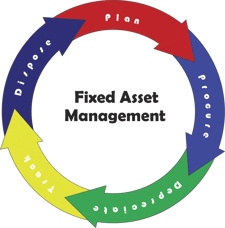
Asset ManagementProfessional service firms don’t traditionally sell products; rather they sell their time and expertise. Increasingly, they ARE selling products and time, and are spending a great deal of capital on tools to deliver both.

A common problem is that many firms can easily see the profits generated from their services, but overlook the contribution (or lack thereof) of the inventory AND fixed assets used to deliver the service by not managing both.  Even worse, they frequently manage and track them in the same manner.

Inventory management and fixed asset management are not one and the same. Read on to learn the difference between the two and understand the importance of utilizing proper accounting for fixed asset management.

Inventory Management

In the professional services world, inventory management is only slightly different from the retail and the production world. Inventory assets represent the items sold or the materials used to create a final product that will be sold. Inventory assets in professional services firms represent the intangible or intangible assets sold along with the service. This could include software or equipment. This is not to be confused with immaterial items, which are usually expensed as overhead. For most professional service firms, the inventory asset is a relatively small percentage of total firm assets.

Most importantly, unsold inventory appears on the balance sheet as an inventory asset and sold inventory appears in the Cost of Goods Sold on the income statement. This is an important standard of Generally Accepted Accounting Practices (GAAP).

Chances are, if you are selling goods as a part of your service offering, you are likely following the standards and hopefully using the Vision Purchasing module for tracking and control. But what about Fixed Assets?

Fixed Asset Management

Like Inventory, fixed assets exist and have specific accounting treatments for professional services firms, retailers, and other types of businesses.

Fixed assets are purchased assets of the firm for long-term use to support ongoing business operations. For example, fixed assets are laptops, desks, software, and vehicles, just to name a few. Since fixed assets are transferable within the company and will be used for multiple projects and multiple accounting periods, GAAP dictates a different accounting treatment than would be used for inventory management. More importantly, fixed assets in professional services firms are typically a large percentage of the total firm assets. In today’s world, the computer, machine, and installed software are the main tools used in delivering the services and often are given the least attention in the firm.

Why Is This Important?

Inventory management is a relatively simple task, but fixed asset management presents several challenges such as:

  • Knowing the location of an asset to ensure you can deliver your projects on time
  • Maximizing the usage of an asset to ensure the maximum ROI is gained from the asset
  • Knowing the history of similar assets to make informed about purchases of new assets
  • Tracking the depreciated value of an asset for tax and insurance purposes
  • Keeping the Balance Sheet clean and free of historical errors to provide accurate ROI and other metrics

Overcoming these challenges doesn’t have to be difficult and can be easily accomplished by deploying an asset management tracking system. When choosing to implement an asset tracking system, it’s important that the system is integrated with your project management, purchasing, and accounting systems to ensure information about the asset is accurately maintained and easily accessible. 

Does Your AEC Firm Practice What You Preach About Your Infrastructure?

Posted by Ryan Felkel on Dec 2, 2015


AEC InfrastructureI came across an article the other day written by ASCE Past President, Andrew W. Herrmann on the Golden Gate Bridge’s 75th anniversary celebration. The article Celebrating ‘Built to Last’ – Which Actually Demands a Lot of Maintenance, discussed the investment of on-going infrastructure maintenance and it got me thinking. The AEC industry touts about the government investing in infrastructure and how neglecting airports, highways, and bridges is more costly if it isn't maintained. The IT world has been saying the same about IT systems and databases. Is your firm guilty of not maintaining your IT infrastructure?  

Let's take a look at some on-going maintenance that your firm may be overlooking:  

Backup Mistakes

Unfortunately, for municipalities and governments, there is no backup for when a bridge or building falls apart. That is to say, there is no way to restore the bridge with a click of a button in the same way your firm can to restore lost data. Preparing for failure and implementing a reliable backup plan is essential to maintaining the integrity of your data.

The problem is many people believe this is an easy and mindless task, but often make some very common mistakes.

  1. Many firm’s only test their backups periodically, and it either becomes a forgotten task or done improperly. Verifying backups is a useful practice to ensure data is intact, readable, and can be restored if data is ever lost.
  2. Many firms that have their own servers tend to only backup data and not the server’s operating system and applications. While this practice saves time and valuable memory on the server, it can often be more costly in the future if the server itself fails. For example, it is much easier to restore the operating system, the applications and then the data than it is to manually install the operating system and setup the applications.   

Server and Hardware Failure

Normal wear and tear of the roads and bridges is the primary reason for the need to perform ongoing maintenance. It is required to ensure physical integrity for years to come. Likewise, many firms overlook the parts of their IT infrastructure that are prone to wear and tear. Although most of the components of servers and hardware are electrical, they also contain a few mechanical parts that tend to be more prone to failure. The reality is, as these components age, they tend to experience wear and tear that will inevitably result in a failure.

Interesting enough, failure can be avoided if you’re aware of common warning signs.

  1. Servers and hardware are designed to operate while creating minimal noise. If you start hearing a clicking or grinding sign coming from your server or computer, it’s likely you’re going to experience a failure soon.
  2. Mechanical failure is the result of wear and tear, plan on replacing servers and hardware more frequently to avoid the unexpected and dreaded failure.

Avoiding Updates

An ACEC whitepaper titled, Our Infrastructure Crisis – Your Turn to Act noted that one of the consequences of under-investment by municipalities and governments is an aging and outdated energy infrastructure. Aside from the inefficiencies of using outdated technologies, the cost to update the energy infrastructure is going to be massive. The problem is that the energy infrastructure has to work in sync, therefore updating one component means other key components will need to be replaced so the overall system can continue to work in harmony.  These same consequences can affect a firm using outdated software.

When deciding to update your antiquated software, you may also have to update other enterprise software your firm uses and maybe some hardware as well.

  1. Firms using older software that runs on unsupported operating systems, such as Windows XP, will have to update their hardware to support the new software.
  2. Also, even if your operating system may support some newer software, those can potentially impact other software that are reliant upon them.
The take away here is that using supported and current software versions might seem expensive, but in the long run, it pays to stay up-to-date. By not being on the most current software, your firms' productivity and efficiency can greatly deminish. 

The Big Picture

Just like municipalities and governments failing to maintain the roads, bridges and airports, AEC firms can experience significant costs for failing to maintain their IT infrastructure. The big picture is that maintaining your IT infrastructure requires you to ensure you backup your information, proactively prevent server and hardware failure, and most importantly, stay-up-date.    


The Pitfalls of Project Management Planning for Project-based Firms

Posted by Scott Seal on Oct 14, 2015

Project Planning Blog GraphicCongratulations! Your firm just won the largest project in its history and it’s time to celebrate, or is it? Unfortunately, winning the big project doesn’t guarantee success and big profits. For project-based firms, project management is synonymous with profit management, but many projects start in the red making it nearly impossible to make a profit. Here’s a look at some common pitfalls project-based firms face before they ever start a project.

Accurate Job Costing

If you have been on a proposal team, you know the feeling of relief that overcomes you once you finally submit the proposal. Weeks of working long hours reading and writing exhilarating technical content and attending meeting after meeting. All this work and time exhausted by several people when in reality, your final price is the biggest factor in winning. But, can your firm deliver the project on the proposed budget?

Accurate job costing requires accurate information, and most firms believe they have the right systems for their business model. Excel sheets and the time clock work, but these systems don’t communicate very well. Even more, consider the unreported overhead time to reconcile these systems and the mistakes made during this process.

“If it works, don’t fix it” doesn’t always apply, and information in more than one system doesn’t work when trying to maximize profit. When it comes to job costing, you already have to worry about inaccurate estimates from suppliers. These are costs you can’t control, so be sure to take control of your internal cost monitoring to create profitable bids you can deliver.

Establishing Key Performance Indicators

Key Performance Indicators (KPIs) are various quantifiable measurements used for determining the success of the project. The KPIs establish a guide to the project and are used as the basis for critical decision-making. More importantly, not executing on a specific KPI can affect the project’s profitability for your firm and your client’s satisfaction.

Here’s where some project-based firms struggle. In many cases, several of the KPIs are destined for failure before the project starts. The problem is that defining KPIs is truly challenging and your clients usually lack experience with the process. All too often, this results in KPIs that are unrealistic and unmeasurable.

Establishing realistic KPIs is the first step to managing the profit of a project. As the project manager, it’s in your best interest to have a strong role in creating the KPIs. Good project KPIs have values that can be accurately measured and clearly reported on. Further, they need to be understood and agreed to by all parties. To learn more about project KPIs, click here.

Risk Management

Projects are full of unforeseen obstacles and predicting these is not always possible, but this doesn’t mean your firm can’t minimize the impacts. They just need to have a formal risk management strategy. Although this might be a time consuming process, it’s a necessary process required to protect your profit.    

A study by Info-Tech Research Group found that organizations with a formal risk management strategy are more than half as likely to have project management success than those with a reactive approach. To put it another way, having a risk management strategy before the project gets started is critical to the project’s success and profitability.

A risk management strategy starts with identifying common risks such as unrealistic schedules and requirements that fail to align with the strategy of the project. Once these risks are identified, evaluate the impact each risk will have on the project. From there, make a contingency plan that has a pre-planned response to the unexpected event.       

Become a Profit Manager

Don’t start your next project in the red. Project management starts with project planning, and not having the right systems and processes in place can hinder the success of the project. If your firm is falling into any of these pitfalls, consider the changes that you can make to become an effective profit manager.  

Tackle a Project with Resource Planning

Posted by Michael Kessler, PMP on Sep 23, 2015

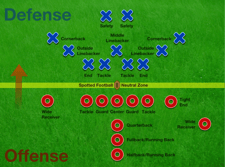
American Football Positions2It’s finally fall again and you know what that means, the leaves are changing color and the temperature is dropping, but most importantly - football is back and the wait for our favorite teams to take the field is finally over. Nevertheless, what does football and resource planning have to do with each other? Simple, coaches are like project managers, their resources are the players, and the project is the season. So what we can learn from football coaches to become more effective project managers?

Monday Morning Quarterbacking

A good coach always reflects on each game to identify plays that worked and plays that need work, and of the players, who played well and who under performed. They spend hours watching videos of the previous game to develop a plan to overcome shortfalls. Successful coaches know planning forward cannot occur until they’ve planned backwards.

Smart resource planning starts with planning backwards. Like football coaches, project managers need to think back on the previous week and evaluate their performance. This is a time when you ask yourself how efficient was your previous plan?

Let’s say you planned a task to take 20 hours and it was really done in 10 hours. Is this a result of a great resource or an over-estimated work duration? Identifying what went well and what didn’t go so well allows for continuous improvement throughout the project lifecycle. As a result, project managers can make cost saving decisions and improve resource utilization.  

Have the Right Playbook

The playbook is the lynchpin to a winning team in football. A team can have all the best players, but without a plan, they can’t play as a team. Even more, the teams they play each week change and players get injured. To build the right playbook, the coach needs to know what to expect from the other team and which players they have available.

So who are your injured reserve resources and who do you have available?

Let’s start with your injured reserve. These resources are allocated to non-billable work such as marketing and business development or out on PTO. These resources don’t have 100% availability and this needs to be taken into account when developing your playbook. Therefore, non-billable work needs to be aggressively maintained when resource planning to make sure resources are not over utilized.

Now think about your shared resources. Are other project managers keeping their project plans up-to-date so you know which shared resources are available? Shared resources availability may change throughout the lifecycle of a project and it may change several times. As a result, they often become over utilized. A shared resource’s time has to be updated regularly to ensure project plans across the organization stay on track.

Be Prepared to Call an Audible

The playbook is complete and now it’s game day. Everything is going as planned and the plays called by the coach are unstoppable. Then all of a sudden, the opposing team changes their formation on the line. The coach then instructs the quarterback to call an audible.  

Like the coach's playbook, your plan needs to be flexible. Being blindsided by unforeseen circumstances in project management should be anticipated. Don’t let dependent tasks get disrupted and destroy your plan. By adding contingencies to dependent tasks, you can avoid major disruptions to your project plan and be ready to call an audible.  

Earning the Gatorade Shower!

Every week, coaches are revamping and tweaking their plans. They evaluate their bench and design plays based on their available players and their individual skills. Constantly trying to improve and continue to win all in hopes that their resource planning throughout the season earns them the championship and they receive the coveted Gatorade shower.

Is Your Professional Services Firm Client-Focused?

Posted by Ryan Felkel on Aug 19, 2015

Client FocusedAll too often, certain words and catchphrases are overused in business meetings to the point they have become trite and serve little to no real purpose. These words and phrases are used in business blogs, articles, websites, and day-to-day business emails. One such term, "client-focused", is thrown around as a marketing gimmick for professional services firms, but what does it really mean to be client-focused?

Before we get too far, here’s what you need to know:

  1. There is a difference between saying you’re a client-focused firm and actually being client-focused.
  2. Your firm’s culture dictates the level of service your clients receive. 
  3. If your firm isn’t using technology to support your client relationships, you’re already behind.

The Firm-Focused vs. Client-Focused Professional Services Firm

Being truly client-focused depends on how your firm sees their clients. Sure, it is easy to talk the talk, but putting words into action is where things tend to get difficult.

When a firm places an enormous emphasis on the needs of their clients, they are firm-focused. A firm-focused business makes decisions based on the benefits to themselves and not with their client’s best interest in mind. 

On the contrary, truly "client-focused" firms make decisions that are determined by their client’s needs, as they are at the center of all such business decisions. They understand exactly what their clients need which helps to promote a symbiotic relationship between the firm and the clients.

Through the delivery of top-notch service aimed directly at the needs of their clients, a company will see a simultaneous rise in business performance. After all, the services provided were determined with the client and their needs in mind.  

Living the Firm’s Culture

Who are your clients? The answer might surprise you, but in the business world, there are two types: internal and external clients. 

Internal clients are members of your organization that rely on the help of other members to perform their job. These individuals can fall anywhere on the spectrum of your chain of command, from coworkers to upper management and executives. 

On the other hand, external clients are clients in the traditional sense of the term. They are the buyer of the services your firm provides. 

Do you feel you receive great service from the other internal customers within your firm? If you’re not receiving great service from within your own organization, imagine the service your external clients are receiving. Your firm’s culture is a reflected by the employees, and your clients can see if you live by the values you market.

If you’re not satisfied with your internal customer service, start communicating and living the values that define your firm. Your clients will notice the difference.

How Technology is Changing Playing Field  

Keep up with the Joneses - In order to be competitive and effective within an industry, your firm needs to ensure it is using innovative technology that helps promote success. Failing to innovate hinders a firms’ ability to adapt and grow while the "Joneses," aka your competitors, employ the use of industry leading technology enabling them to leave you in the dust. 

With a Client Relationship Management (CRM) software, you can take your company to the next level by keeping the functions of your company in a centralized system. This helps promote a conducive work environment in which the sales and marketing teams, and administration and finance teams can better work together to achieve client-focused results. To learn more about the basics to Deltek Vision CRM, click here.

An additional benefit of using innovative technology and software is that it enables you to access your work on-the-go. Today we have access to everything on our smartphone devices. From banking to entertainment, email to ordering pizza and everything in between, we can do incredible things with just one, single device. Having mobile access to your CRM allows you to -update client information on-the-go and enables other members of your organization access to the most up-to-date information about your clients. 

The Takeaway 

The importance of understanding what it means to be "client-focused" cannot be overstated. Your firm should define itself by its actions and not by catchphrases.

The goal of being client-focused is to nurture client relationships to retain clients and win more work. Remember, your existing clients are the lifeblood of your organization. According to Bain & Company, it cost 6 to 7 time more to acquire a new customer than retain an existing one. It seems smart to try to keep the clients you already have.

Full Sail Partners Selected to Accounting Today's 2015 Top Value-Added Reseller (VAR) List

Posted by Full Sail Partners on Aug 10, 2015


Accounting_Today_2015.jpgFull Sail Partners, a Client Feedback Tool and Deltek Premier Partner, recently announced it has earned a spot on Accounting Today’s 2015 Top Value-Added Reseller (VAR) List. Accounting Today is a leading provider of online business news for the tax and accounting community, offering breaking news, in-depth features, insightful editorial analysis, and a host of web-related resources and services.

Each year a select group of 100 organizations are honored for their accomplishments as VARs. The top VARs are selected from organizations focused on sales and implementation of accounting and Enterprise Resource Planning (ERP) software. Criteria used to determine the winners include 2014 revenue, number of offices, and staff size.

According to Seth Fineberg, Technology Editor of Accounting Today, “The Accounting Today VAR 100 list is comprised of top accounting and ERP software resellers throughout the country, ranked by revenue. This select group represents those in the world of accounting software resellers that are truly ahead of the pack and we are pleased to honor them in this special report.”

Full Sail Partners provides on-premise and cloud-based solutions for architects and engineers, energy and environmental consultants, and professional service firms across the United States. Full Sail Partners' team, collectively, brings more than 200 years of experience with Deltek solutions. The firm represents unique technology solutions that integrate with Deltek Vision including Deltek’s Kona social collaboration platform, the Client Feedback Tool, and Vision Unleashed.

"Last year Full Sail Partners was listed as one of the VARs to watch and we are extremely honored to make our return to the Value-Added Reseller Top 100 List," said Sarah Gonnella, Vice President of Marketing and Sales of Full Sail Partners. "Our firm continues to deepen our bench strength with Deltek Vision experts, allowing us to be the go-to firm for consulting, customization and integration. Jumping to number 85 in Accounting Today’s Top 100 Value Added Reseller list is a great accomplishment and demonstrates our ability to engage our existing client base, as well as, target new project-based firms beyond the AEC industry.”


9 Deadly Sins Owners of Consulting Firms Make

Posted by Sarah Gonnella on Jul 30, 2015

Deadly Sins, Consulting FirmThe other day I was having a discussion with a client about the challenges of owning a consulting firm. It’s funny how these types of conversations force you to reflect on your own experiences. I quickly realized I made some mistakes along the way as all business owners do when they first start out. I’ve also been witness to mistakes by other consulting firms that have reached out to us for help. From these past experiences, I have identified 9 deadly sins owners of consulting firms should avoid.

  1. Not Staying True to the Purpose – When you started the firm you had a purpose, your mission, vision and principles. Don’t lose sight of how you became a successful consulting firm, even through the tough times. It’s important to diversify and be innovative, but it must always fit what you stand for. When you leave your core business, you also lose your core loyal clients.
  2. Failing to Innovate – When firms fail to see the changing tealeaves and adapt to their client demands and the competitive landscape, the business can become stagnant and may even die out. Innovation opens your firm up to the next big success. Ideas may fail, but continually innovating and adapting will keep a consulting firm growing.
  3. Not Planning for Growth – Alan Lakein said, “Failing to plan is planning to fail.” This couldn’t be more true when it comes to thinking about how you will grow your firm. The demise of any consulting firm is hoping to stay where it is and not planning for future growth. Change is constant and you can rest assure that your competitors are looking at ways to grow their staff, revenue and client base.
  4. Misunderstanding Profitability – You would think this would be a no brainer for consulting firms, but you would be surprised at the excuses made by Project Managers and Owners about why the profit number is declining. Most consulting firms watch profitability for the company, but are you watching the profit on each project? Even worse is when you make the same mistake with the next project. It’s important to take those lessons learned and circle them back to the proposal process.
  5. Not Tracking Cash Flow – Firms that do understand profit often forget that it is only half the problem. Clients that do not pay can derail the best profit and growth program and impact cash flow. Having a consistent feedback program with clients can decrease payment issues. By constantly collecting client perceptions about the service delivery, firms can quickly resolve issues and reduce the firm’s payment issues.
  6. Misguided or Lacking Process Improvement – Processes deteriorate over time for all kinds of reasons, including addition of new technology, employee turnover, and cutting expenses or resources. Periodically reviewing your processes - whether technological or how staff approach clients or issues - keep staff trained and technology up-to-date. Technology that allows for automatic workflows is an easy way to improve efficiency, decrease redundancy and create consistency. Keep in mind that pursuing too many process improvements at one-time can also be detrimental to the goal. Process improvement must be clearly defined, have an internal champion and sometimes done in stages.
  7. Treating BD as a Part-Time Lover – For smaller firms especially, business development can be a challenge to juggle getting the business and doing the work. However, if your firm isn’t constantly selling to existing and new clients, your sales pipeline will eventually run dry. Setting goals and monitoring those goals through a CRM system, for example, can provide visibility to ensure business development is consistent.
  8. Ineffective Risk Assessment – The moment we start a business we run into unpredictability and risks every day. Sometimes leaders don’t even know there is a risk issue. Understanding the risks facing your company – from professional liability issues to growing into a new market – allows you to minimize the risk while still being able to “take a chance”.
  9. Improper Planning of Disasters - Failure Happens! However, many firms don’t realize until it’s too late that they don’t have an effective backup and recovery solution for their database, email, and network. Even if your firm has a back-up method in place, many times it can’t be deployed quickly. The scary stat is that 60% of all firms that lose their data will close in 6 months. Instituting a Disaster Recovery System that allows for redundant offsite storage and system restoration within a 36-hour period can greatly reduce the chances of complete loss.

Ask yourself, if your consulting firm is committing any of these deadly sins? If so, what can you do about it? Albert Einstein is quoted as saying, “Insanity: doing the same thing over and over again and expecting different results.”  It would be insane to keep repeating any of these deadly sins.  


Back to the Basics of Deltek Vision CRM

Posted by Kevin Hebblethwaite on May 20, 2015
deltek vision crmDeltek Vision CRM is uniquely designed for scalability within your organization. Whether you are a novice user, or a tenured pro, Deltek Vision CRM is designed to allow you quick and easy access to the relationship data that will separate your firm from the rest of the pack! However, regardless of the capabilities of the software, the success of your firm’s rollout is affected heavily by your past experiences with services management platforms, the firm’s overall culture and philosophies of client management, and your users’ level of buy-in. Maximizing the value that the system brings to your firm requires careful planning and strong commitments to the implementation. 

Initially, you really need to have your act together regarding the overall objectives for improving the firm’s information management. It requires a core group of people to roll up their sleeves and connect the dots between business process and software tools. Once you have these important objectives defined, you can move forward with tailoring the system to support them.

In this discussion, we’ll focus on the following basic elements of handling critical information: collection, accessibility, management and lifecycle.

Collection

One of the most important, and obvious, things we must do with any successful information system is, oddly enough, collect information. When you consider all the data in your miscellaneous spreadsheets, business card piles, Outlook shared folders and “head knowledge” that you DON’T currently have in Vision, the task can be a little overwhelming. Develop capture processes that are efficient, consistent, and make the best use of the people resources you have available. Find any way possible to help unify your team around the belief that Vision is the firm’s single source of truth for the information it’s designed to collect.

Accessibility

It regularly boggles my mind that some users of an information tool as powerful as Deltek Vision take ten minutes or more to get logged in. There are plenty of reasons – I forgot my ID/password, lost the shortcut, can’t remember the URL, have to be at the office for it to work, and so on. Make Vision more accessible by:

  • Creating Start Menu or Desktop shortcuts with Vision’s URL
  • Using the Microsoft Office Desktop Integration utility (included with Deltek Vision CRM license
  • Getting mobile with Touch CRM – Vision contact information literally at your fingertips!

As you gather tips and tricks from your power users, build internal training content and SHARE them. Do whatever you can to make “hard to get in” an unacceptable excuse for staying OUT of Vision. 

Management

Once you’ve paved the path into Vision, teach users how to quickly navigate, find what they’re looking for, and simplify the presentation of information that’s most critical. Mastering the art of searching in Vision is VERY important. The good news is that once you’ve figured it out, you can leverage the skill in any area. Remember that Standard Searches lookup records based on Vision’s basic individual fields. Advanced Searches allow you to construct multi-layered “AND/OR” parameters, search based on custom fields AND (Boolean pun intended) search across info centers! Help your users practice stating their searches out loud before building them in Vision. For those searches you seem to do over again every other week, set them up as Global Favorites. This will make your efforts to find all projects in the states of Idaho, Montana, and North Dakota, for which William Apple was Principal-in-Charge, the fee was greater than $100,000, and whose Long Name started with the letter Z, much more efficient. 

After creating a team of Search Gurus around your office, you can then help each become “Master of His/Her Dashboard.” Again, state out loud what lists, reports, or resources would be awesome to have available each time you log-in to Vision. Figure out which of these items can be displayed on Vision’s dashboard (unique to each Vision user account), choose some cool border colors, and off you go! 

Lifecycle

Typing information over again that already exists in a database is for people who have too much time on their hands. Once you have created a Lead named Bob Smith, who works for XYZ Company, which will soon build a New Headquarters Expansion, located in Nashville, Tennessee, wouldn’t you like Vision to simply pass this information forward through your phases of identifying, pursuing, winning and delivering the project? If so, your next “back to basics” move is to help your firm use Vision’s “Create From…” functionality. Vision can take data you already have and use it in new records in the following ways:

  • Lead > “Convert” to Contact/Client/Opportunity
  • Promotional and Regular Projects “Created from” < Opportunities
  • Project Plans “Created from” OpportunProject Plans “Created from” < Existing Promotional and Regular Projects
  • Promotional and Regular Projects “Created from” < Project Plans

Before you go cross-eyed figuring out all this movement, understand that you need to first identify and sketch out your firm’s project lifecycle before effectively using Vision’s “Create From…” functionality. Think about the following questions:

  • When do we want a prospective project to be "on the list" or counted in the sales forecast?
  • When do we want to start tracking time and expense directly associated with a pursuit?
  • When do we need to start planning and allocating staff resources to a likely project win?

Your answers will help determine points in your cycle where Vision can take much of the information already collected and continue using it in subsequent stages. This feature can be an incredible bridge-builder for interdepartmental relationships amongst the marketing, business development, accounting, and operations areas of your firm. 

It’s never too late to get Back to the Basics in your Deltek Vision CRM system. Remember that the system should support the successful business processes you’ve determined work best for your firm, not vice versa. Whether you’ve just been asked to join an internal discussion that started with “I think we need to get one of those CRM things,” or you’re a Deltek Vision CRM veteran looking to step it up a notch, revisit some of these concepts and help your firm ride into the sunset toward a more informed future.
 

<

Deltek Vision CRM is uniquely designed for scalability within your organization. Whether you are a novice user, or a tenured pro, Deltek Vision CRM is designed to allow you quick and easy access to the relationship data that will separate your firm from the rest of the pack! However, regardless of the capabilities of the software, the success of your firm’s rollout is affected heavily by your past experiences with services management platforms, the firm’s overall culture and philosophies of client management, and your users’ level of buy-in. Maximizing the value that the system brings to your firm requires careful planning and strong commitments to the implementation.


Why Project-Based Firms Should Utilize the Deltek Vision Contract Management Feature

Posted by Rana Blair on May 6, 2015

contract managementI don’t know of a single Professional Service firm without a formal contract management process. Firms spend significant dollars purchasing contract templates and some even retain legal counsel for review. Everyone knows that the contract is an important document in any project undertaking.

Nevertheless, those same firms often begin work without getting the document signed!

Does the importance of the document cease once work has begun? Of course not. But what happens is that the production machine must and does begin before the administration machine can catch up. The contract seems to be subjugated to more pressing needs and the team begins operating on ‘Good Faith’.

External stakeholders have a vested interest in the firm’s contract habits. Professional Liability Insurance applications have at least a few questions relating to whether or not a contract is required, how much work is performed without a contract, and so on. Even the bank wants to know about the status of firm’s contracts and the processes employed. Banks analyze aging or large Accounts Receivable (AR) and next ask about the project’s contracts status. Both want to assess the risk inherent in providing their products to the firm.

It’s All About the Risk

Business is risky. There is no way to eliminate it, only to reduce. Written contracts certainly mitigate risks. Signed ones reduce it further.

Having a signed contract doesn’t guarantee against litigation. There are always competing interpretations of the language after the fact. Better contracts decrease collection time and reduce disputes.

Not having a signed contract does not mean that the firm will not be paid. As long as it is clear that money was to be exchanged for services, there will be some value exchanged. However, the firm might have to perform more work than intended for the stated amount. Additionally, it might mean considerable expense or time attempting to get those dollars.

The truth is, all Professional Services firms have a tendency to do some work without a contract. How much, how often, and with whom is important information that should be assembled and available for review by stakeholders to stay informed about the risks of the firm.

Leveraging the Deltek Vision Contract Management Feature

The Contract Management feature included in Deltek Vision’s Finance Core is one such tool that can be used to assist in accumulating information on this risk factor in the firm. The tool and system are designed specifically with project-based firms in mind. Let’s take a look at how this feature can help:

Track It

Deltek Vision Contract Management allows users to track multiple contract documents, their origination and approval dates, status, and fees requested per document. Because the information is entered on each project, it makes a variety of reports and workflows available allowing for efficient and integrated contract tracking. Optionally, information can be extended neatly into the Project’s Work Breakdown Structure which will allow users to easily see which documents created and amended the fee on each level.

Identify It

By using the Contract Management area of the Project Info Center, users can add the information to reports already in use. Both the Project Summary and Office Earnings allow the Contract Management fields to be selected as columns to appear along-side the existing data on firm reports. Contract statistical data can also be used as a filter on other reports.

Manage It

Integrating project contract information into Deltek Vision allows users to employ the powerful workflow engine in the software. Vision Workflows enables Contract Management users to automate the reporting and informing process around Contracts.

Consider these workflows:

    • Notify Project Manager and/or Principal when a contract has been marked as Approved
    • Remind a user of special handling when a contract exceeding $XXX,XXX has been created
    • Update a column on the Project record when a contract record has been inserted

Use It

Deltek Vision Contract Management users can leverage the information about contract status in other organizational processes. The Contract Management fields are available as filters on any project-based report. This allows the contract status to become a part of the firm’s management process.

Consider using Contract Management data and filters in these activities:

    • Client Management – Create a Project List report for active projects and sorted by Client. Include Contract creation date and status as columns to get the most from the client check-in call.
    • Collections Management – Create a scheduled report for outstanding AR where contract documents are in ‘Pending’ status. Create an AR alert for projects with certain contract status’.
    • Employee Management – Use the Optional Sales Credit feature to measure employees’ participation on specific contract documents. Use in reviews or statistical reporting.

Know the Risk and Accept It

None of us live in a perfect world where a single project meeting hasn’t been had until the contract is signed. However, our focus should turn to understanding and measuring the risk that will be taken on. Firm management should be well informed of the status of the firm’s contracts and have the necessary information on hand should they need to intervene. To support this, contract tracking and management should be integrated with the projects to which they relate. Your Vision software is already well equipped to assist you in the mechanics.

To get started today you can:

  • Review our technical webinar on the Contract Management feature
  • Enter a test contract or two to understand how the feature works
Later you can:
  • Identify how your current process can improve with automation, integration and reporting
  • Backfill existing contract data
  • Contact a Full Sail Partners consultant for more advanced training to customize menus, write workflows and complex reports.

Most Recent News Mentions

We’re changing the way project-based firms operate.

People can’t help but notice.
Who will be next?

Check out our latest newsworthy work: