In the News


We’re devoted to revolutionizing the way our clients do business. Sometimes that gets us noticed.

No big deal.

Posts by Sarah Gonnella:

11 P’s for Peak Performance of a 'Perfect Employee' (Clone)

Posted by Sarah Gonnella on Jun 26, 2025

PERFECTIONOur modern day culture is often obsessed with perfection. Magazine covers are graced by photoshopped professional models and our TV screens are filled with successful eclectics whose wealth is their biggest problem.

Fortunately, perfection is not an attainable goal; the real goal is the path we follow as we strive for peak performance which is the essence of a 'perfect employee'.

It was Vince Lombardi that said, “Perfection is not attainable, but if we chase perfection we can catch excellence.” Considering that the NFL Super Bowl trophy is named after Vince Lombardi, you could say he knew a thing or two about peak performance…

So, what qualities help us along this path to being the ‘perfect employee’? 

What are the 11 P's of Peak Performance?

If obtaining peak performance is our professional goal, then, what exactly are the attributes that we need to be the 'perfect employee'?  Following is the list of benchmark qualities you should strive for on your path:

1. Proficient. Sure, you can’t have all the answers but you know how to dive in or connect with the right people to figure them out. You come to the table with suggestions - not more problems. You are constantly looking at how to improve the process.

2. Proud. You are proud of your work because your efforts are always well thought out, tested and reviewed. You don't rely on others to finish your assignments but ask others to quality check your work to make sure it is always correct.

3. Persistent. We all know to learn from mistakes, but the 'perfect employee' personifies this concept. You admit when you are wrong sooner than later. If you don't know how to do something, you find out how … with no excuses.

4. Passionate. You LOVE what you do and radiate emotion when you talk about your work!  You learn on your own, offer improvements, and share with others what you know.

5. Productive. Your willingness to push up your sleeves and work overtime while not jeopardizing other commitments is renowned. While we all have parts of our jobs that are not favorable, 'perfect employees' realize the goal of those less desirable tasks and get them done.

6. Positive. You exemplify “Can Do!” by accepting that you can always improve, you see challenges as opportunities, and you think about how things can be done instead of complaining about what you can't change (including the past).

7. Professional. You understand that while comradery is important with co-workers and clients, there is a fine line between “fun” and unprofessional “fooling around.” You make sure your work is top notch and your comments will not ever be construed as childish or offensive.

8. Able to keep Promises. You are always thinking about priorities and when the job will be completed in order to deliver in order to keep your promise. You communicate when a conflict arises but still look to deliver on time. You are faithful about deadlines and rarely provide excuses.

9. Punctual. You understand the value of time, yours as well as others. People think “punctual” is your middle name.

10. Able to Promote … others and yourself. You promote great deeds and great work regardless of who completed it. You are always thinking and talking about ways to make the workplace a better environment for your colleagues and services better for clients.

11. Purposeful. Each day has a purpose. You take each day and every action seriously; constantly thinking about what needs to be accomplished and how to generate purposeful results.

HOW to be “perfect” (or close)?

Providing professional services, by nature, means that we are tasked to serve our clients. We often measure billings, schedule delivery and quality of deliverables, yet fail to objectively measure the real goal - driving client delight. Strive to be the 'perfect employee' to your clients by evaluating how to obtain your peak performance and implementing continuous improvement with feedback!


Key Performance Metrics for Architecture and Engineering Firms

Posted by Sarah Gonnella on Aug 17, 2023

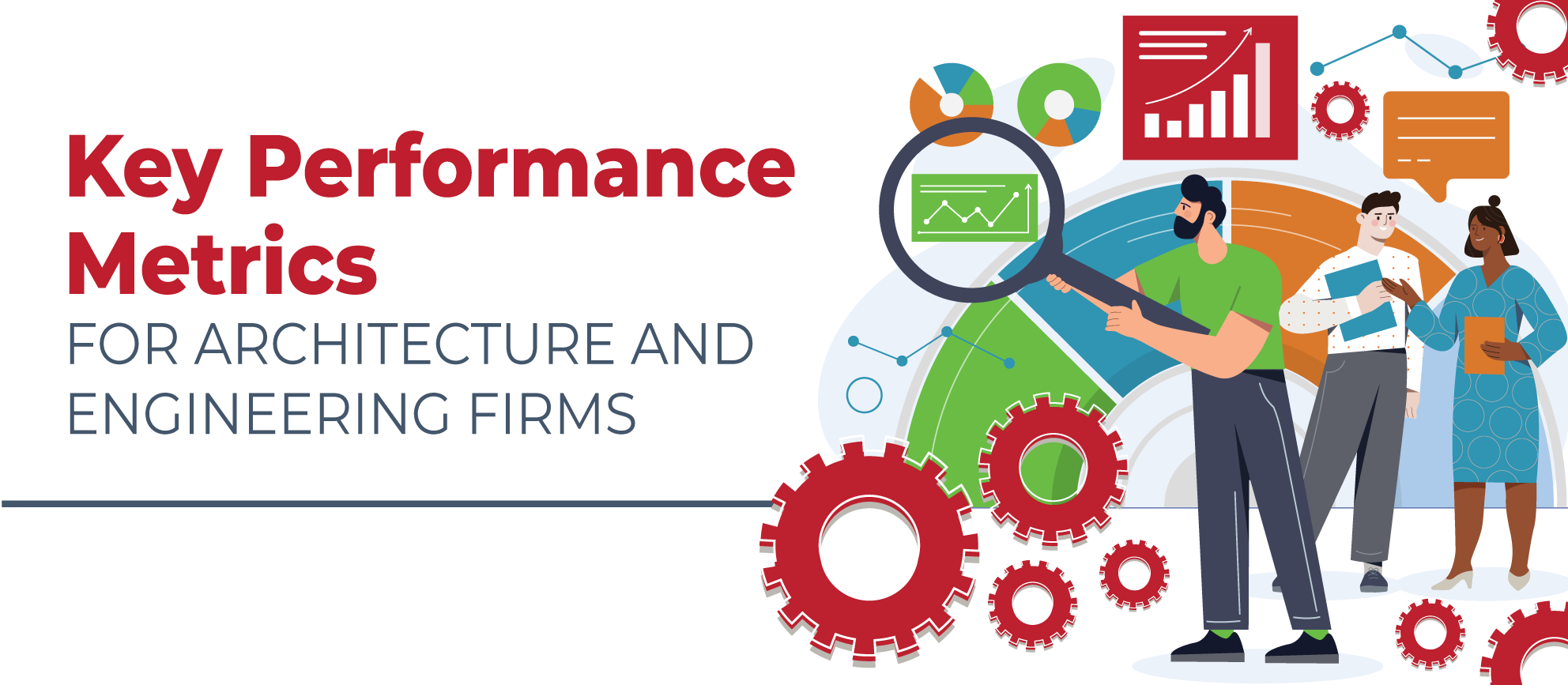
08-17-23 Key Performance Metrics for AE Firms Banner

How does your firm measure up? That is the vital question many architectural and engineering (AE) firms should be asking themselves. It is challenging to manage what you are unable to measure! There are several key performance metrics that an AE firm should use to determine its current status. These measurements are important to not only keep you abreast of the condition of your company, but they also allow you to examine the past, so you can plan for the future. Let’s look at a few of the significant performance metrics. 

Proposal Win Rate

When we talk about Proposal Win Rate, we're essentially looking at how effective your business development efforts are at turning potential leads into actual projects. It's like keeping score on how well you're playing the business game! By tracking this rate, you gain valuable insights into what strategies are paying off and which ones might need a little tweaking. 

Even the tiniest improvement in your win rate can have a huge impact on your bottom line. Think about it – landing just a few more projects out of every ten proposals can make a significant difference in your profitability.  

In the fiercely competitive world of AE firms, the ability to gain new business is like having a superpower. It's what sets successful firms apart from the rest. So, honing your business development skills and consistently improving your win rate is critical to your success. 

Here's a pro tip: When analyzing your Proposal Win Rate, pay attention to the reasons behind both your wins and losses. Learning from both successes and setbacks is the secret sauce to continuous improvement. You might discover patterns that can help you replicate your victories or identify areas that need some extra attention. 

Profit

Profit is a crucial metric for any AE firm’s success. It tells you how well your firm is doing financially. It's the money left over after deducting all expenses from your gross income. Profitability metrics help AE firms figure out which projects are worth pursuing. It shows you if you're making enough money to keep your operations going and growing. 

Analyzing your profit helps you make smart decisions about where to focus your efforts and resources. It's like a report card for your financial performance. Being profitable is essential for your firm's sustainability and growth. It allows you to invest in your business and attract top talent. 

But don't get too fixated on profit alone. Keep in mind that different projects may have different profit margins and timelines. 

By keeping a close eye on your profit over time and comparing it to your goals, you can spot areas for improvement and make informed decisions for a prosperous future. 

Labor Utilization

Labor utilization is a metric that helps you measure your team's efficiency. It ensures you have the right number of employees for optimal performance. By analyzing labor utilization, you can identify both high and low performers, enabling you to take targeted actions for improvement. 

To maintain an effective labor utilization rate, review both billable (direct) and non-billable (indirect) hours. Monitoring this metric allows you to make data-driven decisions and allocate resources wisely for maximum productivity. 

A well-utilized team leads to a happy and productive work environment, driving your firm's success. Keep an eye on labor utilization for a thriving team and business! 

Net Revenue/Operating Income

Net revenue and operating income are like a dynamic duo that keeps your business running smoothly and efficiently. Let's take a closer look at these essential metrics and understand why they're crucial for your AE firm's financial success. 

First up, net revenue is the lifeblood of your business. It's the total revenue your firm generates after deducting any discounts, returns, or allowances. Think of it as the fuel that keeps your business engine roaring. Without sufficient net revenue, your firm's growth and sustainability could hit a roadblock. 

Operating income, on the other hand, measures your business's capacity to take on new projects while covering all operating expenses. It's like a litmus test of your firm's operational efficiency. By subtracting your operating expenses from your net revenue, you get a clear picture of how much profit you're generating from your core operations. 

Now, here comes the interesting part: net revenue also sheds light on your firm's relationship with subcontractors. It shows how much of your revenue goes to paying them for their services, leaving you with the revenue that your firm retains for its own services. Understanding this breakdown helps you gauge the impact of subcontracting on your profitability. 

By carefully tracking net revenue and operating income, you can make informed decisions about pricing, resource allocation, and investment opportunities. It's like having a compass that points you in the direction of profitability and growth. 

For example, if you notice that your net revenue is high, but your operating income is lagging, it could signal inefficiencies in your operations or excessive costs that need addressing. On the other hand, if your operating income is strong, but net revenue is low, it might be time to revisit your pricing strategies or explore new revenue streams. 

In a nutshell, net revenue and operating income are two sides of the same coin. Together, they provide valuable insights into your business's financial health, helping you steer it toward prosperity. 

So, pay close attention to this financial power duo. Regularly monitor their performance, set targets, and use the insights gained to fine-tune your business strategies. With net revenue and operating income on your side, you'll be well-equipped to navigate the waters of profitability and keep your AE firm thriving! 

Backlog

The backlog metric is your firm's project navigator, keeping you on course within your budget. By tracking both ongoing projects and potential wins, it provides a clear picture of your workload and budget needs. This insight helps you plan ahead, allocate resources effectively, and deliver top-notch results to your clients. Regularly keeping an eye on your backlog ensures you stay on track and sail smoothly toward success! 

Client Loyalty

For any AE firm to grow and continue to be successful, client loyalty is a necessity. It is important for both word-of-mouth referrals and repeat business. Meeting client expectations, proactively engaging in client feedback, and acting on areas that need improvement are all essential to keeping loyalty. 

Cost of New Business

When it comes to growing your AE firm, new business opportunities can lead the way. But expanding also means there are costs involved. Measuring these costs helps you choose which opportunities are worth pursuing and if the potential gains are worth the investment. Remember, calculated risks can lead to profitable growth. So, keep an eye on the cost of new business and set your company on a path of strategic expansion! 

Measuring Up the Firm

Keeping a close eye on key performance metrics is the secret sauce to your AE firm's ongoing success. We've explored some noteworthy metrics today, but there's a whole world of data waiting to be discovered. It's up to you to decide which metrics align best with your firm's goals. 

To see how your firm measures up with these KPIs and gain valuable insights into the A&E industry, we encourage you to download the latest Annual Deltek Clarity A&E Industry Study by clicking the image below. This study contains valuable information to aid your decision-making and stay ahead of the competition. 

Remember, the path to prosperity starts with data-driven decision-making. Equip your firm with the right metrics, ensure your team understands the goals, and set sail toward a brighter, more successful future! 🚀 

Know the Real Facts About Upgrading from Deltek Vision to Deltek Vantagepoint: Dispelling the Misconceptions

Posted by Sarah Gonnella on Dec 21, 2022
2022-DV to DVP Upgrade the Facts_BannerAs a Deltek representative, we have heard all kinds of misconceptions about Deltek Vantagepoint. Despite our monthly newsletters, webinar series, and continued communication, we are still speaking to firms that are confused or have been advised incorrect information about transitioning from Vision to Vantagepoint. Most are honest mistakes conveyed by all kinds of people. However, many of these "untruths" come from competitors spreading incorrect rumors so they can take advantage of your firm and convince you to leave Deltek. 


We need your help! Please send this blog to everyone at your firm. Share it with user groups you are involved with and other firms that you know use Deltek Vision. Below are the real facts about upgrading from Deltek Vision to Deltek Vantagepoint. Please help us to dispel the misconceptions.

What is Deltek Vantagepoint?

  • Deltek's reimagined flagship project-based solution, the next version of Deltek Vision for architects, engineers, and other professional services businesses. 
  • Designed to help you manage the entire project lifecycle better than before. 
  • Based on feedback from Deltek customers over the past 10 years. 
  • An intuitive, powerful solution that puts your people and projects at the center of your business so you can be more efficient, productive, and profitable

For executives or employees wanting to view the upcoming changes, we recommend checking out our hour-long monthly Deltek Vantagepoint demonstration. Additionally, our team has put together tons of resources to help firms including our Deltek Vantagepoint mini demonstrations. In each of these demos, viewers will see how Deltek Vantagepoint empowers the different roles within your firm. Each demo goes into detail on a specific feature of Vantagepoint, with each video being 4-20 minutes long. 

Dispelling the Misconceptions about Deltek Vantagepoint

Q: Is Deltek Vantagepoint a new product?

A: It is a continuation of the Vision product. Think Vision 10!

Q: Will our firm need to repurchase to move to Deltek Vantagepoint?

A: No! If you are current on maintenance, it is free. This does not mean upgrading to Vantagepoint should be done without a strategic plan in mind.

Q: How long will Deltek Vision continue to be supported?

A: The short answer is Deltek hasn't set a date.   

The long answer is that under the Deltek Support Assurance program, Deltek provides three distinct phases and levels of support: Active, Maintenance, and Sustaining. Even when the product moves to Maintenance and Sustaining Support, your firm is still supported and will have plenty of time to upgrade. The product is currently under Active Support, which means that software enhancements, hot fixes and service packs are supported. Maintenance Support still receives hot fixes for severity 1 issues and tax, legal and regulatory updates and lasts 12 months. Sustaining Support is where you still have access to all of the pervious fixes and service packs. Additionally, Deltek has stated they will give us at least a year's notice before moving it to Maintenance Support. So, that provides your firm plenty of time. 

Q: To get Deltek Vantagepoint, do I have to move to the cloud?

A: No! However, it might make sense, so reach out to your account manager if you are interested.

Q: Will Deltek Vantagepoint be available on-premise?

A: Yes!

Q: Will Deltek Vantagepoint require me to migrate my data?

A: No! Your data will move over. There are considerations due to the way that Vantagepoint handles data differently than Vision, especially if you have repurposed any info centers.  

Q: Will all of my user-defined fields and user-defined info centers move over?

A:  Yes!

Q: Will Vantagepoint contain the exact functionality as Vision 7.6?

A: No. The product is being reimagined and improved. There are certain areas that will not move forward. Please read on for more details.

Q: Can my firm request to upgrade to Deltek Vantagepoint and move next week?

A: We do not recommend that. There are considerations that need to be made. We highly recommend starting with reviewing Deltek and Full Sail Partners’ resources and requesting a Vantagepoint Upgrade Consultation

What Are My Options for Getting a Vantagepoint Test Environment?

For firms that are seeking to obtain a Vantagepoint test environment, the answer to this question depends on your current deployment method. Below are the options: 

My firm is hosted by Deltek Cloud or On-Premise: Visit the Vantagepoint Upgrade Resources page on the Deltek website, and scroll about three-quarters of the way down the page to the “Get Preview Environment” section of the page. 

My firm is hosted by Full Sail Partners: If your firm is hosted by Full Sail Partners, email your Account Manager or hosting@fullsailpartners.com. 

My firm is hosted by an external hosting provider: If your firm is hosted by an external hosting provider, request that your provider set up a test environment. If they have not set up a Vantagepoint environment before, then we recommend you reach out to Full Sail Partners or your partner of record. It might make sense to consider moving to Deltek's cloud, hosting permanently with Full Sail Partners, or utilizing Full Sail Partners' transition hosting service. Contact us if you are interested in any of these options. 

Keep in mind, the upgrade to Deltek Vantagepoint requires a new install and has new installment requirements. For on-premise clients, please check out our past webinar: Is Your Firm Technically Prepared for Deltek Vantagepoint? 

Who Do I Contact?

If your firm is seeking assistance with upgrading to Vantagepoint, our team is here to help. Request a Vantagepoint Upgrade Consultation. Additionally, here are other resources to know.     

Deltek Vantagepoint Resources Page: Please click here to check it out, and to clarify some distinct areas on this page, please read below: 

What is the Customer Assistance Program (CAP)? 

CAP is focused on helping Vision customers prepare for their upgrade to Vantagepoint. This is a complementary program for Deltek Vision customers. It runs for eight weeks, and you can have as many people as you want from your company participate. This program will cover specific upgrade topics and best practices. You will also be able to join live sessions with the experts to ask questions. You can register here for any of the sessions. The next sessions from Deltek in 2023 will be session 14 starting January 25, 2023, and session 15 starting April 19, 2023. 

What is the Vantagepoint Readiness Portal? 

The Vantagepoint Readiness Portal is your go-to resource for all things Vantagepoint. This portal includes videos, demonstrations, and presentations by Deltek experts to give you a perspective of how things have changed from Vision to Vantagepoint. This is the first step on your journey toward understanding Vantagepoint. There are also resources specifically for administrators including details about preview environments. The Portal has info about CAP too. To access the portal, just follow these simple steps: 

  1. Log into the Deltek Learning Zone (DLZ) platform with your DLZ account credentials. 
  2. On the opening Dashboard screen, use the “Enter Search keyword” feature to search for the “Readiness Portal.” 
  3. The “Deltek Vantagepoint Readiness Portal” will come up as the top result for all Vision and Vantagepoint product users, and you can simply click to enroll and launch the portal. 
  4. Once enrolled, you can access the portal at any time from your personal Learning Profile where it will appear on your “Courses” list. 

Deltek Vantagepoint Resources

Make sure to check out our webinar series about preparing for the upgrade to Deltek Vantagepoint. In this series, our team of consultants covers a variety of topics such as technical requirements, resource planning, and project management, new CRM functions, and the improved accounting interface. This webinar series page also includes demonstrations of Deltek Vantagepoint. If you prefer to read about the enhancements, check out all the articles we have posted about the enhancements Vantagepoint offers to firms that upgrade from Vision! 

Deltek Vantagepoint – A New Era for Project-based Professional Services Firms

Posted by Sarah Gonnella on Dec 30, 2020

As 2020 draws closer to the end, we reflect on the past and think about the future. A two-decade era of Deltek Vision is winding down. As a result, we are encouraging firms to make the move to Vantagepoint when it's right for them. Additionally, Deltek will continue to support Vision beyond 2023, with no end of life yet determined by Deltek. Its legacy will continue under a new name - Deltek Vantagepoint. Just like Vision, Vantagepoint will continue to help your people manage your projects from start to finish, but with a reimagined, intuitive interface focused on efficiency. Throughout 2020, our firm has communicated with more than 250 firms about their plans to upgrade from Vision to Vantagepoint. In 2021, we look forward to continuing the conversation with many more firms and demonstrating why Deltek Vantagepoint is the gold standard for project-based firms.

Deltek Vantagepoint-2

Available Resources at Your Fingertips

As the Deltek Vision product continues to evolve to Deltek Vantagepoint, clients are looking for answers and clarification on how the change will impact them. The foundation of this new solution is based on Vision with enhanced features and capabilities that users should be aware of before they upgrade. Full Sail Partners has dedicated two years to providing firms with resources to help answer questions and simplify the upgrade process. If you are just starting this journey, be sure to review these resources:

In 2021, we plan to continue educating firms about the latest features as new versions are released. Be sure to sign-up for two webinars focused on the latest release of version 3.5. Both of these webinars will be an hour long and experts will be available to answer your questions.

Preparing for Success

For firms that are ready to jump into 2021 with a plan in hand, we recommend checking out our webinar Preparing for a Successful Move from Vision to Vantagepoint and our Vantagepoint Transition Services to learn more about our 3-step process. Full Sail Partners is helping firms navigate through the upgrade process to deliver a smoother result. Our process reveals the “sins” over the years that might need to be addressed and helps answer the questions of where to start. We have dedicated resources ready to help you outline a plan, train your staff on new features, and make the process more efficient.

Bringing Everything and Everyone Together

Deltek Vantagepoint is designed for the needs of everyone throughout the project lifecycle. The solution was built specifically for professional services firms to improve productivity, boost collaboration, and increase profitability. Suffice to say it was purpose-built with people and projects in mind, bringing all critical business processes into one unified platform. Deltek Vantagepoint brings value to all roles within your firm:

The Future is Deltek Vantagepoint

We understand there are other products that your firm may consider, but we suspect none of them will match the superior levels of project intelligence, management and collaboration needed to grow your business. In 2021, we look forward to helping existing and new project-based businesses better understand the power of Deltek Vantagepoint. Wherever you may be in your Deltek journey, let Full Sail Partners help you navigate your way!

The Value of Vantagepoint for Executives

Posted by Sarah Gonnella on Nov 4, 2020

Vantagepoint Value  for Executives

As an Executive, we carry a lot on our minds and plates these days to ensure our companies are running smoothly. Unifying our teams and simplifying our business processes is a key challenge all executives are looking to resolve. When searching for tools to help staff, it is important to find systems that will grow with your business. This is why thousands of firms rely on Deltek products. For professional services firms, executives are turning to Deltek Vantagepoint to track growth, performance, and profits throughout the project lifecycle. Let’s explore the value of Vantagepoint for executives.

Creating Value for Your Team

Deltek Vantagepoint provides 360-degree visibility into your projects to drive business success. Creating value is not done magically. It requires thinking about the end users’ experience and understanding their business. With Deltek Vantagepoint, much of that work has been done for you. Deltek Vantagepoint was designed by thinking about how each person within your firm will interact within their role and creating efficiency around their interaction with the solution.

Some of the key benefits important to executives include:  

  • Sharing mission-critical data easily across your team while eliminating roadblocks and redundancies
  • Creating a collaborative systematic business process to ensure teams are able to quickly share information across the company
  • Visibility into your team resources company-wide to determine how best to avoid missed milestones
  • Driving home accountability to help maximize productivity and improve efficiency
  • Streamlining cash flow management by capturing timely expenses and captured billable hours with targeted alerts and accurate invoices
  • Simplifying and protecting work in the cloud with a secure, sophisticated infrastructure

Perfect Fit for All Sizes of Project-Based Firms

Deltek Vantagepoint is perfect for project-based firms of all sizes. Interestingly, the majority of firms Full Sail Partners serves are under 50 employees (57%) which coincides with the typical size of project-based firms across the United States. So, as your firm continues to grow, the solution should grow with you. What is most important is choosing a solution that fits your staff’s needs and provides leaders the information necessary to make business decisions about your firm’s growth plans. For firms that have more complex needs, the solution also includes robust features like multi-currency, multi-company, multi-language capabilities and much more that can be enabled.

Modern, Intuitive and User Friendly

Vantagepoint is an intuitive, powerful solution that puts your people and projects at the center of your business. It is designed to help you manage the entire project lifecycle better than before. One of the focal points when the solution was created was to ensure the interface was modern, intuitive and user friendly. It is purpose-built to allow firms to access the solution from any device or browser. As Deltek looks to add new features, they include finding ways for users to utilize the solution more easily. Here are a handful of the cool, modern features within Deltek Vantagepoint:

  • Role-based Dashboards – Quickly access pre-built dashboards designed specifically for the different roles which users are involved in within the company.
  • Intelligent Character Recognition (ICR) – Provides users the ability to translate text from handwritten or typed format back into the solution. For example, taking a picture of a receipt and auto filling an expense report.
  • Outlook Add-in – Proactively manage client relationships from within Outlook and synchronize data between both solutions.
  • Calendar Synchronization – Synchronize your personal calendar to easily create touchpoints and timesheet entries.
  • Hey Deltek – Use a personal assistant to help locate, open or create new records.

Built for All Users

In addition to providing executives an at-a-glance look at the health of their business, Vantagepoint is also focused on each role within the firm down to individual employees. The solution was designed with the needs of every employee in mind which ultimately helps executives manage the company. The role Vantagepoint plays in other roles will be discussed in future blogs. Suffice it to say that Deltek Vantagepoint can do it all.

Bringing Everything and Everyone Together

Not only does the solution encourage a collaborative environment, but it brings all your firm’s critical business processes into one unified platform to ensure executives get value from their investment. All employees from project managers to finance to marketing and business development can benefit using Deltek Vantagepoint. Be sure to check out our entire Deltek Vantagepoint mini-series to see how the product can help your employees and firm.

The 41st Annual A&E Deltek Clarity Report: Business Development Trends

Posted by Sarah Gonnella on Sep 9, 2020

Deltek Clarity 41st

“The only constant in life is change.” In the business development world, truer words have never been spoken. The 41st Annual A&E Deltek Clarity Report was conducted at the beginning of 2020 and shows how companies performed during the 2019 fiscal year. Since then, much has changed in the world. The United States is officially in a recession - defined as two consecutive quarters of negative economic growth. Recessions in the A&E industry have proven to be a high-pressure exercise in change management. So, what can we learn from the Clarity report and also from previous recessions in the A&E industry?

Business Development Trend Challenges

The Clarity report showed that challenges from a few years ago remain the same. Time is always a challenge, especially finding time to nurture client relationships. Competition for work continues to get tighter and many firms still struggle to identify new prospects. The A&E industry is overall accustomed to in-person interactions. That dynamic has changed drastically in 2020, requiring firms to identify new ways to develop connections and build relationships.

Getting into Position

Firms that participated in the study were asked to share in which markets they expect their firm’s position to grow, tread, or decline. Over the next 18 months, the transportation market takes the lead at 67% of firms expecting to grow there. Next up is the water/wastewater/stormwater market, followed by the health care market. Firms can remain flexible and be ready for a market shift given the election year and the global pandemic. Market research is always important, and now proves this notion even more.

Tracking the Hit Rate

The Clarity report shows that there’s room for improvement in how firms can use hit rate as a valuable metric. The six-year trend has varied from a 40% - 50% hit rate. Recently, more small and medium-sized firms have formalized a go/no go process, but consistency may be the biggest challenge. Formalizing the system can streamline processes, dedicate resources effectively, and drive the hit rate up. Firms should push business development teams to focus on quality of pursuits, rather than quantity. This is even more important when resources are limited to avoid burnout.

Bringing in the Work

As seen in the 41st Annual Deltek Clarity report, most roles within a firm have some level of responsibility for business development. Executive teams take the lead on the responsibility along with business development staff if that is an option. Marketing groups seem to lead some efforts and the seller/doer model is common in A&E firms. Regardless of who is bringing in the business, only 41% of firms have a formal business development process. Streamlined processes could ensure teams are working efficiently and communicating effectively.

As part of broader marketing efforts, the study asked about marketing techniques for the first time. The survey showed social media posts are the primary marketing technique used by 87% of firms. Traditional trade shows and exhibits are a primary technique for 65% of firms. From there, thought leadership and content marketing are of importance as this showcases the industry experts. This will be a good one to track year after year to see where the trends take us. The survey also asked about the importance of these techniques over the next five years. Social media remains at the top, followed by thought leadership. Trade shows and exhibits surprisingly bump down to the number four spot. In today’s marketing, focusing on your online presence is even more critical.

The Outlook for Business Development

Change brings opportunities. Now more than ever, business development teams should concentrate on strategic planning to narrow in on how to refocus existing business opportunities and develop new business prospects. Firms focused on being flexible and adaptable will continue to flourish in our ever-changing world.

Technology Tips and Tricks to Help Your Kids with Digital Learning Series: Presentations in Google Slides

Posted by Sarah Gonnella on Aug 26, 2020

Google Slides

Many students started the new school year with digital learning. As parents navigate the most efficient way to support their children during the school day, we have launched a digital learning series to help both parents and students. Follow along for technology tips and tricks as families adapt to this new environment. This addition to our series features Google Slides. 

Creating Presentations in Google Slides

Many students across various grade levels are tasked with creating presentations as part of their assignments. There are several programs to choose from, but two of the more popular ones are Microsoft PowerPoint and Google Slides. Google Slides is gaining popularity within school systems. Check out this video to learn about time savers, such as master slides, as well as some tips that can improve the presentation creation experience.


Get Prepared for Digital Learning

We hope you found this vlog in our series helpful. Templates and shortcuts can make better use of time when creating Google Slides and PowerPoint presentations. Therefore, this automation can be beneficial for both students and parents. If you have a technology topic you would like to see covered in the digital learning series, let us know.

Technology Tips and Tricks to Help Your Kids with Digital Learning Series: Keyboard Shortcuts

Posted by Sarah Gonnella on Jul 29, 2020

Keyboard shortcuts

Across the US, many parents have elected for their kids to do schooling at home, while others are only given the option of digital learning. Since working from a computer is not something many adults and kids are prepared to do, we decided to help out by starting a blog series on technology tips and tricks to adapt to this new environment. Our firm has been working remotely for more than two decades and the hope is that this series provides value to kids and adults alike. Please note that all of the tools mentioned in this first blog are geared towards a PC and Windows applications.

Must Know Keyboard Shortcuts

  1. Create Browser Shortcuts – First things first. Create a bookmark for the applications that need to be accessed daily by navigating to the page you want to save and click Ctrl+D or click the “Star” next to the website address. Name the bookmark with a clear title. Now you have a quick link to access, so you don’t have to remember where to go each morning. 
  2. Copy, Cut & Paste – Some of the most commonly used keyboard shortcuts are copy, cut and paste. They can save tons of typing time. To copy text, highlight the text and press the Ctrl+C buttons simultaneously. To paste the text, put your cursor where you want the text to go and press the Ctrl+V buttons simultaneously. To cut text, highlight the text you want to remove and press the Ctrl+X keys simultaneously. Pro trick: If you want to remove the style and paste as plain text, add the Shift button: Ctrl+Alt+V.
  3. Select All, Undo & Redo – If you want to highlight an entire section of text, use the keyboard shortcut Ctrl+A and it will highlight the entire section of text. This is commonly used in combination with cutting or copying text. If you want to undo an action, press the Ctrl+Z to quickly reverse the previous action. This is commonly used when you accidentally remove text you want back or apply a style that you no longer want. If you would like to redo an action, press the Ctrl+Y keys. This is commonly used to apply a style again or insert an action you just did like a new column or row. These tricks can help you save mouse clicks.
  4. Minimize All Windows – If you quickly want to view the desktop and minimize all windows, you can click on the Windows button + D. This is a helpful trick to minimize it all. Another quick way to minimize is to go to the bottom right hand on the task bar. To the far right there is a bar next to the time. When you click on it, all windows will minimize.
  5. Moving Between Programs – When your work requires multiple applications to be open, it can sometimes be difficult to minimize and reopen the right application. One easy way to find your document or application is to use the Alt+Tab key. It will open all of your applications and allow you to tab over to the one you want with ease. Pro Tip: Add Shift to move to the previous tab (Alt+Shift+Tab).
  6. Finding Information – Many times it is difficult to find the information you are wanting on a page. As long as the page is not an image, you can search for words on a webpage, pdf, etc. by clicking Ctrl+F. Then type in the word you are searching.
  7. Revisit a Browser Tab That Was Accidentally Closed– If you accidentally closed out of a browser tab, there is a simple keyboard shortcut that can quickly bring it back open. Simply click Ctrl+Shift+T.
  8. Format Painter – The format painter applies all attributions. Think of it as copying and pasting for formatting styles. Highlight the text, row, column, or graphic you want to apply to another object and click on the Format Painter icon under the Clipboard. From there, highlight the object you would like to apply the format to. Pro Tip: You can also click Ctrl+Shift+C to copy all formatting and Ctrl+Shift+V to apply the formatting.
  9. Screenshot – To take a screenshot of the entire screen, click the Ctrl+PrtSc. If you only want to take a screenshot of the application or dialogue box that is up, click on that application or dialogue box and click the Alt+PrtSc. Chromebook Tip: Many schools are providing Chromebooks. It is important to note the instructions are different. Here is an article for Chromebook users: https://www.theverge.com/2020/1/14/21065295/chromebook-screenshots-how-to-take-keyboard-keys.
  10. Screen Freeze – Many times when your computer is not responding, one program is causing an issue. A keyboard shortcut that all users should learn about is Ctrl+Shift+Esc. Many of you may have used Ctrl+Alt+Delete in the past and it still works, but Ctrl+Shift+Esc is a quicker way to pull up the Task Manager and see what programs are using CPU memory or which programs are not responding. Once you determine which program, you can close just that program down.
  11. Dictation Tool - It isn’t a keyboard shortcut, but this button is a life saver for kids that don’t know how to type and struggle with spelling. In each Office product, there is a Dictation tool. An important reminder is to make sure they go back and re-read what they wrote. It might be good to have an adult review before an assignment is submitted, too.

Get Prepared for Digital Learning

We hope you found the first blog in our series helpful. Understanding keyboard shortcuts helps expedite the learning process and makes it easier to execute homework and assignments for both students and parents. If you have a technology topic you would like to see covered to help the digital learning process, let us know.


Key Reasons to Attend Our Virtual Deltek CRM Bootcamp

Posted by Sarah Gonnella on Jun 24, 2020

Virtual CRM bootcamp

Last year, we conducted multiple CRM workshops throughout the US. We received such great feedback that we wanted to do it again. This year we are offering a virtual experience and it will be a "bootcamp" to get your CRM into shape. This bootcamp is focused on helping your firm discover how to better utilize your Deltek Vision CRM system. If you are considering attending but aren’t sure if the bootcamp is right for you, here are some key reasons to attend.

  • Native State of CRM - Many attendees remarked that it was great to see what Deltek looked like before their firm customized it. Many of our attendees did not realize how much their system had been changed by past employees. That insight provided them a baseline of what changes had been made allowing them to rethink some of the custom fields previously added. Now is the perfect time to understand the original form of your system and reevaluate processes prior to upgrading to Deltek Vantagepoint.
  • Hands-On - Although delivered in a virtual format, each session will be hands-on and interactive. Users will be given access to a Deltek Vision CRM database to follow along with the presenter during each session. Each bootcamp series is limited to only 20 people to allow for maximum participation and engagement. Each attendee will learn how to better utilize and configure a Deltek Vision CRM system and set-up useful reporting metrics for agile decision making. 
  • Expand Your Thinking For best results, firm attendees would include someone who is leading the CRM strategy and someone who is responsible for implementing the strategy. Although this bootcamp focuses on the fundamentals, it also will teach how to define strategies that will help you better recognize and manage client, contact, and partner touchpoints. The best CRM system works in combination with accounting.
  • Adequate Time for Questions – With this year’s workshop split into four two-hour sessions, attendees will have even more time to play with their sample database and come back with questions. The workshop was already designed to allow plenty of time for this. With the new format, we anticipate even more in-depth and insightful discussions and questions.

What Did Past Attendees Think?

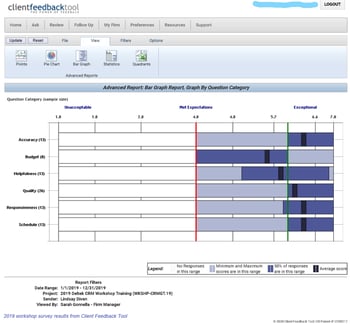
2019 workshop survey results from CFT

Following the 2019 workshop series, 56.5% of attendees responded to a request for their feedback. Of those that responded, ALL felt the workshop met or exceeded their expectations. Accuracy, Responsiveness, and Schedule received the highest response rate. Each of them received an average of 6.3, which means the workshop exceeded expectations, based on the Client Feedback response rate. Attendees were asked these questions:

  1. How clearly and accurately was the information presented?
  2. How well did the agenda, pace and length of the presentation align with the time allotted for it?
  3. How well did we respond to questions brought up in the presentation?

Here are some comments from some attendees:

"Lindsay is an excellent presenter and her ability to relate the BD/Marketing aspect to the accounting and overall business functions was invaluable." - Siobhan Turner, Marketing Director at Bentley Architects & Engineers, Inc.

"Lindsay was patient and clear in all her explanations. Very happy I took the day and attended the course. It really made me see the total potential of the software and our next steps." - Alfred Lurigados, Sr. Vice President, BCC Engineering, Inc.

"The workshop was complete with easy-to-follow slides and thorough explanations.The presentation met my objectives. I set out to get a better understanding of CRM and how it fits into the rest of Vision and this presentation did that. Lindsay is a great presenter and I felt I took some things away from the workshop that I did not previously know."  - Karl Lundmark, Database Administrator at Gas Transmission Systems, Inc. (GTS)

Bonus Bootcamp Workbook

All participants will receive a workbook used to not only implement what they learned at the bootcamp but also enhance their use of Deltek Vision CRM. This workbook includes: 1. Discussion Starters; 2. CRM Readiness Checklist; 3. Best Practices Tips; 4. Top 10 CRM Tips & Tricks; and 5. Preparing for Vantagepoint.

Be sure to visit our website to sign up for our virtual CRM bootcamp. It is definitely worth the small registration fee. Hope to “see” you there!

Top Reasons Professional Services Firms Should Leverage Deltek Talent’s Learning Management System (LMS)

Posted by Sarah Gonnella on Jun 17, 2020

Learning Management System

As a professional services firm, your business exists because of the knowledge and expertise of your employees. Staying competitive requires these employees to keep up with the changing times and current industry practices. A learning management system (LMS) can set your professional services firm up for success by providing your employees training content related to their positions. However, one of the challenges with an LMS is finding or creating the relevant content. With Deltek Talent and RedVector joining forces, your firm can now leverage pre-built ample content. Let’s see the reasons why your firm should consider utilizing Deltek Talent’s Learning Management System.

Comprehensive Training Library

To start off with, Deltek Talent teamed up with RedVector which provides a comprehensive training library including courses in project management, safety, industry codes and standards, leadership development and much more. The online library contains approximately 4,000 courses authored by more than 200 subject matter experts and accredited by 100 national and state bodies. This extensive offering eliminates the need for your firm to have to create content on the fly. Here is a complete list in the AEC course catalog

Access Training Anywhere

Another key issue impacting employee learning is the time commitment. Many professional services firms require their employees to be flexible with their time and those employees often have to be other places during the workday besides at their desks. Conveniently, Deltek Talent is a cloud solution accessible from anywhere with internet access. Users can access content on-the-go from any device allowing employees to learn when it’s convenient for them.

Training Content in One Location

One of the main advantages of having RedVector aligned with Deltek Talent is that professional services firms have content from day one. Furthermore, firms can add additional instructor-led, online, and external courses allowing users to access courses in one location. It is easy for users to document what courses they have completed so managers have visibility into their employees’ development progress. With Deltek Talent’s LMS, there won’t be any problems with finding the appropriate content for employee enrichment.

Improve Performance & Retention

Professional services firms save a lot of time and money when their employees grow with the company and stay long term. Within Deltek Talent Learning, RedVector provides an assessment tool that helps determine the competency level of employees, new hires, or students and generates an individual training curriculum based on deficiencies in the assessment results. Thus, providing impactful learning opportunities that improves employee performance, reduces turnover and puts employees in the driver’s seat of their own careers. 

Reduce Risk

Finally, for highly regulated industries, managers need to track required training and certifications which can be done with Deltek Learning Management. Additionally, RedVector provides more than 500+ courses that address the most hazardous situations professional services firms face. Employees will learn how to recognize and prevent at-risk conditions or behavior before they lead to an incident. Having the correct employee certifications and providing safety awareness helps reduce employee and company risk. Here is a list of RedVector’s health, safety and environment library collection.

Fuel Prosperity

Deltek Talent and RedVector combined focus on providing professional services firms with skills training, continuing education, and performance support to reduce risk and promote employee success. When firms help their employees perform better and grow in their careers, they not only retain the best employees but make certain they are engaged which leads to a prosperous outcome for all.

Most Recent News Mentions

We’re changing the way project-based firms operate.

People can’t help but notice.
Who will be next?

Check out our latest newsworthy work: