In the News


We’re devoted to revolutionizing the way our clients do business. Sometimes that gets us noticed.

No big deal.

Posts about Technology Solutions (6):

Reasons to Automate the Accounts Payable Process

Posted by Ryan Felkel on Jun 27, 2018

Invoice AutomationThe accounts payable (AP) process is one of the most important tasks a firm performs daily. Although accounts payable automation is not new technology, it has come a long way over the years. It’s surprising that so many firms have not embraced this technology to improve the AP process. Maybe it’s because they feel doing it manually will be more accurate, or they think their current process is efficient and cost-effective? So, let’s take a look at the benefits of automating the AP process and see if these preconceived notions have merit.

Going Paperless and Reducing Error

Accounts payable is a paper-intensive process that requires printing, copying, storing and retrieving papers. Additionally, manual processes are slow and are prone to human error rather than being more accurate as one may think.  With AP automation, invoices are stored digitally, and both paper costs and manual entry are eliminated saving money and ensuring accuracy.

Improving Employee Productivity

The AP process is a repetitive and time-consuming manual task. For instance, processing an invoice manually requires a person to copy information from an invoice and add it to the accounting books. When a firm automates the AP process, employees are relieved of doing these tasks and can focus their efforts on more profitable pursuits. 

Getting Insight into Your Firm’s Finances

It’s difficult to manage your firm’s finances if you can’t see them. Solutions like spreadsheets or pen and paper hinder your firm’s ability to generate accurate financial reports. Furthermore, being able to see who you owe money to allows you to predict future firm spending and avoid late payment fees and penalties. With AP Automation, your firm’s financial picture is easily accessible and therefore manageable.

Gaining Control of the Procurement Process

Procurement policies are hard to enforce if you do not have a way to approve a purchase before it’s made. Using an automated AP solution allows firms to setup an approval process that ensures purchases are in compliance with firm policy. Firms can gain control of their spending by knowing when a purchase is made prior to being issued an invoice which promotes transparency.

Automate Your Firm’s AP Process

With actual reduction in error, cost savings and a clear view of firm finances, the preconceived notions of not using AP automation are certainly without merit. And there’s even more benefit to automation. An automated AP solution allows vendors to submit invoices to a designated email address or webpage which reduces the risk of losing invoices. It also ensures you pay your vendors on time which makes them happier to work with your firm. Is your firm ready to automate?


Spend Management Reporting Made Easy

Posted by Full Sail Partners on May 9, 2018

Spend Management ReportingFinancial reports are essential to every organization for providing information about the health of a business to internal stakeholders as well as interested outside parties. For many firms, this is a manual process which requires significant time and resources to collect expense and invoice details, code them to the ledger, and then organize high-level summary information. Your accounting staff shouldn’t be spending their time organizing data, but instead analyzing the data to help your firm make better business decisions.

What’s the Solution?

To get started, SAP Concur has organized the key information into many standard dashboards, tiles and over 180 reports available in the standard report catalog. Many of the standard dashboards include the bulk of information your teams need, but they can also be personalized to meet specific requirements or preferences. These dashboards, tiles, and reports can be used to assist managers in tracking budgets and forecasting for future cashflow management. Tracking elements include spend by expense type, time-period, and project or department.

Why SAP Concur Reporting?

To budget for future spending and forecast future cash needs, you need to understand what you have spent in the past and what spend is still outstanding. Firms often use the processed spend data from within their financial or enterprise resource planning (ERP) system. However, the challenge firms face is real time access to spend and accrual data that hasn’t yet been submitted into their ERP system. Concur Analytics Data is available in real time and is available before the expense report or invoice is submitted for payment.

Get to Know Tiles

Tiles in Concur can be used by themselves or pulled into dashboards for a more comprehensive view of spend.

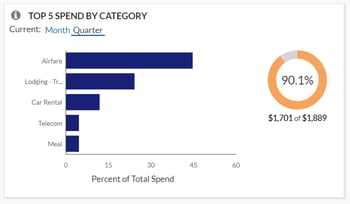
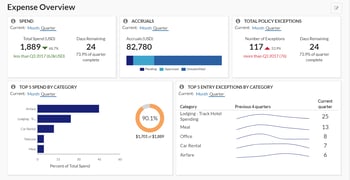
  • Top 5 Spend by Category allows users to easily view where your spend has been incurred. This lets you quickly determine if it is incurred in the expected categories, if spending needs to be reduced, and where might make the greatest impact. Accountants can then utilize the Spend Analysis dashboard or Expense Entry Analysis Details report to drill further into the categories and spend by vendor to help negotiate better pricing with your top vendors.

Concur 1

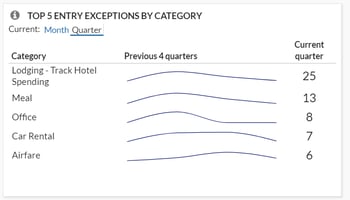
  • Top 5 Entry Exceptions by Category enables users to easily view exceptions. This allows your team to identify the impact of any policy changes and see the policies with the most violations that should be investigated further. For even more visibility, they can then drill down into the Policy Exception Detail or Spend Analysis dashboard as well as the Expense Exception Analysis for both Report Level and Report Entry Level reports.Top 5 Entry Exceptions by Category
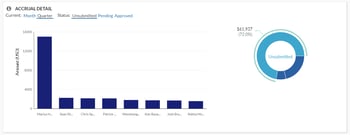
  • Accrual Detail lets you identify the largest opportunity to take action on with outstanding spend, and specifically which individuals carry the largest value of outstanding spend. Your managers can either find training opportunities with these top individuals or focused spending cuts. For your accounting staff, this tile will help you determine the impact to future cashflow during tight budget cycles.

Accrual Detail

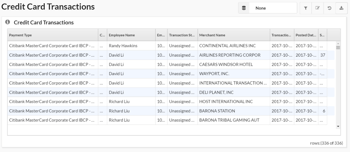
  • Credit Card Transaction Report is one of the best features since it enables you to easily regain hours or even days’ worth of your accounting staff’s time. Although it may not be the sexiest feature, it is critical for keeping your data in compliance. This report lists all credit card transaction details imported into Concur. It can be used as a comprehensive listing or as an ad hoc exception report to look at certain subsets of credit card transactions. Organizations with a corporate card program need to reconcile their credit card transactions with the card statement to ensure all expenses are being processed, and this report can assist with that reconciliation. Also, this report can be grouped by Employee, then sorted by Posted Date to mirror the format of the credit card statement for simplified reconciliation. Another version of this report, the Unassigned Credit Card Transaction report, can help you quickly find those expenses which have been accrued are not yet assigned to an expense report.

Credit Card Transactions

Take a Deep Dive with Reports

For more in-depth analysis and details, reports can help streamline your workflows and drill down into the data you need. Custom reports can also be created by the Concur team if your requirements fall outside of the standard options.

Quick Access with Dashboards

You can start with one of many pre-built dashboards or create your own from scratch by adding tiles and reports to existing templates. While there are many dashboards available, some of the top ones include the Expense Overview dashboard and Policy Compliance dashboard. 

The Expense Overview dashboard is a perfect starting point for budget, cashflow management, and policy compliance all in one place. This dashboard can be used as a starting point to create a new custom “Spend Management” dashboard. Managers can use this detail for budget and forecasting purposes. Personalization recommendations are to retain the Spend, Accruals, and Top 5 Spend by Category tiles as well as adding additional tiles: Spend Summary Trends, Spend Change by Category, and Accrual Detail.

Expense Overview

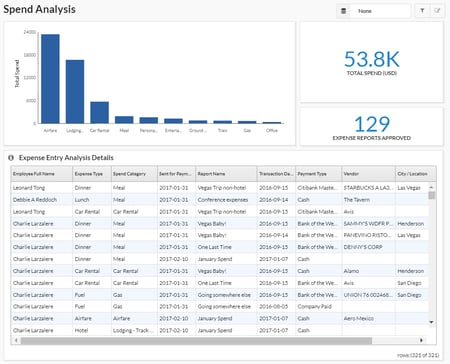
The Spend Analysis dashboard is an incredibly functional dashboard that offers users an in-depth analysis on total spend for a given period along with a summary breakdown of that spend by Expense Type and associated detail. This dashboard can be easily filtered to show specific Spend Categories, Expense Types, or Employees for total spend analysis or grouped and sorted in ways that are meaningful for specific tasks. It allows leaders to identify what their teams have spent in a given period. They can even track individual spending patterns to identify specific areas for follow-up or track improvements in spending behaviors. This report is versatile in that it can be filtered to show trends in spending patterns or behaviors. If more detailed analysis is required, use the Expense Entry Analysis Detail report.

It is recommended that an organization review their travel policy once a year and adjust as needed. It is important to consider the potential impact of a policy change before one is implemented. If an organization does not have a limit on cell phone reimbursement, but needs to create a policy on this expense, the Spend Analysis dashboard can be reviewed to identify average reimbursement rates to establish a baseline for a new policy. This dashboard can also be used to assess the impact of such a policy change to identify how many individuals would have been out of policy if the value was changed.

Spend Analysis

SAP Concur is a Complete Spend Management Solution

With over 180 reports available in the standard report catalog, Concur can help you quickly and easily analyze your Travel, Expense, and AP automation program to gain valuable insight into how to proactively manage all aspects of your business’s finances. It’s been said that knowledge is power, but having too much information can be as bad as not having enough. You need to be able to see spend clearly so you have more time to run your business. As your business and reporting needs evolve, let Concur and Full Sail Partners help you capture and monitor the data you need.

Make Smarter Decisions with the Informer 5 Business Intelligence Tool

Posted by Ryan Felkel on Apr 11, 2018

Informer 5Business analytics has become increasingly important for professional services firms. However, finding a business intelligence (BI) tool that works with Deltek Vision and gives us the analytics we want has been challenging. We need flexibility, customization and ease of use to answer important questions about our firms yet often we find that this type of analysis is not accessible in Vision. Thus, we are faced with the export/import/number crunch process in an external tool like Excel plus countless hours spent doing the calculations over and over. We need a better solution, instant access, and easy updates.

Enter Informer 5

Introducing Informer 5, the BI tool which works with Deltek Vision to make instant analytics readily available. Informer 5 is an integrated customizable interface to Vision data for use in various analytical scenarios. Using the Blackbox Connector, direct integration with Vision is now a reality.  

You simply select the data fields you want in your database including standard Vision fields, User Defined Fields, and User Defined Info Centers, and you’ll quickly be able to visually see project metrics, employee measurements, marketing results, and firm forecasting. You’ll be able to answer questions such as: 

  • How are my projects performing?
  • How is that new branch office doing?
  • Are my employees billing enough hours?
  • How is the firm doing compared to the last three years?

Also, remember those spreadsheets with all that data we built over the past years? Informer 5 can integrate this data with your Vision data. No need to reinvent the wheel, we can use it as a data source. Other data sources? Informer 5 can access those too.

Visualize Your Data with Informer 5

Are you interested in where your work is being done and where the profits are made? Well, Informer 5 also includes geographical presentations including maps. You can easily visualize and determine these specifics with Informer 5.

You can even find the numbers behind the pictures. Informer 5 has built in drill down capabilities that can take you directly to the detail data. From Profit Center to Project Manager, Project Manager to Project, and all the way down to line item detail, data can be acquired with Informer 5, and all of this can be gathered from the same graph with no need to run additional reports.

Make Smarter Decisions with Informer 5

On a final note, the Informer 5 package includes set calculations for many of our industry standard metrics. Additional calculations can be added to customize this solution for any firm. Also, firm data can be updated regularly on schedule or updated on demand from Vision. It is up to you. So, with all of these awesome features of Informer 5 and its integration with Vision, isn’t it time for your firm to start making smarter decisions?

The Top 10 Read Full Sail Partners’ Blogs of 2017

Posted by Jennifer Renfroe on Jan 17, 2018

2017 Most Read Blogs With all the hot topics of last year, we thought it would be interesting to see which ones were valued the most by Deltek Users. To figure this out, we compiled a list of the top 10 read Full Sail Partners’ blogs of 2017. From finance, to marketing, to HR, to project managers, it seems that we offered a little something for everyone. Let’s check them out:

  1. The Unknown Features of Timesheets in Deltek Vision

It is a mystery why we deal with time management so badly. This is our commodity which we sell to our clients. However, we treat it like a curse, as if it’s an evil process that accounting forces on us. It somehow escapes us that this is the lifeblood of our business, and without it, we are out of business. So why don’t we manage this better and how can we improve our firm’s practices? Find out now! 

  1. Maximizing Organizational Breakdown Structure and Work Breakdown Structure in Deltek Vision

As Deltek Vision systems are implemented and processes are written, the common denominator is most often the connection between the Organizational Breakdown Structure (OBS) and the Work Breakdown Structure (WBS). Whether it be the uniqueness of each or the relationship between the two, the attention paid to these early stages of development is instrumental in the flow and reporting of information in your Vision database. Click here to explore some areas to consider when designing the structure of your database. 

  1. Is This the End of Deltek Vision's Revenue Method B?

Revenue Method B is the most widely used revenue method in Deltek Vision. In fairness, this is Vision’s default method for projects whose charge type is Regular. As a result, most firms use it since it’s easy to deploy and seems to work, or so we think. Learn more about Revenue Method B here. 

  1. The Truth Behind Why Your CRM System Sucks!

The main reason why CRM implementations usually fail isn’t because of the system, it’s because of you. I told you this was going to be hard to swallow. A CRM system is meant to provide a place to house all of the important information about your clients and opportunities. However, many firms purchase a CRM system thinking it will miraculously do the work for them with no effort required. Find out what your firm needs to know to have a successful CRM system. 

  1. 6 Key Statistics that Fuel the Competition for Talent Management

Organizations with antiquated talent management philosophies will struggle to attract, nurture and retain top talent in 2017. Many HR teams make the common mistake of having decentralized or ineffective systems and processes. Check out six key statistics that demonstrate why HR teams can no longer be reactionary and should evaluate their talent management processes and systems. 

  1. Using Multi-Company in Deltek Vision: The When, Why and How

Within Deltek Vision lies a very handy tool which enables a firm to have multi-company functionality. However, the benefits of this multi-company functionality feature seem to elude many firms that would greatly appreciate its capabilities. So, let’s talk in detail about multi-company functionality and the why, when and how firms should use this fantastic feature. 

  1. Ten Firm Initiatives to Improve Deltek Vision

Although it is easy to accept the status quo, there is always room for improvement. Once improvements are made, it is hard to believe that we operated the way we did before. So, there it is, the continuous cycle of breaking the status quo to improve our firm processes which ultimately ensures future success. As Deltek Vision users, we should focus on initiatives which enhance our Vision systems and allow us to remain efficient and effective in business. Find out which initiatives your firm can take on in 2018. 

  1. Why You Should Be Using Deltek Dashboards

Are you maximizing your time by taking advantage of a dashboard? Dashboards are one of the most beneficial and functional parts of a system and yet are often the most underutilized. Dashboards are comprised of dashparts, or widgets, which are used as a portal into your Deltek database. For firms using Deltek Vision or Deltek Talent, the dashparts are extensive and include reports, metrics, links, alerts, tips and more. Find out why your firm should be using dashboards. 

  1. Understanding and Effectively Using Cross Charge in Deltek Vision

Cross charge capabilities in Vision are based on similar theories as multi-company but are focused on the interaction within a company and its organizational breakdown structure (OBS). It is important to understand that cross charging is a financial tool and is based on the general ledger. It is not an attribute of project reporting since time charged to a project remains on the project for billing and reporting purposes. Cross charge is labor focused and occurs after the timesheet is posted. Still confused? Learn what you need to know to effectively use cross charge. 

  1. Introducing Deltek for Professional Services

Welcome to Deltek for Professional Services (DPS), the next generation solution for professional services automation (PSA). If PSA is a new term for you, think of it as a specialized system like an enterprise resource planning (ERP) solution except specifically designed for the professional services industry. So, what can DPS do for your firm? Let’s see how this new cutting-edge solution will add value.

The Full Sail Partners’ team strives to provide our clients with useful resources that add value to their Vision systems. We hope that these widely read blogs from 2017 did just that. If you haven’t had the chance to review them yet, we hope you’ll do so now. Also, remember to keep an eye out for what’s coming in 2018!


  

On the Mergers & Acquisitions Path, Which Fork in the Road to Choose?

Posted by Michael Kessler, PMP on Jan 10, 2018

Mergers and Acquisitions Mergers and acquisitions (M&A) in the architectural and engineering (A&E) industry are on the rise. Unfortunately, many firms are not prepared to successfully implement the M&A process. With an acquisition, it is imperative that the “buying” entity have a well-defined set of procedures to easily onboard the incoming firm. In the case of a merger, all involved firms would need a set plan which would dictate the transition to a new firm. However, first a firm must decide the direction it will take regarding the M&A process and evaluate how it will affect the current organization’s structure.

Navigating Forks in the Road for Your Firm 

There are many reasons a firm may decide to begin the M&A process. Each firm has its own vision for the future. On this path, there are 3 “forks in the road,” and a firm must choose one:

  1. Absorbing the acquisition into an existing organization
  2. Creating a new organization within an existing company
  3. Creating a new company 

Making the Acquired Company Part of the Buying Company

Absorbing the acquisition into an existing organization is the easiest and most straight forward. This scenario is usually the result of a simple employee purchase. For example, a design engineering firm acquires a mechanical engineering firm. In this case, the incoming engineers are integrated into an existing profit center (department). They may have brought projects with them or are going to be staffed on existing projects. Since it requires no structural changes to the database, very little of any testing is needed. The focus would be more human resources related blending the culture of the acquired firm into the existing one. 

Making a New Organization within the Buying Company 

Creating a new organization within an existing company is most often the result of expanding service offerings. For example, a base building architectural firm acquires an interiors firm. If the firm’s current structure is studio based, a new studio would be required for the interior work. Under this scenario, a change to the existing structure is made that will require testing. This will include: 

  • Cross Charging
  • Overhead Allocation
  • T&E group management 

In addition, reporting parameters need to be updated to ensure the new organization is included in all metrics and indicators. This will require reasonable lead time to do a test and final cutover. 

Making a New Company Altogether

Creating a new company by merging firms is the most common scenario, and regardless of the dynamics, is often driven by numerous outside factors such as: 

  • Tax implications
  • Buyout and payout provisions
  • Currency requirements
  • Country, state, and other municipal requirements
  • Banking relationships
  • Investment and or holding company requirements
  • Professional licensing requirements 

In a merger situation, a change to the existing structure is made that will require testing. This will include: 

  • Intercompany Billing
  • Foreign currency management
  • Consolidated reporting (in addition to the reporting parameter updates noted above) 

Additional factors that will need to be considered in risk mitigation are: 

  • Rules defining internal pricing
  • New currency being introduced into the environment 

This situation will require at least one test cutover and lead time needs to be considered during the process. 

Final Considerations for Mergers and Acquisitions   

Once you have selected which of the forks on the M&A road to take, the real work begins. Beyond the integration testing noted above, there are two other risk areas that must be considered. 

  1. Data import
  2. Revenue management 

Regardless of which direction your firm chooses to take in the M&A process, Full Sail Partners can offer consulting from subject matter experts. Contact us and we will be happy to help. You don’t have to walk alone. Additionally, we will be at the 2018 Southeast States M&A Symposium in Miami, Florida on January 24th and 25th. 


Hot Service Offerings for Deltek Users in 2017

Posted by Amy Balassone on Dec 20, 2017

Deltek Logo2017 was a banner year for Deltek users with so many amazing new service offerings coming available. Each of these solutions was designed with users in mind to create a more streamlined business operation. From improved user interfaces to near instantaneous data transfers, Deltek users now have an array of options to get their work done faster and more efficiently.

Let’s take a look at these hot service offerings from 2017.

Deltek for Professional Services

Deltek for Professional Services (DPS) is the newest cloud-based professional services automation (PSA) enterprise software solution designed by Deltek and launched this year. DPS is based on Vision with an improved user interface like that of iAccess for Vision. Deltek for Professional Services integrates and automates your firm’s business processes allowing better control over your business and your projects. Designed to meet the needs of the A&E industry, DPS manages the project throughout the entire lifecycle including business development, project management, resource management, collaboration and financial management.

Deltek Talent

Deltek Talent helps businesses maximize their strongest and most distinctive resource, their people. It simplifies the entire employee lifecycle, enabling companies to seamlessly recruit, on–board, develop, compensate, and track their employees. Maximizing your Talent with Deltek Talent allows you to keep skills and competencies at the forefront of your strategy providing the competitive edge you need to stay ahead in the ongoing war for talent.  

Deltek Project Information Management

Deltek Project Information Management (PIM) provides project management and collaboration tools designed to help employees access critical project information to stay connected throughout the entire project lifecycle. With PIM you will avoid lost files and duplicate information saving hours of manpower. You can see all versions of the project documents, tag documents across multiple related locations, and review new designs and drawings instantly. Organized files across all aspects of business in one centralized location provides companies the intelligence to more effectively run their business.

Blackbox Connector

The Blackbox Connector is a no-code, low cost connector offering an interface between Deltek Vision and other third party business applications. With the Blackbox Connector, you will significantly reduce integration time and duplicate efforts in the entry and maintenance of data. The Blackbox Connector provides easy to implement solutions focused on connecting your Deltek Vision system to Concur, Client Feedback Tool, Constant Contact and Mail Chimp. Connectors for both HubSpot and Informer will be released soon. The Blackbox Connector eliminates data silos by providing a better and more formidable way to connect to Deltek Vision.

Do More with Deltek in 2018

Whether your firm is looking for ways to retain top talent or help to expedite completing expense reports, there is a solution for you. Are you ready to take advantage of these time saving services?

The Importance of Being Efficient: Using an Automated Talent Acquisition System

Posted by Sarah Gonnella on Nov 29, 2017

Talent Acquisition Automation Gone are the days where human resources (HR) professionals simply focused on just filling staff requisitions. Today’s HR professionals are looking to build relationships which will impact their organization’s bottom line. With this in mind, they must successfully compete for and win the best talent which fits the needs of their firms. The talent acquisition team can boost the efficiency of both the recruitment and on-boarding of this talent using an automated system.

9 Talent Acquisition Processes that are Improved Using an Automated System 

  1. Standardized Job Descriptions | Having standardized job descriptions that can be automatically pulled into a requisition allows HR professionals to immediately begin finding qualified candidates. Establishing standardized job descriptions also sets skills requirements, job expectations, and success measurement. 
  2. Requisition Request and Approval | Automating the requisition and approval process ensures the team knows about a new hire request. This process also gives team members one last opportunity to evaluate the job description and provides tracking for the position moving forward.
  3. Write Once, Share Often | One of the biggest benefits of an automated talent system is the ability to share the job request in multiple locations without duplicating efforts. HR professionals can now streamline the publishing process by posting the position on the firm website, job boards, and social media, while enabling employees to share via their social networks. 
  4. One Place for Qualified Candidate Pool | A talent acquisition system ensures candidate submissions go into one centralized location. When candidates submit their resumes online, their information is associated to the requisition and can also be assigned to future pools for searching. No more excel spreadsheets needed nor keeping up with random emails and submissions from various locations. 
  5. Quick Candidate Notifications | Letting a candidate know his application was received and is being reviewed can make a positive impression. Even if a candidate doesn’t fit this position, he may fit a future position. The ability to send quick notifications to multiple candidates streamlines the recruitment process because candidate contact is automatically maintained. 
  6. Standardized Letters | Standardized letters (offer, decline, interview, etc.) allow HR to respond automatically to all candidates. These letters are significant to the candidate experience, and the automatic response reduces the work it would take to individually contact each candidate.
  7. Electronic Forms and Checklists | Reducing the amount of physical paperwork needed throughout the application and onboarding process is necessary for efficiency. Electronic forms and checklists make sure all necessary information is gathered, and that the process is seamless. 
  8. Internal Notifications | The first week of a new hire is the most important time to make a good impression. Automated internal notifications keep everyone involved with the new hire in the loop, so no one drops the ball.
  9. Let It Flow | The beauty of an automated talent acquisition process is that the flow of information eliminates duplicate entry. Once the candidate enters his information on the job application, it continues to flow through to the on-boarding process thus reducing manual entry. 

Automate Your Talent Acquisition Process 

Every HR professional wants to find and match the right candidates to open positions as quickly as possible. However, they also want the candidate experience to be a positive one for lasting relationships. Having an efficient talent acquisition process can improve new hire readiness and decrease time to revenue, while keeping the candidate experience in mind. Is your firm ready for an automated system?


Bring Data Together with the Blackbox Connector

Posted by Ryan Felkel on Nov 8, 2017

Blackbox ConnectorData here, data there - this seems to be a continuous issue for professional services firms as more technology solutions designed to overcome specific business challenges enter the market. Luckily, there is an answer to this problem for Deltek Vision and Deltek for Professional Services (DPS) users - the Blackbox Connector. Simply stated, the Blackbox Connector allows users to embrace the power of third-party technology solutions using the data in their Deltek Vision or DPS database. Here’s a look at the current and upcoming integrations available from the Blackbox Connector.

Outbound Marketing Connectors

Email marketing has revolutionized how businesses stay connected with clients. Even more, being able to know who opens and clicks on links in the email becomes valuable business intelligence. With Constant Contact and MailChimp, this information is attainable, and all that is needed for these solutions currently resides in your Deltek database. Click here to learn about email marketing.

With the Blackbox Connector, your Deltek CRM data is easily integrated with Constant Contact or MailChimp. Just create the email in your chosen email marketing solution, and with a push of a button, your target contacts in your Deltek CRM quickly populate the email target list in the email marketing solution. The open and click data for each email campaign will appear in the associated marketing campaign in your Deltek CRM.  

Spend Management Connector

Maximizing your profit means controlling how your business spends money. Spend management requires having timely and actual spend information. The Concur solution allows businesses to automate the expenses process from receipt to reimbursement and to gain visibility into travel expenses. Additionally, the Concur solution provides businesses with the ability to automate accounts payable and see spending before it’s spent. Learn more about spend management here.

The Blackbox Connector for Concur connects these key accounting responsibilities with the accounting tools in Deltek Vision and DPS. The current version of this Connector allows expense data collected in Concur, including receipt images, to automatically populate in the expense module in Deltek Vision or DPS. This enables your firm to take advantage of the powerful expense management capabilities of Concur. The automated accounts payable capabilities from Concur will soon be integrated with Deltek Vision and DPS.

Customer Success Connector

As a firm finishes a project, it doesn’t always mean the client felt it was a success. Ensuring your project delivery was successful requires managing client expectations throughout the lifecycle of the project. The Client Feedback Tool allows businesses to capture feedback periodically throughout the project lifecycle. As a result, your project managers can better manage client expectations. Find out more about client feedback in this article.

Using the Client Feedback Tool Connector, project managers can easily obtain feedback at specific milestones of a project from the project info center or hub in Deltek Vision or DPS. The Client Feedback Tool Connector allows for surveys to send based on multiple criteria such as billing milestones or at a set timeframe utilizing the existing data in Deltek Vision or DPS.

Inbound Marketing Connector

In today’s world, every business is competing to be found on the internet and discovering how your inbound marketing efforts are attracting clients is essential to developing meaningful relationships with prospects. Using the HubSpot marketing software, your firm has access to all the tools it needs to run an inbound marketing campaign. Soon, business development teams will be able to acquire this vital information from HubSpot.

Coming in 2018, the HubSpot Blackbox Connector for Deltek Vision and DPS will allow data collected in HubSpot to populate the associated marketing campaigns in your Deltek CRM. When your inbound marketing efforts generate new contacts, their information will create new contacts in your Deltek CRM. With the Blackbox Connector for HubSpot, your business development team will have great new insight into your firm’s inbound marketing efforts.

Business Intelligence Connector

Having the ability to quickly analyze data to make informed decisions is a necessity to stay ahead of the competition. With Informer 5, users can create, analyze, visualize and collaborate in a user intuitive environment to make data-driven decisions. Informer 5 is a new generation of business intelligence and data analytics.   

In early 2018, Deltek Vision and DPS users will now be able to use Informer 5 to cleanse, merge, and analyze the data in their Deltek database. Firms using the Informer 5 Blackbox Connector will have an edge over their competition using timely and actionable insights.

Integrate Your Data with the Blackbox Connector

Deltek Vision and DPS are powerful solutions designed to help professional services firms win more business and better manage resources by tracking, editing, and analyzing project details. Despite the overwhelming capabilities of an ERP or PSA solution, further technology solutions are sometimes required. This is why the Blackbox Connector was created.  It is specifically designed to allow your firm to maximize the capabilities of your Deltek products, while also taking advantage of these other world class solutions, all along keeping your data in one system. Learn more about how your firm can bring data together.


Why Take Deltek Vision to the Cloud?

Posted by Ryan Felkel on Aug 23, 2017

Deltek Vision Cloud Did you know that 30% of Vision customers are in the cloud today? That is a fact, and the number is growing every day as more and more Deltek Vision clients are deciding to take their systems to the cloud. Now, what makes the Deltek Vision Cloud so attractive for so many firms?

Always Available and Reliable 

Being able to always fully utilize your Deltek Vision system is vital to run a successful business. With the Deltek Vision Cloud, you can rest assured that your firm will have access to Vision whenever needed with a 99.9% average uptime. What makes this possible? Well, Deltek has a dedicated cloud operations team. Ensuring your data is always safe in case of disaster, with a top-notch disaster recovery environment, is the number one priority.

Know Your Data is Secure in the Deltek Vision Cloud

As the leader in ERP solutions for project-based firms, Deltek knows the importance of data security to these firms. Therefore, Deltek selected Amazon Web Services (AWS) to ensure your data is protected by a leader in the data security industry. Working together, AWS maintains the physical infrastructure and security, and Deltek handles application management in the Deltek Vision Cloud. To learn more about AWS, click here.  

Access Deltek Vision from Anywhere

With the Deltek Vision Cloud, if you have a secure internet connection, you can access Deltek Vision from anywhere. This allows your mobile workforce to search data and update information while working remotely. Since Deltek makes protecting your data its top priority, you can be certain that these remote connections are secure.

Keep Up with the Latest Versions

When you use the Deltek Vision Cloud, timely updates to the latest versions of Vision are automatically done for you. As a result, you can free up valuable IT resources from having to implement the updates and hot fixes. Additionally, custom reports and other customizations are easier to maintain in the cloud environment during the update process. Deltek also allows you to determine the best upgrade window for your firm.

Consider Moving to the Deltek Vision Cloud

If your current hardware is aging or you have plans for growth, you can avoid the cost of replacing old hardware or adding new hardware by moving to the Deltek Vision Cloud. Your firm will have safe and reliable Vision access, as well as remote employees with a secure internet connection. Futhermore, you can leave the burden of Vision updates and hot fixes to the dedicated Deltek cloud operations team instead of your IT resources. The cloud is waiting for you.


Top Free Resources for Deltek Users

Posted by Ryan Felkel on Aug 16, 2017

Free Resources Yep, you read that right. I said free resources are available for Deltek users. Using these free resources, you can become more familiar with Deltek products and keep up with the newest features and how they work. Even more, Full Sail Partners and Deltek both offer these free resources for your consumption. So, what are these useful yet complimentary tools and where do you find them?

User Groups 

User groups are a great way to network with your peers, learn tips about how they utilize their systems and perhaps better ways to accomplish specific tasks. User group meetings are led by a Deltek expert and you will enjoy an interactive environment where you learn more about a feature and get questions answered in real time. Additionally, user groups provide the opportunity to talk with other users about challenges you may be having so you can discover solutions. Look for a user group in your area and check out our upcoming list of user group events.

Webinars 

Both Full Sail Partners and Deltek offer webinars on a variety of topics presented by subject matter experts. These webinars can be attended live or viewed later on demand. You can ask questions during live webinars and walk away with the answers you are seeking. Additionally, webinars can be attended from anywhere that has internet access making them extremely convenient. Check out a list of upcoming and on demand webinars here.

YouTube 

Full Sail Partners also offers short training videos and demos for Deltek Vision users. These give you the ability to learn as your schedule allows. In our YouTube videos, we show you how to complete time saving tasks so you can quickly move from novice to power user. The videos are packed with valuable information to benefit all users. Make sure to check out and subscribe to our YouTube channel. 

Blogs 

Our weekly blogs cover hot and relevant industry topics. Each blog is written to provide helpful insights and tips with the intention of keeping users up to date on all of the latest information available. You will find links to our blogs in our monthly newsletter or you can check out our blogs on our website. 

Stay Tuned for the Latest Free Resources

While you can always visit our website daily, there are other ways to keep in the loop. We use Facebook, LinkedIn and Twitter to spread the word about our new educational resources. Also, make sure to subscribe to our monthly newsletter where you can find lists of new blogs, webinars, and events.

Most Recent News Mentions

We’re changing the way project-based firms operate.

People can’t help but notice.
Who will be next?

Check out our latest newsworthy work: