Full Sail Partners Blog | Project Management (10)

Posts about Project Management (10):

Top 10 Feedback Techniques for Project Delivery

Posted by Admin on May 14, 2013 12:00:00 AM
This guest blog was written by Ryan Suydam.

Project delivery is all about taking an idea from concept through to production. Firms want their projects completed in the fastest and most cost-efficient manner possible, all without sacrificing quality. Incorporating feedback into a firm’s process helps the team perform at their best, while the very act of asking for feedback shows clients proactive and professional care. To help jumpstart your client feedback process, we’ve listed the top 10 feedback techniques to facilitate project delivery. 

Feedback Techniques1. Make it Comfortable.

When requesting feedback make sure the process is comfortable to use for all parties. The more comfortable the process, the more likely both parties are to participate. A comfortable process means clients will not feel put on the spot and concerned about a confrontation. Focus questions on processes, not personalities, and offer a flexible answer scale to capture subtle nuances of perceptions. 

2. Create Actionable Results.
An effective feedback technique requires data to enable follow-up. Be sure you are asking questions that allow you to retrieve measurable, actionable data. If the questions are too vague or too open ended, you won’t have the information that you need to take action.  

3. Process Focused.

The questions asked should be about process rather than people or products. We aren’t looking to find out how well the client “liked” us, but rather where our process is working great and where it might need some improvement.  

4. Go Beyond Satisfaction.

Ask your clients questions focused on their expectations, instead of their satisfaction, because satisfaction is the expected norm. The client’s perception of how you performed compared to their expectations is the key to knowing where to improve your project delivery process. Additionally, you’ll find 500% more exceptionally positive feedback than you will challenging feedback – and we all love to discover good news. 

5. Reduce Liability.

When asking for feedback, focus on questions that can reduce liability and encourage positive outcomes. Just by asking for feedback throughout a project, you are creating a record of the service perceptions all along the way, reducing the chance of a lawsuit and increasing your ability to meet their needs. Feedback helps keep you and your client aligned on a common goal - a successful project outcome. 

6. Don’t Wait.

Collect feedback throughout the project, not just at the end - when it’s too late to improve that project. Response rates are highest when the client senses his feedback might improve the project outcome. Once the project is over, the incentive to respond is gone. 

7. Make it Trackable.

Tracking feedback responses isn’t complicated, but making sure everyone on your team gets the feedback they need, reviews it, and takes appropriate action can be much more challenging. Deploy good tools to capture who is asking for feedback, who’s responding, and who takes what action on each critical response. 

8. Use Instant Alerts.

Collect feedback in a way that you can be instantly alerted to new feedback and drive real-time follow-up.  A good system will establish score thresholds that indicate, in real-time, when follow-up is required for exceptional circumstances. Make sure the right people are alerted so nothing falls through the cracks. 

9. Keep the Client First.

Structure your feedback techniques so that it is quick and easy for the client to give you feedback. Don’t waste their time with long surveys or questions with answers that only matter to you.  Response rates are higher with multiple short surveys over a period of time, than with one or two long surveys sent less frequently. 

10. Follow up.

Don’t neglect the follow up! A survey should always start a conversation, not replace one. Typically, follow-up is simply a personal acknowledgement that you saw and read the response. However, if any special situations were noted (either in scores or comments) be sure you open a dialogue to show how the feedback will change the process and project going forward. 

Each of these feedback techniques focus on a deliberate approach to your feedback collection efforts. Set your goals to collect actionable feedback in way that is easy for the client. Make understanding the results and following up easy for you too. See feedback as the opportunity that it is to improve your process, reduce your liability and become your client’s expert.

Interested in learning more about how you can start collecting client feedback?

10 Most Common Resource Management Problems

Posted by Scott Seal on May 1, 2013 12:00:00 AM

Every professional services firm works to distinguish itself by the creativity, effectiveness and execution of its services. But more often than not, the reality is that these firms tend to succeed or fail based on how effectively they overcome the most common resource management problems.  

  1. Resource Management, Resource Management Problems, ERP, Deltek VisionMissed project deliverables and deadlines — Getting the work done on time sounds simple, but it’s not. It’s a complex balancing act involving creativity, quality control, resource management and much more. If you don’t have sound processes in place, all the best thinking in the world won’t mean a thing.

  2. Ineffective documentation on billable hours — What creative person wants to hear that their success might rely in part on basic accounting skills? For professional services firms, effectively managing billable hours is one of the biggest factors in profitability, and thus, lasting success.
  3. Lack of project resource visibility — A firm’s management needs to be able to quickly understand what projects are underway for which clients. Essentials include progress on milestones, technical issues and how, when and where resources have been allocated.
  4. Assigning the wrong people to teams — Each project requires a team with the right insights, talents and other qualities. As Deltek’s Bob Stalilonis observes, “In an industry where the workforce is one of its greatest assets, staffing processes can be either a boost to profitability or a thorn in the side.”
  5. Accounting and project management disconnect — Using several different tracking systems for key financial and project data can waste time, cause frustration, and increase the likelihood of data-related errors. Also, managers are less able to quickly respond to cost, scheduling or resource issues.
  6. Inefficient cash forecasting — Some firms are good at this, and others, not so much. It’s a complicated discipline (involving such areas as accounts payable and receivable, taxes, regulatory compliance and more), and without resource allocation to a timeline, there’s no way to forecast cash from projects.
  7. One-off spreadsheets and workarounds — Not all solutions are created equal or, for that matter, shared equally with the right people. Too often, spreadsheets and other workarounds exist in silos across a firm, leading to duplicated efforts, incomplete solutions, missed opportunities and unprofitable projects.
  8. Under-informed decision-making — Resource management problems always involve information in one form or another. Whether the information regards projects, teams, or human and other resources, it adds up to a large dataset that management must have at their fingertips before making any big decisions.
  9. Failure to meet financial reporting standards — Depending on their market, professional services firms often need to comply with various EVM (Earned Value Management) reporting regulations. It may not be rocket science, but failing to ensure metric reporting compliance can result in firms not getting reimbursed on contracts.
  10. Missed opportunities in business capture — Organizing and managing the work of business development teams is a complex, high-stakes process. Firms that find an effective way to do so tend to not only optimize their ROI and profitability, but also ensure just-in-time hiring or business development.

Of course, this list is really just a starting point — and depending on your firm, there are probably some resource management problems that may not belong in the top ten, or others that should appear right at the top of list. 

But whatever the core problems you face, and whether you manage them with in-house staff using ERP software and other solutions, or outsource them altogether, they must be addressed. Nothing can sink a firm deeper, or faster, than failing to properly handle these basic resource management problems. 

What Does ERP Mean - Jargon Buster

Posted by Wendy Gustafson on Apr 24, 2013 12:00:00 AM

SaaS, ERP, CRM, LOL blah, blah, blah. Today everything seems to be reduced down to acronyms, to fit into our fast paced instant message, text, and Twitter world.  However, many times we can be left out of the story because we don’t know what they mean.  So, what does ERP mean and what are some of the common related terms? To help you decipher this business jargon, let’s discuss what it is and how it can help firms.

What does ERP meanERP – Enterprise Resource Planning is a system facilitating the flow of information between all business functions, from your Finance and Management Accounting to Project management, Client Relationship Management (CRM – see more below), Human Resources, Inventory and Purchasing. 
The benefit of an ERP is your business efficiency can improve dramatically as all your business processes are automatically synchronized.  The real-time functionality allows for upper management to react quickly to changing dynamics in the company and the economy. 

Some of the characteristics to look for in a “good” ERP solution are:

  • Operates in “Real-Time”, reflecting what is going on with your business now
  • Database that supports all applications and allows for minimal duplication of efforts
  • Consistent interface throughout the system for ease in training staff

SaaS – Software as a Service is a software model where the software and data are centrally located on the “cloud” (see below).  SaaS solutions are typically accessed via a web browser allowing access from any location.  SaaS solutions have become popular over the last several years.

Some of the benefits of a SasS model are:

  • Easier administration at the client level as all updates, and patches are handled by the provider on a timely basis
  • Management of the data back-ups
  • Subscription feel providing a lower up-front investment compared to traditional software models

CRM - Customer Relationship Management is a model for managing a company’s interactions with current and future customers.  A typical CRM system will synchronize sales, marketing, customer service and technical support (if applicable).

Some benefits of a CRM system are:

  • Identification of top clients allowing for better customer service focus
  • Increasing information sharing between employees
  • Allowing systems to track client contacts
  • Providing visibility into sales and marketing efforts

SQL – Structured Query Language is a programming language that allows access to and management of large amounts of data. The data is stored in a relational database and offers the user the ability to manipulate and view the data in various ways. Efficiency is the main benefit of a relational database as the data can be easily formatted providing ease of grouping and comparison.

Cloud refers to using the internet to access programs and data.  Operating in the cloud has some real advantages in that you can access your data anywhere at any time and the cost of maintaining local hardware and operating systems are reduced (somewhat replaced by the cost of the cloud operations).  Some concerns are ensuring data integrity and security, reliability, limited customization and latency.  Be sure to check out this whitepaper for more information about the cloud.

Project-Based ERP is an ERP system built to meet the needs of project-based industries.  Project-based industries generate most of their business via individual projects (as opposed to producing widgets).  A project-based ERP will allow managers to track the life-cycle of individual projects from the initial proposal through project close-out.  This allows management analysis of the success (or challenges) of individual efforts, apply best practices and come up with a company policies and procedures.

Open Architecture refers to the ability to add-on, customize or upgrade components of existing system software.  Software that has open architecture publishes or makes available its structure allowing for developers to access and manipulate.  In some cases this allows direct access via an OBDC (yet another acronym meaning Open Database Connectivity) connection or information sharing via an API (Application Programming Interface). 

Of course this is only a snapshot of what you hear out there. Hopefully it will serve as a starting point so you expand your research ERP.  New terms are created daily (just check any 15 year olds text messages to see) so this may be obsolete by the time it is published.  However, it does help you get a handle on the terms you have heard on the news, business reports, and around the office.  And now when someone asks you ‘What does ERP mean,’ you’ll have the answer!

5 Ways to Improve Workplace Efficiency

Posted by Sarah Gonnella on Apr 17, 2013 12:00:00 AM

Every firm is looking for ways to improve workplace efficiency.  Why?  Because the results are happier employees, improved bottom line, and a streamlined work environment.  There are a number of ways to achieve this goal, but what are the top ways to increase business productivity?  Let’s take a look at 5 ways to improve workplace efficiency:

  1. VisibilityImprove Workplace Efficiency to Evaluating Utilization
    Has your firm ever been guilty of making a sales call to the same client as someone else at your firm during the same week or even worse, submitting on the same proposal? When a client calls, do you know within a couple of minutes who the last person was that worked on the job or talked to them, and if there are any previous issues that are unresolved? In order to make quick, informed decisions and have the right information at the right time, it’s important to have real-time access and accurate visibility. Firms with the ability to instantly understand over and underutilization of resources by project and employee are able to quickly re-assign resources to increase productivity. Many firms utilize an ERP system to gain a global view of their company.

  2. Repeatable Process
    Another inefficiency we find are firms that don’t think about developing processes that are repeatable. Firms that take the time to think through processes, document them, and test against them avoid recreating processes and errors each time they are carried out.

    Two examples are the execution of a project and hiring a new employee. Both of these should have repeatable processes that everyone knows within your company. What happens when you miss an important step in either of these examples?  You lose money. By not executing the steps outlined during a project, you run the risk of overrun and a project that fails. By not following a hiring process, you run the risk of not having the same standards of candidates throughout the company, which could result in the wrong hire.

  3. Measuring the Right Statistics
    I had an old co-worker that used to create as many activities in the system as they could because that is what was important to their boss. The philosophy was more calls, emails, activities resulted in more sales and opportunities. The problem with this was there were two important factors left out: the quality of the activities and the results of those efforts.  In order to affect results, you have to choose the right statistics then track the results.  Establishing the right measurable goals and expectations help employees understand the value they bring to the company. When setting up metrics for employees remember to:
    • Establish goals for the company
    • Work with each employee to identify how they will contribute to the success of the firm and gain agreement on those goals
    • Measure them at set time periods

  4. Manage Customer Expectations
    Managing customer expectations impacts your long-term relationship with a client. When your customers are happy, your firm spends less time performing tasks that could have been avoided to get the client or project back on track. However, managing those expectations can be difficult to do throughout the project delivery. One way to manage customer expectation is to check-in with the client at multiple times throughout the project. Period check-ins provide your team with the time needed to make adjustments if something is not meeting the client’s expectations. Additionally, handling a small issue is much easier then handling a client that unloads their bottled up frustrations all at once.

  5. Develop Engaged Employees
    Did you know that a recent Gallup poll revealed that disengaged employees – least productive employees -- cost the US economy $370 billion every year?  In the review, three types of employees were identified: Engaged, Not Engaged, and Disengaged.  Engaged employees innovate and use their talents to build the company, while disengaged employees tear down the infrastructure by questioning and disagreeing with anything and everything.  Another set of employees are those that are not engaged. They sit back and avoid committing themselves.  It went on to show that of the US workforce, 29% is actively engaged, 55% is not engaged, and 16% is disengaged. So in essence only a third of your firm is operating at their full capacity.

    Each employee has different needs or desires. At times, money is important to employees. However, many employees find other things much more important in a firm: flexible work hours, recognition of talent, or an outlined career path. Ultimately firms should establish an open communication with employees and establish trust. Lack of transparency and understanding of the big picture and goals of the company leave employees wondering and concerned about the future.

The key to improve workplace efficiency is to constantly evaluate, adjust, and improve. What are your thoughts? Do you think your firm could benefit from these 5 steps? Try them and see if your overall efficiency impacts productivity and profitability.

Confessions of a Timesheet Procrastinator

Posted by Scott Gailhouse on Mar 29, 2013 12:00:00 AM


Okay, here goes…I actually love doing my timesheet on a daily basis.  There, I said it and I feel so much better. But hold on, let me back up a little.  Maybe “love” is too strong.  Let’s go with “like”.  I actually like doing my timesheet on a daily basis.

However this was not always the case.  Like most of you, the idea of filling out a timesheet was akin to having a root canal, but only worse.  In our firm, timesheets are due on a semi-monthly basis, but we have a policy that timesheets must to be completed daily.  I know, right?

This policy was easy to ignore until one day, much to my surprise, I received an e-mail alert that my timesheet had not been completed the day before.  AN ALERT!  It turns out that not only did I receive an alert, but a notation was made in my Employee Info Center record of my violation.  The powers that be had sunk to a new low and now I’m faced with two options; continue ignoring the policy and get an annoying alert on a daily basis, or start doing my timesheet every day.

Being the flexible guy that I am (this is sarcasm for those of you who don’t know me), I started doing my timesheet after each completed task.  And much to my chagrin (read surprise), it wasn’t that bad!  First of all my utilization went up.  Some of those short, billable items that fell through the cracks when I was doing my timesheet at the last minute were now being captured. 

Another plus to filling out my timesheet daily is that my comments are more descriptive.  No longer am I putting “call with so-and-so” in the comments field.  I am actually able to put what was discussed in the comment.  This has made reviewing my draft invoices so much easier because I am no longer second guessing the hours I billed to my projects or having to go back to e-mails hoping I find some clue about what was discussed. 

Also, my projects are easier to manage.  I know at any given time how many hours have been charged to my projects so there are no surprises when it comes time to review my draft invoices.

I am also amazed at how little time it takes.  What seemed like hours before, my timesheet now just takes a few minutes each day to complete.

And as if it couldn’t get any better, there is now a timesheet app for iPhone, iPad, Android and other smart devices.  Now I can do my timesheet on the go.  This has come in handy on many occasions when I’m out of the office but still conducting business.

I think the key here is that my timesheet is always up on my desktop.  Even if I open it up in another window, I always have access to it so that I can record my time as soon as I complete a task.

I challenge anyone to give this a shot!  You’ll save time and alerts popping up on your dashboard or in your e-mail box will become a thing of the past.

Interested in learning more about how firms are getting their employees to submit timesheets daily? Click here.

Are you a Deltek Vision user? Check out the newest custom solution from Full Sail Partners and start getting your staff to complete timesheets daily:

KPI Insight for Project Managers

Posted by Full Sail Partners on Jul 17, 2012 12:00:00 AM

A Cautionary Example of Using KPIs

If a Project Manager Falls Down in the Forest and No One is Around to See It, Does the Project Manger Still Get the Quarterly Bonus?

I have been giving a great deal of thought to KPIs (Key Performance Indicators) lately.  One thought was about the idea of the unintended consequences of putting a “suite” of KPIs (KPIs are like potato chips, you can’t have just one. . .) in place, specifically for Project Managers.

How will their behavior change?  Will measuring chargeability for their project teams cause the employees to be more utilized or cause billable project to become less profitable?

Let me throw out an example.  This example is based upon a real client and provides KPI insight. The Names have been changed to protect the innocent.

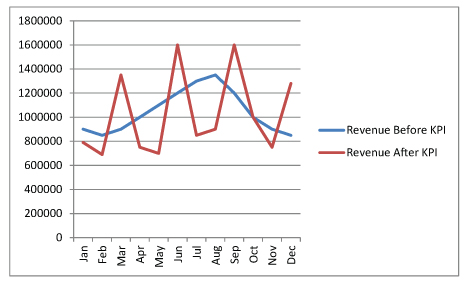
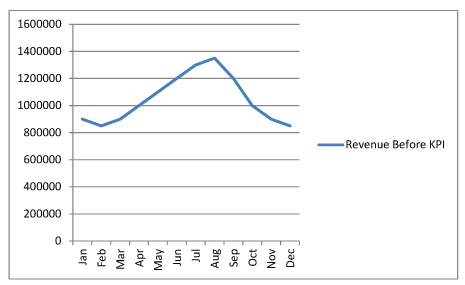
Company A wanted to incentivize their project managers to produce more revenue.  So, after months of discussion and planning, the partners setup revenue targets for each PM based upon past performance and a generously favorable potential revenue prediction for the next year.  The Project Managers would be paid a bonus at the end of each Quarter for any Revenue they brought in over the projected target.  This was very generous, and all the partners agreed that this would drive business revenues higher.

Except it didn’t happen exactly the way they wanted it to.

Here is a graph showing how their revenue was before this particular KPI was put in place:

KPI Key Performance Indicator Before


And here is the before and after picture:

KPI Key Performance Indicator After


Ouch!

This of course caused their accounting team to load up on antacids for most of the year.  Their KPI (and bonus program based on that KPI) had encouraged some behavior that was not necessarily good.  The Project Managers did not care about recognizing any revenue (and by extension, billing the client) until the end of the quarter, and when they did, they typically over-recognized and over-billed.

This problem caused a cascade through-out the organization.  Clients noticed and started to question why this month’s bill was so much larger that last month’s.  Average AR started to go up.  Cash flow went down.  Lines of credit had to be accessed to make payroll (and pay the quarterly bonus).

How could this have been prevented?  Looking back, it is obvious right?  But at the time, this sounded like a great idea and everyone was committed to making it successful.

  1. Too much focus on one KPI is not a good thing.  They should have used several measurements that touched upon AR, Chargeability, and (Project Managers cover your ears!), Client Satisfaction.
  2. Quantitative measurements are great, but we also need some Qualitative measurements in the mix.
  3. Involve many different types of people in your KPI development.  Someone might have pointed out this scenario at the beginning if the partners had not developed this on their own.

Which brings me to my final point... KPIs only help if you review them frequently and action is taken based upon them.  A well designed KPI exists to measure performance and if adjustments are not made based upon them...then no one saw the Project Manager fall in the forest.

View webinar on KPI Insight for Project Managers.

Latest Posts