Full Sail Partners Blog | Cate Phillips

Posts by Cate Phillips:

The Ultimate Checklist for a Smooth Vision to Vantagepoint Upgrade
Posted by Cate Phillips on Jan 30, 2025, 12:00:00 AM

01-30-25 V to VP Upgrade -  Banner


Upgrading from Deltek Vision to Vantagepoint is a big step, and it can feel overwhelming. But fear not! With the right preparation, guidance, and tools, the transition can be smooth and set your firm up for long-term success. At Full Sail Partners, we’ve assisted numerous firms in navigating this process, and we’re here to share our expertise.

This checklist will help your firm prepare for the upgrade, ensuring a seamless transition. Let’s dive into the steps you need to take:

1. Explore Upgrade Resources on Full Sail Partners’ Website

Your first stop should be the Vantagepoint Upgrade Assistance Page on the Full Sail Partners’ website. This page consolidates everything needed, including links to resources from both Deltek and Full Sail Partners. It provides:

  • Guides and best practices for upgrading
  • Links to Deltek resources
  • Exclusive tools and services from Full Sail Partners

In addition to Full Sail Partners' resources, Deltek offers several tools to assist with your upgrade, including the Customer Assistance Program (CAP) and the Vantagepoint Readiness Portal. The CAP provides access to personalized consulting and technical support, while the Readiness Portal contains videos, training modules, and checklists to help firms navigate the upgrade process. Together, these resources ensure you have comprehensive support at every stage.

Navigating these tools will give you a clear understanding of what to expect and where to start.

2. Schedule a Vantagepoint Upgrade Consultation

Requesting a consultation with the Full Sail Partners’ team is an essential step. Consultants can:

  • Assess your firm’s current setup
  • Identify potential challenges or customizations
  • Provide tailored advice and a clear roadmap for the upgrade process

Ready for a consult today? Request a Vantagepoint Consult by clicking here.

3. Get a Personalized Vantagepoint Readiness Report

The next step is to identify the issues before upgrading. Our Vantagepoint Readiness Report identifies things that need to be cleaned-up prior to obtaining your preview environment and upgrade. The cost includes a consultant that will meet with you to review everything and discuss areas of importance. The report gives you a snapshot of your entire database and the items your firm needs to address.

This is the most critical and helpful step. It starts you down the path of knowing what you need to know. This process includes:

  • Reviewing your current database configuration
  • Helping you prepare a preview environment for your new solution
  • Identifying key areas for clean-up and adjustment

This readiness report ensures your firm is set up for success and ready for the next stages.

4. Review System Requirements and Compatibility

Before diving into the upgrade, verify that your hardware, software, and integrations meet the Vantagepoint requirements. The assistance page includes links to Deltek’s technical specifications. Ensure the following:

  • Servers and workstations meet performance requirements
  • Third-party integrations are compatible
  • Current workflows are reviewed to identify custom configurations

5. Cleanse Your Data, Review Processes & Make Desired Changes

Upgrading is the perfect opportunity to declutter your system and review your firm’s processes. The Vantagepoint Readiness Report is the perfect checklist of where to target your efforts. Some common reviews and updates include:

  • Archive old projects
  • Update and validate contact information
  • Standardize data fields for consistency
  • User roles and security settings

Clean data and clear processes will make the transition smoother and your new system more efficient.

6. Backup Your Current Vision System

Creating a full backup of your existing system is critical. A backup ensures you can recover data if any unexpected issues arise. This backup should include:

  • Project records
  • Contact lists
  • Financial data

It’s always better to be safe than sorry!

7. Configure Your Vantagepoint Preview Environment

This step may be handled internally, but many clients may ask for our assistance. Some of those things include technical services, weekly meetings, establishing new processes, training and configuration changes, and programming to automate clean-up. Some firms want to take the lead and only need guidance, while others want a more hands-on approach.

For projects that require more coordination, our firm will assign you a consultant to oversee the project and offer additional resources depending on what is revealed from the Vantagepoint Readiness Report. Should we need any additional custom scripts, that would be handled by one of our developers. Firms might also need assistance from one of our IT consultants for any technical items. It is hard to estimate needs since the readiness report helps to outline what is necessary.

8. Test the System in a Sandbox Environment

Before going live, testing is essential. A sandbox environment allows you to:

  • Simulate daily workflows
  • Run key processes, like project setups and reporting
  • Identify and resolve issues

Involve team members from various departments to get a holistic view of the system’s performance.

9. Train Your Team and Make Adjustments

Your team’s success depends on their understanding of the new system. Full Sail Partners offers comprehensive training resources. To prepare your team:

  • Host training workshops
  • Provide access to user guides and videos
  • Encourage hands-on practice in a sandbox environment

Deltek’s Vantagepoint Readiness Portal is also an excellent resource for team training. It includes interactive modules and videos tailored to various roles, ensuring every team member has the knowledge they need.

10. Make the Shift to Full Production

This step involves moving the preview environment to production. With our Transition Copy Scripts, firms can capture many of the changes in the preview environment and move them to production which eliminates having to redo things. The scripts can be run as many times as you would like at no additional charge.

During the Deltek Vantagepoint transition, firms can save time by capturing the changes made in the test environment. During the Vision upgrade, the upgrade scripts to Deltek Vantagepoint will bring over all of your data and custom fields. However, the field order is not retained, and screen design properties, saved searches, reports, and dashboard/dashparts will reset.

Using Full Sail Partners’ Transition Copy Scripts allows firms to retain their changes and eliminates redundancy and rework between each test upgrade and your final production environment. The execution of the scripts can be customized and/or run independently of each other.

11. Execute the Upgrade with Expert Support

When it’s time to go live, rely on experienced professionals to guide you. The Full Sail Partners’ team provides support to:

  • Troubleshoot issues
  • Minimize disruption
  • Ensure a smooth transition

Key considerations include:

  • Scheduling the upgrade during off-peak times
  • Having IT and consulting support on standby
  • Communicating a clear “go-live” plan to all users
  • Using the Deltek Vantagepoint Readiness Portal to confirm upgrade dates provided by Deltek - This portal includes the specific timeline for your firm’s upgrade and ensures that everyone involved is aware of the schedule

12. Follow Post-Upgrade Best Practices

Your upgrade doesn’t end at go-live. Post-upgrade optimization ensures you’re getting the most out of Vantagepoint. Post-upgrade steps include:

  • Monitoring system usage and performance
  • Scheduling follow-up training sessions
  • Staying informed about updates and new features

Scheduling regular check-ins to review system performance and address any user feedback is essential.

See All Vantagepoint Upgrade Resources in Mini-Demo

Upgrading to Vantagepoint is an exciting opportunity to enhance your firm’s operations. To explore all the resources available, including how to access the Vantagepoint Readiness Portal, watch my mini-demo. In it, you’ll find step-by-step guidance and practical tips to ensure your upgrade process is as smooth and stress-free as possible. Click the image below to watch today!
Navigating the Upgrade to Deltek Vantagepoint

Posted by Cate Phillips on May 30, 2024, 12:00:00 AM

05-30-24 Navigating DVP Upgrade - Banner

As dedicated navigators in the vast ocean of Deltek Vantagepoint, we, at Full Sail Partners, are helping our seaworthy clients say a proper goodbye to Deltek Vision 7.6 which served us well for many sun cycles. Luckily, you don’t have to go on this journey alone, nor do you have to be a stowaway on someone else’s cruise. We have many flotation devices to help you stay above water and personally assist you on this upcoming adventure as you swiftly make your way to Deltek Vantagepoint.

At the start of your maiden voyage, the critical role Full Sail Partners will play is to amplify Deltek’s open communication, ensuring that you’re well-informed and prepared for any changes so that new users won’t be left adrift at sea. Our mutual crews can work collaboratively to clean up your Vision databases, map out the current ones plus dream up the future of your firm’s Vantagepoint instance. We also ensure confidence in the new data and the way of operating to launch successfully, and you can look forward to smooth sailing.

Maneuver Easily Using Deltek’s Resources

Consider Deltek’s Customer Assistance Program (CAP)

Embarking on the journey of upgrading to Vantagepoint, consider the CAP ready to steer you through the initial tides of the process. Deltek has meticulously mapped out the voyage for the entire year of 2024 presenting a comprehensive four-week program; a program that’s both a breeze and one that is easy to embark upon.

Click here to learn more about CAP. 

Take Advantage of the Readiness Portal and DLZ

As you endeavor to set sail, the Vantagepoint Readiness Portal is available for each Deltek client. This grants you and your crew an expansive view of the forthcoming advancements with Vantagepoint. This portal is brimming with navigational aids to guide you through the upgrade odyssey, spotlighting the innovative features and enhancements that set Vantagepoint apart from Vision. Should you find yourself off-course, and in need of DLZ access to enter your Readiness Portal, fear not. Signal your trusty first mate at Full Sail Partners (your Account Manager) or drop a message in a bottle to DeltekUniversity@dlz.Deltek.com, and they’ll chart a path to clearer waters.

Take Time to View Further Functionality of Vantagepoint

Furthermore, as with viewing a magnificent rainbow over a seashore, you can align with Deltek or Full Sail Partners to witness Vantagepoint in its full splendor. The array of demos, videos, webinars, and additional resources serve as beacons along the coast, casting light on the system’s functionality and benefits. These guiding lights are designed to help you sail through the newly discovered Vantagepoint sea with poise and assurance.

Strategies for Smooth Sailing in Your Vantagepoint Upgrade

Choose Your Crew Wisely and Clearly Communicate

Assembling an appropriate crew for the upgrade voyage to Vantagepoint is akin to gathering a seasoned team of sailors, each skilled in navigating the different bodies of water of Finance, Marketing/Sales, Operations, and Project Management. Such a diverse crew is a necessity for a successful journey, ensuring a well-rounded perspective as you and your mates chart the course ahead. Furthermore, a clear communication plan like a captain’s orders is essential: articulating concerns, spotlighting benefits, and setting expectations to align every member of the crew on the nautical adventure that awaits.

Map Out Your Pre-Upgrade Operations

Before hoisting the sails and embarking on this grand expedition to a new horizon, it’s paramount to chart your current navigational routes. This cartography of your present workflow is the key to understanding the winds and currents that have brought you this far and preparing for the transition to new waters. Even if you’re enlisting the expertise of a consultant, possessing a detailed map of your current operations is like having the stars to guide you: indispensable for steering the upgrade process in the right direction.

Listen to Feedback and Seek Insight

Feedback loops are the compass for your voyage, essential for maintaining the right course by listening to the feedback from throughout your entire organization. Whether it’s through tailored learning adventures, mentorship from seasoned sailors, or gamified training regattas, engaging your crew in creative and immersive ways is crucial to success. These methods are like the constellations in the night sky, guiding you in gathering insights that are needed for a triumphant transition to Vantagepoint.

Ready for Your Journey to Deltek Vantagepoint?

With the maps, guides and compass needed on your voyage to Deltek Vantagepoint, you and your crew are ready to embark. The upgrade from Vision to Vantagepoint process is not merely a passage from one point to another; it’s an opportunity to set forth on a journey of discovery, to explore uncharted territories in the realm of powering project success. The future awaits, and with Vantagepoint, you’re well-equipped. Get started today by requesting a Vantagepoint upgrade consultation. Click the image below to embark.


New Features in Deltek Vantagepoint 5.5

Posted by Cate Phillips on Nov 30, 2022, 12:00:00 AM

2022-DVP 5.5 Features -Banner

The new features in Deltek Vantagepoint 5.5 enhance usability, increase personalization for individual users and streamline project management and accounting workflows. It’s easier than ever for professional services firms to access the right information and complete common tasks quickly. Here’s an overview of what’s new.

Schedule Dependencies

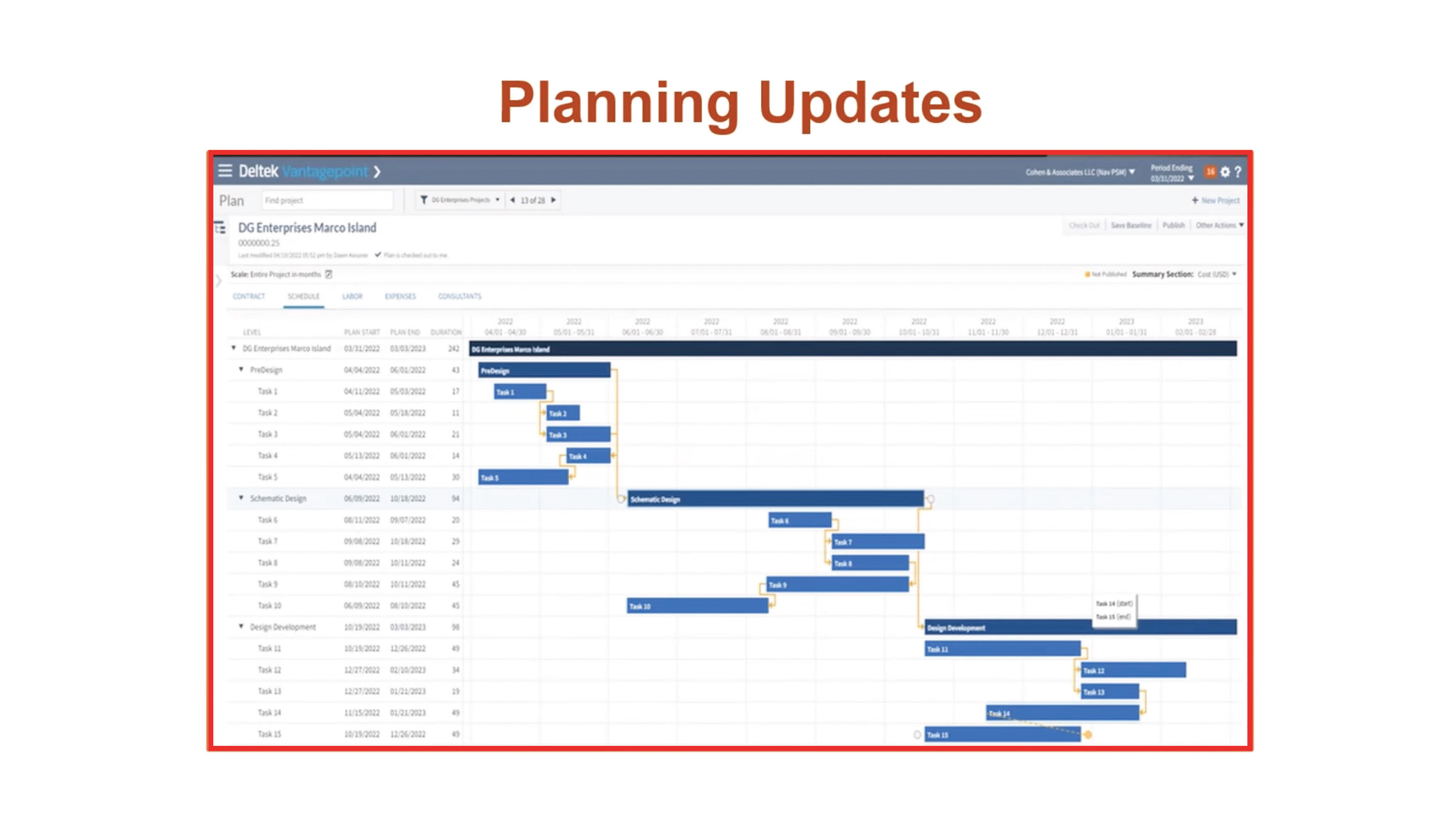
Users with the Resource Planning Module can create dependencies in the Gantt chart and manage a project’s critical path. Project managers can quickly visualize and modify the project schedule, work breakdown structure elements and the relationship between those elements. When an update is made at one level, all of the dependent levels are automatically updated.

Dependencies are also accessible in the Project Planning report. Users can view information about dependency relationships between work breakdown structure elements, projects and associated labor codes.

DVP55_BlogScreenshots_1

Drill-Down Paths

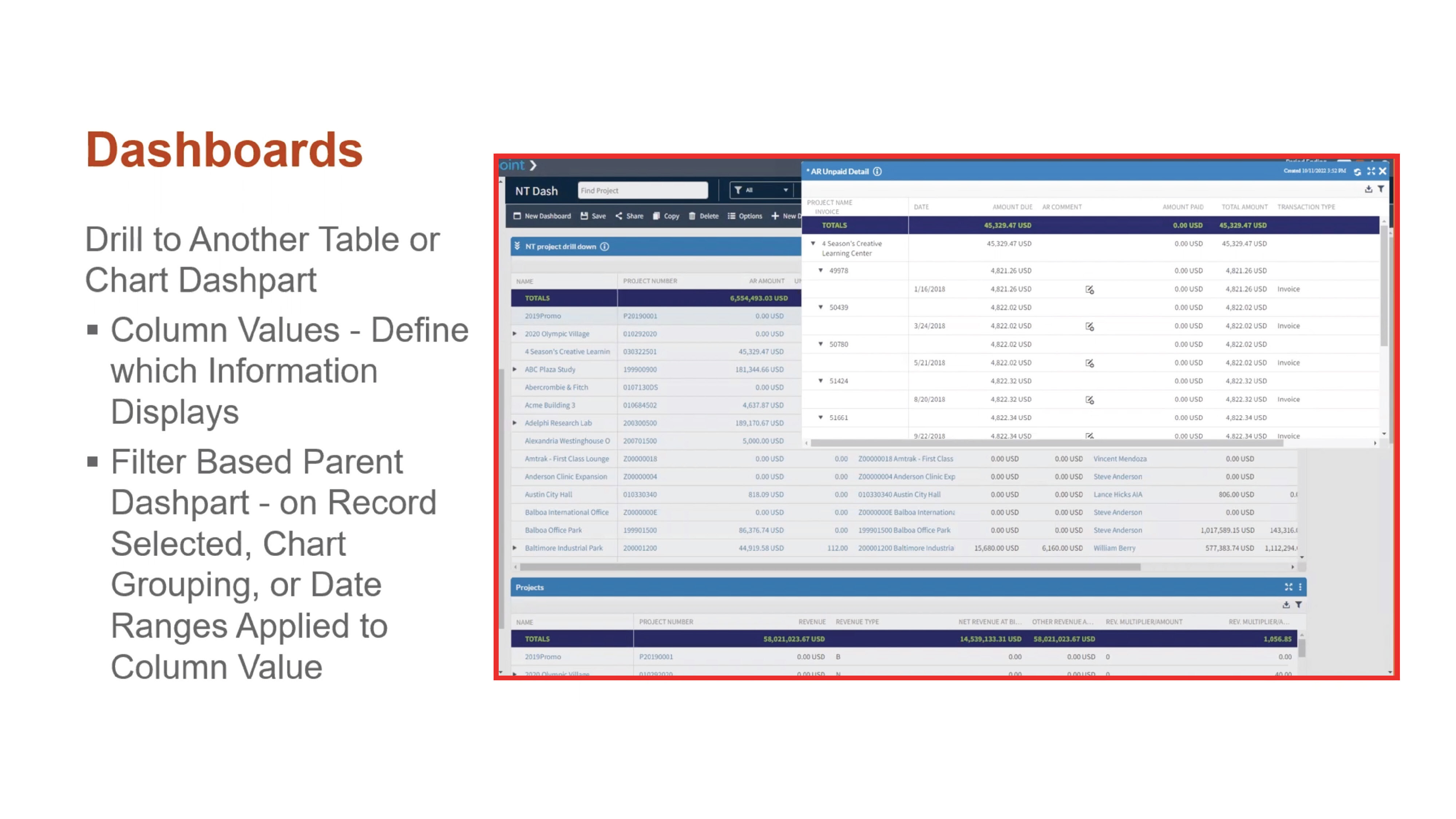
Help users access the right information quickly with drill-down paths. Users can determine which information is shown when they drill down into key summary metrics on a chart or table. For example, when a user clicks on a column displaying outstanding accounts receivable data, Deltek Vantagepoint can be configured to show them a dashpart with AR invoice detail.

DVP55_BlogScreenshots_2Personal Dashboards

Users can now create their own personalized dashboards without engaging an administrator or manager. This added flexibility will help expand adoption and free up administrator time since users can customize more of their experience with Deltek Vantagepoint.

Update Percent Complete from the Dashboard

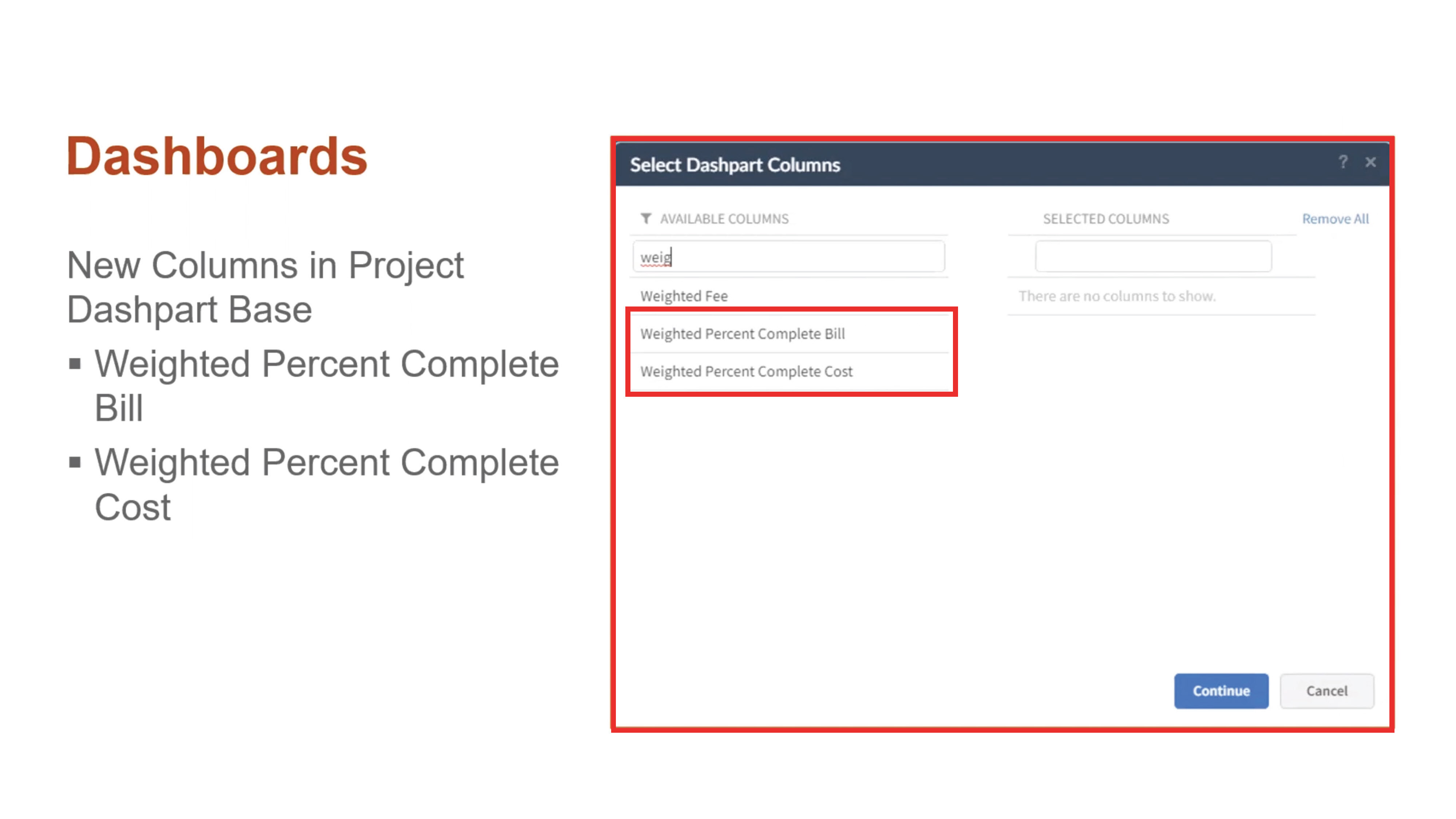
With Deltek Vantagepoint 5.5, project managers can easily manage percent complete with fewer clicks, ultimately improving reporting and billing accuracy. There are new columns in the project dashpart base for Weighted Percent Complete and Weighted Percent Complete Cost. Users can see and modify the percentage of completion per project billing or cost amount right from the dashboard.

DVP55_BlogScreenshots_4Streamlined Purchasing

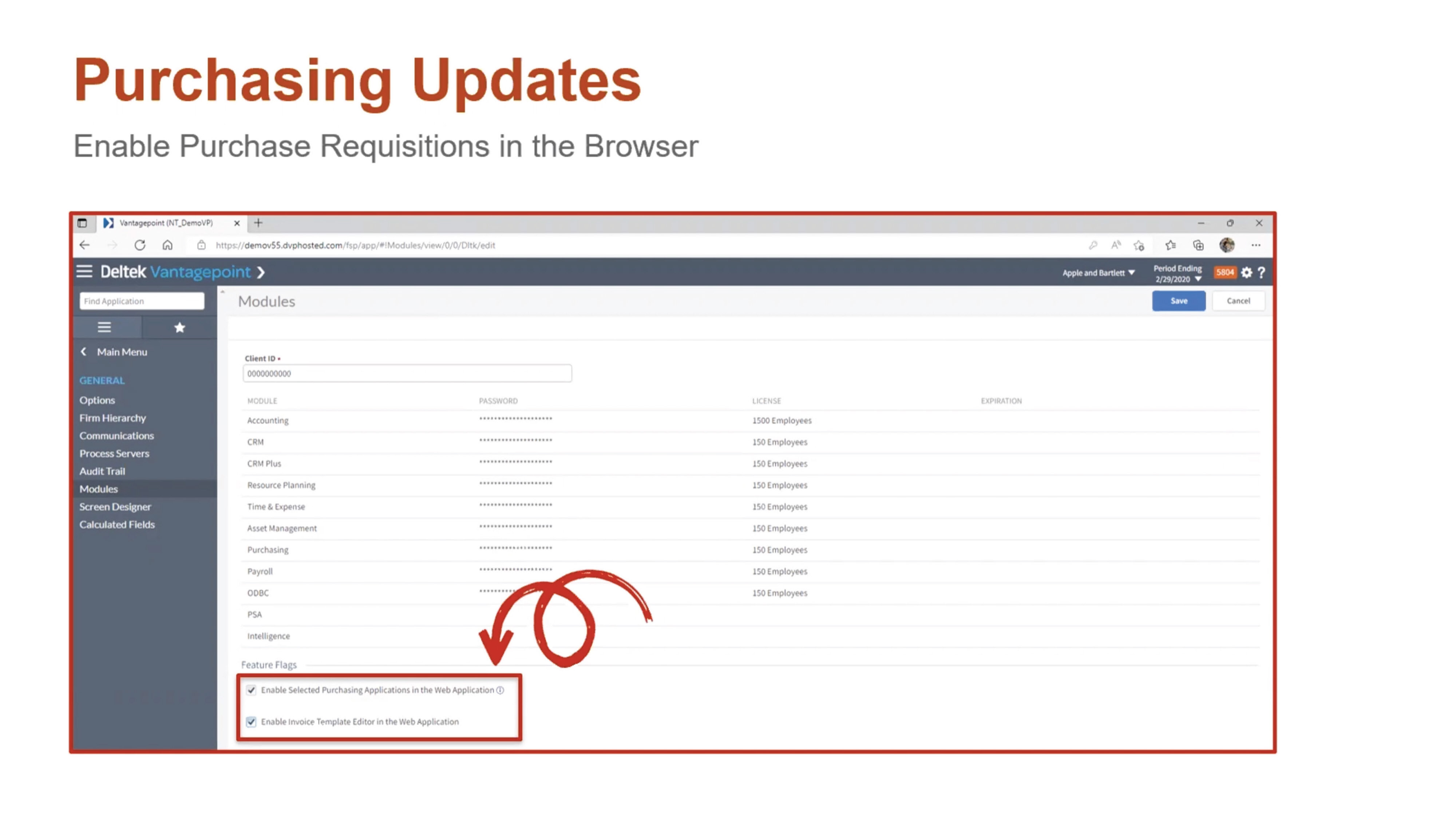
Deltek Vantagepoint 5.5 enables staff to perform purchase requisitions and process approvals within any browser. Purchasing Requisitions, Purchase Orders, Items and Items Master are now accessible in the navigation pane of the browser application.

DVP55_BlogScreenshots_5

Other Purchasing Updates

Additional purchasing updates in Deltek Vantagepoint 5.5 include: 

  • New layout for suggested vendors
  • Ability to add a vendor on the fly
  • Ability to attach documents of any status
  • Ability to view purchasing reports
  • Redesigned interface for the purchase requisition form

Accounting Updates

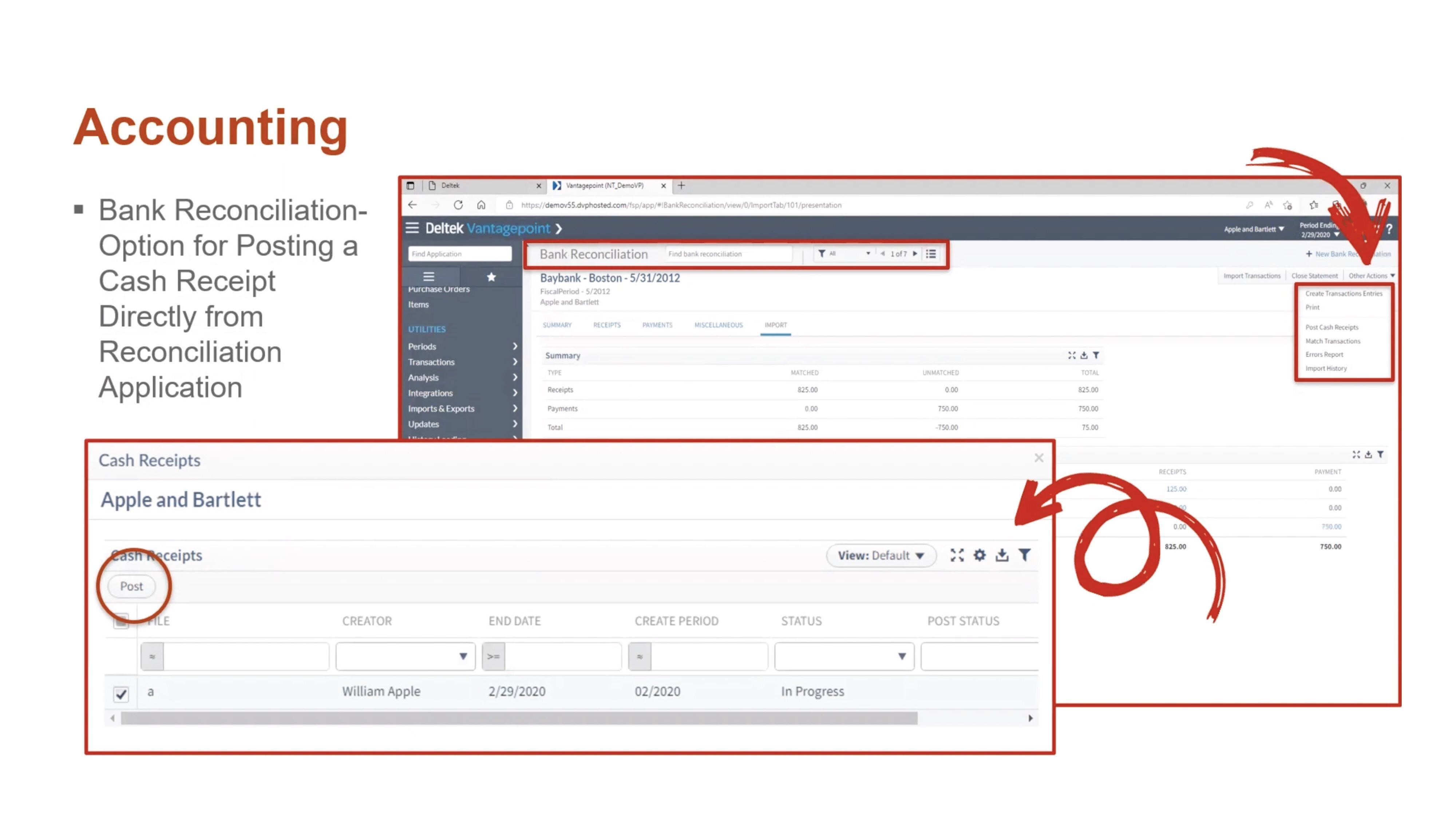
Deltek Vantagepoint 5.5 offers several new features that streamline accounting processes. Users can now post cash receipts that were created in bank reconciliation. This option is available for those that have rights granted to their role in the Accounting tab from Settings >Security> Role. The Transaction Center Approval option must also be set to “No” in Settings and Accounting Transactions.

DVP55_BlogScreenshots_6

Other Accounting Updates

The other accounting updates in Deltek Vantagepoint 5.5 include: 

  • Expanded reporting in timesheets and billing
  • Print capability for Billing Category Rate Table reports
  • New overtime premium calculation that uses the cost rate in the Billing Labor Override Table instead of the Cost Rate in the Employee Hub for the employee

Email Templates

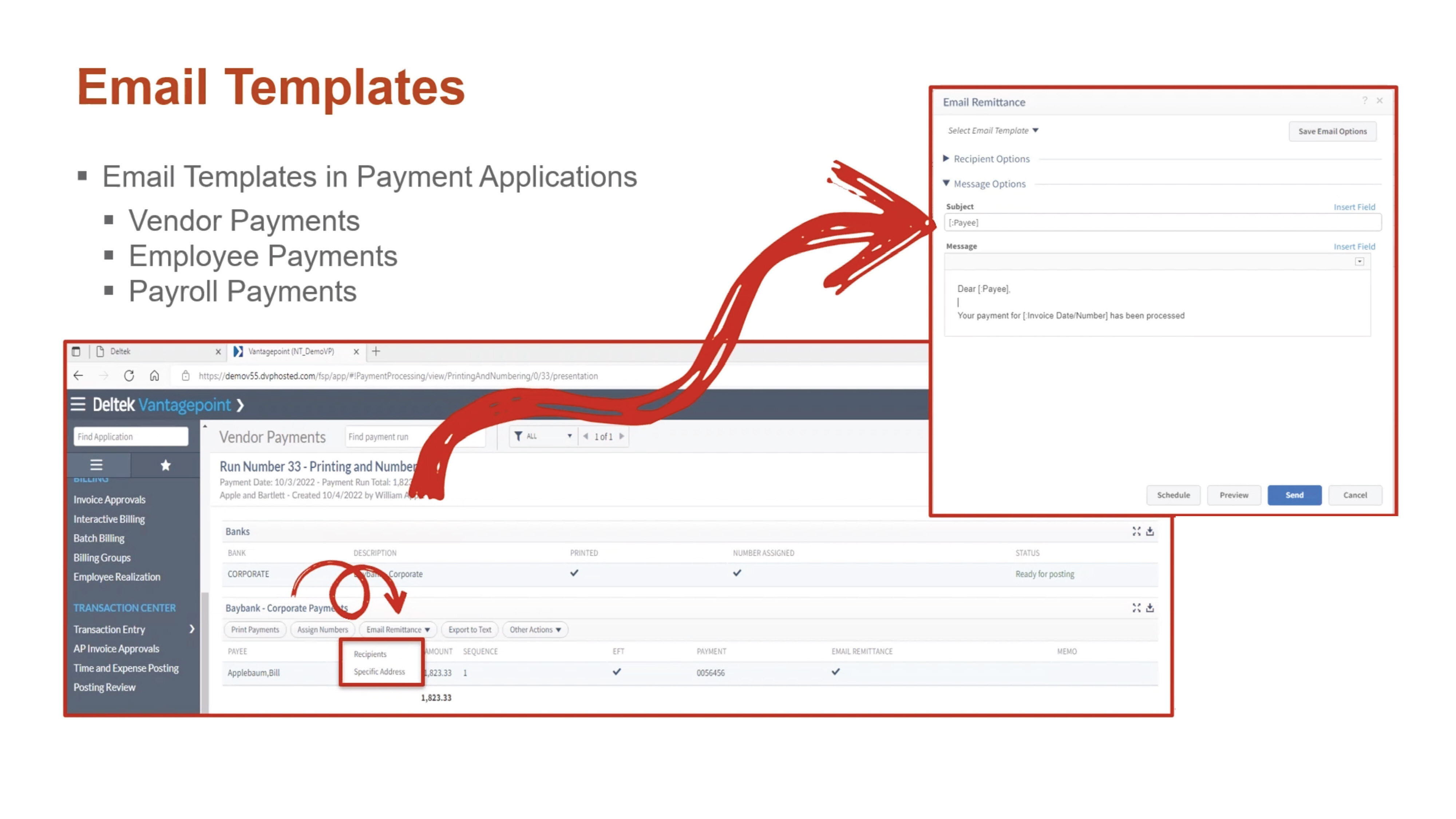
To help support digital payment processes, Deltek Vantagepoint 5.5 allows users to use email templates when sending electronic payment remittances by email. Templates can be configured to reuse standard information, such as regular text or database fields. Email templates are available in the Vendor Payments, Employee Payments and Payroll Payments applications. Users can save templates for personal use, for all users with the same role, or for all users within the firm.

DVP55_BlogScreenshots_7Approval Center Updates

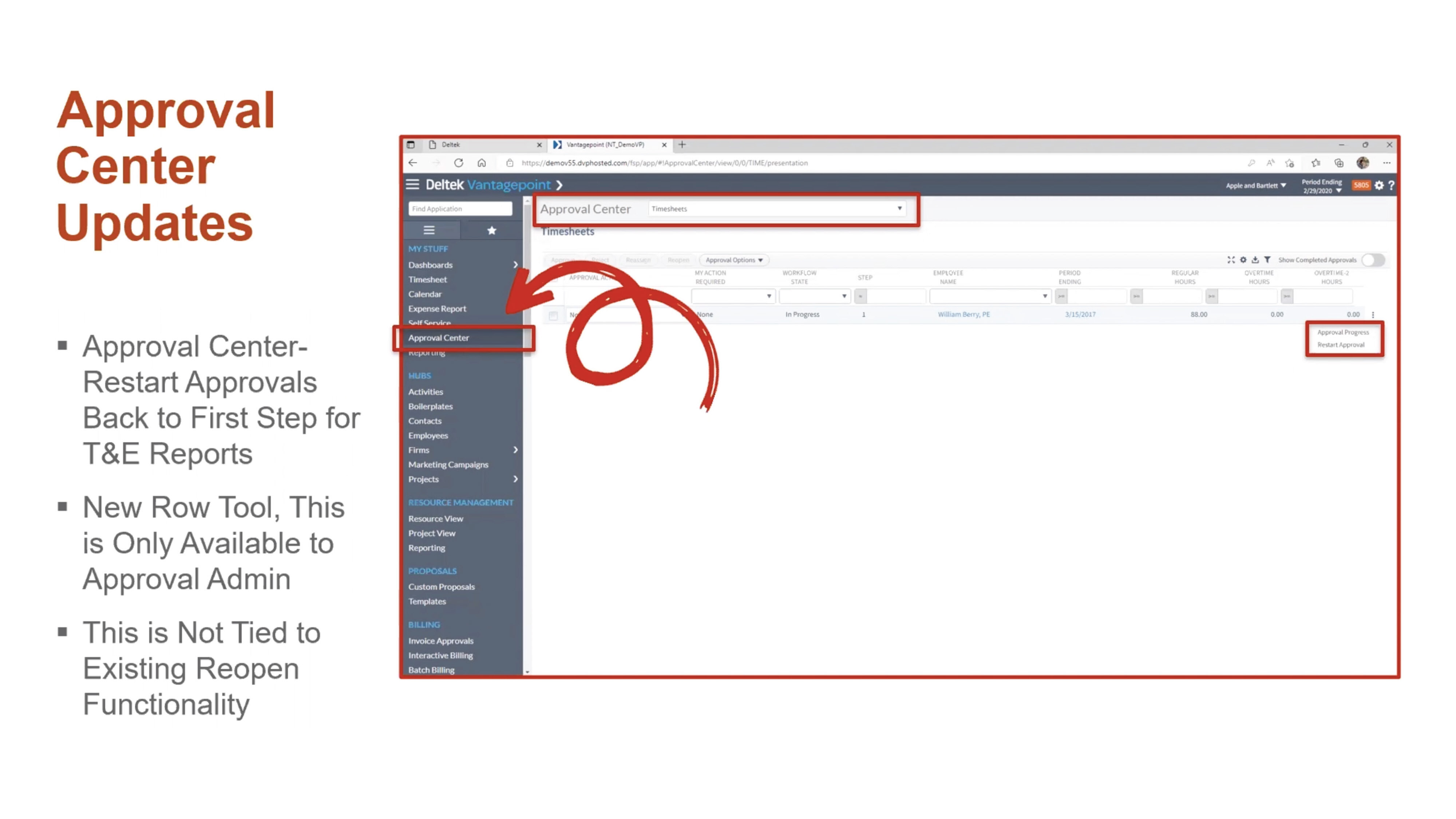
Users can restart approvals for timesheets and expense reports. This process removes all approved history and comments that are associated with the record and begins the process from the first step, no matter where the record is in the approval process.

DVP55_BlogScreenshots_8

General Usability Updates

Deltek Vantagepoint 5.5 also comes with a number of usability updates:

  • See notifications immediately instead of every five minutes with real-time alerts.
  • See all users viewing a record.
  • Set favorites in navigation to find commonly viewed applications with ease.
  • Set minimum/maximum and default values for standard numeric fields.
  • Use predefined searches within Advanced Search.
  • Print timesheet reports from the Floor Check dialogue box.
  • Access Labor Planning videos in Online Help.

Learn More About the New Features in Deltek Vantagepoint 5.5

This is just a high-level overview of the many new features in Vantagepoint 5.5. To learn more about what Vantagepoint has to offer, click below to talk to one of our consultants today.

Business Development Calls Made Easy with Deltek Vantagepoint CRM

Posted by Cate Phillips on May 4, 2022, 12:00:00 AM

2022 - BD Calls Made Easy with DVP CRM-01

Before the pandemic, I used to volunteer to judge high school debate and often found myself sitting in a public-school library on a Saturday morning staring at those cheesy posters where the words say “Attitude is Everything” …those have not changed by the way. Except 25 years later, those words still ring true. I do not know about you, but if I am rolling into a Zoom business development (BD) call with a bad attitude, it is doomed to fail. Since attitude is important when it comes to developing relationships with clients, how can the new and improved Customer Relationship Management (CRM) power of Deltek Vantagepoint make it easier to keep those business development calls on track? 

Attitude and Deltek Vantagepoint CRM? 

I started writing this on a debate kick, and it therefore must continue… As any good debater will tell you, something should not be fully considered until it has been argued from both the pro and con sides. So, how can business development calls be made easy with Deltek Vantagepoint CRM? Let us compare how it would go from both attitude perspectives. 

Bad Attitude Scenario 

5am – snooze 

5:30am – snooze again, since I went to bed later than normal last night, that is the mental self-justification I will go through this morning. 

6am – wake up, grab phone, check calendar. Okay, good, first meeting is not until 8am, I can sleep more, reset alarm. 

7:15am – grab phone, what? Why? I should have gotten up earlier so I could work out and do my morning stuff. I am grumpy about it.  

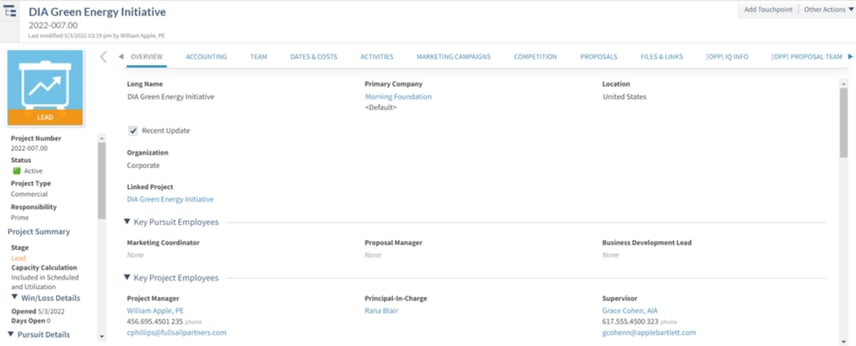
7:45am – showered and dressed, sitting down, I must scramble to review a prospect’s info in Vantagepoint. I glance at some fields. I notice that I am about to be talking to the Facilities Director at an airport. My engineering firm has done the type of project they are looking to do but only in Europe. My job is to impress the Facilities Director and get him to introduce us to the architect and then hopefully she will want to bring us in on this massive project.  

8am – meeting starts, I am not as ready as I should be. It goes okay, but it is not a slam dunk. He agrees to let me call him back, but I know in my gut he is not going to be calling the architect immediately to sing our praises. 

8:30am – I guess I should get the notes in the system. I am super discouraged and annoyed at this point, but I try to rally myself to get my activity recorded with enough detail so that I can perhaps salvage this a bit when I do my follow-up. 

Here is the rub folks. The Deltek Vantagepoint CRM is there to help me, and it is a great tool in my toolbox. I did not use it here to my full advantage. 

Good Attitude Scenario 

5am – snooze 

5:30am – I am up! I am not necessarily happy about it, but it happened. I get started on my morning stuff. 

7am – sitting down in my office now, I will not bore you with the details of my morning ritual, but I fed my mind, body and soul before I walked in the door. I am happy I have an entire hour to prepare for my call.  

Here is what I do to prepare using Deltek Vantagepoint CRM: 

Since the project will a subcontractor opportunity to the architect that is always the prime at this airport, she is the contact record I want to peruse. I know I have only got 30 minutes to get this Facilities Director to agree to introduce me to her. From my networking, I know that if he says give this firm a shot, she will consider it. I immediately then go to look at the projects associated with these two contacts. 

Bus_Dev_Calls-01

I also know that she has been a little unhappy with the engineering firm they used from a well-placed cold call by my Business Development Representative (BDR) last year. How do I know this, you ask? I have an excellent memory, and it simply always unfolds perfectly when needed. NOPE. My team and I always track everything inside Deltek Vantagepoint.  

I read my Activity notes from three years ago when I had drinks with someone that reports to the Facilities Director at a conference. She was the one that clued me in to how key the Facilities Director was in terms of getting the architect’s attention. Then I reviewed the notes our BDR had in there from the cold call. Those notes were in an Activity from the call placed and on the Competition tab of my project.  

Bus_Dev_Calls-02

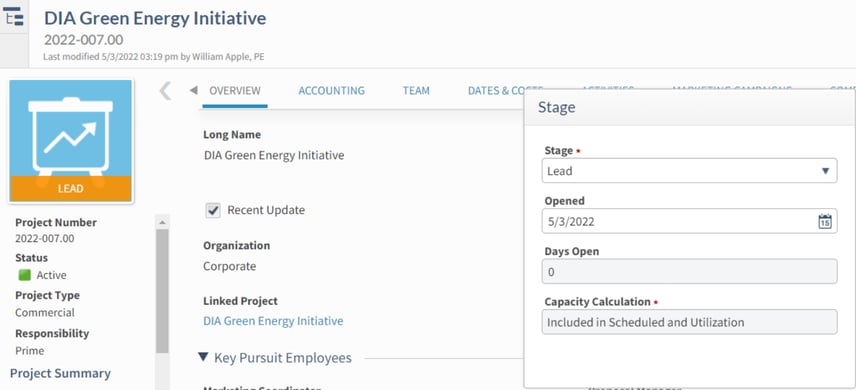
Next, I double checked his and her LinkedIn pages and saw no new connections between us that I did not already know about in advance. My project is at a Lead stage and being the awesome Relationship Manager that I am, I enjoy seeing my projects get into our system, and I lovingly monitor the data associated with them. 

Bus_Dev_Calls-03

I also have a custom field in my Deltek Vantagepoint CRM that gives me something to brag about here. I can query my CRM to find past airport references, and I have 2 or 3 case stories (bragging rights) ready to tell if I get the opportunity in the call. 

8am – The meeting starts, and I am ready to kill it. During the call, the Facilities Director mentions another two of his colleagues that I was not aware of, and their roles could be important should we get this project to the awarded stage. I jot down their info so that our Marketing Associate can fill in the gaps with some research and get them entered in the system.  

8:30am – The call is over. It was the slam dunk I deserved. He was impressed with the stories I was able to tell, and since I was aware of the pain that the current engineering firm is creating with the Architect, this allowed me to effectively differentiate our firm. He said that he would be emailing her right away before he forgot, to ask her to get coffee and discuss what we can bring to the table. We scheduled our next steps. I was able to use the Outlook Connect to immediately get the appointment calendared and tracked in the CRM in one fell swoop. 

Which Attitude Won the Debate?    

Obviously, this debate was destined to go for the Pro - we all knew that, right? The bad attitude not only set me up to perform poorly, but it also affected my ability to leverage my Deltek Vantagepoint CRM correctly. So, here I have proven a good attitude + a great CRM = successful business development efforts. Ready to maintain a positive attitude in your business development efforts by fully embracing Deltek Vantagepoint CRM?  

Stay tuned for future blogs on this topic that cover other parts of the sales cycle and project lifecycle prior to the awarded stage. 


To Vantagepoint or Not to Vantagepoint, that is the Question...

Posted by Cate Phillips on Mar 30, 2022, 12:00:00 AM

03-30-22 ERP Banner

Project-based firms have many options when it comes to Enterprise Resource Planning (ERP) packages, albeit difficult choices to make. In his well-known play Hamlet, Shakespeare delivered us a Hamlet who was contemplating a major decision in his famous soliloquy. So, are the decisions around life and death that Hamlet considered at all comparable to that of choosing an ERP? Well, let’s have some fun here with Shakespeare and try to make a case for it. 

Avoid the Old Bait and Switch

In the Shakespeare play, Hamlet has all these murderous plans and ways to avenge the death of his father. The famous quote “the lady doth protest too much, methinks” isn’t so much about how fickle women can be (even though everyone knows fickleness has no gender), but rather it’s said as part of a trap to see if Claudius will reveal his guilt. What can be learned from these homicidal maniacs, other than to bring back the word ‘methinks’, one may ask? 

When selecting an ERP, project-based firms must consider the entire cost of the product to avoid feeling trapped. No one likes to feel taken advantage of or stuck in a situation that isn’t meeting expectations. When clients come from other ERPs on the market, one of the main complaints is typically that they felt like their ERP provider or consultants were constantly after more fees. They were sold a product that could do a ton, but the investment necessary to get to all those great features was hidden. The result is feeling like a bait and switch has trapped the firm into pouring more into a system which was thought to be ready for full operation.  

Deltek Vantagepoint is sold as a highly configurable project-based ERP system. Full Sail Partners’ expert Vantagepoint consultants approach sales and implementations with eyes that are wide open to balance cost with efficiencies. Vantagepoint works best when it meets each firm’s business needs, and it does take configuration and therefore an investment, to get there, but it’s well worth it. So, if project-based firms have the right expectations going in, they shouldn’t be feeling trapped. 


Wrap Some CRM/RP Rigor Around the Madness

Some of the most significant and best changes from Deltek Vision to Vantagepoint are happening in the Customer Relationship Management (CRM) and Resource Planning Management (RP) modules. These are complete game changers in the market and none of the competition invested as much as Deltek has into fine-tuning these glorious pieces of functionalities. Deltek has been listening to client feedback for more than a decade and continues to listen as they expand Vantagepoint’s capabilities.  

So going back to the play, Polonius responds to Hamlet at one point by saying “Though this be madness, yet there is method in ’t.” Running a professional services or consulting firm can feel insane some days. Clients can pop up out of nowhere with additional needs, and suddenly, the entire day’s schedule has been turned into something else. Deltek Vantagepoint helps wrap some rigor around the “madness” in a user-friendly way that will actually increase user adoption in project-based firms.  

Keeping the madness at bay, Full Sail Partners has now helped more than 200 firms go from Deltek Vision to Deltek Vantagepoint. The number one reason why system usage increases with Vantagepoint is because of its ability to manage the entire project lifecycle, from a prospect that knows nothing of what it’s like to work with the firm to managing the resources and how the work is delivered. Vantagepoint also offers the type of visibility into finances, operations and performance that firms need to grow. The number two reason usage increases with Vantagepoint is because the CRM makes life easier for marketers, seller-doers, project managers, and leadership. Opportunities are no longer separate files from projects, so it’s all one record in Vantagepoint.  

Additionally, with the Deltek Vantagepoint Outlook Connect and Gmail for business connect, users can see the interaction history between contacts, clients, and projects as well as quickly log emails into Vantagepoint. This feature allows users to bring Vantagepoint into their email inboxes. And this tool comes with other features like the ability to synchronize calendars and schedule meetings while saving them in Vantagepoint at the same time. To learn more about the Vantagepoint Outlook Connect, check out this mini demo. 


Keep that New ERP Feeling Longer  

To put it lightly, in the play, Hamlet was worried about the “afterlife” in that other famous soliloquy when he said, “to die, to sleep – to sleep, perchance to dream.”  This is similar to how many of our clients are worried about their “aftercare,” with continuously improving their processes with Vantagepoint once they’ve made the leap to get there. A Full Sail Partners’ service becoming more popular with clients recently is the Navigational Analysis for Vantagepoint. A firm’s entire system is scanned, and current processes are evaluated to discover how well they are serving the firm. It’s like an annual physical exam by a physician that results in a complete work-up on the health of your system.  

It’s important to develop a plan for aftercare that includes regular data clean-up, optimizing processes, increasing efficiencies and overall continuous improvement. A consultant isn’t necessary to keep a firm’s ERP fresh; it’s like anything else. If experts are needed to bring their knowledge and best practices to the table, it can be outsourced, or a firm can do it itself.  

Exit Stage Right   

In review, it is certainly interesting to see how much Shakespeare’s characters in Hamlet seem to have reflected upon similar issues like with the tribulations of project-based firms regarding choosing an ERP. So perhaps they are comparable? However, the answer to Vantagepoint or Not to Vantagepoint appears to be evident. To Vantagepoint!  


Click the image below to learn how to add the powerful, feature-rich ERP to your toolbox and get your team working on the same page of the same book.

Latest Posts