
Full Sail Partners Blog | Gina Stamper

Posts by Gina Stamper:

Deltek Vantagepoint Tips: SaaS Administrator Guide and Instructions
Posted by Gina Stamper on December 18, 2025

2025-12-18 DVPTips_banner

So, you are moving to the Cloud!  Your company has made the move, and you have been assigned as the SaaS Administrator.  You may find yourself wondering, “What does this mean to me?  What do I need to do first? Where do I start?”  At first the task may seem overwhelming as you receive welcome letters, guides and instructions on “How to get started.”  We at Full Sail Partners want you to know that you are not alone. We have put together answers to some of the most frequently asked questions we get when a client moves their database to a cloud solution.

What do I need to do first?
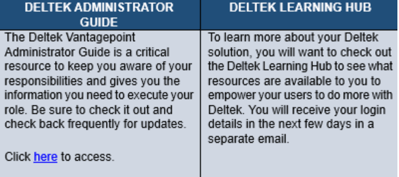
12-18 -Image 01As the SaaS Administrator, you will receive a welcome letter that contains links to your test environment as well as a lot of other information.  The most important task to perform at this time is to click the live link (sample above) to the Deltek SaaS Administrator Guide.  It will be your MVR (most valuable resource) during your transition to the cloud.


What is the next step after I familiarize myself with the SaaS Administrators guide?

The second most important task as the SaaS Administrator is to set up your Deltek Customer Care Account.  This is where most communication takes place between you and Deltek. It is where you perform all SaaS Administrator functions, open support tickets, and keep up to date on the latest happenings at Deltek. If you are an existing Deltek client and will be migrating data from an existing Vision database or a prior Deltek product, this portal will be the first stop in the process of transferring your files to the cloud. 

Can’t I just have Full Sail Partners set up my account?

Because of the importance placed on security, only the Saas Administrator can submit service requests on behalf of your firm.  These requests can only be submitted via your account on the Deltek Customer Care portal.  The SaaS administrator will work closely with Full Sail Partners on the implementation process.  However, only the SaaS Administrator can make service requests. These requests include database uploads, administrator password resets, request backups, database refreshes, or request a sandbox; they will also receive all system maintenance communications.  

How do I keep up with announcements regarding scheduled maintenance or service-related issues?

These communication emails will be sent from: Deltek Support Services <deltekss@deltek.com> Please work with your internal IT team to ensure this is a trusted email address and they aren’t filtered out by your firm’s spam filter. </deltekss@deltek.com>

As the primary person responsible, what if I am not available? Can a second Administrator be added?

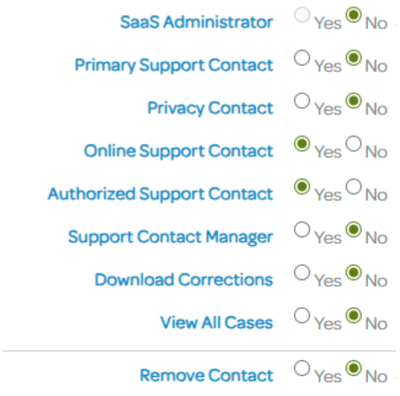
Absolutely! Deltek encourages all clients in the Cloud to have at least one additional SaaS administrator assigned to their account.  You, as the SaaS administrator, can assign the rights to an additional SaaS administrator via the Deltek Customer Care Portal.  Once you are logged into Customer Care simply click on the Administer section, click on Manage Company Contacts, if the person has never had a customer care account, add them here by clicking ‘Add Contact’, if the person already has an account simply scroll down and click on their name and these select the correct radial buttons:
12-18 Image 02

You may even assign Full Sail Partners as your second Administrator.  This will give us the ability to upload databases and custom files directly for you.  Your Full Sail Partners account manager can provide assistance if you decide to assign our firm as an additional SaaS administrator.

How do I add graphics to my firm's invoices?

Absolutely, just follow these quick steps:

You can upload any standard picture file format, such as PNG, JPG, BMP, or GIF. Uploading a large image file could slow down the upload process or cause a time-out error.

  1. To upload an image:
  2. In the Navigation pane, select Settings > Billing > Invoice Template Editor.
  3. On the Actions bar of the Invoice Template Editor form, click Other Actions > Manage Images.
  4. On the Available Images dialog box, click Upload Image.
  5. On the Select Image to Upload dialog box, browse to the image file and click Open.
  6. Click OK.

My firm has experienced a serious event that has created the need for our database to be restored to a specific point in time. Can this be done?

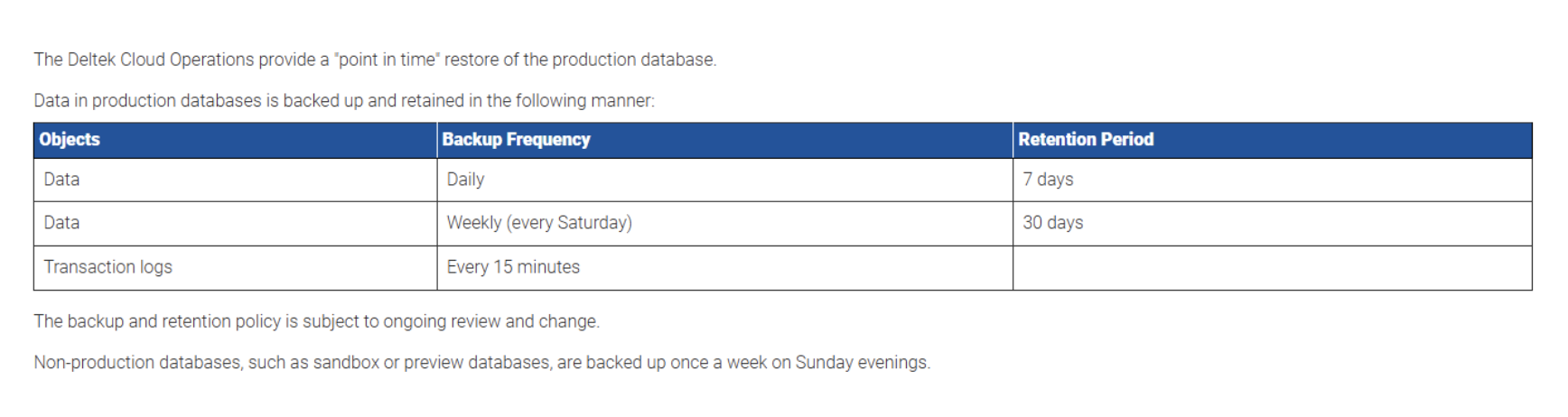
If you require a restore from a specific point in time, you may send the request through Deltek Customer Care indicating the past time frame you need for the restore.  You must also include the time that you would like for the restore to take place as your system will be unavailable while the restore is performed.  See below for Deltek’s current Backup and Retention Policy:
12-18 Image 03

Is there any additional information I should review?

Being the SaaS Administrator is a very important assignment.  Keep in mind, you are the keystone for communication between your firm and Deltek.  Being informed by familiarizing yourself with the SaaS Administrator Guide is essential to your success as the SaaS Administrator for your firm. You can access the guide by typing: Vantagepoint Cloud Administrator’s Help System into the search box on Deltek’s Customer Care website.

Ready to take the next step?  Empower your employees through training!

Deltek now offers tons of training and learning opportunities at no cost to its clients by clicking the following link: https://learning.deltek.com/ From here you can personalize the learning hub and even create learning paths for your employees to follow.

Still have questions and not sure where to turn, don’t hesitate to reach out to your Full Sail Partners Account Manager, we are happy to assist you in this journey.
Why Your SMB Firm Should Consider Taking Your ERP to the Cloud

Posted by Gina Stamper on August 29, 2024

08-29-24 DVP Why Your SMB Firm Should Consider Taking Your ERP to the Cloud - Banner

Gartner corroborates that 85% of organizations will go for a cloud-first approach by 2025. Is your professional services firm in this 85%? If not, what’s holding you back? And what does it mean to have a ‘cloud-first approach’? A ‘cloud-first approach’ means information is loaded, stored, and accessible from the internet. If your firm hasn’t evaluated taking your ERP (Enterprise Resource Planning) system to the cloud, here are 5 key things to consider:

1. Easy Access:

With a cloud-based ERP system, your team can access essential project data from any location, at any time. This real-time accessibility allows for seamless collaboration, ensuring everyone is working with the most up-to-date information, no matter where they are. By eliminating the need for physical proximity, the cloud enables faster decision-making and more responsive project management.

2. Affordability:

Moving your ERP system to the cloud eliminates the need for costly upfront investments in hardware. Instead of paying for servers and infrastructure, your professional services firm benefits from reduced IT maintenance costs, as the cloud provider handles system updates and monitoring. This pay-as-you-go model also offers flexibility, allowing your firm to scale its resources as needed without breaking the bank.

3. Fast and Easy Updates:

Cloud-based ERP systems ensure that updates are handled automatically by the provider, meaning your firm always has access to the latest features and improvements. This eliminates the need for time-consuming manual upgrades, keeping your system up to date without disrupting your business operations. Regular updates also ensure better performance and security, keeping your software running smoothly.

4. Security:

Cloud providers offer robust security measures, including encryption, continuous monitoring, and automatic updates to protect your data from cyber threats. Your professional services firm can rely on their expertise to ensure that the latest security patches are applied without delay. With data backed up in multiple locations, you can rest easy knowing that your information is safe and recoverable in case of a disaster.

5. Competing With Larger Firms:

Cloud-based ERP systems level the playing field by providing smaller firms access to the same powerful technology that larger organizations use. The cost savings from reduced hardware and maintenance allow smaller professional services firms to invest more in growth and innovation. Cloud technology also provides the flexibility to scale resources quickly, helping your firm stay competitive in an evolving marketplace.

Ready to Make the Move to the Cloud?

Many professional services firms, small and large alike, are benefiting from taking their ERP to the cloud as it is keeping them competitive, lowering overall operating costs, and allowing their employees to focus on their primary job rather than maintaining an on-premises system.

Deltek Cloud has over 19 thousand SaaS customers that are using 17 different products with more than 1.8 million cloud users in over 50 thousand databases with an uptime of 99.98% in 2023, and those numbers are continuing to grow in 2024. Can your professional services firm afford to ignore the advantages of the cloud? It’s time to put yourself on an even playing field with other organizations regardless of size and resources.

Still Require More Convincing?

Worried about the downtime involved in moving to the cloud? 99.9% of customers are able to make the move from their on-premises system to Deltek’s cloud environment over the weekend ensuring business hours aren’t interrupted.

Worried about data loss? Deltek keeps daily backups in 2 different time zones and a transaction log backup every 15 minutes!

But don’t just take my word for it, here is what one client, Kathy Krol-Ramirez, from Parikh Consultants, had to say:

“Change is hard. Most of us never want to disrupt things that are going smoothly. However, I realized that upgrades and backups could be easier in the cloud and my IT guy was very thankful to not have to handle the program in-house. Now my staff has the latest update with 24/7 access.”

With hackers coming at us from all angles at all hours, why take the risk? Why put your professional services firm's data, and your lifeline, at risk. Can your firm afford 24/7 security and server monitoring? In Deltek’s cloud, there is a dedicated team of security experts that monitor your data 24 hours a day, 7 days a week, 52 weeks a year with security safeguards that typically exceed any on-premise solutions.

One More Compelling Reason to Move to the Cloud

Need one more compelling reason to move to Deltek’s cloud? Vantagepoint! While being in the cloud is not required to move to Vantagepoint, it does offer many conveniences during your upgrade process. This includes a Vantagepoint preview environment using your professional services firm’s data that is not only created by the Deltek Cloud Operations team but is managed and maintained by them. Which means no need to invest in additional hardware or time to manage and maintain it.

Don’t wait and continue to fall behind the curve and jeopardize your firm's success. Reach out to your account manager today to find out if Deltek’s cloud makes sense for your professional services firm.

Deltek Vision Year End 2015

Posted by Gina Stamper on December 17, 2015

year_end_2015.pngIt’s that time again! Year-end is here and it is time to close out your Deltek Vision system. This blog will provide you with resources and reminders to ensure a successful year-end close out of your Deltek Vision system. Check out the information below, and let us know if you have any questions.

Don't Forget Your Deltek Vision Year-End Processes

As we go through the year-end process there are mistakes we (and others) make that are easy to recover from like entering the 15 page depreciation journal entry “backwards” at midnight sitting in your semi dark office chugging your 15th pot of coffee.  Some are more difficult – like removing all the lower levels of your work break-down structure (did that once – glad our backups worked). So outside of deleting the database, what are some of the items in Vision year end processing that are hard to recover from?

>> Learn more

Stress Free Year-End Process - Yes You Can!

Year-end is always a stressful time of year, but it doesn’t have to be.  As with everything else in the world of Accounting, planning and preparation is the key to a successful and stress-free year end. Check out this article talk provides a few tips to make your year-end close just a little easier.

>> Prepare more

Additionally, check out our on-demand webinar to see how you can make your year-end stress free.  Our panel will provide insight into best practices, tips to close your books with ease, and focus on those “gotchas” on year-end processes. See what our panel says about the following year-end items:

  1. How to make your process efficient
  2. Avoid disruption to production
  3. Communication topics to provide your staff and management
  4. Saving money by evading closing obstacles

>> View more

Year-End Resources Available

It is that time of the year and Deltek Customer Care is working to assist you with year-end activities. You can now take advantage of these year-end resources:

Year-End Forums
Deltek Vision has a dedicated board for Year-End Questions. Access the Deltek Customer Care Forums and connect with your peers to ask questions, exchange ideas and share knowledge about Year-End.

Phone Menu
For complex questions, call Customer Care at 1-877-HLP-PROJ with your questions. At the voice prompts, simply select your product's year-end option to get to a Subject Matter Expert immediately.

Year-End Info Center
This is your one-stop shop for easy access to all year-end related knowledge base articles, videos and special offerings during year-end.

Quick Chat
Access Quick Chat for quick questions regarding Year-End. Chat hours are available Monday - Friday from 7:00 AM - 10:00 PM ET.

Additional Year-End Guides and Videos

All Year-End Guides, documents and Frequently Asked Questions are available. To access this year-end information, visit the Year-End Info Center on the Deltek Customer Care Connect website. There you'll find valuable information with step-by-step instructions for closing your year-end.

We hope these resources serve as good reminder. Best wishes from the Full Sail Partners' staff! Wishing you a prosperous 2016.

Important Note Regarding Year-End Regulatory Updates in 2015

Year-end updates in 2015 will be supported only on Vision 7.3, Vision 7.4 and Vision 7.5. Regulatory updates for releases prior to Vision 7.3 will not be delivered.

Check out the Deltek Support Assurance Product Lifecycle on the Deltek Customer Care Connect website for the latest information on your product's status and definitions of the support delivered in the Active, Maintenance, and Sustaining phases.

It’s Time to Upgrade! 

Working in the most recent release of your Deltek solution ensures your firm is benefiting from all the features and enhancements engineered into the latest versions of Vision. Your support and maintenance plan entitles your firm to download the latest version of your product here if you're not up-to-date!

Is Your Firm Prepared for Deltek Vision 7.5?

Are you ready for Deltek Vision 7.5? Don’t worry, our team of experts are here to get you up to speed! Deltek Vision 7.5 includes features and enhancements that are a direct result of your input. Optimize your organization with Vision 7.5 and provide your teams the latest tools and resources to win more, manage more and do more! 

Register to join us for this free virtual webinar as we review the latest enhancements and features introduced with Deltek Vision 7.5.

New Call-to-action

Latest Posts