Full Sail Partners Blog | Admin

Posts by Admin:

Key Performance Metrics for Architecture and Engineering Firms
Posted by Admin on Nov 15, 2017, 12:00:00 AM

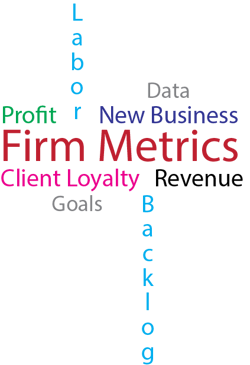
AE Firm Metrics Blog.pngHow does your firm measure up? That is the vital question many architectural and engineering (AE) firms should be asking themselves. It is challenging to manage what you are unable to measure! There are several key performance metrics that an AE firm should use to determine its current status. These measurements are important to not only keep you abreast of the condition of your company, but they also allow you to examine the past, so you can plan for the future. Let’s look at a few of the significant performance metrics.

Proposal Win Rate

A win rate offers insight into which business development endeavors are working.  A minimal improvement in your win rate can make a crucial difference in your profitability. Win rates will aid in determining the chances of sealing a deal. The capability of your company to gain new business is critical to your success.

Profit

Profit is one of the most important metrics in ascertaining the success of any company. Profitability metrics help AE firms determine if they are actively engaging suitable businesses. Profit is the measurement of gross income deducting all expenses.

Labor Utilization

The labor utilization metric helps evaluate acceptable staffing levels.  This metric offers insight into the performance of all employees, identifying which employees are under performing and which are over performing. To maintain an effective labor utilization rate, management should spend time reviewing both direct and indirect portions of the metric.

Net Revenue/Operating Income

Net revenue is the force that keeps a business thriving while the operating income is a measure of business capacity. This measurement determines the amount of income that a firm passes along to subcontractors for their services versus the amount that they keep for their own services. It is a noteworthy metric.

Backlog

To measure whether you are operating within your budget and track the remaining work your firm has, the backlog analytic is very helpful. For this metric to be effective, it is important to include both the proposals you hope to win as well as the current work that remains. This will allow your firm to get an accurate picture of your ongoing work and budget needs. 

Client Loyalty

For any business to grow and continue to be successful, client loyalty is a necessity. It is important for both word of mouth referrals and repeat business. Meeting client expectations, proactively engaging in client feedback and acting on areas that need improvement are all essential to keep loyalty.

Cost of New Business

Company growth is often the result of new business. There is almost always a cost involved with obtaining new business such as labor and materials. Measuring these costs aids in selecting which new businesses to go after and if the potential gain will outweigh the cost.

Measuring Up the Firm

Continuously measuring and monitoring key performance metrics on a regular basis is vital to the continued success of your AE Firm. While we have discussed some notable ones, there are endless measurable metrics for your firm. It is up to you to determine which metrics would most benefit your particular firm. However, make sure both staff and management have a clear understanding of the chosen company metrics and your goals.

Revenue Generation Methods

Posted by Admin on Nov 1, 2017, 12:00:00 AM

Revenue Generation In a previous article, we discussed the challenges with Revenue Method “B.”  In this article, we will look at several different approaches to revenue generation and how these can affect our revenue accruals. Can these methods get us closer to FASB 606 compliance?

Work in Progress Method

Work in progress (WIP) method adds unbilled items to the revenue formula. Unbilled items include labor, reimbursable expenses, and reimbursable consultants. The standard formula only includes items marked as “to be billed.” Items marked as “hold,” “write off,” or “delete” are excluded.

This method is a good candidate for unlimited time and materials projects that are not billed regularly. The WIP amount is easily tracked on the unbilled report and shows as the unbilled variable on some project reports. The WIP method is a standard Vision option.

The main disadvantages to this method are:

  • This method includes billings and is subject to the issues related to using billings
  • This formula has no limit and could lead to revenue overruns
  • This may not comply with FASB 606 since it may not correctly measure revenue

Percent Complete Method

Percent complete method requires project compensation values and percent complete values. For best accuracy, these values should be managed at the lowest level of the work breakdown structure (WBS).

Percent complete is calculated in one of two ways:

  1. Percent complete x by total compensation
  2. (Percent complete x by labor compensation) + job to date direct consultants at billing + job to date reimbursable consultants at billing + reimbursable expenses billed

These methods can produce more accurate revenue, and the biggest advantage is these methods do not use billing amounts in the formula. 

The challenge with this method is obtaining accurate percent complete numbers. This requires estimates of completion which can pose a challenge. Especially if we need this measurement for multiple WBS on a project. The percent complete method is a standard Deltek Vision option.

Earned Value Method

Earned value method uses a percent complete strategy but can calculate revenue via the formula. There are several strategies that can be used to calculate the percent complete:

  • Using Project Summary Tables - calculate the percent complete based on job to date spent which requires the use of workflows to calculate the values and user defined fields to display the amounts in the Project Info Center
  • Using Project Budgets - calculate the percent complete based on budget amount expended which can require user intervention
  • Using Project Planning Module - calculate percent complete based on estimate to complete and estimation at completion values calculated in the planning module which requires the planning module and regular updates of project plans

Time and Materials Method

Time and materials method is based on transactional inputs to the project. Revenue is earned as expenses are incurred. As a result, this is a simple and straightforward method.

This method is easy to deploy and needs no manual intervention. The formula needs to be adjusted based on what transactions we want to include in revenue such as direct expenses.

Subject to Max

The subject to max variable can be added to a formula to put a “cap” on revenue. Subject to max uses total compensation (labor + consultants + expenses) from the Project Info Center in Deltek Vision.

If you need to cap individual amounts (labor, consultant), we need to create a separate revenue method for that individual limit (labor compensation, consultant compensation, etc.) and combine these methods into a “lesser than” formula to give us the lesser of earnings or compensation.  

Lesser Than/Greater Than

With these variables, we can compare two formulas and take the higher or lower amount, depending on how we want to calculate the revenue. For example, we want to take the lower of job to date billings or percent complete, or we want to take the lower of total labor spent or labor compensation. The formula will return the lowest amount as revenue.

The Matching Principal

Remember the matching principal. With any revenue method we use, we want to get the best match between calculated revenues and the associated expenses. In several formulas, we are matching labor revenue with actual labor spent, or (better) the actual earned value attained by those labor costs.

For expenses, the objective is to have a -0- effect on net revenue. Revenue is earned as expense is incurred. In this scenario, the accounts payable transaction triggers revenue. When the expense is incurred, revenue is generated. This results in -0- net revenue. Why is this important? Because now we can measure the true effectiveness of our labor.

Measuring Project Performance with Revenue Generation  

Revenue generation is a key component to measuring project performance. There are many revenue formulas we can use to accrue revenue to our projects, and there is no “one size fits all” method that will work perfectly for every firm or project. Users should develop and test methods to determine which method(s) fit best for them. Many firms use multiple methods tailored to specific projects.

The bottom line is that revenue must accurately measure earnings to be in compliance with GAAP and FASB 606. Revenue and expenses must accurately be matched to provide the best measurement of project performance.


Deltek Releases New Support Center

Posted by Admin on Oct 11, 2017, 12:00:00 AM

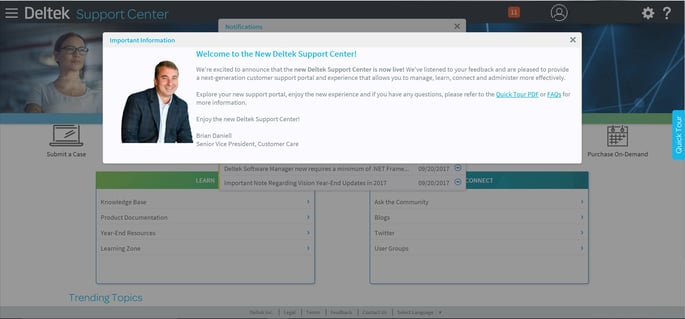
Deltek rolled out its new customer support center on Monday, October 9th, 2017. The support center has been improved allowing users to learn, connect and more effectively manage their experiences. Entering the Deltek Support Center after October 9th, you now see a message that looks like this:

Deltek Support Center Welcome ScreenDeltek Support Center Welcome Screen

New Login Feature

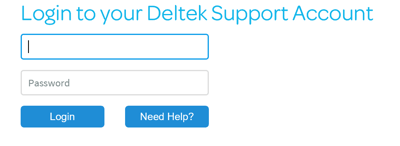
There is a new login feature when using the enhanced support center. You will still navigate to the same URL that you previously used. Prior to the new help center, you would have seen a login button and an account assistance button. However, you will notice that, where the account assistance button used to be, it now says “Need Help?”

Deltek Support Center Login Screen

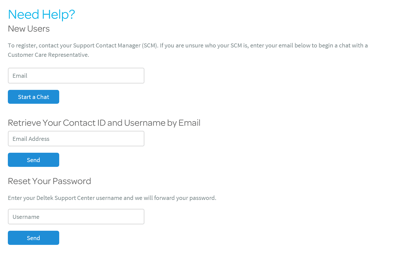
When you click on “Need Help?,” you now have the option to chat with someone. This feature offers the real-time ability to speak with a Deltek professional who can assist you. To access the chat, you will need to enter your email address and then click “Start a Chat.”

Deltek Support Center Login Assistance Screen

To get back to the login page from this page, you will need to click the silhouette Silhouette.png in the top right corner. This will enable you to log into the support center.
Stay Up to Date with Notifications

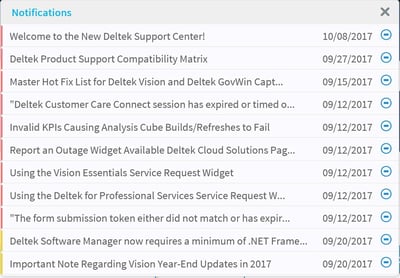
After logging in, you will receive the critical info pop-up announcing the new site. When you close this pop-up, or if you are logging in after the alert has been removed, you will immediately be presented with a list of notifications.

Deltek Support Center Notifications Popup

Key highlights of the notifications popup include:

  • The notifications are equivalent to the old alerts and announcements section
  • You can hide the notifications popup if you do not wish for it to popup every time you open the support center
  • Global notifications are color coded: high (red), med (yellow) and low (green)
  • You will only see alerts for the products that you own
  • You can click on the number in the orange square at the top of the screen which indicates how many notifications there are if you choose to hide the notifications

Manage Your Deltek Support Center Account

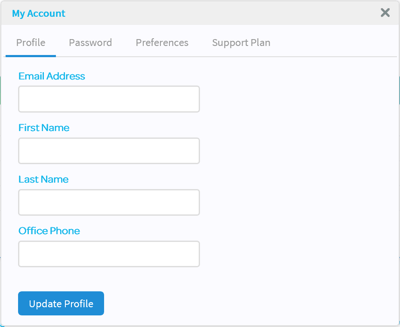
In the upper right, you will see the gear icon. This icon allows you to open the “My Account” section. This is where you update your profile settings, and you can also see the current support plan you have.

Deltek Support Center Account Management Screen

The account management section allows you to change the following:

  • Password
  • Preferred language
  • If you want or do not want to see notifications

Get Support for Your Deltek Products

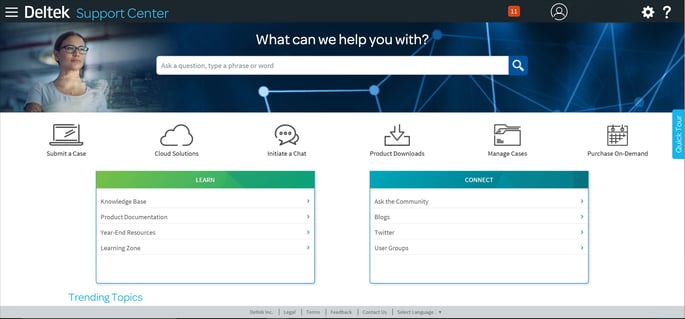
The search bar offers you the ability to look for forums, posts and knowledge based articles using specific words or phrases. Everyone will see the learn and connect information boxes, and if you are an administrator, there will be an additional box that will be available. Below the information boxes are “Trending Topics,” which show the top ten articles for the products that you own for the last thirty days. You will only see the topics in this list that relate to the products that you own.

Deltek Support Center Main PageDeltek Support Center Main Page

Depending on the level of support you have, you will possibly see up to six icons. The icons you view are driven by permissions. If you can’t find the answer, submit a case. Deltek will then research your inquiry. Availability, however, depends on the type of service plan you have purchased. Here are the options you will see depending on your license agreements:

  • Cloud Solutions- You will see this is if you own a Saas product. When clicking this icon, you will be able to choose the cloud solution you are needing help with. This will open a wide range of help topics specific to your needs.
  • Initiate a Chat- This icon allows you to enter a chat with Deltek staff. Be sure to check the bottom of the chat page for specific hours of availability.
  • Product Downloads- The Deltek Software Manager (DSM) is your central place to download all the Deltek products you own, including all service packs and hot fixes.
  • Manage Cases- Here you can check the status, view details, and update your support cases. Previously called, “My Support Cases.”
  • Purchase On-Demand - Deltek's “On-Demand Support” is available for situations that require brief, one-time access to our support experts for situations that are not covered by your annual maintenance fee.

If you have less than three icons available, they will not show. You can still access the available options by going to the upper left-hand corner of the screen and utilizing the menu to navigate to your desired destination.

Enjoy the New Deltek Support Center

As you can see, the new customer service center is not only user friendly, but it eliminates information that does not pertain to you. The updated service center’s ultimate goal is to help you continue to get the most out of your Deltek product. Click here for more information about the Deltek Support Center.

Why C-Level Financial Types Are More Interested in CRM than Ever

Posted by Admin on May 3, 2017, 12:00:00 AM

CRM for Financial LeadersThere has been an uptick in interest recently from C-Level financial leaders to become more involved with the CRM functions within Vision. You may ask yourself why this new trend is occurring since the CRM module of Vision is for marketing and business development functions. The reason must surely be based on an informational need so that actionable decisions can be made.

CRM Information for Financial Leaders 

CRM databases are full of information to help the marketing and business development team drive new business. So, what information can provide financial leaders the insight they need to make better decisions?  

  1. The Life Cycle of Projects – More often than not, a project is born during the opportunity stage. More specifically, the opportunity can trigger a promotional project and/or a resource plan. As a result, there are financial considerations that must be taken into account: 
  • The numbering of both the promo project and the plan
  • Determining when the pursuit trigger will need to include resources in the staffing heat map
  • Figuring out the rate tables and a multiplier that are going to be used in the plan 
  1. Pipeline and Backlog – A conversation that often occurs between a CFO and director of business development is about the movement of future revenue from the pipeline to soft backlog to hard backlog. This can result in some level of double counting and is especially prevalent in task ordering agreements or infinite deliver/infinite quantity (IDIQ’s). C-Level financial people need to be involved in the definition stage of how future revenue is separated and quantified.
  2. Cost of Winning and Losing Work – Opportunities afford us the ability to track hit rates. These are metrics showing win/loss ratios and can be filtered by unique attributes that are meaningful to your organization. One suggested attribute to track separately is sole source versus competitive wins. From this metric, financial managers can begin to quantify and measure the effort that goes into these wins and losses. However, this requires creating a promo project once the decision is made to bid on an opportunity.
  3. Utilization – Having the fluidity to evaluate time spent on a proposal is a value add. Moreover, C-Level financial types are also aware of utilization. By moving time from a promo project to a regular type project, the time moves from non-productive to productive. When we use Vision functionality to isolate proposal time on utilization reports, it provides insight into why employees are not being productive. 

Sharing Information Firm Wide

It’s always best practice to share important firm data with key individuals from all teams, but those people should also be able to find the information on their own. Like this new trend for financial leaders to learn more about using the CRM module in Vision, marketing and business development people also need to know how to access information from the financial side of Vision. Most importantly, everyone should be involved in the implementation of all Vision modules to ensure the initial setup, data structure and reports are valuable to the firm.

6 Key Statistics that Fuel the Competition for Talent Management

Posted by Admin on Mar 15, 2017, 12:00:00 AM

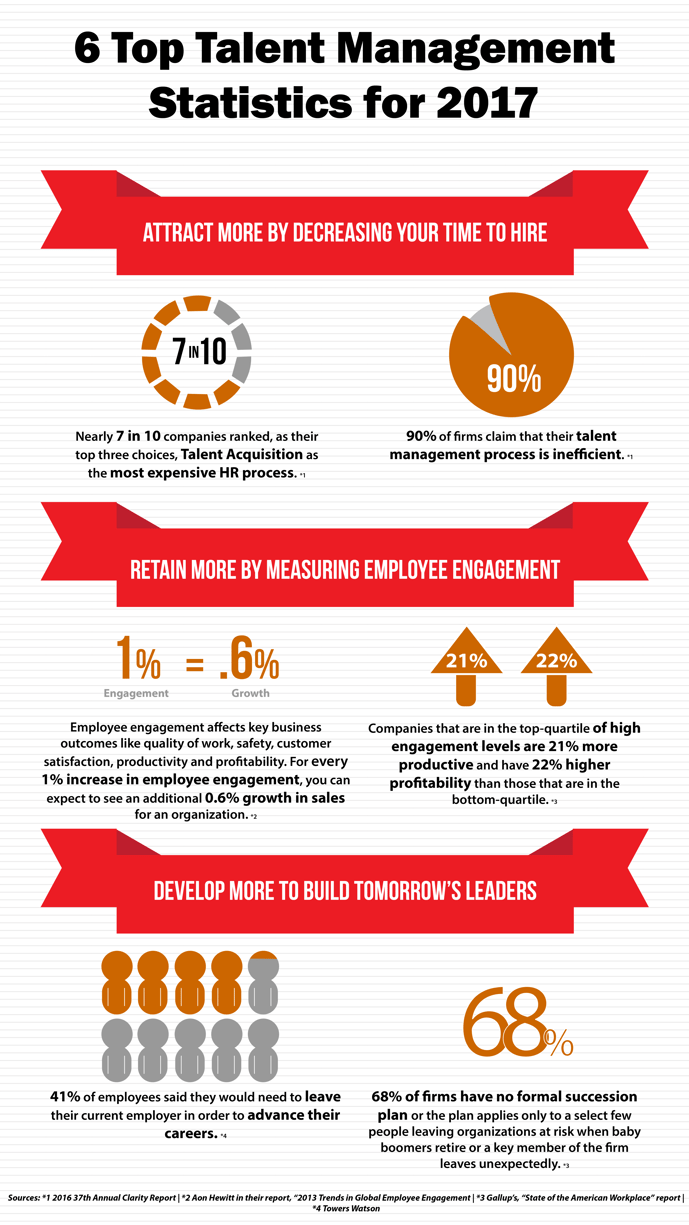
Organizations with antiquated talent management philosophies will struggle to attract, nurture and retain top talent in 2017. Many HR teams make the common mistake of having decentralized or ineffective systems and processes. This infographic illustrates six key statistics that demonstrate why HR teams can no longer be reactionary and should evaluate their talent management processes and systems.

Deltek-Talent-Infographic-Final.png

Learn More about the Challenges of Talent Management

Interested in learning more about how to overcome the increased competition for talent in 2017? Join our webinar where we will discuss how HR can overcome the top five challenges with talent acquisition.

Topics:  
HR

Client Connections - Create Unique Client Experiences

Posted by Admin on May 19, 2016, 12:00:00 AM

Is your business focused around your clients? While some readers may be quick to answer ‘yes’, and others quick to answer ‘no’, the truth likely remains somewhere in-between. Foster more meaningful client connections by understanding client expectations or concerns. Watch the video below to see how your firm can create a unique client experience to differentiate yourself from the competition.

Deltek Vision Year End 2015

Posted by Admin on Dec 17, 2015, 12:00:00 AM

year_end_2015.pngIt’s that time again! Year-end is here and it is time to close out your Deltek Vision system. This blog will provide you with resources and reminders to ensure a successful year-end close out of your Deltek Vision system. Check out the information below, and let us know if you have any questions.
Don't Forget Your Deltek Vision Year-End Processes

As we go through the year-end process there are mistakes we (and others) make that are easy to recover from like entering the 15 page depreciation journal entry “backwards” at midnight sitting in your semi dark office chugging your 15th pot of coffee.  Some are more difficult – like removing all the lower levels of your work break-down structure (did that once – glad our backups worked). So outside of deleting the database, what are some of the items in Vision year end processing that are hard to recover from?

>> Learn more

Stress Free Year-End Process - Yes You Can!

Year-end is always a stressful time of year, but it doesn’t have to be.  As with everything else in the world of Accounting, planning and preparation is the key to a successful and stress-free year end. Check out this article talk provides a few tips to make your year-end close just a little easier.

>> Prepare more

Additionally, check out our on-demand webinar to see how you can make your year-end stress free.  Our panel will provide insight into best practices, tips to close your books with ease, and focus on those “gotchas” on year-end processes. See what our panel says about the following year-end items:

  1. How to make your process efficient
  2. Avoid disruption to production
  3. Communication topics to provide your staff and management
  4. Saving money by evading closing obstacles

>> View more

Year-End Resources Available

It is that time of the year and Deltek Customer Care is working to assist you with year-end activities. You can now take advantage of these year-end resources:

Year-End Forums
Deltek Vision has a dedicated board for Year-End Questions. Access the Deltek Customer Care Forums and connect with your peers to ask questions, exchange ideas and share knowledge about Year-End.

Phone Menu
For complex questions, call Customer Care at 1-877-HLP-PROJ with your questions. At the voice prompts, simply select your product's year-end option to get to a Subject Matter Expert immediately.

Year-End Info Center
This is your one-stop shop for easy access to all year-end related knowledge base articles, videos and special offerings during year-end.

Quick Chat
Access Quick Chat for quick questions regarding Year-End. Chat hours are available Monday - Friday from 7:00 AM - 10:00 PM ET.

Additional Year-End Guides and Videos

All Year-End Guides, documents and Frequently Asked Questions are available. To access this year-end information, visit the Year-End Info Center on the Deltek Customer Care Connect website. There you'll find valuable information with step-by-step instructions for closing your year-end.

We hope these resources serve as good reminder. Best wishes from the Full Sail Partners' staff! Wishing you a prosperous 2016.

Important Note Regarding Year-End Regulatory Updates in 2015

Year-end updates in 2015 will be supported only on Vision 7.3, Vision 7.4 and Vision 7.5. Regulatory updates for releases prior to Vision 7.3 will not be delivered.

Check out the Deltek Support Assurance Product Lifecycle on the Deltek Customer Care Connect website for the latest information on your product's status and definitions of the support delivered in the Active, Maintenance, and Sustaining phases.

It’s Time to Upgrade! 

Working in the most recent release of your Deltek solution ensures your firm is benefiting from all the features and enhancements engineered into the latest versions of Vision. Your support and maintenance plan entitles your firm to download the latest version of your product here if you're not up-to-date!

Is Your Firm Prepared for Deltek Vision 7.5?

Are you ready for Deltek Vision 7.5? Don’t worry, our team of experts are here to get you up to speed! Deltek Vision 7.5 includes features and enhancements that are a direct result of your input. Optimize your organization with Vision 7.5 and provide your teams the latest tools and resources to win more, manage more and do more! 

Register to join us for this free virtual webinar as we review the latest enhancements and features introduced with Deltek Vision 7.5.

Introducing the Deltek Vision Constant Contact Connector

Posted by Admin on Nov 19, 2015, 12:00:00 AM

constant-contact-share-logo-1.gifIntroducing the Deltek Vision Constant Contact Connector! Full Sail Partners unveiled a new breed of Deltek Vision connectivity at the Deltek Insight Conference.These ready-to-go solutions included an integration to Constant Contact. This cutting edge technology allows firms to integrate to Constant Contact at a fraction of the development time and cost needed to build out a similar solution from scratch. Any Deltek Vision user can utilize this solution no matter if they are in the cloud or on-premise. 

When developing the solution, our own team was challenged by the manual process we had to go through on almost a weekly basis and heard of many other Deltek Vision users faced with the same challenge. During the development of the solution the Full Sail Partners team sought to: 

  • Allow users to utilize the existing Marketing Campaign functionality to associate contacts and leads
  • Eliminate the manual push of contact and lead data to Constant Contact
  • Provide visibility and searching capabilities to unsubscribe, open, clicks, forwards and bounce data in Vision
  • Report on single email lists in one Marketing Campaign for all email mailings or single mailings, i.e. newsletters
  • Weed out duplicates and poorly formatted email addresses prior to mailings 

We invite you to view our video to learn more about our Deltek Vision Constant Contact Connector. Additionally, Full Sail Partners has partnered with Constant Contact to also offer new Constant Contact clients a discount off your subscription. Happy marketing!   


Interested in Connecting Your Deltek Vision System to the Outside World?

Want to learn more about this new breed of API connection tool that can be used on-premise and in the cloud? Full Sail Partners the first and only solution provider to bring you applications that can immediately connect to your Deltek Vision product with little to no effort from your IT department. Start doing more with your Deltek Vision system!


Top 10 Features in Deltek Vision CRM

Posted by Admin on Nov 11, 2015, 12:00:00 AM

Learn More

Ready to learn more about the features offered in Deltek Vision CRM? Sign up for our virtual webinar:

New Call-to-action

Preparing for a Merger or Acquisition with Deltek Vision Multi-Company

Posted by Admin on Oct 21, 2015, 12:00:00 AM

DELTEK MULTICOMPANYAccording to PWC, “M&A activity accelerated sharply in the second quarter of 2015 with substantial increases relative to the prior quarter in both volume and value of transactions.” As consultants assisting firms with merging their databases, we have seen this up tick too and firms involved in mergers or acquisitions are finding great value out of Deltek Vision’s Multi-Company feature. Some firms don’t know that Multi-Company is included with their Vision Core Finance application. It just needs to be enabled and configured when your firm is ready to add another
company to your current Vision database. 

What is Multi-Company?

Vision Multi-Company allows a firm to manage multiple legal entities in a single Vision database.  There is no limit to the number of companies that can be maintained in Vision. Multi-Company streamlines the process of managing accounting functions between companies when resources are shared. Once Multi-Company is enabled, it is easy to switch between companies. Just like changing periods in Vision, a simple utility selection will move you between companies. 

Each company operates as a separate entity. Info Center records, such as clients and contacts, can be shared across the enterprise (the “enterprise” encompasses all companies managed in Vision). However, other Info Center records, such as employees, are company specific. Projects and phases can be owned by a single company or set up so that individual phases can be owned by different companies.  

Before Enabling Multi-Company

There are several factors to consider before enabling the Multi-Company feature.  One primary factor to consider is how your companies will interact with one another. When resources are shared, how will the company loaning their staff or paying expense on behalf of another company be compensated? This is done through intercompany billing. 

Definition: Intercompany billing is defined as, internal transactions between two associated companies who file a consolidated tax return or financial statement. 

There are several approaches to intercompany billing that should be a part of the planning discussion during the implementation process. These and other questions should be addressed during the planning process and will help you determine if Multi-Company is a good fit for your firm. 

Considerations When Setting Up a New Company in Deltek Vision

When acquiring a company to be added to your Vision database as a separate company, there are a number of enterprise-wide requirements to consider. For example, the fiscal calendar, work breakdown structure and organization structure must be the same across all companies, as well as, key formats such as project numbers, vendor numbers, employee numbers, etc. All of these items must be consistent across all companies.

After the initial planning meeting, if your firm determines that Multi-Company is not an option, you can always explore the alternative of using Organization reporting within Vision. Organization reporting gives you the ability to manage separate business units within a single company environment. The “maintain separate balance sheets” feature in Vision could also be used if needed, as well as, the labor cross charge feature to move revenue, labor and cost between organizations.

Final Thoughts

A well thought out, carefully planned implementation is essential to a successful Multi-Company implementation. Once the final implementation plan is in place, the creation of a test Multi-Company environment before the final configuration in your live Vision database will go a long way in preparing your finance staff and the rest of your employees for the new Multi-Company environment and all of the new features a Multi-Company database has to offer. For more information on Multi-Company check out this previous blog on how it works.


Latest Posts