Full Sail Partners Blog | Deltek Vantagepoint (4)

Posts about Deltek Vantagepoint (4):

Q3 Accounting Checklist: Key Actions to Prepare for a Smooth Year-End Close

Posted by Theresa Bowe on Aug 7, 2025 12:00:00 AM

08-07-2025 DVP Smooth Year End_banner

As the third quarter unfolds, accounting teams should shift into preparation mode for year-end. Q3 offers a strategic window to review financial performance, clean up data, and fix lingering issues—before the rush of the fourth quarter.

By taking time now to perform a thorough accounting review, firms can improve forecasting accuracy, avoid costly surprises, and set the stage for a stress-free year-end close. Below is a checklist of Q3 accounting functions every firm should prioritize.

1. Reconcile Balance Sheet Accounts

Before year-end, your books need to be airtight. Use Q3 to verify and reconcile all major balance sheet accounts:

  • Bank accounts: Ensure monthly reconciliations are current and properly documented.
  • Accounts receivable and payable: Tie subledger reports to the general ledger.
  • Unbilled revenue and work in progress (WIP): Confirm that earned revenue is recognized accurately.
  • Prepaids and accruals: Review for proper allocation and timing.

Don’t wait for year-end to uncover discrepancies—identify and resolve them now while there’s still time to investigate.

2. Review Project Data and Statuses

Project-level accounting has a direct impact on financial reporting and profitability. Q3 is the time to:

  • Validate project statuses and close out completed projects. This includes marking them as active, dormant, or inactive in Deltek Vantagepoint.
  • Review on-going projects with project staff to ensure budgets and timing is accurate.
  • Ensure all job-to-date labor and expense is recorded.

A well-maintained project database reduces billing delays, improves reporting accuracy, and supports better decision-making heading into Q4.

3. Clean Up Vendor and Client Records

Outdated or duplicate vendor/client data can create payment delays, compliance issues, and audit red flags. During Q3 is a great time to:

  • Merge duplicate vendors and clients in your accounting system.
  • Ensure there is a W-9 on file for all vendors and verify the proper tax classification is selected.
  • Review payment terms and outstanding balances

Getting your vendor and client data in order now will simplify 1099 prep and reduce friction during the January crunch.

4. Audit Timesheets and Labor Cost Allocations

Labor is often a professional services firm’s largest cost, and any misallocations or gaps can lead to revenue leakage or compliance risk. Tasks to begin in Q3 include the following.

  • Confirm all timesheets are submitted and approved.
  • Audit for correct project/task assignments.
  • Check for missing or duplicate time entries.
  • Ensure labor costs align with billable and overhead expectations.

Regular audits also help with resource planning and team utilization analysis as you forecast Q4 and beyond.

5. Analyze Budget vs. Actuals and Forecast Year-End Performance

Q3 provides a crucial opportunity to assess how your actual performance aligns with your budget—and to adjust expectations accordingly. Recommended tasks are:

  • Run YTD financial reports and compare to the annual budget.
  • Identify underperforming or overperforming areas. /li>
  • Update year-end forecasts based on real data.
  • Communicate adjustments to leadership and project managers.

This not only helps course-correct for Q4 but also strengthens next year’s budgeting process.

6. Examine Unbilled Services and Revenue Recognition

Leaving revenue on the table is a common risk, especially for project-based firms. To avoid before year-end do the following:

  • Review all open projects for unbilled time and expenses.
  • Check for projects where work is complete, but billing hasn’t occurred.
  • Ensure revenue recognition aligns with accounting policies and GAAP.

Addressing billing gaps now improves cash flow and ensures revenue is appropriately captured in the current year.

7. Evaluate Internal Controls and Approval Workflows

As your firm evolves, your internal controls should too. This includes:

  • Reviewing user roles and system permissions.
  • Testing approval workflows for purchases, timesheets, and billing.
  • Confirming separation of duties and audit trails are in place.
  • Tightening controls around sensitive financial areas.

Proactive control reviews can prevent fraud, errors, and compliance issues before they become audit findings.

8. Begin Preliminary Year-End Planning

While it may feel early, beginning year-end planning in Q3 can prevent bottlenecks later. Consider:

  • Scheduling year-end close tasks and assigning responsibilities.
  • Communicating deadlines for final billing, AP entries, and expense reports.
  • Reviewing your audit prep checklist.
  • Updating documentation for policies and procedures.

Firms that start planning in Q3 consistently report smoother closes and fewer surprises in January.

Q3 is Your Prep Season

Think of Q3 as your accounting “halftime.” It’s the perfect time to assess performance, fix gaps, and get your financial house in order—so when Q4 hits, you’re ready to sprint to the finish.

A disciplined mid-year review sets the foundation for a clean close, reliable reporting, and confident decision-making. The work you do now pays dividends in accuracy, efficiency, and peace of mind later.

Need an extra set of eyes—or hands?

If your Q3 checklist feels more like a mountain than a molehill, you're not alone. Our finance consultants are here to help you get ahead of year-end chaos with expert guidance, personalized training, and support tailored to your firm’s needs.

Whether it’s reconciling the tricky stuff, setting up reports in Deltek Vantagepoint, or diving deep into Navigational Analysis—we’ve got you covered.

📩 Reach out today to connect with one of our finance pros and start your smoothest year-end close yet!

Why I Enjoy Using Deltek Vantagepoint: A Few Favorite Features

Posted by Cynthia Fuoco on Jul 31, 2025 12:00:00 AM

2025-07-24 Management of Change Finance_banner-1

As someone who uses project management and ERP tools on a regular basis, I’ve come to appreciate software that not only delivers on functionality but also makes day-to-day tasks easier and more intuitive. Deltek Vantagepoint has been that kind of platform for me. It’s full of thoughtful features designed to streamline workflow, reduce manual effort, and keep teams aligned. Here are a few of the things I particularly enjoy about using Deltek Vantagepoint:

1. Easy Navigation That Saves Time

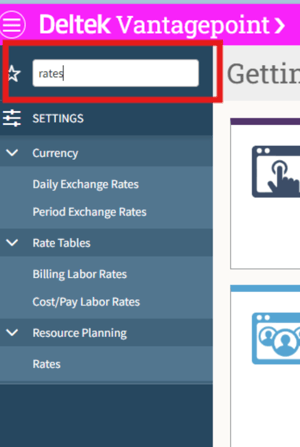
Let’s face it—nobody wants to spend extra time clicking around a complicated interface. One of the first things I noticed and appreciated about Deltek Vantagepoint was its clean and intuitive navigation. Whether I’m jumping between projects, running reports, or updating timesheets, everything feels organized and accessible. The dashboard is customizable, the menus are logically structured, and the search functionality is responsive and smart. That means less time digging for information and more time focusing on work that matters.

07-31 Screenshot 01

2. Autofill Phases in Billing Terms: Small Feature, Big Impact

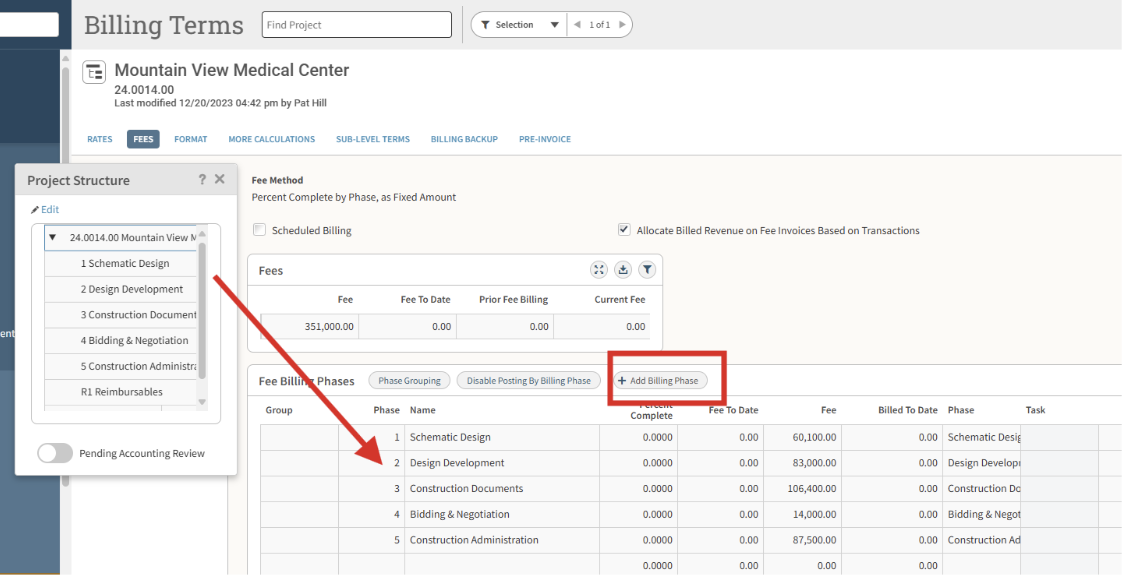
Billing can be one of the more tedious parts of managing projects—especially when every phase has to be manually entered or double-checked. That’s why I love that Vantagepoint includes an Autofill Phases feature in its billing terms. It’s a subtle but powerful tool that automatically populates project phases based on predefined structures. This reduces human error, saves time, and ensures consistency in billing setup across the organization.

07-31 Screenshot 02

3. PTO Approvals Sync with Timesheets and Plans

Keeping timesheets and project plans in sync with approved time off can be a real pain—especially in larger teams. What I appreciate about Vantagepoint is that it automatically adds approved PTO to both timesheets and resource plans. It’s one of those automation features that you don’t realize you need until you have it, and once you do, you can’t imagine going back. It helps prevent scheduling conflicts and gives a more accurate picture of team availability in real-time.

4. More Robust and Flexible Screen Designer

The upgraded Screen Designer in Vantagepoint is another feature that deserves recognition. It allows for greater flexibility in customizing forms and layouts to meet the specific needs of your organization. Whether it’s adjusting fields for data entry, refining the layout for better usability, or creating custom views for different roles, the robust screen designer makes it easier to tailor the system to how your teams actually work.

Final Thoughts

Deltek Vantagepoint isn’t just about tracking time or managing budgets—it’s about making daily tasks smoother, more automated, and less error-prone. From smart billing automation to seamless PTO integration and user-friendly navigation, these features might seem small on their own, but together they add up to a much better user experience.

If you’re using Deltek Vantagepoint, I’d love to hear what your favorite features are. And if you’re thinking about switching platforms, these might be a few good reasons to consider giving it a try.

What's Your Upgrade Speed? Choosing the Right Path from Deltek Vision to Vantagepoint

Posted by Rana Blair on Jul 17, 2025 12:00:00 AM

2025-07-17 Upgrade Speed_banner

Upgrading from Deltek Vision to Vantagepoint doesn’t have to be overwhelming—or take forever. Whether you want to go fast, take a strategic detour, or explore the full landscape of Vantagepoint, there’s an upgrade path designed just for you.

At Full Sail Partners, we offer three distinct service options to match your firm’s readiness, resources, and goals: Accelerated Advancement, Strategic Guidance, and Elevated Execution.

And yes—some firms can go live in just 4 weeks. 🙌

Accelerated Advancement: The Fast Track to Vantagepoint

If your firm is still on Deltek Vision, you’ve probably heard the message loud and clear—it's time to upgrade to Vantagepoint. But what if we told you that your firm might be the perfect fit for a faster, simpler, and more efficient upgrade process?

Introducing Accelerated Vision to Vantagepoint—a brand-new service from Full Sail Partners that gets your firm upgraded and operating in Vantagepoint in just 4 weeks. Yep, you read that right. Four. Weeks.

This service package is ideal for firms that want to maintain the same core features and functionality as their Vision system, without overhauling everything. With Accelerated Advancement, we handle the heavy lifting for you—configuring your system, training your team, and supporting your go-live.

Best for firms that:

  • Are hosted by Full Sail Partners or Deltek SaaS
  • Are using Vision 7.6
  • Have fewer than 50 employees
  • Do not have CRM (RP is okay if not active)
  • Have a small upgrade team (2 people max)
  • Can commit ~2 hours/week during the 4-week window

What’s included:

  • Expert configuration to closely replicate your current Vision setup
  • Targeted training on key functions like time, billing, and reports
  • Checklists, testing, and live support
  • Ongoing Q&A and post-live support to explore enhancements over time

Timeline:

4 weeks (not including prep/technical work)

Strategic Guidance: The Collaborative, Balanced Approach

Think of this as your moderate-paced, guided journey. With Strategic Guidance, you’ll explore new features and priorities while keeping your business running smoothly. We guide your team through training, testing, and configuration—at a pace that allows for thoughtfulness and growth.

Best for firms that:

  • Have 40–150 employees
  • Want to explore optimization opportunities
  • Use CRM and/or Planning modules
  • Need more detailed training and decision-making support
  • Can commit to weekly or bi-weekly meetings and in-between tasks

What’s included:

  • Consultant-led planning and testing
  • CRM and Planning toolset setup
  • Process improvements across departments
  • Strategic introduction to dashboards, workflows, and reporting

Timeline:

12–20 weeks depending on firm size and goals as well as Full Sail Partners’ consultant availability calendar.

Elevated Execution: The Full Transformation

For firms ready to rethink how they operate from top to bottom, Elevated Execution is a deep-dive service offering. This path includes business process evaluation, systems redevelopment, and end-to-end support across finance, CRM, planning, and operations.

Best for firms that:

  • Are highly customized or in the midst of change (mergers, acquisitions, etc.)
  • Use multiple add-ons or multi-company/multi-currency features
  • Have 150+ employees (or smaller, complex firms)
  • Want to improve operations and adopt a fully modern project lifecycle

What’s included:

  • Project lifecycle redevelopment
  • Advanced configuration and custom workflows
  • CRM and Resource Planning transformations
  • Training programs, dashboard builds, go-live support, and post-upgrade triage

Timeline:

24–36 weeks depending on complexity.

How Do You Pick the Right Upgrade Approach?

It depends on:

  • Your current setup (cloud or on-premise)
  • Team size and structure
  • Add-ons and level of customization
  • Readiness and internal bandwidth

That’s where our Vantagepoint Readiness Report comes in. It’s our signature step to identify your starting point, reveal data cleanup needs, and map out your upgrade plan.

Start Here: The Vantagepoint Preparation Questionnaire

Before picking your upgrade speed, take 5–10 minutes to complete the Vantagepoint Preparation Questionnaire—it’s the easiest way to start your upgrade journey.

What is it?

  • A self-assessment to evaluate your current Vision setup and upgrade readiness
  • Identifies key areas like data cleanup, system configuration items, and process improvements
  • Helps determine your firm’s best upgrade approach – Accelerated Advancement, Strategic Guidance, or Elevated Execution

Why Complete It?

  • Pinpoints potential challenges before you start your upgrade
  • Saves time by streamlining your planning process
  • Helps us tailor recommendations for your firm’s specific needs

What Happens Next?

  • Our team reviews your responses and provides guidance
  • You can schedule a consultation for personalized upgrade approach recommendations
  • You gain a clear roadmap for your Vantagepoint upgrade

Complete your questionnaire today by clicking here or the image below.

Meet Deltek Dela: The AI-Powered Game Changer for Project Based Firms

Posted by Jake Lucas on Jul 10, 2025 12:00:00 AM

2025-07-10 Meet Dela_banner

There’s a new coworker in town—and spoiler alert—they don’t take coffee breaks. 😏

Deltek Dela™ is Deltek’s AI-powered intelligent business companion. And no, that’s not just a fancier title for “digital assistant.” Dela is the full package—packed with smart summaries, predictive capabilities, automation tools, and a natural language interface. She’s not here to passively respond to commands. She’s here to enhance productivity, accuracy, and value across your entire project lifecycle.

Let’s take a look at how Dela is bringing purposeful innovation to project-based firms—and why she’s quickly becoming everyone’s favorite team member.

From Digital Assistant to Full-On Business Companion

Plenty of tools throw around AI buzzwords like “chatbot” or “virtual assistant.” But Deltek didn’t create Dela just to keep up with trends.

Dela is the sum of all AI capabilities inside Deltek Vantagepoint. She’s not just bolted on. She’s built in.

With Dela, you can:

  • Draft content like client emails and project summaries with GenAI.
  • Predict project success with data-driven insights.
  • Automate repetitive tasks like invoice and expense entry.
  • Ask natural-language questions like “What’s our win rate with [Client Name]?” and get answers instantly.

And that’s just the beginning.

Making the Entire Project Lifecycle Smarter

Dela isn’t AI for the sake of AI. Every tool, every feature, every suggestion is designed with a specific purpose: to make project-based businesses more productive, efficient, and profitable.

Here’s how she shows up across the entire project lifecycle:

🧲WIN: Fill Your Pipeline Smarter (and Faster)

Sales and marketing teams can use Ask Dela to:

  • Quickly find best-fit opportunities,
  • Summarize a client or opportunity to identify the best next step,
  • Capture contacts instantly using the built-in business card reader,
  • And easily create follow-ups, meetings, or proposal tasks—all from one prompt.

Forget hunting through tabs and records. Just type what you need and Dela does the rest.

📊MANAGE: Stay on Top of Project Health

With all the data sitting inside your ERP, it’s easy to get overwhelmed—or worse, miss critical insights.

Dela puts the most relevant data right at your fingertips:

  • Need a project’s financial performance summary? Ask Dela.
  • Want to assess resource skills or competencies for upcoming needs? Ask Dela.
  • Looking to predict earned value, labor multipliers, or schedule variance? She’s already on it.

Think of her as your project whisperer, helping you manage with confidence instead of chaos.

🛠 DELIVER: Streamline Billing & Admin Workflows

Once the project is in motion, the last thing your team wants is to be buried in receipts and invoices.

Dela takes care of the annoying stuff:

  • Scan receipts or AP invoices, and she auto-fills the data fields.
  • Need to know the outstanding AR for a client? She’ll summarize it instantly.
  • Want to follow up with a billing contact? She’ll even draft the email for you.

Yes, really.

📈 MEASURE: Turn Insights into Action

Project performance, firm-wide KPIs, DSO trends—Dela’s dashboards and smart summaries help you:

  • Get paid faster,
  • Spot risk before it becomes a problem,
  • Make strategic decisions with data you trust.

She even gives you a 360° view of client health and project profitability without the need for complex reporting tools.

Real Ways Dela is Changing the Game

We could tell you Dela “enhances decision-making through AI,” but let’s be real—you want specifics.

Here’s how Dela is already shaking up how project-based firms operate:

1. Ask Dela: Your Natural Language Command Center

No need to memorize report filters or open five tabs—just type (or speak!) what you need. Try something like:

  • “What’s our win rate for projects with [Client Name]?”
  • “Summarize the financials for project R00181.00.”
  • “Create a meeting with the proposal team for this Friday at 2pm.”
    Yes, she even creates and attaches activities to employees. 😎

2. Smart Summaries That Work Overtime

Ever wanted a quick snapshot of a project or client without clicking through 12 screens? With Dela:

  • Get Project Smart Summaries to view plan status, earned value, DSO, AR, and more in a flash.
  • Use Client Smart Summaries to scan pursuits, project history, and key contacts—all in one clean summary. Perfect for BD pros and executives.

3. Automating the Boring Stuff

Let’s be honest: no one gets into project management to manually enter AP invoice data or type out expense receipts.

  • Dela’s ICR (Intelligent Character Recognition) scans invoices and receipts and fills out the fields for you.
  • Capture business cards from events with a quick scan—and voilà, a new contact in CRM.

4. Predictions That Actually Matter

Dela isn’t just reactive. She’s out here forecasting like a pro—so you’re not blindsided by low margins, resource gaps, or underperforming projects.

Expect insights like:

  • EAC profit & variance
  • Labor multipliers
  • Schedule or spend variances
  • DSO and AR trends

Basically, she’s that teammate who sees problems before they happen (and gently nudges you to fix them).

But Is It Really That Smart?

Yep. Unlike some of the AI-lite tools from competitors that stop at basic automation or chat bots, Dela is built right into Vantagepoint. She pulls data from all corners of your system—CRM, projects, resourcing, financials—and turns it into actionable intelligence.

And the best part? She evolves with your data. Meaning the more you use her, the more helpful she becomes. Kinda like your favorite pair of running shoes—once you break her in, it’s game on.

Who’s This For?

If your team is still:

  • Digging through reports to answer simple questions,
  • Manually entering in expense and AP invoice data,
  • Missing red flags on projects until it’s too late,
  • Or just feeling like they can’t quite get ahead…

Then yes, Dela is for you.

From business developers to PMs to accounting teams, everyone gets a boost.

See Dela in Action

At Full Sail Partners, we’re helping firms just like yours harness the full power of Dela and Deltek Vantagepoint. Whether you’re already on Vantagepoint or exploring your options, we’ll show you exactly how Dela can make your workflows smarter—and your life easier.

👉 Want a sneak peek? Watch our mini-demo by clicking the image below and get a firsthand look at Dela’s magic in action.

TL;DR:

Deltek Dela isn’t just a chatbot. She’s your all-in-one, AI-powered business companion that helps your project-based firm work smarter across the entire lifecycle—from pipeline to payments.

And yes, she really is that smart.

Got questions? We’ve got answers. And probably a few dashboards to go with them.


From Growth Mode to Sustain Mode: What the 2026 Clarity Study Says About Financial Management

Posted by Cindy Cates on Jun 26, 2025 2:34:46 PM

2026-DeltekClarity_BusinessDevelopment_banner


Every year, the Deltek Clarity A&E Industry Study gives architecture and engineering firms something concrete to work with: real data from real firms about what's working, what's stalling, and where the industry is heading. The 47th edition surveyed 896 firms of all sizes and types, and the throughline is clear. This isn't a market that rewards guessing or going through the motions. The firms pulling ahead are the ones making intentional, disciplined decisions at every level of the business.

Over the next few weeks, we're breaking down each section of the report. This week: Business Development.

More work, less reward

Here's the headline: firms submitted 32% more proposals in 2025 than they did the year before. That sounds like momentum. But the median capture rate fell 3.8 percentage points to 44.4% — the lowest it's been since 2019 and the sharpest single-year decline in the nine-year trend.

BD activity is rising, but converting pursuits to projects is becoming harder and more complex. The win rate data adds some nuance — the median slipped to 49% industrywide, but architecture firms were the outlier, actually gaining five points to 45%, likely reflecting tighter pursuit selection in a market where design-led work is more relationship-dependent. Almost nobody got easier wins this year.

Capture rate — the dollar value of proposals awarded relative to the dollar value submitted — makes the picture even clearer. Large firms dropped six points to 34%. Medium firms fell three points. The gap between the top quarter of firms (61.3%) and the bottom quarter (30.2%) is 31 percentage points — a spread that has less to do with market conditions and everything to do with how intentionally firms are choosing which work to chase.

High performers bucked the trend entirely, with their capture rate rising 10 percentage points to 59% while everyone else's fell. Same market, same headwinds, meaningfully better returns. The difference isn't luck or firm size or sector mix. It's the discipline to pursue less and win more.

Some of the decline reflects a market shift toward smaller-value projects — the total value of proposals submitted grew 12% while the number grew 32%, pointing to a lower average project value per pursuit. And a lot of it reflects what happens when more firms are chasing the same work in an increasingly crowded market.

The market itself is changing

It's not just that competition is stiffer — it's that the market opportunity itself is evolving.

Data centers debuted as a new category in this year's study and immediately claimed the top spot: 72% of firms expect to grow their position in that sector over the next 18 months. Energy and power held at 57%. These are sectors that barely registered a few years ago and are now driving significant optimism. Meanwhile, transportation dropped nine percentage points and hospitality continues its post-pandemic retreat. The firms best positioned for this environment aren't waiting for their traditional sectors to rebound — they're building credibility in new ones, which takes time, intentional relationship-building, and a clear-eyed view of where the firm can actually win.

Economic uncertainty compounds all of this. It debuted in this year's survey as a new BD challenge and immediately ranked as the top first-choice concern at 19%. The response isn't to slow down — it's to build a deeper pipeline and invest in positioning now rather than reacting when conditions shift.

Go/no-go decisions have never mattered more

Eighty percent of firms say they use a go/no-go process — but how they use it is shifting. Use for strategic opportunities only grew two percentage points to 32%, and use for all opportunities edged up to 38%. Among firms not yet using the process, 49% are now considering adoption, up from 29% the prior year. That's a meaningful signal.

A well-executed go/no-go process isn't a gate to slow things down. It's a filter that protects the firm's most valuable resource: pursuit capacity. As Daphne Bryant of ACEC put it in the report, it does more than filter opportunities — it aligns the firm's resources, expertise, and relationships with the pursuits that are truly winnable and worth winning.

The key word is data. Go/no-go decisions need to be driven by data-based questions — probability of winning, existing relationships, delivery capacity, fit for the work — not instinct or individual preferences. That's where a well-configured Deltek Vantagepoint environment earns its keep: relationship history, prior win/loss patterns, pipeline load, and delivery capacity all in one place. If your team is still making these decisions off a spreadsheet or a whiteboard, we should talk.

Pre-pursuit intelligence is a competitive edge — and AI is changing how firms build it

One of the most interesting data points in this section: lack of intel to position for a win dropped 15 percentage points — the steepest decline on the entire chart. Firms are getting smarter about the information available to them before they pursue, and AI-assisted tools are a big part of why — BD teams and principals are using them to surface opportunities earlier, qualify pursuits faster, find strategic partners and gather more context before committing resources.

But pre-positioning only works if the administrative burden is low enough to make room for it. That's where tools like Informer and Power BI, connected to Deltek Vantagepoint, pay off — surfacing win rates by sector, capture rate trends, and pursuit stage velocity in dashboards BD leaders can actually use day to day. We helped RTM Engineering Consultants build exactly this kind of visibility into their Vantagepoint environment — read how they did it. When your data is connected, your team spends less time hunting for answers and more time acting on them.

Formalizing the process (without making it rigid)

The share of firms with a formal BD process dipped three percentage points to 46% — worth examining but but not panicking over. As the seller/doer model expands and project managers take on more BD responsibility, a rigid step-by-step process often doesn't fit how the work gets done. The goal is practical frameworks — flexible enough to work across different markets and client types, consistent enough to create real pipeline visibility.

Vantagepoint has the infrastructure to support all of this — opportunity stages, pipeline reporting, relationship tracking, proposal history — but most firms are only using a fraction of it because the system wasn't configured with their specific workflow in mind. Full Sail Partners consultants work through exactly this with firms. Check out this demonstration on CRM in Vantagepoint to get the ideas flowing, then let's talk about building it around how your firm actually works.

The seller/doer model is thriving — and putting real pressure on project managers

The blended seller/doer model leads at 48%, and the seller/doer-only model holds second at 40%. Among high performers, seller/doer adoption rose nine percentage points to 55% — the clearest signal that top-performing firms are integrating BD responsibility into technical roles rather than siloing it. The reason is straightforward: clients want to talk to the people who will actually do the work.

But the model comes with real tension. Project managers edged down five percentage points to 14% "almost always responsible" for BD — a pullback that likely reflects what the industry already knows: the demands on PMs are often unrealistic. Cross-training for BD ranked third among top initiatives at 36%, up four points — a positive investment, but training alone doesn't solve a capacity problem.

The firms getting this right build structured time for BD into the PM role. And they invest in reducing friction in the tools. Project managers who can log a contact, update an opportunity stage, or check pipeline status inside the same system where they manage projects are far more likely to actually do it. If your PMs find BD tasks burdensome, that's often a workflow problem more than a motivation one. Our team can help.

The bottom line

The 2026 Clarity data on Business Development tells a consistent story: the environment rewards discipline, not volume. What separates high performers is a sharper, more intentional approach — to which pursuits they chase, how they position for them, and how they deploy the people responsible for bringing work in.

But discipline doesn't come from willpower alone. It comes from having the right data in front of the right people at the right time. That's what a well-configured Deltek Vantagepoint environment delivers — not just a system of record, but a foundation for smarter decisions across the entire BD lifecycle.

Full Sail Partners works with A/E/C firms at every stage — from first-time Vantagepoint implementations to established practices looking to get more out of a system they've had for years. We've seen the full picture, and we know where the gaps tend to show up. If you're ready to make your data work harder for your BD team, let's talk.

Next up in the series: Project Management. We'll dig into how firms are managing delivery pressure, what the data says about the most challenging phases of the project lifecycle, and where technology is creating the biggest opportunities.


Introducing a Custom Vantagepoint Hub for Master Agreements, IDIQs and Task Orders

Posted by Amanda Roussel on Jun 19, 2025 12:00:00 AM


2025-06-19 Custom VP Hub - Master Agreements Banner


Let’s be honest—tracking Master Service Agreements (MSAs), IDIQ contracts, and their related Task Orders in Deltek Vantagepoint isn’t exactly straightforward. If you’ve been juggling spreadsheets, cross-referencing records, or constantly second-guessing your contract metrics… we feel your pain.

And we built something better.

Here at Full Sail Partners, we love solving real challenges for project-based firms. One request we’ve heard time and again from our clients is this: “We need a better way to track Master Agreements in Vantagepoint.”

So, we got to work—and we’re excited to introduce a custom-built hub designed to do just that. Whether you're tracking indefinite delivery contracts, parent agreements, or ongoing on-call projects, this solution gives you the clarity and control Vantagepoint users have been missing.

Why a Custom Hub for Master Agreements?

Standard functionality in Deltek Vantagepoint is powerful, but when it comes to managing large umbrella contracts—especially those that span multiple years, multiple task orders, and multiple departments—things can get messy fast.

Here’s where things typically break down:

  • You’re tracking MSAs in spreadsheets… while also trying to manage projects in Vantagepoint.
  • You’ve got multiple pursuits tied to a single agreement, but no centralized place to view them.
  • Your pipeline reports are double-counting opportunities, inflating projections and skewing metrics.
  • Finance and marketing teams are using different “versions of the truth.”

Sound familiar? That’s exactly why we developed this custom Master Agreement Hub.

What the Custom Hub Does (and Doesn’t Do)

This custom solution adds a new “hub” in Vantagepoint where you can create a Master Agreement record and link all relevant pursuits and projects to it. Think of it like a command center for your most complex contracts.

With this custom hub, you can:

✅ Track and manage Master Service Agreements, IDIQs, and Task Orders

✅ Link pursuits and projects back to the parent agreement

✅ Automatically pull in key data from related records

✅ Display total contracted value, awarded work, pipeline, and more

✅ Eliminate duplicate reporting across business development and finance

✅ Create reports that make sense to your entire team

It doesn’t replace the Projects Hub—it enhances it. You’ll still manage your pursuits and active jobs in their respective places. But now, you have a smarter way to see the whole picture.

Real-World Scenarios: When This Custom Hub Really Shines

Let’s look at a few common use cases where this custom solution becomes a game changer:

📌 Scenario 1: Federal or Statewide IDIQ Contracts
Your firm wins an IDIQ contract with a state agency that allows task orders over a five-year period. You’re pursuing multiple task orders each quarter, but your team can’t keep track of what’s been awarded, what’s in pursuit, and what’s been completed.

With this hub, you can tie every task order to the original IDIQ contract, view real-time status across all pursuits, and see total contract metrics at a glance.

📌 Scenario 2: Municipal On-Call Agreements
You’ve got an on-call services contract with a local government. Projects are added sporadically over time, and different PMs are handling different scopes. Your leadership wants to know: “What’s the total value of this agreement and how much have we actually won?”

Now, you can answer that in seconds—with visuals to back it up.

📌 Scenario 3: Large Client with Multiple Ongoing Projects
A major higher education or healthcare client has multiple campuses and dozens of concurrent projects under a single master services agreement. You want to evaluate performance across the whole contract, but your data is scattered.

Link all the projects to the MSA, track total billings and revenue, and identify which departments or service lines are driving results.

See It in Action: Free Mini-Demo

Want to see how it works? You're in luck.

Join us Wednesday, June 25 at 1pm ET for a 15-minute live mini-demo where Principal Consultant Amanda Roussel will walk you through this new functionality using sample records and reports.

👉 Click here to register now 

Who Should Attend?

This mini-demo is ideal for:

  • Marketing teams who need to track pursuits tied to a single agreement
  • Project managers juggling multiple jobs under one umbrella contract
  • Operations and finance teams who want better visibility into pipeline and awarded revenue
  • Anyone tired of reconciling conflicting reports from different departments

If you’ve ever said, “There has to be a better way,” this demo is for you.

Let’s Make Contract Chaos a Thing of the Past

This isn’t just a “nice to have”—it’s the kind of enhancement that can bring sanity back to your project tracking. Contracts are only getting more complex, and your systems should make managing them easier, not harder.

Join us for the demo. Ask your questions. See what’s possible.

Then decide if this custom hub could be the solution your firm didn’t know it needed.

👉 [ Register now ] and get access to the live demo and the recording.

Introducing the HubSpot Connector for Vantagepoint: Marketing Automation Without the Mayhem

Posted by Wesley Witsken on Jun 5, 2025 12:00:00 AM

2025-06-05  HubSpot Connector for Vantagepoint Banner rev02

You know what’s not fun?

Exporting contact lists. Cleaning spreadsheets. Re-uploading them into another platform. Then wondering if your campaign results will ever make it back to your CRM.

You know what is fun?

Clicking one button—and watching your marketing list fly from Deltek Vantagepoint to HubSpot like a data-driven superhero.

We’re thrilled to announce the launch of our Blackbox Connector for HubSpot + Vantagepoint, and it’s about to make your marketing life a whole lot easier.

Whether you’re trying to reach past clients, follow up with new leads after a conference, or just want to run a quick A/B test—this integration takes the chaos out of syncing your marketing efforts and puts everything right where it belongs: in one clean, closed-loop system.

Here’s What You Can Do With the HubSpot Connector

With just a few clicks, you can:

✔️ Build a segmented list in Vantagepoint
✔️ Push it into HubSpot instantly—no spreadsheets required
✔️ Send an email campaign using HubSpot’s tools
✔️ Pull performance data (opens, clicks, bounces, unsubscribes) right back into Vantagepoint

It’s fast. It’s seamless. And it means no more awkward handoffs between marketing, BD, and project teams. Everyone gets access to campaign insights—right inside the system they’re already using.

Let’s Paint the Picture…

You’ve just wrapped up a major healthcare architecture conference. You’ve met new contacts. Reconnected with past clients. And now you want to follow up with a tailored email about your firm’s healthcare expertise.

Before, that probably meant asking someone to export a list from Vantagepoint, emailing it to marketing, uploading it into HubSpot, then trying to remember to send performance results back later. (Yikes.)

Now? You create a new Marketing Campaign in Vantagepoint. Tag your contacts with “Healthcare Conference.” Push the list straight into HubSpot. Launch your email. Then click a button to have opens, clicks, and engagement metrics flow back into Vantagepoint like magic.

Even better—those results show up not only on the campaign, but also on each individual contact record. So your project managers and principals? They’ll finally know which of their contacts are actually engaging with marketing. (And that’s a win for everyone.)

How It Works (In 3 Simple Steps)

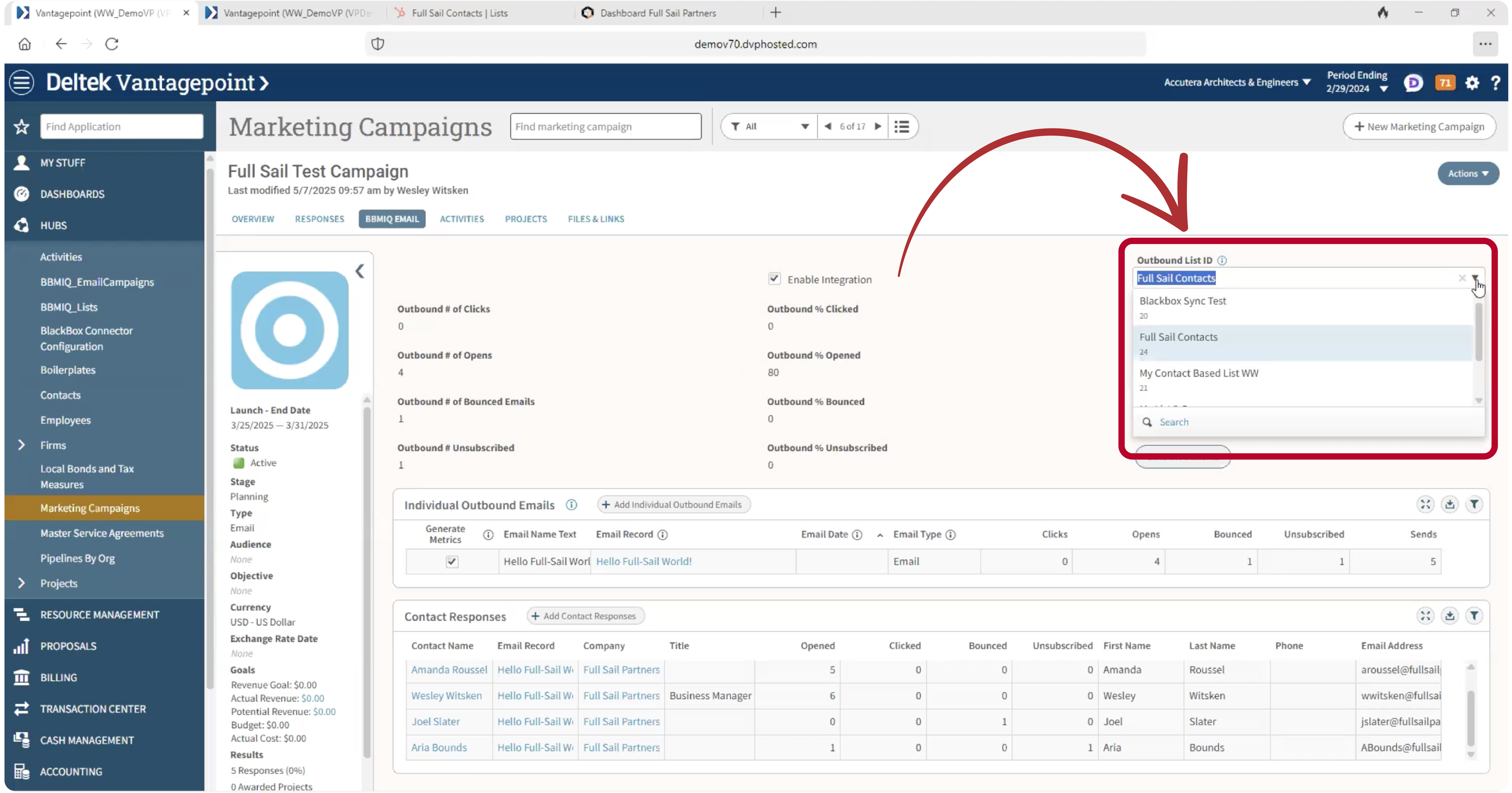
Step 1: Build Your List in Vantagepoint

2025-06-05 Hubspot Connector 01 rev2

Start in the Marketing Campaigns Hub. Build your contact list based on whatever filters matter—recent project involvement, industry tags, or events attended. You can even use custom fields that you created with Screen Designer.

Make sure your contacts have email addresses, and that you’ve enabled the BBMIQ integration for that campaign.


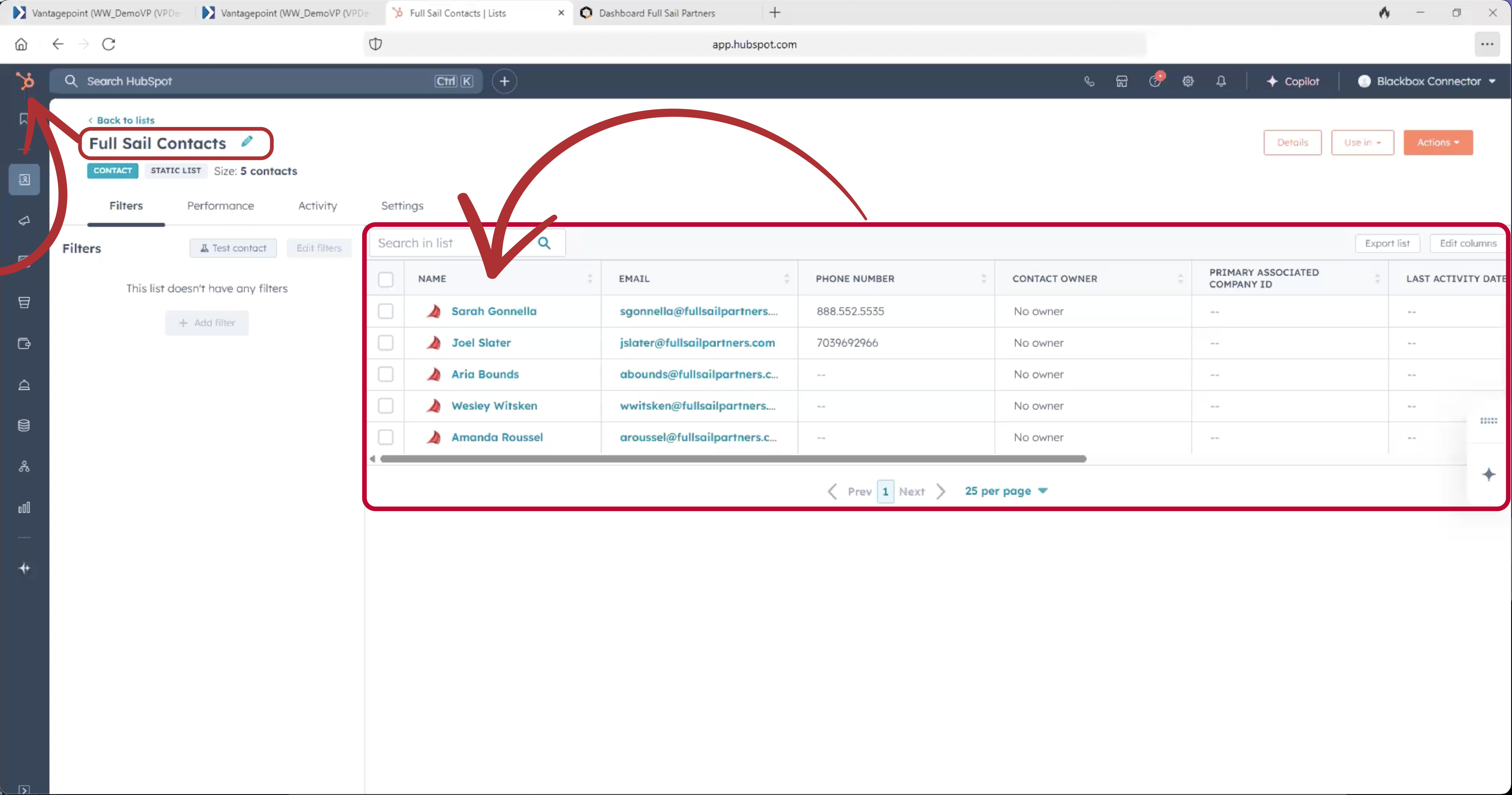
Step 2: Push It to HubSpot

Hop over to the BBMIQ Email tab, where you’ll select a static contact list from your HubSpot account. Then—drumroll, please—click Send Contacts to HubSpot.

Just like that, your Vantagepoint contact list appears in HubSpot, ready for your next email campaign.

2025-06-05 Hubspot Connector 02 rev4


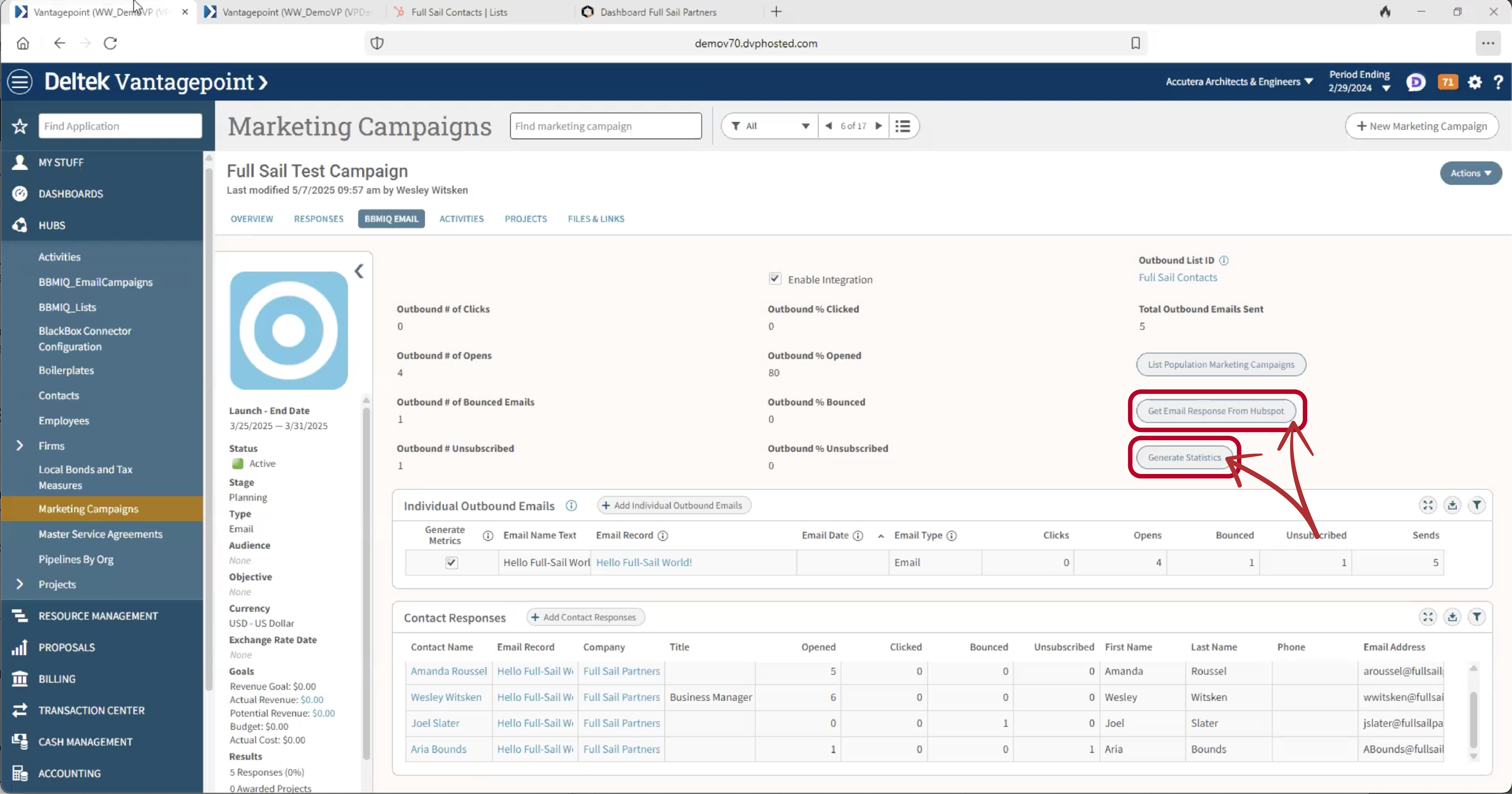
Step 3: Pull Results Back In

2025-06-05 Hubspot Connector 03 r3

Once your email is sent and the results start rolling in, return to the same BBMIQ Email tab in Vantagepoint.

Add the outbound email to the campaign, hit Get Email Response from HubSpot, then click Generate Statistics.

Boom. Now you’ve got:

  • Total sends
  • Opens
  • Clicks
  • Bounces
  • Unsubscribes

…all right there in Vantagepoint—no digging, no guessing, no data delays.

Why This Matters (Especially for Non-Marketers)

Let’s say your technical staff doesn’t live in the Marketing Campaigns hub (no surprise there). But they do care about which contacts are engaged when they’re prepping for a meeting or writing a proposal.

With the Marketing IQ tab on the contact record, they can now see marketing email engagement at a glance—what was sent, when, and how that contact responded. That’s powerful intel to help guide business development conversations and deepen client relationships.

No more guessing who’s warm, who’s cold, or who unsubscribed three months ago. It’s all there, in context, inside the system your whole team already uses.

Close the Loop. Open New Possibilities.

When your marketing data lives in silos, everything gets harder—planning campaigns, tracking performance, reporting on ROI. But when your CRM and email platform talk to each other? Magic happens.

The HubSpot Connector for Vantagepoint delivers:

✨ Smarter list building
✨ Streamlined campaign execution
✨ Data-driven marketing insights
✨ And zero spreadsheet wrangling

This is more than a sync. It’s a strategic bridge between marketing and the rest of your firm.

Hear It Straight From the Source

Want to see how this connector performs in the real world?

Join us for our upcoming webinar with HR Green, where their CRM Database Manager shares:

✔️ Why their team needed a better way to connect Vantagepoint and HubSpot
✔️ What the deployment process looked like with our Blackbox Connector
✔️ The results and ROI they’ve seen since implementation

You’ll walk away with actionable insights—and maybe a little marketing envy. 😉

Click below to see how Full Sail Partners is helping firms like HR Green turn disconnected systems into seamless marketing engines.

Because great marketing doesn’t happen in isolation—and now, neither does your data.

Dashboard Showdown: Vantagepoint vs Informer – Which One Wins for You?

Posted by Wesley Witsken on May 22, 2025 12:00:00 AM

05-22 DVP VP vs Informer Showdown Banner rev

🎯 Dashboards. They’re everywhere. And if you’re using Deltek Vantagepoint, you’ve probably built a few. Maybe even lived in a few. But what happens when you hit that moment where you say, “I wish this dashboard could just…” and it can’t?

Let’s break down the differences between Vantagepoint dashboards and Informer dashboards – and help you figure out which one deserves the spotlight in your firm’s data story.

Dashboards in Vantagepoint: The Reliable Workhorse 🐎

Let’s give credit where it’s due. Vantagepoint dashboards are like that dependable project manager who shows up on time, sticks to the script, and gets the job done without drama.

Here’s where they shine:

  • They live inside Vantagepoint – no switching tools or logging in somewhere else.
  • They update automatically with the most current data.
  • They’re great for answering simple, common questions like “How many hours did we bill last week?” or “What’s in our pipeline?”
  • They highlight the data you already care about – and calculated fields give you some customization wiggle room.

But…

They’re also bound by the rules Deltek has built in. If your business needs go beyond “basic,” you may quickly find the guardrails a little too tight.

Limitations include:

  • No joining data across multiple hubs or tables 
  • No SELECT statements inside calculated fields 
  • No calculating values across dashparts (so pulling a KPI into a separate dashpart? Not gonna happen) 

So what if your data needs are more “build your own adventure” than “color by numbers”?

Enter Informer + Blackbox Connector: The Custom Data Dream Team 💥

For those who like their data deep, layered, and tailored to their unique business structure—Informer paired with our Blackbox Connector is where the magic happens.

Why Informer?

  • It lets you go wild with custom dashboards: charts, pivot tables, and other charts that pull from multiple reports or data sources.
  • It’s perfect for firms that want to track very specific performance metrics or roll up data in ways Vantagepoint dashboards can’t handle.
  • It answers the deeper questions like:
    “What exactly are we holding our people accountable for?”
    “How does our performance vary by org structure?”
    “What data do our decision-makers need?”

And here’s where it gets even better…

🚀 Our Blackbox Connector for Informer comes with 5 ready-to-use dashboards designed specifically for project-based firms like yours. That means:

  • Faster implementation
  • Less time spent building from scratch
  • Immediate insights into project performance, financials, CRM activity, and more

And because the Connector automates the flow of data from Vantagepoint to Informer, you can stop worrying about manual exports or data delays. It just works. 🙌

So… which one should you use?

Great question. Here's a quick cheat sheet:

Feature
Vantagepoint Dashboards
Informer Dashboards
Data Freshness Real-time, in-VP Refreshed via Connector
Simplicity ✅ Easy to use ❌ Steeper learning curve
Customization ❌ Limited ✅ Highly customizable
Multiple Hubs/Tables ❌ Not supported yet ✅ Fully supported
Visual Options Basic charts, KPI’s, Tables, Drilldowns Advanced charts, pivots, and more
Setup Fast and out-of-the-box Faster with 5 pre-built dashboards from Blackbox Connector

In a nutshell:

Use Vantagepoint Dashboards when you need quick glances at simple, report-based data.

Use Informer when you need to dive deep, customize everything, and make smarter decisions with more context—especially if you want to start strong with our pre-built dashboards.

Ready to level up your data game?

Whether you want to supercharge your dashboards or finally get the insights your leadership team has been begging for, we’ve got your back.

Don’t just take our word for it—watch our on-demand webinar linked below and see how Informer dashboards (powered by our Blackbox Connector) bring your Vantagepoint data to life. From pre-built dashboards to custom deep dives, you’ll get a firsthand look at what’s possible.

Reliable AI is the Secret Sauce to Supercharging Vantagepoint

Posted by Jake Lucas on May 8, 2025 12:00:00 AM

05-08 DVP AI Secret Sauce Banner rev

Let’s be honest—AI is everywhere right now. And while that’s exciting, it can also be frustrating. Because when it comes to using AI tools to actually get real work done inside Deltek Vantagepoint, most firms are either just dabbling… or getting burned.

Here’s the thing: AI is only helpful if it’s reliable. Otherwise, it’s just a very confident tool giving you half-right answers.

I’ve been building AI applications since generative AI first exploded onto the scene. And now, as an AI Developer at Full Sail Partners, I’m taking that experience and putting it to work for project-based firms like yours. Whether it’s out-of-the-box tools like ChatGPT or custom-built AI inside Informer and Vantagepoint, the goal is simple: make your life easier, your insights faster, and your decisions better.

Let’s talk about how we actually make that happen.

Why Most AI Tools Fall Short

A lot of AI out there is like an enthusiastic intern on their first day—well-meaning but not quite ready to be left unsupervised.

You ask a vague question, and the AI gives you something that sounds useful… but it’s either way off base or completely made up. Yep, that’s a thing—AI hallucinations. And in the world of project financials, that’s a pretty big red flag.

Unreliable answers lead to wasted time. Bad data leads to bad decisions. And if you’ve got deadlines and KPIs on the line, that’s a risk you can’t afford.

The Two Core Principles That Make AI Reliable

In my work developing AI tools that play nicely with Vantagepoint, I’ve focused on two big ideas:

1. A Window into the Facts

Most AI tools give you an answer and then ask you to just… trust it. Not great.

Instead, we build AI that shows its work. When you ask a question, you don’t just get an answer—you get the data behind it. You can click to verify, dive deeper, and understand exactly how the AI came to that conclusion. It's like a GPS that tells you why it picked that route, not just where to go.

This is built directly into our Informer AI Assistant, which works inside Microsoft Teams and pulls data from Vantagepoint.

2. Reliability Training

Making AI trustworthy takes more than good intentions. It takes practice—and the right techniques. Here are three I use all the time (and you can too):

  • One-Path Prompting: Ask one clear, specific question. No vagueness. No contradictions. Just a straight line from question to answer.
  • Problem Expansion: Break big, complicated asks into smaller pieces. Think about how you’d delegate to a new employee—you wouldn’t say “solve all our issues.” You’d say “check this one report and flag anything unusual.”
  • AI University (for developers): This one’s for the builders out there. Train your AI to be really good at one thing. Not everything. Just one thing, and let it do that extremely well.

By building these techniques into our AI tools, we make sure the end result is actually useful. So useful, in fact, that most users don’t even need to think about the tech behind it. It just works.

So, What Does This Look Like in Real Life?

Here’s an example: You’re in Microsoft Teams and you need to check whether a project is running over budget.

Instead of logging into Vantagepoint, clicking through dashboards, pulling reports, and second-guessing yourself—you send a single message to our AI assistant.

A few seconds later, you’ve got a clear, accurate answer, complete with the source data. Want to drill down further? One click and you’re in Informer, seeing the full picture.

No app-switching. No spreadsheet spelunking. Just one question, one answer, and a whole lot of time saved.

Why This Matters (to You, Right Now)

Whether you’re a PM, a marketer, or a firm executive, the common thread is this: you need good data, fast.

Reliable AI changes the game.
It helps you stop guessing.
It gives you time back.

And it turns your mountain of Vantagepoint data into real, usable insights—without you doing all the heavy lifting.

Want to See It for Yourself?

If this got your wheels turning, I’d love to show you more. I’m hosting a live webinar on Wednesday, May 14 at 1pm ET, where I’ll walk through exactly how we’re using these principles to build real, working AI tools for Vantagepoint.

We’ll look at both out-of-the-box tools you can start using today and custom-built solutions that can save your firm serious time and effort.

If you’ve been curious about AI—but skeptical—it’s the perfect session for you.

Solve Common Problems with Deltek Vantagepoint AP Voucher Lookup

Posted by Rhiannon Schaumburg on Apr 24, 2025 12:00:00 AM

04-24 DVP AP Vouchers

For accounting professionals, the AP voucher is the single source of truth for tracking supplier invoices. An AP voucher has information from a supplier like the firm amount that is due, terms for payment, signatures of authorized firm representatives, and more. Keeping this information up to date and correct is critical, however, errors and other changes do occur.

  • Is there an invoice that was accidentally entered twice and one needs to be voided/reversed?
  • Was tax, shipping or another amount missing on an invoice and now it is already posted?
  • Was an invoice amount entered incorrectly and it needs to be corrected?

If this sounds familiar, it’s because these are all common issues that come up in the AP world. Typically, AP associates will enter a new voucher to correct these items and then reverse or add to/subtract from the value of an original invoice. By doing this, two vouchers are entered for the same invoice number, often by adding a letter or number to the original invoice number. When the invoice is paid, the associate needs to remember to select both vouchers to pay the entire correct amount of the invoice. In the case of a duplicate invoice, there isn’t a “void voucher” option like there is void check or void client invoices.

However, there is a better solution - utilize “Voucher Lookup” to edit an AP voucher easily & smoothly!

Using Deltek Vantagepoint AP Voucher Lookup

Once an AP Voucher is posted in Deltek Vantagepoint, it isn’t very evident that there is an option to edit the voucher. But there is! Voucher lookup is a great tool that is not as widely used as it should be.

When using AP Voucher lookup, Vantagepoint “attaches” the new voucher detail lines to the original voucher by utilizing the same voucher number and voucher header. When the corrected voucher is attached to the original there won’t be two vouchers for the same invoice to reconcile in vendor review or select in payment processing! As a result,

Examples of Deltek Vantagepoint AP Voucher Lookup:

Issue 1: Whoops! Two vouchers were entered for the same invoice and one of them needs to be reversed.

Voucher Lookup_01

Solution: Enter a new AP transaction, use voucher lookup, and reverse the original lines. This AP entry will be linked or “attached” to the original voucher, not creating a new voucher but editing the original, making a zero-dollar total invoice. The steps are as follows:

  1. Go to Transaction Center > Transaction Entry > AP Vouchers. Either start a new batch (if using batches) or a new transaction (if using single transaction posting).
  2. Select the vendor. Don’t enter the rest of the header data!
  3. Go to the top right under “Other Actions” and select “Voucher Lookup”.
    1. A list of the vouchers for this vendor will appear.
    2. Select the voucher for the invoice that needs to be edited.
    3. In the top of the list there is a search box that can be used to find an amount, voucher or invoice number and it will search for any matches from the existing vouchers.
  4. Next, select the voucher that requires editing. The voucher header information will populate from the original voucher… this is where the linking comes in.
  5. At this point, anything entered in the voucher details below will add to the original voucher line items. If the original entry had three lines and another is added, four lines will appear in the voucher review.
  6. In this example, the duplicate voucher needs to be reversed entirely.
    1. To reverse lines, go back to “Other Actions”, select “Copy/Reverse Lines”.
    2. Check the box in the top header row to select all voucher detail lines.
    3. Click “Reverse All”.
    4. This selection will bring these lines into the voucher detail as a negative, using the same project coding. Which is simple, FAST, and does not require re-keying of line items!

      Voucher Lookup_02
  7. Post voucher as usual.
  8. In Voucher Review, the original line items and the additional line items entered during the Voucher Lookup will appear.
  9. In this example, the overall voucher is now zero and the total lines in the voucher are 6.

Voucher Lookup_03

Issue 2: Need to add an additional line for tax, shipping or other charges missed on original entry?

Solution: Do all steps from above except for step 6 - don’t use the Copy/Reverse function. Simply add the needed lines to the voucher detail in the Project Information grid. Any lines that are added will link/attach to the original voucher and add/subtract to the original voucher amount.

Issue 3: Need to correct an amount in the original voucher?

Solution: Do everything above, including Copy/Reversing Lines. It is suggested to reverse the line(s) that were entered incorrectly and then enter the correct amount so there is a good audit trail. After reversing the line(s) that were entered in error, add the correcting lines in the Project Information grid on the same voucher. Every line that is reversed and/or added will still link/attach to the original voucher and add/subtract to the original voucher amount.

Solve Common Accounting Challenges with Deltek Vantagepoint

Deltek Vantagepoint does more than making AP voucher corrections easy. Check out this webinar to learn about 15 Must-Know Features to Supercharge your Vantagepoint Efficiency, and make sure to explore all the free Vantagepoint content available on the Full Sail Partners’ website.


Latest Posts