Full Sail Partners Blog | Rana Blair

Posts by Rana Blair:

Training, Tools, and Metrics: What the 2026 Clarity Study Says About Project Management

Posted by Rana Blair on Jul 23, 2026 9:59:07 AM

2026-DeltekClarity_Project_Management_Trends_banner

Every year, the Deltek Clarity A&E Industry Study gives architecture and engineering firms something concrete to work with: real data from real firms about what's working, what's stalling, and where the industry is heading. The 47th edition surveyed 896 firms of all sizes and types, and the throughline is clear. This isn't a market that rewards guessing or going through the motions. The firms pulling ahead are the ones making intentional, disciplined decisions at every level of the business.

Project management is where that intentionality either shows up or doesn't. And this year's data makes clear that firms are choosing to show up.


Firms are investing in project managers on purpose

When firms were asked to name their greatest growth opportunity for the coming year, investing in project managers and project management ranked first, at 27%. That's not a small signal. It means firms are looking at their own performance and concluding that the fastest path to better outcomes isn't more headcount or more tools — it's a stronger PM function.

You can see that intentionality showing up in the numbers. Formal project management training climbed four percentage points this year, with 44% of firms now training at least half of their project leaders. Use of clearly defined PM processes held steady, with 68% of firms applying a formal process to at least half their work. These aren't dramatic leaps, but they're directional, and they matter because they attack the problem at its root.

That root problem has a name: competing priorities. For the sixth consecutive year, competing priorities tops the list of PM challenges, cited by 53% of firms. Project managers are being asked to balance delivery with business development, client management, and internal initiatives — often without any added structure to help them manage the load. Training solves part of this. So does giving PMs real visibility and the right tools. But the biggest lever might be the simplest one: role clarity. When a PM knows exactly what they own and what they don't, competing priorities stop competing quite so hard.

This is a place where a well-configured Deltek Vantagepoint setup earns its keep. Resource planning and project planning tools that reflect how your firm actually works — not just how the system shipped out of the box — give PMs the visibility to prioritize with confidence instead of guessing. If your current setup feels more like a filing cabinet than a decision-making tool, that's a configuration problem, not a Vantagepoint problem, and it's exactly the kind of thing our consulting team works through with firms every day.

You can't manage what you can't see

Project managers are also being asked to stay ahead of issues they often can't fully see. The Study asked firms to rate their visibility into key project metrics, and the split is telling. Visibility into cost variance and project-specific KPIs improved this year, with 56% and 55% of firms respectively reporting high or very high visibility. Schedule variance and client satisfaction visibility told a different story: only 31% of firms report strong visibility into schedule variance, and just 24% into client satisfaction.

That gap matters because schedule issues and client dissatisfaction rarely announce themselves. They build quietly, and by the time they're visible without good data, they've usually already compounded. Firms that give PMs clearer, earlier visibility into schedule status create room to course-correct before a small slip becomes a missed milestone. The same logic applies to client feedback: firms building structured feedback loops into the project lifecycle, rather than treating client check-ins as an afterthought, are better positioned to catch friction early and strengthen the relationship instead of just reacting to a complaint.

The good news is that this is measurably improving. The share of firms measuring client satisfaction rose to 41.6% this year, up 2.5 points, and more of that measurement is happening across all projects rather than just strategic ones. That's a shift toward treating feedback as a standard part of delivery, not a selective courtesy.

Closing this visibility gap is exactly what tools like Deltek Vantagepoint's reporting capabilities,paired with a platform like Informer, are built for. Dashboards that surface schedule and KPI data in real time — instead of buried in a spreadsheet someone updates once a month — give PMs the early warning system they need to actually act on a problem instead of just documenting it after the fact.

No accountability without metrics

For the first time, establishing PM accountability metrics debuted as the #1 initiative firms plan to pursue, chosen by 33% of firms. That's worth sitting with for a moment. Accountability has always mattered in project delivery. What's new is firms formally naming it as their top priority — which tells you that a lot of firms have been running the PMO without a clear, agreed-upon way to measure whether it's working.

You genuinely can't hold anyone accountable to a standard that doesn't exist in measurable form. That's where AI and other data-forward technologies earn their place in this conversation — not as a replacement for good management, but as the engine that surfaces the data and the story behind the data clearly enough to actually change behavior. A dashboard that just shows a red number doesn't move anyone. A tool that shows a PM why their schedule variance crept up, and what pattern is driving it across their whole portfolio, gives them something to act on.

This is the kind of gap Deltek's own AI orchestrator, Dela, is aimed at closing — surfacing those insights across the project lifecycle so accountability metrics come with some context, not just a number on a report. 

This is also where firms need to be honest about sequencing. Incorporating AI into project management debuted as a top-three PM challenge this year at 32% — a striking result for a brand-new option. Firms recognize AI's potential, but they're also recognizing that clean data and consistent processes have to come first. AI applied to messy inputs just produces confident-sounding noise faster. Get the fundamentals in place, and AI becomes a real productivity lever instead of another tool competing for a PM's attention.

Shared processes protect consistency

If accountability is the destination, consistent information management is the road that gets you there. When firms were asked about their top challenges managing project information, maintaining consistency and managing quality of deliverables tied for the top spot, each cited by 49% of firms. Administrative workload followed closely at 35%, and project document workflows, deliverable collaboration, and managing submittals and RFIs each landed at 28%.

Look at that list as a group instead of as isolated line items, and the pattern is obvious: consistency suffers when administrative workload is heavy and document workflows aren't built to handle it. A PM buried in manual file-sharing, redundant status updates, and scattered version control doesn't have the bandwidth left to maintain consistent standards, no matter how good their intentions are.

This is squarely a shared-process problem, and it's exactly the kind of gap FSP's consulting team is built to close — configuring Vantagepoint so document workflows, submittals, and project information actually live where they should, instead of in a dozen inboxes and shared drives. For firms syncing project data with outside systems, the Blackbox Connector platform removes another layer of manual administrative work by moving that data automatically instead of by hand. Every hour a PM doesn't spend chasing down a file is an hour they get back for the parts of the job that actually require judgment.

The human element still wins

For all the emphasis on data, tools, and accountability, it's worth pointing out what firms say they already do well: managing client relationships remains the top project management strength for the fourth consecutive year, cited by 80% of firms. Collaboration and communication held steady in second at 60%.

That's a meaningful data point in a conversation so focused on metrics and technology. It confirms there will always be a human element to this business, and that's not something firms should want to engineer away. The goal of better tools and cleaner data isn't to replace the relationship-building that PMs are clearly good at — it's to free up the time and mental space that's currently being eaten by administrative friction, so PMs can spend more of it on the relationships and judgment calls that actually move projects forward. It's the same logic that shows up in business development and marketing: automate the repetitive, reactive work so people can spend more time on the strategic work only they can do.

The bottom line

Training and metrics are the throughline in this year's Project Management data. Firms are training more project leaders, formalizing more processes, and — for the first time — naming accountability as their top initiative. The firms getting the most out of that shift are the ones giving PMs real visibility into schedules, costs, and client feedback, and pairing that visibility with metrics people are actually held to.

None of this replaces good project managers. It supports them — with the role clarity, the data, and the tools to do the human parts of the job better.


Catch up on the series so far: Technology Trends | Business Development | Financial Management

Next up: Human Capital Management — we'll close out the series with what the data says about turnover, training, and the people side of firm performance.


 

5 Reasons Why You Should Retire Your Planning Spreadsheets

Posted by Rana Blair on Sep 11, 2025 12:00:00 AM

09-11-2025 5 Reasons to Retire Your Planning Spreadsheets_banner

Is your firm still using spreadsheets to plan your projects? The good news is that you’re not alone. The bad news is that using spreadsheets as an enterprise planning tool is very likely costing you time and money. Spreadsheets, while they are familiar to people and easy to customize, lack the many benefits of an integrated planning system. As I meet with Architecture and Engineering firms, we hear common complaints and challenges about their spreadsheet planning “solutions.”

Do any of these problems sound familiar? If so, this may be the year to retire your spreadsheet in favor of an enterprise resource planning system.

Here are 5 Reasons Why Spreadsheets are Challenging Your Entire Enterprise

1) Multiple Versions of the “Truth” Haunt Staffing Meetings

We find that firms that use spreadsheets to plan staffing assignments tend to end up with multiple versions of the truth. This tends to create havoc during staffing meetings as each manager has their own version of the truth, creating meeting havoc, and leading to errant meetings that lack focus. Say no to meeting havoc and refocus your staffing meetings on adjusting plans and assignments.    

2) Inability to Show Real-time and Accurate Actuals

Spreadsheets are great to start planning a project, but once the project starts evolving, updating the spreadsheet becomes a tedious process that PMs quickly give up on. As the project progresses, spreadsheets struggle to show actual hours and costs spent to date. Even worse, a firm will devote manual hours requiring employees to track this information by hand – rather than investing in an integrated planning system that streamlines this process.

3) Disconnected Month End Processes

During the month end process, spreadsheets create chaos for accounting. The root cause of all this chaos stems from the duplicate and manual labor spawned from disconnected spreadsheets. Firms that use an integrated planning system eliminate the burden of spreadsheets to allow accounting to focus on financial performance, freeing up PMs to focus on project success.  

4) Project Managers and Management at Odds

Project Managers often find themselves at odds with management when it comes to staffing decisions – PMs need new resources; management thinks there is too much overhead. Firms without a way to plan staffing assignments are left with only their best ‘guesstimates’ when it comes time to validate new hires. Successful firms justify new hires by utilizing a single project management system to look at current staffing capacity compared to future assignments.

5) Adjustment Failure

Firms utilizing spreadsheets to identify project profitability goals at the beginning of the project often fail to adjust throughout the project lifecycle. Those that do try to adjust their spreadsheets work with outdated information. This lag in data creates the inability to make real-time decisions about staffing and scheduling that can impact the success of a project. By investing in a project management system connected to financials provides firms the ability to view up-to-date-billing, resource and revenue forecasts.

There is a Better Way with an Integrated Planning System

Imagine if you were able to standardize your planning process across the entire firm. Standardization allows your firm to strengthen communication amongst project managers, accounting and management, providing insight for the firm as a whole. Ready to ditch the spreadsheet? Check out the ways your firm can handle project planning and staffing with Deltek Vantagepoint!

Think You Don’t Have Time to Upgrade from Deltek Vision to Vantagepoint? Think Again

Posted by Rana Blair on Sep 4, 2025 12:00:00 AM

09-04-2025 Think You Dont have time to upgrade_banner

We hear it all the time:

“We just don’t have the time right now.”
“I know we need to upgrade, but I can’t handle learning all the new stuff.”
“They say we should update our processes as part of the upgrade—it's just too overwhelming.”
“The consulting costs sound like more than we can budget for this year.”

Here’s the good news: You don’t have to wait. You don’t have to overhaul everything. And you definitely don’t need to put your upgrade off any longer.

Say hello to our Accelerated Vision to Vantagepoint Upgrade—a focused, 4-week upgrade path built specifically for firms like yours.

Why This Works (Especially When You Think It Won’t)

If your firm is already on Vision 7.6, doesn’t use CRM, and has a relatively simple setup—this is the fastest, least disruptive way to get to Vantagepoint.

Here's how we make it manageable:

  • You get a preview environment
  • We configure your system to work like your current Vision setup
  • You receive targeted training on just what you need to complete your regular processing including project setup, timesheets, and billing
  • We don’t ask for your whole team—just a couple of key players
  • You get post-live support to help you ease into new features on your timeline
  • No big-budget consulting proposal—just a focused, guided experience

How the 4-Week Process Works

This isn’t a traditional long-haul upgrade. It’s an express lane designed for firms who want to get up and running—then explore new features later.

  • Before You Begin:
    We hold an Orientation Meeting to assess your readiness, schedule your program, and help you to ensure you have a preview.
  • Weeks 1–4:
    Our consultant team sets up your Vantagepoint environment, provides training, and walks you through essential testing.
    • Week 1: We configure your database—security roles, screen designs, timesheet approvals, reports, and more.
    • Week 2: You get hands-on training and begin testing the system.
    • Week 3: We fine-tune roles and reports, set up dashboards, and prep for go-live.
    • Week 4: Go live! We walk through your final checklist and provide Q&A support.
  • Go Live:
    Your team transitions with confidence, armed with checklists, meeting support, and everything you need to hit the ground running.
  • After Go-Live:
    We don’t disappear. You’ll have scheduled Q&A sessions and a chance to outline what new features you’d like to explore over the next year. We document it and work with your account manager to make it happen.

Why This Approach Is a Game-Changer

The Accelerated Upgrade saves time, reduces cost, and avoids the scope creep that often comes with traditional upgrades. It’s perfect for firms who want to:

  • Migrate fast without compromising quality
  • Minimize disruption to day-to-day operations
  • Focus on learning the essentials now and advanced features later

If you want more later or right away, we've got you covered. 

Don’t Overthink It—Just Get Started

Here’s what this upgrade approach doesn’t require:

  • Rewriting every process in your firm
  • Training every single employee at once
  • A six-month budget for consultants
  • Waiting until you have “everything perfect"

Let’s face it—if you’re waiting for the perfect time, it’ll never come. But this Accelerated Path is purpose-built to get you upgraded with minimal lift, and maximum clarity.

The Vantagepoint Preparation Questionnaire – Your First Step

Before you commit to any upgrade path, start with a quick self-assessment.

What is it?

  • A tool to evaluate your current Vision setup and readiness
  • Pinpoints key areas like cleanup, system configuration, and training needs
  • Helps us determine if you’re a fit for the Accelerated track—or another path

Why complete it?

  • Identifies potential roadblocks early
  • Streamlines your planning process
  • Helps us tailor our recommendations to your firm

What happens next?

  • Our team reviews your responses
  • You get expert guidance on a scheduled consultation
  • You walk away with a clear, customized roadmap

👉 Complete your questionnaire today by clicking here or the image below.

What's Your Upgrade Speed? Choosing the Right Path from Deltek Vision to Vantagepoint

Posted by Rana Blair on Jul 17, 2025 12:00:00 AM

2025-07-17 Upgrade Speed_banner

Upgrading from Deltek Vision to Vantagepoint doesn’t have to be overwhelming—or take forever. Whether you want to go fast, take a strategic detour, or explore the full landscape of Vantagepoint, there’s an upgrade path designed just for you.

At Full Sail Partners, we offer three distinct service options to match your firm’s readiness, resources, and goals: Accelerated Advancement, Strategic Guidance, and Elevated Execution.

And yes—some firms can go live in just 4 weeks. 🙌

Accelerated Advancement: The Fast Track to Vantagepoint

If your firm is still on Deltek Vision, you’ve probably heard the message loud and clear—it's time to upgrade to Vantagepoint. But what if we told you that your firm might be the perfect fit for a faster, simpler, and more efficient upgrade process?

Introducing Accelerated Vision to Vantagepoint—a brand-new service from Full Sail Partners that gets your firm upgraded and operating in Vantagepoint in just 4 weeks. Yep, you read that right. Four. Weeks.

This service package is ideal for firms that want to maintain the same core features and functionality as their Vision system, without overhauling everything. With Accelerated Advancement, we handle the heavy lifting for you—configuring your system, training your team, and supporting your go-live.

Best for firms that:

  • Are hosted by Full Sail Partners or Deltek SaaS
  • Are using Vision 7.6
  • Have fewer than 50 employees
  • Do not have CRM (RP is okay if not active)
  • Have a small upgrade team (2 people max)
  • Can commit ~2 hours/week during the 4-week window

What’s included:

  • Expert configuration to closely replicate your current Vision setup
  • Targeted training on key functions like time, billing, and reports
  • Checklists, testing, and live support
  • Ongoing Q&A and post-live support to explore enhancements over time

Timeline:

4 weeks (not including prep/technical work)

Strategic Guidance: The Collaborative, Balanced Approach

Think of this as your moderate-paced, guided journey. With Strategic Guidance, you’ll explore new features and priorities while keeping your business running smoothly. We guide your team through training, testing, and configuration—at a pace that allows for thoughtfulness and growth.

Best for firms that:

  • Have 40–150 employees
  • Want to explore optimization opportunities
  • Use CRM and/or Planning modules
  • Need more detailed training and decision-making support
  • Can commit to weekly or bi-weekly meetings and in-between tasks

What’s included:

  • Consultant-led planning and testing
  • CRM and Planning toolset setup
  • Process improvements across departments
  • Strategic introduction to dashboards, workflows, and reporting

Timeline:

12–20 weeks depending on firm size and goals as well as Full Sail Partners’ consultant availability calendar.

Elevated Execution: The Full Transformation

For firms ready to rethink how they operate from top to bottom, Elevated Execution is a deep-dive service offering. This path includes business process evaluation, systems redevelopment, and end-to-end support across finance, CRM, planning, and operations.

Best for firms that:

  • Are highly customized or in the midst of change (mergers, acquisitions, etc.)
  • Use multiple add-ons or multi-company/multi-currency features
  • Have 150+ employees (or smaller, complex firms)
  • Want to improve operations and adopt a fully modern project lifecycle

What’s included:

  • Project lifecycle redevelopment
  • Advanced configuration and custom workflows
  • CRM and Resource Planning transformations
  • Training programs, dashboard builds, go-live support, and post-upgrade triage

Timeline:

24–36 weeks depending on complexity.

How Do You Pick the Right Upgrade Approach?

It depends on:

  • Your current setup (cloud or on-premise)
  • Team size and structure
  • Add-ons and level of customization
  • Readiness and internal bandwidth

That’s where our Vantagepoint Readiness Report comes in. It’s our signature step to identify your starting point, reveal data cleanup needs, and map out your upgrade plan.

Start Here: The Vantagepoint Preparation Questionnaire

Before picking your upgrade speed, take 5–10 minutes to complete the Vantagepoint Preparation Questionnaire—it’s the easiest way to start your upgrade journey.

What is it?

  • A self-assessment to evaluate your current Vision setup and upgrade readiness
  • Identifies key areas like data cleanup, system configuration items, and process improvements
  • Helps determine your firm’s best upgrade approach – Accelerated Advancement, Strategic Guidance, or Elevated Execution

Why Complete It?

  • Pinpoints potential challenges before you start your upgrade
  • Saves time by streamlining your planning process
  • Helps us tailor recommendations for your firm’s specific needs

What Happens Next?

  • Our team reviews your responses and provides guidance
  • You can schedule a consultation for personalized upgrade approach recommendations
  • You gain a clear roadmap for your Vantagepoint upgrade

Complete your questionnaire today by clicking here or the image below.

Improve Project Planning with Deltek Vantagepoint

Posted by Rana Blair on Feb 8, 2024 12:00:00 AM

02-08-24 Improve Project Planning with DVP-Banner

For professional services firms, having a reliable project planning tool is critical to ensuring projects are profitable. In a competitive landscape, successful project execution hinges on the effectiveness of project planning, driving the need for firms to invest in tools that not only meet but exceed expectations. Therefore, a project planning tool needs to be intuitive for users and must improve project scheduling and resource planning.

With Deltek Vantagepoint, project planning has been taken to the next level with a focus on the features and functionality that project managers need. This advanced tool is carefully crafted to specifically cater to the distinct needs of project managers, making sure it not only meets, but also anticipates their requirements. Here are some key features of Vantagepoint that will assist project managers with delivering successful and profitable projects.

Start Early with Templates

Getting a project off to a good start needs a bit of an early boost. Luckily, Deltek Vantagepoint helps out by offering practical ways to help plan things out early. Here’s what you need to know to get a head start.

  • Successful Delivery: This starts long before contracts are signed so consider creating the plan when the project is first entered in a Pursuit Stage. Vantagepoint offers a variety of methods that can be used to efficiently create a preliminary plan.
  • Project Templates: Firms can create multiple templates for use in creating new project records or when adding structure to a project. Using Project Templates allows users to quickly add the phases of work that are typical for the projects.
  • Projects Used as Templates: Firms can create Project records that can serve as templates for creating new records. These records can hold typical Work Breakdown Structure (WBS) elements like Project Templates but can do much more. The records can serve as a plan template that will allow the user to instantly create a plan with Schedule Durations, Generic Resources, and Planned Hours.

Aside from the ease of creating a project plan, planning the project in advance allows professional services firms to proactively manage pricing and resourcing.

Keep the Schedule Updated

Keeping the project schedule updated is a pivotal aspect of effective project management, and Deltek Vantagepoint equips users with powerful tools for this purpose. The plan Gantt charts are a great tool for managing the dates in a plan. The Schedule Tab allows planners to visually manage dates, durations, and dependencies for project delivery phases. Users can also adjust the project schedule from any level of the project by simply dragging and dropping the timeline bars and reviewing the Critical Path on demand, ensuring a clear understanding of key project dependencies.

Beyond the convenience of schedule management, the real-world impact of keeping the schedule updated becomes evident in staffing discussions. Maintaining an accurate and current schedule is a crucial reference point for conversations surrounding short- and long-term staffing availability. By staying on top of the schedule, project managers can better address staffing needs, optimize resource allocation, and enhance overall project efficiency.

Anticipate Resource Usage Curve

The keystone of true resource planning is predicting resource demands as they will likely occur. All project delivery phases have a ‘curve’ that should be reflected in the resource plan. Deltek Vantagepoint’s Project Planning allows users to plan the hours differently in specific time frames. With the Distribute Hours feature, users can take a more precise approach to planning resource hours over specific date ranges by using hours or percentages per day.

This level of granularity in resource planning is not just about meeting requirements; it's a strategic move to decrease the chance of resource clashes. Understanding the intensity of resource usage during different phases of a project becomes a proactive measure to minimize conflicts and optimize resource allocation. By anticipating resource usage, project managers can navigate the intricacies of resource planning with precision, ensuring easy and efficient workflows that align with project objectives.

Review Performance Against the Baseline

The Baseline serves as the bedrock, outlining the assumptions upon which the scope, schedule, and budget of the entire plan are built. Saving the Baseline at the right time allows users to review the deviations and project the final outcomes.

Deltek Vantagepoint not only facilitates this review but also enhances it by allowing users to compare Baseline values with Estimate at Completion (EAC) values. This comparative analysis can be conducted seamlessly across various platforms, including the Plan, Dashboards, and the Project Review feature. This multi-faceted approach to reviewing performance against the Baseline ensures a complete understanding of how the project is progressing in relation to its initial assumptions.

Take Control of Your Project with Deltek Vantagepoint 

Deltek Vantagepoint Planning and Resource Management allows professional services firms to collaborate and analyze project performance from the pursuit through closeout. Maintaining the plan throughout the life of the project improves financial performance and enhances communication around schedules and resource needs. Furthermore, by using this advanced tool, project managers can proactively minimize resource clashes by anticipating resource usage and ensuring project objectives are met. Take control of your projects today!

Improve Project Planning with Deltek Vantagepoint

Posted by Rana Blair on Jan 30, 2024 12:00:00 AM

02-08-24 Improve Project Planning with DVP-Banner

For professional services firms, having a reliable project planning tool is critical to ensuring projects are profitable. In a competitive landscape, successful project execution hinges on the effectiveness of project planning, driving the need for firms to invest in tools that not only meet but exceed expectations. Therefore, a project planning tool needs to be intuitive for users and must improve project scheduling and resource planning.

With Deltek Vantagepoint, project planning has been taken to the next level with a focus on the features and functionality that project managers need. This advanced tool is carefully crafted to specifically cater to the distinct needs of project managers, making sure it not only meets, but also anticipates their requirements. Here are some key features of Vantagepoint that will assist project managers with delivering successful and profitable projects.

Start Early with Templates

Getting a project off to a good start needs a bit of an early boost. Luckily, Deltek Vantagepoint helps out by offering practical ways to help plan things out early. Here’s what you need to know to get a head start.

  • Successful Delivery: This starts long before contracts are signed so consider creating the plan when the project is first entered in a Pursuit Stage. Vantagepoint offers a variety of methods that can be used to efficiently create a preliminary plan.
  • Project Templates: Firms can create multiple templates for use in creating new project records or when adding structure to a project. Using Project Templates allows users to quickly add the phases of work that are typical for the projects.
  • Projects Used as Templates: Firms can create Project records that can serve as templates for creating new records. These records can hold typical Work Breakdown Structure (WBS) elements like Project Templates but can do much more. The records can serve as a plan template that will allow the user to instantly create a plan with Schedule Durations, Generic Resources, and Planned Hours.

Aside from the ease of creating a project plan, planning the project in advance allows professional services firms to proactively manage pricing and resourcing.

Keep the Schedule Updated

Keeping the project schedule updated is a pivotal aspect of effective project management, and Deltek Vantagepoint equips users with powerful tools for this purpose. The plan Gantt charts are a great tool for managing the dates in a plan. The Schedule Tab allows planners to visually manage dates, durations, and dependencies for project delivery phases. Users can also adjust the project schedule from any level of the project by simply dragging and dropping the timeline bars and reviewing the Critical Path on demand, ensuring a clear understanding of key project dependencies.

Beyond the convenience of schedule management, the real-world impact of keeping the schedule updated becomes evident in staffing discussions. Maintaining an accurate and current schedule is a crucial reference point for conversations surrounding short- and long-term staffing availability. By staying on top of the schedule, project managers can better address staffing needs, optimize resource allocation, and enhance overall project efficiency.

Anticipate Resource Usage Curve

The keystone of true resource planning is predicting resource demands as they will likely occur. All project delivery phases have a ‘curve’ that should be reflected in the resource plan. Deltek Vantagepoint’s Project Planning allows users to plan the hours differently in specific time frames. With the Distribute Hours feature, users can take a more precise approach to planning resource hours over specific date ranges by using hours or percentages per day.

This level of granularity in resource planning is not just about meeting requirements; it's a strategic move to decrease the chance of resource clashes. Understanding the intensity of resource usage during different phases of a project becomes a proactive measure to minimize conflicts and optimize resource allocation. By anticipating resource usage, project managers can navigate the intricacies of resource planning with precision, ensuring easy and efficient workflows that align with project objectives.

Review Performance Against the Baseline

The Baseline serves as the bedrock, outlining the assumptions upon which the scope, schedule, and budget of the entire plan are built. Saving the Baseline at the right time allows users to review the deviations and project the final outcomes.

Deltek Vantagepoint not only facilitates this review but also enhances it by allowing users to compare Baseline values with Estimate at Completion (EAC) values. This comparative analysis can be conducted seamlessly across various platforms, including the Plan, Dashboards, and the Project Review feature. This multi-faceted approach to reviewing performance against the Baseline ensures a complete understanding of how the project is progressing in relation to its initial assumptions.

Take Control of Your Project with Deltek Vantagepoint 

Deltek Vantagepoint Planning and Resource Management allows professional services firms to collaborate and analyze project performance from the pursuit through closeout. Maintaining the plan throughout the life of the project improves financial performance and enhances communication around schedules and resource needs. Furthermore, by using this advanced tool, project managers can proactively minimize resource clashes by anticipating resource usage and ensuring project objectives are met. Take control of your projects today!

No Cost? No Catch? No Way! Discover the Truth About Deltek Vantagepoint Planning

Posted by Rana Blair on Feb 27, 2023 12:00:00 AM


02-23-23_planning_banner REV

Deltek Vantagepoint features a free Planning tool that is available for use by EVERY user on ANY type of project. That’s right! The Vantagepoint Project Planning application is free with Back Office and ready to use without additional licensing costs! 

Your team can enjoy the benefits of using a modern project planning tool with no messy integrations or boring training sessions. With just a few steps, your firm can go from looking in the rearview mirror to careening toward excellence using a modern predictive planning tool. Just open the software, get a little Best Practices assistance from your friendly Deltek Vantagepoint Planning Consultant, and get users trained. Then watch how it improves awareness and performance. 

Login now and you can access… 

  • Plans for any Project Charge Type. 
  • Overhead Projects – Wonder where the IT time goes? Use the Plan to review JTD Spending on Labor and Expenses! 
  • Promotional Projects – Need to be conscious of the spend on pursuing projects? Create a plan to set expectations and monitor spending! 
  • Regular Projects – Set up the plan and budget for resources and review at any time.

Contract Information 

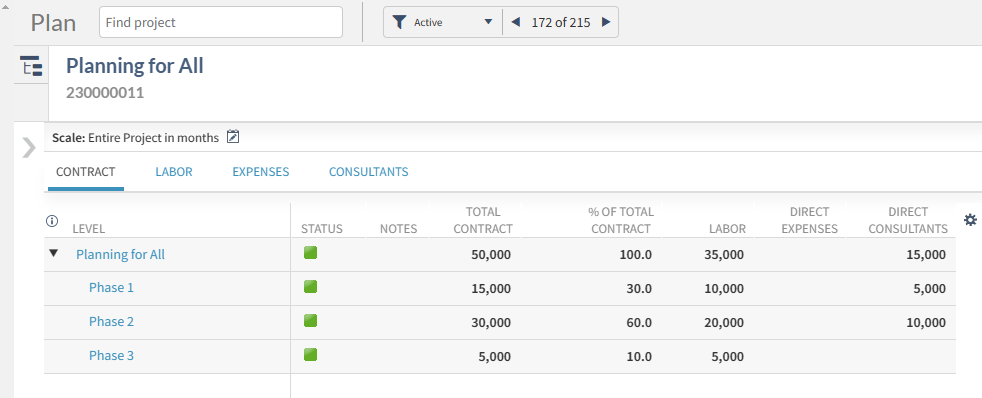
Planning provides users with key information on the contract values stored in the Contract Management section of the Project. When the Contract is updated in the project, it is updated in the plan automatically! WOW! 
 Table

Description automatically generated

Labor JTD Review and ETC Planning 

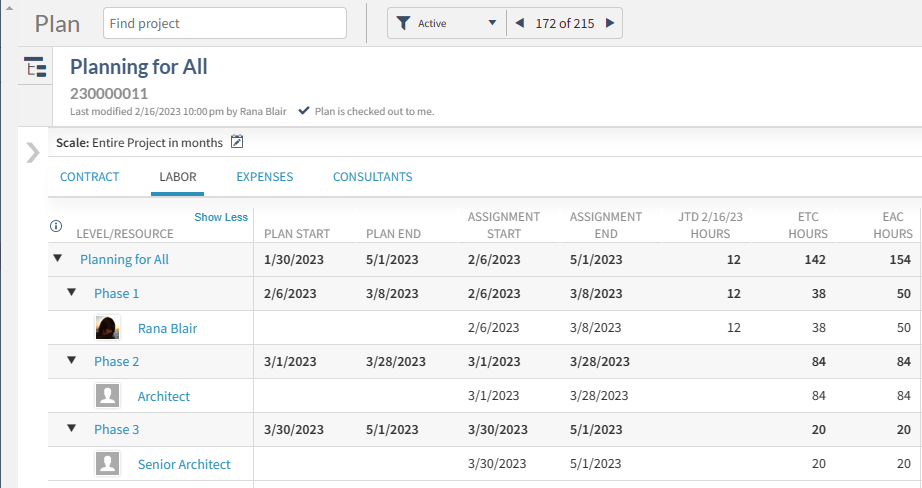
Using the plan to view JTD Labor and enter the remaining hours needed to complete the work is simple and provides immediate feedback on the expected total hours. 

Table

Description automatically generated

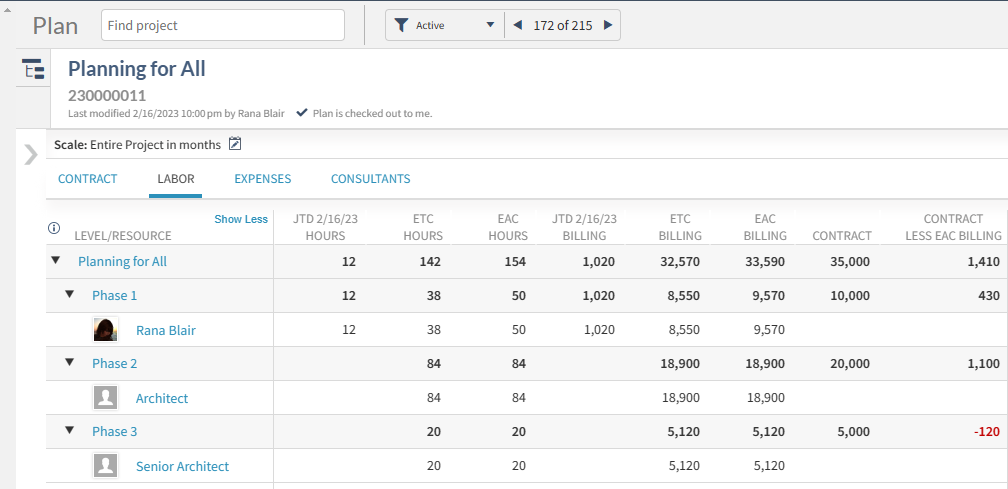
This information automatically calculates dollars spent and projected at Billing or Cost values and generates a forecast of project performance. 

Table

Description automatically generated

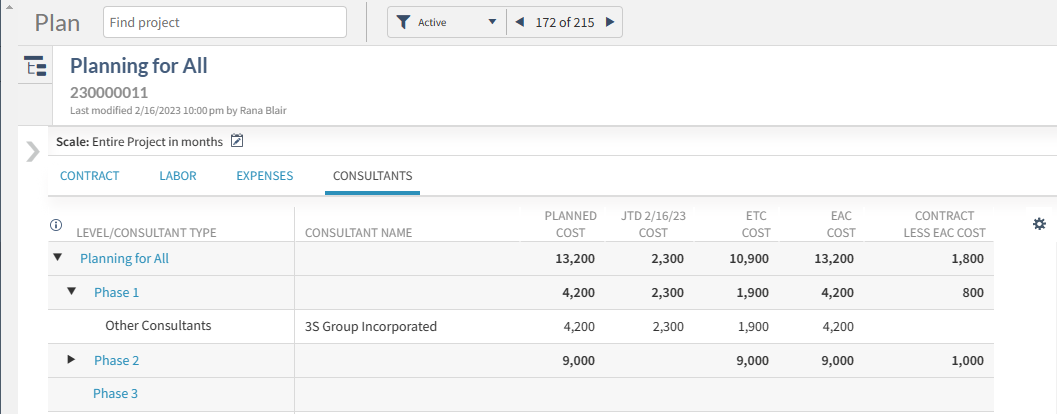
Planning for Expenses and Consultants 

Expense & Consultant budgets can be planned in dollars, and like the Labor, the posted amounts are updated in the plan automatically. 

Table

Description automatically generated
 

Visibility EVERYWHERE! 

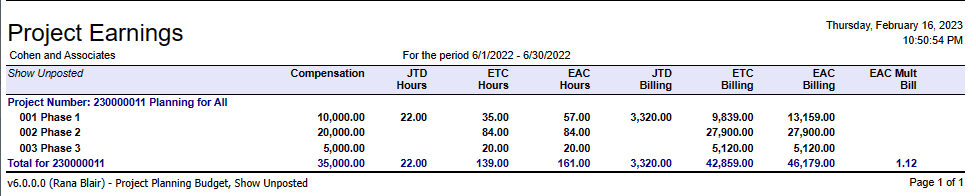
Viewing project performance in the plan effectively replaces the boring black & white reporting we’ve been forced to use all these years! It’s so exciting!  

Want to keep your reports? You can have them at no extra charge. The data from the plans can be used in most Project reports by simply changing the Budget Details to Project Planning Budget and choosing the right columns. 

A picture containing text

Description automatically generated  A screenshot of a computer

Description automatically generated

But Wait, There’s More!  

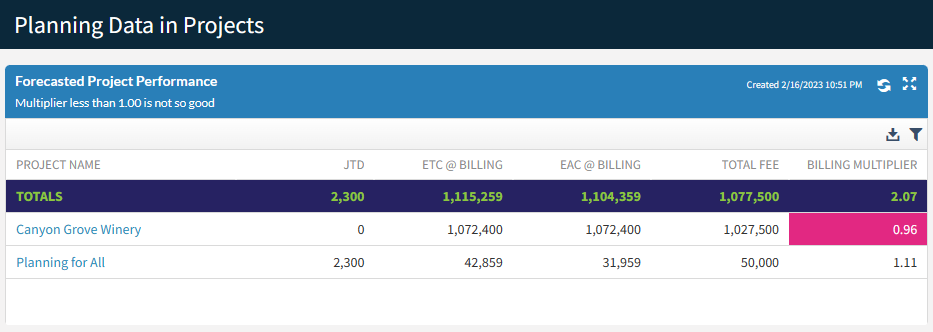
Want a reporting tool that updates automatically when your plan changes? You can have it! See the same information from the plan in a colorful Deltek Vantagepoint Dashboard! Just wow! 

Graphical user interface, application

Description automatically generated

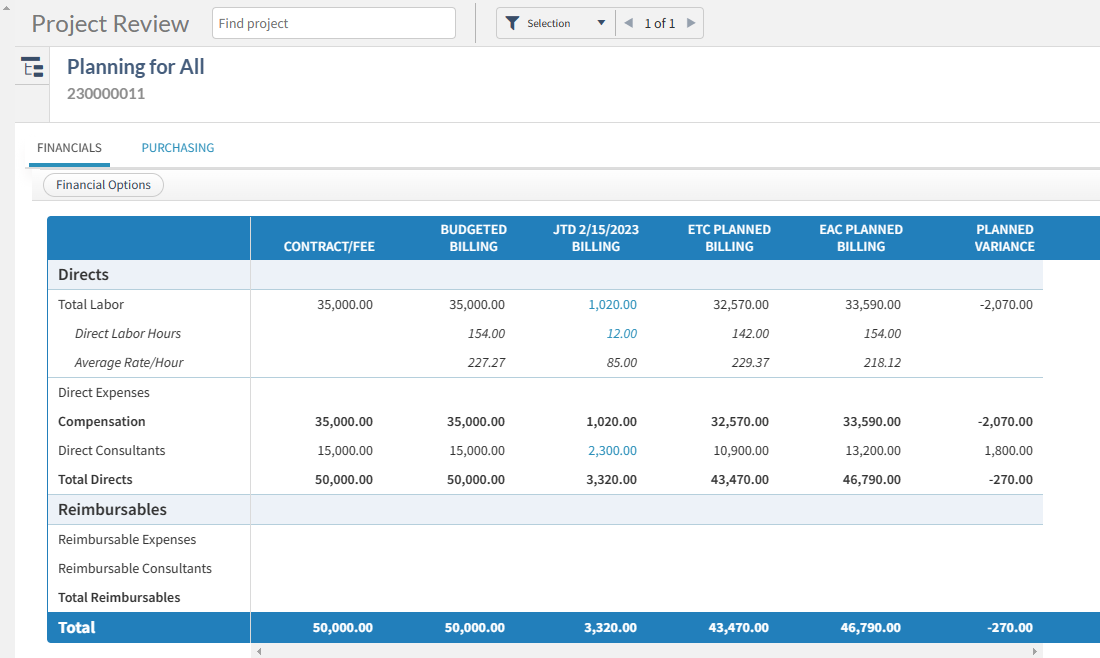
Do you feel like you must choose between the Budget tool and the Planning application? Well, you can have both! Review Planned Data next to Budget data in the new Vantagepoint Project Review. Accountants can have their place and Project Managers can too! 

Table

Description automatically generated

And there’s even more! Implementing use of the Planning tool allows your firm to extend the investment with Planning Resource and Budget Alerts. Planning data can even be used to streamline and validate Timesheet Entries. 

All This for ZERO Easy Payments 

Let’s review the features you get for ZERO Easy Payments! 

  1. Labor, Consultant, and Expense Planning  
  1. Planning by Employee and Generic Resource 
  1. Real-time Labor visibility (including unposted time!) 
  1. Data Visibility in applications, reports, dashboards 

How Can So Much Be Free? 

It’s simple, the tool has been scaled to fit the current needs of firms of all sizes. Adoption of the basic tool is easy, and the benefits easily recognized. Today, you can dabble in the Planning tool with little investment. And when you are ready for more, simply add licenses without losing any of the momentum you have achieved. 

What is included in the licensed Vantagepoint Planning and Resource Management application? 

As of Vantagepoint 5.5, features available to licensed users fall into four categories: 

  • Usability Features 
    • Schedule Tab with exportable Gantt chart 
    • Schedule (Task) Dependencies  
    • Planning Subrows to display Planned and Actual values for Hours, Cost, Billing in time scale periods 
    • Planning Assignments displayed on the Employee Card 
    • Bulk Redistribution of Hours and Variance Spreading 
  • System Extensions 
    • Project Pursuit Stages 
    • Revenue Forecast Application 
    • Estimated Fee and Probability fields 
    • Planning Exports 
  • Visibility 
    • Project Planning Reports 
    • Planning Dashparts such as My Upcoming Assignments  
    • Resource Planning Data in the Calendar Timesheet 
  • Resource Management  
    • Resource View, Project View, and Reporting 
    • Generic Assignments Dashparts 

Getting So Much for So Little 

You might be wondering, “How can so much come for so little?” It’s simple, the tool has been scaled to fit your needs now and in the future. Today, you can dabble in the Planning tool with little investment or risk. And when you are ready for more, simply add licenses without losing any of the momentum you have achieved. 

Whether your firm has zero or hundreds of licenses for Deltek Vantagepoint Resource Planning, the need to manage project performance is universal. The steps for input and maintenance are all the same regardless of how far you want to take the data.  Act Now!  Get started with Planning today!  


Easily Change Project Plan Dates and Hours with Deltek Vantagepoint

Posted by Rana Blair on May 18, 2022 12:00:00 AM

2022 - Redistribute Planned Hours-01

For professional services firms, projects often don’t go according to the original plan. This forces the project manager to spend time updating the project plan to reflect new project dates, adjusted hours, and resources needed to complete the project. With Deltek Vantagepoint, this doesn’t have to be a burden on the firm’s project managers. These changes are easily and automatically made, allowing the firm to focus on serving clients instead of constantly updating plans.

Typical Project-Based Firm Planning Scenario 

Let’s say the Natural Sciences Building at Northwest project was originally scheduled to take place from January 2021 through September 30, 2021. The phases at the beginning were Master Planning and Project Management. Then the project goes on hold for a few months, which happens often for project-based firms. Now, the project is restarting with a new phase in a new date range. The project manager wishes to set a proper baseline on the original schedule, and then review the new plan against the baseline.  

Let’s walk through each of these steps separately. Then, at the end, learn about how to see this in action.  


Changing Project Plan Dates at Various Project Levels

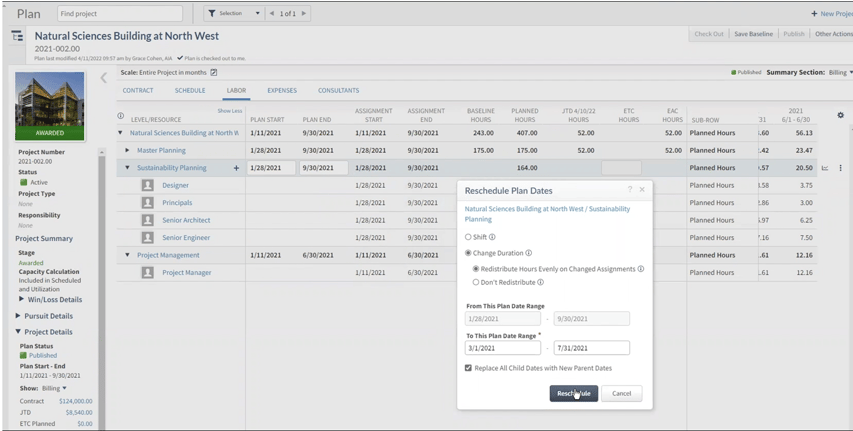
Changing the plan dates is always the first step. To change the dates at a phase level, click the ‘kabob’ at the far right of the phase and select the Reschedule dialogue. Using this tool, users can shift the entire phase to the left or right or change the duration by dragging it longer or shorter.  

For this example, the new duration for the Sustainability Planning phase will begin on March 1, 2021, and end on July 31, 2021. At this point, Vantagepoint will ask to replace the child dates – those dates of the individual resources beneath the phase. In this case, the answer is yes, replace child dates.  

Screen Shot 2022-05-18 at 10.43.41 PM

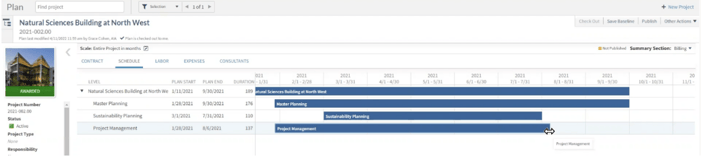
Another way to change dates is to go into the Schedule tab. When clicking on the phase to change, put it into edit mode. This will allow the user to simply drag it to the new dates and duration desired. Users can drag the bar right or left and/or hover over to get the bi-directional arrow to expand the duration. Again, the system will ask to replace the child dates or not. 

Screen Shot 2022-05-18 at 10.52.02 PM

Redistributing the Planned Project Hours 

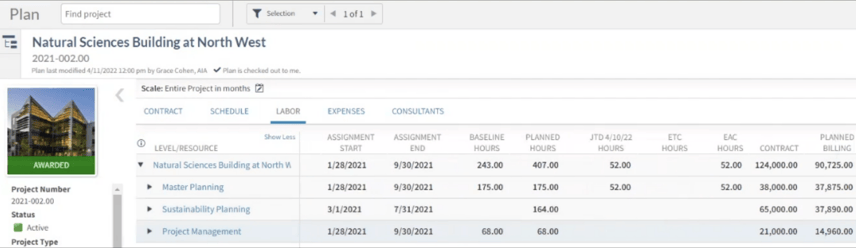
Now that the project dates are correct, it is time to go to the Labor tab to work on the planned hours. Going back to the example, the master planning phase was scheduled to begin on January 28 and end on September 30. Its planned hours are 175, which matches the baseline, so no changes are needed. 

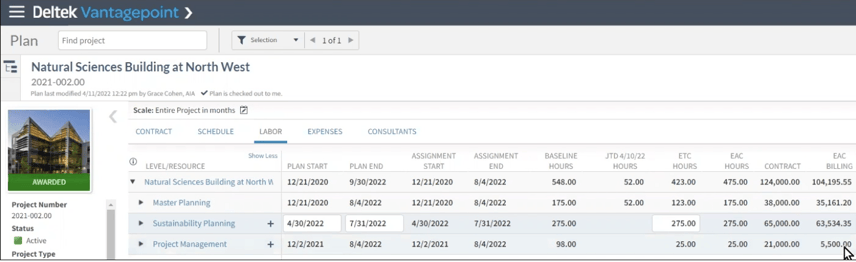
However, on the Sustainability Planning phase, there are some changes needed because there are no baseline hours saved. The planned hours also look low. To look at this further, users can go into their grid settings and turn on different columns such as Contract and Planned Billing. Doing this, the project manager sees 164 hours, the planned value is coming up at $37,980 but the contract value is $65,000. This will be the first place to start changing planned hours. 

Screen Shot 2022-05-18 at 10.44.17 PM

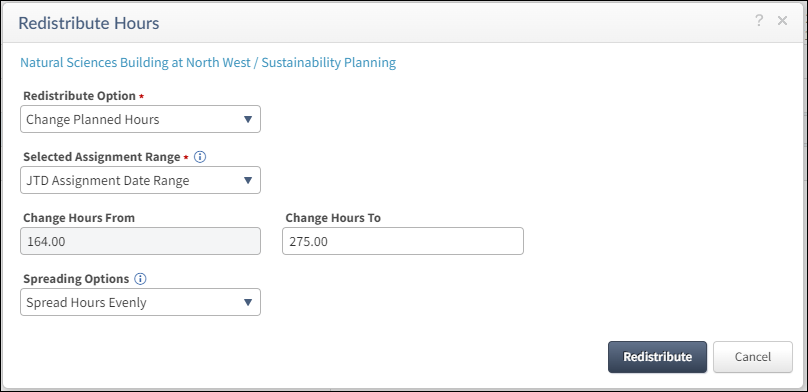
To do this, go to the phase level and select the ‘kabob’ at the end of the row. Select Redistribute Hours and Change Planned hours. For this example, the project will change those 164 hours to 275. Choose to do this for the entire assignment date range and spread hours evenly over the time period. By choosing to redistribute here, the project manager can now see that the planned hours are 275 and the value is calculated at $63,534 which is closer to the contract value.  

Graphical user interface, application

Description automatically generated

Setting a New Project Baseline  

Now let’s plan forward or true-up this project plan. In the screenshot above, the master planning phase has a baseline of 175 hours, with 52 hours exhausted but only 77 hours remaining in the Estimate to Complete (ETC). The Estimate at Completion (EAC) hours is settling around 130 hours, and the project manager knows that the project will use most, if not all, of the 175 budgeted hours. So, the hours in the master planning phase will need to be redistributed using the ‘kabob’ at the end of the phase row. This will help push forward the hours and then allow the project manager to fine-tune them as the project progresses.  

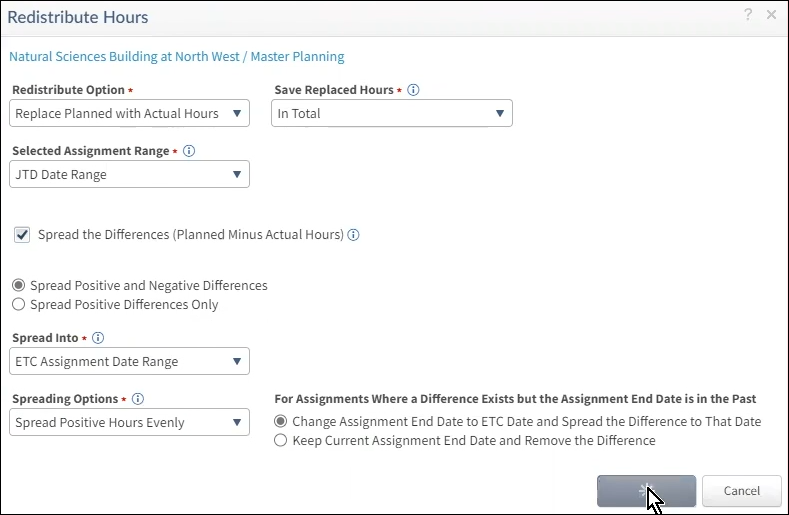
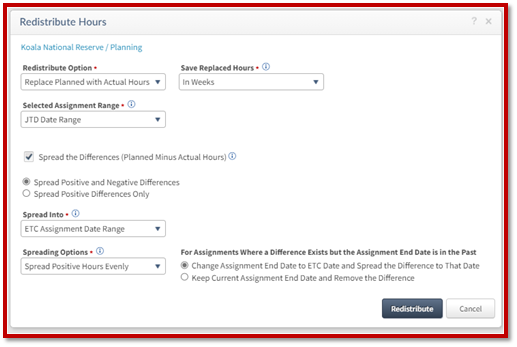
In the redistribute planned hours dialogue box, select the option to replace the planned with actual hours and replace those hours in total. Use the hours from the job to date (JTD) range, choose to spread the differences, and choose to spread both the positive and negative differences in the ETC assignment date range. Then choose to spread the hours evenly.  

Graphical user interface, text, application,

Description automatically generated

The project manager would do this for each phase that changes the duration or timeframe. Also, with this example, the project manager would make the changes for the sustainability and project management phases. Once those changes are made, the EAC billing is $104,000 and the contract value is $124,000, which looks like the project will perform rather well. The last step is to publish the plan and start working on the project.  

Screen Shot 2022-05-18 at 10.44.37 PM

See Project Plan Changes in Action 

While reading about how easy Deltek Vantagepoint makes it for project managers to adjust their project plans, seeing it in action is even better. Click the image below to watch a 16-minute demonstration to understand how Vantagepoint’s Resource Planning makes it very convenient to plan for unplanned project changes. 

Resource Planning Enhancements in Deltek Vantagepoint

Posted by Rana Blair on Feb 23, 2022 12:00:00 AM

Vantagepoint Resource Planning Enhancements Hero Image

Projects are the lifeline for professional services firms. Deltek Vantagepoint provides applications to support the project planning and resource management activities—Project Planning, Resource Management and Plan Reporting. For those firms who are familiar with Deltek Vision planning, you’re in for a real treat with the enhancements added to Vantagepoint.

The enhancements include the ability to Change Planned Hours, select the ETC / JTD basis in system settings, save Resource View searches for roles, and use Spread Variance to push unused plan hours forward. Let’s dig deeper into these improvements.

Set Plan Inclusion System-Wide

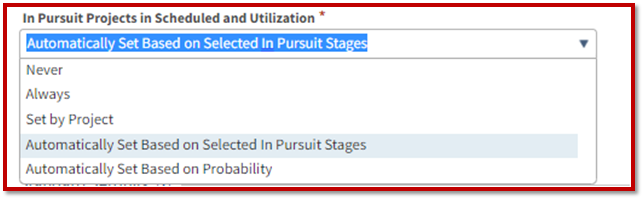
Deltek administrators now have the ability from a system-level to set the inclusion of “in pursuit” project plans on some sort of objective basis. The screenshot below shows how these are automatically set based on the pursuit stages. Keep in mind when the project is awarded, it’s included in those calculations. The beautiful part about Vantagepoint is firms have complete visibility into all the plans, even if the project was not included in those utilization calculations and reports.

VPPlanning-InclusionSettings

The administrator can set different options based on the firm’s preferences. Those include:

  • Never – This means that users can plan but the plan won't be included in the calculations.
  • Always – Selecting this option will always include the plans, regardless of the degree of seriousness or clarity that you have.
  • Set by Project – This is not recommended because it relies on the plan creator to remember to mark the plan for inclusion.
  • Automatically Set Based on Selected in Pursuit Stages – This is the recommended option because it leverages the intelligence of the software to determine the stage of the project and then to automatically determine inclusion into those calculations.
  • Automatically Set Based on Probability – This uses the probabilities set up in the system. Preferences can be set to say anything greater than 50% probability, for example, will be included. Vantagepoint provides a lot of flexibility with this, but this flexibility is from the system standpoint and not each individual plan.

Set Estimate to Complete (ETC) and Job to Date (JTD) Basis System-Wide

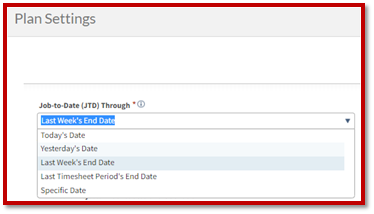
While the ability to set and/or change the ETC and JTD was available in Deltek Vision Planning, it was often changed for one purpose or another and could be forgotten to be put back. In Vantagepoint, this is a system setting so that every plan is using the same ETC and JTD basis as shown in the screenshot below.

VPPlanning-JTDSettings

Firms can select the system settings and the basis that works best for them. For example, a firm has a JTD basis through Last Week’s End Date, and that is last Saturday. All the JTD is shown through that date and the ETC date starts the next business day. That allows the firm to have certainty about the JTD figures. If the firm customarily has weekly timesheets that are always completed by the end of the week, this may be a great system setting.

Alternatively, firms can use the Last Timesheet Period’s End Date. If the firm lags a little bit on timesheet entries, utilizing this option so that the JTD information being shown in the plan is that of the last timesheet period will most likely work better. Firms can use this option so that the JTD information shown in the plan is as of that last timesheet week. So, for the first few days of the timesheet period, it's not as accurate, but it's more accurate once that timesheet period is posted and closed.

Rescheduling Plans

Vantagepoint Planning is further enhanced with the ability to reschedule plans. The reschedule ability allows users to either shift or change the duration for the labor tab. This is only for the labor tab in Vantagepoint Planning. Users can pick up the entire date range and move the start date or move it to the finish date.

Like Vision Planning, if the duration is the same, the hours can use the same proportions from the time period. When the duration length is increased, it keeps the same pattern. Conversely, when the duration length is decreased, the system can respread it evenly. But, if the duration shrinks, the system will not like it if unplanned hours fall outside the new duration. In Vantagepoint, this becomes very clear with well-written error messages that pop up for the user.

Change Planned Hours

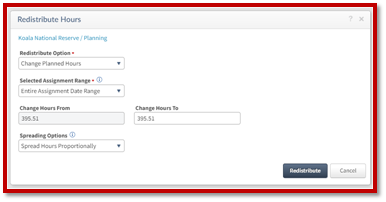
Changing planned hours is a new function in Deltek Vantagepoint. Project managers can use this functionality to update the planned hours in any timeframe. They can choose to spread the hours proportionally or evenly. For example, a user can take all the hours at the project level or work breakdown structure (WBS) level two and change the planned hours from A to B. This can be done in any timeframe. It can also be done backward and forward using the ETC day. There are a lot of options to change planned hours in Vantagepoint Planning.

The screenshot below shows the new Redistribute Hours menu in Vantagepoint where users can change the planned hours.

VPPlanning-RedistributeHours

Replace Planned Hours with Actual Hours

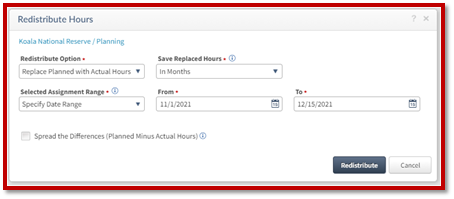
The next enhancement is the ability to replace planned hours with actual hours. This functionality allows users to choose the replacement of hours for a specific date range or across all dates as well as choose to calculate on a weekly, monthly, or total basis. An example is shown below.

VPPlanning-ReplacePlanwithActualHours

Spread Variance

The ability to spread the variance between planned and actual hours can be done in several ways over the time periods selected. It allows the user to control how they spread the differences between actual and planned as well as choose different date ranges. The date range can be a specific date range, an entire date range, or just a short amount of time. The project manager can choose to spread the hours including the negatives or just limit to the positive differences. The variance can be spread evenly or proportionately.

The biggest enhancement is that now this setting is directly available in the plans in Vantagepoint as opposed to another menu or area of the system, providing better visibility, as shown below.

VPPlanning-SpreadVariance

Vantagepoint Planning is Reimagined for Project-Based Firms

With these enhancements to Vantagepoint Planning, project-based firms can not only quickly create project plans but adjust them to the unpredictable nature of the projects. It’s the right project management tool to control project delivery. Do you want to see these Deltek Vantagepoint Planning enhancements in action? Use the button below to see Rana Blair demonstrate each of them.


The 41st Annual A&E Deltek Clarity Report: Project Management Trends

Posted by Rana Blair on Sep 23, 2020 12:00:00 AM

Deltek Clarity 41st

Projects are the bread and butter of A&E firms and well executed ones are an absolute necessity to remain competitive. Based on the results of the 41st Annual Deltek Clarity Report, A&E firms are aware of the need for project management responsibilities to be more clearly defined. Project information processes must be improved and there should be more investment in project manager (PM) training. Additionally, PMs require more visibility into KPIs to meet performance expectations. Here are some snippets from this year’s report.

Project Management Challenges

The 41st Deltek Clarity Report showed the top three project management challenges facing firms to be the same for the third straight year. Those challenges are inexperienced PMs, staff shortages and competing priorities. PMs are at the center of project management, so they need to be better trained and be knowledgeable of firm and industry wide best practices. For firms to deliver successful projects, PMs across all projects should be keenly aware of their responsibilities. They should also become experts in their practice and to bring in other members that complement the team.

Project Status

According to this year’s report, the number of projects that came in on or under budget is slightly higher than last year. With a six-percentage point increase to 72% for architecture firms and high performers coming in with 75% of projects on target or under budget, project status appears positive. Additionally, two-thirds of projects were recorded as being current or ahead of schedule which is up two percentage points from last year. Visibility into project financials and KPIs plus targeted PM training positively impacts project execution.

Tracked KPIs for Project Management

In the survey, and consistent with last year, most A&E firms track profitability (92%) and net revenue (91%). Next is average collection period (87%) and multipliers (80%). The least-tracked KPIs remained on-time delivery, schedule variance and earned value management. The report again indicated, based on these findings, that there was a need for greater project visibility. Increasing efforts to track those KPIs would in fact improve project success, business performance and client satisfaction. In particular, the failure to track schedule variance would be reflected in the percentage of projects determined to be behind schedule.

Measuring Client Satisfaction

Based on the 41st Deltek Clarity Report, 54% of surveyed firms do measure client satisfaction. The majority of those which are not currently doing so are considering it for the coming year. Engineering firms are more inclined to evaluate client satisfaction, and the larger the business, the more likely it is considered. Of those firms that measure client satisfaction, 58% do so for all projects. Firms use a variety of means such as in person to electronic surveys. While the executive team is usually in charge of contacting clients (50%), large firms rely on the PMs (56%) to monitor client satisfaction. Lastly, firms that do not regularly measure client satisfaction will not be very effective with process improvement.

Well Executed Projects

As seen in the 41st Annual Deltek Clarity Report, A&E firms understand that improving project management training and providing access to KPIs will lead to improved project performance. Additionally, leveraging tools to streamline project delivery and investing in both PMs and the whole project team will make the process much more efficient. When projects are well executed, clients are likely more satisfied, and firms earn repeat business. This ultimately keeps firms competitive in the A&E industry.

Latest Posts