Full Sail Partners Blog | CRM (2)

Posts about CRM (2):

How These Microsoft Office Integrations Make Deltek Vantagepoint Even More Powerful

Posted by Stephany Socha on Mar 13, 2025 12:00:00 AM

03-13 How These Microsoft Office Integrations Make Deltek Vantagepoint Even More Powerful - Banner

As someone who has worked with Deltek Vantagepoint for years, I can confidently say that it’s a powerhouse for project-based firms. But what really takes its functionality to the next level? It's seamless integration with Microsoft Office, particularly Outlook and Teams. These integrations don’t just make your life easier—they make your work more efficient, more connected, and ultimately, more valuable.

If you’re not already using the Vantagepoint Connect Add-in for Outlook or leveraging the Teams integration within Vantagepoint, let me introduce you to the game-changers that will revolutionize how you manage projects, communications, and collaboration.

Vantagepoint Connect: Outlook Add-in

Turning Your Inbox into an Extension of Vantagepoint

We all live in our inboxes, so why not make Outlook work smarter? With the Vantagepoint Connect Add-in for Outlook, your CRM and project management tools are just a click away—right inside your email.

Key Features That Save You Time and Effort:

03-13_01 Blog
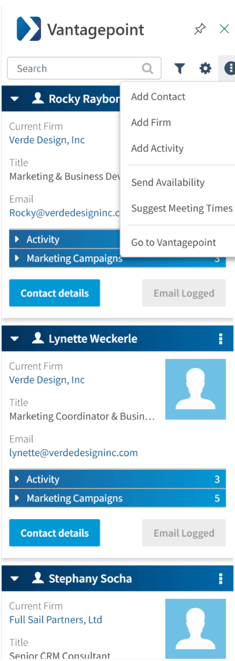
  • Easily Add Contacts and Firms
    Got an email from a new potential client? Instead of manually entering their information into Vantagepoint, just open the Vantagepoint Connect pane inside Outlook and instantly create a new Contact or Firm record.
  • Log Emails as Activities
    Ever had an important client conversation get lost in the email abyss? With just one click, you can log emails directly into Vantagepoint as an Activity, keeping a clear record of communications tied to the right firm, project, or marketing campaign.
  • Schedule Meetings Without the Back-and-Forth
    The built-in Scheduling Assistant lets you send availability links, propose meeting times, and even create Teams meetings—right from Outlook. No more endless email chains trying to find a time that works.
  • Search Your Vantagepoint Database from Outlook
    Need to check if someone is already in your system? The search bar inside the Vantagepoint Connect pane lets you pull up records for Contacts, Firms, Projects, and Activities without ever leaving your email.

Why This Matters:

Instead of bouncing between applications, you can perform essential CRM tasks directly in Outlook. The result? A faster, more connected workflow that ensures your data stays up to date with minimal effort.


Microsoft Teams + Vantagepoint: Instant Collaboration, Right Where You Need It

Bridging the Gap Between Project Data and Real-Time Communication

We all know that great projects are built on effective communication. With Microsoft Teams integration inside Vantagepoint, staying connected with your team has never been easier. Instead of switching between platforms or hunting for contact info, you can start a Teams chat directly from within Vantagepoint—right where you are already working.

How It Works:

  • See Who Is in the Same Record as You
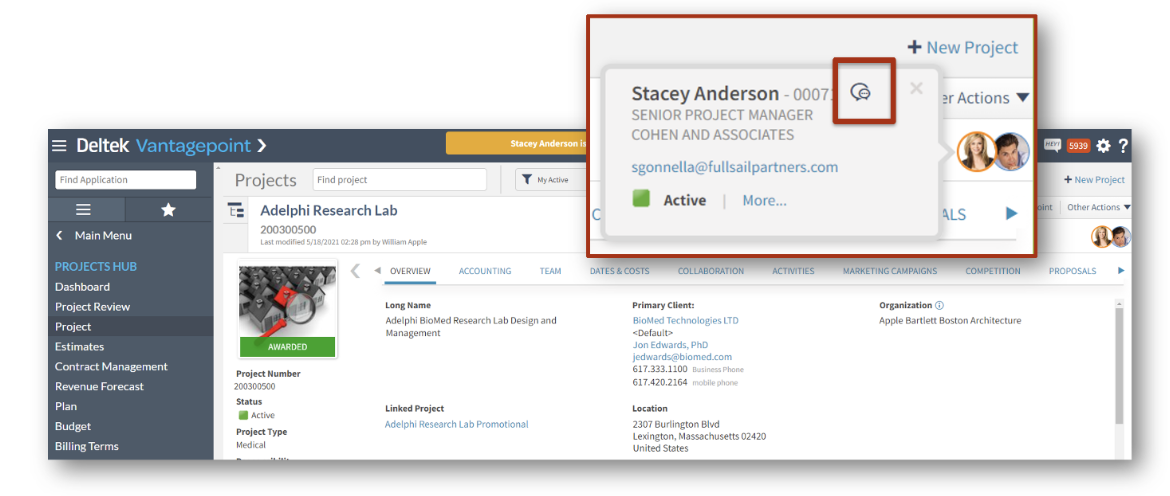
    If other users are currently in the same record in Vantagepoint—whether it is a project, contact, or another hub—you will see their presence via a small chat bubble next to their name (see screenshot below).
  • Instantly Start a Teams Chat
    Need to ask a quick question or clarify project details? Simply hover over the chat bubble and initiate a one-on-one Microsoft Teams chat directly from Vantagepoint. No need to search for their name in Teams or leave your workflow.
  • Seamless Setup
    If your firm has enabled the Microsoft Teams Chat option in Settings » General » Communications, you can immediately start chatting with team members without leaving Vantagepoint.

03-13_02 Blog

Why This Matters:

When working on projects, timing is everything. Instead of sending an email and waiting hours for a reply, you can now ping a teammate in Teams and get an answer instantly. This eliminates communication delays, reduces email clutter, and keeps teams aligned in real-time.

With the Teams Chat integration, Vantagepoint is no longer just your project management system—it’s your real-time collaboration hub.

Why These Integrations Are a Must for Any Vantagepoint User

Whether you are a BD professional, a project manager, or a marketing leader, these integrations provide three major benefits:

  1. Time Savings: No more duplicate data entry or switching between multiple applications.
  2. Better Collaboration: Keep teams aligned with real-time access to shared information.
  3. Stronger Data Integrity: Ensure that all interactions and project updates are automatically captured inside Vantagepoint.

By integrating the tools, you already use every day—Outlook and Teams—Deltek Vantagepoint becomes even more powerful. It’s about working smarter, not harder.

Take Your Vantagepoint Experience to the Next Level

With Microsoft Outlook and Teams integrations, Deltek Vantagepoint isn’t just a project management system—it’s a powerhouse for seamless collaboration, streamlined workflows, and smarter communication. If you’re not taking full advantage of these tools yet, now is the perfect time to get started!

Want to see the Outlook integration in action? Watch my mini-demo, to see how Vantagepoint Connect can help you work smarter—right inside Outlook. Click below to watch today!


No More Manual Madness: Automate Your AEC Firm with Deltek Vantagepoint Workflows

Posted by Wesley Witsken on Mar 6, 2025 12:00:00 AM

03-06 No More Manual Madness Automate with DVP Workflows - Banner

Let’s face it—AEC firms have no shortage of repetitive tasks, data entry nightmares, and inefficient workflows. Whether it's notifying employees about project updates, ensuring proposals are properly tracked, or keeping financial approvals on schedule, these manual processes drain time, increase errors, and create unnecessary headaches.

That’s where Deltek Vantagepoint Workflows come in. By automating common tasks, firms can reduce human error, improve efficiency, and free up valuable time to focus on high-impact work. Say goodbye to manually sending emails, updating records, or chasing approvals. With automation, your team can operate like a well-oiled machine—seamless, streamlined, and stress-free.

In this blog, we’ll explore how:
✅ User-Initiated Workflows eliminate repetitive data-entry tasks
✅ Scheduled Workflows automate recurring actions like reminders
✅ Real-world automation case studies showcase workflow-driven efficiency

User-Initiated Workflows: Stop Repetitive Tasks in Their Tracks

Think about how much time your team spends on mundane, repeatable tasks like updating project statuses, notifying team members of changes, or ensuring required fields are filled in correctly. If these tasks aren’t automated, they can easily slip through the cracks or waste hours of valuable work time.

What Are User-Initiated Workflows?

User-Initiated Workflows in Deltek Vantagepoint allow automated actions to trigger when a record is created, modified, or deleted, eliminating the need for manual follow-ups. These workflows can:

  • Send instant email notifications when a project is updated
  • Ensure data accuracy with validation rules
  • Automatically update fields when conditions are met
  • Create activities based on specific actions

Example: Project Status Update Automation

Let’s say your firm has a process where, when a project is marked “dormant,” the project principal needs to be notified. Without automation, this means:
❌ Someone must remember to add the completion date
❌ Someone must manually send an email to the principal
❌ If forgotten, the principal is left in the dark

With User-Initiated Workflows, you can automate this entire process:
✅ When a project is changed to "dormant," the system automatically updates the completion date
✅ An email notification is triggered to the project principal
✅ A reminder calendar activity is created for the principal follow-up

Result? No more forgotten notifications, no more manual emails, and a streamlined workflow that just works.

Scheduled Workflows: Automate Routine Reminders and Reports

Now, let’s talk about the routine tasks your firm does on a daily, weekly, or monthly basis. Manually sending reminders, pulling reports, or tracking deadlines takes up valuable time.

What Are Scheduled Workflows?

Scheduled Workflows in Deltek Vantagepoint run at regular intervals to automate tasks that don’t require immediate action. Instead of triggering on record changes, these workflows operate on a set schedule, like:

  • Sending employee reminders on key deadlines (e.g., expense report submissions)
  • Generating automated reports (e.g., project performance updates)
  • Triggering notifications based on hire dates or anniversaries

Example: Monthly Employee Anniversary Notifications

Many AEC firms send emails recognizing employee anniversaries. Without automation, this means:
❌ HR manually runs reports
❌ Emails must be written and sent manually
❌ Employees might be overlooked

With Scheduled Workflows, you can set up an automated reminder that runs on the 1st of every month: ✅ The system identifies employees with an upcoming anniversary
✅ A record-specific email is automatically sent to HR (or the company)
✅ No one is forgotten, and employees feel valued 🎉

This same logic applies to monthly project status updates, invoice reminders, or even marketing email triggers—automate it once, and let Vantagepoint do the rest.

Real-World Wins: Workflow-Driven Automation in Action

Let’s take a look at how actual AEC firms have used Vantagepoint Workflows to increase efficiency and eliminate headaches.

Case Study #1: Reducing Proposal Errors with Validation Workflows

Problem: A marketing team struggled with missing or incorrect information in proposal records, leading to errors in submittals and last-minute fixes.

Solution: A User-Initiated Workflow was set up to:
✅ Require certain fields (Project Manager, Fee, Proposal Due Date) before saving
✅ Show a validation warning if any required field was missing
✅ Block saving until all necessary information was entered

Result:

  • 80% fewer errors in proposals
  • Faster turnaround time for marketing teams
  • Increased accuracy in CRM records

Case Study #2: Automating Project Manager Notifications

Problem: Project Managers weren’t notified when they were assigned to new projects, causing delays in planning and client communication.

Solution: A User-Initiated Workflow was created to:
✅ Automatically email the assigned Project Manager when a new project is created
✅ Send a dashboard alert to the PM
✅ Include key details (client name, budget, deadline) in the notification

Result:

  • PMs received instant notifications, reducing onboarding time
  • Teams could proactively plan work instead of waiting for updates
  • Fewer miscommunications between departments

Case Study #3: Automating Invoice Reminders for Accounting

Problem: The accounting team struggled with late invoice submissions because project managers often forgot to submit approvals.

Solution: A Scheduled Workflow was created to:
✅ Send automated reminders to PMs on the 5th and 10th of every month
✅ Track pending invoices and notify accounting
✅ Escalate overdue approvals after 15 days

Result:

  • 30% faster invoice approvals
  • Improved cash flow with more timely billing
  • Less manual chasing from accounting

Say Goodbye to Busywork – and Hello to Automation

Manual processes are a thing of the past. With Deltek Vantagepoint Workflows, your AEC firm can eliminate inefficiencies, reduce human error, and free up valuable time to focus on high-impact work. Want to discover even more ways to streamline your processes and boost efficiency? Watch our webinar, "15 Ways to Be More Efficient in Vantagepoint", where we break down practical tips, automation strategies, and expert insights to help you get the most out of your system. Click below to get access today.

The Ultimate Checklist for a Smooth Vision to Vantagepoint Upgrade

Posted by Cate Phillips on Jan 30, 2025 12:00:00 AM

01-30-25 V to VP Upgrade -  Banner


Upgrading from Deltek Vision to Vantagepoint is a big step, and it can feel overwhelming. But fear not! With the right preparation, guidance, and tools, the transition can be smooth and set your firm up for long-term success. At Full Sail Partners, we’ve assisted numerous firms in navigating this process, and we’re here to share our expertise.

This checklist will help your firm prepare for the upgrade, ensuring a seamless transition. Let’s dive into the steps you need to take:

1. Explore Upgrade Resources on Full Sail Partners’ Website

Your first stop should be the Vantagepoint Upgrade Assistance Page on the Full Sail Partners’ website. This page consolidates everything needed, including links to resources from both Deltek and Full Sail Partners. It provides:

  • Guides and best practices for upgrading
  • Links to Deltek resources
  • Exclusive tools and services from Full Sail Partners

In addition to Full Sail Partners' resources, Deltek offers several tools to assist with your upgrade, including the Customer Assistance Program (CAP) and the Vantagepoint Readiness Portal. The CAP provides access to personalized consulting and technical support, while the Readiness Portal contains videos, training modules, and checklists to help firms navigate the upgrade process. Together, these resources ensure you have comprehensive support at every stage.

Navigating these tools will give you a clear understanding of what to expect and where to start.

2. Schedule a Vantagepoint Upgrade Consultation

Requesting a consultation with the Full Sail Partners’ team is an essential step. Consultants can:

  • Assess your firm’s current setup
  • Identify potential challenges or customizations
  • Provide tailored advice and a clear roadmap for the upgrade process

Ready for a consult today? Request a Vantagepoint Consult by clicking here.

3. Get a Personalized Vantagepoint Readiness Report

The next step is to identify the issues before upgrading. Our Vantagepoint Readiness Report identifies things that need to be cleaned-up prior to obtaining your preview environment and upgrade. The cost includes a consultant that will meet with you to review everything and discuss areas of importance. The report gives you a snapshot of your entire database and the items your firm needs to address.

This is the most critical and helpful step. It starts you down the path of knowing what you need to know. This process includes:

  • Reviewing your current database configuration
  • Helping you prepare a preview environment for your new solution
  • Identifying key areas for clean-up and adjustment

This readiness report ensures your firm is set up for success and ready for the next stages.

4. Review System Requirements and Compatibility

Before diving into the upgrade, verify that your hardware, software, and integrations meet the Vantagepoint requirements. The assistance page includes links to Deltek’s technical specifications. Ensure the following:

  • Servers and workstations meet performance requirements
  • Third-party integrations are compatible
  • Current workflows are reviewed to identify custom configurations

5. Cleanse Your Data, Review Processes & Make Desired Changes

Upgrading is the perfect opportunity to declutter your system and review your firm’s processes. The Vantagepoint Readiness Report is the perfect checklist of where to target your efforts. Some common reviews and updates include:

  • Archive old projects
  • Update and validate contact information
  • Standardize data fields for consistency
  • User roles and security settings

Clean data and clear processes will make the transition smoother and your new system more efficient.

6. Backup Your Current Vision System

Creating a full backup of your existing system is critical. A backup ensures you can recover data if any unexpected issues arise. This backup should include:

  • Project records
  • Contact lists
  • Financial data

It’s always better to be safe than sorry!

7. Configure Your Vantagepoint Preview Environment

This step may be handled internally, but many clients may ask for our assistance. Some of those things include technical services, weekly meetings, establishing new processes, training and configuration changes, and programming to automate clean-up. Some firms want to take the lead and only need guidance, while others want a more hands-on approach.

For projects that require more coordination, our firm will assign you a consultant to oversee the project and offer additional resources depending on what is revealed from the Vantagepoint Readiness Report. Should we need any additional custom scripts, that would be handled by one of our developers. Firms might also need assistance from one of our IT consultants for any technical items. It is hard to estimate needs since the readiness report helps to outline what is necessary.

8. Test the System in a Sandbox Environment

Before going live, testing is essential. A sandbox environment allows you to:

  • Simulate daily workflows
  • Run key processes, like project setups and reporting
  • Identify and resolve issues

Involve team members from various departments to get a holistic view of the system’s performance.

9. Train Your Team and Make Adjustments

Your team’s success depends on their understanding of the new system. Full Sail Partners offers comprehensive training resources. To prepare your team:

  • Host training workshops
  • Provide access to user guides and videos
  • Encourage hands-on practice in a sandbox environment

Deltek’s Vantagepoint Readiness Portal is also an excellent resource for team training. It includes interactive modules and videos tailored to various roles, ensuring every team member has the knowledge they need.

10. Make the Shift to Full Production

This step involves moving the preview environment to production. With our Transition Copy Scripts, firms can capture many of the changes in the preview environment and move them to production which eliminates having to redo things. The scripts can be run as many times as you would like at no additional charge.

During the Deltek Vantagepoint transition, firms can save time by capturing the changes made in the test environment. During the Vision upgrade, the upgrade scripts to Deltek Vantagepoint will bring over all of your data and custom fields. However, the field order is not retained, and screen design properties, saved searches, reports, and dashboard/dashparts will reset.

Using Full Sail Partners’ Transition Copy Scripts allows firms to retain their changes and eliminates redundancy and rework between each test upgrade and your final production environment. The execution of the scripts can be customized and/or run independently of each other.

11. Execute the Upgrade with Expert Support

When it’s time to go live, rely on experienced professionals to guide you. The Full Sail Partners’ team provides support to:

  • Troubleshoot issues
  • Minimize disruption
  • Ensure a smooth transition

Key considerations include:

  • Scheduling the upgrade during off-peak times
  • Having IT and consulting support on standby
  • Communicating a clear “go-live” plan to all users
  • Using the Deltek Vantagepoint Readiness Portal to confirm upgrade dates provided by Deltek - This portal includes the specific timeline for your firm’s upgrade and ensures that everyone involved is aware of the schedule

12. Follow Post-Upgrade Best Practices

Your upgrade doesn’t end at go-live. Post-upgrade optimization ensures you’re getting the most out of Vantagepoint. Post-upgrade steps include:

  • Monitoring system usage and performance
  • Scheduling follow-up training sessions
  • Staying informed about updates and new features

Scheduling regular check-ins to review system performance and address any user feedback is essential.

See All Vantagepoint Upgrade Resources in Mini-Demo

Upgrading to Vantagepoint is an exciting opportunity to enhance your firm’s operations. To explore all the resources available, including how to access the Vantagepoint Readiness Portal, watch my mini-demo. In it, you’ll find step-by-step guidance and practical tips to ensure your upgrade process is as smooth and stress-free as possible. Click the image below to watch today!

Resume and Project Information Management Using Deltek Vantagepoint

Posted by Lindsay Diven on Feb 1, 2024 12:00:00 AM

02-01-24 DVP Resume and Project Info - Banner

In the competitive landscape of architecture/engineering (A/E) consulting, two critical assets set firms apart: their people and their projects. As a former marketing director for a large A/E firm, I fully understand the challenges involved in managing these assets effectively. Utilizing Deltek Vantagepoint, we offer streamlined solutions for managing both resumes and project information, ensuring your firm's unique strengths are showcased in every proposal, presentation, and marketing effort.

Strategic Resume Management: Capturing and Updating Professional Profiles

We perceive professional resumes not just as documents, but as dynamic profiles that showcase the strengths of your firm's most valuable assets: its people.

Starting Strong: Capturing New Hire Information

The journey of efficient resume management begins when a new employee joins your firm. This is a golden opportunity to capture their excitement and fresh perspective. Here’s how we recommend utilizing Deltek Vantagepoint and your HR processes to streamline this step:

  1. Coordinate with HR: At the point of hiring, collaborate with HR to integrate marketing and resume information collection into the onboarding process. Utilize HR’s existing data collection methods, adding specific forms or questions relevant to marketing needs.
  2. Gather Comprehensive Information: Collect essential data such as bios, previous projects, licenses, awards, special skills, software proficiency, languages, and contacts. For strategic hires, consider a dedicated marketing onboarding session to align their expertise with your firm’s marketing strategies.
  3. Automate with Deltek Vantagepoint: Leverage Deltek Vantagepoint to automate the information capturing process. This system can be set up to alert the marketing team of new hires, enabling the collection and updating of resume details seamlessly into your database.

Ongoing Updates: Keeping Resumes Fresh and Relevant

Regular updates are crucial to maintain the accuracy and relevance of resumes. Here's a streamlined approach:

  1. Determine Update Frequency: Decide how often resumes need refreshing. This can be annually, bi-annually, or aligned with each person’s work anniversary.
  2. Strategic Distribution: Utilize Deltek Vantagepoint to manage and schedule resume updates using email alert workflows. Provide current resumes to employees, along with clear instructions and deadlines for updates.
  3. Engage Personally: Consider conducting brief interviews or meetings, especially with key personnel, to ensure comprehensive and up-to-date information.
  4. Update the Employee Record: Once the updated information is gathered, use Deltek Vantagepoint to keep your database current. This ensures that any proposal or marketing material has the latest information at hand.

Case Study: Streamlining Annual Resume Updates at a Growing A/E Firm

A prime example of effective resume management was at my previous firm, a growing A/E firm. As the firm expanded to around 300 employees, we recognized the need for a structured yet flexible system for annual resume updates. Our strategy involved breaking down the updates into manageable monthly tasks, leveraging both Deltek and a work anniversary-based schedule. Here's an overview of our process:

Planning Phase: Leveraging Deltek Vantagepoint for Organization

  1. Monthly Employee Selection: Utilizing Deltek, we extracted a monthly list of employees based on their work anniversaries. This systematic approach ensured that every employee's resume was updated annually, without overwhelming our resources.
  2. Preparation of Update Materials: We compiled the existing master resumes from our database, along with a custom-designed resume update memo and instructions.

Gathering Phase: Personalized and Coordinated Efforts

  1. Distributing Update Materials: The update materials were personally delivered to employees in our main office. For our six satellite offices, we collaborated with marketing coordinators or office managers to ensure distribution. In cases where direct handover was not feasible, we used email as an effective alternative.
  2. Setting Deadlines and Reminders: A two-week timeframe was typically given for updates, with reminders set up in Deltek to keep track of deadlines.
  3. Scheduling Interviews When Necessary: For certain key roles or when detailed updates were required, we scheduled one-on-one interviews, adding a personalized touch to the process and ensuring comprehensive updates.

Updating Phase: Keeping Our Database Current

  1. Collection and Review of Updates: We gathered the revised resumes and additional information provided by employees, reviewing them for completeness and accuracy.
  2. Editing and Finalizing Resumes: Necessary edits and rewrites were undertaken to ensure that the resumes accurately reflected each employee's latest achievements and experience.
  3. Database Updating: Using Deltek, we updated our central database with the new information. This not only refreshed individual resumes but also ensured that our entire resume pool was current and ready for use in proposals and marketing efforts.

This case study highlights the efficacy of using a structured, technology-driven approach to manage resume updates in a large firm. By leveraging our Deltek database, we were able to streamline the process, maintain high-quality resumes, and ensure that our marketing and proposal materials always featured the most up-to-date and relevant information about our team members.

Project Information Management: Keeping Project Portfolios Up-to-Date

Just as vital as managing resumes is maintaining up-to-date project information. This includes project descriptions, milestones, and outcomes – all crucial for marketing and business development efforts. Here’s how to effectively manage this process:

  1. Diverse Update Methods: Consider annual updates, project milestones, pursuit-driven updates, award submittals, and initiative-driven updates. Choose the method that best aligns with your firm's needs and project types.
  2. Project Update Process: Establish a routine for gathering project information, such as sending out Project Information Profiles (PIPs) alerts to project teams and scheduling site visits for in-depth understanding.
  3. Automated Reminders and Checkpoints: Use Deltek Vantagepoint to set up workflow alerts for project updates at various milestones, ensuring no project goes unaccounted for.

Forward-Thinking Project Management: Begin with Your Goals in View

An essential aspect of managing project information effectively is to start with a clear understanding of how this information will be utilized. For instance, if a project is a potential candidate for a Design-Build Institute of America (DBIA) award, it's crucial to collect comprehensive design and construction details right from the start. Anticipating the requirements of award submissions or other future uses can guide what data to gather throughout the project's lifecycle. Utilizing past award criteria as a template for data collection ensures you capture all necessary details for future submissions.

Case Study: Site Visit Program

A practical application of this forward-thinking approach can be seen in a construction firm in Florida, which has established an effective site visit program to collect robust project information. Their marketing manager shared insights into their process, which I’ve adapted to optimize using Deltek Vantagepoint.

  1. Pre-Visit Preparation: Prior to site visits, a Project Information Profile (PIP) is sent to the project team via an email alert workflow. The project engineer fills in key details like project costs, square footage, and client information into the project record linked in the email.
  2. Collaborative Meetings: The project's key personnel, including the project manager, safety manager, and quality control manager, convene to discuss the project with the marketing representative. These meetings, often accompanied by informal gatherings over meals, foster open communication and information sharing.
  3. On-Site Insights: The marketing representative tours the site, gaining a visual understanding of the project. This first-hand experience is invaluable when drafting project descriptions and stories later.
  4. Drafting the Project Story: Back in the office, the marketing representative uses the insights gathered to draft a compelling narrative of the project, which is then refined and stored in Deltek Vantagepoint.
  5. Final Review and Approval: The draft is sent back to the project team for final review and approval, ensuring accuracy and completeness.

Additional highlights of their site visit program include:

  • Continuous Engagement: A marketing representative is assigned to each project from start to finish, responsible for collecting initial information, attending key meetings, and ensuring all relevant documents are stored in Deltek Vantagepoint. Because Vantagepoint project records often get created in the pursuit stage, the marketing coordinator field is often populated in the project record.
  • Strategic Site Visits: Site visits are conducted at critical project milestones, such as kickoff, mid-point, and completion, to gather dynamic information, including lessons learned and design insights. Workflow alerts and reminders can be sent to applicable project leads when such milestones are met.
  • Leveraging Award Criteria: Award submission questionnaires are used to guide the questions asked during site visits, ensuring comprehensive data collection aligned with potential award submissions.
  • Integrated Photography Sessions: Marketing representatives coordinate with photographers during project photoshoots, ensuring visual documentation aligns with the project's narrative.

This case study exemplifies the benefits of a strategic, goal-oriented approach to project information management. By integrating these practices with Deltek Vantagepoint, marketing professionals can ensure their project portfolios are detailed, up-to-date, and ready to meet any marketing or proposal need.

Integrating Resume and Project Information Management

Combining the management of resumes and project information provides a holistic approach to showcasing your firm's capabilities. Both elements are integral to crafting compelling proposals and presentations, and their management should be interlinked for maximum efficiency and impact.

  1. Unified Database Management: Use Deltek Vantagepoint as a central repository for both employee and project information, ensuring consistency and ease of access.
  2. Streamlined Processes: Establish integrated workflows in Deltek Vantagepoint for updating both resumes and project information, reducing duplication of efforts and enhancing collaboration between departments.
  3. Regular Reviews and Updates: Schedule periodic reviews of both resumes and project portfolios to ensure they reflect the most current and relevant information, leveraging automated reminders and scheduling tools within Deltek Vantagepoint.

Transform Your CRM Practices with Deltek Vantagepoint Workflows

Mastering the art of resume and project information management is crucial for A/E/C firms striving for excellence. Full Sail Partners' expertise, coupled with the power of Deltek Vantagepoint, provides a robust solution to streamline these processes, ensuring your firm's assets are always up-to-date and compellingly presented. Embrace these strategies to transform your information management into a strategic asset, enhancing both marketing and business development efforts.

As a next step in your journey to CRM excellence, we invite you to watch our webinar: "Automating CRM Success with Deltek Vantagepoint Workflows." You'll learn how to build and implement effective Vantagepoint workflows for CRM information collection and management, gaining insights into streamlining updates for projects in pursuit, enhancing project information management for proposals, and optimizing employee data processes. Just click the image below to watch today.


Deltek Vantagepoint CRM Workflow Examples to Streamline Data Management

Posted by Lindsay Diven on Dec 14, 2023 12:00:00 AM

12-15 CRM Workflow Examples to Streamline Data Management- Banner rev

For marketing professionals and business developers in project-based firms, managing client relationships effectively is critical. Deltek Vantagepoint workflows provide powerful tools to automate and enhance your CRM processes, ensuring your team stays ahead in your competitive markets.

Below are five different CRM workflow examples that you can create in Vantagepoint to help speed up and automate your data management processes. Read to the end to get a bonus tip and some additional information about workflow actions and maintenance.

1. Automate Role Assignments for Efficiency

Consider the setup of a new potential project within your CRM system. The usual process may involve manually assigning a client manager or principal based on client relationships and organizational hierarchies—a task prone to human error and time-consuming cross-referencing. However, with Deltek Vantagepoint workflows, these assignments can be automated.

CRM Workflow Example: When you enter a new potential project into the system, the workflow can automatically assign the client manager and principal based on predefined rules related to the client and their organization. This not only reduces the potential for errors but also streamlines the process, freeing up your team to focus on strategy and client engagement.

2. Proactive Alerts for Immediate Action

Alerts are a critical component of staying proactive and responsive. In Deltek Vantagepoint, workflows can be set to trigger alerts—both emails and notifications—based on specific conditions within the CRM.

CRM Workflow Example: When a project’s stage is changed to “Won” or “Awarded,” an automated email can be sent to the project team, finance, and operations, prompting them to continue the project setup process. This seamless communication ensures that everyone is on the same page and ready to move forward without delay.

3. Uphold Data Quality with ‘Data Police’ Workflows

Data integrity is a non-negotiable aspect of CRM systems. Workflows in Deltek Vantagepoint can act as your 'data police', ensuring that data quality is maintained without the need to make every field mandatory.

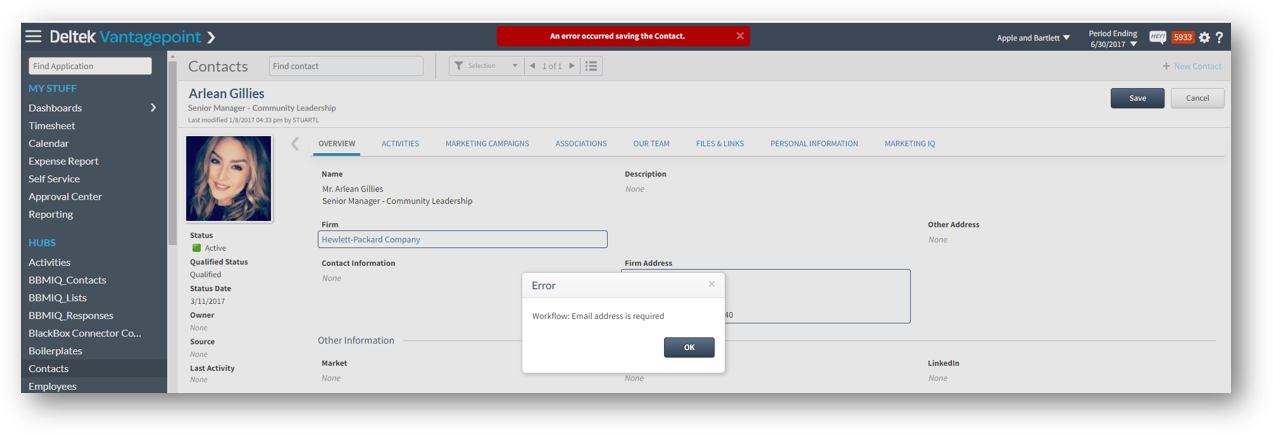
CRM Workflow Example: If a new contact is added without crucial information such as their title or email, a workflow can display an error message, prompting the user to complete these fields before saving. This enforces data integrity rules while maintaining user-friendliness. Similarly, if a field critical for project execution is missing—such as a contact’s role or key project detail —a warning can prompt the responsible party to complete this information before proceeding.

4. Automated Reminders for Timely Follow-ups

Workflows can also be employed to keep your team on track with their responsibilities, from updating records to renewing licenses.

CRM Workflow Example: If a proposal’s due date passes without a change in its stage, a workflow can automatically send a reminder to the responsible team member. Similarly, reminders for license renewals or contract expirations can be set, ensuring compliance and uninterrupted service.

5. Dynamic Field Requirements Across Pursuit Stages

Tailoring the amount of information required at different stages of a project pursuit can greatly enhance CRM efficiency, a strategy highlighted by Stacey Ho from Otak. In Deltek Vantagepoint, workflows can be set up to adjust field requirements as a project moves from an early pursuit stage to a contracted project.

CRM Workflow Example: At the “proposal submitted” stage, the workflow might prompt users for comprehensive data including estimated fee, project manager name, etc., while at the “lead” stage, it focuses on basic project information like client name and project name. This ensures relevant and timely data collection without overwhelming the user.

Implementing Stacey Ho’s approach in your Deltek Vantagepoint workflows means your data collection is as dynamic as your pursuits, ensuring you have the right information at the right time to make informed decisions.

Bonus Tip! Proactively Audit Your CRM Data with Scheduled Reports

Regular data audits are crucial for maintaining the accuracy and relevancy of your CRM system. While not technically a workflow, you can leverage the power of monthly scheduled reports to keep your data in check. Instead of overwhelming annual audits such as when you’re preparing your firm’s holiday cards, monthly reports break down the data review process into manageable segments. This allows for more frequent and focused evaluations of your CRM data, ensuring its ongoing accuracy and usefulness.

And a bonus to routine data auditing is that you can see who is creating the records and use these monthly reports as an opportunity to do continuous CRM training!

Example: Set up a monthly report in Deltek Vantagepoint to track new and modified firm and/or contact records. This report can highlight changes in contact details, the addition of new firms, or updates to existing records. You can also create these reports to show you who created the record. By regularly reviewing this report, your team can quickly identify and rectify discrepancies, update obsolete information, and confirm the integrity of new data entries.

These reports enable your team to proactively address data discrepancies and maintain a high standard of data quality. Regular monitoring ensures that your CRM database is not just up to date, but also a reliable foundation for your marketing and business development activities. Diverse Workflow Types to Enhance Your CRM Approach with Deltek Vantagepoint In the realm of CRM management using Deltek Vantagepoint, it's vital to recognize the different types of workflows available to optimize your processes.

User-Initiated vs. Scheduled Workflows

User-Initiated Workflows: These are activated by direct interaction—when a team member makes a change to a record and meets certain criteria, the workflow jumps into action. This hands-on approach ensures that workflows are triggered by deliberate updates, making sure that every client interaction is captured and acted upon.

CRM Workflow Example: A director of marketing updates the status of a marketing campaign. Upon saving, a user-initiated workflow can trigger a sequence of follow-up tasks for the team to execute, ensuring that no opportunity for client engagement slips through the cracks.

Scheduled Workflows: This workflow type functions autonomously, running at predetermined times regardless of user activity. It’s the silent engine in the background, keeping the CRM machine well-oiled and functional without the need for constant user intervention.

CRM Workflow Example: Imagine a scheduled workflow that evaluates project stages every Friday at 5 PM. If a project in an “In Pursuit” stage step has been idle for a certain period (more than 60 days, for example), the workflow can prompt a notification to the assigned business developer to take action.

Workflow Actions: The Muscle Behind Automation

Workflow actions are the actual mechanisms by which automation is applied within your CRM. While these may vary across different systems, Deltek Vantagepoint offers a robust selection of actions:

  • Errors or Warnings: These are crucial for maintaining data accuracy. If a field is incomplete or incorrect, the system can flag this with an error or warning—either as a simple notification or by preventing the user from proceeding until the issue is rectified.
  • Email Alerts: Tailored emails can be dispatched to specific individuals or groups based on their role or involvement with a record, such as notifying a Project Manager when a project is awarded.
  • Alert Notifications: Similar to email alerts, you can send a notification to a selected person or group when the conditions that you specify for the workflow are met, ensuring visibility and prompt attention.
  • Field Updates: Changes in one part of the record can trigger updates in another, keeping the data congruent and up-to-date without manual entry.
  • Activity Creation: A core function in Deltek systems, this action can, for instance, automatically schedule a debriefing meeting when a project is marked as lost.

Advanced users may also employ more complex actions such as executing stored procedures or SQL scripts, providing a level of customization and control suited to unique business requirements.

Incorporating these varied workflows into your CRM strategy with Deltek Vantagepoint not only increases efficiency but also provides a structured, error-minimized approach to client relationship management. Understanding and utilizing the full spectrum of workflow actions available in Deltek Vantagepoint is key to harnessing the full potential of your CRM system, turning routine data management into strategic asset management.

Regular CRM Workflow Maintenance

Maintaining the efficiency and accuracy of your workflows is as crucial as setting them up. Julie Huval from Beck Technology shares a proactive approach to ensure that your Deltek Vantagepoint workflows continue to function optimally.

Biannual Workflow Checkups: To keep workflows running smoothly, it’s important to conduct regular maintenance. Beck Technology implements a biannual cleaning routine, which involves revisiting and updating their workflows to ensure they align with current business processes and data requirements.

Example: Julie maintains a running list on their Kanban card of items to be reviewed and cleaned every six months. This list serves as a living document, constantly updated with new items identified by the team. When the scheduled cleaning quarter arrives, a new Kanban card is created from this master list to guide the cleaning process, ensuring nothing is overlooked.

Adopting a similar maintenance strategy for your Deltek Vantagepoint workflows, as practiced by Julie Huval and her team at Beck Technology, can significantly enhance the longevity and effectiveness of your CRM system. Regular maintenance not only keeps your workflows aligned with your current business needs but also paves the way for continuous improvement and efficiency in your data management practices.

Leverage Deltek Vantagepoint CRM Workflows for Competitive Advantage

By embedding Deltek Vantagepoint workflows into your CRM strategy, you can enhance the productivity of your marketing and business development teams. The automation of mundane tasks, timely alerts, strict data governance, and the setup of automated reminders can transform the pace and precision of your client management operations, ultimately contributing to a streamlined, efficient, and more profitable business practice.

As we've explored the various ways Deltek Vantagepoint can revolutionize your CRM strategy, remember that these insights are just the beginning. To truly harness the full potential of these dynamic workflows, firsthand experience and guidance are invaluable. We invite you to watch our webinar, where we'll dive deeper into the practicalities of setting up and optimizing various CRM workflows in Deltek Vantagepoint. Click the image below to access the webinar.


Dos and Don'ts When Implementing Your CRM

Posted by Amanda Roussel on Mar 9, 2023 12:00:00 AM

03-02-23_Dos-and-Donts-Implementing Banner

It’s no shock that technology is constantly changing. While some firms are accustomed to decentralized pursuit and marketing data, others are recognizing the need to consolidate platforms and streamline processes. In doing so, teams are discovering that a shared resource offers more transparency and accountability if executed smoothly. What are you waiting for? 

My years as a proposal specialist, marketing coordinator, marketing director, and now a CRM consultant have shown me that not all firms, or systems, are the same. There are often similarities regarding firm priorities, but people and processes can vary greatly. Let’s look at some pointers from the success stories and perhaps some lessons learned from others.  

Approach as a Team 

DO: Approach a CRM implementation with a TEAM mindset. 

The more successful implementations not only have executive support throughout the process, but they have executive engagement and involvement. This takes a commitment of time and effort from the leadership team as well as other stakeholders. Stakeholders may include members of the leadership team, marketing, and business development, seller/doers, proposal coordinators, and more.  

In Deltek Vantagepoint, everyone is using the same system and the same data, but for multiple purposes. This is certainly a team project, whether you would like to admit it or not. This concept is likely a change from previous processes.  

DON’T: Expect the marketing team to implement and roll out to the entire firm. 

There’s more to Deltek Vantagepoint CRM than marketing. It’s true! A strong CRM can guide how your firm identifies, pursues, and wins work. By capturing the right data, results can be analyzed and strategies adjusted.  

Engage Stakeholders 

DO: Think about business processes as a whole.  

It can take a large team of people in various roles to win work. Everyone has a part in the process, and representatives from those roles should be included in the implementation team. In Deltek Vantagepoint, many roles touch even just one project record. Business developers, proposal coordinators, project managers, finance teams, and project accountants all have a vested interest in recording data. The process needs to be seamless and support business processes. 

Ask questions, and then ask more! A few to get you started include:  

  • Where do groups track efforts?  
  • What reports are modified outside of Vantagepoint?
  • What information do you want to know but have no way of knowing?
  • How many emails are sent to find out who talked to John Doe recently? 
  • What are the pain points in the process of winning work?

DON’T: Assume an individual or small group has all the answers to the above questions.  

Each role has an interest in different parts of the process. Use this opportunity to address as many as possible while implementing CRM in Deltek Vantagepoint.  

Manage Expectations 

DO: Identify firm priorities to focus on.   

What are the primary goals? And what is the timeline to accomplish these? Priorities usually identify themselves after stakeholders converse and discuss wish list items. Here are more questions to prioritize:  

  • Does the firm want to have a clean pipeline?
  • Does the firm want to utilize project forecasting?
  • Does the firm want to know what is being spent on the pursuit of work? 
  • What is the return on effort for marketing initiatives?
  • How easily can a contact list be created for a holiday mailer? 

Secondary priorities can come into the fold after the primary priorities are rolled out. For firms new to CRM, there are recommended stepping stones to build upon and each of those takes some time. After all, a CRM implementation is usually rolled into a potentially busy workload. Identifying priorities and creating realistic timelines helps team members understand what’s important now and what to look forward to in the future.    

DON’T: Expect to successfully roll out a complete CRM in a few months. 

On the surface, that’s potentially an achievable goal. However, it may be more transactional than impactful. Do it right and go for impact!  

Make Decisions 

DO: Identify needs, discuss solutions, and make decisions.  

Making decisions allows for configurations to be made and tested. Once tested and confirmed that the process and system meet user needs, then document and execute it. Most CRM configurations can be modified and adjusted as needed. You must start somewhere though.  

DON’T: Delay decisions.  

I see implementations lose steam when decisions take too long. Sometimes this is due to not having the right team members around the table. Teams must include decision-makers and doers.   

Educate  

DO: Socialize the concept of CRM with employees.  

Introduce bite-size pieces of visuals, data, or processes in company meetings. By nature, some employees may become CRM champions or power users. Give them access and let them promote CRM with the implementation team. It’s always great to identify those cheerleaders within the firm that naturally promote a CRM because they believe in the process and trust the data.  

DON’T: Shock your users and give them a manual. 

People don’t typically like surprises. CRM implementation is no different. Helping others recognize what’s in it for them can go a long way. Even without the presence of a formal CRM platform, some employees are likely tracking CRM-like information. Perhaps it’s in a spreadsheet, email platform, another CRM tool, a notebook, or even their heads! Introduce them to a new tool to increase efficiency. 

Be Open to Adaptation  

DO: Recognize that this is a fluid and ongoing effort.  

Your business is constantly changing, which means your CRM system will need to adapt to those changes. A well-implemented CRM has an accompanying maintenance plan and onboarding steps.  

DON’T: Think you’re done after your go-live date.  

Tweaks will be made along the way, and workflows may change your life!  

Everyone Should be Involved When Implementing CRM 

There are many best practices to learn from and take advantage of here. While CRM is a tool that was historically used by marketing teams, Deltek Vantagepoint offers so much more than that. A theme that should be promoted throughout an implementation is “our system.” A CRM implementation is a group effort and everyone throughout the firm should be considered and involved throughout the process. 


What to Look for in a CRM Consultant

Posted by Sarah Gonnella on Feb 9, 2023 12:00:00 AM


02-09-23_CRMConsultant_Banner

The other day I had a prospect call looking for a CRM (Client Relationship Management) software, but what he found was a CRM Consultant vs. a “salesperson.” Don’t get me wrong, I absolutely want to sell software…to the right fitting firm. As with most calls, this caller wanted to set up a time for a demonstration.  

However, without understanding the prospect's challenges, and ultimately how the software will help the client’s marketing strategy, a demonstration is futile. A CRM system isn’t a magic bullet. So, when you are looking for new CRM software, it’s important to also evaluate who will assist you beyond the sale. Below is what to look for in a CRM Consultant: 

A Results-Oriented CRM Consultant Identifies Firm Needs

When speaking to a client or potential client, a CRM Consultant asks probing questions to evaluate the firm’s current processes, its challenges, and ultimately what the client is looking to accomplish. As a CRM Consultant, it’s important to understand the firm’s level of sophistication related to marketing processes and measurement. Just like a growing baby, each firm is at a different growth stage.  

baby growth sm

A baby must learn to roll over, crawl, stand, walk, and then run, and so must a firm. You can’t expect to immediately start running. Some firms’ processes are advanced despite the fact that they have no CRM system. Others have no processes at all. A firm must start somewhere. So as a consultant, it’s important to understand the firm’s marketing maturity before establishing a CRM implementation for that firm.  

During the above-mentioned call, the prospect was a little taken aback when I told him that our system wasn’t the right fit for his needs. Ultimately, he was looking for another type of software. Although it ended up not being a lead, the prospect was thankful for my honesty as I took the time to understand what his firm needed and helped guide him down a better search path. 

A Vigilant CRM Consultant Engages Key Players Throughout Implementation

After establishing needs, it’s important to make sure you have the right players. As outlined in this previous blog article, 8 Reasons for a Successful Implementation, it’s important to ensure executive buy-in during the sales process. Just as important is having the right CRM champion, and with an ERP (Enterprise Resource Planning) system, it’s important to get finance involved.  

All these key players must be a part of not only the implementation but also the sales process. When involvement from any of these roles is lacking, the likelihood of success is lessened. It is the role of the CRM Consultant to make sure that these key players are established from the beginning and do their part through the implementation. These key people play a huge part in the rollout of the system and must also engage other end users to ensure all departments, divisions, markets, and offices are represented. 

It is the Duty of a CRM Consultant to Look to the Future

When going through an implementation, a misconception that many firms have is that once the implementation is complete, so is the development of your CRM. Well, what worked today won’t necessarily work tomorrow. As your marketing strategy and the competitive landscape change, your CRM system must continue to evolve.  

Your CRM Consultant should look to resolve short-term and long-term needs, as well as think about strategic marketing plans. For example, do you plan to open a new office, go into a new market, or start a new service line? A CRM Consultant is there to guide your firm on metrics that would be valuable to access your marketing traction. 

Your CRM Consultant Should Be a Strategic Partner

A CRM Consultant should be more than a trainer or a vendor. Treating one as such is a common mistake made by firms seeking to hire a CRM Consultant. So how do you know if you have a consultant or a vendor?  

If we look at the basic definition of a vendor, “a person or company offering something for sale,” we can see there is no value added beyond the sale. Whereas a consultant is “a person who provides expert advice professionally.” A value-added CRM Consultant should have a background in marketing and be able to help your firm adapt the system to your marketing strategy.  

A consultant will: 

  • Ask strategic questions to better understand your business needs. 
  • Provide best practices and facilitate your company in adapting the system to gain insight into metrics that matter. 
  • Go beyond showing you how to just use the system.
  • Help you learn how to increase user adoption.
  • Look at ways to improve your business and your clients.
  • Understand your industry. 

Bonus: The consultant uses the system in his or her own business. 

Ultimately, your CRM Consultant should be a partner that understands your business needs and be someone you can rely on to help you as new needs arise. If your firm is looking to improve its CRM processes or looking for a CRM system, be sure to check out Full Sail Partners’ CRM resources page. These resources include mini demonstrations, webinars, whitepapers, and more.


Using Deltek Vantagepoint Systems to Maintain Better Contact Data

Posted by Evan Creech-Pritchett on Oct 19, 2022 12:00:00 AM

2022 - Contact List - Banner

It’s hard to believe that it is already so late in the year. It feels like not so long ago we were trying to beat the heat with cool drinks on sandy shores. But now the weather is beginning to cool down and the leaves are changing color, and that can only mean one thing: time to hunker down and manage the firm’s holiday contact list! Hopefully, this process has already been started but if not, this article shares a couple of tips on how using Deltek Vantagepoint features and functions can help maintain the firm’s holiday contact list and keep it clean for the future.  

Data Clean Up 

Before getting into the nitty gritty of data cleanup, let’s do a quick review. Every contact needs to have at least five parts: contact name, job title, firm name, email address and firm address. These five fields are standard in Vantagepoint, and with this information, marketers can build basic lists to use for both email marketing and direct campaigns.  

Then there are pieces of contact information that can be considered “nice to have.” These include attributes like market, rating, source, contact owner, mailings and segment type. These are not essential to the contact, but they can help narrow down who they are and what exactly the contact means to the company. 

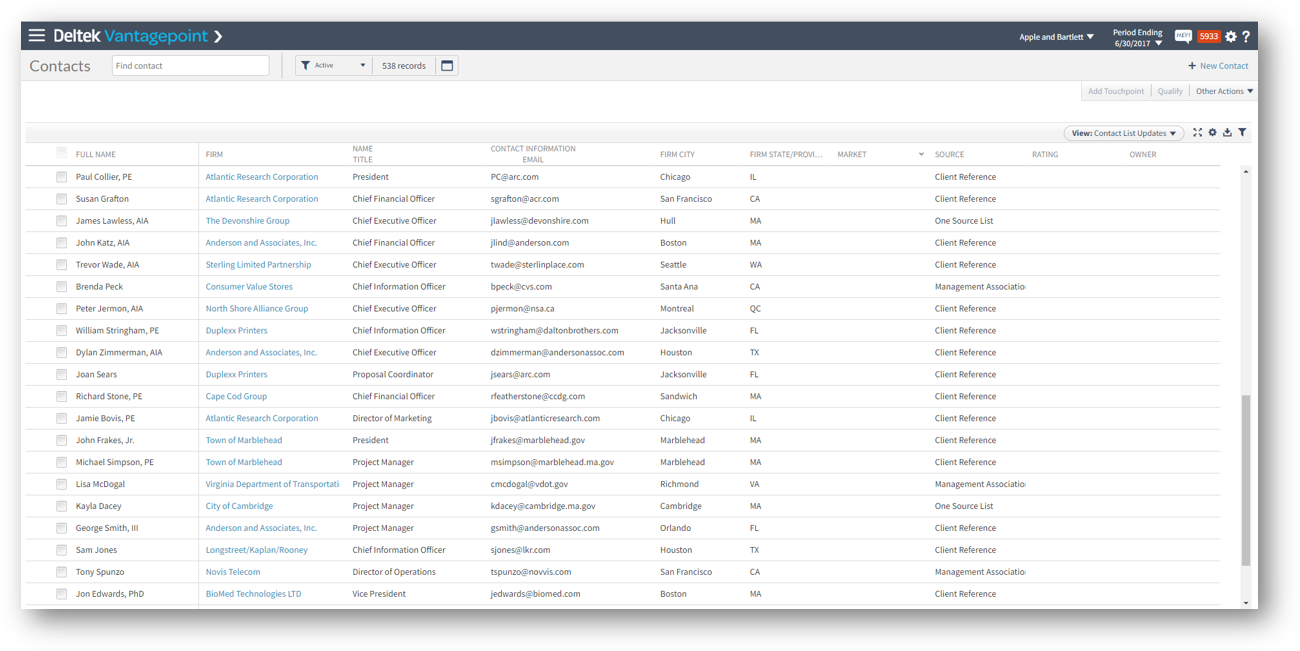
Once marketers have identified their must-have and “nice-to-have” contact fields, head over to Vantagepoint and view the contact in list view. Using this Vantagepoint feature, allows marketers to quickly see what contact data is missing or outdated. See the screenshot below. 

Contacts - list viewThis feature isn’t just in the Contacts hub either, so be sure to look for it in other hubs that may need some cleaning up as well.  
Send More Emails  

To avoid ending up with a bunch of old contacts, the best advice is to send more emails! Of course, don’t just spam the contacts, because that would just drive them away. Instead, think about sending newsletters weekly and/or monthly. By sending regularly email marketing campaigns to contacts, marketers will get contact information back such as bounced email addresses. This piece of information could indicate that the contact has moved firms or retired. Doing this throughout the year will help make the effort of creating holiday contact lists less daunting.  

Create Marketing Campaigns for Segmented Lists 

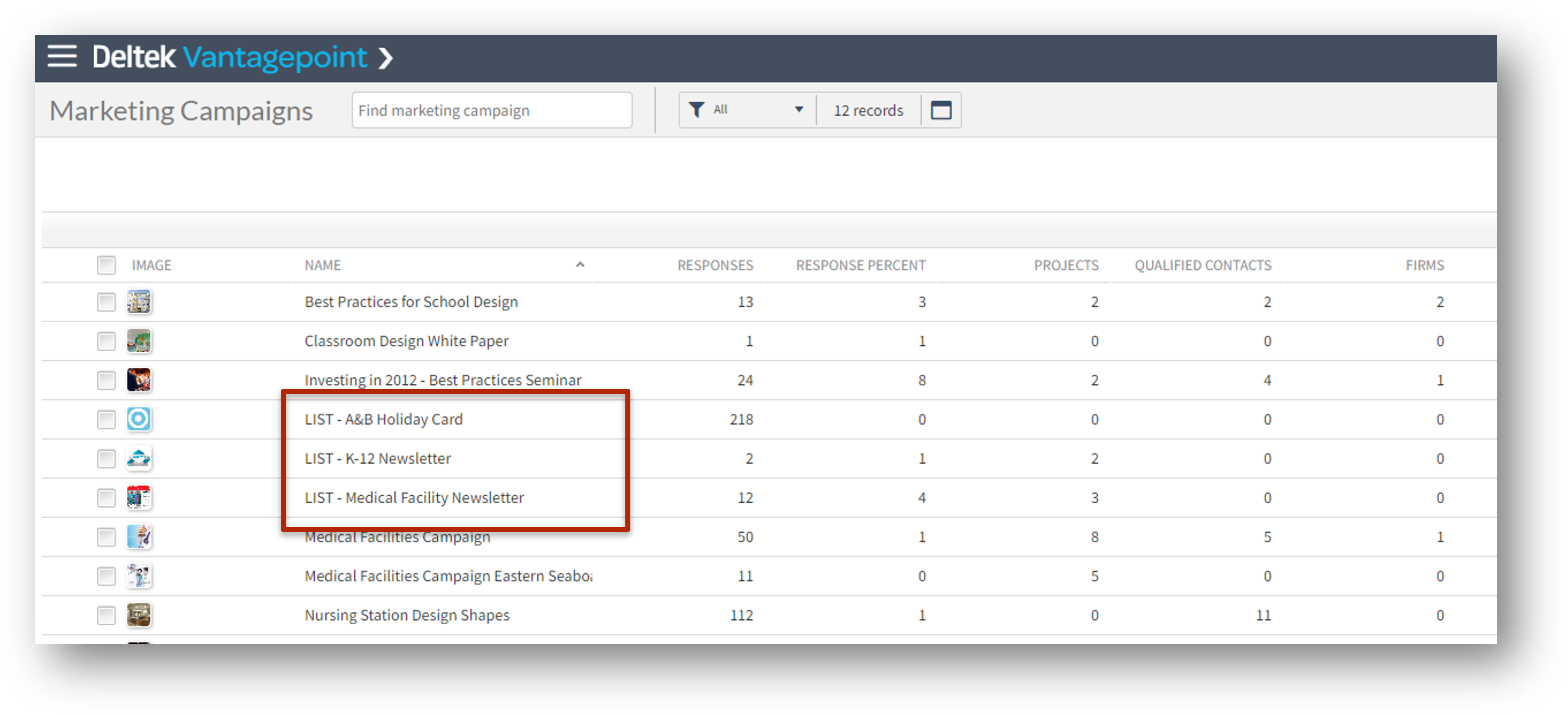
In the same vein as the last tip, use Vantagepoint Marketing Campaigns for list segments. To do this, create a new Marketing Campaign record with the name “List-Holiday Card,” for example. Then associate different contacts based on their segments (whether it be geographic, demographic, etc.) to add them to a list aka the Marketing Campaign record. With these new marketing campaigns more emails can be sent, and as contacts are created and updated, they can be added to different lists. 

Contacts - Marketing Campaigns - Lists

Monitor New Contact Creation with Scheduled Reports 

Another good practice is to have Deltek Vantagepoint monitor what new contacts were created in the database. Deltek Vantagepoint allows the user to send scheduled reports of what contacts were created in a set period of time (i.e. weekly, monthly, etc.). When these are set up, a report will be sent to the user consisting of all the new contacts and will include who initially created the contact and if there is any missing information that needs to be added. In the case that any of the aforementioned key fields of the contact are missing, the user can follow up with the contact creator and ask them to fill out the required information. This feature can also be used for projects and employees, but in our case monitoring contacts is best. 

Use Workflow Warnings and Errors for Must-Have Contact Information 

Finally, make sure you are using workflows to your advantage. These workflows can be set up to indicate errors and warnings when a contact has missing information. Warnings will simply alert the user that the contact needs more information, but they will allow the contact to be saved nonetheless. Errors on the other hand will completely stop the user from saving the contact. Both of these options are effective ways to keep a contact list clean but be sure to choose which one to use carefully.  

 Contacts - workflow errors

See these Contact Management Tips in Action  

These are just some ways to utilize the Deltek Vantagepoint system features and functions to manage contacts, even outside of the holiday season. To see these features in action, click the image below to watch a replay of the webinar, A Modern Approach to Managing Holiday Contact Lists. 


Empowering Your Team with Deltek Vantagepoint Connect Add-in for Outlook

Posted by Sarah Gonnella on Mar 23, 2022 12:00:00 AM

2022-Outlook Connect-01

The Vantagepoint Connect add-in with Vantagepoint CRM provides two-way synchronization of your contacts and calendar items within your Outlook email application. Outlook Connect empowers users across the firm to help nurture client relationships and collaborate with your team. While in Outlook, users can pin the context pane, so it remains visible. This allows the ability to view contacts and firms in the context of the active email addresses to provide quick insight to contact and firm information along with activity, pursuits, projects, and marketing campaigns. This visibility provides the entire team with valuable information while emailing and scheduling meetings. Let's take a look at how Deltek Vantagepoint Connect empowers users at your firm. 

Executives Seeking to Unify Their Team 

Sharing critical data easily across the firm is a key objective, yet a challenge for every executive. Managing and sharing data across the organization increases the ability to make crucial decisions across the business. Accessing data in a tool, like Outlook, that the firm uses on a daily basis eliminates roadblocks and redundancies for users across the company. With Deltek Vantagepoint Connect, Outlook allows users to search for and view information entered in Vantagepoint for any firm, contact, or project while in the tool. 


Increasing Client Communication Tracking for Marketing & Sales Teams 

When different departments approach tracking data in different ways, it adds barriers for marketing and sales to attain a holistic view across the firm. Identifying how to provide quick access to users entering and pursuing business across the firm ensures marketing and sales are able to provide meaningful reporting about the firm’s efforts. While using Outlook, team members now have the ability to create firms, contacts, pursuits, projects and activities within Vantagepoint as they are responding or sending emails. Having client data at your fingertips promotes transparency across the firm and improves communication to ensure departments are no longer working in silos. Outlook Connect integration is a vital tool to connect to your ERP to help marketing and sales strengthen collaboration across the company.    

Improving Project Management Productivity 

Project Managers live by tasks and schedules. During a project, a task is much more than just a to-do. It is also the way project-based firms bill for their time. Project Managers additionally need the ability to schedule and synchronize internal calendars and meetings. With the Vantagepoint Outlook Connect, users can now synchronize calendar items between Outlook and Vantagepoint. This eliminates the need to enter data twice.  

Outlook Connect also streamlines the process of scheduling meetings through the Scheduling Assistant. Through the Scheduling Assistant, clients can see the team's availability and choose a time to meet that works with both of their schedules. The client only sees available times and does not see any other details or appointments on your calendar. Alternatively, project managers can also provide specific times that are available for the entire team and provide defined time slots to the client. Once they choose a time, all internal team members will receive an invitation on their calendar. Lastly, when a calendar event is shared with Vantagepoint, users can log that time to their timesheet. Talk about improving productivity! 

Accessing Financial and Project Client Communication History   

Many times, firms may overlook finance’s need to access client data from Outlook. Finance always seems to be in the ERP system working on billing, AR and financial reports. However, Outlook is something they also use on a daily basis. One key way finance may find value from Outlook Connect is its ability to log email or correspondence related to billing. Outstanding AR, project contract documentation and contract changes should all be logged in your ERP related to the client, contact and project. Documenting correspondence and keeping client communication up to date guarantees all team members have access to the latest client communication history.   

Enable Your Professional Services Team 

Data has the potential to transform professional services firms' business when users share information across their entire company. No matter what role you are in, getting helpful data into the hands of your users enables them to make informed, data-driven decisions. Check out our past mini-demonstrations to see how Deltek Vantagepoint + Outlook is changing the way CRM is managed by professional services firms. 


Click the image below to learn how Full Sail Partners can help you Synchronize Your Business Outlook Calendar with Deltek Vantagepoint. 

Why Deltek Vantagepoint CRM for Professional Services Firms

Posted by Ryan Felkel on Oct 27, 2021 12:00:00 AM

The world of professional services firms revolves around clients and projects. It’s a daily process of finding new clients and pursuing them for new work with hopes that all this effort equates to a winning project. While some firms chose to treat this like a rat race, others have learned that it’s more efficient to be strategic and intentional with their tactics. The latter has also likely adopted Deltek Vantagepoint CRM. Which enables professional services firms to use data to make actionable decisions that generate profitable projects.

Deltek Vantagepoint logo

Use Deltek Vantagepoint CRM to Track Client Relationships

Touchpoints galore! That’s right, professional services firms have touchpoints with numerous people at client firms and the information gained during these interactions needs to be collected and stored in one common place. By having these insights stored in a centralized system, firm marketing and business development teams can identify new pipeline opportunities and nurture key relationships.

Additionally, Deltek Vantagepoint CRM is the only real project-based CRM and supports the “seller-doer” model. The “seller-doer” model is when project managers and/or consultants are responsible for providing their services as well as generating new work. With Vantagepoint, “seller-doers” can easily record client touchpoints since they are in the same system being used to deliver and manage projects and engagements.

Gain Insights into Client Interests

Creating the right messaging and keeping clients engaged is a daily battle for marketers. Each victory is one step closer to winning the war, or in this case, new work. In this modern-day business development warfare, insights into client behavior are the weapons to success. Marketing campaigns in Deltek Vantagepoint can be used to track and measure the success of particular marketing efforts. Initiatives such as email blasts, webinars, industry conference sponsorships and more can all be tracked in Vantagepoint marketing campaigns.

Using these insights, marketers can determine which techniques and messages are working best to keep clients engaged. Business development teams can identify firms and contacts that are demonstrating high levels of interest and know what is getting their attention. As a result, relationships can be nurtured, and proposals can be more tailored to address the unique needs of a client.

Identify Opportunities and Create Winning Proposals

Often, it’s not just about finding new work, but it’s also about picking which request for proposals (RFPs) to pursue. Let’s admit, proposals are time consuming and often require the involvement of staff from several departments. Furthermore, firms often lack a go/no go process that is based on actual data. However, that doesn’t need to be the case if firms are using Deltek Vantagepoint.

Vantagepoint is a single source of truth since it contains project pursuit and opportunity information. Prior to picking which RFPs to pursue, business development teams using Vantagepoint can:

  • Identify if internal resources are available to assist with the response.
  • Apply lessons learned from previous wins and losses.
  • Use quantifiable data to determine if an opportunity is financially beneficial for the firm.

After deciding which new RFPs to pursue, Vantagepoint remains a handy tool for the team responsible for preparing the proposal response. Being a project-focused CRM tool, the new pursuit stage begins by capturing project information in a new project. This allows the team to build an actual project plan with assigned resources, timelines, and budgets to ensure the final proposed project can be delivered in a profitable manner.

Additionally, past project information with descriptions, pictures, budgets and more can be included as reference project information. As is the same for resumes of employees that are identified as key resources for the project.

Automate Activities, Notifications and More with Workflows in Deltek Vantagepoint CRM

Updating data and maintaining clean accurate data is a daily struggle. More importantly, without taking the time to keep data up to date, it eventually becomes useless. Workflows are essential for automating repetitive tasks and notifying people about actions that need to be taken. In Deltek Vantagepoint workflows can:

  • Update a client record when a change to the client field is made in a user defined grid.
  • Provide an error notification with a user fails to update a required field or uses a wrong value.
  • Trigger follow-up reminders for predefined activities in a marketing campaign.
  • Automate the RFP go/no go process.

While these are just a few examples of workflows available in Vantagepoint, a Full Sail Partners’ consultant can help identify more workflows a firm can utilize to meet their unique needs. Click here to reach a crew member.

Win More Work with Deltek Vantagepoint CRM

Being that Deltek Vantagepoint is a project-centric CRM, it’s built and designed for the way professional services firms do business. Firms using Vantagepoint CRM gain a clear vision into their business development pipeline, nurture the right client relationships at the right time, and can propose competitive and reliable project bids. Now is the time to adopt Vantagepoint CRM and all its capabilities to win more business.

Latest Posts