Full Sail Partners Blog (7)

Understanding the Four Levels of Severity When Submitting a Case to Deltek Support

Posted by Amy Balassone on Feb 13, 2025, 12:00:00 AM

02-12 Understanding the Levels of Severity Deltek Support - Banner  Banner-1

Let's be real: dealing with system issues can be a major headache. But knowing how to categorize your problem when submitting a support case to Deltek can make all the difference in getting the help you need—fast. Choosing the right severity level ensures that Deltek can prioritize your case appropriately, saving you from unnecessary delays and frustrations.

So, let’s break down the four severity levels Deltek offers, what they mean, and how to make sure your issue gets the attention it deserves.

1. Mission Critical (Severity 1)

This is the "all hands on deck" level. If your system is completely down, producing incorrect data that could lead to major business blunders, or preventing you from working altogether—this is your category.

Examples of Mission Critical Issues:

  • Your entire system crashes and won't let you log in.
  • Financial calculations are way off, potentially leading to serious business risks.
  • A major system failure with no workaround, grinding operations to a halt.

What Happens in Severity 1 Cases:

  • Deltek immediately prioritizes Severity 1 cases as top priority.
  • A dedicated Support Services Analyst will be assigned to your case full-time to ensure a rapid resolution.
  • This level is used when there’s an imminent deadline or business-critical operations at risk, and there’s no reasonable workaround to mitigate the issue.

Why It’s Important: Mission-critical issues require swift action to minimize downtime and business disruption. This is why Deltek places the highest priority on these cases and dedicates full-time resources to resolving them.

2. Critical (Severity 2)

Think of this as the "high priority, but not a total meltdown" level. A major function isn't working properly, but you can still get some work done with a workaround.

Examples of Critical Issues:

  • A key feature is glitching, but you’ve found a workaround to keep moving.
  • A non-production system is acting up and causing delays.

What Happens in Severity 2 Cases:

  • Deltek assigns a Support Services Analyst to tackle your issue during business hours.
  • The case is treated with urgency, but since you have a workaround, it’s not as critical.
  • The analyst works with you to identify the problem and find a long-term solution.

Why It’s Important: Your operations might not be at a full stop, but resolving these issues quickly is crucial to avoid further disruptions.

3. Elevated (Severity 3)

This level covers the "it's annoying but not a deal-breaker" kind of issues. Your system is working, but not as smoothly as you'd like.

Examples of Elevated Issues:

  • A visual glitch that’s more of an eyesore than a real problem.
  • A feature that’s sluggish but still functional.
  • Formatting errors that don’t impact operations.

What Happens in Severity 3 Cases:

  • A Support Services Analyst will take a look and work on a fix.
  • These cases don't demand immediate attention but are still important.
  • Issues may be escalated if they become more problematic.

Why It’s Important: Even small frustrations can add up. Getting them fixed ensures your system remains efficient and user-friendly. Deltek prioritizes resolving these issues promptly to maintain optimal system performance and user satisfaction.

4. General (Severity 4)

This is your "curious, but not in a rush" level. These cases are for general questions, feature requests, or minor bugs that don’t disrupt daily operations.

Examples of General Issues:

  • You’re unsure how to use a specific feature and need clarification.
  • A minor bug that’s annoying but doesn’t impact your workflow.
  • Suggestions for future improvements.

What Happens in Severity 4 Cases:

  • Support will get to these as part of their regular workflow.
  • Since there’s no critical time constraint or major business impact, the response time may be longer than for higher-severity cases.
  • Support staff will provide assistance based on normal procedures, and issues may be resolved in future product updates or patches.

Why It’s Important: Even small things matter—whether it's answering your questions or improving future system versions.

How to Choose the Right Severity Level

Picking the right severity level helps Deltek help you—quickly and efficiently. Here’s a cheat sheet:

  • Severity 1: If your business is at a standstill—submit ASAP.
  • Severity 2: Major impact, but you can still function.
  • Severity 3: Moderate impact with workarounds.
  • Severity 4: Minor impact or general questions.

By understanding and accurately selecting the severity level of your issue, you help Deltek respond faster and more effectively, ensuring minimal disruption to your business. Remember, the more specific and detailed you are when submitting your case, the quicker and more efficiently your issue will be addressed.

Need Help Deciding? We're Here for You!

Still unsure which severity level fits your issue? No worries! Reach out to your Full Sail Partners Account Manager, and they'll help you submit your case with confidence. We're here to make your Deltek experience as smooth as possible!


Streamline Employee Data Management with the Blackbox Connector for Deltek Vantagepoint and ADP Workforce Now

Posted by Joel Slater on Feb 6, 2025, 12:00:00 AM


02-06-25 BBC_ADP and Workforce Now -  Banner rev

Managing employee data across multiple systems can be a time-consuming and error-prone process for firms using Deltek Vantagepoint and ADP Workforce Now. The Blackbox Connector for ADP Workforce Now simplifies this challenge by seamlessly syncing employee data between the two systems. Designed with efficiency and accuracy in mind, this connector ensures your firm maintains a single source of truth while reducing the manual effort required to manage employee records.

What Is the Blackbox Connector for ADP Workforce Now?

The Blackbox Connector is an API-based integration that connects Deltek Vantagepoint with ADP Workforce Now. This pre-built connector automates the flow of employee data between the two systems, eliminating the need for manual data entry and reducing the likelihood of errors.

As best practice, ADP serves as the system of initial input for employee data. When a new employee is onboarded in ADP, the connector triggers the creation of their employee record in Deltek Vantagepoint. All mapped fields—such as demographic details, orgs/departments, hire dates, pay rates, PTO, education, skills, and even custom fields—are automatically synced to the Deltek Vantagepoint Employees hub. This creates a streamlined process where the relevant data captured during onboarding in ADP flows seamlessly into Vantagepoint without duplication of effort.

Key Features of the ADP Vantagepoint Connector

  1. Automated New Hire Sync:
    • Automatically provisions new employee records in Deltek Vantagepoint when new staff are added to ADP Workforce Now.
    • Transfers all mapped fields without requiring manual data entry.
  2. Ongoing Data Synchronization:
    • In addition to new hires, updates mapped fields for active/existing employees, ensuring any changes made in ADP (e.g., pay rate adjustments or organizational changes, PTO data, etc.) are reflected in Deltek.
    • Enables a daily synchronization schedule, with an on-demand button available in Vantagepoint for immediate updates.
  3. Seamless Termination Updates:
    • Syncs termination details from ADP to Vantagepoint, with timing logic and effective date configurations to manage the deactivation of employee records.
  4. Customizable Field Mapping:
    • During setup, clients work with our team to map fields from ADP to Vantagepoint based on their specific needs.
    • Supports a range of standard and custom fields for tailored integration.
  5. Operational Visibility:
    • The Blackbox Connector platform provides real-time visibility into the connector’s operations, including successful API calls and workflows.
    • Error logs allow clients to identify and address issues quickly, ensuring minimal disruption to operations.

Benefits of a Seamless Integration

  1. Eliminate Manual Data Entry: By automating data synchronization, firms reduce the time and effort required to manage employee records. This efficiency not only saves administrative hours but also allows HR and finance teams to focus on higher-value tasks.
  2. Ensure Data Accuracy: Manual data entry often introduces errors that can cause downstream issues in payroll, project assignments, and compliance reporting. The connector’s automated workflows minimize these risks, ensuring consistent and reliable data across both systems.
  3. Maintain a Single Source of Truth: With ADP Workforce Now as the primary input system of employee data, firms can rely on accurate, up-to-date information being reflected in Deltek Vantagepoint. This consistency enhances reporting, decision-making, and overall operational integrity.
  4. Support Scalability: Whether your firm is growing or adjusting to organizational changes, the connector’s customizable mappings and robust infrastructure ensure it scales with your needs.

See the ADP Vantagepoint Connector in Action

Curious to see how the Blackbox Connector for ADP Workforce Now can transform your employee data management? Click below for an overview of the solution. You’ll get a firsthand look at how this connector streamlines data synchronization, reduces manual effort, and enhances accuracy.

The Ultimate Checklist for a Smooth Vision to Vantagepoint Upgrade

Posted by Cate Phillips on Jan 30, 2025, 12:00:00 AM

01-30-25 V to VP Upgrade -  Banner


Upgrading from Deltek Vision to Vantagepoint is a big step, and it can feel overwhelming. But fear not! With the right preparation, guidance, and tools, the transition can be smooth and set your firm up for long-term success. At Full Sail Partners, we’ve assisted numerous firms in navigating this process, and we’re here to share our expertise.

This checklist will help your firm prepare for the upgrade, ensuring a seamless transition. Let’s dive into the steps you need to take:

1. Explore Upgrade Resources on Full Sail Partners’ Website

Your first stop should be the Vantagepoint Upgrade Assistance Page on the Full Sail Partners’ website. This page consolidates everything needed, including links to resources from both Deltek and Full Sail Partners. It provides:

  • Guides and best practices for upgrading
  • Links to Deltek resources
  • Exclusive tools and services from Full Sail Partners

In addition to Full Sail Partners' resources, Deltek offers several tools to assist with your upgrade, including the Customer Assistance Program (CAP) and the Vantagepoint Readiness Portal. The CAP provides access to personalized consulting and technical support, while the Readiness Portal contains videos, training modules, and checklists to help firms navigate the upgrade process. Together, these resources ensure you have comprehensive support at every stage.

Navigating these tools will give you a clear understanding of what to expect and where to start.

2. Schedule a Vantagepoint Upgrade Consultation

Requesting a consultation with the Full Sail Partners’ team is an essential step. Consultants can:

  • Assess your firm’s current setup
  • Identify potential challenges or customizations
  • Provide tailored advice and a clear roadmap for the upgrade process

Ready for a consult today? Request a Vantagepoint Consult by clicking here.

3. Get a Personalized Vantagepoint Readiness Report

The next step is to identify the issues before upgrading. Our Vantagepoint Readiness Report identifies things that need to be cleaned-up prior to obtaining your preview environment and upgrade. The cost includes a consultant that will meet with you to review everything and discuss areas of importance. The report gives you a snapshot of your entire database and the items your firm needs to address.

This is the most critical and helpful step. It starts you down the path of knowing what you need to know. This process includes:

  • Reviewing your current database configuration
  • Helping you prepare a preview environment for your new solution
  • Identifying key areas for clean-up and adjustment

This readiness report ensures your firm is set up for success and ready for the next stages.

4. Review System Requirements and Compatibility

Before diving into the upgrade, verify that your hardware, software, and integrations meet the Vantagepoint requirements. The assistance page includes links to Deltek’s technical specifications. Ensure the following:

  • Servers and workstations meet performance requirements
  • Third-party integrations are compatible
  • Current workflows are reviewed to identify custom configurations

5. Cleanse Your Data, Review Processes & Make Desired Changes

Upgrading is the perfect opportunity to declutter your system and review your firm’s processes. The Vantagepoint Readiness Report is the perfect checklist of where to target your efforts. Some common reviews and updates include:

  • Archive old projects
  • Update and validate contact information
  • Standardize data fields for consistency
  • User roles and security settings

Clean data and clear processes will make the transition smoother and your new system more efficient.

6. Backup Your Current Vision System

Creating a full backup of your existing system is critical. A backup ensures you can recover data if any unexpected issues arise. This backup should include:

  • Project records
  • Contact lists
  • Financial data

It’s always better to be safe than sorry!

7. Configure Your Vantagepoint Preview Environment

This step may be handled internally, but many clients may ask for our assistance. Some of those things include technical services, weekly meetings, establishing new processes, training and configuration changes, and programming to automate clean-up. Some firms want to take the lead and only need guidance, while others want a more hands-on approach.

For projects that require more coordination, our firm will assign you a consultant to oversee the project and offer additional resources depending on what is revealed from the Vantagepoint Readiness Report. Should we need any additional custom scripts, that would be handled by one of our developers. Firms might also need assistance from one of our IT consultants for any technical items. It is hard to estimate needs since the readiness report helps to outline what is necessary.

8. Test the System in a Sandbox Environment

Before going live, testing is essential. A sandbox environment allows you to:

  • Simulate daily workflows
  • Run key processes, like project setups and reporting
  • Identify and resolve issues

Involve team members from various departments to get a holistic view of the system’s performance.

9. Train Your Team and Make Adjustments

Your team’s success depends on their understanding of the new system. Full Sail Partners offers comprehensive training resources. To prepare your team:

  • Host training workshops
  • Provide access to user guides and videos
  • Encourage hands-on practice in a sandbox environment

Deltek’s Vantagepoint Readiness Portal is also an excellent resource for team training. It includes interactive modules and videos tailored to various roles, ensuring every team member has the knowledge they need.

10. Make the Shift to Full Production

This step involves moving the preview environment to production. With our Transition Copy Scripts, firms can capture many of the changes in the preview environment and move them to production which eliminates having to redo things. The scripts can be run as many times as you would like at no additional charge.

During the Deltek Vantagepoint transition, firms can save time by capturing the changes made in the test environment. During the Vision upgrade, the upgrade scripts to Deltek Vantagepoint will bring over all of your data and custom fields. However, the field order is not retained, and screen design properties, saved searches, reports, and dashboard/dashparts will reset.

Using Full Sail Partners’ Transition Copy Scripts allows firms to retain their changes and eliminates redundancy and rework between each test upgrade and your final production environment. The execution of the scripts can be customized and/or run independently of each other.

11. Execute the Upgrade with Expert Support

When it’s time to go live, rely on experienced professionals to guide you. The Full Sail Partners’ team provides support to:

  • Troubleshoot issues
  • Minimize disruption
  • Ensure a smooth transition

Key considerations include:

  • Scheduling the upgrade during off-peak times
  • Having IT and consulting support on standby
  • Communicating a clear “go-live” plan to all users
  • Using the Deltek Vantagepoint Readiness Portal to confirm upgrade dates provided by Deltek - This portal includes the specific timeline for your firm’s upgrade and ensures that everyone involved is aware of the schedule

12. Follow Post-Upgrade Best Practices

Your upgrade doesn’t end at go-live. Post-upgrade optimization ensures you’re getting the most out of Vantagepoint. Post-upgrade steps include:

  • Monitoring system usage and performance
  • Scheduling follow-up training sessions
  • Staying informed about updates and new features

Scheduling regular check-ins to review system performance and address any user feedback is essential.

See All Vantagepoint Upgrade Resources in Mini-Demo

Upgrading to Vantagepoint is an exciting opportunity to enhance your firm’s operations. To explore all the resources available, including how to access the Vantagepoint Readiness Portal, watch my mini-demo. In it, you’ll find step-by-step guidance and practical tips to ensure your upgrade process is as smooth and stress-free as possible. Click the image below to watch today!

Did You Miss These Deltek Vantagepoint Updates?

Posted by Lisa Ahearn on Jan 23, 2025, 12:00:00 AM

01-23-25 Vantagepoihnt Features -  BannerIf you’ve been using Deltek Vantagepoint but haven’t kept up with the latest versions, you might be missing out on some game-changing features. Versions 7.0, 7.1, and 7.2 are packed with updates that make navigating, managing, and automating your work easier than ever. From smarter navigation to advanced AI tools, these updates are designed to save you time and streamline your processes. Let’s dive into the highlights to see what you might have overlooked!
NOTE: Not all companies were upgraded to versions 7.1 and 7.2. For those companies that did not get 7.1 and 7.2, those features and more will be in 2025. 

Jump to each section by clicking below:

Smarter Navigation to Save You Time

Enhanced Search Capabilities

Efficiency Features to Speed Up Your Workflow

Data Management and Customization

Automation That Does the Heavy Lifting

Accounting and Project Management Improvements

Visual and Dashboard Updates You’ll Love

Why Update Now?

Smarter Navigation to Save You Time

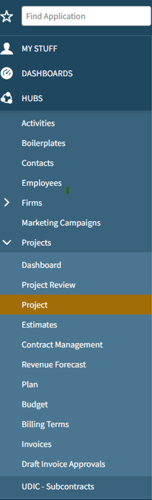
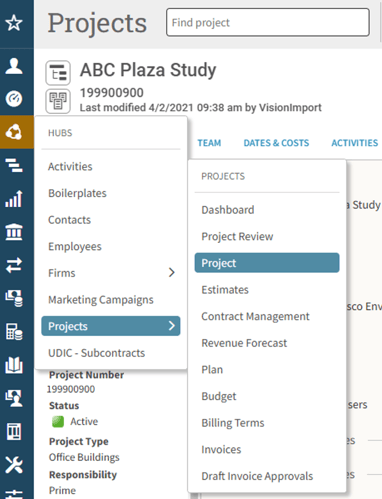
🚀 Redesigned Navigation Menu (7.0)
Tired of hunting for what you need? The redesigned menu now includes nested items and collapsible fly-outs for a more streamlined user experience.

Blog_V7_Feature_01Blog_V7_Feature_02

🔗 Open in New Tab or Window (7.1)
Right-click menu items or blue hyperlinks to open them in a new tab without losing your place. It’s a simple tweak that can make a big difference.

👤 Logged-In User Image Replaces the Gear Icon (7.1)
Your logged-in user image has replaced the gear icon in the upper right corner, giving a more personalized touch to accessing your preferences.


Enhanced Search Capabilities

🔍 Updates to Search (7.1)
Search now supports multiple values separated by semicolons, with operators like "equals" and "contains." Plus, you’ll find handy new filters for "this year" and "last year" to refine your results faster.

📥 Advanced Search and Download (7.2)
No more detours to print preview. You can now access advanced search and download directly via Other Actions or by clicking the three dots at the end of a row in Favorite Reports. This streamlined approach saves you time and clicks.

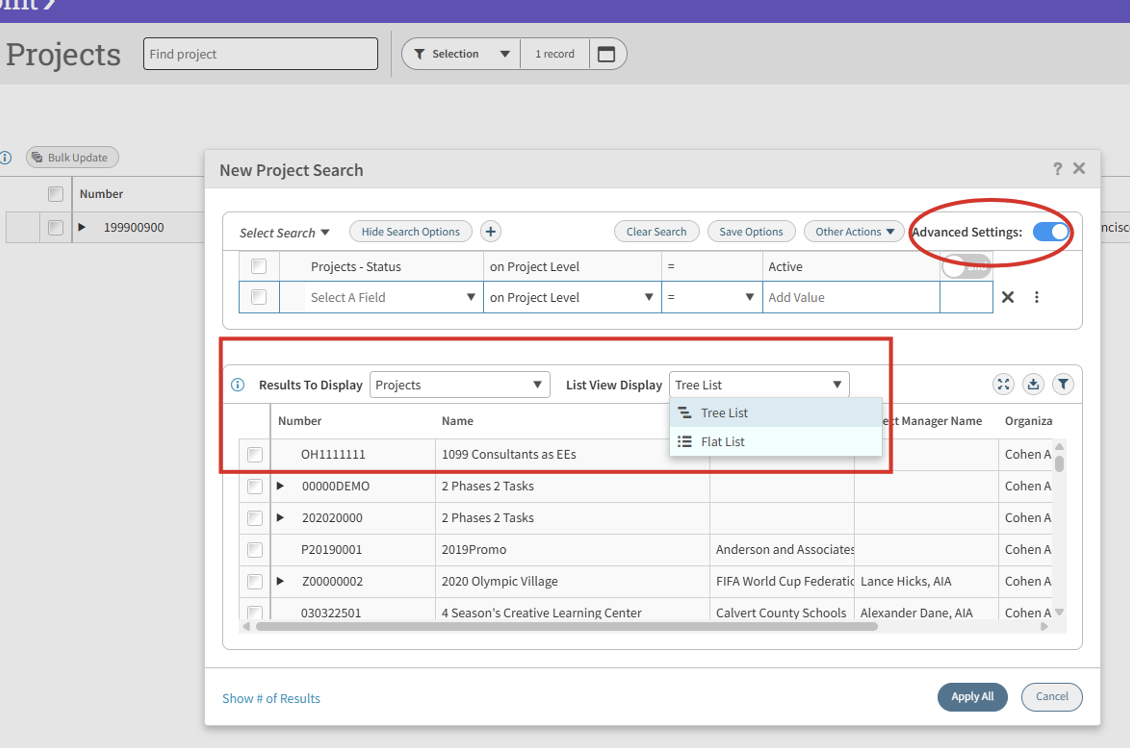
🔍 Advanced Work Breakdown Structure (WBS) Search (7.0)
Searching within the Project Hub is now more flexible. Toggle on Advanced Search to customize how lower WBS levels are displayed. Select your desired results and list view display type for a more tailored search experience.

Blog_V7_Feature_03


Efficiency Features to Speed Up Your Workflow

⌨️ Keyboard Shortcuts (7.0)
Speed things up with new shortcuts for navigating Vantagepoint like a pro.

📋 Jump to Row in List View (7.0)
Switch between grid and list views without losing your place. The record you’re reviewing stays in focus, so you can avoid unnecessary scrolling and stay efficient.

Row Level Validations in Transactions (7.0)
Transaction entry just got easier. You can now move to a new row without completing every field in the current one. Validation happens only when you click Save, making it simpler to copy rows and update key details like amounts or account numbers.

📋 Bulk Updates for List View (7.0)
Simplify your data updates with the new bulk update feature for list views. Make updates to multiple records at once, saving time and effort when managing large datasets.


Data Management and Customization

📂 Data Import (7.0)
User-Defined Hub imports are now available directly in the web browser, marking the first step toward transitioning all data imports from desktop to browser. Imports respect locked and required fields, and you can use Settings to trigger workflows or bypass Screen Designer for smoother operations.

🆕 Track New Records (7.0)
Creating multiple new hub records? While doing so, the search bar is now replaced with “New Records,” allowing you to quickly view and manage all the records you’ve just created without creating a new search.

Blog_V7_Feature_04

🛠️ Opt-In Features (7.0)
Not ready for every update? The Opt-In Features list in Settings lets you try enhancements before they become standard, making it easier to manage changes at your own pace.


Automation That Does the Heavy Lifting

🤖 Timesheet Assist (7.0 & Enhanced in 7.2)
This smart feature reminds users to complete their timesheets and suggests projects based on past activity. It’s now integrated into Mobile Time & Expense for even more convenience.

⚙️ Update Timesheet with Approved Absences (7.1)
Approved absences automatically populate timesheets, but you still have full control to edit as needed.

📅 Update Planned Hours from Approved Absences (7.0)
Approved absences can now flow directly into project plans with just a few simple configurations, saving you time and effort.

💾 Explicit Save in List View (7.0)
Make multiple updates to records and save them all at once. This reduces lag and makes updates a breeze.

🚀 Enhanced Navigation with Deltek Dela (7.2)
Deltek Dela takes accessibility to the next level by enabling users to quickly open applications and hub records—even when multiple records share the same name. This enhancement streamlines navigation and speeds up workflows, saving you valuable time.

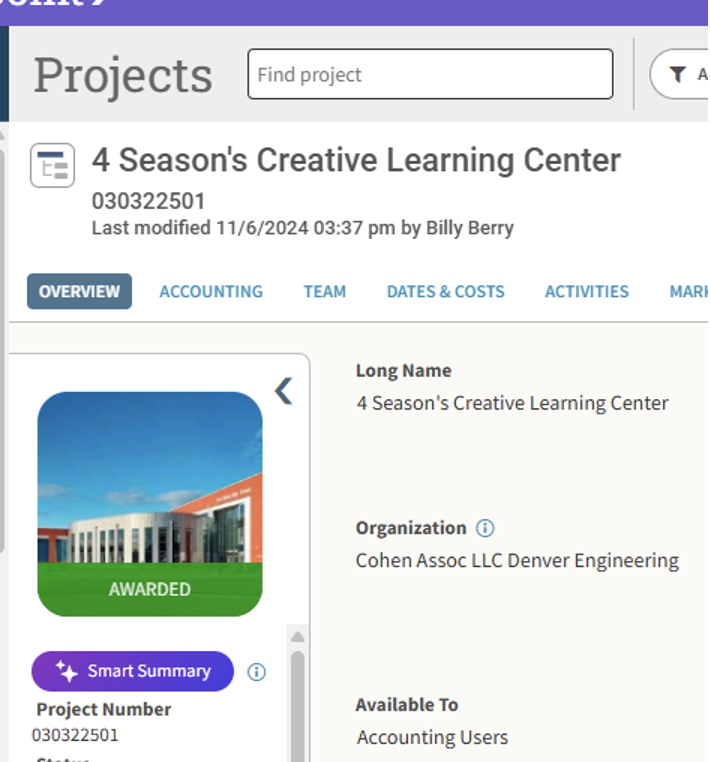
🧠 AI-Powered Project Smart Summaries (7.0)
Let AI handle the busy work. Smart summaries provide insights into your projects without the need for multiple reports.

Blog_V7_Feature_05


Accounting and Project Management Improvements

📊 New Reports: Aged Unbilled Revenue and Project Forecast (7.0)
Gain better visibility into project financials and progress with these detailed new reports.

💸 Batch Billing Enhancements (7.2)
A single error in a batch no longer stops the whole process! Problematic projects are flagged and skipped, so you can resolve issues without holding up the rest.

🧾 Create Voucher from PO in Browser (7.0)
Voucher creation is now available directly in your web browser for a smoother, faster workflow.

📈 View Cost and Billing Rate Columns (7.0)
Plan more effectively with a side-by-side view of costs and billing rates in project planning. Access to cost is still restricted by security.

👀 See Employee Availability (7.1)
Need to reassign tasks? Employee availability is now visible directly from the employee card for better scheduling.

🛒 Purchasing Requisitions (7.0)
Streamline your purchasing workflows with optimized requisitions for Requests for Quotation (RFQ). This enhancement focuses your purchasing process for greater efficiency and accuracy.

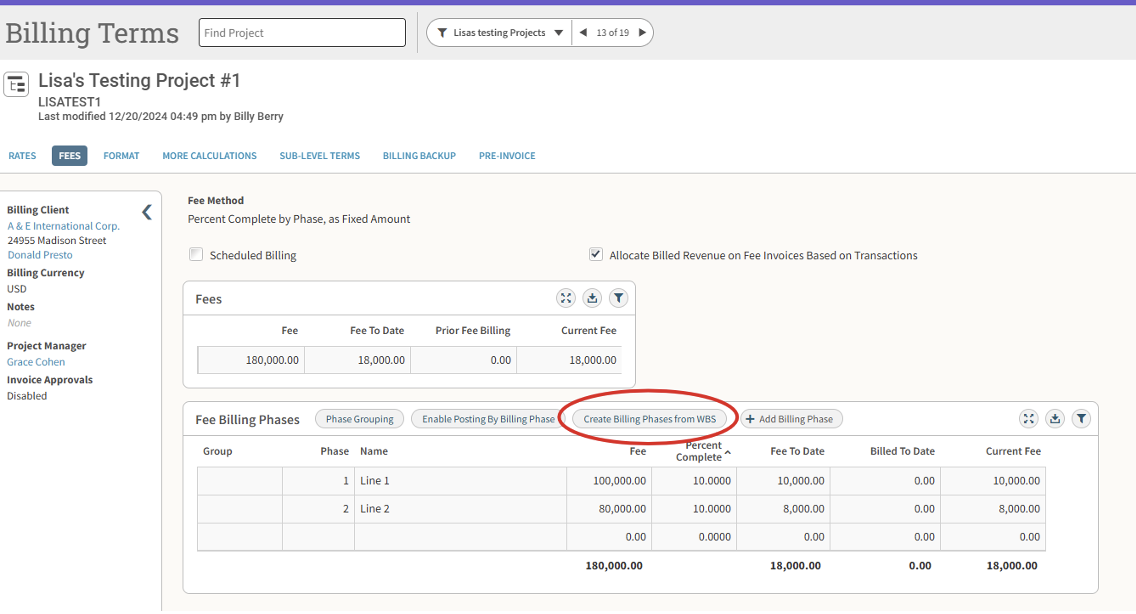
📑 Create Billing Phases from WBS (7.0)
Save time on billing setup with the ability to generate billing phases directly from the Work Breakdown Structure (WBS). This feature simplifies phased fee billing and speeds up the creation of billing terms.

Blog_V7_Feature_06

💸 Update Fees Based on Compensation (7.2)
Project accountants and billers can now save time by updating fees in Billing Terms directly from Compensation. Easily identify and address variances between fee amounts in the billing terms and compensation areas for more accurate billing.

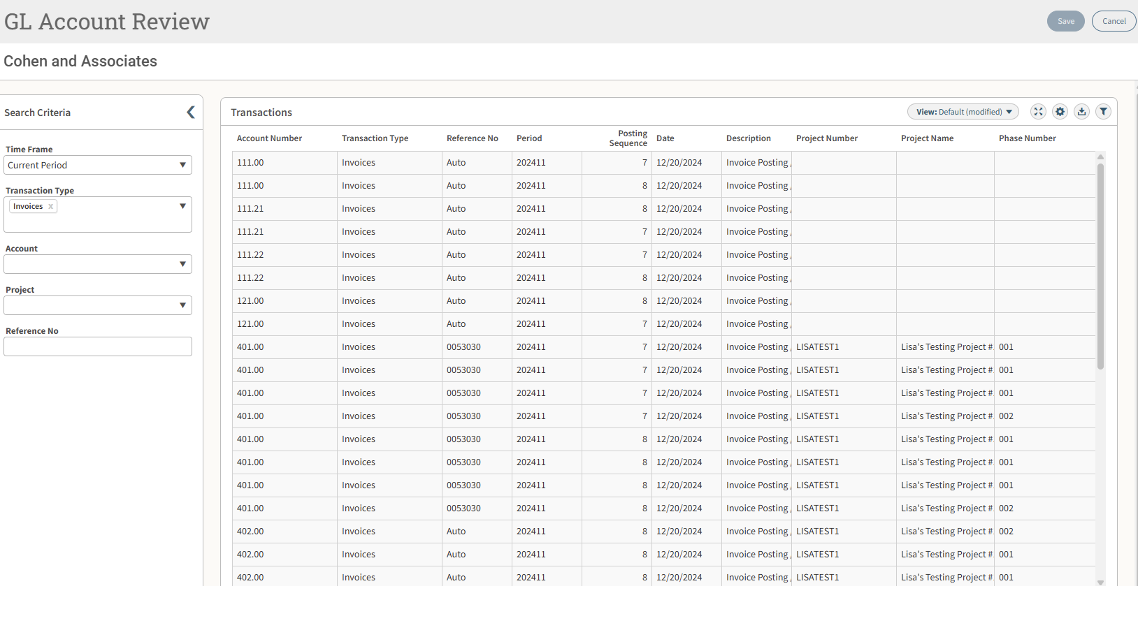
📒 General Ledger (GL) Account Review (7.0)
GL Account Review sets the stage for future enhancements, including user-defined fields in transaction entry. User-defined fields can be set up in 7.0 and the data added in GL Account Review after transactions are posted. Future updates will allow this information to be included during transaction entry.

Think of GL Account Review as a quick and easy way to view activity for one or more GL accounts or transaction types without running a full report, streamlining your financial oversight.

Blog_V7_Feature_071


Visual and Dashboard Updates You’ll Love

🎨 Customizable Dashpart Titles (7.0)
Make your dashboards your own by customizing title bars and font colors.

📊 Funnel Dashpart (7.1)
This new chart type makes it easier to track projects by stage, giving you a clear visual of progress at a glance.

📊 Org-Level Reporting in Dashboards (7.2)
Get deeper insights with the new organization-level reporting feature in dashboards. Easily view metrics like hit rate, revenue, and cost by organization to support better decision-making and performance tracking.

📅 AR Collections Forecast Dashpart (7.2)
Forecast cash flow based on average collection periods for more informed financial planning.

📊 AP Detail Dashpart Base (7.0)
Gain better visibility into financial details with the AP Detail Dashpart Base. Access Voucher Review information, including Paid-When-Paid details, across multiple companies and currencies. Need a quick snapshot of payables due in the next 30 days? Use this base to create a KPI dashpart and stay ahead of your financial planning.


Why Update Now?

The latest updates to Vantagepoint are packed with smarter navigation, enhanced automation, and powerful dashboard features to simplify your workflows and free up your time for strategic work.

Want to see these updates in action? Explore Powering Project Success with Deltek Vantagepoint, our mini-demo series showcasing dozens of impactful features. Click the image below to discover how these tools can help you streamline your processes and drive project success!

Navigating Your Digital Transformation: Embrace the Future with Cloud Solutions

Posted by Amy Balassone on Dec 19, 2024, 12:00:00 AM

12-19-24 Cloud Solutions_Banner

In today’s fast-paced digital world, businesses are embarking on a transformative journey toward modernizing their IT infrastructure. Imagine your business is like a spacecraft venturing into the vast expanse of a new digital universe. Instead of charting the stars alone, you can have a trusted mission control—a consulting partner—to guide you through the complexities of this digital cosmos. Welcome to the future of IT: Cloud Solutions.

What is a Cloud Solution?

To grasp the concept of Cloud Solutions, let’s explore this futuristic digital landscape. The “cloud” is a sophisticated network of servers and services that exists online, accessible through the internet. It’s not a physical entity but a metaphor for a model where your IT infrastructure is managed by a specialized provider. This partnership means that all aspects of IT—data storage, hardware, software updates, and security—are handled by experts, allowing you to focus on your core business activities.

Consider this: you run a cutting-edge architectural firm, renowned for your innovative design projects. Your architects are masters of design and creativity, but managing internal IT systems, keeping up with technological updates, and handling technical issues are outside their expertise. Additionally, purchasing and maintaining IT equipment represents a significant non-revenue-generating cost. A Cloud Solution offers the ideal remedy by taking these burdens off your shoulders. Advantages of Cloud Solutions

Cost Efficiency

Cloud Solutions bring a new level of financial predictability and efficiency. Instead of being burdened with large capital expenditures for on-site hardware and its ongoing maintenance, cloud computing allows you to shift to a more manageable and predictable financial model. By adopting a cloud-based approach, you benefit from a fixed annual cost that covers all your IT needs—hardware, software, updates, and support. This fixed cost model helps stabilize your IT budget, turning what was once a variable expense into a consistent, manageable investment.

Not only does this make budgeting easier, but it also eliminates the financial strain of unexpected IT expenses. With Cloud Solutions, you’re investing in a streamlined, cost-effective approach to managing your IT infrastructure, freeing up resources to focus on growing your business and pursuing innovation.

Robust Security

Data security is a top priority in the digital realm. Cloud providers invest in advanced security measures, including encryption, regular audits, and compliance with stringent standards. Furthermore, cloud facilities are designed to withstand physical threats like natural disasters, ensuring your data remains protected and accessible.

Sustainability

Embracing cloud computing aligns with environmental stewardship. Cloud Solutions contributes to reduced energy consumption and lower carbon footprints by optimizing resource utilization and minimizing electronic waste. This supports broader sustainability goals and corporate responsibility.

Accessibility and Flexibility

The cloud’s most transformative feature is its accessibility. It enables you to access data and applications from anywhere, anytime, and on any device. This flexibility supports remote work, enhances collaboration, and keeps your team productive regardless of their location.

Choosing the Right Digital Transformation Consulting Partner

As you prepare for this digital voyage, partnering with an experienced consultant is crucial. So, what are some key traits of successful consultants?

  1. Dependability: A great consultant consistently delivers on their promises and provides reliable service.
  2. Attention to Detail: Precision matters. Top consultants produce flawless work and manage every aspect of your IT environment with meticulous care.
  3. Expert Knowledge: Seek consultants with extensive experience in cloud technologies. Their expertise will guide you through the intricacies of cloud solutions and help you make informed decisions.
  4. Critical Thinking: Exceptional consultants evaluate all potential solutions thoroughly, considering various factors to identify the best fit for your needs.
  5. Resourcefulness: Effective consultants are adept at finding creative solutions to complex challenges, leveraging their industry knowledge and connections.
  6. Effective Communication: Good consultants ask insightful questions and listen attentively to your needs, ensuring their recommendations align with your business goals.

Embark on Your Digital Journey with Full Sail Partners

As you venture into the digital future, Full Sail Partners is your mission control, offering the expertise and support needed to navigate the cloud’s vast opportunities. Available consulting services and free webinars provide valuable insights into the benefits of cloud computing, helping you make the most of this technological leap.

With just a click, you can begin your journey towards a more efficient, secure, and sustainable IT environment. Embrace the future with confidence, knowing that your digital transformation is guided by expert hands.

So, while you may not be exploring distant galaxies, the journey to digital transformation is just as exciting and essential. Partner with Full Sail Partners and chart your course to a future where technology enhances your business capabilities and drives success.

Simplifying Personalized Holiday Messages with Deltek Dela™ AI-Powered Companion

Posted by Wesley Witsken on Dec 12, 2024, 12:00:00 AM

12-12-24 Simplifying Personalized Holiday Messages with Dela_Banner 2

In today’s fast-paced business world, efficiency is key. As organizations continue to embrace digital tools to streamline workflows, Deltek has introduced a powerful new assistant: Deltek Dela™. This AI-powered digital assistant, integrated directly into Vantagepoint, allows users to interact with their data using natural language queries. It’s designed to simplify your work by helping you find critical project details, team member information, and even draft written content with ease. One of the most compelling features of Dela is its ability to assist with content creation, and in this blog post, we’ll explore how it can be used to create personalized holiday mailing cards.

What is Deltek Dela™?

Dela, an AI-powered assistant, is designed to make Vantagepoint more intuitive and efficient. By using natural language, users can easily query data from various hubs within Vantagepoint, such as Projects, Employees, Firms, and Contacts. This allows for seamless data analysis and content creation, all in real-time, without the need for complex navigation.

Dela is especially useful for ad-hoc analysis, drafting written content, and summarizing data, making it a versatile tool for both everyday tasks and larger projects. However, while it’s powerful, Dela does have some limitations, including access to only certain types of data and hubs (without user-defined fields and grids). Despite these restrictions, the tool proves to be incredibly effective when paired with free-form text entries, such as those found in the Activities grids.

The Holiday Mailing Card Use Case

One example of how Dela can simplify your workflow is in the creation of personalized holiday cards. Consider a firm that regularly sends out holiday greetings to its clients. While this is a thoughtful gesture, the time it takes to craft individualized messages can be overwhelming—especially when trying to incorporate personal details like special milestones or activities associated with a client.

This is where Dela shines. By querying activity data related to a specific contact, users can easily draft personalized messages in just a few steps. Let's walk through how this process works using Dela’s functionality.

Step 1: Querying Activities

First, users can query Dela for specific activity information tied to a contact. Activities are a crucial part of the Vantagepoint system, allowing users to record detailed notes and interactions with clients. These free-form text entries often include valuable insights like the client's personal interests, upcoming or past milestones, and important life events—perfect for creating personalized content.

Because the Notes section of Activities is free form, it is extremely easy for normal system users to add information. There is no need for them to find a correct dropdown, grid entry, or checkbox in the record. As long as users are trained to use Activities, they can simply add whatever information they deem interesting about the contact.

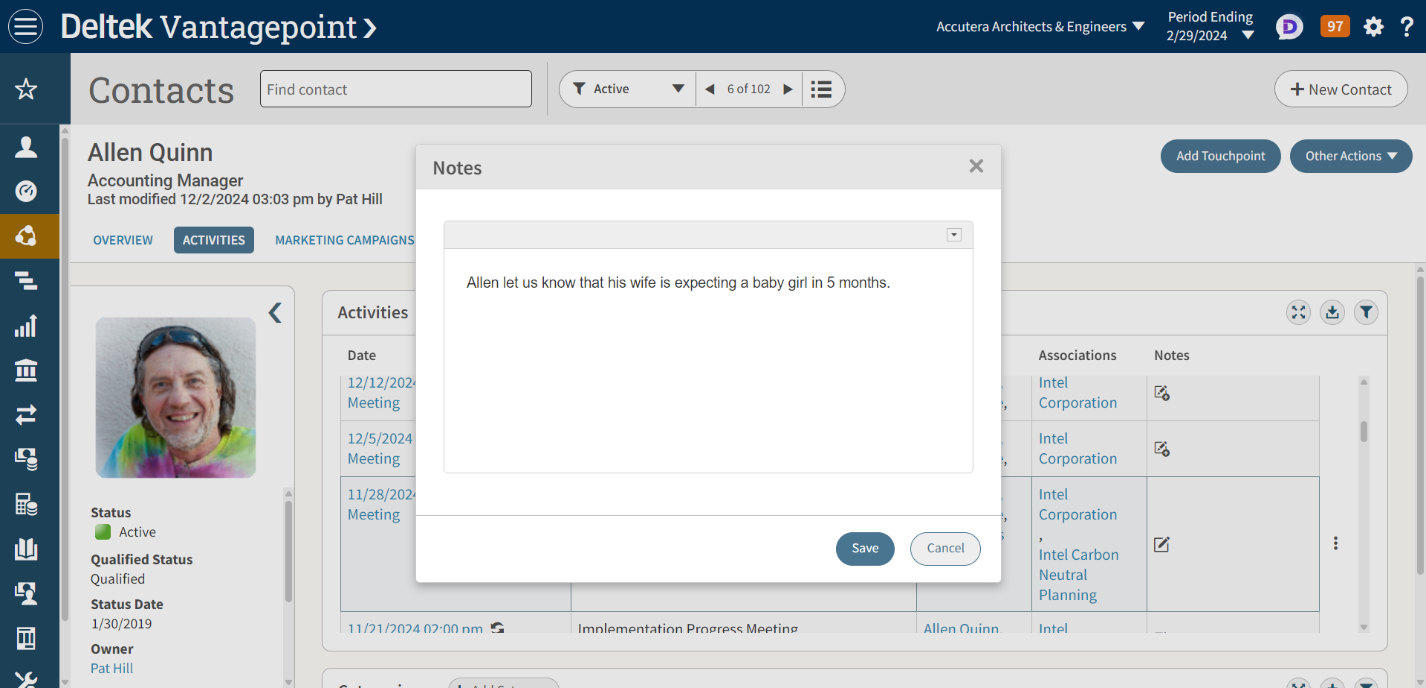
For instance, let’s say one of the firm’s contacts, Allen, had a meeting with a Project Manager concerning a current project. During that meeting, he mentions that his wife is pregnant. Afterward, the Project Manager adds a note to the Vantagepoint Activity for this meeting:

“Allen mentioned his wife is having a baby in 5 months.”

undefined-Dec-06-2024-04-45-06-2781-PM

This Activity is stored in Allen’s profile but locating that detail manually would be time-consuming. Instead, Dela can quickly summarize this information and help users generate a meaningful message.

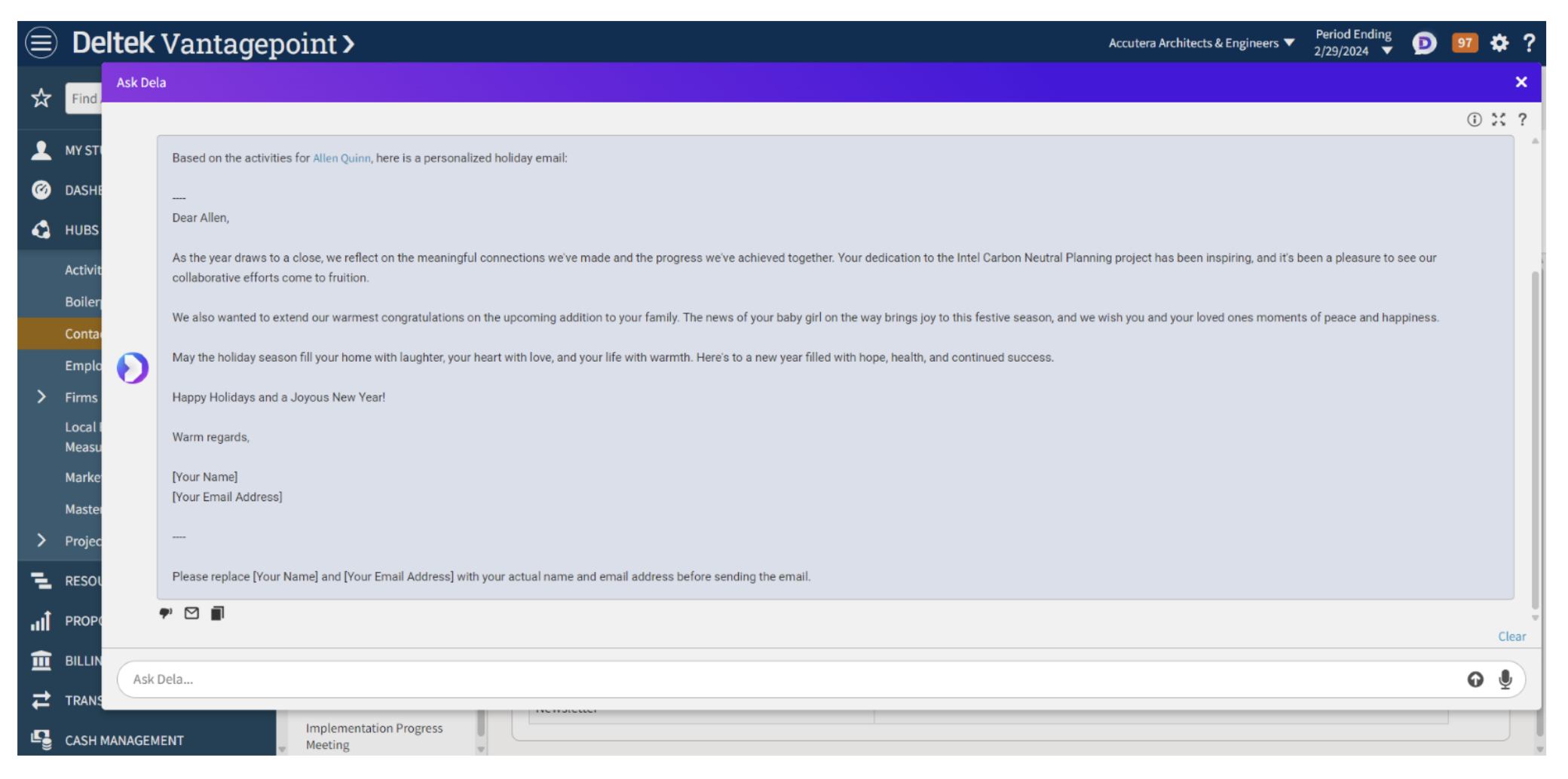
A simple prompt to Dela could be: “Based on the activities for this contact, create a personalized holiday email for him.”

Step 2: Dela Responds

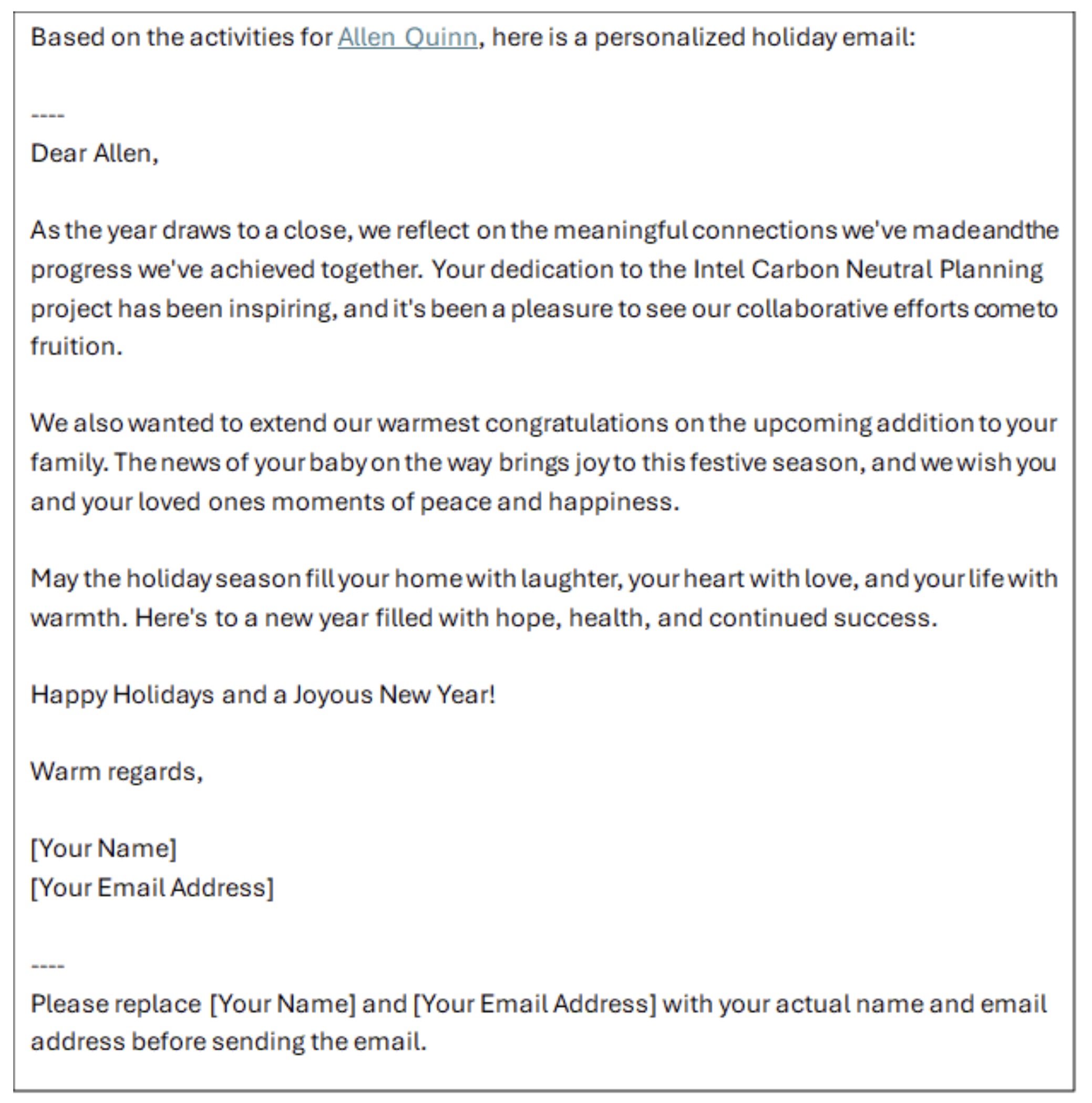
Once the prompt is entered, Dela quickly processes the data and generates a draft email. Here’s an example of what Dela might provide:

Dela 02

Dela 03

In just a few seconds, Dela has generated a thoughtful, personalized message that acknowledges Allen’s life event—without the user needing to sift through Activity entries and notes or manually write the email.

Step 3: Editing and Sending

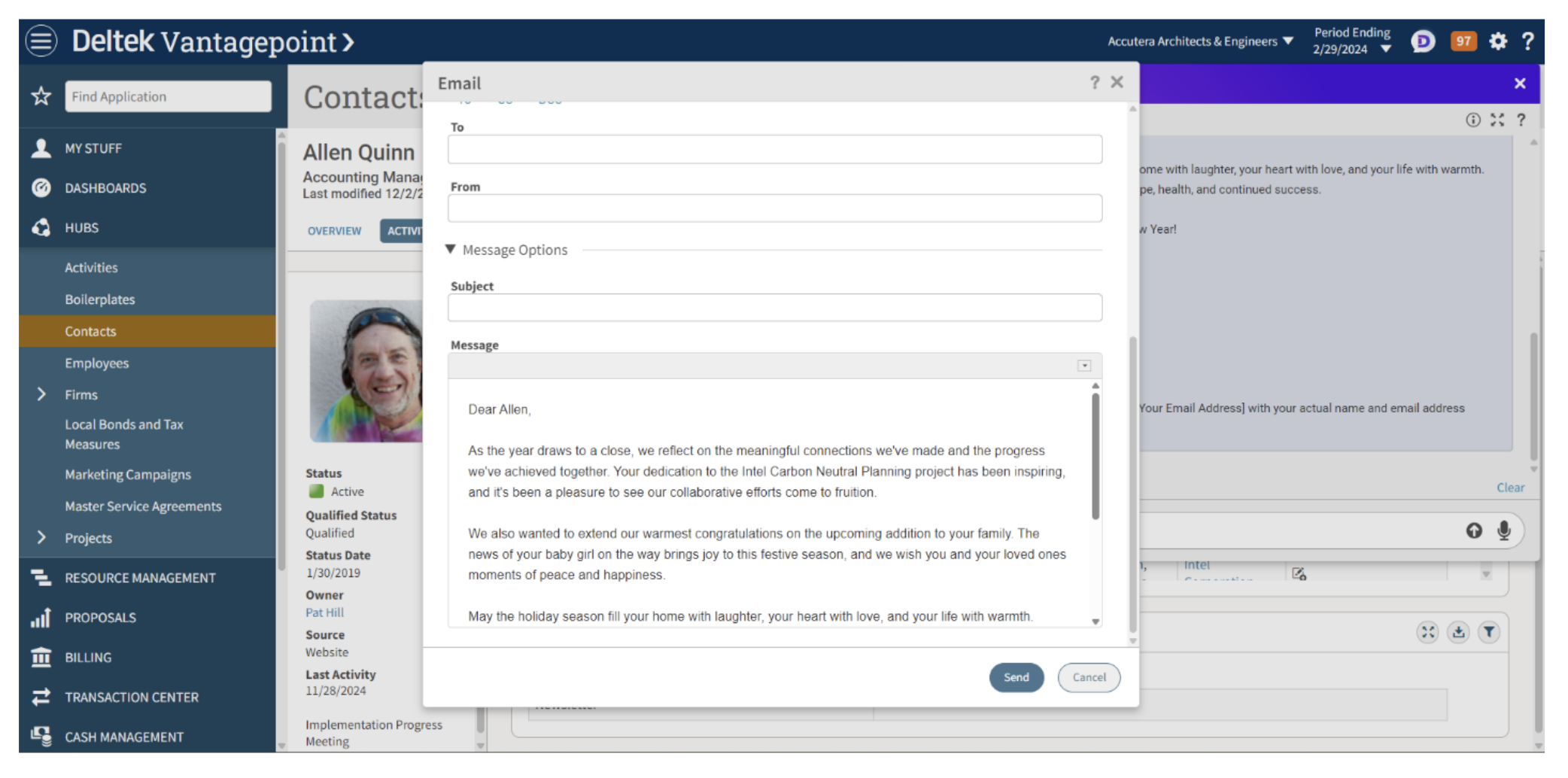
Once the message is generated, the user can easily review and edit the content before sending it. With Dela’s integration into Vantagepoint, there’s no need to switch between different platforms or tools. The user can either click a button to send the email directly or copy the content to paste it elsewhere.

Dela 04

Dela offers additional customization options, such as the ability to adjust the tone of the email. For example, users could choose a more formal or informal style depending on the nature of the client relationship. The integration with Vantagepoint also ensures that all the relevant details, such as the firm’s branding and contact information, are included in the email template.

Why Dela’s Capabilities Shine with Activities Data

This holiday email example highlights one of Dela’s most impressive features: its ability to interpret and summarize free-form text entries in the Activities grid. These notes can range from personal milestones (like Allen’s baby news) to project-specific insights. While these activities can be time-consuming to sift through manually, Dela effortlessly distills them into concise summaries.

Furthermore, since Dela retains the context of the conversation, users can easily follow up on previous queries. For example, if the user asked for the activity summary and then wanted to see additional details about Allen’s current project, they could follow up with another simple prompt like, “What is the latest activity recorded for this contact?” This fluid, conversational interaction makes Dela a natural tool for generating content and obtaining real-time data insights.

By leveraging Dela’s capabilities alongside the free-form text in Activities, users can quickly generate meaningful, personalized content for clients, improving both the quality of interactions and overall productivity.

Enhance Workflow and Productivity with Deltek Dela™

Dela exemplifies how AI-driven tools can enhance workflow and productivity, especially when paired with rich, unstructured data-like Activities. The ability to turn detailed, free-form notes into cohesive and personalized messages in mere seconds can save professionals time and effort, while also fostering stronger client relationships. Whether you’re sending out holiday greetings, drafting follow-up emails, or simply summarizing project activity, Dela is a powerful tool for getting the job done quickly and efficiently.

This example of using Dela for personalized holiday messages is just one of many ways this tool can streamline your workflow. By understanding how Dela interacts with the data and hubs within Vantagepoint, users can harness its full potential to make their tasks easier and more effective.

Learn how Deltek is powering the future for project-based companies with a recap from their most recent user-conference, Deltek ProjectCon. Click the image below to learn more.

Key Takeaways from Deltek ProjectCon 2024

Posted by Evan Creech-Pritchett on Dec 5, 2024, 12:00:00 AM

12-5-24 Key Takeaways ProjectCon2024_Banner

Deltek ProjectCon 2024 united innovators, leaders, and tech enthusiasts to explore the future of project-based solutions. Our crew was fully engaged in the discussions and demos, discovering Deltek’s latest advancements and their practical applications. Whether you missed the event or just want a recap, here are the highlights that caught our attention.

AR Forecast Collections Dashboard

For finance professionals, staying ahead of cash flow is key. Jenny Labranche, Senior Finance Consultant, shared her enthusiasm for Deltek’s new AR Forecast Collections Dashboard:

quote mark-01
Deltek has put together a forecast tool to track your cash coming in because we all know that cash is king in any business.

Expected in the 7.2 or 2025.1 release, this tool promises to streamline cash forecasting and collections, giving firms better control over their financial health.

Clarity Meets Vantagepoint Dashboards

Joel Slater, Client Solutions Manager, was interested in the integration of Deltek Clarity A&E Study benchmarks directly into Vantagepoint dashboards:

quote mark-01
Clients can compare their own specific data and results against the greater industry through the Deltek Clarity study.

This feature provides businesses with actionable insights, making it easier to align their performance with industry standards.

Simplifying Billing and Contract Management

Ease of use remains a top priority for Deltek, as highlighted by Lisa Ahearn, Senior Consultant, who had two exciting updates to share.

quote mark-01
I learned that they are planning on putting billing terms in a list view, which is awesome for all of our billers. Deltek is also bringing document management to contract management so we can finally attach our contracts to our line items for our contract management.

These enhancements are designed to streamline critical workflows, making it easier for firms to manage billing terms efficiently and improve the organization of contracts.

Flexibility and Adaptability: The Future of Deltek

Sarah Gonnella, VP of Marketing and Sales, praised Deltek’s commitment to adaptability:

quote mark-01
Deltek is really focused on flexibility, adapting to how people work, and providing relevant content through AI. Their roadmap through 2026 is full of innovative developments.

The spotlight on tools like Deltek Delaand Harmony reflects their intent to enhance user experience by integrating platforms like Microsoft Teams and offering personalized, data-driven insights.

Solving Business Challenges with AI Innovations

Jake Lucas, our AI Developer, highlighted the growing potential of artificial intelligence in addressing unique business needs:

quote mark-01
A big aha moment has been having conversations with different people and getting a renewed perspective on how AI can solve certain business needs. It’s been fascinating to see the scope of what people are thinking about when it comes to using AI to run their business better.

He emphasized how AI tools like Deltek Dela are meeting immediate challenges while leaving room for future enhancements.

AI and Data Synchronization: Enhancing Business Intelligence and Building Trust

Jake Lucas also presented his session on the transformative role of AI in data processing and real-time synchronization. He noted that as businesses increasingly adopt AI to optimize workflows, real-time insights become essential for tracking performance, forecasting cash flow, and monitoring project progress.

Real-time data synchronization, as demonstrated by our BlackBox Connector integrations, can deliver down-to-the-minute updates that help organizations optimize resource management and make faster decisions. Having immediate access to data enables businesses to react quickly to shifts in project dynamics or staffing needs, driving efficiency and adaptability.

Jake also emphasized the importance of trust and transparency in AI-driven insights, addressing a critical concern for organizations adopting these advanced tools:

quote mark-01
A big takeaway was seeing how AI is improving but still needs that critical element of trust from the users. It’s essential to understand the data and processes AI is using to ensure its accuracy.

With AI playing a growing role in complex data processing, ensuring transparency in how insights are generated is vital. Businesses must be able to trace the sources and methodologies behind AI-driven conclusions, fostering confidence and trust in decisions shaped by this technology.

Optimizing Vantagepoint Investments with Terri Agnew

Terri Agnew, Principal Consultant, led a session as well where she explored how a Navigational Analysis can help maximize Deltek Vantagepoint's capabilities to improve performance.

quote mark-01
A navigational analysis is like dumping out a puzzle on the table. The process is about putting that puzzle back together—understanding your system, identifying pain points, and finding solutions to streamline processes.

She showcased strategies to leverage Vantagepoint’s data to drive more informed decision-making. Her practical insights demonstrated how to close the gap between data analysis and actionable outcomes, leaving attendees equipped with tools to immediately optimize their processes.

Keeping Up with Deltek

Deltek ProjectCon is a unique opportunity to connect with industry leaders, innovators, and technology enthusiasts who share a passion for enhancing project-based solutions and we had a great time interacting with everyone who attended! The insights and tools showcased this year—from AI advancements to streamlined workflows—highlight the tremendous potential for businesses to optimize their processes and achieve greater success. Whether you attended or simply followed along with our highlights, the value of being part of this forward-thinking community is undeniable.

If you want to stay up to date on all things Deltek, visit our webinars page to see what’s on the horizon. We’d love for you to join us as we continue exploring the latest innovations and solutions for project-based firms!

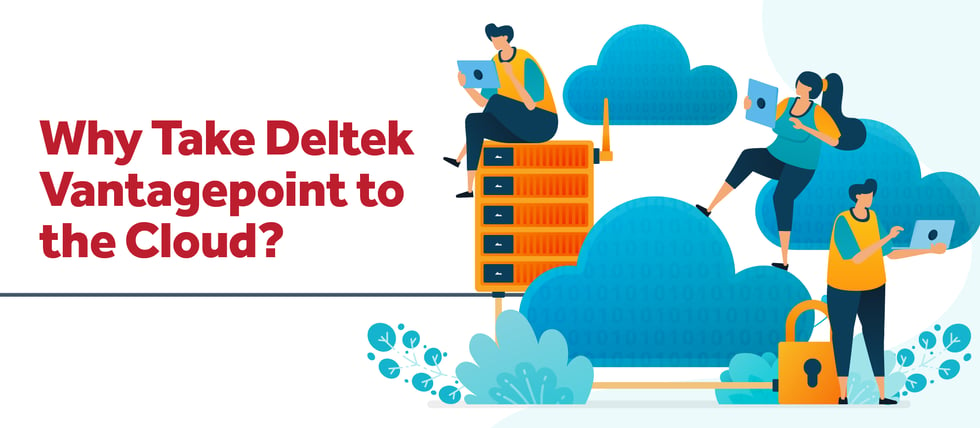
Why Take Deltek Vantagepoint to the Cloud?

Posted by Kim Stamps on Nov 21, 2024, 12:00:00 AM

11-21-24 Why Take Deltek Vantagepoint to the Cloud_Banner

Did you know that over 75% of Deltek Vantagepoint customers are in the cloud today? That's right—every day, more Deltek Vantagepoint clients are taking their systems to the cloud. But what exactly makes project-based firms decide to make the move to the Deltek Vantagepoint Cloud?

Continuous Access to Your Data, Anytime and Anywhere 

Imagine this: you're at the airport, waiting to board a flight to a major work conference, with your presentation materials and agenda in hand but you need to check something really quickly. Or perhaps you're in a quiet coffee shop between client meetings, preparing for your next big pitch and you realize you are missing something that needs to be looked up fast. No matter your location, in the cloud, your data is always at your fingertips, as long as you have secure internet access and a web browser.

The Deltek Vantagepoint Cloud provides the peace of mind that comes with knowing you can safely access, extend, or update your data from any location. With a 99.9% average uptime, you can rely on your data being available whenever you need it. This level of accessibility is a game-changer for businesses that require flexibility and mobility. Whether you're working from home, traveling for business, or simply need to check in on a project while you're away, the cloud ensures that your data is always within reach. No more being tethered to a physical office or worrying about accessing critical information when you need it most. 

Ease Your Growing Pains as You Expand Your Business 

As your business grows, so do your technology needs. Managing hardware can become a significant distraction, especially as the need to upgrade and maintain legacy systems increases. By moving your business to the Deltek Vantagepoint Cloud, you can leave those growing pains behind. Focus on what matters most, growing your business while enjoying the benefits of no hidden fees. 

The Deltek Cloud offers several tailored options, allowing you to pay a clearly defined annual cost each year, eliminating the surprise costs that can occur with on-premise setups. Plus, you'll have a team of experts managing your cloud infrastructure, including servers, storage, networking, patching, software updates, and hardware procurement.

The scalability of the cloud is another significant advantage. As your business expands, the cloud can easily accommodate increased data storage and processing needs without the hassle of purchasing and installing new hardware. This scalability ensures that your IT infrastructure grows seamlessly with your business, allowing you to focus on strategic initiatives rather than technical challenges.

Know Your Data is Secure in the Deltek Vantagepoint Cloud 

Security is a top priority when it comes to your data. The Deltek Vantagepoint Cloud offers features like multifactor authentication, encryption, and monitoring systems to ensure your data is secure. Deltek, a best-in-class service provider for project-based firms, takes security seriously. Their Cloud Security Operations Team and Site Reliability Team provide constant monitoring twenty-four hours a day, seven days a week, and three hundred and sixty-five days a year to protect your firm against any threats. With the cloud, you can have confidence that your data will be safe, no matter the disaster. 

In addition to these security measures, Deltek also complies with industry standards and regulations, providing an extra layer of assurance. Regular security audits and updates ensure that your data is protected against the latest threats. This proactive approach to security means that you can trust Deltek to safeguard your sensitive information, allowing you to focus on your core business activities without worrying about data breaches or cyberattacks. 

Enhance Your Collaboration Capabilities

Furthermore, the cloud offers enhanced collaboration capabilities. Team members can easily share and access documents, collaborate on projects in real-time, and stay connected regardless of their physical location. This improved collaboration can lead to increased productivity and better project outcomes, as everyone has access to the most up-to-date information and the tools they need to succeed. 

The Cloud is Waiting for You 

The benefits of moving to the Deltek Vantagepoint Cloud are clear. From continuous access to your data to easing the growing pains of your business, to ensuring your data is secure, the cloud offers a reliable and efficient solution. It is time to join the growing number of project-based firms that have made the switch and experience the advantages for yourself. 

Moreover, the Deltek Vantagepoint Cloud is not just a technological upgrade; it's a strategic move that can transform the way your business operates. By embracing the cloud, you position your firm for greater agility, security, and growth. So why wait? The cloud is waiting for you - are you ready to take your business to new heights?

Simplify Your Professional Services Firm's AP Process with Automation

Posted by Amanda McClain on Oct 31, 2024, 12:00:00 AM


10-31-24 Automation AP Process_Banner


I believe we could all say, we question what gets put into the ‘snail mail’ these days. Especially if it is a sizeable check for your professional services firm. Will it arrive on time? Will it be lost? Will the check end up in the wrong hands? So many variables!

Not only are you concerned with the ability of the check to show up at its destination, but the timeline of when the payment will clear the bank. Sometimes this can take weeks, which might affect how fast you can reconcile your books. Add in the influx of employees working from home, and now you have even more concerns with printing the actual checks.

Accounts Payable (AP) as a manual process increases the likelihood of potential fraud and creates uncertainty, which could eventually affect your professional services firm’s cash flow. So how does a company simplify this process, alleviating the longer timeline and potential for discrepancies? You automate your Accounts Payable process!

Benefits of Automating Your AP Process

The AP process is one of the most important tasks a professional services firm performs daily. Automating it allows you visibility into every vendor payment easily to see its status, and an automated AP process can be fully integrated and streamlined to your preferences.

Although AP automation is not a recent technology, it has come a long way over the years. It is surprising that so many firms have not embraced this technology. Maybe it’s because they feel doing it manually will be more accurate, or they think their current process is efficient and cost-effective. So, let’s look at the benefits of automating the AP process and see if these preconceived notions have merit.

Going Paperless and Reducing Error

Accounts Payable is a paper-intensive process that requires printing, copying, storing, and retrieving paper. Additionally, manual processes are slow and are prone to human error rather than being more accurate as one may think. The paper-based process of printing and mailing checks can be transformed into a digital process of selecting, processing, and scheduling your electronic payments against your AP.

With AP automation, invoices are stored digitally, and paper, shipping costs, and manual entry are eliminated, saving money and ensuring accuracy, while also speeding up the entire payment process. Your increased visibility into payment status will also help simplify reconciliation and help to avoid duplicate entries.

Improving Employee Productivity

The AP process is a repetitive and time-consuming manual task. For instance, processing an invoice manually requires a person to copy information from an invoice and add it to the accounting books. There is no longer a need to manually reenter information for ACH payments or to recreate a physical check with automation.

When a professional services firm automates the AP process, employees are relieved of doing these tasks and can focus their efforts on more profitable pursuits. The opportunity for error is lessened and more time is available for your employees to be more productive in other areas of business.

Getting Insight into Your Firm’s Finances

It’s difficult to manage your professional services firm’s finances if you can’t see them. Solutions like spreadsheets or pen and paper hinder your firm’s ability to generate accurate financial reports. With automation, digital audit trails for all payments whether it be a physical check, credit card, or an ACH are available to ensure you clearly see what stage each of your payments is in.

You can immediately offset the liability and reconcile payments versus waiting for them to clear. Furthermore, being able to see who you owe money allows you to predict future firm spending and avoid late payment fees and penalties. With AP Automation, your firm’s financial picture is easily accessible and therefore manageable.

Gaining Control of the Procurement Process

Procurement policies are hard to enforce if you do not have a way to approve a purchase before it’s made. Using an automated AP solution allows firms to set up an approval process that ensures purchases are in compliance with firm policy. Professional services firms can gain control of their spending by knowing when a purchase is made prior to being issued an invoice which promotes transparency.

Automating AP is a Win-Win Situation for All

With actual reduction in errors, cost savings and a clear view of firm finances, the preconceived notions of not using AP automation are certainly without merit. And there’s even more benefit to automation. An automated AP solution allows vendors to submit invoices to a designated email address or webpage which reduces the risk of losing invoices.

With the opportunity for error decreasing and your employees' productivity increasing, it is a win-win situation for everyone involved. AP automation also ensures you pay your vendors on time, which makes them happier to work with your firm. Not sure if your firm is ready to automate?

Specialized Services: Consulting, Training, and Outsourced Accounting

Posted by Wendy Gustafson on Oct 24, 2024, 12:00:00 AM

10-24-24 Specialized Services_Banner

Ensure the Success of Your Business by Utilizing Specialized Services

Staying competitive requires not only adopting the right systems and tools but also ensuring they have the right support structures in place. Whether a company is implementing a new software system, optimizing current processes, or managing its finances, specialized services like consulting, training, and outsourced accounting are essential to success. These services ensure businesses leverage their systems effectively, empower their teams, and optimize financial operations.

Each of these services plays a unique role, however, together they provide a comprehensive strategy for business growth and efficiency. Moreover, experts available from each area play different key roles in ensuring the success of your business. Let’s take a look at the difference between these three crucial services and see what they each offer your company and the overall benefit of utilizing them.

Consulting

At its core, consulting is about providing expert advice and strategies that align a company's systems with its specific business needs. Modern software systems — like Enterprise Resource Planning (ERP) platforms — are designed to help companies streamline processes, control data, and optimize workflows. However, even the most sophisticated systems are not a one-size-fits-all solution. Without proper setup and customization, these tools may fail to deliver their full potential. This is where consulting services come into play.

A qualified consultant can assess a company’s current processes, identify areas for improvement, and help configure the system to meet those specific needs. Consultants are not limited to the initial setup of systems; they are valuable at any stage of a company’s journey. From identifying new functionalities that address evolving needs to optimizing existing features, consultants offer an often-needed outside perspective and the specialized knowledge that can be critical to enhancing system performance.

For example, after implementing a new ERP system, a company might struggle with inefficiencies or underutilized features. A consultant can step in to reconfigure the system, ensuring that workflows are optimized for productivity. Additionally, they can offer guidance on how to leverage newer features as systems update over time. This proactive approach ensures that businesses stay ahead of the curve, continually optimizing their tools and processes in alignment with their goals.

Training

Having an up-to-date and properly configured system is only part of the equation. No matter how advanced a system is, it can only be as effective as the people using it. This is where training becomes critical. Training empowers staff to fully understand and utilize the systems at their disposal, ensuring that the company gets the maximum benefit from its investment.

Without proper training, even the most well-designed system can become underutilized or misused. Employees may only know the basics or might default to outdated methods, even when new, more efficient processes are available. A common issue occurs when staff fall into a routine of "this is how we do it here," becoming resistant to change and unaware of new features or improved processes that could significantly enhance their productivity.

A structured and continuous training program solves this problem. Regular training allows staff to stay current with new system updates, understand best practices, and adopt more efficient workflows. Additionally, as businesses grow and evolve, so do employee roles. Ongoing training can help newly promoted staff adjust to their expanded responsibilities, ensuring they understand how to fully utilize the system to meet the demands of their new positions.

Furthermore, training isn't just important for new hires. Existing staff also benefit from continuous education, especially when software systems release updates or new features. As trainers are experts in their own right, this specialized service empowers employees with the necessary skills to ensure the company remains competitive in a fast-paced business environment.

Outsourced Accounting

Finally, as with any business, accounting is a vital function. It's the backbone that ensures invoices are sent to clients, payments are made to employees and vendors, and management has access to accurate financial data for decision-making. However, maintaining an in-house accounting team can be costly and time-consuming, particularly for smaller firms. This is where outsourced accounting services provide a lot of value.

Outsourced accounting involves hiring an external team to handle various accounting tasks, either as a supplement to an internal team or as a full-service solution. This can range from day-to-day tasks like data entry, timesheet management, and expense reporting to more complex functions like bank reconciliation, project budgeting, and financial analysis.

One of the main advantages of outsourced accounting services is the consistency and expertise it brings. These services are performed by professionals with specialized training and experience often across multiple industries. As a result, companies benefit from tried-and-tested processes that help optimize financial operations and ensure compliance with the latest regulations.

Additionally, outsourcing provides flexibility. A company may not need a full-time in-house accounting team, especially during periods of low activity. By outsourcing, businesses can scale their accounting needs up or down based on demand, ensuring cost efficiency. For example, a business might require additional accounting support during tax season or when undergoing rapid growth. Outsourced accounting services can step in to fill these gaps, ensuring financial operations run smoothly without burdening the in-house team.

Moreover, outsourcing allows management to focus on core business activities rather than having to deal with the complexities of accounting. Using this specialized service provides a reliable team to handle the finances, so companies can concentrate on growing their business, confident that their financial operations are being managed by experts.

A Holistic Approach to Business Success

Incorporating these unique and specialized services into your business strategy can significantly improve efficiency, productivity, and therefore, overall success. Consulting services ensure that your ERP or other business systems are set up in alignment with your company’s specific goals and processes. Training empowers your team to use these systems to their full potential, ensuring that your investment in technology is fully realized. Outsourced accounting provides expert financial support, filling in gaps and ensuring that your company’s financial operations run smoothly and efficiently.

Whether your company is just starting out or looking to refine its existing operations, investing in these specialized services can help. By utilizing these services, businesses can streamline operations, reduce costs, and achieve their objectives more effectively. Take advantage of these services and position yourself for long-term success.


Latest Posts