Full Sail Partners Blog | Project Based Firms (2)

Posts about Project Based Firms (2):

The Ultimate Vantagepoint Efficiency Toolkit: 15 Features You’re Probably Not Using—But Should Be

Posted by Lisa Ahearn on Mar 27, 2025 12:00:00 AM

03-27 Ultimate VP Efficiency Toolkit_rev

Ever feel like your Deltek Vantagepoint system could be working harder for you?

If you're like most project-based firms, you're juggling tasks, chasing down data, and performing the same manual steps day after day. Sound familiar? Then it’s time to march into efficiency with a toolkit designed to streamline your workflow and automate the time-sucking tasks that drain your day.

Enter: 15 must-know Vantagepoint features that will help you reclaim your time and elevate your day-to-day operations.

Want to see these features in action plus get bonus features not listed here? Check out Lisa Ahearn's on-demand webinar here.

Everyday Time-Savers

1. Open in New Window
Toggle between records and dashboards without losing your place. Right-click menu items or blue hyperlinks to open them in a new tab without losing your place. It’s a simple tweak that can make a big difference. This one small trick can make a big difference when multitasking.

2. Grid View Customization + Saved Views
If records are displayed in a list view, users can save the columns selected in the view and then apply those settings in the future. This may not seem like a big deal but is just one of the small, but mighty ways Deltek is improving user efficiency in Vantagepoint.

Click the gear icon to customize columns, then save your grid views for fast filtering. Bonus: Share them with your team. Watch a mini-demo of this feature here.

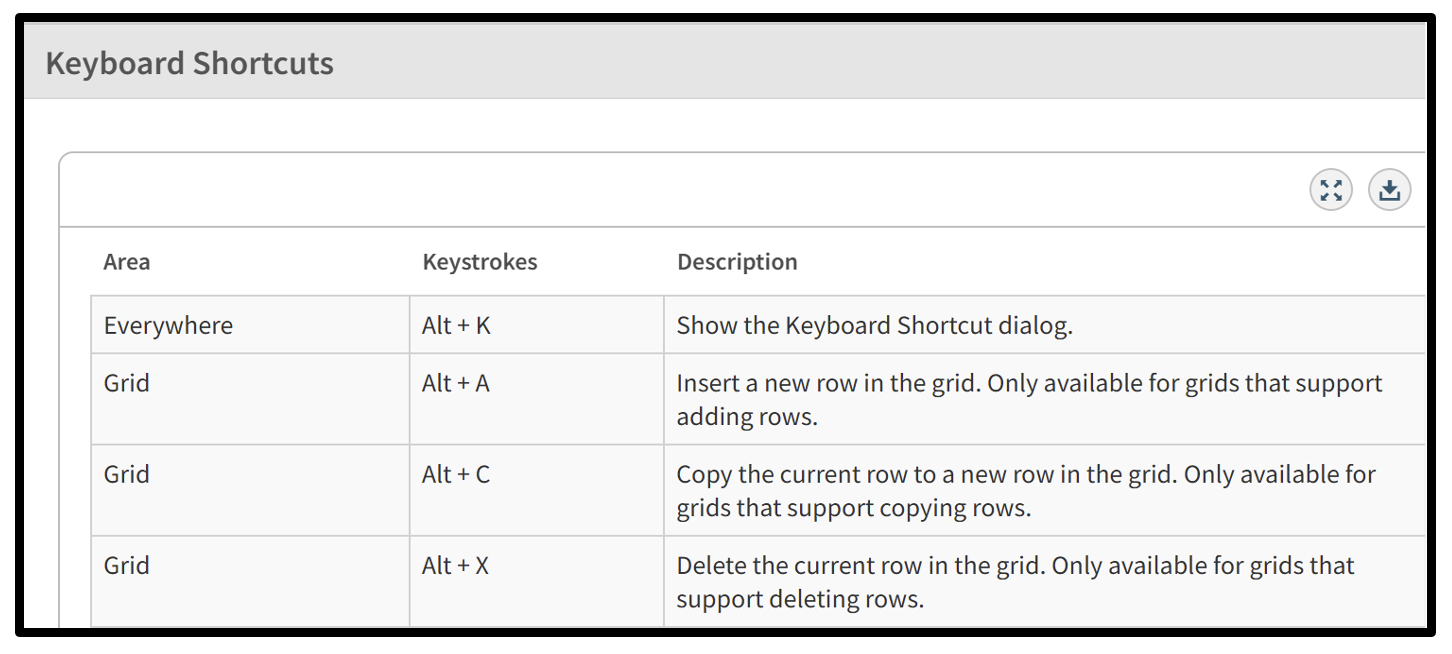
3. Keyboard Shortcuts
Use Alt + K to reveal powerful shortcuts for inserting rows, checking boxes, or navigating dropdowns. Once you try them, you'll never go back.
03-27-25 screenshot 01

Click-Less Cleanups

4. Bulk Updates
Change multiple records at once—like updating project stages or contact info. It’s like magic for data cleanup.

With Bulk Update, you’ll be able to update multiple fields across numerous records simultaneously—saving time and headaches! This feature’s user-friendly interface makes bulk editing intuitive, even if you’re not a tech guru. Plus, you’ll enjoy peace of mind with built-in error handling, allowing you to quickly resolve any records that can’t be saved right away. And for added control, administrators can decide who has access, thanks to role-based permissions.

See the bulk update feature in action here.

5. Auto-Populate Timesheets with Holidays & Absences
Reduce timesheet errors and save time with auto-filled entries for PTO and holidays (once approved).

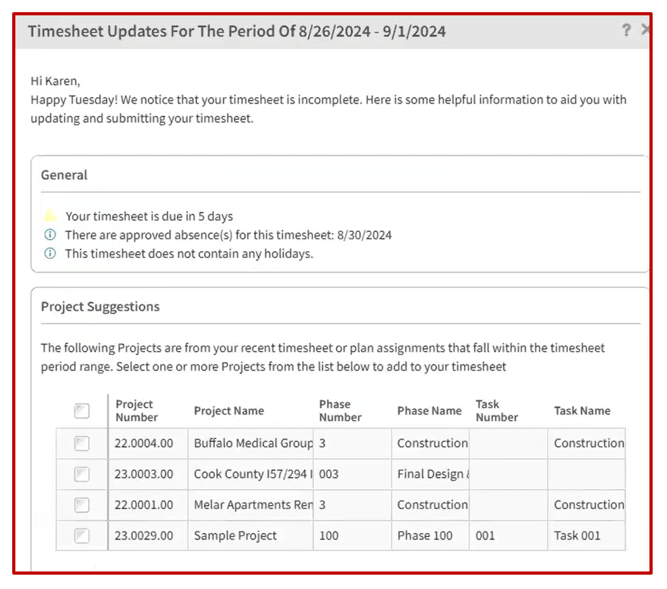
6. Timesheet Assist Reminders
Friendly pop-ups remind users to complete timesheets and suggest projects to charge time to. Timesheet assist provides users with reminders and suggestions based on past projects or active assignments. It allows users to quickly add suggestions to their timesheets, with full control over project selection. And, it offers flexible settings, including options to select Time Groups and reminders days before timesheet deadlines.

Discover how this feature helps ensure more accurate timekeeping to streamline your firm's business processes in this mini-demo.
03-27-25 Screenshot 02

Automation & Smart Tools

7. Opt-In Features
Get early access to new features before they become standard. A great way to test drive efficiency-enhancing tools.

8. Dela (AI Assistant)
Need to find a record, create a contact, or log an activity? Just ask Dela. This AI-powered companion honors your security settings and keeps getting smarter.

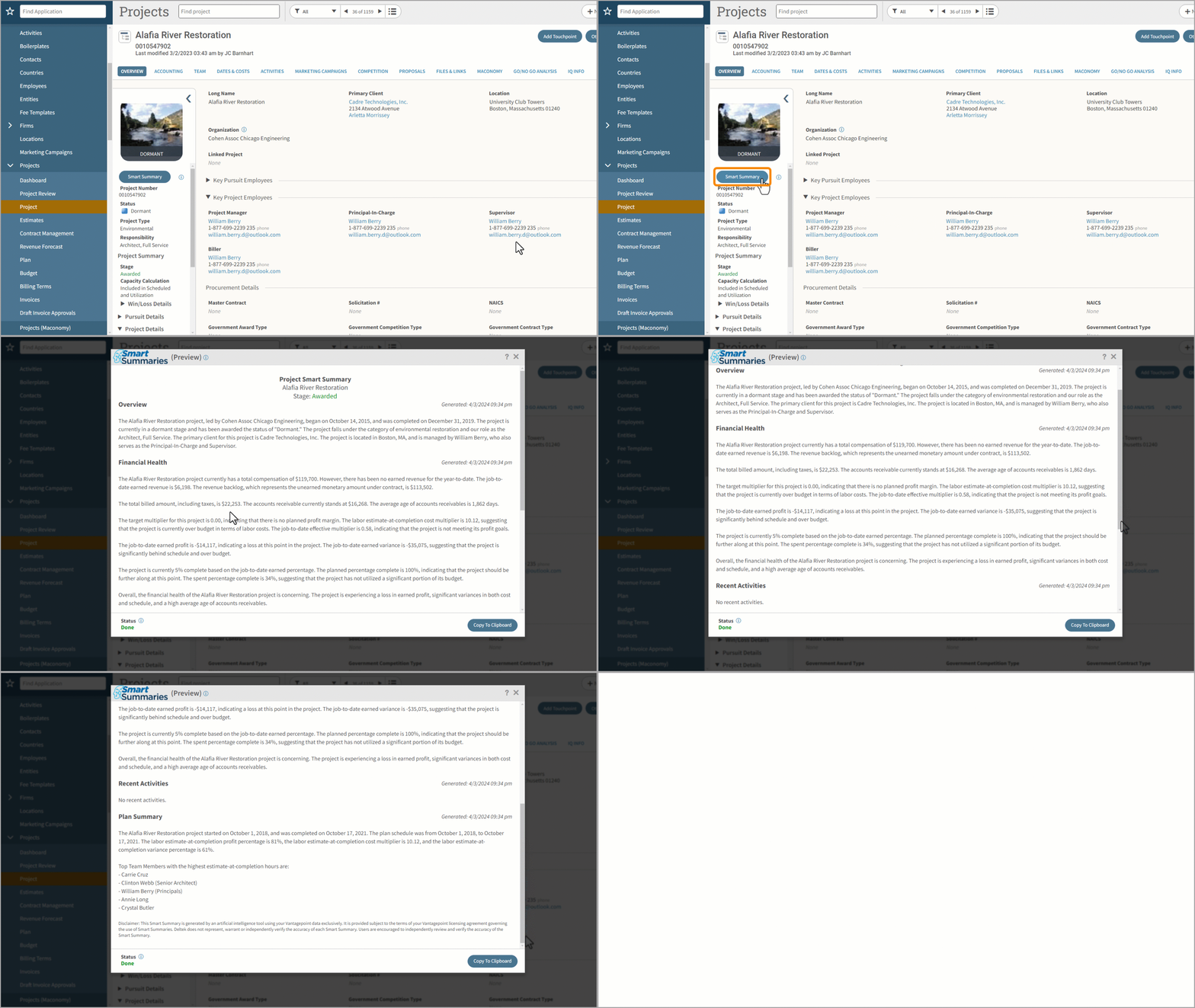
9. Smart Summaries for Projects and Firms
Summarize project and firm data quickly, without running a report. Perfect for execs who want insights fast.
03-27-25 Screenshot 03_projsummary2

Data Visibility & Dashboards

10. Dashparts
Dashparts provide a flexible way to visualize your data right from the dashboard.

You can use funnel chart types to track your pipeline, making it easier to see which opportunities are moving through your business development process.

There are organizational-level options available for both the project and project detail bases, giving users deeper insights depending on how they need to view their data. You can also display the average collection period by project and group it by client to better understand payment trends.

Forecasted accounts receivable collections can be visualized to help with cash flow planning. Additionally, the AP Detail base allows you to review voucher information with ease, bringing even more transparency to your financial data.

11. Employee Capacity Visibility
See how reassigning hours impacts staff availability. You can see employee availability directly from the employee card in the plan. No more guesswork.

12. Auto-Populate Time Off in Project Plans
Approved absences flow directly into your resource plan. Deleted requests are removed too.

Search Like a Pro

13. Multi-Value Search Operators
Search for multiple values using “contains” or “=”. Great for filtering specific project types or client groups.

14. GL Account Review
Search transactions across accounts and periods, then export data with or without preview. Super handy during audits.

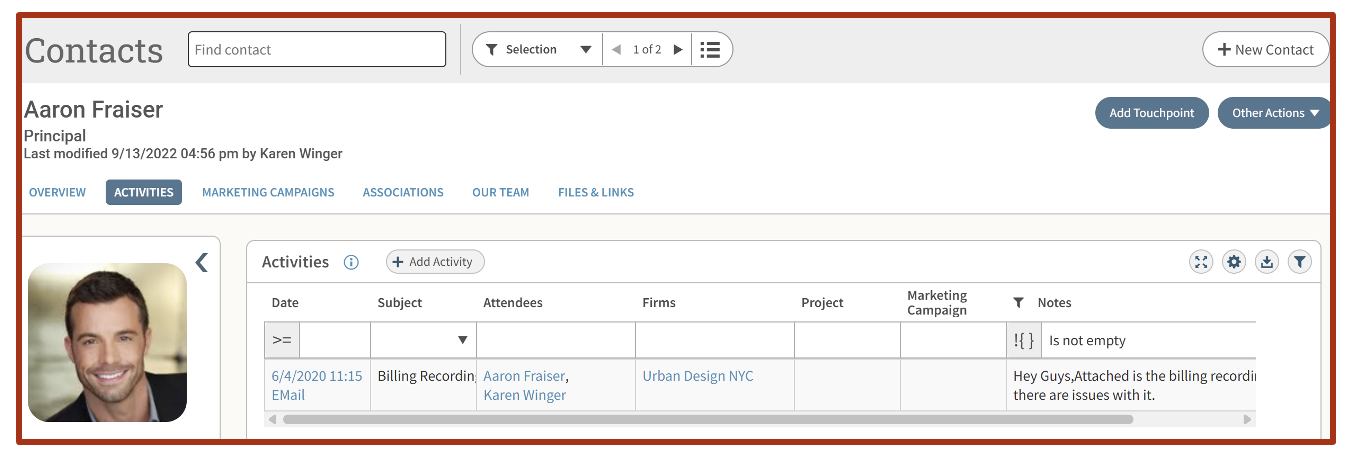
15. Activities Grid Improvements
Multiselect contacts or employees, view notes directly in the grid, and more. A big win for CRM users.
03-27-25 Screenshot 04

So, What Will You Automate First?

Imagine logging into Vantagepoint and seeing exactly what you need—timesheets filled out, dashboards prepped, project data updated—all before your second cup of coffee.

This isn’t just a dream. With the right features, it’s your new reality.

📅 BONUS: Watch Lisa Ahearn’s on-demand webinar to see these features in action—plus even more Vantagepoint tips to boost your efficiency. Watch today by clicking the image below.

March into efficiency. Your streamlined workday awaits.



Revitalizing Marketing Strategies for Services and Project-Based Firms

Posted by Lindsay Diven on Jul 18, 2024 12:00:00 AM

07-18-24 Marketing Strategies -  Banner

Consumers. Buyers. Clients. Users. Customers. You want them, you need them, regardless of the business you own. But does the type of business you own affect how you market to them? Absolutely! Marketing for service and project-based firms can be a tricky task, requiring a blend of formulaic approaches and individual creativity. What you’re marketing makes all the difference.

Defining Your Business Type

Understanding the nature of your business is crucial to crafting an effective marketing strategy. Different types of businesses—whether they offer tangible products, intangible services, complex projects, or a mix of both—require tailored marketing approaches to reach and engage their target audiences effectively.

  • Product-Based Firms: These organizations offer tangible products to their customers—items that can be packaged and placed on a shelf. Marketing for these firms is often straightforward and follows textbook examples taught in marketing classes nationwide.
  • Service-Based Firms: These organizations primarily offer people, processes, or expertise. Since you can't package people or put a process on a shelf, marketing must be approached differently.
  • Project-Based Firms: Similar to service-based firms, these organizations manage and deliver projects, often involving complex coordination of resources and expertise. Marketing for project-based firms needs to highlight the firm's ability to deliver successful projects, meet client needs, and provide specialized expertise.
  • Hybrid Firms: These businesses offer a mix of products and services. Marketing efforts must be tailored to each target market segment, emphasizing both tangible and intangible offerings.

Tailoring Your Marketing Strategy

When marketing a product, you let the product speak for itself, showcasing how it solves customer problems. This can be done through demonstrations, videos, or testimonials showing the product in action. Marketing for service and project-based firms is a bit different, yet fundamentally similar. Services and projects solve problems too, but you need to highlight client stories and testimonials. Here’s how:

  • Client Testimonials: Just as with products, services, and projects solve problems. Share success stories from your clients, showcasing how your services or projects have positively impacted their businesses. For example, platforms like Google and Trustpilot use client reviews to market professional services.
  • Client Feedback Tools: Gathering feedback from your clients is essential. Tools like the Client Feedback Tool from Client Savvy allow you to collect regular and periodic feedback from clients about their engagements. This feedback can provide constructive criticism and highlight your strengths, both of which are invaluable for refining your services and enhancing your marketing efforts.

The Power of Client Retention

One significant advantage of service and project-based firms is the potential for high client retention. Happy clients not only contribute to your marketing efforts through word-of-mouth but also ensure a steady revenue stream. Here are some compelling statistics:

  • A 5% increase in customer retention can increase a company's profitability by 75% (Bain & Co.).
  • 80% of your company's future revenue will come from 20% of your existing customers (Gartner Group).
  • Attracting new customers costs five times more than retaining existing ones (Lee Resource Inc.).

Leveraging Client Relationships in Marketing

Happy clients are your secret weapon in marketing your services or projects. Their satisfaction can lead to long-term relationships and a healthier bottom line. Here are some strategies to leverage these relationships:

  • Case Studies: Develop detailed case studies that highlight how your services or projects have met client needs and solved their problems. These case studies can be powerful tools for showcasing your expertise and success.
  • Client Engagement: Regularly engage with your clients through newsletters, updates, and personal check-ins. Keeping the lines of communication open helps maintain strong relationships and encourages repeat business.
  • Client Testimonials and Reviews: Actively seek and share positive testimonials and reviews from your clients. Highlighting client satisfaction through various platforms can build trust and attract new customers.
  • Client Appreciation Events: Host events to show appreciation for your clients. These can be virtual webinars, in-person workshops, or networking events. Such initiatives can strengthen your relationship with clients and provide additional value.
  • Social Media Engagement: Feature your clients on your social media channels. Share their success stories, tag them in posts, and engage with their content. This not only highlights your collaboration but also broadens your reach through their network.
  • Educational Content: Provide clients with valuable content that addresses their pain points and interests. This could be in the form of blogs, whitepapers, webinars, or how-to guides. Educating your clients not only helps them but also positions your firm as an industry leader.
  • Surveys and Feedback: Regularly ask for feedback through surveys to understand client needs and areas for improvement. This proactive approach shows clients that you value their opinions and are committed to enhancing their experience.
  • Partnership Programs: Develop partnership programs with your clients, where you can collaborate on joint marketing initiatives or co-host events. This creates a win-win situation and strengthens the professional bond.

By implementing these strategies, service and project-based businesses can effectively leverage client relationships to enhance their marketing efforts and drive long-term success.

Harnessing Client Feedback for Strategic Insights

Marketing for service and project-based firms requires a nuanced approach that leverages client feedback, highlights successful engagements, and emphasizes the value of long-term relationships. Tools like the Client Feedback Tool can help you gather valuable insights, tailor your marketing efforts, and ultimately boost client retention and satisfaction. By focusing on your clients' stories and continually improving your services based on their feedback, you can create a powerful marketing strategy that drives growth and success.

5 Benefits of Knowledge Sharing with Your Professional Services Firm

Posted by Tasia Grant, PHR on Jun 27, 2024 12:00:00 AM

06-27-24 Benefits of Knowledge Sharing - Banner

A crucial goal for organizations in 2024, according to an online article by Reworked, is to start spreading the wealth of knowledge that your employees have. Firm growth stagnates and employee retention suffers when information is hoarded and not shared. In today’s constantly evolving economic landscape, leadership at professional services firms should embrace the idea of knowledge sharing, setting clear expectations, and creating a culture of trust. Let’s check out 5 key benefits of knowledge sharing for your professional services firm. 

#1 Promotes Innovation

By enabling employees at your professional services firm to access the collective knowledge of their team and other teams, knowledge sharing promotes innovation. When employees can hear the ideas of others and see new perspectives, new solutions can be imagined and new approaches to problems can be taken. Shared knowledge from others removes silos and draws employees together to collaborate creating even more energy.

Then, with this collective knowledge, everyone at your firm can see the bigger picture. This wider view helps challenge existing norms or offers thinking outside of the box and exploring unconventional options. Access to diverse insights encourages the generation of new ideas and promotes a more creative environment which leads to innovation at your professional services firm.

#2 Enhances Employee Engagement

When professional services firms create a culture of collaboration and shared learning, employee engagement is enhanced. Sharing knowledge ensures that everyone at your firm feels like a part of the organization. Specifically, hearing how certain decisions are made empowers employees, and keeping them in the loop lets them know that their voices are heard.

When employees feel valued and involved, they are much more engaged in their tasks. Furthermore, those employees sharing their expertise additionally feel valued for their contributions to your firm. They then are more likely to actively participate in sharing more knowledge. This sense of belonging enhances employee satisfaction and leads to a higher retention rate and a more positive workplace.

For example, at Full Sail Partners, we host quarterly all-company meetings. One section of these meetings is “Top Cool Things to Know” where employees submit the cool things that they discovered the previous quarter. This can include new items they’ve built for clients or a new process to help within their work day. We spend a few minutes during the company meeting sharing these “cool things.”

Having an intentional opportunity to share experiences and proactively planning collaboration time is also critically important with remote working professionals, like our crew.

#3 Supports Learning and Development

Knowledge sharing supports learning and development because employees are allowed to acquire new knowledge and skills from their other teammates at your firm. Enhancing their skills and competencies allows employees to grow and develop. This creates room for more creativity and further development enriching the culture of your professional services firm.

Employees being given access to best practices, lessons learned and expertise at your firm facilitates professional growth and learning. When employees feel encouraged in their quest for knowledge, they are motivated to keep learning. The more learning that occurs the more these employees are even better equipped to contribute to your firm’s overall success.

One way to support learning and development in an on-demand, remote work environment is by recording bite-sized training videos. As you onboard a new employee take a moment to record the different processes they are learning. Keep the videos short and focused on specific processes like how to enter their timesheet, or how to add a new contact to the database. Then store these bite-sized training videos on your intranet or a shared drive. This will allow all employees access to the information when they need it.

#4 Enhances Company Culture

The culture at your professional services firm will be enhanced with knowledge sharing as it promotes transparency and trust. Freely sharing knowledge breaks down barriers between departments, promoting collaboration and working across your teams. When employees can leverage the expertise of others, there is an increase in productivity which creates a harmonious working environment.

Moreover, for newly onboarded employees, knowledge sharing makes them work efficiently from the beginning as they feel valued at the outset. For the more seasoned employees, sharing knowledge helps them move on knowing that they are leaving a legacy. What knowledge they have acquired during their tenure will remain with your professional services firm.

#5 Builds Firm Wide Knowledge

Building firm-wide knowledge through your teams sharing their expertise only brings greater value to your professional services organization. All this vital information shared can be captured and preserved in a reservoir of learning. This is especially useful in the world of remote or hybrid workplaces.

Using technology or in-person methods of knowledge sharing will both yield powerful results. Your professional services firm can leverage digital platforms to store and share this knowledge. Additionally, face-to-face knowledge-sharing sessions can be organized and recorded. Whether your employees are in the office every day, several days a week or only working remotely, knowledge sharing can be accomplished to build this wealth of knowledge available firm-wide.

Positively Impact Employee Retention and Growth with Knowledge Sharing

There are many benefits for leadership at professional services firms to encourage knowledge sharing. It boosts the standard of the workforce. Knowledge sharing encourages employee collaboration, fosters a culture of learning, and creates a safe environment for innovation. Furthermore, when employees at your professional services firm can share their expertise, and other employees can build on their skills, it will help reduce the skills gap, widen the talent pool, and promote retention. Click the image below to go in-depth on upskilling and reskilling your employees.

How Professional Services Firms Benefit from Multicompany in Deltek Vantagepoint

Posted by Scott Gailhouse on Oct 12, 2023 12:00:00 AM

10-13-23  Benefits of MultiCompany_Banner rev02

Within Deltek Vantagepoint lies an extremely useful tool that, when enabled and configured, allows a professional services firm to manage multiple companies within a single Deltek Vantagepoint database. However, the benefits of multicompany functionality seem to elude many professional services firms that would gain the most from its capabilities. So, in this blog, let’s delve into this multicompany functionality and discuss why, when, and how firms should use this fantastic feature.

Why Use Deltek Vantagepoint Multicompany?

Basically, the need for a multicompany environment comes down to the ability to track entities with separate tax ID numbers in a single Deltek Vantagepoint database. Some of the scenarios that require multicompany management include:

  • Banking relationships
  • Investments and/or holding company requirements
  • Tax reporting
  • Professional licensing requirements
  • Foreign country reporting requirements

Additionally, the need for intercompany billing can occur when two or more related companies make payments on behalf of the other companies. The most common reason for intercompany billing is the sharing of labor resources between companies that have separate payrolls and/or vendor payments for another related company.

When a professional services firm decides to utilize multicompany functionality, it is recommended that sub-ledgers be enabled to track the due to and due from, and clear intercompany balances. With multicompany enabled, users can use both the Accounts Payable and Accounts Receivable aging reports for intercompany balances.

First Determine the Internal Pricing Structure

Upon implementing multicompany functionality in Deltek Vantagepoint, professional services firms must first determine what internal pricing structure to adopt. The options are:

  • Re-class only - moves the transaction to intercompany Accounts Receivable/Accounts Payable at cost
  • Project Centric - leaves the transaction on the books of the project’s company with some amount of compensation also moving to keep the loaning organization whole
  • Employee Centric - moves the transaction back to the employee’s company with some amount of revenue moving back as well
  • High Accountability – which uses a work breakdown structure (WBS) to manage transactions and point directly to the company that owns the transaction

Keep in mind that there is considerable flexibility within the options above. Different methods can be configured for different transaction types. Also, by order of operation, the distinct options can be overwritten at the individual company level or by the project at the lowest WBS level.

Intercompany billing makes accounting’s job easier regarding multicompany transactions. When transactions are made to projects not in the home company (the company where the transaction is being posted), invoices and vouchers are created through a series of postings that are reflected in the general ledgers (GLs) of the respective companies. These invoices and vouchers also appear on the Accounts Receivable and Accounts Payable aging reports noted above. The Accounts Payable and Accounts Receivable balances can then be cleared by using the standard check processing and cash receipt routines.

More Benefits of Multicompany

Using Deltek Vantagepoint’s multicompany functionality provides another benefit to firms with consolidated reporting. Consolidated reporting allows a view of the performance of all the companies within the database. Consolidated groupings can represent all companies or a cross-section of companies depending on the needs of company leadership. The consolidation process incorporates standard eliminations of configured control accounts and client-defined accounts, such as capital investments in related companies. Consolidations are “memo” entries and are not posted to the GL.

A multicompany database permits each company to maintain a unique GL while still only creating one set of shared GL account numbers. Furthermore, professional services firms can restrict GL account numbers, and other master records can be shared and/or restricted as well. Vendors (managed in the Vantagepoint Firms Hub) can be shared across the enterprise. However, the accounting tab is company-specific for account number and 1099 purposes.

In addition to the benefits mentioned above, the multi-currency application works in tandem with multicompany to allow companies to have a unique functional currency – the currency the company does business in. This is an excellent feature for professional services firms that work internationally. Lastly, the consolidation process can include Generally Accepted Accounting Principles (GAAP) compliant currency translations and gains/losses entries.

Take Advantage of Deltek Vantagepoint Multicompany Functionality

Is the multicompany functionality in Deltek Vantagepoint the right fit for your professional services firm? Don't leave it to guesswork. Schedule a Navigational Analysis with Full Sail Partners today. We'll help you assess your firm's unique needs and guide you in determining if the multicompany feature is the best solution for you. Dive deeper, make informed decisions, and ensure your firm sails smoothly towards success. Contact us now and let's chart the best course for your business!

Understanding and Effectively Using Cross Charge in Deltek Vantagepoint

Posted by Scott Gailhouse on Sep 7, 2023 12:00:00 AM

09-07-23 Cross Charge Banner

The Labor Cross Charge utility of Deltek Vantagepoint is often an underused accounting feature by project-based firms. It is simply not being utilized because users are not quite familiar with the concept and how it could be of benefit. So, first off, the labor cross charge capabilities in Vantagepoint are based on similar theories as multi-company but are focused on the interaction within a project-based company and its organizational breakdown structure (OBS) and only focuses on labor. Before we dive deeper, here are some links to some resources about multi-company functionality and OBS in case you are unfamiliar with these topics.  

High-Level Insight into Cross Charge in Deltek Vantagepoint 

To those unfamiliar with the concept, cross charging is a financial tool that only impacts the general ledger. It does not change project reporting since the time charged to a project remains on the project for billing and reporting purposes. Cross charge is labor-focused and occurs after the timesheet is posted.  

Since Deltek Vantagepoint is project-based, this simply means that time is entered to a project number whether time is spent on a regular, revenue-producing project or an overhead effort. By default, the labor cost follows the project’s organization. If the cross charge process is not configured or run, the labor cost will remain on the income statement of that organization.  

Why Use Cross Charge? 

As financial and operational managers, we know that revenue can only be earned when a cost is incurred. For this reason, cross charge allows project-based businesses to move these elements in and out of various “buckets” within their organization. When a combined income statement is run, all cross charge entries will zero out and the original revenue and cost will remain.  

The cross charge process is used when project-based firms loan and borrow resources at the lowest level of the OBS, which could be:  

  • Office - OBS is organized based on the physical locations of your offices  
  • Department/Discipline - OBS is structured around different functional areas or departments within your organization 
  • Market Sector - OBS is focused on your firm's market sectors   

A good situation for using cross charge would be with a civil engineering firm where projects will be needed for various disciplines. For instance, the survey department would loan their staff to the engineering projects and cross charge would be the financial component to drive and manage the accounting for the labor.  

There are two internal pricing options to choose from when configuring cross charge:  

  1. Project Centric – This is when labor remains on the income statement of the organization where the project resides. A multiplier is then used to move some portion of operational/overhead (OH) costs from the loaning organization to the borrowing organization. This factor could be limited to a fringe benefit rate or represent a breakeven OH rate or even include some profit. The purpose is to ensure that the loaning organization has an incentive to keep their staff busy, but they also need to be mindful not to over-extend their resources. 
  2. Employee Centric – This works by sending labor back to the employee’s organization. Using typical billing rates, although a multiplier can be used, the revenue is moved from the project’s to the employee’s organization. The purpose again is to ensure the loaning organization doesn’t lose the ability to show a profit by sharing their staff.  

Real-life Application of Cross Charge in Deltek Vantagepoint 

Here is a success story where the operational process and projects are built on the premise that fee and scope drive work breakdown structure (WBS) in a client’s Deltek Vantagepoint database. Under this model, high accountability becomes the first option where phases and tasks within a project are assigned to different organizations based on the portion of the work. Employees charge the phase/task that is assigned to the organization they “live” in. This results in more closely managed projects because the profit accountability is shifted back to the organization supplying the labor. This process eliminates the need for cross charge. 

 However, realizing that in order to run successful projects, there is a necessity to anticipate unplanned needs. This means that the project-based firm must have the ability to borrow an employee from another department for a short-term assignment or a last-minute need. For example, the base building studio decides it needs input from the interior design studio. In this scenario, the client falls back on the project-centric method noted above as a mechanism to facilitate resource sharing and not impede project progress. Furthermore, this is a prime example of a need for cross charge.  

Gain Control of Resources with Cross Charge 

The Labor Cross Charge utility in Deltek Vantagepoint can provide the functionality required to ensure an open and smooth process of resource sharing for your project-based firm. With a thorough understanding and effective implementation, cross charge can provide another dimension in managing your business.  

Interested in more information about using cross charge and how it can help unlock the full potential of Deltek Vantagepoint? Want to learn other ways of ensuring your project-based firm is running as efficiently as possible? If so, Full Sail Partners is happy to offer your firm a Navigational Analysis. 


10 Tips and Tricks for Deltek Vantagepoint Users

Posted by Lindsay Diven on Dec 14, 2022 12:00:00 AM

2022-DVP Tips and Tricks_Banner

Deltek Vantagepoint is a powerful tool with many capabilities to ensure the success of project-based firms. Despite the availability, many users often don’t use the system to its full capacity or simply overlook some of the features of Vantagepoint that will make their jobs easier. In this article, I’ll just scratch the surface of Vantagepoint’s capabilities by sharing 10 tips and tricks. Hopefully one or two of these will help you get more out of your system.  

#1 – Use the Application Finder to Get to Your Information Faster 

As part of its re-imagination process, Deltek took the redesign of the user interface seriously. This means getting the information you need faster and more streamlined. One way they did this was by adding an Application Finder or search bar to the left-hand navigation. You can use this application finder to type in a few characters of what hub you want to open. For example, if you want to open a project record, you can begin typing “Pro...” and it will display all the areas with the word project in it.  

And, with Vantagepoint 5.5, you’ll find little stars next to each sub-menu and you can click to fill in the star and make it available in the favorite menu. To toggle between the favorites menu and the normal menu, use icons directly below the find application and above the menus. Find application is active no matter which icon is selected. See below for an example. 

1 - Navigation

#2 – Personalize Vantagepoint in My Preferences 

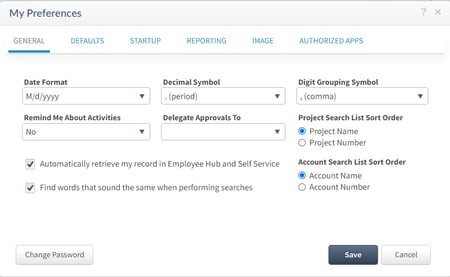
While the Deltek admin can configure the settings for the company, security roles, and even specific users, you can personalize some of the Vantagepoint experience just for you! By clicking on the gear in the top right corner, then selecting “My Preferences,” there are some ways that you can personalize your experience. Some of those include:  

  • Set your preferred project search sort order. You can choose to sort the project lists by Project Name or Project Number.  
  • Choose whether you select saved searches or records when running a report. 
  • Choose whether you want to default to an accounting period or be prompted to select an accounting period upon initial log-on to Vantagepoint.  
  • If your firm has turned on the Contact Qualification settings, you can choose the default Qualified status as either New Lead or Qualified Lead.  
  • You can set your default Country for all addresses in the system.  
  • You can choose what you want to load initially when you log into Vantagepoint. Options include the Application last used, the default Welcome Page, or you can select a specific application.    

2 - my preferences

#3 – Access Vantagepoint from Your Phone 

This is often one of the most overlooked features of Vantagepoint – the mobile apps! Deltek has created two mobile apps specifically for Vantagepoint. One is for time and expense and one is specifically for CRM. Both are available for both iPhone and Android users. Stop what you’re doing right now, open your phone, go to your app store, and then search and download at least the Deltek T&E for Vantagepoint 

The Deltek T&E for Vantagepoint allows you to complete and submit your timesheet on the go! And, with Vantagepoint 5.5, Deltek improved the navigation menu and usability to make completing your timesheet even easier. The T&E app also allows you to submit expenses from your phone too. It utilizes ICR so that you can snap a photo of a receipt and the app intelligently reads text and handwriting to populate the form using machine learning.  

Please note that you’ll need the CRM license to access the Deltek CRM for the Vantagepoint app. With this app, you’ll be able to view, add and edit records including firms, contacts, projects, and activities. And, with Vantagepoint 5.5 or later, you can snap a photo of a business card, and using the same ICR technology, it will either add or update the contact information.  

#4 – Don’t Miss an Important Alert or Assignment 

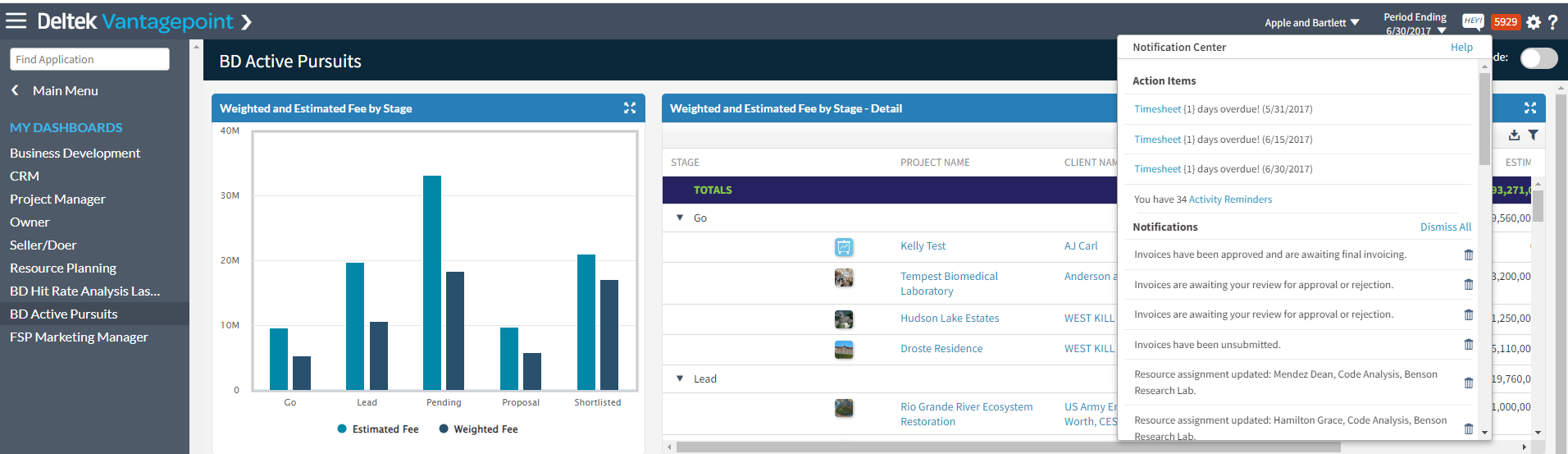
The notification center allows you to instantly see how many outstanding action items and notifications you have. You’ll know you have an important notification when a red number appears in the top right corner of Vantagepoint. This notification center is organized by Action Items and Notifications. The Action Items area includes activities, approval assignments, and past-due timesheets. The Notifications area includes workflow notifications, alerts, and failed and completed process server jobs. 

3 - notification center

#5 – Use List View to See and Update Many Records at Once 

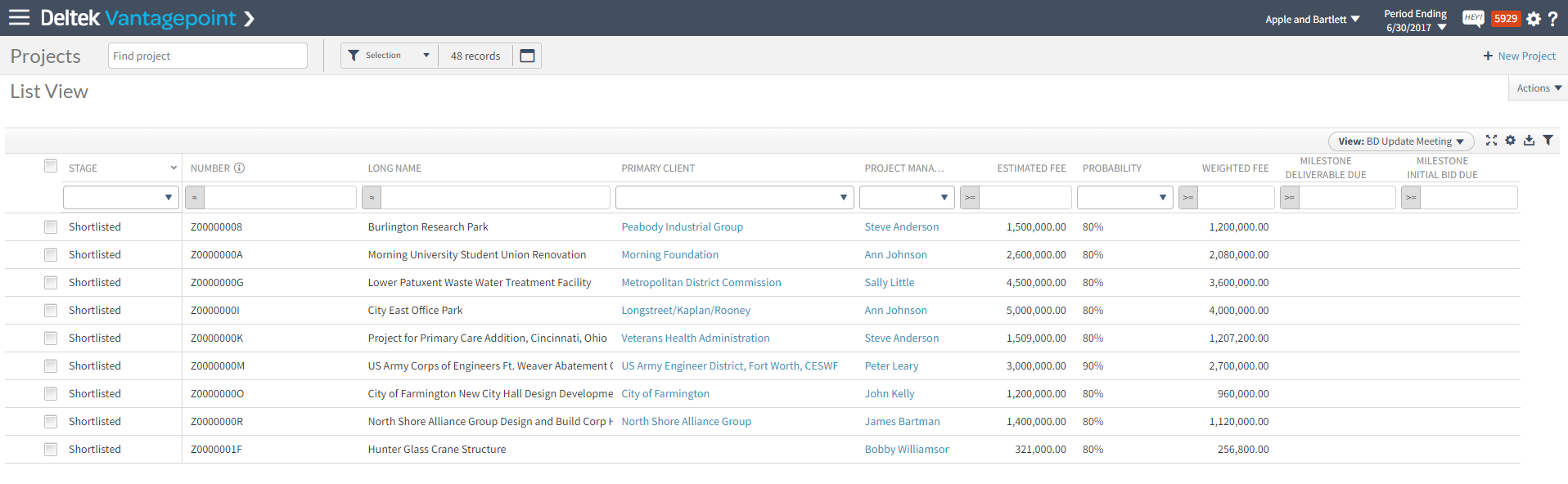
Every Hub area in Vantagepoint has the ability to show one record at a time or multiple records at once using List View. No matter what Hub you’re in, to toggle between record and list view, click the button with the three lines just to the right of the record numbers (see screenshot below). 

4 - list view

When you go into List View, you’ll see all of the records you have opened based on your search criteria. And, once you’re in List View, you can do a few different things. Below are just a few of the list view functions.  

  • Quickly sort and filter the records by clicking the little funnel icon on the right-hand side.  
  • Choose which columns (or fields) you want to see in list view by clicking the gear just above the list of records
  • Update the information in each cell by clicking in it.  
  • Download the records as they currently appear on the screen by clicking the down arrow just above the list of records. 
  • Save the view so you can apply it again or save different views based on the task for that session.   

5 - list view

#6 – Stop Wasting Time Searching for Your Information 

If you find yourself constantly looking for the same records or the same type of records over and over again, I encourage you to create a saved search. You can create saved searches for yourself or for others (based on your security settings) to quickly find the records you need. Some popular saved searches include: 

  • Projects where I am the Project Manager (or Principal or Marketing Manager), 
  • Contacts located in a certain city or state,  
  • Clients where I am the client manager, and 
  • Active pursuits which can be a list of projects in certain stages. 

Watch this mini-demo to learn more about searching and saving frequently used searches. 

#7 – Set Up Projects Faster Using Project Templates  

With Deltek Vantagepoint, there are most likely going to be more people creating new project records. This includes marketing, business development, project managers, and accounting. This differs from other ERP systems, including Deltek’s previous Vision system, where mostly finance or accounting open new projects. Because of Vantagepoint’s streamlined project lifecycle, you only need to open one project record that will be used from pursuit to project delivery.  

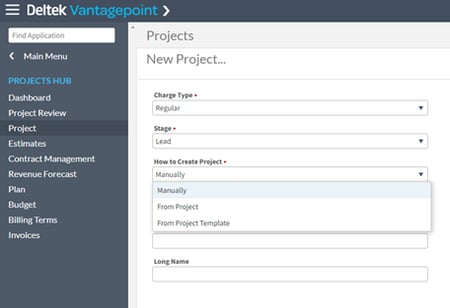
Make the project creation process faster and more consistent by utilizing project templates. When you create a project from either another project or a project template with a structure already determined, Vantagepoint will build that new project with that same structure and/or allow you to choose to edit the structure during the project creation process.    

6 - project creation

Through this process, you can choose the levels of the project that you want to use as well as add additional levels and edit values as needed before saving.  

#8 – Use the Calendar to Complete Your Timesheet 

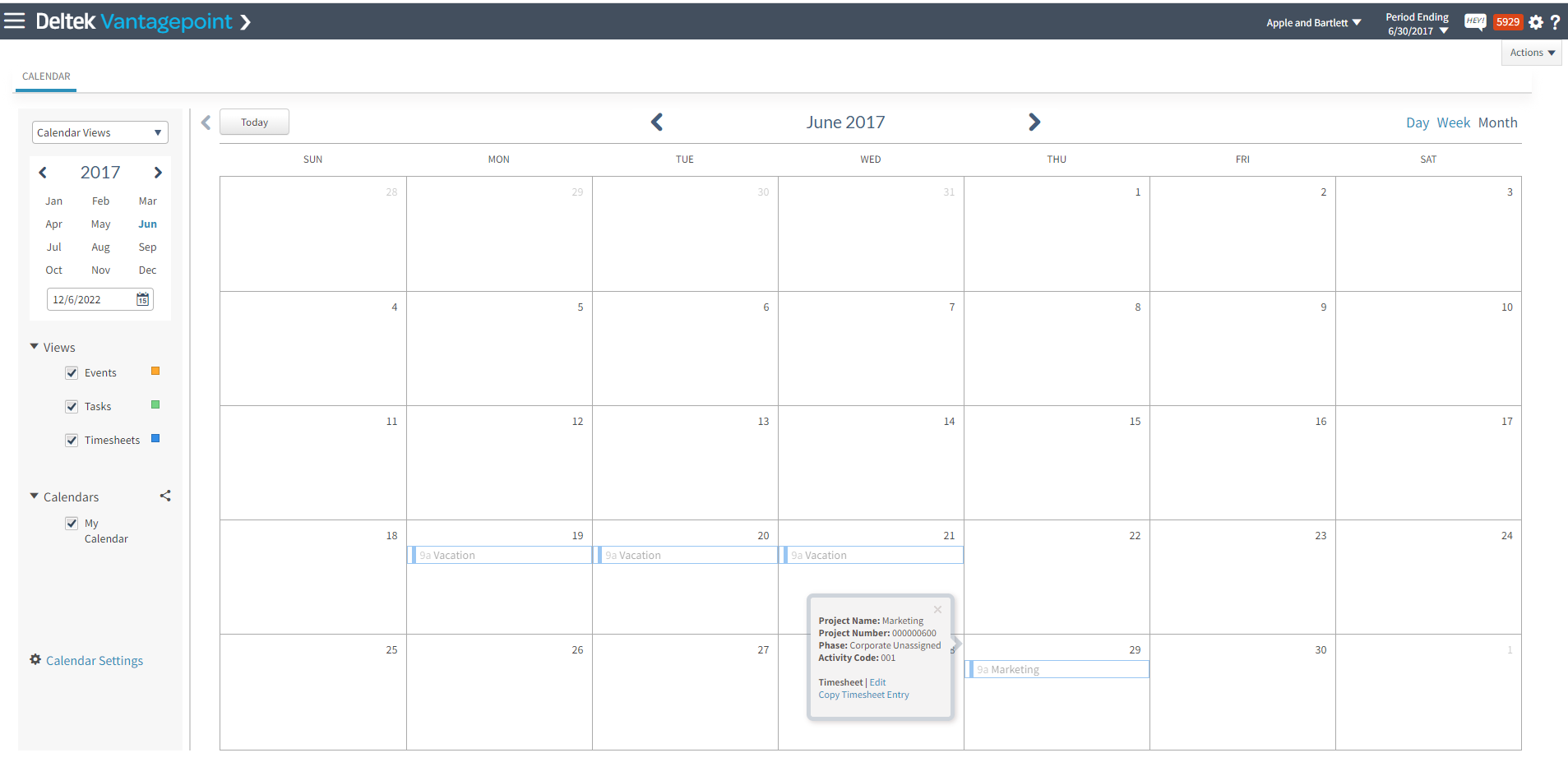
If you’re like me and find visual displays easier to read than line-item displays, then the Calendar is for you! The calendar feature is found under My Stuff and allows you to create, edit, and schedule events and activities as well as their associated tasks and timesheet entries. You can use the Calendar Timesheet Pane to add timesheet entries. In this view, you can see recent projects and upcoming assignments and drag these items to the calendar.  

7 - calendar timesheet

#9 – Share Vantagepoint Records Easily 

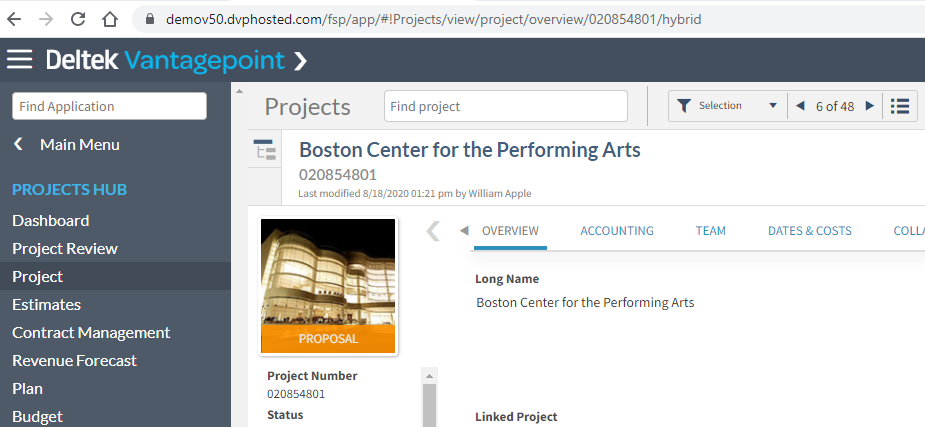
Because Deltek Vantagepoint is a web browser-based application, each record or screen has its own URL that is specific to your Vantagepoint instance. You can save your Vantagepoint URLs to specific applications, Hubs, or records similar to how you save other favorite websites, or you can share them with your coworkers.  

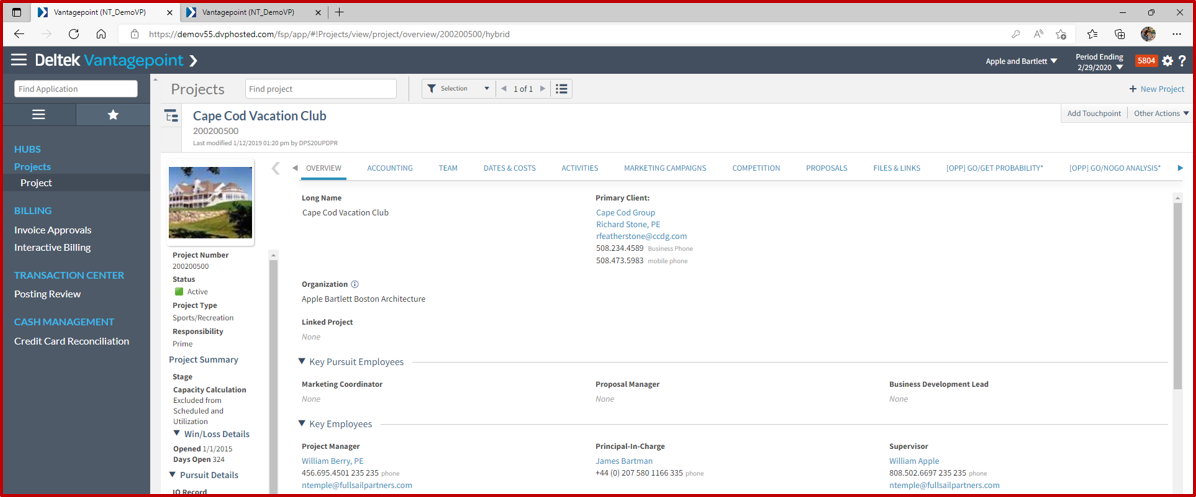
See the screenshot below, specifically the URL at the top of the image. I can copy and paste that URL link to send in a Teams Chat or email to one of my coworkers. When they click on the link, they will be prompted to log into Vantagepoint but then be taken directly to that project record.  

8 - project url

#10 – Get the Right Help, When You Need It 

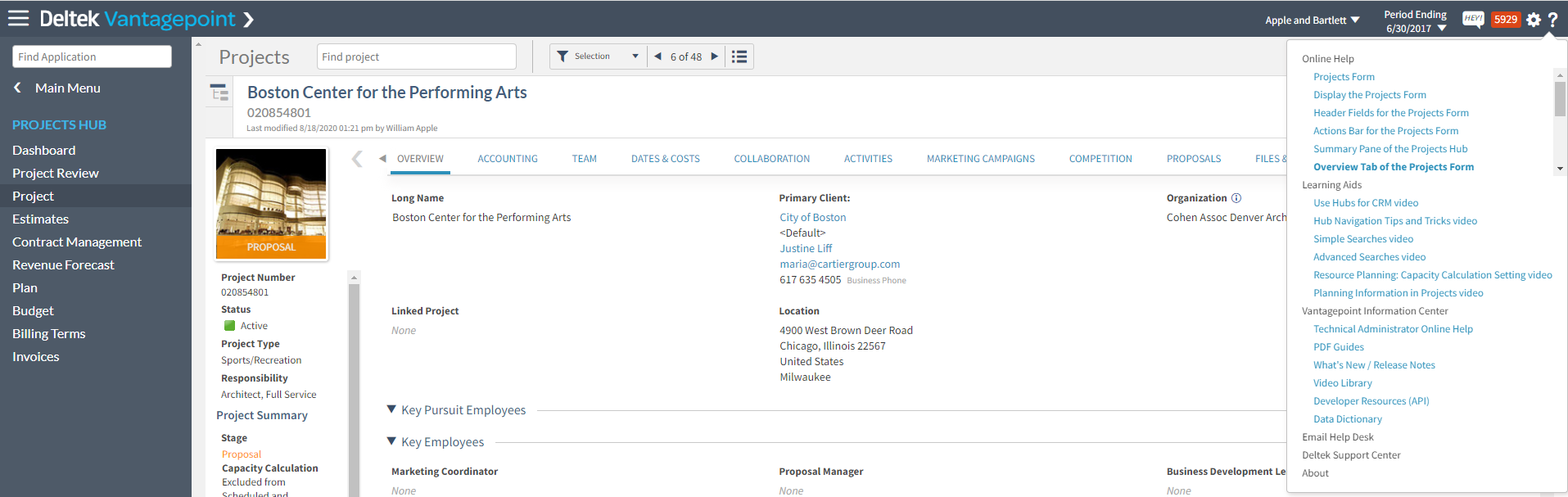
Another part of Deltek’s reimagining was the help or support portal for Vantagepoint. No matter where you are in the system, you can click on the question mark in the top right corner and the Help options will change dynamically based on what Hub or application area you’re currently in. The example below shows project-related information including links to Online Help, Learning Aids, Information Center, and more.  

9 - online help 

If you find yourself not knowing what a specific record or application does, what to do next, or if you want to learn more, make sure the next step is to click the question mark in the top right corner.   

Do More with Deltek Vantagepoint 

These are just 10 tips and tricks to help you get more value from Deltek Vantagepoint. To see these and others in action, please click the image below to view our mini-demo series – Powering Project Success with Deltek Vantagepoint. Each mini-demo is less than 15 minutes and will show you how Vantagepoint empowers the different roles in your firm.  

New Features in Deltek Vantagepoint 5.5

Posted by Cate Phillips on Nov 30, 2022 12:00:00 AM

2022-DVP 5.5 Features -Banner

The new features in Deltek Vantagepoint 5.5 enhance usability, increase personalization for individual users and streamline project management and accounting workflows. It’s easier than ever for professional services firms to access the right information and complete common tasks quickly. Here’s an overview of what’s new.

Schedule Dependencies

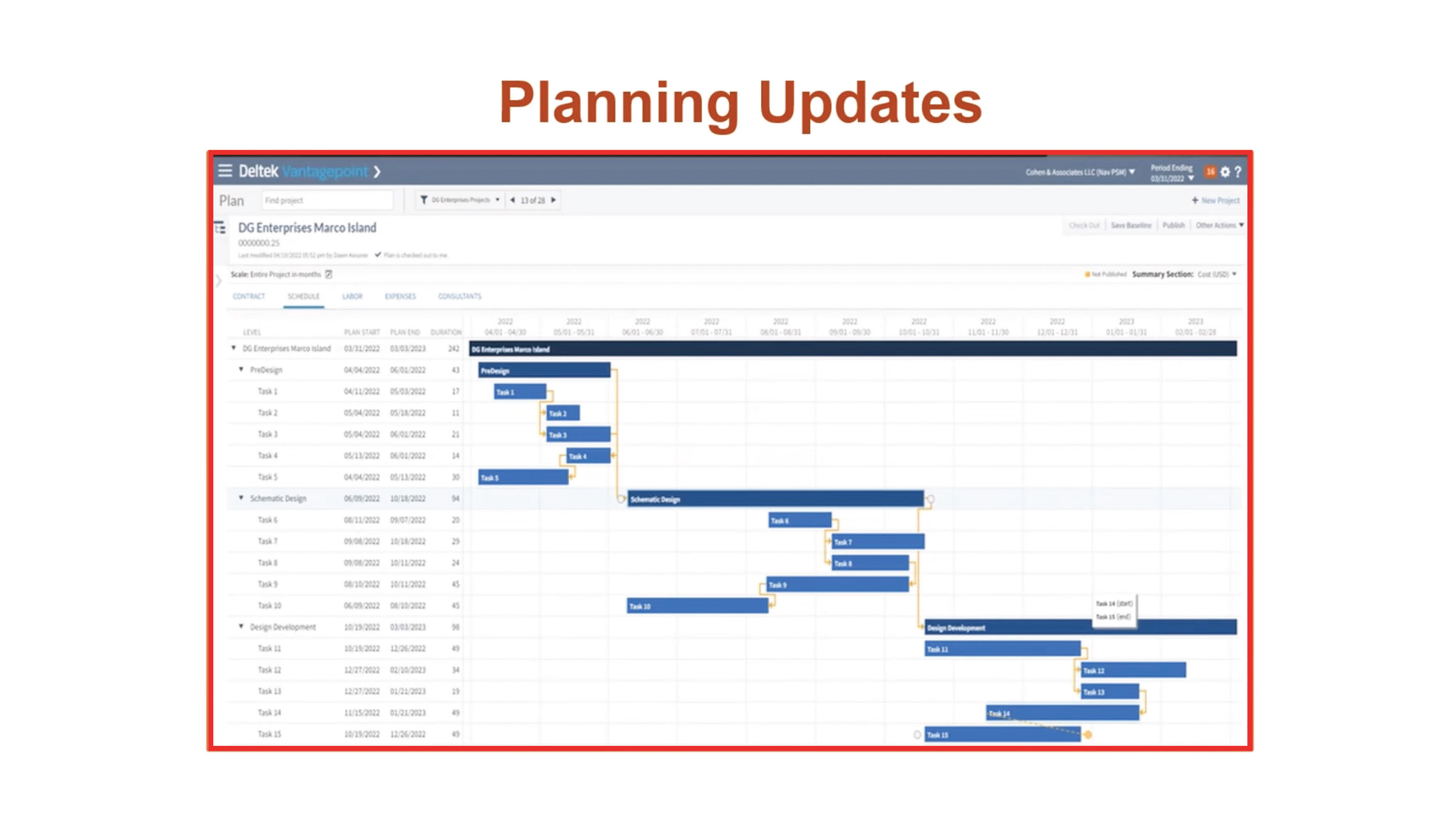
Users with the Resource Planning Module can create dependencies in the Gantt chart and manage a project’s critical path. Project managers can quickly visualize and modify the project schedule, work breakdown structure elements and the relationship between those elements. When an update is made at one level, all of the dependent levels are automatically updated.

Dependencies are also accessible in the Project Planning report. Users can view information about dependency relationships between work breakdown structure elements, projects and associated labor codes.

DVP55_BlogScreenshots_1

Drill-Down Paths

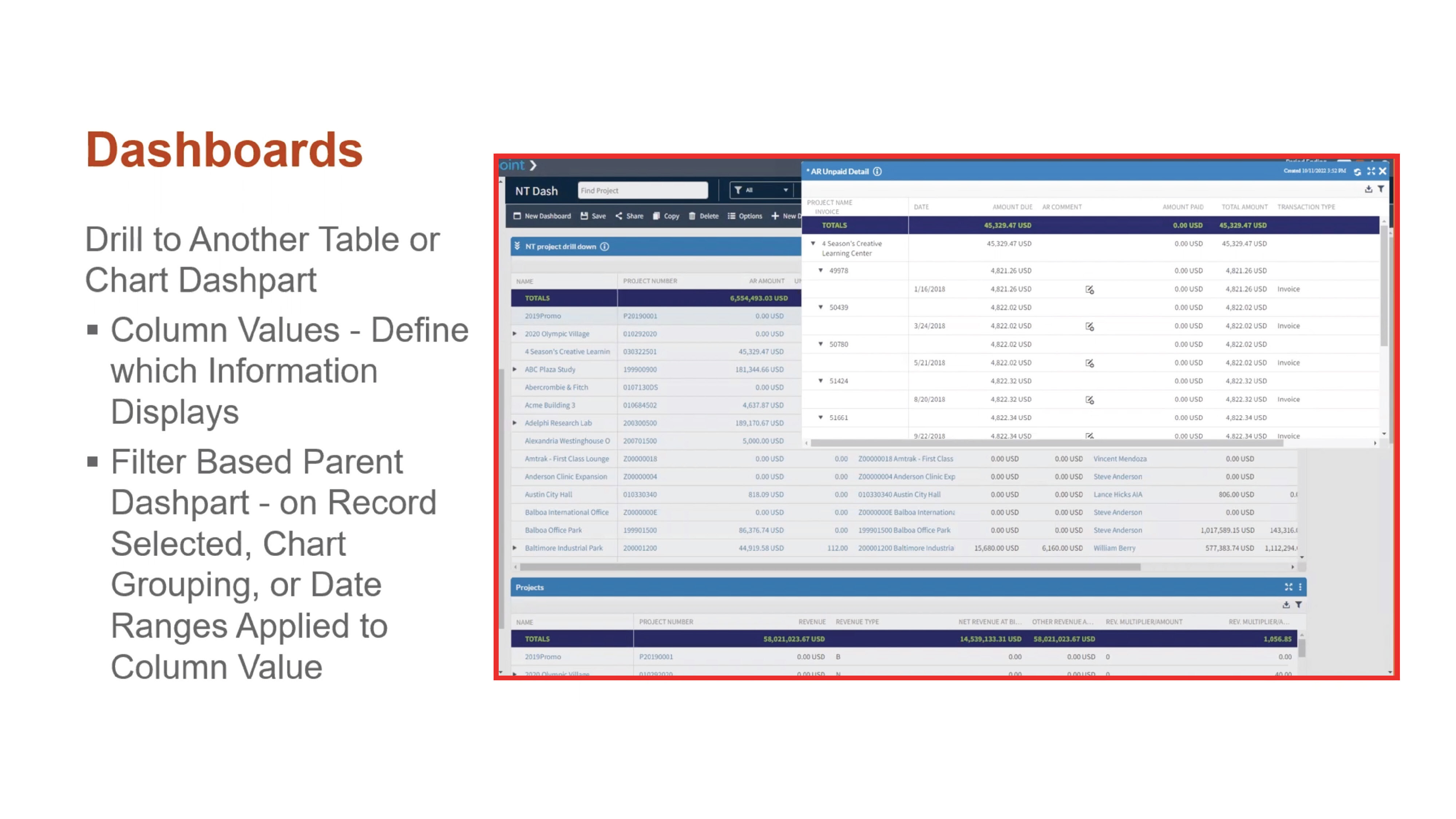
Help users access the right information quickly with drill-down paths. Users can determine which information is shown when they drill down into key summary metrics on a chart or table. For example, when a user clicks on a column displaying outstanding accounts receivable data, Deltek Vantagepoint can be configured to show them a dashpart with AR invoice detail.

DVP55_BlogScreenshots_2Personal Dashboards

Users can now create their own personalized dashboards without engaging an administrator or manager. This added flexibility will help expand adoption and free up administrator time since users can customize more of their experience with Deltek Vantagepoint.

Update Percent Complete from the Dashboard

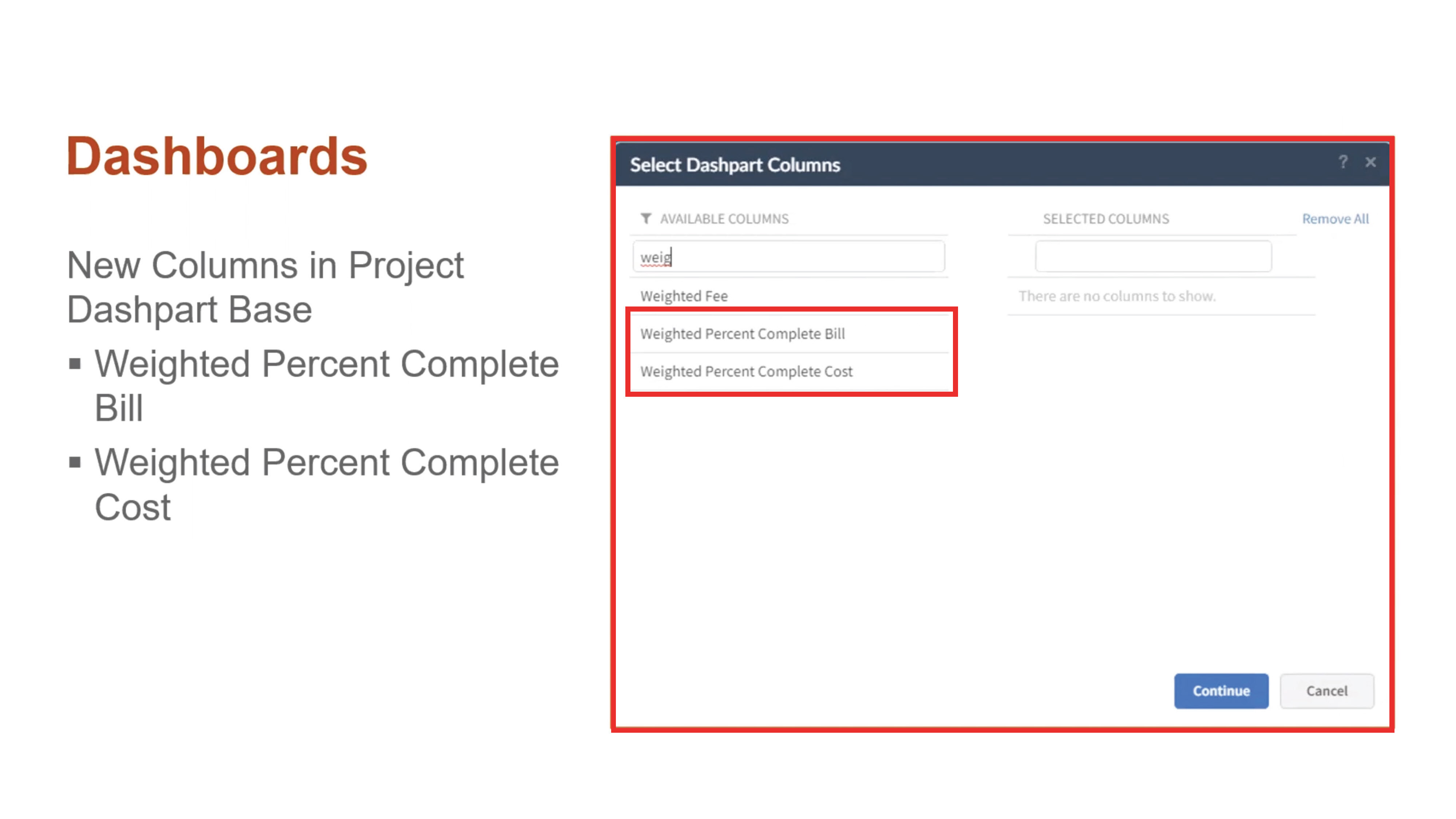
With Deltek Vantagepoint 5.5, project managers can easily manage percent complete with fewer clicks, ultimately improving reporting and billing accuracy. There are new columns in the project dashpart base for Weighted Percent Complete and Weighted Percent Complete Cost. Users can see and modify the percentage of completion per project billing or cost amount right from the dashboard.

DVP55_BlogScreenshots_4Streamlined Purchasing

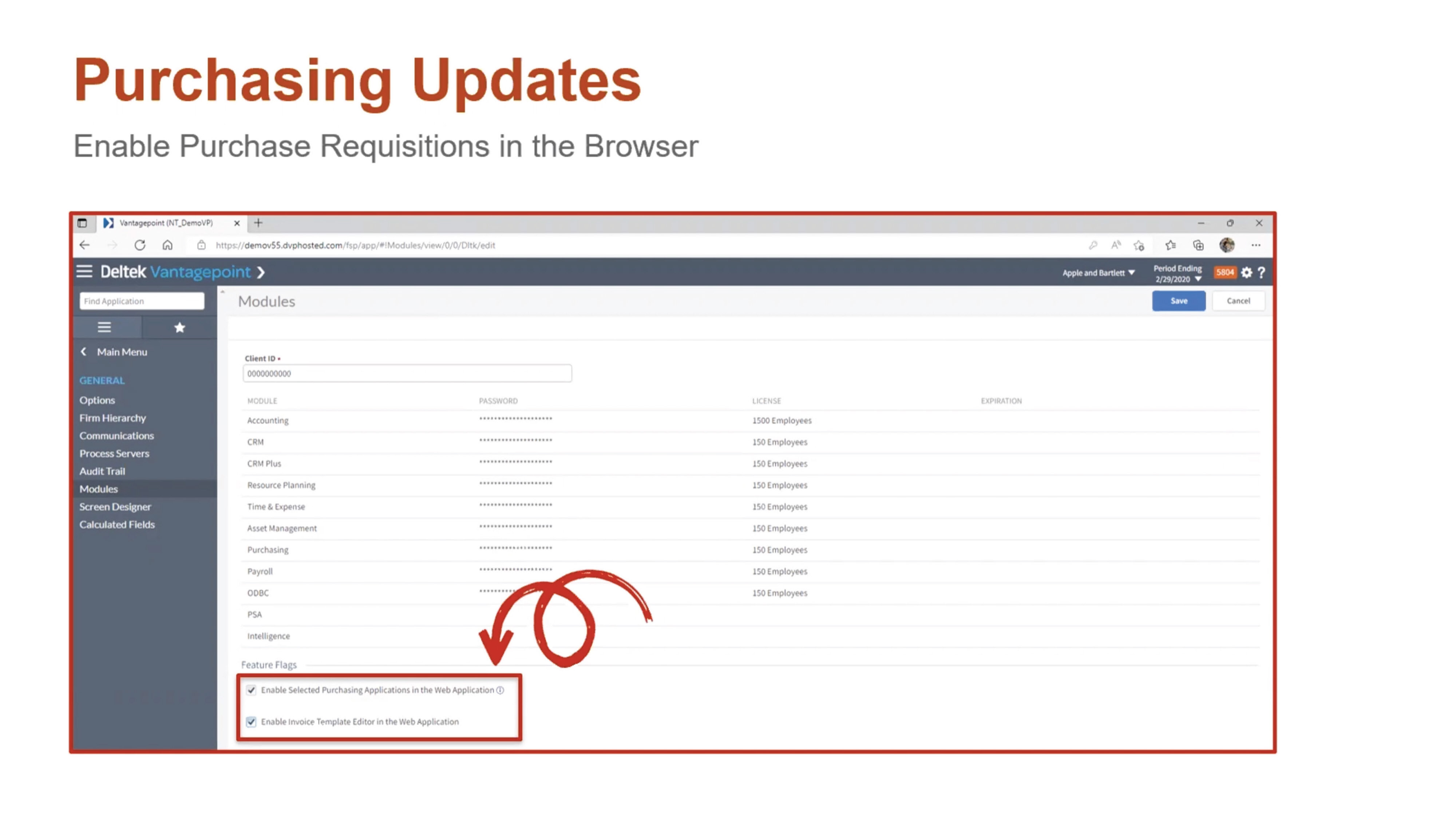
Deltek Vantagepoint 5.5 enables staff to perform purchase requisitions and process approvals within any browser. Purchasing Requisitions, Purchase Orders, Items and Items Master are now accessible in the navigation pane of the browser application.

DVP55_BlogScreenshots_5

Other Purchasing Updates

Additional purchasing updates in Deltek Vantagepoint 5.5 include: 

  • New layout for suggested vendors
  • Ability to add a vendor on the fly
  • Ability to attach documents of any status
  • Ability to view purchasing reports
  • Redesigned interface for the purchase requisition form

Accounting Updates

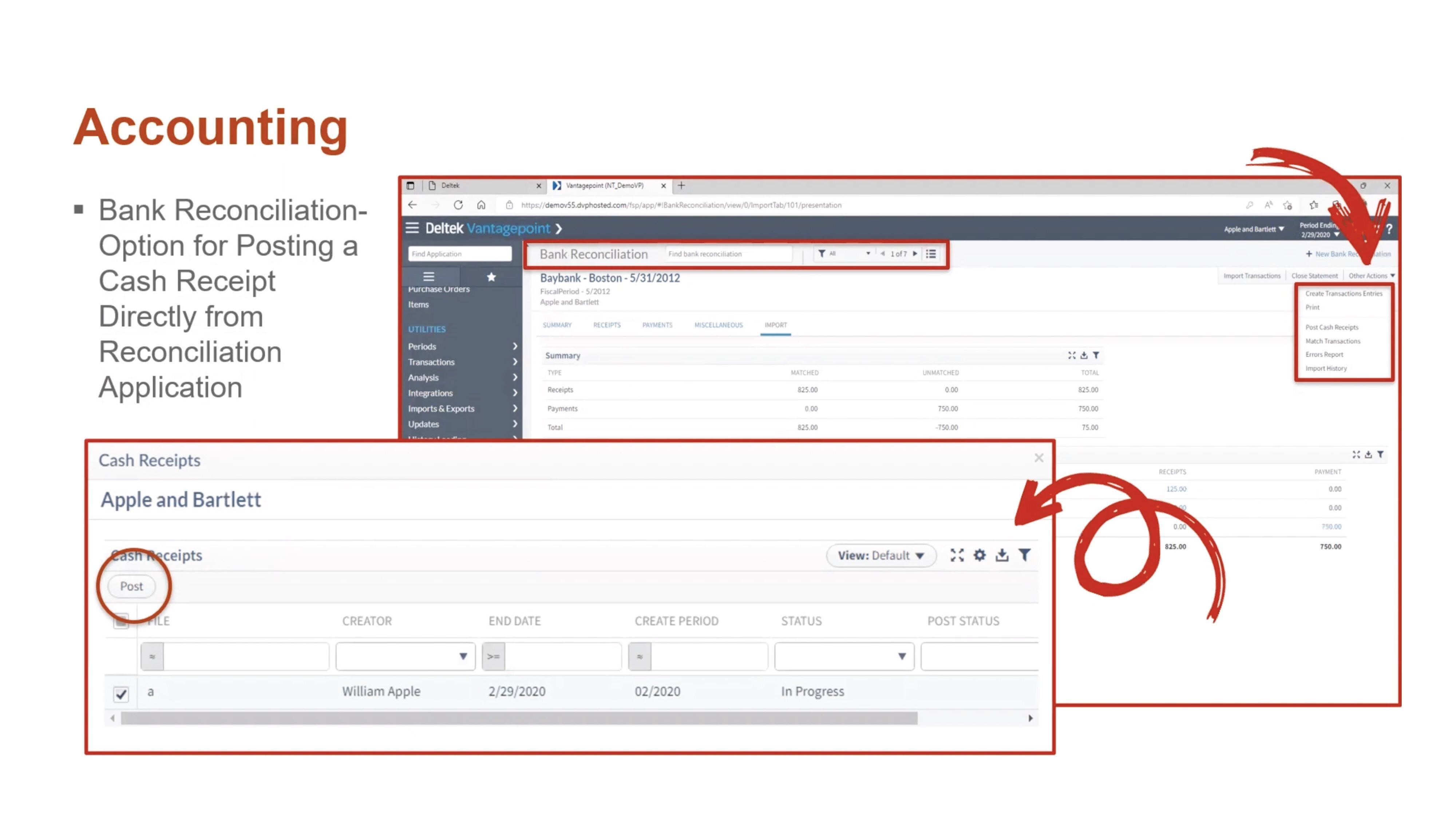
Deltek Vantagepoint 5.5 offers several new features that streamline accounting processes. Users can now post cash receipts that were created in bank reconciliation. This option is available for those that have rights granted to their role in the Accounting tab from Settings >Security> Role. The Transaction Center Approval option must also be set to “No” in Settings and Accounting Transactions.

DVP55_BlogScreenshots_6

Other Accounting Updates

The other accounting updates in Deltek Vantagepoint 5.5 include: 

  • Expanded reporting in timesheets and billing
  • Print capability for Billing Category Rate Table reports
  • New overtime premium calculation that uses the cost rate in the Billing Labor Override Table instead of the Cost Rate in the Employee Hub for the employee

Email Templates

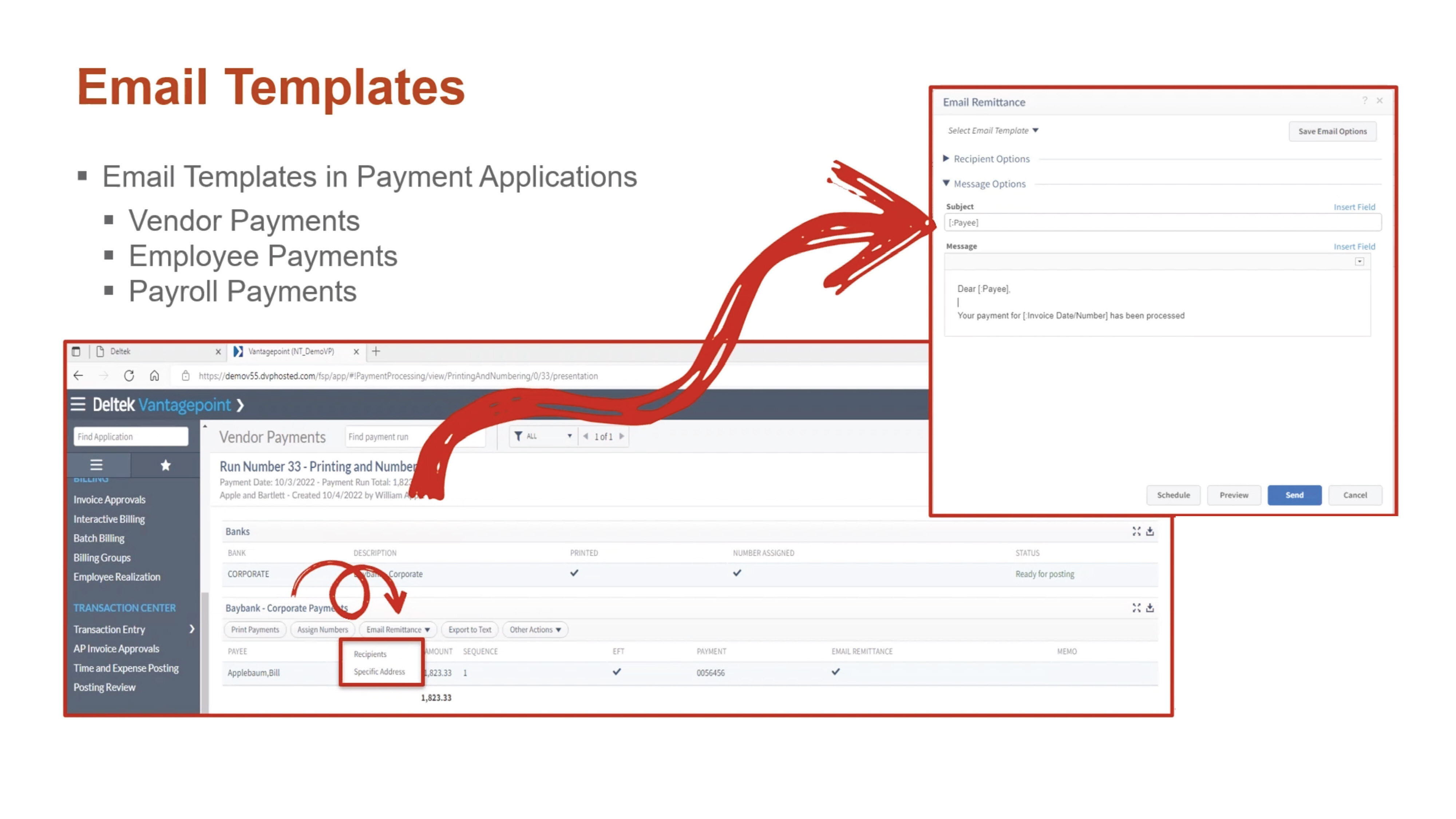
To help support digital payment processes, Deltek Vantagepoint 5.5 allows users to use email templates when sending electronic payment remittances by email. Templates can be configured to reuse standard information, such as regular text or database fields. Email templates are available in the Vendor Payments, Employee Payments and Payroll Payments applications. Users can save templates for personal use, for all users with the same role, or for all users within the firm.

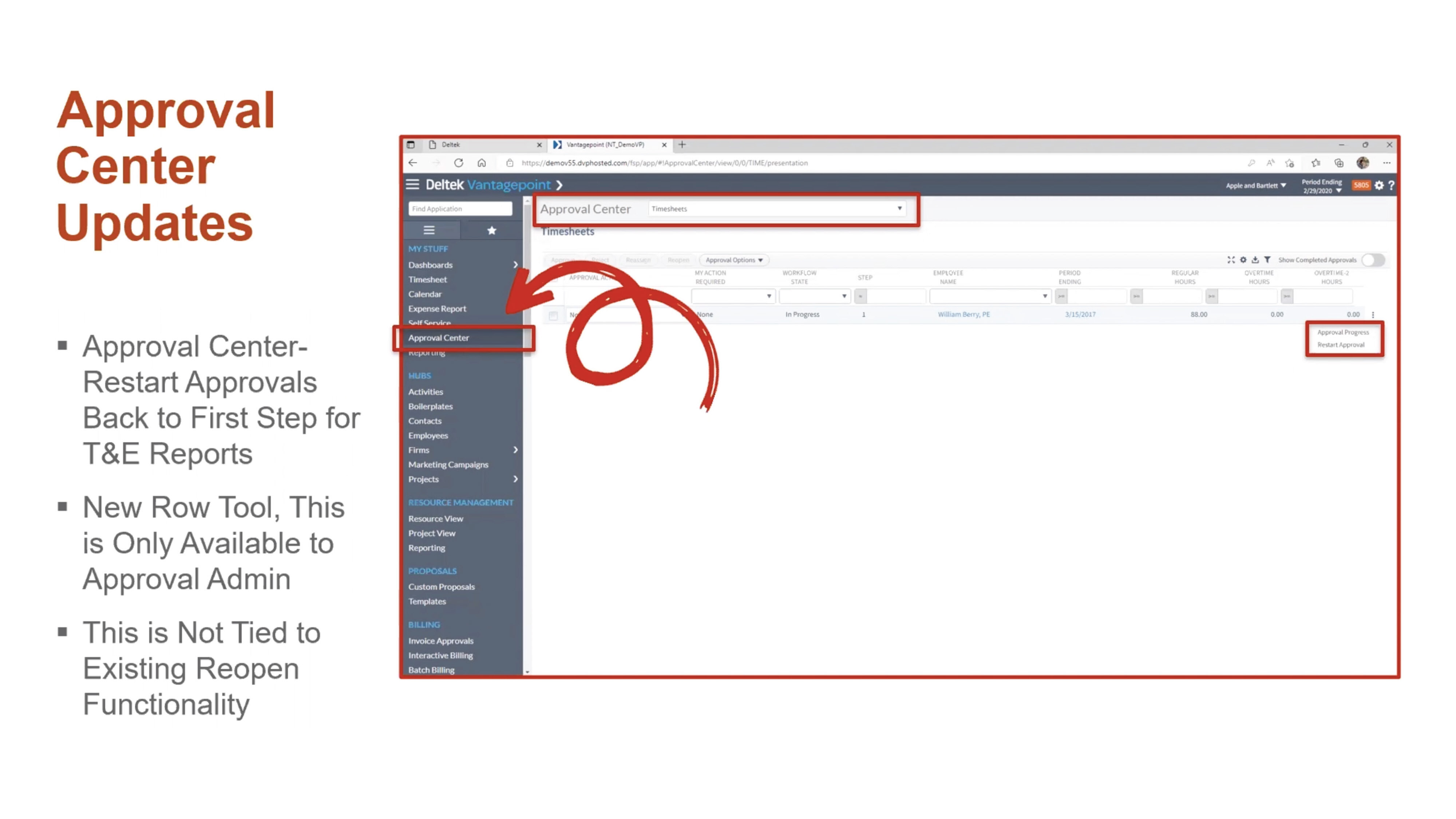
DVP55_BlogScreenshots_7Approval Center Updates

Users can restart approvals for timesheets and expense reports. This process removes all approved history and comments that are associated with the record and begins the process from the first step, no matter where the record is in the approval process.

DVP55_BlogScreenshots_8

General Usability Updates

Deltek Vantagepoint 5.5 also comes with a number of usability updates:

  • See notifications immediately instead of every five minutes with real-time alerts.
  • See all users viewing a record.
  • Set favorites in navigation to find commonly viewed applications with ease.
  • Set minimum/maximum and default values for standard numeric fields.
  • Use predefined searches within Advanced Search.
  • Print timesheet reports from the Floor Check dialogue box.
  • Access Labor Planning videos in Online Help.

Learn More About the New Features in Deltek Vantagepoint 5.5

This is just a high-level overview of the many new features in Vantagepoint 5.5. To learn more about what Vantagepoint has to offer, click below to talk to one of our consultants today.

Top Technology Trends from the 43rd Deltek A&E Clarity Study

Posted by Heath Harris on Nov 16, 2022 12:00:00 AM

2022-ClarityReport_Tech_Banner-01

The net revenue growth forecast for A&E firms is the highest it’s been in 10 years. Based on the findings from the 43rd Deltek A&E Clarity Study, the industry has rebounded from the pandemic with full pipelines and an optimistic future outlook. Meeting that demand comes with serious challenges, with labor shortages and rising costs being most prominent.    

Firms are turning to technology to empower their teams and improve project delivery. They’re prioritizing the right investments over simply purchasing the newest technology. Here are the top insights from the study and some guidance for ensuring that technology investments deliver positive ROI. 

Top Technology Challenges for A&E Firms 

The top technology challenge professional services firms are facing is the inability to invest time in learning. With full project pipelines, firms are dedicating resources to completing client work, limiting the time they can spend on learning new technologies. Small firms struggle with this issue the most, though it’s a prominent issue for medium and large firms as well.  

Technology costs, which topped the list in last year’s report, was the second most commonly cited challenge. Firms are also struggling with prioritizing which trends apply to their organization. With so much technology to choose from, many firms are understandably unsure which trends to pursue. Finding the right fit, whether it be data science tools or digital twins—for the firm and for their client base—isn’t easy.  

Other challenges include educating employees and clients about trends, lack of champions to drive technology adoption and limited corporate openness to emerging technologies.  

A&E Firms Are Focused on Getting it Right 

Firms are honing in on the initiatives that enable them to take a pragmatic approach to technology adoption and integration.   

When asked about their top three technology initiatives:  

  • 64% said creating strategic technology implementation plans.  
  • 47% said educating staff on technology trends. 
  • 46% said identifying and developing technology subject matter experts. 

This pragmatic approach is a good way to enter into digital transformation. However, firm leaders should be careful not to get stuck in a cycle of endless planning. One way to cautiously approach technology is to look for ways to expand usage of current tools. This can provide quick wins and competitive advantages without requiring significant investment or onboarding time.  

Internal Champions Can Take on Challenges and Lead Key Initiatives 

To take on technology challenges in the short term, firms should engage tech-savvy employees as internal technology champions. Technology champions can help improve the ROI of technology in the following ways:  

  • Fill current skill gaps by leading the charge to incorporate technology into project execution.  
  • Promote and expand adoption of existing technologies throughout the business.  
  • Identify the most viable technology investments and trends for the firm.  

Only 36% of firms ranked this as one of their top three initiatives, meaning that many are missing an opportunity to address current gaps in technology planning and adoption.  

Which Technologies Should A&E Firms Focus On? 

To help guide technology planning, A&E firms should look at technology as falling into two buckets. Technology that supports project delivery, such as smart infrastructure and digital twins help firms remain competitive and address common challenges in the building process. Business-optimizing technologies, like data science and next-level project management tools can be used to automate repetitive tasks, empower workers to make more informed decisions, and ultimately improve client satisfaction.  

For more insight into which technology areas A&E firms should focus on, watch the webinar 

Focusing on these areas will enable firms to address some of their biggest concerns: 

  • Attract and retain talent by appealing to the next generation of employees, who want to work with companies that give them access to the latest technology.  
  • Prepare for disruption. As innovation continues to transform the A&E industry, the right technology will help firms future proof their businesses.  
  • Increase revenue streams by identifying the ideal services and delivery methods that lead to competitive advantages and higher profits.  

Dive Deeper Into the Technology Insights from the Deltek Clarity Study 

Firms aren’t investing in technology for technology’s sake. They’re focused on making the right investments that will enable them to increase productivity and compete for projects and talent. With the right guidance, they can take on the opportunities and challenges ahead. For more technology insights, download the full report.  

Deltek Vision and Vantagepoint Year-End 2022

Posted by Scott Gailhouse on Nov 2, 2022 12:00:00 AM

2022 - Year-End_Banner

Year-end is the final accounting process to close “the books” at the end of each year. With 2023 just around the corner, it is never too early to plan for your year-end close. Planning and organization on your part can make the year-end process less challenging for the entire accounting staff.   

Take the Time to Document and Get Organized 

As always, you should take the time to document your year-end procedures. Not only the tasks performed in Deltek Vantagepoint and Vision, but all accounting tasks you perform should be documented so that you have a comprehensive guide that you can refer to every year. It is also vital that you create an accounting calendar.  

The accounting calendar is not just for year-end, but for month-end and quarter-end tasks as well. This calendar is a schedule of anticipated dates for financial activities. You should also develop a year-end checklist to make sure you don’t miss anything. One other tip to make this process go smoothly is to make sure that you are performing your month end reconciliations on a timely basis. 

Common Year-End Tasks 

Some of the more common year-end tasks for most companies are: 

  • Reconcile All Cash Accounts - Verify all transactions have been posted into Deltek Vantagepoint/Vision to ensure your general ledger balances match your bank statements. Make adjustments as required. 
  • Credit Card Reconciliations – In order to ensure all credit card transactions are captured, make sure all expense reports are entered and posted. 
  • File Reconciliation Report – This report should be run at month-end and at year-end. This report identifies discrepancies between the GL and the subledger reports. 
  • Final Invoicing – Process all client invoices for the fiscal year. 
  • Review Outstanding Accounts Receivables - Follow up with clients who have outstanding accounts receivable beyond 30 days. Send past due statements and/or simply give them a call. Enter the results of your collection efforts in the comments section of Vision Invoice Review. Year-end is an excellent time to collect your outstanding receivables. If you determine there is uncollectable AR, be sure to write those invoices off. 
  • Review Unbilled Detail - Time and expense transactions that cannot be invoiced to clients should be written off at this time. 
  • Fixed Assets – Fixed Assets are larger purchases that are made throughout the year (i.e., equipment, automobiles, furniture, computers, etc.). Check to see if all fixed assets reported on the balance sheet are still owned. If not, record the sale or disposal of these fixed assets. Verify the depreciation on your fixed assets as well. Then make any necessary adjustments. 
  • Employee Expenses and Accounts Payable - Verify that all accounts payable vouchers have been recorded in Deltek Vision/Vantagepoint. Make your 401(k), SEP IRA, and Simple IRA contributions, if you have not done so. Try and pay all your vendors and employee expense reports by year-end. 
  • Notes Payable - Verify notes payable (i.e., loans) amounts on your balance sheet match the statements from your lenders. Then make adjustments if necessary. 
  • 1099 Forms – Order 1099 forms. Make sure all W-9 forms from your vendors and/or contractors that are paid $600 or more throughout the year are on file in the Firms Hub in Vantagepoint or the Vendor Info Center. Don’t forget 1099s should be mailed by January 31st. 
  • W-2s – Order W-2 forms if you run payroll in Vantagepoint/Vision. W-2s should be mailed by January 31st. 
  • Budget for Next Year - Create your GL budget for the new year. 

Be Prepared to Close Out the Year 

In Deltek Vantagepoint and Vision, opening the 1st period of your fiscal year also opens the new fiscal year. Depending on your security rights, you can still process in the prior fiscal year if needed. 

There are several initialization utilities that need to be performed. For example, Open New Period (fiscal year), Open New Benefit Year, 1099 Initialization and Open a New W-2 Quarter/year if you are using the payroll module. Deltek Vantagepoint and Vision will generate a posting log for the initialization utilities. If your Vantagepoint or Vision database is configured for Multicompany, the initialization utilities need to be run in each company. The only exception is the Open New Period utility, which opens for all companies at once. 

Deltek will issue a Year-End update at the end of December containing tax updates for payroll users. Also, be on the lookout for Deltek’s Vision and Vantagepoint Year-End guide for more detailed information on year-end closing. 


Latest Posts