Full Sail Partners Blog | Project Management (3)

Posts about Project Management (3):

Improve Project Planning with Deltek Vantagepoint
Posted by Rana Blair on Jan 30, 2024 12:00:00 AM

02-08-24 Improve Project Planning with DVP-Banner

For professional services firms, having a reliable project planning tool is critical to ensuring projects are profitable. In a competitive landscape, successful project execution hinges on the effectiveness of project planning, driving the need for firms to invest in tools that not only meet but exceed expectations. Therefore, a project planning tool needs to be intuitive for users and must improve project scheduling and resource planning.

With Deltek Vantagepoint, project planning has been taken to the next level with a focus on the features and functionality that project managers need. This advanced tool is carefully crafted to specifically cater to the distinct needs of project managers, making sure it not only meets, but also anticipates their requirements. Here are some key features of Vantagepoint that will assist project managers with delivering successful and profitable projects.

Start Early with Templates

Getting a project off to a good start needs a bit of an early boost. Luckily, Deltek Vantagepoint helps out by offering practical ways to help plan things out early. Here’s what you need to know to get a head start.

  • Successful Delivery: This starts long before contracts are signed so consider creating the plan when the project is first entered in a Pursuit Stage. Vantagepoint offers a variety of methods that can be used to efficiently create a preliminary plan.
  • Project Templates: Firms can create multiple templates for use in creating new project records or when adding structure to a project. Using Project Templates allows users to quickly add the phases of work that are typical for the projects.
  • Projects Used as Templates: Firms can create Project records that can serve as templates for creating new records. These records can hold typical Work Breakdown Structure (WBS) elements like Project Templates but can do much more. The records can serve as a plan template that will allow the user to instantly create a plan with Schedule Durations, Generic Resources, and Planned Hours.

Aside from the ease of creating a project plan, planning the project in advance allows professional services firms to proactively manage pricing and resourcing.

Keep the Schedule Updated

Keeping the project schedule updated is a pivotal aspect of effective project management, and Deltek Vantagepoint equips users with powerful tools for this purpose. The plan Gantt charts are a great tool for managing the dates in a plan. The Schedule Tab allows planners to visually manage dates, durations, and dependencies for project delivery phases. Users can also adjust the project schedule from any level of the project by simply dragging and dropping the timeline bars and reviewing the Critical Path on demand, ensuring a clear understanding of key project dependencies.

Beyond the convenience of schedule management, the real-world impact of keeping the schedule updated becomes evident in staffing discussions. Maintaining an accurate and current schedule is a crucial reference point for conversations surrounding short- and long-term staffing availability. By staying on top of the schedule, project managers can better address staffing needs, optimize resource allocation, and enhance overall project efficiency.

Anticipate Resource Usage Curve

The keystone of true resource planning is predicting resource demands as they will likely occur. All project delivery phases have a ‘curve’ that should be reflected in the resource plan. Deltek Vantagepoint’s Project Planning allows users to plan the hours differently in specific time frames. With the Distribute Hours feature, users can take a more precise approach to planning resource hours over specific date ranges by using hours or percentages per day.

This level of granularity in resource planning is not just about meeting requirements; it's a strategic move to decrease the chance of resource clashes. Understanding the intensity of resource usage during different phases of a project becomes a proactive measure to minimize conflicts and optimize resource allocation. By anticipating resource usage, project managers can navigate the intricacies of resource planning with precision, ensuring easy and efficient workflows that align with project objectives.

Review Performance Against the Baseline

The Baseline serves as the bedrock, outlining the assumptions upon which the scope, schedule, and budget of the entire plan are built. Saving the Baseline at the right time allows users to review the deviations and project the final outcomes.

Deltek Vantagepoint not only facilitates this review but also enhances it by allowing users to compare Baseline values with Estimate at Completion (EAC) values. This comparative analysis can be conducted seamlessly across various platforms, including the Plan, Dashboards, and the Project Review feature. This multi-faceted approach to reviewing performance against the Baseline ensures a complete understanding of how the project is progressing in relation to its initial assumptions.

Take Control of Your Project with Deltek Vantagepoint 

Deltek Vantagepoint Planning and Resource Management allows professional services firms to collaborate and analyze project performance from the pursuit through closeout. Maintaining the plan throughout the life of the project improves financial performance and enhances communication around schedules and resource needs. Furthermore, by using this advanced tool, project managers can proactively minimize resource clashes by anticipating resource usage and ensuring project objectives are met. Take control of your projects today!

What is the Difference Between Project Backlog and Project Forecasting?

Posted by Scott Seal on Dec 7, 2023 12:00:00 AM

12-06-23 Backlog and Forecasting_BannerIf you're neck-deep in the world of professional services consulting, you know that staying on top of your financial game isn't just about counting beans; it's about smart planning and even smarter execution. That's where getting cozy with project backlog and project forecasting comes into play. They're like the dynamic duo of the project management world, and if you're in charge of the purse strings or the big decisions at your professional services firm, you'll want to give these two the attention they deserve.
So first off, let’s break each of them down:

  • Project Backlog: This is your bread and butter—it's all the work you've already won but haven't done yet. Think of it as your safety net; it's work that you can bank on in the short term. And it's a gold star for your marketing or business development team, too, because it means they've been doing something right. But here's the kicker: it's not just about having a backlog; it's what you do with it. Manage it well, and you're looking at a smooth road to profit town. Mismanage it, and well, it's a bumpy ride.
  • Project Forecasting: Forecasting, on the other hand, is your crystal ball. It's a bit more elusive, a cocktail of educated guesses and wishful thinking. The business development and marketing folks have their ear on the ground, listening for the rumble of potential projects. They're not sure bets like your backlog, but with a savvy mix of hope and pragmatism, they plot out what could be coming down the pipeline.

Now, when you put backlog and forecasting together, you get a killer combo that gives you the full picture: cash flow in the immediate future and what your workload might look like down the line.

Leveraging Project Backlog and Project Forecasting for Optimal Performance

Mastering your backlog and forecasting is crucial for various roles within your professional services firm:

  • For Project Managers: Clear visibility into the project backlog means you can allocate resources effectively, prevent scheduling conflicts, and maintain optimal workflow. Deltek Vantagepoint, for instance, can provide the granular insight you need to ensure that projects are adequately staffed and that timelines are met, minimizing the risk of underutilization or bottlenecks.
  • For Business Developers: Your backlog is your success story in numbers—it's proof of performance that you can showcase to potential clients. Knowing what's in the pipeline helps you strategize new business pitches and align offerings with market demand. When it comes to forecasting, having a robust prediction tool allows you to prioritize pursuits based on the likelihood of project acquisition and future revenue potential. Deltek Vantagepoint's pipeline management tools ensure you're targeting the right opportunities at the right time.
  • For Marketing Teams: Backlog data informs you when to double down on lead generation efforts or refine targeting strategies. It's a barometer for market engagement, guiding you on when to accelerate awareness campaigns or capitalize on high demand. With Vantagepoint Marketing Campaigns, you can gauge campaign impacts on your forecast and backlog, enabling data-driven marketing decisions.
  • For Financial Controllers: Backlog and forecast reports are not just numbers; they're predictors of your firm's financial health. They validate if revenue projections are on track and highlight discrepancies that need attention. The accurate and detailed reports from Deltek Vantagepoint can assist in adjusting financial strategies, whether it’s scaling operations or tightening budget controls.

By integrating tools like Deltek Vantagepoint to manage backlog and forecast, every role from project management to business development can benefit from increased visibility, better decision-making capabilities, and a stronger strategy for sustainable growth.

How to Implement a Backlog and Forecast Strategy

It is not complicated. The project backlog and project forecasting process needs only to provide a standard tool for company-wide project planning and review. Use the following three steps to initiate a project backlog and project forecasting process.

Step 1: Begin with a Detailed ‘Bottom-up’ Forecast

Project managers, your weekly routine should include a thorough review of your project backlog. Prioritize the projects with more than a 60% likelihood of commencement. Allocate your team members, estimate the required hours, and plan out the next eight weeks. It’s a practical exercise in resource allocation and workload management.

The benefits?

  • You'll balance team capacity against project demands, considering downtime for vacations or training.
  • You’ll monitor project progress and ensure you're on track with milestones.
  • You’ll forecast potential revenue by aligning upcoming work hours with billing rates.

Step 2: Consolidate Insights at a Management Level

Once project managers provide their data, it's time for leadership to analyze it. This aggregation step allows for spotting trends, potential resource sharing, future revenue projections, and early detection of budgetary issues or hiring needs.

Step 3: Validate Your Forecast

Compare your projected outcomes with the actual data. This step verifies the accuracy of your forecasting and provides a basis for adjustment and improvement.

With Deltek Vantagepoint, you can streamline these processes, enabling your leadership, project management, finance, business development, and/or marketing teams to detect trends, identify efficiency opportunities, and enhance decision-making with data-driven dashboards.

This approach is about more than just numbers; it's about using data to tell the story of your professional services firm’s trajectory, making informed decisions, and navigating your firm's path forward with confidence. Let’s get started on making backlog and forecasting integral parts of your strategic toolkit.

Ready to Navigate Your Firm's Future with Clarity?

Chart a course for success with Full Sail Partners. Our expertise in working with professional services firms and Deltek Vantagepoint positions your firm to master both project backlog and forecasting, transforming data into actionable insights. Connect with us to see how we can help you optimize your operations and elevate your project management strategy.

Project Management Trends from the 44th Annual Deltek A&E Clarity Study

Posted by Evan Creech-Pritchett on Oct 5, 2023 12:00:00 AM

10-05-23 Deltek Clarity Recap-PM Trends_Banner2

Full Sail Partners has been closely following the annual Deltek Clarity Architecture and Engineering Industry Study, and in our previous blogs, we've delved into various aspects of this comprehensive report. As we continue our exploration of this year's 44th Annual Deltek Clarity study, we shift our focus to the critical realm of project management within the architecture and engineering (A&E) industry. This sector struggles with numerous challenges daily, and the study offers valuable insights into the current trends and issues affecting project managers. In this blog, we will dissect key findings from the study, particularly homing in on project management challenges and the strategic initiatives poised to address them. 

Project Management Challenges 

In the ever-evolving realm of architecture and engineering, project management is the linchpin of success. However, it's not without its formidable challenges. In this section, we'll delve into these critical challenges, from gaining better visibility into KPIs to grappling with staffing shortages. Furthermore, we will discuss strategies for overcoming them to achieve project management excellence. 

Visibility into Project Management KPIs: Project managers grapple with obtaining clear insights into key performance indicators (KPIs) and the tools required to manage them effectively. This issue affects project performance and client satisfaction. 

Projects on or Ahead of Schedule: 59.76% of projects are on track for schedule and budget. Despite this, staffing challenges continue to persist and impact project outcomes. 

Competing Priorities: A&E firms with well-defined roles, responsibilities, and efficient tools are better equipped to manage project resources. Quality control hubs, such as Centers of Excellence (CoEs) and Project Management Offices (PMOs), are instrumental in driving best practices. 

Staff Shortages: The industry continues to struggle with hiring and retaining skilled staff, with 62% of firms identifying it in their top 3 concerns. Offering tools, training, and attractive work cultures can help attract and retain next-generation project managers. 

Project Management Solutions 

Navigating the intricate landscape of project management in the architecture and engineering industry demands not just an understanding of the challenges but also the strategies to overcome them. In this section, we'll explore proactive solutions that address the industry's top project management challenges. From upskilling and training to streamline project management to harnessing collaborative platforms for improved effectiveness, and investing in technology for seamless connectivity, we'll unravel the keys to project management success.  

Addressing Top Project Management Challenges: To overcome these challenges, A&E firms are reducing their reliance on new project manager hires. Instead, they are focusing on upskilling, training, promotion, and formal career development planning to maintain productivity and deliverable quality. 

Project Management Effectiveness: Staffing issues, strong pipelines, and backlogs combined with increased staffing costs and skill gaps can hinder project management effectiveness. Collaborative platforms and regular training can help bridge these gaps. 

Connecting Teams and Using Systems: A common challenge is connecting all relevant teams on the same platform and ensuring employees use these systems correctly. This requires investment in technology and proper training. 

Project Management KPIs 

Effective project management necessitates careful planning and monitoring through various KPIs. While financial KPIs such as net revenue, profitability, and multipliers are well-tracked, there's room for improvement in non-financial KPIs like client satisfaction, schedule variance, and earned value.  

Balancing Financial and Non-Financial KPIs: Top financial KPIs like net revenue, profitability, and multipliers continue to be tracked by most firms at 94%, 93% and 83% respectively. However, firms showed less reliance this year on the non-financial KPIs like client satisfaction and earned value, at only 36% and 18% of firms tracking these statistics. Achieving a balance between financial and non-financial KPIs is essential for successful project management. Focusing solely on financial metrics can lead to oversight of critical project aspects. 

Project Reporting Accuracy: While A&E firms are gaining confidence in reporting project costs accurately, there's still room for improvement in reporting project schedules. Accurate schedule reporting is crucial for project success. 

Project Management Initiatives 

As the architecture and engineering industry continues to evolve, it's imperative to not only identify challenges but also to proactively address them through strategic initiatives. In this section, we will explore how A&E firms are taking forward-looking steps to enhance project management. These initiatives encompass investing in internal project management expertise, defining roles more clearly, and harnessing the power of technology and software tools to pave the way for a more efficient future in project management.  

Investing in Internal Project Management: A key priority for A&E firms is investing in internal project management, replacing the focus on hiring more qualified staff. Developing best practices and clearly defining roles for project management are also top priorities. 

Leveraging Technology: While technology can provide substantial support in project management, only a small percentage of firms are prioritizing investments in better software tools. Maximizing the value of existing tools and technology is crucial. 

Facing Challenges with Project Management Head on  

The A&E industry faces ongoing challenges in project management, including visibility into KPIs, staffing shortages, and maintaining project schedules and budgets. However, A&E firms are proactively addressing these challenges by investing in training, upskilling, and improved project management processes. Balancing financial and non-financial KPIs, accurate reporting, and leveraging technology will be essential for future success in the industry. By nurturing a culture of continuous improvement and transparency, A&E firms can enhance project management effectiveness and, ultimately, client satisfaction. 


The How-To Guide for Understanding Capacity Calculations in Deltek Vantagepoint Resource Management

Posted by Terri Agnew, CPA on Sep 28, 2023 12:00:00 AM

9-28-23_ResourceMgmt Views - Banner

Using the Resource View in Deltek Vantagepoint is a quick and easy tool for project-based firms to determine which employees are properly scheduled or utilized, and/or those who may not have enough or too many hours planned. This view has a lot of valuable information on one screen and can sometimes seem a bit overwhelming. So, the content provided here in this blog, which is utilized with Resource Planning licensing, will assist you with the questions like “What do the blue/red/grey colors mean?” or “How is the utilization % calculated” and help make this form one of the most important tools in your firm’s resource management toolbox.  

Three Show Capacity Views 

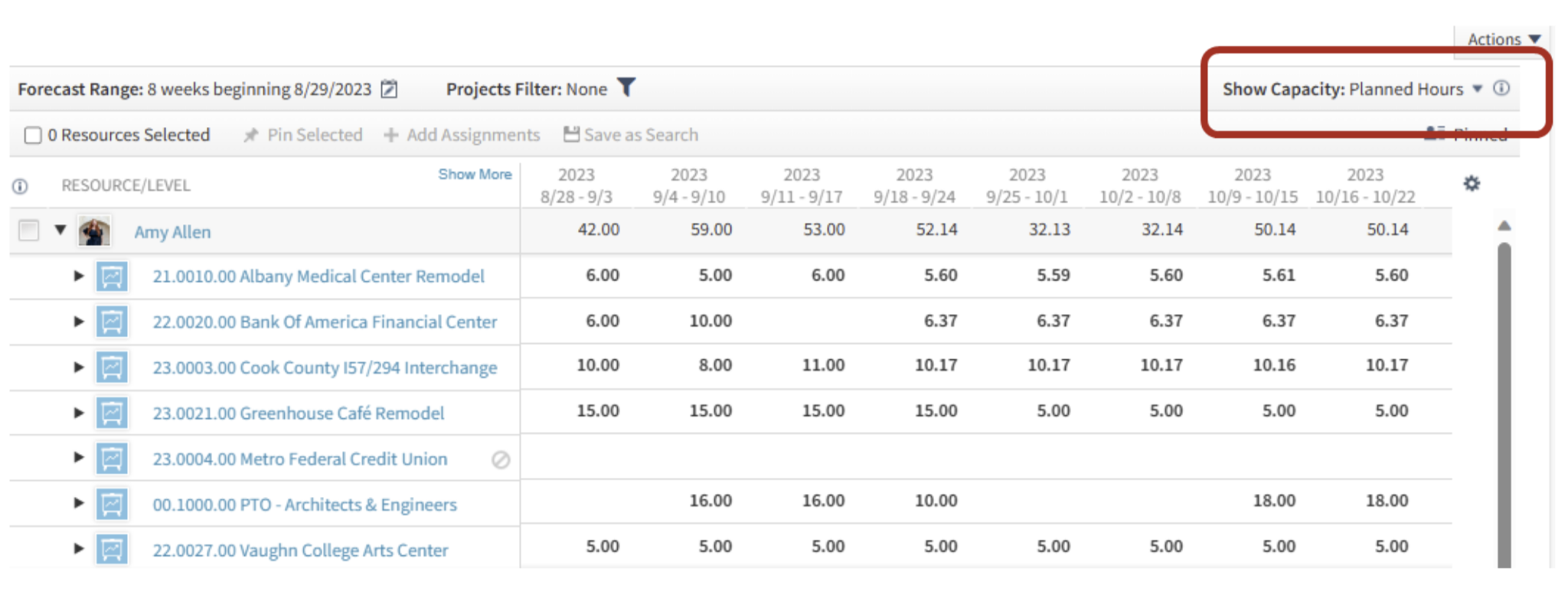
There are three different options to monitor your resources: Planned Hours, Scheduled %, and Utilization %. Below you will find illustrations showing how these three views are calculated for you to better understand the information Resource View is displaying. 

Planned Hours 

Planned Hours is the simplest of the calculations as it is what it says it is – all planned hours! Use this view to simply check each selected resource's total planned hours for the time period shown in the Forecast Range. Planned hours will be shown for all published plans for ALL types of projects – overhead, promotional, and regular projects. Planned hours will show even if the project is showing a capacity calculation of excluded from scheduled and utilized % on the project’s summary pane. 

ResourceMgmt_01

Scheduled %

When you change the view from Planned Hours to Scheduled %, you will notice the “heat map” will appear. This “heat map” is used to visually draw a user’s attention to which resources are properly scheduled (grey), under scheduled (blue), or over scheduled (red) based on the firm’s chosen thresholds (Settings > Resource Planning > Resource Settings). 

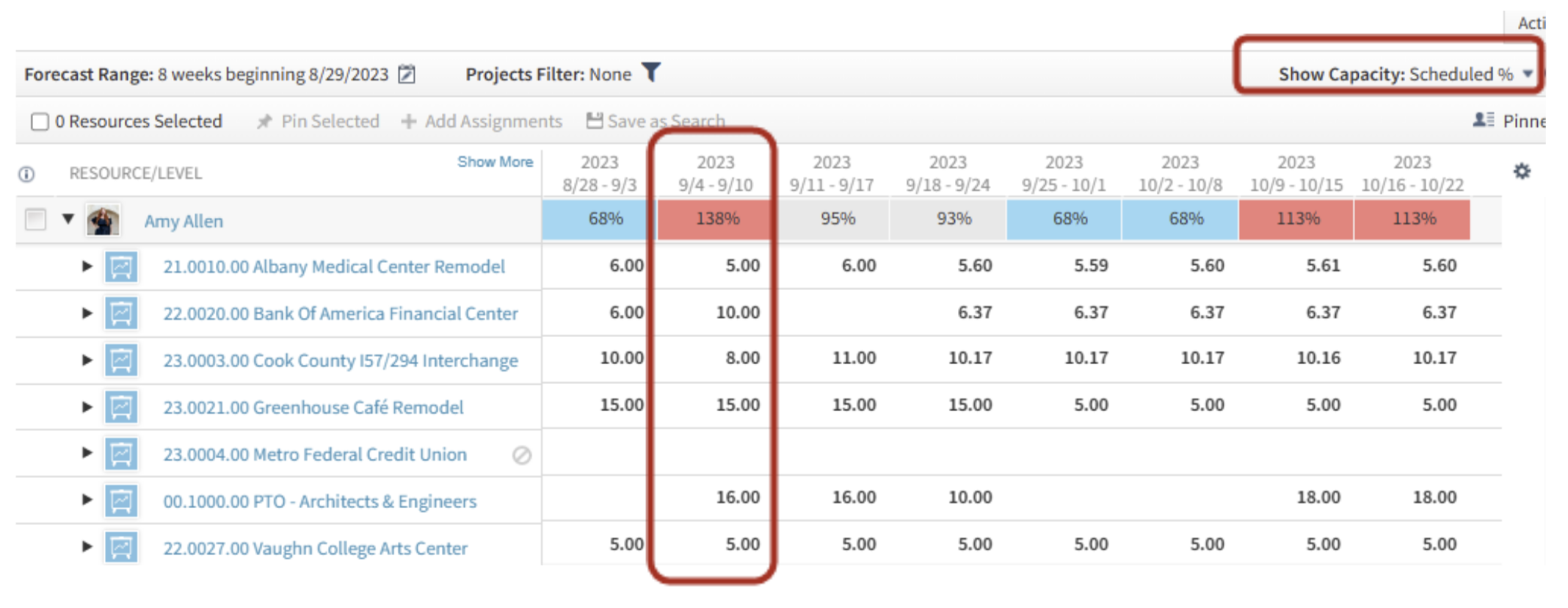
ResourceMgmt_02

The Scheduled % is a calculation of Planned Hours divided by Available Hours for the resource. This view is great to use to get an understanding of if a resource is too busy (red) or has availability to be assigned to more projects (blue) or if they are appropriately scheduled during the timeframe (grey). 

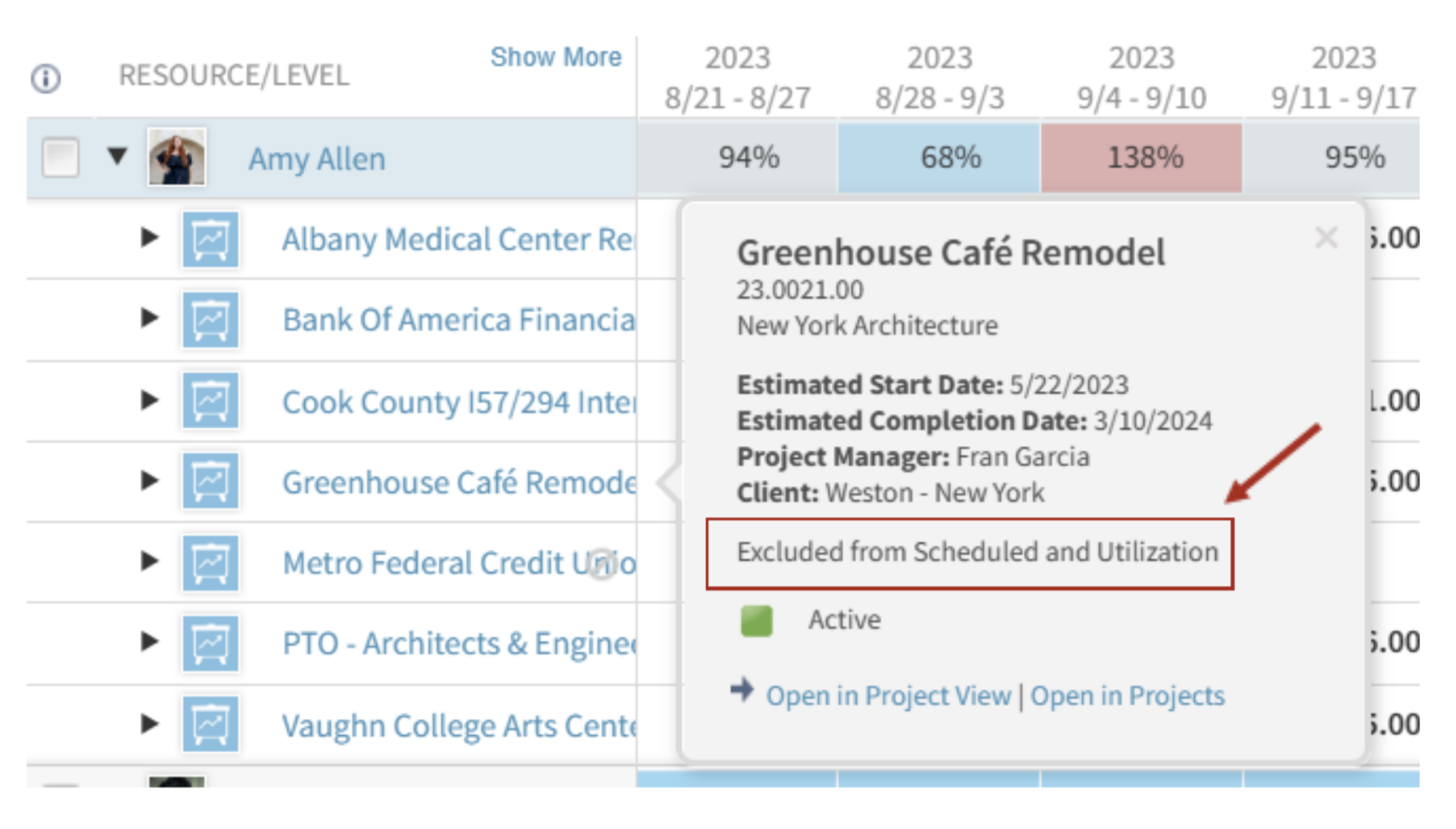
  • Planned Hours - this calculation will include all types of projects (regular, promotional, & overhead). However, if a project shows as “Excluded from Scheduled and Utilization” on the Project’s Summary tab, those planned hours will not be used in this calculation. Note that excluded hours will still show the hours when the details are expanded for the resource. 
  • Available Hours - these are calculated using the employee’s standard hours from their employee hub, less any non-workdays as indicated in Settings > Resource Planning > non-Workdays. 

In the example shown below, I will break down the calculation for the week of 9/4 – 9/10 where Amy Allen is showing over scheduled at 138%. 

Planned Hours / Available Hours = Scheduled %      =     44 / 32 = 138% 

Planned Hours = 59 total hours planned less 15 hours for Greenhouse Café Remodel as that project is currently set to “Exclude from Scheduled and Utilization” in the project. The numerator is 59 -15 = 44 hours. 

*Note when you click on the blue link of each project, a small summary box for the project will appear where you can easily see if a project is “included” or “excluded” from Scheduled and Utilization. 

ResourceMgmt_03

Available Hours – Amy Allen’s standard hours are set as 8 hours per day in her employee hub, which is typical for a full-time 40-hour/week employee. The week of 9/4 – 9/10 contains a Labor Day Holiday in the company’s non-workday settings. As discussed earlier, holiday hours are excluded from available hours. Therefore, the denominator is 40 – 8 = 32.  

 *Note that when you click on a resource’s name, the Employee Card will appear. On that employee card, you will find the Hours/Day in the bottom right of the Profile Tab. 

Now, the shading!  What is this heat map telling you?   

Understandably, being scheduled at 138% would seem to be over scheduled just because it is a relatively large number, but the system is compared to the firm’s Resource Planning Settings. In my demo database shown here, the blue shading indicates under scheduled as under 90%, and the red shading for over schedule when over 105%. Grey is “just right” of 90 – 105%, which this firm has indicated as appropriately scheduled.    

In summary, in my database, a full-time, 40-hour/week employee would show as properly scheduled (grey) if the scheduled hours are between 36 (90% x 40) and 42 hours, under-scheduled would be less than 36 hours (blue) and over scheduled as over 42 hours (red). 

Utilization %

The Utilization % will show the percentage of the planned hours for billable projects (regular/won projects) and those In Pursuit projects marked as “included in scheduled and utilization”. Use this view to show how an employee is tracking against their Target Utilization. Even if an employee is well scheduled, in the example above, if several of the projects are either overhead or In Pursuit and not included in scheduled and utilization, the employee may be shown as under-utilized.  

ResourceMgmt_04

Utilization % is a calculation of Total Billable Planned Hours divided by Available Hours (same calculation as above). 

Total Billable Planned Hours only includes regular projects, no promotional projects nor overhead projects. Regular projects will be all those in the Stage Step of Won and any In Pursuit that are “Included in Scheduled & Utilization” Capacity calculations. 

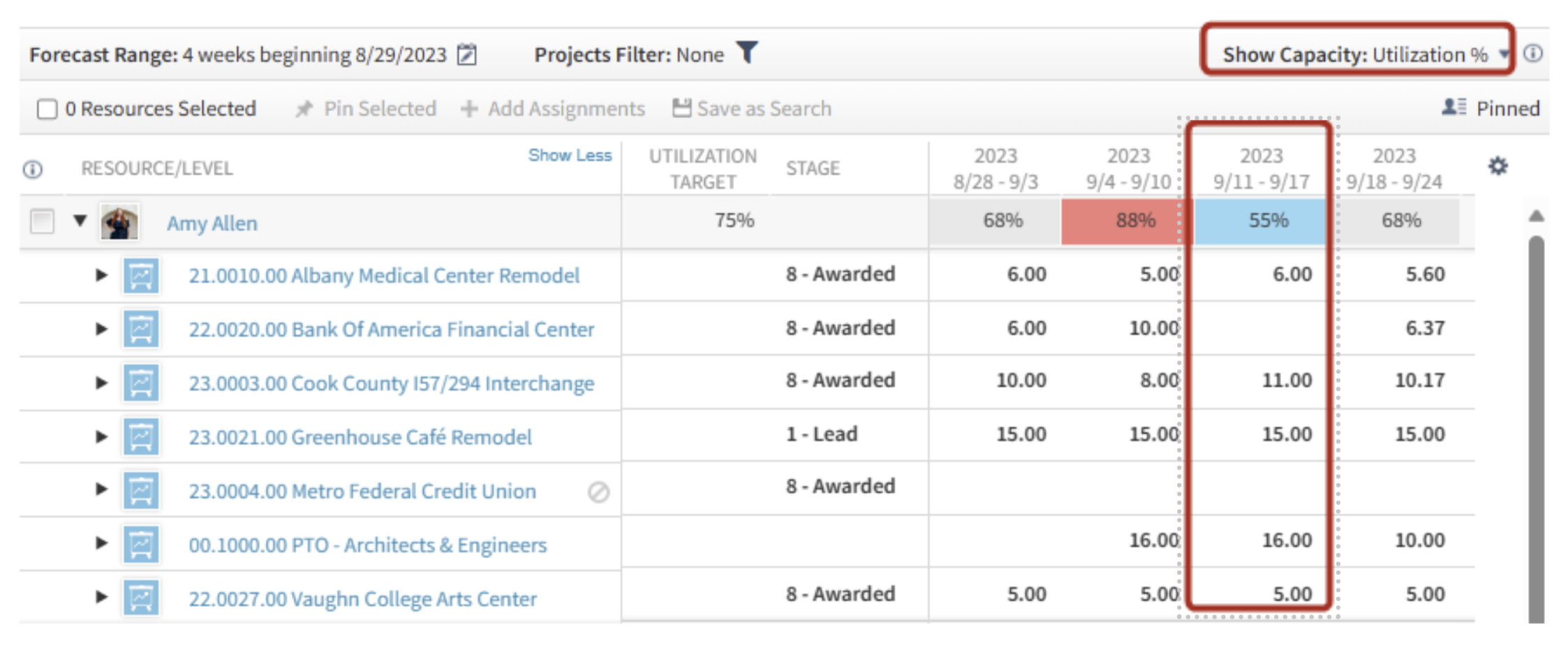
For this example, I will be showing the calculation for the week of 9/11 – 9/17 from the picture above. In this view, I am also showing a few additional columns in the middle grid that help demonstrate if a project is “billable” or not.   

As you can see, I have one project that is a Lead Stage – Greenhouse Café Remodel, and as discussed above, that project is Excluded from Scheduled and Utilization so those hours will not be included in the numerator. Additionally, there is one project that is overhead (no stage listed), which is PTO.   

Total Billable Planned Hours / Available Hours = Utilization %      =     22 / 40 = 55% 

Total Billable Planned Hours = 53 total hours planned less 15 hours for Greenhouse Café Remodel as that project is currently set to “Exclude from Scheduled and Utilization” in the project, less the PTO hours of 16. The numerator is 53 -31 = 22 hours. 

Available Hours (as stated above) are calculated using the employee’s standard hours from the employee hub, less any non-workdays. This week does not have a holiday and this employee’s standard hours are 8 hours/day so the Available Hours = 40. 

Shading for Utilization %: 

To understand the heat map for the Utilization %, the formula considers each employee’s Utilization Target, which is set in the Employee Hub. This employee, Amy Allen, has a Utilization Target of 75%. 

The threshold calculation is the Utilization % divided by the employee’s Utilization Target. 

For the week ending 9/17, Amy’s planned Utilization % is 55% divided by the target of 75% equals 73%. In my demo database shown here, the blue shading will be under-utilized if the utilization % is under 90%, red shading over 105%, and “just right” or grey is between 90 – 105%. Therefore, since Amy’s threshold calculation is 73%, she is showing blue as that is under-utilized in my database. 

Capacity Calculations Made Easy with Resource View 

So, in summary, the Resource View in Deltek Vantagepoint has a lot of valuable information on one screen. You can use it to navigate to three different views to understand (1) how many hours an employee has planned in total (Planned Hours), (2) if the employee is over/under scheduled (Scheduled %), and (3) if the employee is over/under utilized by simply navigating between the three options in “Show Capacity”. Project based firms should be making the most of the resource management tools available within Deltek Vantagepoint! To learn more about this feature and other Resource Management tools, please visit our webinars located here: Webinars for Project Manager Rockstars! 


How to Measure a Project’s Financial Health

Posted by Theresa Depew on Jun 22, 2023 12:00:00 AM

06-22-23 Financial Health_Banner

When it comes to assessing the financial well-being of our projects, we know that relying solely on project invoices is like gazing at the tip of an iceberg while missing the grandeur beneath the surface. At Full Sail Partners, we understand that true success lies in exploring a variety of analytics and statistics. Let's dive into the world of project metrics and discover the key to unlocking financial prosperity. 

The Essentials to Determining a Project’s Financial Health 

To begin with, there are a few essential components we must consider when determining a project's financial health. Every project should be documented with: 

  • Current and Accurate Fee: A clear understanding of the project's fee is vital. It serves as a baseline for evaluating profitability and making financial decisions throughout the project's lifecycle. 
  • Work Breakdown Structure (WBS): A well-defined WBS that aligns with the project's fee and scope helps us accurately allocate costs and resources. It provides a framework for tracking expenses and ensures that financial evaluations are aligned with the project's objectives. 
  • Proper Revenue Recognition Method: Selecting the appropriate revenue recognition method is crucial for accurate financial reporting. It ensures that revenue is recognized in a manner that reflects the project's progress and performance accurately. 

Understanding the Components of a Project's Financial Health 

To truly focus on the financial success of a project, we rely on job-to-date (JTD) as our measurement of time. Now, let's explore some key statistics that can be found or created using Deltek Vantagepoint’s Project Earnings Report: 

Profit or Variance  

This metric allows us to compare revenue/earnings with costs incurred. For projects billed on time and materials (T&M), a zero variance indicates profitability, as the project profit is built into the billing rates. However, a negative variance suggests the need to write off charged time. For fixed fee/lump sum projects, the goal is to minimize costs while still delivering on scope and quality. 

Projected Profit or Variance  

Calculating this metric involves updating and managing the estimate to complete (ETC). By combining the ETC with the JTD cost, we derive the estimate at completion (EAC). Comparing the EAC to the Fee allows us to gauge the project's health upon completion and identify potential scope creep. By analyzing actual and projected profit together, we can establish four scenarios and develop a matrix approach for reviewing a project's financial health: 

  • Scenario 1: JTD shows a profit, but there is a projected reduction in that profit moving forward. This indicates the need for careful cost management to maintain profitability. 
  • Scenario 2: JTD shows a profit, and continued or increased profit is forecasted. This demonstrates a healthy financial trajectory. 
  • Scenario 3: JTD shows a loss, but some or all of that loss can be mitigated moving forward. This calls for identifying and addressing the factors contributing to the loss and implementing corrective actions. 
  • Scenario 4: JTD shows a loss that will continue or grow. In this case, it is crucial to evaluate the project's viability and explore strategies for minimizing further losses. 

Direct Labor Multiplier 

This metric is crucial for managing a specific project and aligning with the firm's overall goals. It measures how much revenue is generated per labor dollar charged. The estimated multiplier is determined at the project's inception, and it's important to have a basis of comparison when evaluating this statistic. 

Work in Process (WIP)  

WIP is calculated as the difference between project revenue and the amount invoiced. Monitoring WIP helps mitigate any potential risks to project earnings. If revenue is accrued, it's vital to consider the time associated with billing and collection. Deferring revenue can minimize or mitigate risks effectively. 

Backlog  

This metric indicates the remaining revenue to be earned, representing the future available revenue stream. When combined with all projects, it forms a significant line on our Key Performance Indicator (KPI) graph. Additionally, it reflects the required full-time equivalent man-hours to complete and deliver contracted work. It's worth noting that backlog can be derived from the ETC, showcasing the interconnectedness of these metrics. 

It's crucial to note that all these metrics work in tandem, complementing and informing each other. For instance, backlog can be derived from the estimate to complete (ETC), demonstrating the interconnected nature of these indicators. By considering them collectively, we gain a comprehensive understanding of a project's financial health and can make informed decisions accordingly. 

Measuring a Project’s Financial Health is Multifaceted and Continuous  

At Full Sail Partners, we believe that measuring the financial health of a project requires a multifaceted approach. By relying on a variety of analytics and statistics, we gain a holistic understanding of the project's financial landscape. Project invoices, while important, are just one piece of the puzzle. 

To make our projects truly profitable, it is essential to continually measure and monitor their financial health. By utilizing a range of metrics and closely tracking project milestones, you can proactively identify potential shortcomings and take corrective actions before they escalate. This approach empowers project managers and the entire team to drive success, deliver value to clients, and optimize financial outcomes. 

Deltek Vantagepoint: Empowering Project-Based Consulting Businesses for Financial Success 

In conclusion, measuring a project's financial health goes beyond relying solely on project invoices. By leveraging various analytics and statistics, including key performance indicators, milestones, and specific metrics like profit or variance, projected profit or variance, direct labor multiplier, WIP, and backlog, you gain a comprehensive view of a project's financial status. This comprehensive approach allows you to make informed decisions, mitigate risks, and steer projects toward profitability.  

So, embrace these valuable insights, keep a close eye on your project's financial well-being, and unlock the path to sustainable success in your project-based consulting business. To see how Deltek Vantagepoint supports good project financial management, watch the webinar below!  

No Cost? No Catch? No Way! Discover the Truth About Deltek Vantagepoint Planning

Posted by Rana Blair on Feb 27, 2023 12:00:00 AM


02-23-23_planning_banner REV

Deltek Vantagepoint features a free Planning tool that is available for use by EVERY user on ANY type of project. That’s right! The Vantagepoint Project Planning application is free with Back Office and ready to use without additional licensing costs! 

Your team can enjoy the benefits of using a modern project planning tool with no messy integrations or boring training sessions. With just a few steps, your firm can go from looking in the rearview mirror to careening toward excellence using a modern predictive planning tool. Just open the software, get a little Best Practices assistance from your friendly Deltek Vantagepoint Planning Consultant, and get users trained. Then watch how it improves awareness and performance. 

Login now and you can access… 

  • Plans for any Project Charge Type. 
  • Overhead Projects – Wonder where the IT time goes? Use the Plan to review JTD Spending on Labor and Expenses! 
  • Promotional Projects – Need to be conscious of the spend on pursuing projects? Create a plan to set expectations and monitor spending! 
  • Regular Projects – Set up the plan and budget for resources and review at any time.

Contract Information 

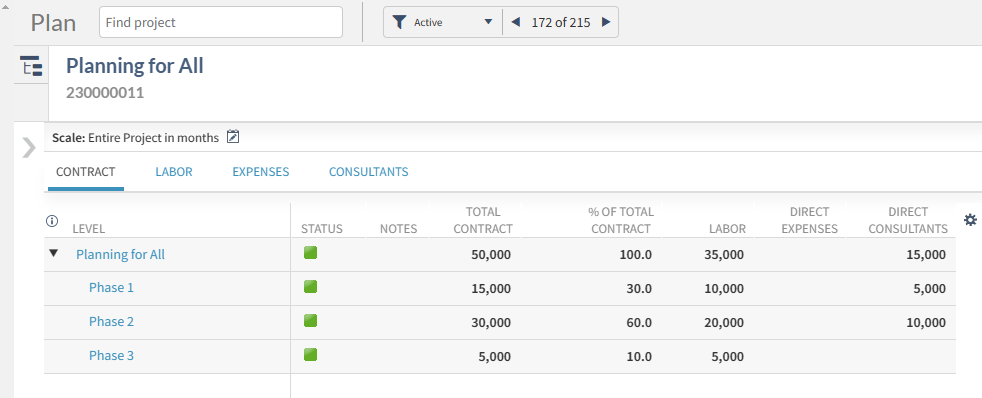
Planning provides users with key information on the contract values stored in the Contract Management section of the Project. When the Contract is updated in the project, it is updated in the plan automatically! WOW! 
 Table

Description automatically generated

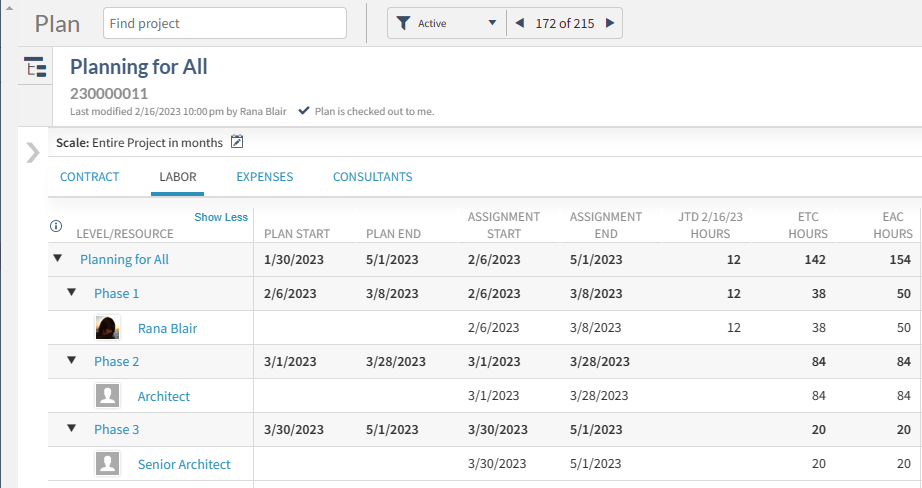
Labor JTD Review and ETC Planning 

Using the plan to view JTD Labor and enter the remaining hours needed to complete the work is simple and provides immediate feedback on the expected total hours. 

Table

Description automatically generated

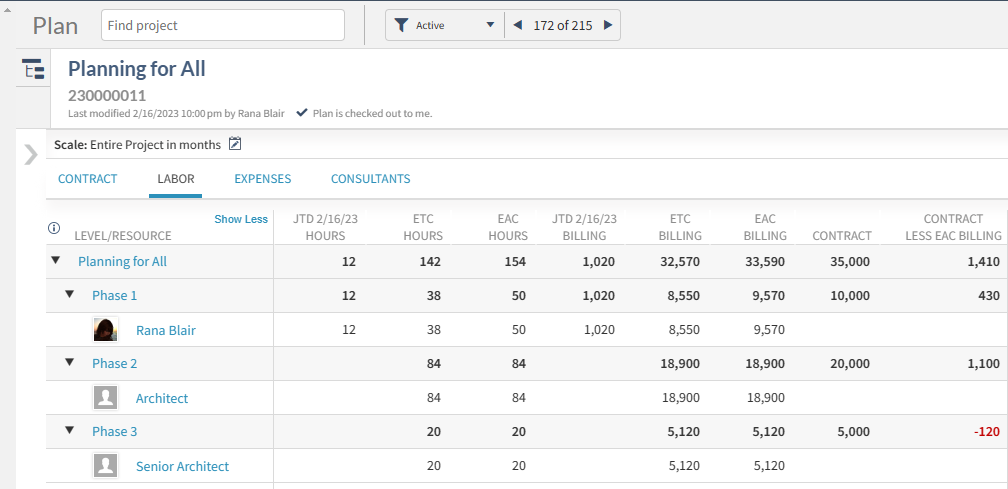
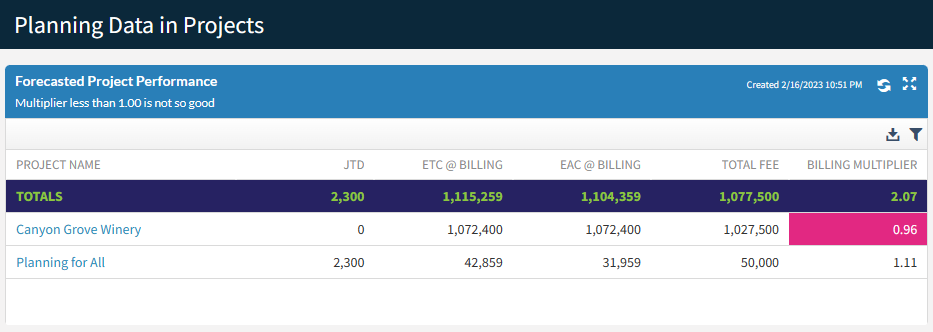
This information automatically calculates dollars spent and projected at Billing or Cost values and generates a forecast of project performance. 

Table

Description automatically generated

Planning for Expenses and Consultants 

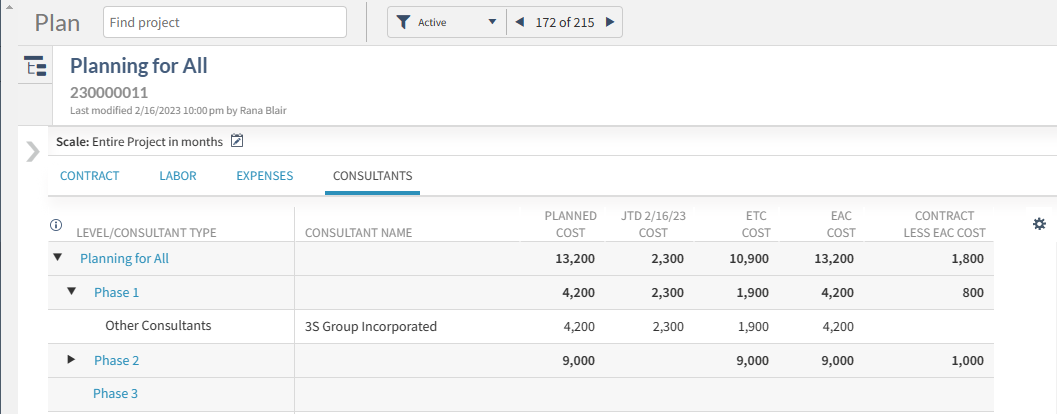
Expense & Consultant budgets can be planned in dollars, and like the Labor, the posted amounts are updated in the plan automatically. 

Table

Description automatically generated
 

Visibility EVERYWHERE! 

Viewing project performance in the plan effectively replaces the boring black & white reporting we’ve been forced to use all these years! It’s so exciting!  

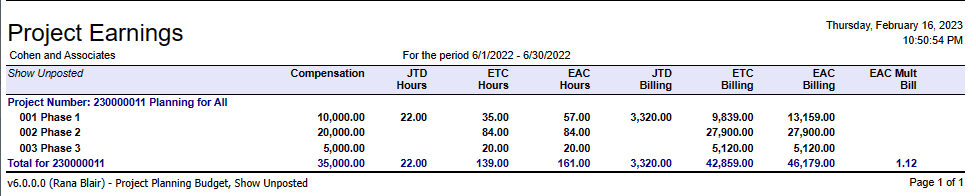
Want to keep your reports? You can have them at no extra charge. The data from the plans can be used in most Project reports by simply changing the Budget Details to Project Planning Budget and choosing the right columns. 

A picture containing text

Description automatically generated  A screenshot of a computer

Description automatically generated

But Wait, There’s More!  

Want a reporting tool that updates automatically when your plan changes? You can have it! See the same information from the plan in a colorful Deltek Vantagepoint Dashboard! Just wow! 

Graphical user interface, application

Description automatically generated

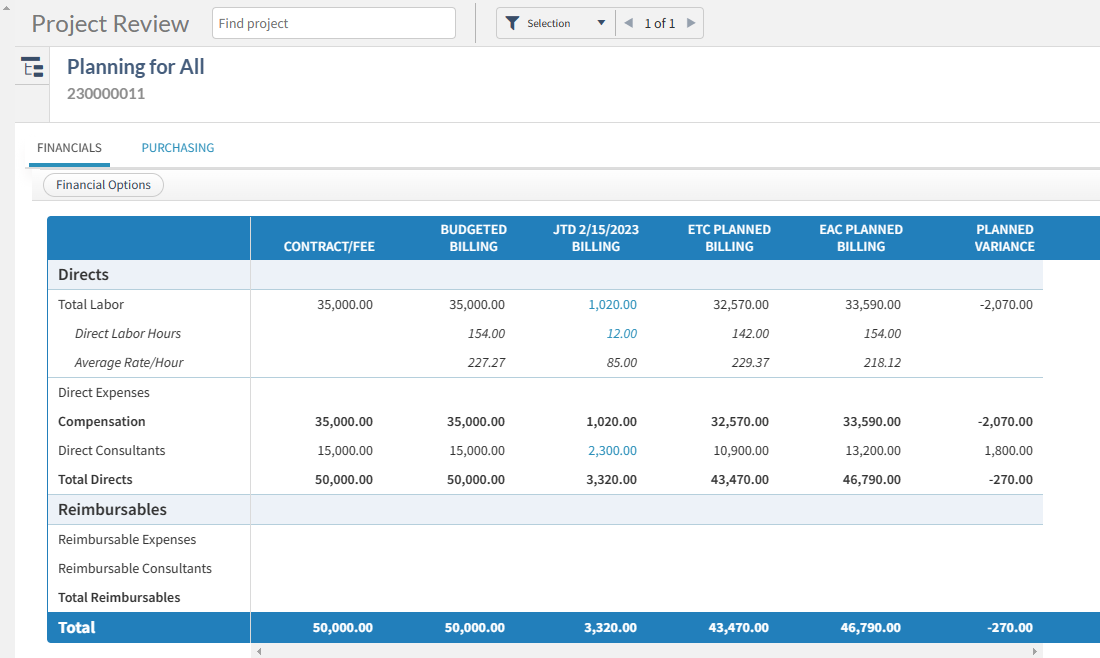
Do you feel like you must choose between the Budget tool and the Planning application? Well, you can have both! Review Planned Data next to Budget data in the new Vantagepoint Project Review. Accountants can have their place and Project Managers can too! 

Table

Description automatically generated

And there’s even more! Implementing use of the Planning tool allows your firm to extend the investment with Planning Resource and Budget Alerts. Planning data can even be used to streamline and validate Timesheet Entries. 

All This for ZERO Easy Payments 

Let’s review the features you get for ZERO Easy Payments! 

  1. Labor, Consultant, and Expense Planning  
  1. Planning by Employee and Generic Resource 
  1. Real-time Labor visibility (including unposted time!) 
  1. Data Visibility in applications, reports, dashboards 

How Can So Much Be Free? 

It’s simple, the tool has been scaled to fit the current needs of firms of all sizes. Adoption of the basic tool is easy, and the benefits easily recognized. Today, you can dabble in the Planning tool with little investment. And when you are ready for more, simply add licenses without losing any of the momentum you have achieved. 

What is included in the licensed Vantagepoint Planning and Resource Management application? 

As of Vantagepoint 5.5, features available to licensed users fall into four categories: 

  • Usability Features 
    • Schedule Tab with exportable Gantt chart 
    • Schedule (Task) Dependencies  
    • Planning Subrows to display Planned and Actual values for Hours, Cost, Billing in time scale periods 
    • Planning Assignments displayed on the Employee Card 
    • Bulk Redistribution of Hours and Variance Spreading 
  • System Extensions 
    • Project Pursuit Stages 
    • Revenue Forecast Application 
    • Estimated Fee and Probability fields 
    • Planning Exports 
  • Visibility 
    • Project Planning Reports 
    • Planning Dashparts such as My Upcoming Assignments  
    • Resource Planning Data in the Calendar Timesheet 
  • Resource Management  
    • Resource View, Project View, and Reporting 
    • Generic Assignments Dashparts 

Getting So Much for So Little 

You might be wondering, “How can so much come for so little?” It’s simple, the tool has been scaled to fit your needs now and in the future. Today, you can dabble in the Planning tool with little investment or risk. And when you are ready for more, simply add licenses without losing any of the momentum you have achieved. 

Whether your firm has zero or hundreds of licenses for Deltek Vantagepoint Resource Planning, the need to manage project performance is universal. The steps for input and maintenance are all the same regardless of how far you want to take the data.  Act Now!  Get started with Planning today!  


New Features in Deltek Vantagepoint 5.5

Posted by Cate Phillips on Nov 30, 2022 12:00:00 AM

2022-DVP 5.5 Features -Banner

The new features in Deltek Vantagepoint 5.5 enhance usability, increase personalization for individual users and streamline project management and accounting workflows. It’s easier than ever for professional services firms to access the right information and complete common tasks quickly. Here’s an overview of what’s new.

Schedule Dependencies

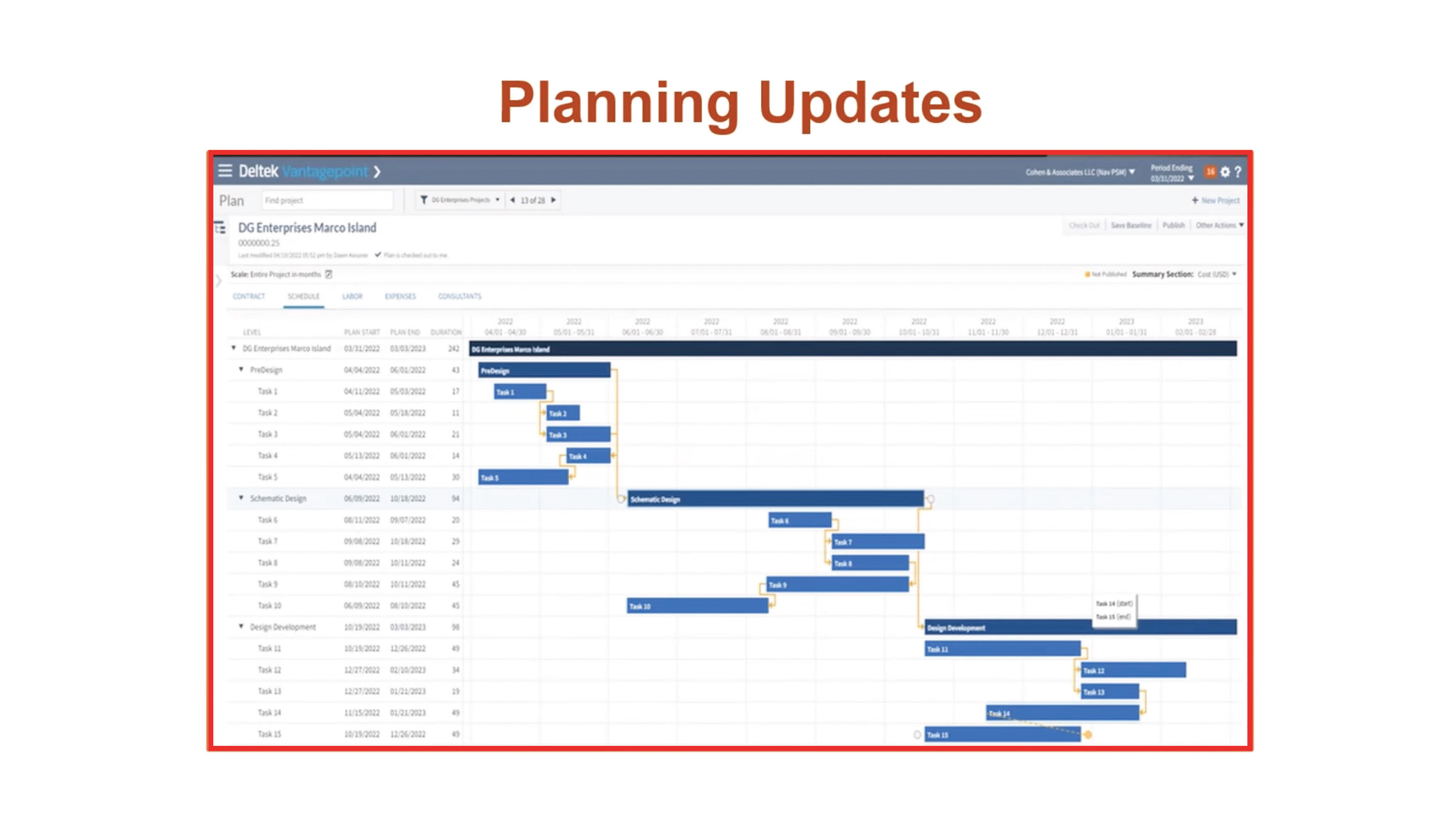
Users with the Resource Planning Module can create dependencies in the Gantt chart and manage a project’s critical path. Project managers can quickly visualize and modify the project schedule, work breakdown structure elements and the relationship between those elements. When an update is made at one level, all of the dependent levels are automatically updated.

Dependencies are also accessible in the Project Planning report. Users can view information about dependency relationships between work breakdown structure elements, projects and associated labor codes.

DVP55_BlogScreenshots_1

Drill-Down Paths

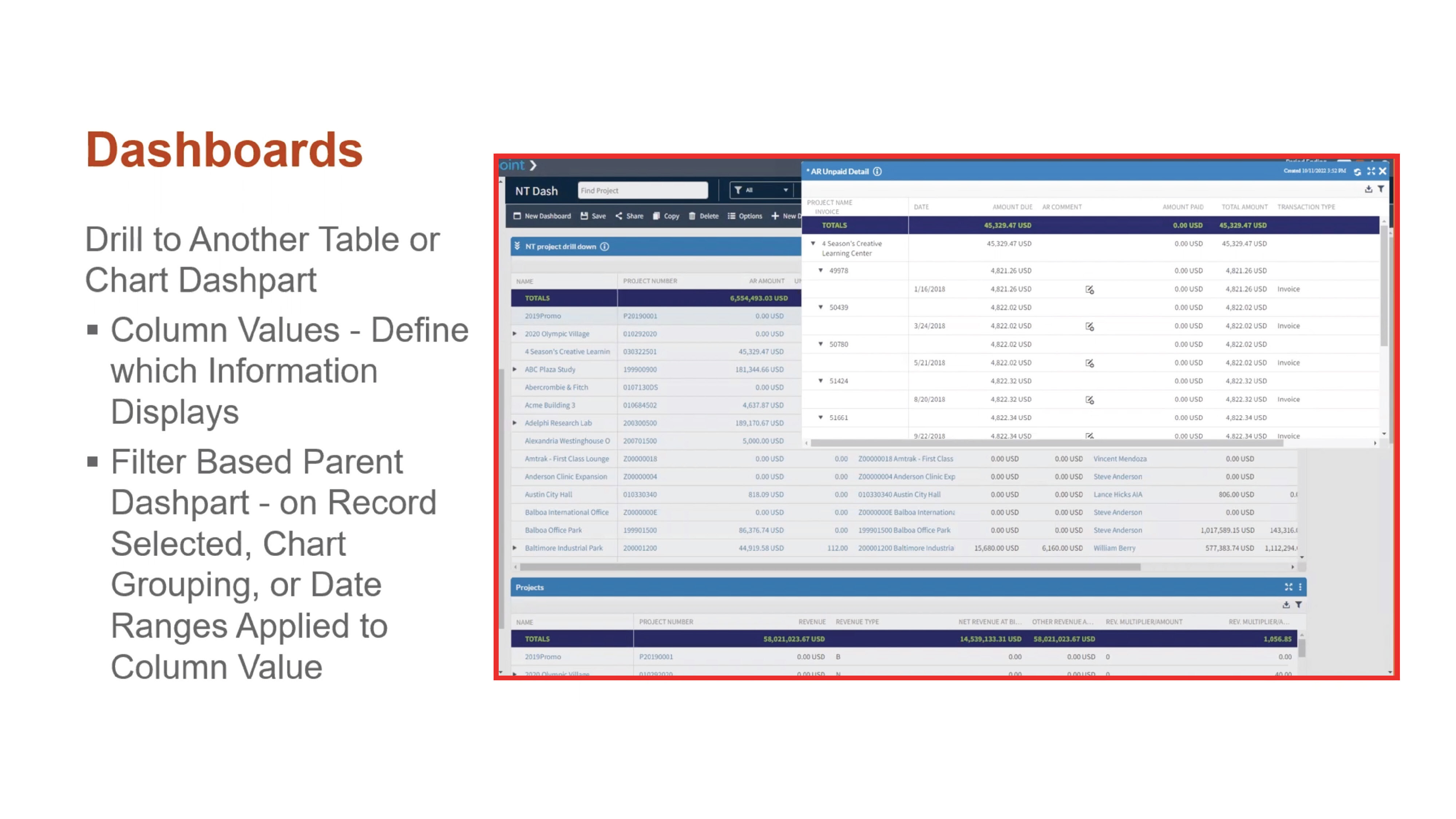
Help users access the right information quickly with drill-down paths. Users can determine which information is shown when they drill down into key summary metrics on a chart or table. For example, when a user clicks on a column displaying outstanding accounts receivable data, Deltek Vantagepoint can be configured to show them a dashpart with AR invoice detail.

DVP55_BlogScreenshots_2Personal Dashboards

Users can now create their own personalized dashboards without engaging an administrator or manager. This added flexibility will help expand adoption and free up administrator time since users can customize more of their experience with Deltek Vantagepoint.

Update Percent Complete from the Dashboard

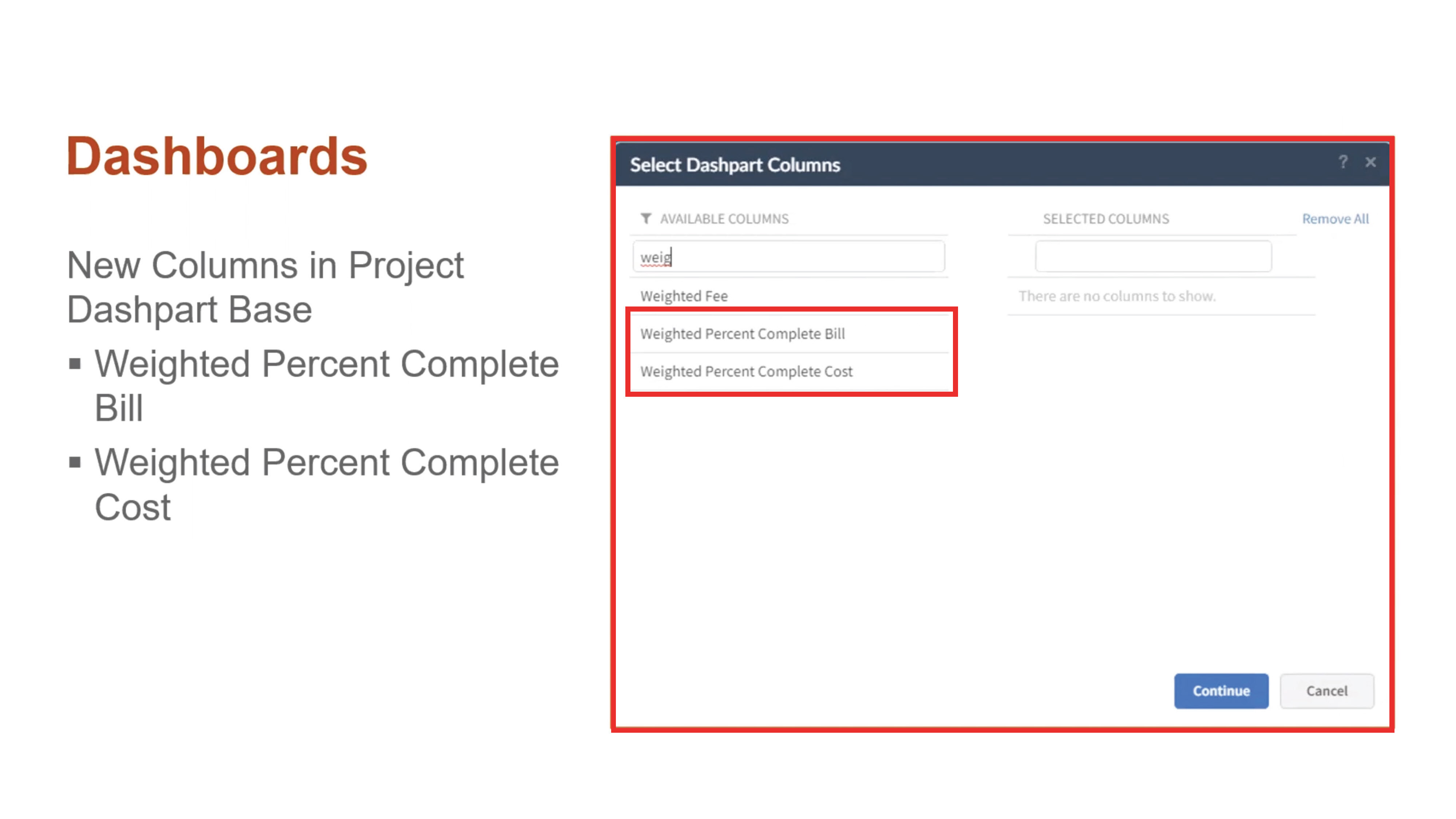
With Deltek Vantagepoint 5.5, project managers can easily manage percent complete with fewer clicks, ultimately improving reporting and billing accuracy. There are new columns in the project dashpart base for Weighted Percent Complete and Weighted Percent Complete Cost. Users can see and modify the percentage of completion per project billing or cost amount right from the dashboard.

DVP55_BlogScreenshots_4Streamlined Purchasing

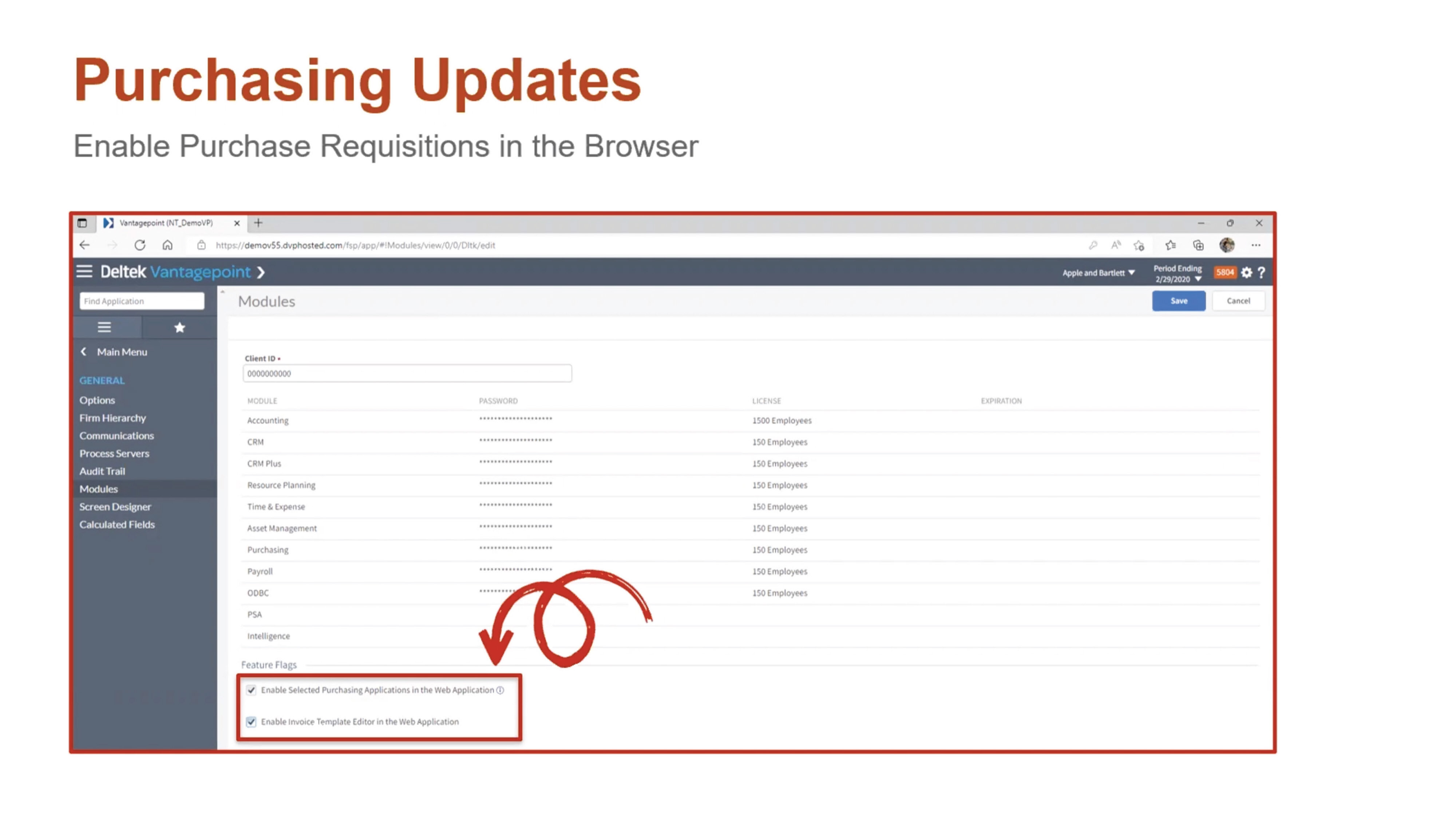
Deltek Vantagepoint 5.5 enables staff to perform purchase requisitions and process approvals within any browser. Purchasing Requisitions, Purchase Orders, Items and Items Master are now accessible in the navigation pane of the browser application.

DVP55_BlogScreenshots_5

Other Purchasing Updates

Additional purchasing updates in Deltek Vantagepoint 5.5 include: 

  • New layout for suggested vendors
  • Ability to add a vendor on the fly
  • Ability to attach documents of any status
  • Ability to view purchasing reports
  • Redesigned interface for the purchase requisition form

Accounting Updates

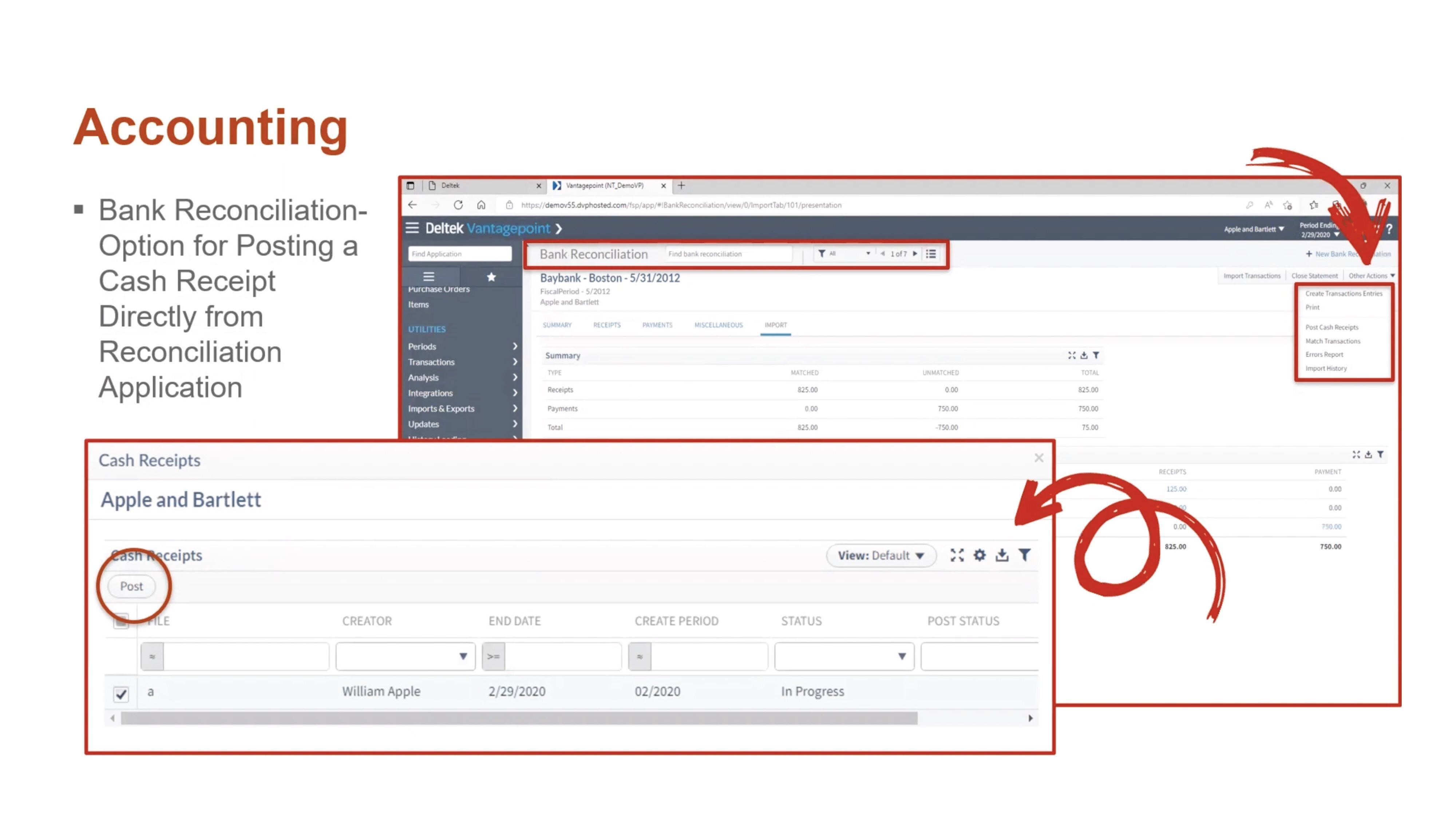
Deltek Vantagepoint 5.5 offers several new features that streamline accounting processes. Users can now post cash receipts that were created in bank reconciliation. This option is available for those that have rights granted to their role in the Accounting tab from Settings >Security> Role. The Transaction Center Approval option must also be set to “No” in Settings and Accounting Transactions.

DVP55_BlogScreenshots_6

Other Accounting Updates

The other accounting updates in Deltek Vantagepoint 5.5 include: 

  • Expanded reporting in timesheets and billing
  • Print capability for Billing Category Rate Table reports
  • New overtime premium calculation that uses the cost rate in the Billing Labor Override Table instead of the Cost Rate in the Employee Hub for the employee

Email Templates

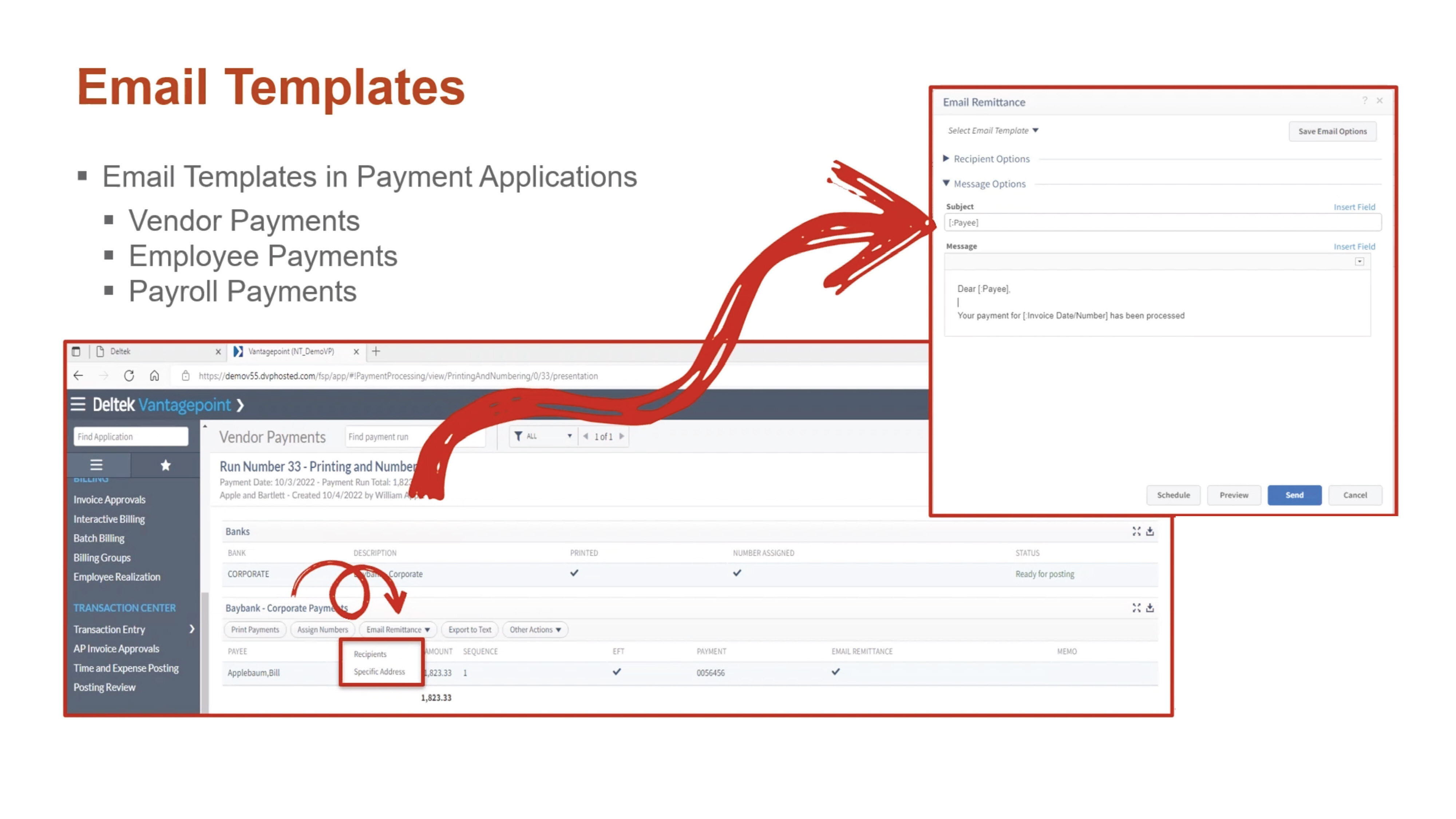
To help support digital payment processes, Deltek Vantagepoint 5.5 allows users to use email templates when sending electronic payment remittances by email. Templates can be configured to reuse standard information, such as regular text or database fields. Email templates are available in the Vendor Payments, Employee Payments and Payroll Payments applications. Users can save templates for personal use, for all users with the same role, or for all users within the firm.

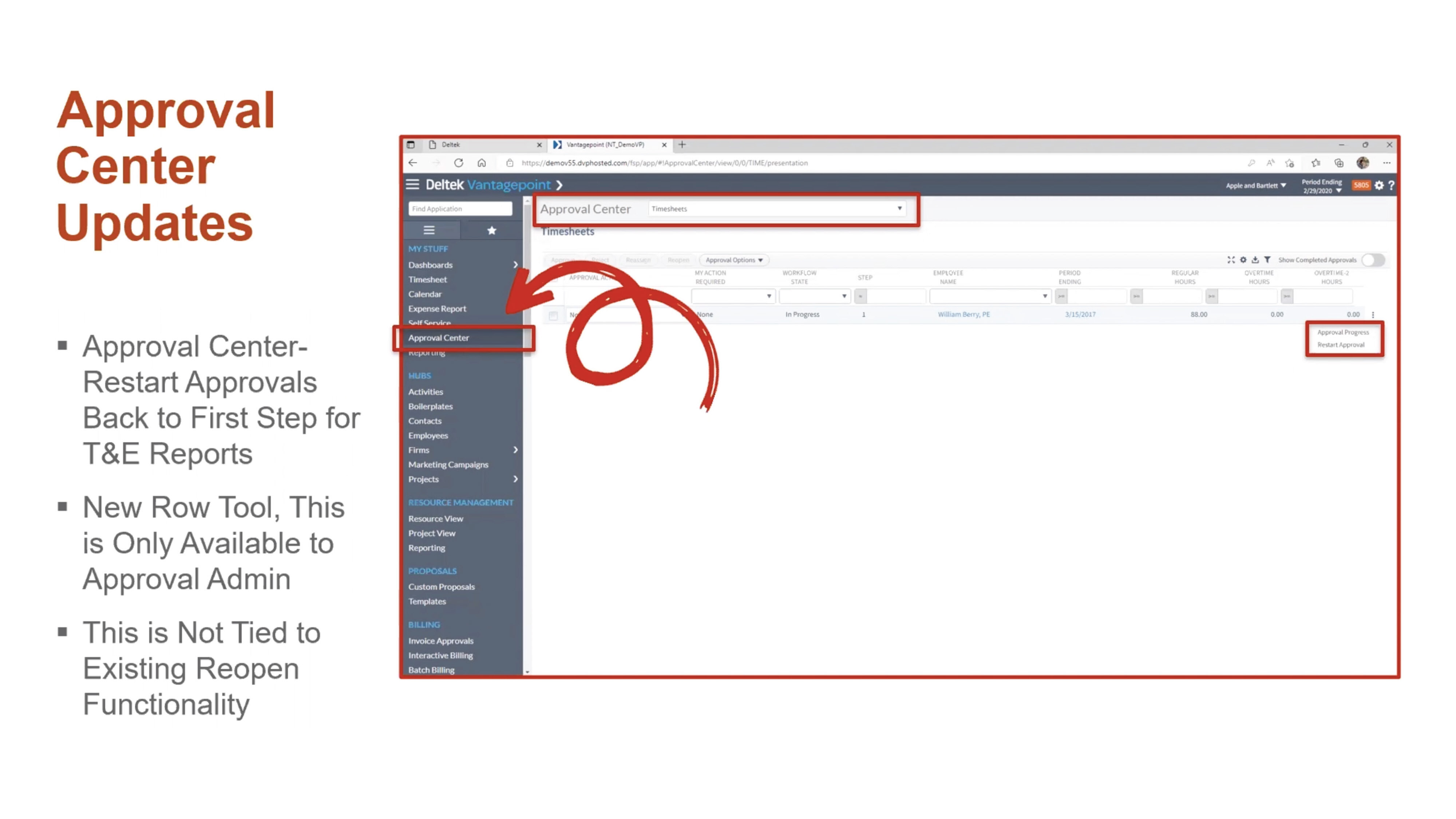
DVP55_BlogScreenshots_7Approval Center Updates

Users can restart approvals for timesheets and expense reports. This process removes all approved history and comments that are associated with the record and begins the process from the first step, no matter where the record is in the approval process.

DVP55_BlogScreenshots_8

General Usability Updates

Deltek Vantagepoint 5.5 also comes with a number of usability updates:

  • See notifications immediately instead of every five minutes with real-time alerts.
  • See all users viewing a record.
  • Set favorites in navigation to find commonly viewed applications with ease.
  • Set minimum/maximum and default values for standard numeric fields.
  • Use predefined searches within Advanced Search.
  • Print timesheet reports from the Floor Check dialogue box.
  • Access Labor Planning videos in Online Help.

Learn More About the New Features in Deltek Vantagepoint 5.5

This is just a high-level overview of the many new features in Vantagepoint 5.5. To learn more about what Vantagepoint has to offer, click below to talk to one of our consultants today.

Top Technology Trends from the 43rd Deltek A&E Clarity Study

Posted by Heath Harris on Nov 16, 2022 12:00:00 AM

2022-ClarityReport_Tech_Banner-01

The net revenue growth forecast for A&E firms is the highest it’s been in 10 years. Based on the findings from the 43rd Deltek A&E Clarity Study, the industry has rebounded from the pandemic with full pipelines and an optimistic future outlook. Meeting that demand comes with serious challenges, with labor shortages and rising costs being most prominent.    

Firms are turning to technology to empower their teams and improve project delivery. They’re prioritizing the right investments over simply purchasing the newest technology. Here are the top insights from the study and some guidance for ensuring that technology investments deliver positive ROI. 

Top Technology Challenges for A&E Firms 

The top technology challenge professional services firms are facing is the inability to invest time in learning. With full project pipelines, firms are dedicating resources to completing client work, limiting the time they can spend on learning new technologies. Small firms struggle with this issue the most, though it’s a prominent issue for medium and large firms as well.  

Technology costs, which topped the list in last year’s report, was the second most commonly cited challenge. Firms are also struggling with prioritizing which trends apply to their organization. With so much technology to choose from, many firms are understandably unsure which trends to pursue. Finding the right fit, whether it be data science tools or digital twins—for the firm and for their client base—isn’t easy.  

Other challenges include educating employees and clients about trends, lack of champions to drive technology adoption and limited corporate openness to emerging technologies.  

A&E Firms Are Focused on Getting it Right 

Firms are honing in on the initiatives that enable them to take a pragmatic approach to technology adoption and integration.   

When asked about their top three technology initiatives:  

  • 64% said creating strategic technology implementation plans.  
  • 47% said educating staff on technology trends. 
  • 46% said identifying and developing technology subject matter experts. 

This pragmatic approach is a good way to enter into digital transformation. However, firm leaders should be careful not to get stuck in a cycle of endless planning. One way to cautiously approach technology is to look for ways to expand usage of current tools. This can provide quick wins and competitive advantages without requiring significant investment or onboarding time.  

Internal Champions Can Take on Challenges and Lead Key Initiatives 

To take on technology challenges in the short term, firms should engage tech-savvy employees as internal technology champions. Technology champions can help improve the ROI of technology in the following ways:  

  • Fill current skill gaps by leading the charge to incorporate technology into project execution.  
  • Promote and expand adoption of existing technologies throughout the business.  
  • Identify the most viable technology investments and trends for the firm.  

Only 36% of firms ranked this as one of their top three initiatives, meaning that many are missing an opportunity to address current gaps in technology planning and adoption.  

Which Technologies Should A&E Firms Focus On? 

To help guide technology planning, A&E firms should look at technology as falling into two buckets. Technology that supports project delivery, such as smart infrastructure and digital twins help firms remain competitive and address common challenges in the building process. Business-optimizing technologies, like data science and next-level project management tools can be used to automate repetitive tasks, empower workers to make more informed decisions, and ultimately improve client satisfaction.  

For more insight into which technology areas A&E firms should focus on, watch the webinar 

Focusing on these areas will enable firms to address some of their biggest concerns: 

  • Attract and retain talent by appealing to the next generation of employees, who want to work with companies that give them access to the latest technology.  
  • Prepare for disruption. As innovation continues to transform the A&E industry, the right technology will help firms future proof their businesses.  
  • Increase revenue streams by identifying the ideal services and delivery methods that lead to competitive advantages and higher profits.  

Dive Deeper Into the Technology Insights from the Deltek Clarity Study 

Firms aren’t investing in technology for technology’s sake. They’re focused on making the right investments that will enable them to increase productivity and compete for projects and talent. With the right guidance, they can take on the opportunities and challenges ahead. For more technology insights, download the full report.  

Deltek Vision and Vantagepoint Year-End 2022

Posted by Scott Gailhouse on Nov 2, 2022 12:00:00 AM

2022 - Year-End_Banner

Year-end is the final accounting process to close “the books” at the end of each year. With 2023 just around the corner, it is never too early to plan for your year-end close. Planning and organization on your part can make the year-end process less challenging for the entire accounting staff.   

Take the Time to Document and Get Organized 

As always, you should take the time to document your year-end procedures. Not only the tasks performed in Deltek Vantagepoint and Vision, but all accounting tasks you perform should be documented so that you have a comprehensive guide that you can refer to every year. It is also vital that you create an accounting calendar.  

The accounting calendar is not just for year-end, but for month-end and quarter-end tasks as well. This calendar is a schedule of anticipated dates for financial activities. You should also develop a year-end checklist to make sure you don’t miss anything. One other tip to make this process go smoothly is to make sure that you are performing your month end reconciliations on a timely basis. 

Common Year-End Tasks 

Some of the more common year-end tasks for most companies are: 

  • Reconcile All Cash Accounts - Verify all transactions have been posted into Deltek Vantagepoint/Vision to ensure your general ledger balances match your bank statements. Make adjustments as required. 
  • Credit Card Reconciliations – In order to ensure all credit card transactions are captured, make sure all expense reports are entered and posted. 
  • File Reconciliation Report – This report should be run at month-end and at year-end. This report identifies discrepancies between the GL and the subledger reports. 
  • Final Invoicing – Process all client invoices for the fiscal year. 
  • Review Outstanding Accounts Receivables - Follow up with clients who have outstanding accounts receivable beyond 30 days. Send past due statements and/or simply give them a call. Enter the results of your collection efforts in the comments section of Vision Invoice Review. Year-end is an excellent time to collect your outstanding receivables. If you determine there is uncollectable AR, be sure to write those invoices off. 
  • Review Unbilled Detail - Time and expense transactions that cannot be invoiced to clients should be written off at this time. 
  • Fixed Assets – Fixed Assets are larger purchases that are made throughout the year (i.e., equipment, automobiles, furniture, computers, etc.). Check to see if all fixed assets reported on the balance sheet are still owned. If not, record the sale or disposal of these fixed assets. Verify the depreciation on your fixed assets as well. Then make any necessary adjustments. 
  • Employee Expenses and Accounts Payable - Verify that all accounts payable vouchers have been recorded in Deltek Vision/Vantagepoint. Make your 401(k), SEP IRA, and Simple IRA contributions, if you have not done so. Try and pay all your vendors and employee expense reports by year-end. 
  • Notes Payable - Verify notes payable (i.e., loans) amounts on your balance sheet match the statements from your lenders. Then make adjustments if necessary. 
  • 1099 Forms – Order 1099 forms. Make sure all W-9 forms from your vendors and/or contractors that are paid $600 or more throughout the year are on file in the Firms Hub in Vantagepoint or the Vendor Info Center. Don’t forget 1099s should be mailed by January 31st. 
  • W-2s – Order W-2 forms if you run payroll in Vantagepoint/Vision. W-2s should be mailed by January 31st. 
  • Budget for Next Year - Create your GL budget for the new year. 

Be Prepared to Close Out the Year 

In Deltek Vantagepoint and Vision, opening the 1st period of your fiscal year also opens the new fiscal year. Depending on your security rights, you can still process in the prior fiscal year if needed. 

There are several initialization utilities that need to be performed. For example, Open New Period (fiscal year), Open New Benefit Year, 1099 Initialization and Open a New W-2 Quarter/year if you are using the payroll module. Deltek Vantagepoint and Vision will generate a posting log for the initialization utilities. If your Vantagepoint or Vision database is configured for Multicompany, the initialization utilities need to be run in each company. The only exception is the Open New Period utility, which opens for all companies at once. 

Deltek will issue a Year-End update at the end of December containing tax updates for payroll users. Also, be on the lookout for Deltek’s Vision and Vantagepoint Year-End guide for more detailed information on year-end closing. 


Using Deltek Vantagepoint Systems to Maintain Better Contact Data

Posted by Evan Creech-Pritchett on Oct 19, 2022 12:00:00 AM

2022 - Contact List - Banner

It’s hard to believe that it is already so late in the year. It feels like not so long ago we were trying to beat the heat with cool drinks on sandy shores. But now the weather is beginning to cool down and the leaves are changing color, and that can only mean one thing: time to hunker down and manage the firm’s holiday contact list! Hopefully, this process has already been started but if not, this article shares a couple of tips on how using Deltek Vantagepoint features and functions can help maintain the firm’s holiday contact list and keep it clean for the future.  

Data Clean Up 

Before getting into the nitty gritty of data cleanup, let’s do a quick review. Every contact needs to have at least five parts: contact name, job title, firm name, email address and firm address. These five fields are standard in Vantagepoint, and with this information, marketers can build basic lists to use for both email marketing and direct campaigns.  

Then there are pieces of contact information that can be considered “nice to have.” These include attributes like market, rating, source, contact owner, mailings and segment type. These are not essential to the contact, but they can help narrow down who they are and what exactly the contact means to the company. 

Once marketers have identified their must-have and “nice-to-have” contact fields, head over to Vantagepoint and view the contact in list view. Using this Vantagepoint feature, allows marketers to quickly see what contact data is missing or outdated. See the screenshot below. 

Contacts - list viewThis feature isn’t just in the Contacts hub either, so be sure to look for it in other hubs that may need some cleaning up as well.  

Send More Emails  

To avoid ending up with a bunch of old contacts, the best advice is to send more emails! Of course, don’t just spam the contacts, because that would just drive them away. Instead, think about sending newsletters weekly and/or monthly. By sending regularly email marketing campaigns to contacts, marketers will get contact information back such as bounced email addresses. This piece of information could indicate that the contact has moved firms or retired. Doing this throughout the year will help make the effort of creating holiday contact lists less daunting.  

Create Marketing Campaigns for Segmented Lists 

In the same vein as the last tip, use Vantagepoint Marketing Campaigns for list segments. To do this, create a new Marketing Campaign record with the name “List-Holiday Card,” for example. Then associate different contacts based on their segments (whether it be geographic, demographic, etc.) to add them to a list aka the Marketing Campaign record. With these new marketing campaigns more emails can be sent, and as contacts are created and updated, they can be added to different lists. 

Contacts - Marketing Campaigns - Lists

Monitor New Contact Creation with Scheduled Reports 

Another good practice is to have Deltek Vantagepoint monitor what new contacts were created in the database. Deltek Vantagepoint allows the user to send scheduled reports of what contacts were created in a set period of time (i.e. weekly, monthly, etc.). When these are set up, a report will be sent to the user consisting of all the new contacts and will include who initially created the contact and if there is any missing information that needs to be added. In the case that any of the aforementioned key fields of the contact are missing, the user can follow up with the contact creator and ask them to fill out the required information. This feature can also be used for projects and employees, but in our case monitoring contacts is best. 

Use Workflow Warnings and Errors for Must-Have Contact Information 

Finally, make sure you are using workflows to your advantage. These workflows can be set up to indicate errors and warnings when a contact has missing information. Warnings will simply alert the user that the contact needs more information, but they will allow the contact to be saved nonetheless. Errors on the other hand will completely stop the user from saving the contact. Both of these options are effective ways to keep a contact list clean but be sure to choose which one to use carefully.  

 Contacts - workflow errors

See these Contact Management Tips in Action  

These are just some ways to utilize the Deltek Vantagepoint system features and functions to manage contacts, even outside of the holiday season. To see these features in action, click the image below to watch a replay of the webinar, A Modern Approach to Managing Holiday Contact Lists. 


Latest Posts