Full Sail Partners Blog | Professional Services (4)

Posts about Professional Services (4):

To Vantagepoint or Not to Vantagepoint, that is the Question...

Posted by Cate Phillips on Mar 30, 2022 12:00:00 AM

03-30-22 ERP Banner

Project-based firms have many options when it comes to Enterprise Resource Planning (ERP) packages, albeit difficult choices to make. In his well-known play Hamlet, Shakespeare delivered us a Hamlet who was contemplating a major decision in his famous soliloquy. So, are the decisions around life and death that Hamlet considered at all comparable to that of choosing an ERP? Well, let’s have some fun here with Shakespeare and try to make a case for it. 

Avoid the Old Bait and Switch

In the Shakespeare play, Hamlet has all these murderous plans and ways to avenge the death of his father. The famous quote “the lady doth protest too much, methinks” isn’t so much about how fickle women can be (even though everyone knows fickleness has no gender), but rather it’s said as part of a trap to see if Claudius will reveal his guilt. What can be learned from these homicidal maniacs, other than to bring back the word ‘methinks’, one may ask? 

When selecting an ERP, project-based firms must consider the entire cost of the product to avoid feeling trapped. No one likes to feel taken advantage of or stuck in a situation that isn’t meeting expectations. When clients come from other ERPs on the market, one of the main complaints is typically that they felt like their ERP provider or consultants were constantly after more fees. They were sold a product that could do a ton, but the investment necessary to get to all those great features was hidden. The result is feeling like a bait and switch has trapped the firm into pouring more into a system which was thought to be ready for full operation.  

Deltek Vantagepoint is sold as a highly configurable project-based ERP system. Full Sail Partners’ expert Vantagepoint consultants approach sales and implementations with eyes that are wide open to balance cost with efficiencies. Vantagepoint works best when it meets each firm’s business needs, and it does take configuration and therefore an investment, to get there, but it’s well worth it. So, if project-based firms have the right expectations going in, they shouldn’t be feeling trapped. 


Wrap Some CRM/RP Rigor Around the Madness

Some of the most significant and best changes from Deltek Vision to Vantagepoint are happening in the Customer Relationship Management (CRM) and Resource Planning Management (RP) modules. These are complete game changers in the market and none of the competition invested as much as Deltek has into fine-tuning these glorious pieces of functionalities. Deltek has been listening to client feedback for more than a decade and continues to listen as they expand Vantagepoint’s capabilities.  

So going back to the play, Polonius responds to Hamlet at one point by saying “Though this be madness, yet there is method in ’t.” Running a professional services or consulting firm can feel insane some days. Clients can pop up out of nowhere with additional needs, and suddenly, the entire day’s schedule has been turned into something else. Deltek Vantagepoint helps wrap some rigor around the “madness” in a user-friendly way that will actually increase user adoption in project-based firms.  

Keeping the madness at bay, Full Sail Partners has now helped more than 200 firms go from Deltek Vision to Deltek Vantagepoint. The number one reason why system usage increases with Vantagepoint is because of its ability to manage the entire project lifecycle, from a prospect that knows nothing of what it’s like to work with the firm to managing the resources and how the work is delivered. Vantagepoint also offers the type of visibility into finances, operations and performance that firms need to grow. The number two reason usage increases with Vantagepoint is because the CRM makes life easier for marketers, seller-doers, project managers, and leadership. Opportunities are no longer separate files from projects, so it’s all one record in Vantagepoint.  

Additionally, with the Deltek Vantagepoint Outlook Connect and Gmail for business connect, users can see the interaction history between contacts, clients, and projects as well as quickly log emails into Vantagepoint. This feature allows users to bring Vantagepoint into their email inboxes. And this tool comes with other features like the ability to synchronize calendars and schedule meetings while saving them in Vantagepoint at the same time. To learn more about the Vantagepoint Outlook Connect, check out this mini demo. 


Keep that New ERP Feeling Longer  

To put it lightly, in the play, Hamlet was worried about the “afterlife” in that other famous soliloquy when he said, “to die, to sleep – to sleep, perchance to dream.”  This is similar to how many of our clients are worried about their “aftercare,” with continuously improving their processes with Vantagepoint once they’ve made the leap to get there. A Full Sail Partners’ service becoming more popular with clients recently is the Navigational Analysis for Vantagepoint. A firm’s entire system is scanned, and current processes are evaluated to discover how well they are serving the firm. It’s like an annual physical exam by a physician that results in a complete work-up on the health of your system.  

It’s important to develop a plan for aftercare that includes regular data clean-up, optimizing processes, increasing efficiencies and overall continuous improvement. A consultant isn’t necessary to keep a firm’s ERP fresh; it’s like anything else. If experts are needed to bring their knowledge and best practices to the table, it can be outsourced, or a firm can do it itself.  

Exit Stage Right   

In review, it is certainly interesting to see how much Shakespeare’s characters in Hamlet seem to have reflected upon similar issues like with the tribulations of project-based firms regarding choosing an ERP. So perhaps they are comparable? However, the answer to Vantagepoint or Not to Vantagepoint appears to be evident. To Vantagepoint!  


Click the image below to learn how to add the powerful, feature-rich ERP to your toolbox and get your team working on the same page of the same book.


5 Tips to Keep Passwords Secure at Professional Services Firms

Posted by Evan Creech-Pritchett on Mar 16, 2022 12:00:00 AM

2022 - Passwords Banner

In an age where technology is intertwined with every aspect of life, it is more important than ever to keep data protected. Since passwords are practically the keys to everyone’s livelihood both professionally and personally, if they fall into the wrong hands then there’s no telling how much trouble this could cause for everyone connected to them. By neglecting to follow proper password protection protocols, companies have unintentionally been responsible for their own data breaches and even those of their business partners. That’s why employees and leadership at professional services firms should use these five tips to help strengthen their passwords and keep security protected.

Tip #1 – Use a Unique Password 

Let’s say someone at the firm has been hacked and an unapproved person has gained access to a password. That’s already a concern, but the effect is multiplied tenfold if that same password has been used on other accounts at the firm. Once the password has been discovered, there will certainly be an attempt to use it wherever possible to get into even more of the unprotected accounts. To prevent this from happening, a completely different password should always be used on every separate firm account. 


Tip #2 – Resist Easy to Guess Passwords 

This one should be obvious, but one would be surprised by how many people use passwords like “12345” and “password” just because they are easy to remember. Personal information such as birthdays, pets’ names, and street addresses should also be avoided. To be safe one should use a password that is more random. A good password should have more than eight characters and contain numbers, special characters, uppercase letters and lowercase letters.  

Tip #3 – Be Very Cautious When Asked to Share Passwords 

Avoid scammers at all costs. Scams come in many forms - some may be emails, some may be phone calls, and some may even impersonate a friend, co-worker, client or relative online just to get access to a password. Some of these scams may try to create a sense of urgency, so always stop and remember to think it through carefully. Consider why that person would need this information, and if the person reaching out is unfamiliar, then do not continue with the contact. Here’s the golden rule to follow for not getting scammed: never give away a password.  

Tip #4 – Keep Software and Browsers Up to Date 

Keep the firm’s web browsers, applications, and operating systems up to date. If there’s an exploit to be found, it’s on an older version. It is not necessary to update to the newest version as soon as it is out, but it is generally a good idea to move to the newer versions as soon as possible. Some applications will come with a pre-set password. These should always be changed, even if they are randomly generated. If there is worry about exploits in newer versions of programs, then do research before the decision is made to update. Software companies will generally release patch notes for users to check before they update. 

Tip #5 – Use Two Factor Authentication or a Password Manager 

Two factor authentication requires a third-party app that will require approval for sign-ins. Once logged into an account, a notification on your authenticator app will be received where entry is approved or denied for whoever is logging in. Password managers are a bit more complex but will ensure safety just the same. Once logged in, the password manager will generate random passwords for the user. With these, only one password will need to be remembered to get into the manager, and it will take care of the rest. For extra safety, feel free to use both in tandem. 

Bonus Tip - Stolen Password.... Now What?

So, how can someone at a professional services firm tell if a password has been stolen? More importantly, what can be done about it? 

Well, the best way to identify if a password has been compromised is to watch for suspicious activity. The critical indicators can be anything from strange posts or questionable emails on firm accounts to even small subtle changes in personal information that seem off to the user. Some applications will inform the user when there is an unusual activity, which is especially helpful in these situations.  

Once there is evidence that an account has been breached, the first thing to do is immediately change the password. If this account is tied to others, those accounts should also have their passwords changed and be reviewed for any confirmation of hacking. One should also inform other firm staff and business partners of the breach to proactively prevent any other data breach complications. 

Stay Diligent and Safe

Professional services firms are not alone in the need to protect security, but with the expert knowledge that they are hired for, data breaches can have long term negative effects on both the firm and clients. These five tips should help strengthen firm security and protect its valuable data and clients. It’s a scary internet world out there, so it is important to keep both professional services firms and their staff safe so they can continue to work hard!  


Click the image below to learn how Full Sail Partners can help with Application Hosting. 

Seeking Perfection in an Imperfect World - Optimizing the Accounting Calendar

Posted by Rick Childs on Mar 2, 2022 12:00:00 AM

2022-Accounting Calendar-01

In a perfect world for project-based firms, as soon as a task is performed for a client, money would appear in the firm’s bank account. After all, the firm is contracted to provide services for a fee, and services were performed. End of story, right?  

Well, my bad! In the real world, that performance of services requires a good bit of help along the way, in order to get that payment in the bank. So, the story needs to expand a little to reach this ideal end game. That’s when having and implementing a good accounting calendar becomes a necessity. This routine cadence of work and accounting functions helps firms be able to rely on a regular schedule of deposits for work performed. 

A Good Accounting Calendar is a Necessity

Over the past 30 years, I have worn many hats and filled many roles involved in every step of the revenue process, including being a manager and being managed. I have learned that one of the greatest necessities is a good “Accounting Calendar” because it is essential to control the process and to have a schedule for the activities involved. Furthermore, for this to work, there must be planning, knowledge and “buy-in” by every level and department in the company from executive to “boots on the ground.” There also must be an individual overseeing the activities. That responsibility generally falls within the duties of the controller. 

Venturing back to my “perfect world,” or a reasonable facsimile thereof, if professional services firms setup and work within a good accounting calendar, they can achieve success, lower overhead, reduce billing time and collect payment for services quickly. Moreover, getting the team to follow a schedule is not a “dream.” It can, has been and is being done every day.  


Overview of the Evolution of Revenue

Below is what I call the “Evolution of Revenue.” It walks through from when the work has been performed through money in the bank. The evolution steps include:  

  • Performed Services = Unrecorded Time 
  • Recorded Time = Unapproved Time 
  • Approved Time = Unrecognized Revenue 
  • Recognized Revenue = Unbilled Revenue 
  • Billed Revenue = Uncollected Revenue 
  • Collected Revenue = Money in the Bank 
  • Money in the Bank = Gives the firm options for expansion and compensation… and that’s a whole other story! 

As the “Evolution of Revenue” shows above, it all starts with work being performed and work being recorded. The first tool to be used is a weekly timesheet. Why weekly, you may ask? Weeks don’t coincide with months or years, and firms publish monthly, quarterly, and annually! Granted, but firms are talking about scheduling, efficiency and supervision, therefore, weekly timesheets work the best. Believe me, I have tried them all, and firms can still publish monthly financials. So, let’s look at a sample schedule based on the weekly timesheet: 

  • Work Week is Monday through Sunday. 
  • All time is to be recorded daily. This provides the project manager the opportunity to review, approve and report on work as it is performed – up to the minute budget vs. actual. 
  • Monday - All time for the previous week must be inputted and submitted for approval by noon on Monday. 
  • Noon on Tuesday - The project manager and managerial review of time must be completed by noon on Tuesday. 
  • Close of Business Tuesday - The accounting and human resources review for overhead, benefits, OT, etc. must be completed by close of business on Tuesday. 
  • Wednesday Morning - Time is posted Tuesday afternoon or Wednesday morning. 

So now the firm has time in and posted each week. What then? Well, for one thing, if the firm is using Revenue Recognition – which it should be – it can publish Revenue figures for the previous week on Wednesday morning, along with Employee Utilization figures and Project Management Reports. 

Next Steps in the Evolution

So far, we have covered the first four steps in the Evolution and moved from Performed Services to Unbilled Revenue. Given that, let’s fast forward to Month-End where the Revenue evolves from Unbilled to Billed. Let’s review a couple of thoughts surrounding managing receivables. 

Let’s make the following assumptions:  

  • The billing month-end is the last Friday of the month. 
  • The accounting month end is the last day of the month. 
  • Preferred payroll is bi-weekly. 

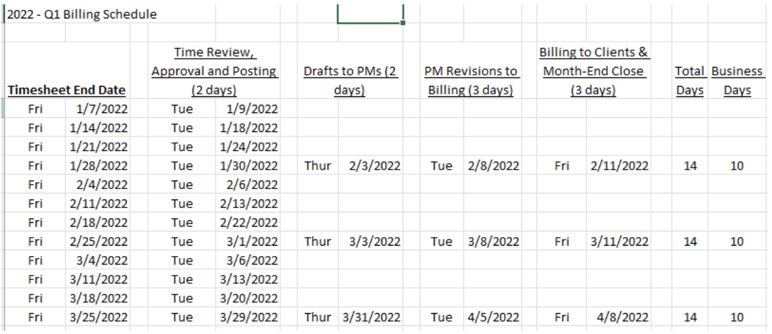
Below is a sample of how this schedule lays out on a calendar in Q1 of 2022, spanning 2 weeks and 10 business days. This model has been used successfully with the buy in of project management, billing and accounting and provides principals with revenue by week and for the month on the Wednesday following the last Friday of the month. 

Acct_Calendar

Once the invoices have gone out, the responsibilities for follow-up vary by client and role. For clients that are being billed for the first time, the billing department follows up three days after bills are emailed to ensure that the proper individual received the invoice and to see if there are any changes that need to be made to the delivery instructions. For existing clients, billing is responsible for follow-up on accounts receivable (AR) up to 60 days past due, project management is responsible for AR up to 120 days and departmental management gets involved after that. All responsible parties receive auto-generated AR emails weekly so that all are on the same page as to who is on task.

Optimize the Accounting Calendar to Realize the Dream

As John Lennon once said, “You may say I’m a dreamer, but I’m not the only one.” Having a solid billing and accounting calendar is not a dream, it is a necessary and doable reality. Every firm has a plan and the thing that generally separates the dream from the reality is taking on the responsibility of enforcing the schedule and the deadlines. No one should be exempted from completing their assigned tasks at the time.  

Click the image below to find more accounting and finance resources. 

Resource Planning Enhancements in Deltek Vantagepoint

Posted by Rana Blair on Feb 23, 2022 12:00:00 AM

Vantagepoint Resource Planning Enhancements Hero Image

Projects are the lifeline for professional services firms. Deltek Vantagepoint provides applications to support the project planning and resource management activities—Project Planning, Resource Management and Plan Reporting. For those firms who are familiar with Deltek Vision planning, you’re in for a real treat with the enhancements added to Vantagepoint.

The enhancements include the ability to Change Planned Hours, select the ETC / JTD basis in system settings, save Resource View searches for roles, and use Spread Variance to push unused plan hours forward. Let’s dig deeper into these improvements.

Set Plan Inclusion System-Wide

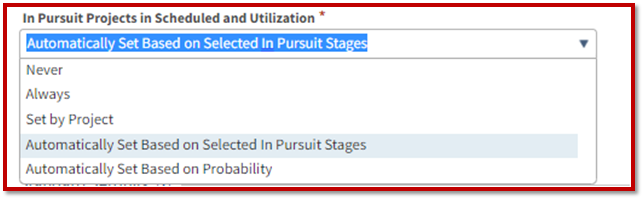
Deltek administrators now have the ability from a system-level to set the inclusion of “in pursuit” project plans on some sort of objective basis. The screenshot below shows how these are automatically set based on the pursuit stages. Keep in mind when the project is awarded, it’s included in those calculations. The beautiful part about Vantagepoint is firms have complete visibility into all the plans, even if the project was not included in those utilization calculations and reports.

VPPlanning-InclusionSettings

The administrator can set different options based on the firm’s preferences. Those include:

  • Never – This means that users can plan but the plan won't be included in the calculations.
  • Always – Selecting this option will always include the plans, regardless of the degree of seriousness or clarity that you have.
  • Set by Project – This is not recommended because it relies on the plan creator to remember to mark the plan for inclusion.
  • Automatically Set Based on Selected in Pursuit Stages – This is the recommended option because it leverages the intelligence of the software to determine the stage of the project and then to automatically determine inclusion into those calculations.
  • Automatically Set Based on Probability – This uses the probabilities set up in the system. Preferences can be set to say anything greater than 50% probability, for example, will be included. Vantagepoint provides a lot of flexibility with this, but this flexibility is from the system standpoint and not each individual plan.

Set Estimate to Complete (ETC) and Job to Date (JTD) Basis System-Wide

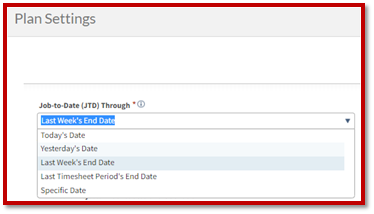
While the ability to set and/or change the ETC and JTD was available in Deltek Vision Planning, it was often changed for one purpose or another and could be forgotten to be put back. In Vantagepoint, this is a system setting so that every plan is using the same ETC and JTD basis as shown in the screenshot below.

VPPlanning-JTDSettings

Firms can select the system settings and the basis that works best for them. For example, a firm has a JTD basis through Last Week’s End Date, and that is last Saturday. All the JTD is shown through that date and the ETC date starts the next business day. That allows the firm to have certainty about the JTD figures. If the firm customarily has weekly timesheets that are always completed by the end of the week, this may be a great system setting.

Alternatively, firms can use the Last Timesheet Period’s End Date. If the firm lags a little bit on timesheet entries, utilizing this option so that the JTD information being shown in the plan is that of the last timesheet period will most likely work better. Firms can use this option so that the JTD information shown in the plan is as of that last timesheet week. So, for the first few days of the timesheet period, it's not as accurate, but it's more accurate once that timesheet period is posted and closed.

Rescheduling Plans

Vantagepoint Planning is further enhanced with the ability to reschedule plans. The reschedule ability allows users to either shift or change the duration for the labor tab. This is only for the labor tab in Vantagepoint Planning. Users can pick up the entire date range and move the start date or move it to the finish date.

Like Vision Planning, if the duration is the same, the hours can use the same proportions from the time period. When the duration length is increased, it keeps the same pattern. Conversely, when the duration length is decreased, the system can respread it evenly. But, if the duration shrinks, the system will not like it if unplanned hours fall outside the new duration. In Vantagepoint, this becomes very clear with well-written error messages that pop up for the user.

Change Planned Hours

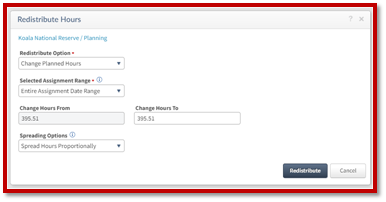
Changing planned hours is a new function in Deltek Vantagepoint. Project managers can use this functionality to update the planned hours in any timeframe. They can choose to spread the hours proportionally or evenly. For example, a user can take all the hours at the project level or work breakdown structure (WBS) level two and change the planned hours from A to B. This can be done in any timeframe. It can also be done backward and forward using the ETC day. There are a lot of options to change planned hours in Vantagepoint Planning.

The screenshot below shows the new Redistribute Hours menu in Vantagepoint where users can change the planned hours.

VPPlanning-RedistributeHours

Replace Planned Hours with Actual Hours

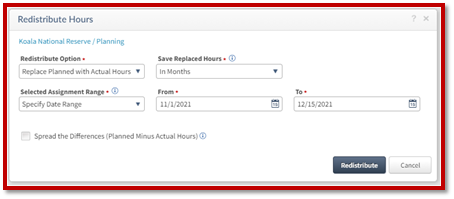
The next enhancement is the ability to replace planned hours with actual hours. This functionality allows users to choose the replacement of hours for a specific date range or across all dates as well as choose to calculate on a weekly, monthly, or total basis. An example is shown below.

VPPlanning-ReplacePlanwithActualHours

Spread Variance

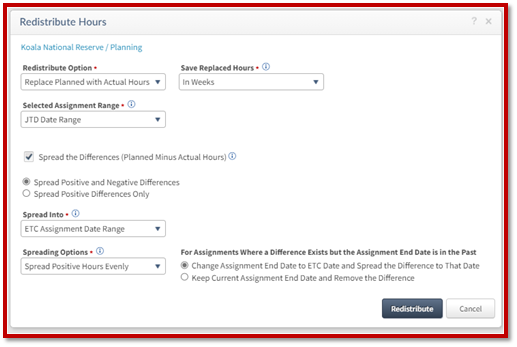
The ability to spread the variance between planned and actual hours can be done in several ways over the time periods selected. It allows the user to control how they spread the differences between actual and planned as well as choose different date ranges. The date range can be a specific date range, an entire date range, or just a short amount of time. The project manager can choose to spread the hours including the negatives or just limit to the positive differences. The variance can be spread evenly or proportionately.

The biggest enhancement is that now this setting is directly available in the plans in Vantagepoint as opposed to another menu or area of the system, providing better visibility, as shown below.

VPPlanning-SpreadVariance

Vantagepoint Planning is Reimagined for Project-Based Firms

With these enhancements to Vantagepoint Planning, project-based firms can not only quickly create project plans but adjust them to the unpredictable nature of the projects. It’s the right project management tool to control project delivery. Do you want to see these Deltek Vantagepoint Planning enhancements in action? Use the button below to see Rana Blair demonstrate each of them.


Outgrowing QuickBooks – 5 Reasons Professional Services Firms Need More

Posted by Joel Slater on Jan 26, 2022 12:00:00 AM

QuickBooks serves as a logical starting point for SMB professional services firms. For good reason - it’s affordable, popular, and easy to use accounting software. Though, on the downside, it provides very little flexibility and accommodation for how a business actually needs to run 

Having difficulty looking at accounting report

Simply put, QuickBooks isn’t designed for project-based companies. It’s an entry-level accounting system, with purposefully generic functionality, intended to serve a diverse client base that spans various industry types. Consequently, the basic and straightforward nature of the product, which perhaps is viewed as a positive, can quickly become the opposite. Many professional services firms will eventually reach a point where the limitations of QuickBooks can hinder future growth. 

When might a firm reach that point? Below are 5 top reasons clients are choosing to trade in QuickBooks for an industry specific ERP that is purpose-built to meet the needs of a growing project-based business.     

Cumbersome Invoice Creation 

For a project-focused professional services firm, getting client invoices created and out the door can be considered one of the most critical functions. This process may have once been easy, but as the business has grown, projects have likely become more complex. With that means more complicated, multi-part, client invoice requirements.  

What used to take a couple of hours is now taking over a week, and accounting staff is burdened with cobbling together invoice-supporting data from various disconnected, error-prone sources. Not to mention the challenges of even getting the project management team to complete their timesheets in the first place. Once those bills have finally been painstakingly created and issued to clients, they still may not be correct.   

Incorrect invoices going out the door can slowly erode the trust of clients and lead to unnecessary, time-consuming, back-and-forth. On the other hand, accurate invoices, which are processed and paid quickly by clients, can provide various benefits to include reduction in DSO (days sales outstanding) and increased cash flow.  

Limited Visibility into Project Reporting

Do Project Managers and professional services firm leaders have a consistent and reliable source of truth to monitor the overall health and status of projects? For many who rely on QuickBooks, the answer is no. Just like on the invoice creation side, the necessary data to support project reporting is scattered among various spreadsheets. Answering what should be a simple question related to project status could take days to assemble a response. By the time of that response – odds are, the data is already out-of-date, and often irrelevant. The thought of any ‘real time’ project status, to include capturing data such as committed costs, may likely seem impossible when operating within these sorts of system-related confines.  

Not having a proper visibility into project timeline, budget, and other KPIs has consequences. It can quickly eat into profit margin and limit a professional services firm’s ability to make informed decisions in support of its projects and business.   

QuickBooks Lacks Support for the Entire Project Lifecycle 

Everyone needs an accounting system. However, even a relatively small, basic operation may quickly find that it needs more tools at its disposal. There are obvious functions like time keeping & employee expense reports, providing the ability to seamlessly allocate those costs to projects in support of invoice creation and project reporting. Additionally, perhaps there is a need to link the front and back-office operations to better manage the complete ‘project lifecycle’ (from initial lead pursuit through to project close-out). This includes a CRM (customer relationship management) module, or the ability to do more detailed project planning and resource scheduling.  

These are all areas and functions that a professional services firm is undoubtedly already actively performing, but just manually and “offline,” using spreadsheets and email to manage. The purpose of an ERP is to combine multiple functions within a single fully integrated solution that spans the entire business. More specifically, a project-based ERP is designed to do the same, but with functionality specifically geared towards a project-oriented company. 

Sure, QuickBooks capabilities can be expanded using external and 3rd party add-on tools that make initial claims around 'integration'. Yet, the result for many who go down that path can be a clunky, frustrating software experience – leaving many wishing they instead invested their time and resources into the lower-risk approach of just implementing a Deltek product.   

QuickBooks Can Limit the Ability to Pursue Projects

For many of the reasons already stated, professional services firms shy away from pursuing new projects they fear may be too taxing and burdensome on their existing accounting system. Simply stated, they don’t have the tools in place to responsibly graduate to the next level. Passing up new business opportunities can be painful, but unfortunately necessary, for those firms who are not equipped with the internal systems to support growth. 

Take WBS (work breakdown structure) requirements, for example. This means breaking down a more complex project into smaller components and deliverables. Many times projects require an invoice to reflect the way the project was bid. Providing a WBS ensures the estimate is managed and billed the way it was proposed. Unfortunately, QuickBooks limits the ability to pursue projects with more advanced requirements because it cannot easily track efforts in this manner. For many professional services firms, this is essential functionality needed to initially price/propose, manage, deliver, and invoice these projects.   

QuickBooks Hinders Growth 

The idea of a more ‘open ended’ system experience that can truly conform and adapt to evolving business requirements becomes more appealing. Those cascading menu options, check boxes, and configuration screens that may have once been viewed as intimidating and inaccessible may quickly start to make more sense. Deltek can easily accommodate growing firms. This is why 80% of AEC firms use Deltek. It has all the utilities, under the hood to handle the needs of future growth. As a professional services firm grows, its bookkeeping system should be able to scale and enable that progress, versus introducing hurdles and limitations.  

Grow Quicker with Deltek 

To reiterate, there is nothing inherently wrong with QuickBooks. If there were, it probably wouldn’t be the widest-deployed entry-level accounting system in the market. But the unique requirements of a professional services firm can still quickly create situations where to bring a firm to the next level, it needs to be re-tooled with industry specific solutions.  

ERP is not just for the ‘big guys’ anymore. The introduction of cloud-based applications (relieving clients of internal IT requirements), and also packaging and implementations catering to small firms, has opened many doors over the last several years. In fact, a majority of current day Deltek clients could be considered SMBs, who previously came from QuickBooks.  

Have additional questions? Full Sail Partners and Deltek got it covered. Deltek Vantagepoint is an industry-leading project-based ERP designed to support the entire project lifecycle. Having extensive experience with new system implementations (to include data migration, system configuration, and product training), Full Sail Partners has helped hundreds of clients graduate from QuickBooks. Please contact us to start a discussion.  

Level Up Your AE Firm’s Business

Posted by Ryan Felkel on Jan 12, 2022 12:00:00 AM

For all businesses, earning a nice profit is the expected goal. Yet for some AE firms, stagnant earnings, increasing costs and expenses, low new client acquisition, and deteriorating workplace culture may have become the new normal. What was once a business bursting at the seams and barely able to take on more work, has now become complacent and satisfied with mediocrity. However, there is something that can be done to change the current course. Take a quick read through the following tips to help create ideas for ways to get started.

man walking up steps

Create and Stick to a Plan

Get SMART and create a strategic business plan that provides clear direction and expected results. For some AE firms, this may be as simple as reviewing the existing plan and making updates to meet current business needs. In other cases, it may be best to scrap the existing plan and start over from scratch. Either way, a solid business plan needs to be reinforced with SMART goals.

SMART is an acronym that stands for Specific, Measurable, Achievable, Realistic, and Time-based. To create SMART goals, begin by thinking about the entire firm and decide how to designate areas of responsibility and determine expected results. It is likely easiest to start at the department level and then work down from there. Additionally, goals need to focus on the desired result and need to be high level while remaining specific. If there seems to be an excessive number of goals, it is likely that they are too granular and focused on task level items and not the desired result. Lastly, goals need to be measurable and incorporated with time-based milestones.

Get Friendly with the Firm Numbers

It’s time to stop avoiding that uncomfortable relationship people seem to have with numbers. We are not all accountants. However, numbers can tell the ugly truth even when someone doesn’t want to hear it. Like that one friend we all keep around that inevitably reminds us of what we are trying to avoid in an effort to minimize the realities of a situation. So, what numbers are important? All of them.

A good place to start is with cash flow. There’s no way around it, businesses with limited cash reserves and low cash flow will inevitably shut down. Also, get friendly with the firm’s overall net profit and the profit performance of the firm’s projects. Keep in mind that great profits don’t always equate to positive cash flow which is required to bill overhead expenses and salaries. Lastly, check the firm’s credit score to make sure the firm can get a loan with favorable terms if cash flow becomes a temporary issue or new assets need to be purchased. Many firms are finding that a solid business intelligence solution provides the best insights into numbers. Learn more in this past webinar.

Embrace the Multi-Generation Workforce

Move over generation MTV, the kids are entering the workforce. Seriously, there are now four generations in the modern workforce. To put this into perspective, there are employees that remember sharing work computers, and there are employees that got their first personal computer at eight years old. To say the least, there are some differences in expectations when it comes to the way work gets done.

Sure, it’s easiest to just say conform to our ways or else. But the reality is that the members of the younger generations are the leaders of the future. Therefore, it’s important for firms to start adjusting to accommodate these differences. For help, check out this white paper.

Engage and Interact with Clients in More Ways

Welcome to the 21st century, where that must-have fancy technology is out of date before most of the world even knows that it exists. We are now in the digital era which has transformed the way we communicate and consume information. Now, we have personal computers in the form of mobile phones that mostly fit in our pockets. As a result, people have become accustomed to receiving notifications and obtaining information using these digital formats.

A lot, if not all AE firms, have websites, but some of these websites were created and last updated over a decade ago. Furthermore, even those firms that have a modern website still likely only have a small digital footprint. Therefore, AE firms need to evaluate their current digital marketing efforts to decide which areas need improvement. To help AE firms, Full Sail Partners is publishing a blog series titled “Driving Growth with Digital Marketing” that is specifically geared towards AEC companies. Find a listing for all the articles and signup for notifications about new articles and other content here.  

Take Your AE Firm to the Next Level

Ready to improve your AE firm? Putting SMART Goals in place, confronting the inevitable numbers, accommodating workplace differences, and engaging in the digital era will move firms from stagnant to reinvigorated. These efforts will result in a visible positive impact. Additionally, Full Sail Partners can aid in identifying areas of opportunity for improvement via a Navigational Analysis. Use the link button below to contact us to learn more.

A Walk Down Memory Lane as Full Sail Partners Celebrates 10 Years!

Posted by Sarah Gonnella on Jan 5, 2022 12:00:00 AM

We are excited to celebrate our 10-year anniversary! Clients, partners, employees, and family have all embarked on this journey with us, and in so many ways, we have grown together. For this reason, we plan to recognize this big accomplishment and continue to make great strides together in 2022! Cheers to another amazing year full of fantastic projects and collaboration! We invite you to be the first to see our new 10-year anniversary logo and check out our new resource pages providing you content by role.

Full Sail Partners 10 Year Anniversary Logo

Since the creation of Full Sail Partners in 2012, the number of our employees has expanded 131% allowing us to become the technology provider when it comes to project-based solutions. Over those 10 years, our viewership has expanded 785% and we have received almost 23k website submissions. We have shared more than 540 blog articles, 293 web pages, and 132 webinars. So, in celebration, we are listing the top content based on viewership. Enjoy!

Most Viewed Thought Leadership Blog 

>>>7 Ways to Overcome Obstacles<<<

Maybe it shouldn’t be surprising that the most viewed thought leadership blog was about overcoming obstacles? These past several years brought many challenges to our work and personal lives. When faced with adversity, it sometimes can be hard to breakdown how to handle it. In this blog, we discussed 7 tips to overcome obstacles.

Most Downloaded Whitepaper 

>>>Deltek AE Clarity Report<<<

As a Deltek Platinum Partner, we promote Deltek’s annual survey focused on the Architecture and Engineering (A&E) industry. The report is one of the world’s most sought-after A&E research findings each year providing in-depth analysis about the industry’s financial condition and market outlook. 

Most Webinar Submissions 

>>>Things We Love About Deltek Vantagepoint So Far<<<

Our webinar with the most submissions was a presentation back in 2019. This webinar is still getting a lot of attention! Firms were excited about the release of Deltek Vantagepoint, and this still holds true today. During the webinar, we covered the Top 10 Features along with some honorable mentions. The webinar was so well attended, we were asked to do an updated version a year later: Deltek Vantagepoint: The Best All In One.

Webinar with the Largest Attendance 

>>>The Project Lifecycle of Deltek Vantagepoint<<<

Professional services firms need a system that takes them through the entire project lifecycle from lead identification to pursuit and final project execution. So, it makes sense that this webinar had the largest attendance in our 10-year history, especially with the enthusiasm surrounding Deltek Vantagepoint. The webinar took firms from beginning to end and compared the similarities and differences between Vantagepoint and Vision. 

Most Viewed Webpage 

>>>Our Crew<<<

Other than our home page, our most viewed webpage is about our crew. Just like with every professional services firm, our employees are the heart and soul of our company. More than 31,000 people have checked out our staff, which averages out to about 7 people a day. Everyone at our company believes we are the best at what we do! We have an amazing, collaborative, and talented team that also makes work fun. This is best illustrated by our professional and fun photos showing another side to our team.

Most Requested Blackbox Connector Solution

>>>Quick Insight to Maintain Contacts<<<

Everyone loves FREE stuff, which probably explains why our newest solution on our Blackbox Connector page sky rocketed to become our most requested page. Full Sail Partners presented on a contact and email management tool for Deltek Vantagepoint in December, 2021, to help firms clean-up their data. The tool searches for duplicate email addresses, duplicate names, and emails with bad formatting to help users target records needing clean-up. The best part is this tool can be used whether you have Vantagepoint CRM or not!

Most Time Spent on a Blog 

>>>Exception Reporting<<<

Research shows the average time spent on a website page is about 45 seconds. So, when you have a blog that users are spending on average 7.4 minutes reviewing, you know you have content worth reading. It might seem ironic that the blog that had the most time spent on it was about how to spend less time analyzing data. However, that doesn’t come as a revelation to us. The most common complaint amongst professionals is they don’t have time to analyze the data, since they need to just get the job done. If you haven’t checked it out yet, learn more about how exception reporting can save firm leaders and their employee’s valuable time.

Blog with the Most Social Media Shares

>>>9 Ways to Connect with Employees<<<

Each employee has different needs from a job and an employer. Sometimes those needs are in alignment with their employer and sometimes they aren’t. How can employers best connect and create a culture that empowers their employees? In this article, we discussed 9 ways to connect with employees to ensure they feel valued and enthusiastic about their position.

We hope you enjoyed being taken down memory lane or even discovered content that you may have missed. From the inception of Full Sail Partners, our goals were to ensure we had a passionate, dedicated, and collaborative team and to be known for valuable content amongst the project-based industry. Based on comments from our employees and clients, we think we have lived up to those goals. Thank you for joining us on our journey, and we look forward to continuing our endeavor with you and to see what the future holds.

Skills Improvement Versus Corrective Action: Getting to the Root of Things

Posted by Tasia Grant, PHR on Oct 13, 2021 12:00:00 AM

Professional services firm leaders are often inclined to immediately use discipline or use corrective action to address an ongoing performance issue. However, that would be like medicating based on symptoms, without getting to the root cause of the illness. Instead, slowing down and thoroughly evaluating the situation can shed light on possible solutions that are likely more beneficial to the employee and for the firm as a whole.

Employee meeting with supervisor

When to Use a Skills Improvement Plan

Behavioral concerns and non-compliance issues can usually be directly impacted by progressive discipline. On the contrary, skill deficiencies or job performance concerns are usually best addressed with skills improvement plans and that includes more than just the technical skills required to perform the functions of the position. They can also incorporate the other skills essential and critical to the overall scope of the job.

For example, a manager may be a high performer based on their knowledge level and ability to perform the job duties. Yet, they may struggle in the areas of interpersonal communication or may not have had prior management experience and may need to work on developing their leadership skills. Which are areas not related to behavioral or compliance concerns.

Therefore, these skills would be best addressed with coaching, guidance, and setting clear goals and expectations. Coaching can include suggested training, an outlined strategy for change, developed by both the manager and their director, as well as mediation between the manager and their reports. If there is a desire to thrive in the position the manager should be open to the plan laid out to help them improve. Usually, employees do accept and appreciate the assistance if they feel that the plan being presented is sincere and demonstrates that the company wants them to be successful.

When to Use a Corrective Action Plan

Sometimes firms have an employee that excels in their position but is also an employee that is consistently late to their shift, breaking company policy, or their behavior is causing disruption to the team or clients. In this case, a more targeted and direct approach needs to be applied for more immediate results. Cases like these are when corrective action needs to be taken using a progressive discipline plan. This technique provides the employee an opportunity to make improvements or adjustments while allowing the employer to implement corrective actions if there is no improvement.

Corrective actions can vary in severity and can include a verbal warning or a written warning as lighter punishments. Whereas suspending an employee or terminating them can be more severe. Furthermore, corrective action primarily addresses critical problems, recurring issues, and/or problems that endanger health or safety of others.

Employees are Investments

Remember that with both a skills improvement plan and a corrective action plan, the primary goal should be to identify the cause of the change and a solution that leads to positive results. Additionally, firm leaders and managers need to consider that an employee may have greatness in them and are an asset to the firm, but are apprehensive to reveal it for fear that it will set higher expectations of them that they aren’t confident they can achieve. These processes will reveal that and encourage them to embrace it and display it.

The Best Deltek Vantagepoint Video Demos

Posted by Ryan Felkel on Sep 15, 2021 12:00:00 AM

Finding helpful and insightful information just got easier for Deltek Vantagepoint clients. The Powering Project Success with Deltek Vantagepoint mini demonstration series is a growing library of video content for Vantagepoint users of all roles and skill levels. Each video is five to twenty minutes long and about a specific feature and function available in Vantagepoint that many are unaware exist or are unsure how to use.

Person watching demos on laptop

Projects Start with Business Development

Winning work is the first step to initiating a project and Deltek Vantagepoint helps business development (BD) professionals generate and close opportunities. Even on the go! With the mobile CRM functionality, BD team members can easily access and update client information from anywhere using a mobile device. Check out this demo to see how simple it is to review and update client information right on your mobile smart device.

In addition to the great benefits of mobile CRM, tracking Outlook emails and calendar appointments in Vantagepoint CRM is seamless with Deltek Vantagepoint Connect for Outlook. With a few simple clicks, BD team members can conduct typical CRM tasks directly in Outlook. Watch this demo to see how easy it is to create contacts, manage appointments and schedule meetings directly in Outlook.

Simplify Project Startup and Creation

Before work can begin, a client must pay a retainer fee. As simple as this sounds, there can be many parties involved throughout the process. During this mini demo, Vantagepoint accounting professionals can learn how to easily process retainers using cash receipts all while automatically keeping the project manager in the loop through the entire process. As simple as this sounds, it’s a favorite obscure feature for many accounting professionals.

Setting up new project and plan can be a time-consuming process that can be avoided using Vantagepoint Project Templates and Plan Settings. Instead of starting each project from scratch, Project Templates and Plan Settings allow firms to use pre-defined work breakdown structures to quickly set up complex projects. Essentially, simplifying the project creation process and ensuring consistency of project records. Watch this demo to see a project set up in less than 10 minutes.

Track Time for Timesheets Easier

Managing projects and clients is already a lot of work for billable employees. On top of that, they are required to track and update their timesheets on a regular basis. Deltek can’t create more time in a day, but Vantagepoint can make updating timesheets easier. Using the Calendar feature, users can track their billable time and add it to their timesheet with a few clicks. Check out this mini demo to see how.

Manage Talent Acquisition and Learning

Growing firms need to hire quickly and onboard new talent fast. Attracting and recruiting new talent requires getting the message out about new open employment opportunities. During this demo, human resources (HR) professionals will see how to post open positions across multiple job listing platforms with a simple click.

Once a new employee is hired, getting them started and setting up their training needs to be as simple as advertising for the position. In this demo, HR staff will learn how to set up the new hire onboarding process in an online environment. Additionally, the demo covers how employees can submit required paperwork and info as well as complete self-guided online training.

Get Paid Easier

Before billing a client, it’s important to make sure the invoice is correct. This internal back and forth process between project managers and accounting can become time and paper consuming. After watching this demo, accounting professionals and project managers will both be relieved once they see how easy it is to digitally markup invoices and resubmit them to accounting.

The ugly side of accounting is having to bill and collect interest from clients. Well, Deltek Vantagepoint can’t talk with clients about late payments, but it can make charging interest easier. Learn how to set up billing terms in Vantagepoint to make collecting and tracking past due balances easier in this demo.

Deltek Vantagepoint Provides Answers

Reports after report, Deltek Vantagepoint as them which is great. However, picking the right report can be confusing which is not Deltek’s intentions. In this demo, picking the right project planning related report is thoroughly explained along with the context about how each report is created. This demo is great for those tasked with forecasting project performance.

What seemed like a dream for project managers is a reality in Vantagepoint. With the combination of project planning and budgeting in one hub, project managers can quickly review project success based on both of these data inputs. The Project Review demo shows how Vantagepoints pulls from both these data sources to help ensure projects are profitable.  

Maximize the Benefits of Deltek Vantagepoint

Getting work done just got easier for Deltek Vantagepoint users! While these are just a few of the mini demos available in the Powering Project Success with Deltek Vantagepoint series, more are available using the link button below. Make sure to regularly check out the growing demo library for updates and share these with coworkers.

Driving Growth with Digital Marketing: What is Digital Marketing

Posted by Lindsay Diven on Aug 18, 2021 12:00:00 AM

This article is the first in the Driving Growth with Digital Marketing series. This series will walk A/E/C firms through how to develop a digital marketing program that will raise brand awareness, capture new leads, and increase revenue.

But, before the series covers the nuts and bolts of how to do this, let’s define digital marketing, its history and how it can benefit A/E/C firms.

Driving Growth with Digital Marketing logo version 2

Digital Marketing Defined

Digital marketing is defined as any marketing that uses electronic devices to convey promotional messages and measure its impact. Typically, these marketing practices include marketing campaigns that appear on computers, phones, tablets, or other electronic devices. It takes many forms including videos, emails, and social media posts. Additionally, it includes organic content and paid content such as display ads. Digital marketing is often compared to “traditional marketing” like magazine ads, billboards, and direct mail.

The History of Digital Marketing

The term Digital Marketing was first coined in the 1990s when customer relationship management (CRM) software became a significant factor in marketing technology. Then in 1994, the first clickable banner ad went live for the “You Will” campaign by AT&T. Over the first four months of it going live, 44% of all people who saw it clicked on the ad.

In the 2000s, with increased internet usage and the birth of the iPhone, customers began to search products and make decisions about their needs online first, instead of consulting a salesperson. This encouraged marketers to find new ways to integrate digital technology into market development.

Digital marketing took another step forward in 2007 when marketing automation was developed. Marketing automation is the process by which software is used to automate conventional marketing processes. With this new technology, marketers could launch multichannel marketing campaigns based on the customers specific activities.

After that, social media including Facebook, LinkedIn, and Twitter made consumers even more dependent on digital applications in their daily lives. Now customers and potential customers expect a seamless user experience across different channels when searching for a firm’s information.

Digital Marketing Campaign Types

Digital marketing can consist of both online and non-internet channels and strategies. Common online digital marketing channels and strategies consist of:

  • Search engine optimization (SEO)
  • Search engine marketing (SEM)
  • Content marketing
  • Inbound marketing
  • Influencer marketing
  • Social media marketing
  • Email marketing
  • Display advertising
  • Pay per click advertising (PPC)

Off-line or non-internet digital channels and strategies consist of:

  • Television
  • Text message campaigns (SMS and MMS)
  • Virtual displays or electronic billboards such as at conferences or events
  • Custom apps
  • Cold calling

The Driving Growth with Digital Marketing series will go more in-depth on several of these digital marketing strategies. Click on the image below to be alerted when a new article in the series is available.

Goals for Digital Marketing

We live in a digital age, and millions of people spend most of their time on digital platforms including their computers and phones. Marketing is all about connecting with targeted contacts in the right place, at the right time, and if the contacts are plentiful online, then that’s where the best marketing strategies should be implemented.

One goal of digital marketing is to raise brand awareness. Recent trends show businesses and digital marketers are prioritizing brand awareness, focusing more of their digital marketing efforts on cultivating brand recognition and recall than in previous years. This is evidenced by a 2019 Content Marketing Institute study, which found that 81% of digital marketers have worked on enhancing brand recognition over the past year. Another Content Marketing Institute survey revealed 89% of B2B marketers now believe improving brand awareness to be more important than efforts directed at increasing sales.

Another goal for digital marketing is lead nurturing. Many A/E/C firms work with the same clients for many different projects. Because of this high rate of repeat work, the marketing goals aren’t to raise awareness to new leads, but rather, keep the firm top of mind with existing clients. Also, the sales cycle in the A/E/C industry can be long, stretching out several months, if not years. Therefore, a firm might want to stay in front of those leads between projects.

Most likely, the goals for the digital marketing program will consist of a combination of both of these for different markets and clients.

Benefits of Digital Marketing for A/E/C Firms

The agency Hinge Research conducts original research for digital and thought leadership marketing specific to the A/E/C Industry. In their 2020 study of high growth A/E/C firms, they found high growth firms are dedicating almost 27% of their revenue to marketing, and are generating 50% of new leads from digital sources.

Other benefits of developing a digital marketing program for A/E/C firms include:

  • Cost effectiveness – Compared to traditional marketing strategies such as print advertising, conference sponsorship or attendance, digital marketing is relatively low cost. Some of the digital marketing strategies only cost the time to produce the materials and the technical knowledge. Others involved purchasing relatively low-cost software and online advertising like display ads or PPC.
  • High return on investment – Because of its relatively low cost to generate new leads that could result in thousands of new firm revenue, the return on investment is very high for digital marketing. And with the proper marketing technology in place to track and attribute the marketing campaigns appropriately, it’s relatively easy to track.
  • Easier to measure – Compared to traditional marketing strategies like a print ad or conference sponsorship, with a digital campaign you can know almost immediately how it’s performing. For example, an email marketing campaign’s performance can be known within hours or the next day. The opens and clicks are a good indicator of its performance, and marketers can use that knowledge to adjust accordingly.
  • Easy to adjust – Because the performance of the digital marketing effort is known quickly, marketers will have that knowledge and can adjust other campaigns with that knowledge.
  • Easy to share – Digital marketing channels like social media posts and email campaigns can be shared with a click of a button. This helps firms create a multiplier affect and amplifies the content.
  • Precise targeting – Traditional marketing is one to many and everyone. For example, an engineering firm places a print ad in an industry publication. The engineering firm hopes that a few people who like what they see in that ad would take a positive action. Marketing over digital platforms allows for targeted campaigning. The engineering firm can now place a display ad where that ad is presented to potential contacts based on their preferences or initial action.
  • Further reach – Digital marketing gives small firms, which make up most of the A/E/C industry, the opportunity to expand their reach. Using the benefits above of low cost, precise targeting, etc. every firm that deploys a digital marketing program can play on the same field as the mega firms. A small architecture firm in Iowa can be the worldwide leader in theater acoustical engineering through digital marketing campaigns and reach theaters in Moscow or Brisbane, for example.

Propelling Forward

The A/E/C industry has often been slow compared to other industries when adopting new marketing trends. But in 2020 with the global pandemic, A/E/C firms were propelled to rapidly make changes to their marketing programs, including shifting resources to digital marketing. Knowing this, Full Sail Partners has developed the Driving Growth with Digital Marketing series. In this series, marketers and principals will learn how to develop a digital marketing program that is right for their firm. Sign up below to be notified when a new resource in the series becomes available.

Latest Posts