
5 Ways to Improve Workplace Efficiency
Every firm is looking for ways to improve workplace efficiency. Why? Because the results are happier employees, improved bottom line, and a streamlined work environment. There are a number of ways to achieve this goal, but what are the top ways to increase business productivity? Let’s take a look at 5 ways to improve workplace efficiency:
- Visibility
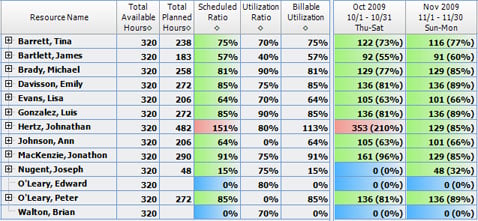
Has your firm ever been guilty of making a sales call to the same client as someone else at your firm during the same week or even worse, submitting on the same proposal? When a client calls, do you know within a couple of minutes who the last person was that worked on the job or talked to them, and if there are any previous issues that are unresolved? In order to make quick, informed decisions and have the right information at the right time, it’s important to have real-time access and accurate visibility. Firms with the ability to instantly understand over and underutilization of resources by project and employee are able to quickly re-assign resources to increase productivity. Many firms utilize an ERP system to gain a global view of their company. - Repeatable Process
Another inefficiency we find are firms that don’t think about developing processes that are repeatable. Firms that take the time to think through processes, document them, and test against them avoid recreating processes and errors each time they are carried out.
Two examples are the execution of a project and hiring a new employee. Both of these should have repeatable processes that everyone knows within your company. What happens when you miss an important step in either of these examples? You lose money. By not executing the steps outlined during a project, you run the risk of overrun and a project that fails. By not following a hiring process, you run the risk of not having the same standards of candidates throughout the company, which could result in the wrong hire. - Measuring the Right Statistics
I had an old co-worker that used to create as many activities in the system as they could because that is what was important to their boss. The philosophy was more calls, emails, activities resulted in more sales and opportunities. The problem with this was there were two important factors left out: the quality of the activities and the results of those efforts. In order to affect results, you have to choose the right statistics then track the results. Establishing the right measurable goals and expectations help employees understand the value they bring to the company. When setting up metrics for employees remember to: - Establish goals for the company
- Work with each employee to identify how they will contribute to the success of the firm and gain agreement on those goals
- Measure them at set time periods
- Manage Customer Expectations
Managing customer expectations impacts your long-term relationship with a client. When your customers are happy, your firm spends less time performing tasks that could have been avoided to get the client or project back on track. However, managing those expectations can be difficult to do throughout the project delivery. One way to manage customer expectation is to check-in with the client at multiple times throughout the project. Period check-ins provide your team with the time needed to make adjustments if something is not meeting the client’s expectations. Additionally, handling a small issue is much easier then handling a client that unloads their bottled up frustrations all at once. - Develop Engaged Employees
Did you know that a recent Gallup poll revealed that disengaged employees – least productive employees -- cost the US economy $370 billion every year? In the review, three types of employees were identified: Engaged, Not Engaged, and Disengaged. Engaged employees innovate and use their talents to build the company, while disengaged employees tear down the infrastructure by questioning and disagreeing with anything and everything. Another set of employees are those that are not engaged. They sit back and avoid committing themselves. It went on to show that of the US workforce, 29% is actively engaged, 55% is not engaged, and 16% is disengaged. So in essence only a third of your firm is operating at their full capacity.
Each employee has different needs or desires. At times, money is important to employees. However, many employees find other things much more important in a firm: flexible work hours, recognition of talent, or an outlined career path. Ultimately firms should establish an open communication with employees and establish trust. Lack of transparency and understanding of the big picture and goals of the company leave employees wondering and concerned about the future.
The key to improve workplace efficiency is to constantly evaluate, adjust, and improve. What are your thoughts? Do you think your firm could benefit from these 5 steps? Try them and see if your overall efficiency impacts productivity and profitability.
 Try this with a small group of invoices to start until you get the hang of it. Then expand to include all your invoices. This method not only saves you time and money (printing and mailing costs) in producing final invoices, but it also gets your invoice to your client sooner which can reduce your cash cycle days.
 Full Sail Partners assisted Wiss, Janney, Elstner Associates, Inc., a prominent A/E/C firm ranked on Engineering News-Record's list of the Top 500 Design Firms in America, with the implementation of Deltek Vision across its business. Full Sail Partners built numerous workflows in Deltek Vision such as conflict checking, project initiation, billing, and project status report. As a result, WJE realized an annual savings of about $1.8 million and a reduction in DSOs of 45 days. The cost to purchase and implement Deltek Vision paid for itself over 30 times in just one year.