Full Sail Partners Blog | Full Sail Partners (6)

Posts by Full Sail Partners:

The Value of Vantagepoint for Executives

Posted by Full Sail Partners on Nov 4, 2020, 12:00:00 AM

Vantagepoint Value  for Executives

As an Executive, we carry a lot on our minds and plates these days to ensure our companies are running smoothly. Unifying our teams and simplifying our business processes is a key challenge all executives are looking to resolve. When searching for tools to help staff, it is important to find systems that will grow with your business. This is why thousands of firms rely on Deltek products. For professional services firms, executives are turning to Deltek Vantagepoint to track growth, performance, and profits throughout the project lifecycle. Let’s explore the value of Vantagepoint for executives.

Creating Value for Your Team

Deltek Vantagepoint provides 360-degree visibility into your projects to drive business success. Creating value is not done magically. It requires thinking about the end users’ experience and understanding their business. With Deltek Vantagepoint, much of that work has been done for you. Deltek Vantagepoint was designed by thinking about how each person within your firm will interact within their role and creating efficiency around their interaction with the solution.

Some of the key benefits important to executives include:  

  • Sharing mission-critical data easily across your team while eliminating roadblocks and redundancies
  • Creating a collaborative systematic business process to ensure teams are able to quickly share information across the company
  • Visibility into your team resources company-wide to determine how best to avoid missed milestones
  • Driving home accountability to help maximize productivity and improve efficiency
  • Streamlining cash flow management by capturing timely expenses and captured billable hours with targeted alerts and accurate invoices
  • Simplifying and protecting work in the cloud with a secure, sophisticated infrastructure

Perfect Fit for All Sizes of Project-Based Firms

Deltek Vantagepoint is perfect for project-based firms of all sizes. Interestingly, the majority of firms Full Sail Partners serves are under 50 employees (57%) which coincides with the typical size of project-based firms across the United States. So, as your firm continues to grow, the solution should grow with you. What is most important is choosing a solution that fits your staff’s needs and provides leaders the information necessary to make business decisions about your firm’s growth plans. For firms that have more complex needs, the solution also includes robust features like multi-currency, multi-company, multi-language capabilities and much more that can be enabled.

Modern, Intuitive and User Friendly

Vantagepoint is an intuitive, powerful solution that puts your people and projects at the center of your business. It is designed to help you manage the entire project lifecycle better than before. One of the focal points when the solution was created was to ensure the interface was modern, intuitive and user friendly. It is purpose-built to allow firms to access the solution from any device or browser. As Deltek looks to add new features, they include finding ways for users to utilize the solution more easily. Here are a handful of the cool, modern features within Deltek Vantagepoint:

  • Role-based Dashboards – Quickly access pre-built dashboards designed specifically for the different roles which users are involved in within the company.
  • Intelligent Character Recognition (ICR) – Provides users the ability to translate text from handwritten or typed format back into the solution. For example, taking a picture of a receipt and auto filling an expense report.
  • Outlook Add-in – Proactively manage client relationships from within Outlook and synchronize data between both solutions.
  • Calendar Synchronization – Synchronize your personal calendar to easily create touchpoints and timesheet entries.
  • Hey Deltek – Use a personal assistant to help locate, open or create new records.

Built for All Users

In addition to providing executives an at-a-glance look at the health of their business, Vantagepoint is also focused on each role within the firm down to individual employees. The solution was designed with the needs of every employee in mind which ultimately helps executives manage the company. The role Vantagepoint plays in other roles will be discussed in future blogs. Suffice it to say that Deltek Vantagepoint can do it all.

Bringing Everything and Everyone Together

Not only does the solution encourage a collaborative environment, but it brings all your firm’s critical business processes into one unified platform to ensure executives get value from their investment. All employees from project managers to finance to marketing and business development can benefit using Deltek Vantagepoint. Be sure to check out our entire Deltek Vantagepoint mini-series to see how the product can help your employees and firm.


Value of the Deltek Vantagepoint Transition Copy Scripts

Posted by Full Sail Partners on Oct 28, 2020, 12:00:00 AM

Transition Copy Scirpts

Are you thinking about your Deltek Vantagepoint upgrade and what steps are required? If you haven't already, we recommend you take a look at Full Sail Partners’ 3-step process. An important fact to know is that Deltek has provided a conversion tool to allow all of your data to move over. No migration necessary. Does that mean I can move tomorrow? No, we do not recommend that. Just like with any upgrade, you need to make sure updates haven’t impacted your processes. This upgrade is a bit more extensive but rest assured Full Sail Partners has tools to make the process easier and more efficient. One of those tools is our Vantagepoint Transition Copy Scripts.

During the testing process, firms will need to address some key areas including workflows, saved searches, reports and configuration settings before moving forward with a production environment. Our Vantagepoint Transition Copy Scripts are a valuable resource to ensure the work you put into addressing issues doesn’t require rework when you move from test to test environment or to your final production environment. Let’s take a look at how this tool can help you with the upgrade process. 

Vantagepoint Preview Environment

Now that clean-up efforts have been identified and prioritized with the Vantagepoint Readiness Report, and clean-up efforts are nearing completion, it may be time to request a preview environment. Many firms are finding the upgrade process to be an opportune time to tidy-up data and fields that have been collected in Deltek Vision over the years. Here is the chance to get Vantagepoint started with best practices and processes.

Upon accessing a firm’s preview environment, you may notice that things look different. The data moves over from Vision to Vantagepoint, but some big areas are consolidated. For example, opportunities get consolidated into projects, and clients and vendors consolidate into the firm hub. As this takes place, you will see some field duplication. Fields may also be organized differently.

Vantagepoint Preview becomes Testing Environment

There are many changes that can be made in the testing environment. It’s important to know that any changes made - screen design properties, saved searches, reports, dashboard/dashparts, and more - will reset upon a preview refresh as well as go live. Full Sail Partners understands that this can be a burden on firms as they track and recreate each of the changes. Full Sail Partners' Transition Copy Scripts allow firms to retain these changes and eliminate redundancy and rework between each test upgrade and your your final conversion.

Below is a list of the available scripts in the transition copy script bundle:

Screen Designer:

  • Design layout location for User Defined Fields
  • Properties including: Hidden, Locked, Required Fields, Tool Tips
  • Resource Planning Configuration

Security:

  • Security user role for each employee
  • Security options for each user role
  • Email Configuration
Saved Searches
  • Private and Shared search options

Reports/Templates:

  • Private and Shared reports with options and selection criteria
  • Proposal templates
Dashboards/Dashparts:
  • Dashboard layout
  • Dashpart widgets
  • Dashpart calculations

Workflows:
  • Hub Workflows
  • Approval Engine Workflows

Newly Created Components and Values:

  • Standard field values and labels
  • Custom fields and labels
  • Custom grids and labels
  • Custom files
  • Custom tabs
  • Custom hubs
  • Navigation tree

Benefits of Using Transition Copy Scripts

Some firms may have a manageable list of changes to address on their own, but we understand that firms with more complex data spend measurable resources getting the test environment just as needed. Below are some of the many reasons to use this impactful tool:

Work efficiently and save time. Adjust fields right where you want them, build dashboards, and configure to meet your firm’s needs. No need to track every change made. These settings will be applied with transition copy scripts.
Test, test, test. Searches, reports, and workflows will need to be recreated and tested. Do so knowing that efforts will not be erased.
Train staff before going live. Once the test environment meets your firm’s needs, you can train staff prior to going live. This can give staff the confidence of using the cohesive system and promote a smoother adoption after going live.
Count on Full Sail Partners. Our Deltek experts are here to cheer, guide, or lead you along your Deltek journey. Our custom team works closely with you to apply the appropriate transition copy scripts

Utilize Your Resources

We understand that there are many other responsibilities needing to be addressed throughout the workday. Full Sail Partners' Transition Copy Scripts can alleviate the redundancy of Vantagepoint refreshes and live environment and spend your time more effectively.  

Wherever you may be in your Deltek journey, Full Sail Partners has additional resources to assist with the Vantagepoint upgrade. Let us help you get there the right way!

Focus on the Future with Sales Forecasting

Posted by Full Sail Partners on Oct 21, 2020, 12:00:00 AM

Forecasting

Are you simply betting that your future will be bright? Or are you using your data to plan for tomorrow? As my data-loving, gal-pal, Stacey Ho, CPSM, puts it: “Forecasting is a little bit of science, and a little bit of crystal ball.” In this blog, I’ll share what forecasting can tell you, and how to get started today using anything from Excel to a major ERP finance software system. Your firm, no matter what size, can take small steps to plan for a bright future.

What is forecasting?

Forecasting is a way to use your pipeline to demonstrate potential future sales. It helps your firm make smarter decisions or know when to course correct. Forecasting can tell you if you need to identify more work, improve your hit hate, recognize “must-win” opportunities, or even when to hire more staff.

Get Started with Forecasting

To get started with forecasting, you will need to set yourself up for success. This is done through aligning the right people, process, data, and technology:

PeopleYou will first want to have a good understanding of who is responsible for data collection, maintenance, input, etc. and who will be gathering and reporting on the data. Consider who has both the knowledge and the time to put the forecast together. Lastly, make sure you have buy-in from your firm leadership.

ProcessOnce you have the people identified, it is time to start working on the process. This includes setting sales goals for your firm, so you have them to compare the forecast to and which can be developed using a top-down or bottom-up approach. You will also want to determine the frequency in which you report the forecast and how often you will update it. The frequency can be weekly, monthly or quarterly. I recommend beginning with quarterly and eventually increasing to monthly for firms just starting to forecast, Additionally, you will need to decide how far out into the future your forecast goes. The two most common forecasts are the current calendar or fiscal year and a rolling 12-month report.

DataTo build your forecast you need data. This includes dates, dollars, and status. I will go into more detail regarding the minimum data you need to build a forecast in just a bit.

TechnologyOnce you have identified people, process, and data, you will have a pretty good idea of what type of technology is needed. CRM systems, like Deltek Vision and Vantagepoint, are developed specifically to make reporting forecasts seamless and automated. Once the information is entered into the system, you can build reports or dashboards easily, segment the data by office or market, and schedule the reports to be delivered automatically.

What are the Minimum Pieces of Information for Effective Forecasting?

Since a forecast is predicting your sales into the future, there are some minimum pieces of information you need to record to develop a forecast report. Those pieces of information are:

  • Opportunity or Potential Project Name – The report is a cumulation of all your future potential projects. So, ideally every opportunity or potential project would be entered into your CRM system.
  • Anticipated Fee – In order to forecast expected sales, you will need at least an estimate of anticipated fee for each opportunity.
  • Date – This can be a date for when you expect the contract, when the proposal is due, or when you expect to begin work on the project. Again, because the forecast is based on a date range, you need to input some date to base the report on. I would recommend capturing a contract or expected start date. No matter what type of date field you choose, be sure to enter and update that data field consistently among all your opportunities.

There are some other data fields that will make your forecast reports even better:

  • Probability – Chances are you are not going to win every opportunity you pursue, so I like to apply a probability to each opportunity. This probability is the likelihood your firm will win the opportunity.
  • Weighted Fee – Weighted fee is what you get when you multiply the estimated fee by the probability. When you calculate this, and use the weighted fee in your forecast, it is more conservative than just using the estimated fee. Sometimes, this gives you a better idea of what your sales will be.
  • Office or Market Segments – I like to develop my forecast reports around the same segments as the other financial reports my firm does. So, if your firm reports P&L around offices, divisions, or studios, then you can set up your forecast reports the same.

Maintaining the Forecast

Now that you have set up your initial forecast report, make sure you maintain it on whatever frequency you decided above. Maintenance encompasses:

  • Data Auditing – This includes routine data updates such as updating the contract or estimated start dates, updating estimated fees, and probabilities.
  • Actualizing – Data actualizing happens when you turn the opportunity into a sale. This involves marking opportunities as wins or losses, updating the estimated fee to the actual final negotiated contract amount, and changing wins to 100% probability if you are using a weighted fee.

How to Use Your Forecasts

While forecasting can tell your firm if it will meet its goals, there are some other uses of sales forecasting. In my experience, forecasts have been used to:

  • Identify your top 10 or “must-win” projects that will allow you to meet or beat your goals
  • Know where your future work is coming from, specifically what clients or markets
  • Understand how increasing your probability (chances of winning) can affect your entire forecast
  • Develop estimated plans of efforts for all your potential projects and combine those with your contracted backlog effort. You can assign resources (named or generic) and see how utilized your teams are.

Get a Clear Picture of the Future

Stop guessing what the future will look like for your firm by developing a sales forecast. With some minimum information that is tracked in a CRM like Deltek Vision or Vantagepoint, you can easily build a forecast report that will give your firm a clear picture of the future. Ready to get started?

Marketing Plays Well with Others

Posted by Full Sail Partners on Oct 7, 2020, 12:00:00 AM

Marketing can integrate

Those in marketing for professional services have a level of knowledge they had to build, likely for a field they did not pursue, and use that knowledge of services to build a brand. In doing so, marketers paint a picture of the firm that they promote. Usually marketing professionals find themselves helping many departments throughout the firm. Not only is collateral client-facing, but marketers often have a responsibility to market to the firm internally. Over the years, I have found many marketers to be integrators in a firm so let’s check out how marketing plays well with others:

Know the Brand

The brand is more than the firm’s identity and reputation. According to an SMPS article, “…strong branding is viewed through three lenses: overall firm branding, personal branding, and employer branding. All three are crucial to a strong brand foundation—and all three are connected in important ways that contribute directly to your firm’s success.”

Marketing has the fun responsibility of viewing the firm with a broader lens and shining the best light on firm strengths. As marketers believe in the services the firm can provide, they can use various channels to get the right message to the right audience. Therefore, knowing internal teams is just as integral as knowing clients.

A lot can change in a firm, whether it be people, services, or goals, and marketers need to be in the know of company happenings to properly communicate the appropriate message. After all, the only constant is change. Marketers find themselves having to be very flexible with messaging as well as keeping up with the dynamic structure of the firm.

Master the Service Lineup

Professional services firms typically have printed material, a digital footprint, and many proposals created for specific clients. Marketers must have knowledge of the firm’s services and a strong bond with technical staff to collaborate and create content. While a majority of technical staff has vast knowledge of what services its group offers, it’s important to educate everyone on all of the firm’s offerings, even if at a very high level. This can lead to more aware project managers as well as cross selling. All marketers should take advantage of education opportunities.

Knowing that many marketers have a great understanding of the firm’s services, they can become integrators within the firm, matching up employees that can benefit from bigger discussions. Collaborations do not stop with technical departments.

Recruit Like a Pro

Great minds come together for the greater good when human resources and marketing collaborate. Recruiting can be quite time-consuming; however, attracting top talent can tighten the candidate funnel. Pulling together human resources’ knowledge, the firm’s brand, and creatively crafting the right message can yield strong new recruits for consideration.

To that note, a firm’s digital footprint can play a huge role in a candidate’s interest. Using social media as a recruiting strategy can have phenomenal results. According to harver.com, 92% of recruiters use social media in their efforts. It is a way to engage passive candidates and employees, make connections, and share quality content.

Naturally, recruits or potential candidates google the firm and can be quick to judge on initial findings. It is imperative that a firm’s brand stand out on social media, such as LinkedIn, and on the firm’s website and network.

Set Standards from the Start

After an offer is accepted, it is also beneficial to include marketing in onboarding efforts to educate the new hire on the following, at a minimum:

  • Branding guidelines (colors, logos, firm names, and more)
  • Branded swag
  • Proposal resume building
  • Email signature
  • Collateral that covers all firm services

As marketers share branding guidelines and set brand expectations from the start, new hires are immediately in the know when it comes to firm resources that are client-facing.

Own that Hat Closet

Marketers may notice that they wear many hats as time passes at a professional services firm. Each hat will give different insight into the firm and potentially challenge the “norm.” There are conversations with all roles of the firm, from C-suite to staff level. All of these collaborations help build the firm’s message that is distributed through email campaigns, mailers, proposals, onboarding, and both digital and social content. With each hat that is worn, many areas are weaved together for a more cohesive firm and a stronger brand.  

Accounting Today’s 2020 VAR 100 List Once Again Includes Full Sail Partners

Posted by Full Sail Partners on Sep 24, 2020, 12:00:00 AM

2020 VAR 100

Accounting Today has recognized Full Sail Partners as one of the top 100 value-added resellers (VARs) for 2020. Being distinguished as a top 100 VAR indicates that Accounting Today is overwhelmingly confident with the firm’s services and knowledge of business accounting principles and the software required to support operations. Each year Accounting Today selects 100 VARs to acknowledge their accomplishments in the accounting software industry. The top VARs are chosen from firms focused on sales and implementation of accounting and enterprise resources planning (ERP) software. Accounting Today uses criteria such as revenue, number of offices, and staff size to generate the list of top VARs. 

According to Accounting Today, VARs on the 2020 list noted that this is the year that has pushed the cloud over the tipping point. Furthermore, the VARs have overwhelmingly echoed each other’s sentiments stating that this year more clients than ever have inquired about cloud and software-as-a-services options. One reason the cloud demand is so high is the peer pressure from others within their industry adopting the cloud. This is a clear example of the benefits and the need to keep up with the competition. For more information about this year’s findings, click here . Also, for the full list of the 100 Top VARs, click here .

“Full Sail Partners is once again pleased to be recognized by Accounting Today as a Top 100 VAR for 2020. Additionally, Full Sail Partners has found that 2020 is the year that the cloud has become a leading topic for our clients. With several of our clients preparing to upgrade from Deltek Vision to Vantagepoint, they have also decided to take advantage of the benefits afforded them by moving their on-premise solution to the cloud,” stated Sarah Gonnella, VP of Sales and Marketing at Full Sail Partners. “We anticipate this trend to continue well past 2021.”

Accounting Today is a leading provider of online business news for the accounting community, offering breaking news, in-depth features, and a host of resources and services. The VAR 100 list is an annual report developed to rank the top technology resellers in the accounting and ERP spaces.  

For more information, please contact Full Sail Partners’ Marketing and Communications Department. 

Technology Tips and Tricks to Help Your Kids with Digital Learning Series: Presentations in Google Slides

Posted by Full Sail Partners on Aug 26, 2020, 12:00:00 AM

Google Slides

Many students started the new school year with digital learning. As parents navigate the most efficient way to support their children during the school day, we have launched a digital learning series to help both parents and students. Follow along for technology tips and tricks as families adapt to this new environment. This addition to our series features Google Slides. 

Creating Presentations in Google Slides

Many students across various grade levels are tasked with creating presentations as part of their assignments. There are several programs to choose from, but two of the more popular ones are Microsoft PowerPoint and Google Slides. Google Slides is gaining popularity within school systems. Check out this video to learn about time savers, such as master slides, as well as some tips that can improve the presentation creation experience.


Get Prepared for Digital Learning

We hope you found this vlog in our series helpful. Templates and shortcuts can make better use of time when creating Google Slides and PowerPoint presentations. Therefore, this automation can be beneficial for both students and parents. If you have a technology topic you would like to see covered in the digital learning series, let us know.

Key Reasons to Attend Our Virtual Deltek CRM Bootcamp

Posted by Full Sail Partners on Jun 24, 2020, 12:00:00 AM

Virtual CRM bootcamp

Last year, we conducted multiple CRM workshops throughout the US. We received such great feedback that we wanted to do it again. This year we are offering a virtual experience and it will be a "bootcamp" to get your CRM into shape. This bootcamp is focused on helping your firm discover how to better utilize your Deltek Vision CRM system. If you are considering attending but aren’t sure if the bootcamp is right for you, here are some key reasons to attend.

  • Native State of CRM - Many attendees remarked that it was great to see what Deltek looked like before their firm customized it. Many of our attendees did not realize how much their system had been changed by past employees. That insight provided them a baseline of what changes had been made allowing them to rethink some of the custom fields previously added. Now is the perfect time to understand the original form of your system and reevaluate processes prior to upgrading to Deltek Vantagepoint.
  • Hands-On - Although delivered in a virtual format, each session will be hands-on and interactive. Users will be given access to a Deltek Vision CRM database to follow along with the presenter during each session. Each bootcamp series is limited to only 20 people to allow for maximum participation and engagement. Each attendee will learn how to better utilize and configure a Deltek Vision CRM system and set-up useful reporting metrics for agile decision making. 
  • Expand Your Thinking For best results, firm attendees would include someone who is leading the CRM strategy and someone who is responsible for implementing the strategy. Although this bootcamp focuses on the fundamentals, it also will teach how to define strategies that will help you better recognize and manage client, contact, and partner touchpoints. The best CRM system works in combination with accounting.
  • Adequate Time for Questions – With this year’s workshop split into four two-hour sessions, attendees will have even more time to play with their sample database and come back with questions. The workshop was already designed to allow plenty of time for this. With the new format, we anticipate even more in-depth and insightful discussions and questions.

What Did Past Attendees Think?

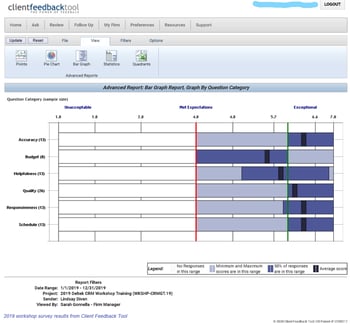
2019 workshop survey results from CFT

Following the 2019 workshop series, 56.5% of attendees responded to a request for their feedback. Of those that responded, ALL felt the workshop met or exceeded their expectations. Accuracy, Responsiveness, and Schedule received the highest response rate. Each of them received an average of 6.3, which means the workshop exceeded expectations, based on the Client Feedback response rate. Attendees were asked these questions:

  1. How clearly and accurately was the information presented?
  2. How well did the agenda, pace and length of the presentation align with the time allotted for it?
  3. How well did we respond to questions brought up in the presentation?

Here are some comments from some attendees:

"Lindsay is an excellent presenter and her ability to relate the BD/Marketing aspect to the accounting and overall business functions was invaluable." - Siobhan Turner, Marketing Director at Bentley Architects & Engineers, Inc.

"Lindsay was patient and clear in all her explanations. Very happy I took the day and attended the course. It really made me see the total potential of the software and our next steps." - Alfred Lurigados, Sr. Vice President, BCC Engineering, Inc.

"The workshop was complete with easy-to-follow slides and thorough explanations.The presentation met my objectives. I set out to get a better understanding of CRM and how it fits into the rest of Vision and this presentation did that. Lindsay is a great presenter and I felt I took some things away from the workshop that I did not previously know."  - Karl Lundmark, Database Administrator at Gas Transmission Systems, Inc. (GTS)

Bonus Bootcamp Workbook

All participants will receive a workbook used to not only implement what they learned at the bootcamp but also enhance their use of Deltek Vision CRM. This workbook includes: 1. Discussion Starters; 2. CRM Readiness Checklist; 3. Best Practices Tips; 4. Top 10 CRM Tips & Tricks; and 5. Preparing for Vantagepoint.

Be sure to visit our website to sign up for our virtual CRM bootcamp. It is definitely worth the small registration fee. Hope to “see” you there!

Top Reasons Professional Services Firms Should Leverage Deltek Talent’s Learning Management System (LMS)

Posted by Full Sail Partners on Jun 17, 2020, 12:00:00 AM

Learning Management System

As a professional services firm, your business exists because of the knowledge and expertise of your employees. Staying competitive requires these employees to keep up with the changing times and current industry practices. A learning management system (LMS) can set your professional services firm up for success by providing your employees training content related to their positions. However, one of the challenges with an LMS is finding or creating the relevant content. With Deltek Talent and RedVector joining forces, your firm can now leverage pre-built ample content. Let’s see the reasons why your firm should consider utilizing Deltek Talent’s Learning Management System.

Comprehensive Training Library

To start off with, Deltek Talent teamed up with RedVector which provides a comprehensive training library including courses in project management, safety, industry codes and standards, leadership development and much more. The online library contains approximately 4,000 courses authored by more than 200 subject matter experts and accredited by 100 national and state bodies. This extensive offering eliminates the need for your firm to have to create content on the fly. Here is a complete list in the AEC course catalog

Access Training Anywhere

Another key issue impacting employee learning is the time commitment. Many professional services firms require their employees to be flexible with their time and those employees often have to be other places during the workday besides at their desks. Conveniently, Deltek Talent is a cloud solution accessible from anywhere with internet access. Users can access content on-the-go from any device allowing employees to learn when it’s convenient for them.

Training Content in One Location

One of the main advantages of having RedVector aligned with Deltek Talent is that professional services firms have content from day one. Furthermore, firms can add additional instructor-led, online, and external courses allowing users to access courses in one location. It is easy for users to document what courses they have completed so managers have visibility into their employees’ development progress. With Deltek Talent’s LMS, there won’t be any problems with finding the appropriate content for employee enrichment.

Improve Performance & Retention

Professional services firms save a lot of time and money when their employees grow with the company and stay long term. Within Deltek Talent Learning, RedVector provides an assessment tool that helps determine the competency level of employees, new hires, or students and generates an individual training curriculum based on deficiencies in the assessment results. Thus, providing impactful learning opportunities that improves employee performance, reduces turnover and puts employees in the driver’s seat of their own careers. 

Reduce Risk

Finally, for highly regulated industries, managers need to track required training and certifications which can be done with Deltek Learning Management. Additionally, RedVector provides more than 500+ courses that address the most hazardous situations professional services firms face. Employees will learn how to recognize and prevent at-risk conditions or behavior before they lead to an incident. Having the correct employee certifications and providing safety awareness helps reduce employee and company risk. Here is a list of RedVector’s health, safety and environment library collection.

Fuel Prosperity

Deltek Talent and RedVector combined focus on providing professional services firms with skills training, continuing education, and performance support to reduce risk and promote employee success. When firms help their employees perform better and grow in their careers, they not only retain the best employees but make certain they are engaged which leads to a prosperous outcome for all.

Manage Your Employee Expenses Like A Pro

Posted by Full Sail Partners on Jun 3, 2020, 12:00:00 AM

Expense management

When employees seek reimbursement for employee-paid expenses, chances are good that far too much time is spent looking for receipts. Often, there is also the question of limits, processes, and details around submitting an expense report. Wouldn’t it be great if there was a software that could manage employee expenses with a seamless process, helping you navigate expenses like a pro? Fear not, as such automation is possible with SAP Concur. Even more, SAP Concur integrates with Deltek Vision and Vantagepoint through the Blackbox Connector to simplify your expense reporting processes.

With SAP Concur, you can see all expense data in one place, offering the big financial picture while making the process easier for your employees. Yes, it can be a win-win for all. Let us look at some of the advantages an automated and integrated expense management tool can offer.  

Makes the Process Easier for Users

While submitting an expense report can be a very frustrating task, it is a necessary business process that cannot be overlooked or eliminated. Usually, it does take administrative or overhead time for some often-extensive searching. Fortunately, SAP Concur can give employees an easier method of submitting expenses on a routine basis with the following features: 

  • Mobile Tools – Users have full access to expense report functions via a mobile device, allowing employees to submit, review, and approve on the go. Having full expense functions on a mobile device makes submitting expenses quick and easy. There is no more waiting until you are back at your desk to complete expense tasks.
  • Receipt Capture – SAP Concur removes the need for a scanner, and never having to use a scanner to upload receipts one by one is priceless. Simply snap a picture of a receipt using your mobile phone camera and start a report from your mobile device, saving processing time.
  • E-Receipts – Transaction data from airlines, hotels, restaurants, and car companies can be automatically captured to create accurate, detailed expense reports. Receipts can be sent directly to your SAP Concur profile, allowing you to quickly add the expense details without having to organize receipts. As soon as the receipt is emailed, it appears on the home expense screen.
  • Credit Card Feeds – Your corporate or travel card transactions are directly fed into SAP Concur for expense processing. This functionality is marvelous; firms no longer need to manually import charges into an ERP or expense program for users to expense or for reconciliation. When a charge is made, the bank sends the transaction to SAP Concur. From there, users will see it on their home expense screen, and it is ready for expensing.

As you can see, the expense management process can be more efficient for employees, allowing them to focus their efforts on earning new business, serving the client, or working on current business. With an easier process, employees can submit their information timelier, and accounting can invoice clients sooner on billable expenses, helping to shorten the invoicing cycle.

Even Accounting Thinks This is Snazzy

Accounting teams are often the ones tracking down the missing details or having to reject submissions for details that were overlooked. By automating expense management and integrating it with your accounting system, SAP Concur can be implemented with workflows, ultimately helping everything flow more smoothly. Here are some of the features that accounting teams can look forward to:

  • Automated Travel Policy – Workflows can be set to warn or stop expenses from being submitted based on your company’s expense/travel policy. Using the audit rules takes the guess work out of policies. Workflows allow the expense audit/approval process to move quickly and efficiently. Auditors and approvers do not need to spend hours verifying every policy detail; most can be set up as a rule and not allowed.
  • Reporting – SAP Concur offers simple spend monitoring, schedule reports, and customizable reporting. The software offers out-of-the-box reporting, which is quick and easy to use. Reports can also be downloaded in different formats – Excel, Word, PDF. If the report needed is not available, it can typically be created and saved for future use.
  • Integration – A comprehensive financial picture and reliable reporting can be gained by connecting to your enterprise resource planning system (ERP), Deltek Vision/Vantagepoint. Integrating SAP Concur with Deltek Vision/Vantagepoint allows a constant and consistent flow of financial data. New or changed employees and projects can be pushed into SAP Concur through an automated feed. Also, expense reports that are approved/processed in SAP Concur will be fed into Deltek Vision/Vantagepoint nightly and be ready for posting. So, no more need for double entry at many levels.

Wins All Around

As you can see from the highlighted features, SAP Concur can eliminate many pain points that come with expense reporting. The right expense management software creates a smoother process for firms, which benefits the employees, supervisors, and accounting team alike. We can all agree that any process that can be automated and ultimately improve a business should be given consideration. Everyone will be pleased with timely expense reimbursement so start managing your expenses like a pro with SAP Concur.

Improve Project Planning with Deltek Vantagepoint

Posted by Full Sail Partners on Apr 29, 2020, 12:00:00 AM

Project planning tools

For professional services firms, having a reliable project planning tool is critical to ensuring projects are profitable. Therefore, a project planning tool needs to be intuitive for users and must improve project scheduling and resource planning. With Deltek Vantagepoint, project planning has been taken to the next level with a focus on the features and functionality that project managers need. Here are some key features of Vantagepoint that will assist project managers with delivering successful and profitable projects.

Use Project Templates in Deltek Vantagepoint

Before your firm actually starts a project, it must first propose how it will deliver the project for the prospective client. Therefore, a project plan must be created during the project proposal development process. Furthermore, your firm will want to ensure its proposed project plan is aligned with its typical project delivery method. With project templates, firms can quickly create a project plan based on the type of work being requested by the client.

Aside from the ease of creating a project plan, using a project template ensures that project managers are using the correct work breakdown structure (WBS) that aligns with their firm’s project delivery model. In addition to containing all the WBS levels, the plan created from the project template will include all the required pre-defined data fields. In summary, project templates:

  • Save time when you create new project records
  • Guarantee data uniformity in your project records
  • Ensure new projects are set up with the proper WBS

Take Advantage of Labor Codes in Deltek Vantagepoint

With Deltek Vantagepoint, the ability to plan labor resources down to the labor code on a project is now possible. This additional functionality, which is seldomly seen in other project planning tools, allows project managers to better manage their project labor planning. With this increased level of granularity, firms can more accurately create internal budgets and improve labor tracking by department, service, or staff level.

The benefit of using labor codes is that the same labor codes are used across the board for all projects. As a result, project reports can include additional and meaningful labor detail that can be sorted by labor code. Additionally, firms that use labor codes can allow employees to bill time at multiple rates if they perform different jobs during a project.

Adjust Project Timelines with the Interactive Gannt Chart

Gantt charts are a great visual assistance tool for project managers, and Deltek has gone a step further by making them interactive in Vantagepoint. For those that are unfamiliar with Gantt charts, they use bars to illustrate a project schedule which can also include dependency relationships between activities and their scheduled time. With the project Gantt chart in Vantagepoint, project managers can adjust the project schedule from any level of the project by simply dragging and dropping the timeline bars.

As a result, project managers now have an easier way to adjust dates as changes to the project occur. Additionally, Deltek has included the ability to export the project Gantt chart in various formats. Among the options are PDF and PNG, and all can simply be attached in a project contract or proposal.

Take Control of Your Project with Deltek Vantagepoint 

As you can see, there are several valuable features in Deltek Vantagepoint’s project planning capabilities that other project planning tools are still lacking. From providing project templates, to offering labor codes to the interactive Gannt chart, Vantagepoint is taking project planning and delivery to the next level. Now is the time to step up your project planning and delivery with Deltek Vantagepoint.

Latest Posts