Full Sail Partners Blog | Jennifer Renfroe (6)

Posts by Jennifer Renfroe:

Why Union Square?

Posted by Jennifer Renfroe on Oct 12, 2016, 12:00:00 AM

Union SquareDocument management in the AEC Industry is more critical than most. Union Square can help your firm integrate all relevant data, allowing you to spend less time organizing and more time executing projects. Union Square enables your firm to store and access critical firm-wide and project information, including documents, financial information, drawings, images, and emails in one central repository. As a result, your firm has the ability to:

  • Ensure team members are working on the most up-to-date files
  • Eliminate inconsistent file structures or displaced files
  • Keep drawings, correspondence, submittals and more in one central location
  • Log incoming documents from any source
  • Provide auto-matching suggestions to improve the quality of records
  • Document register that gives you all the answers you might need about the state of the project from anywhere

Email

Email easily represents the greatest volume of documents and must be managed effectively or your firm will be left with an expensive archive full of duplicates, difficult if not impossible to retrieve information, and significantly slowing down your ability to send critical information to your clients. Union Square will ensure no email can ever be lost and there are no duplicates by allowing your firm to:

  • Save emails from Outlook in just two clicks
  • Save just one copy of an email and avoid duplication of email storage
  • Store all project correspondence and attachments centrally and permanently
  • Strip attachments from email and log appropriately

Document Management

Union Square, combined with Deltek, now offers truly the most integrated platform in the world, reducing operational risk and increasing efficiency.

Other solutions simply are not complete and cannot provide adequate risk reduction and efficiencies. With the varying documents involved in the AEC Industry, basic document sharing provided by SharePoint does not offer a construction issuing system and has no integration with industry design packages. Custom development can be costly and virtually impossible to manage and keep up with future upgrades. A DMS overlay doesn’t provide true risk reduction and access to emails, client reports or company finance all in one location. Union Square will do all of the above and more:

  • Documents, emails, finance, and design files all cross-referenced for rapid retrieval
  • Detailed document audit and full history
  • Documents stored in their native file formats
  • Cache services keep documents local to each office to give a single virtual office across the company without compromising performance

An interactive drawing register provides version control, including:

  • Links that allow the issuing of process control and distribution of drawings throughout their lifecycle
  • Read and write access that provides version control to users based on security permissions

External File Sharing 

The exponential growth in file sizes has made sharing drawing packages a time consuming exercise which lacks company transparency. Manually uploading files to a client extranet or third party file sharing location is slow and requires keeping both an internal and external record of the documents.

Union Square’s design register, issue sheets, document packages and official company records are all exemplar quality and ISO 9001 compliant, fully automated and recorded. The system is unimpeded by file size limits, and documents can be shared internally and externally from the same location with specific user rights for read and write access of only the files or folders chosen. No more worrying about setting up dated FTP sites or emailing large files. Everyone is finally on the same page with one version of the truth.

Contract Administration

Contracts should be easily traceable to reduce the risk of costly legal disputes. All emails, queries, questions and responses are all legally admissible in court. By bringing together the contract communications with the Document Management System, your firm has better visibility of project issues before they arise. Union Square provides enhanced foresight and project management, mitigates risk, and enables your firm to offer detailed status updates to your clients.

Remember, just because you may be required to use someone else’s external system on some projects, these are your client’s records and not your own! You own internal records will be necessary in any legal dispute.

Revit Integration

Union Square has developed a bridge to integrate with Revit. With the industry’s move towards BIM (Building Information Modelling), the way information is exchanged with clients and project partners has to change. Information sharing can sometimes include everything from the native model or IFC file, COBie file to traditional 2D formats like PDF, DWG, DDWF, DWFX and DGN.

Together with the Union Square drawing control system, the Revit integration will help your firm realize significant efficiency gains and see improvements in quality of output and practice-wide consistency with document production through to distribution. Included in the Revit integration is:

  • Bi-directional drawing register
  • Revision and versions management
  • Document issuing and rendition management
  • Hard copy batch print control

With Union Square, your firm will finally have synchronized model sheet information with a live drawing register and the ability to monitor approval/issue status at the click of a button.

More Mobility with Union Square 

No more clipboards! With on-site mobile technology, Union Square automates the process of site data capture, task management and reporting. You can finally achieve a bulletproof audit trail and strengthen your position in contract disputes. With Union Square you will have also have access to Mobile Custom Forms which you can customize to comply with quality assurance processes and integrate your site processes.


5 Tips to Get the Most Out of Your Next Conference

Posted by Jennifer Renfroe on Aug 3, 2016, 12:00:00 AM

5_essential_conference_tips.png

As a first time attendee to SMPS Build Business, I want to make sure that I experience all there is to offer at the national conference for professional services marketers. So before I head off to the City of Brotherly Love I thought it would be a good idea to ask some long time attendees for their advice on how to get the most out of this conference. Here are the 5 tips I found most useful.

Keep in mind, these tips can be used when attending any conference.

Five Essential Tips for Conference Success

  1. Make intros memorable. You are sure to meet more people than you can remember. The same is true for the people you hope to make an impression on. The key to being memorable is to practice how you will introduce yourself. Introduction should intrigue your connection to make them want to learn more. “Hi, I’m Graham I’m a marketer” won’t cut it. Focus on how you and your company add value to your clients. Give the discussion purpose. Perhaps your newfound contact is facing a challenge and you can help them overcome it. Stand out from the crowd by leaving each new contact with a feeling of time and energy well invested.
  2. Identify the best way to capture contact info. Do you have a plan for capturing important details gathered from your networking efforts? Do you plan on jotting details down on a napkin to send off to someone else to enter in your CRM system? Or perhaps you are planning on entering everything immediately using your mobile device. Thinking this process through before the conference will allow you to have a system in place to get the most out of your networking efforts.
  3. Pre-schedule meetings. Prescheduling meetings is my favorite tip for attending any I believe that the primary focus of attending a conference should be to network and connect with people. The number one way to do that is to begin networking and connecting before the conference even begins. Try sending out emails to contacts that you know will be on site, or even create a landing page on your website advertising your attendance to the conference. Better yet, pick up the phone and set-up meetings to have drinks or lunch with contacts.
  4. Have a plan, be willing to adjust. Have you seen the program for this year’s SMPS Build Business? There are a ton of awesome programs! Take your time before the conference to map out your roadmap for sessions you want to attend. However, show up to the conference willing to pivot and adjust on the sessions you attend. You never know when the opportunity will arise to attend a session with an old client or new prospect.
  5. Dress accordingly. You are set for some long days ahead -- between breakout sessions, networking breaks walking the exhibit hall and everything else that goes into attending a conference. Make sure to wear the right shoes – taking care of your feet will keep you mobile and ready to network. Also, don’t forget to dress appropriately to accommodate for changes in room temperature.

Topics:  

Integrate Deltek Vision with Constant Contact for Superior Email Marketing

Posted by Jennifer Renfroe on Jun 21, 2016, 12:00:00 AM

deltekCC.pngFull Sail Partners, a Deltek Vision Premier Partner, has released the Deltek Vision Connector for Constant Contact, an integration of Deltek Vision and Constant Contact.

The Deltek Vision Connector for Constant Contact allows Deltek Vision CRM users to seamlessly create targeted Constant Contact email campaigns by leveraging real-time intelligence directly from Deltek Vision CRM. Once an email campaign is active, users are then able to analyze the results of these campaigns directly in their Deltek Vision system.

“We are really excited to help professional services firms maintain consistency between their Deltek Vision and Constant Contact systems,” said Peter Nuffer, Director of Solution Development at Full Sail Partners. “Users of this integration are refining their messaging and crafting more meaningful campaigns for their readers.”

Connectivity between Deltek Vision and Constant Contact gives users the ability to create more comprehensive email marketing campaigns, reduce labor intensive manual processes and better capture marketing ROI. This mutual relationship between data will allow your marketing team to save countless hours over the duration of a marketing campaign.

“As  one of the first users of the Deltek Vision Constant Contact integration, BG Buildingworks was excited to sync our contacts between our Deltek Vision CRM system and Constant Contact,” said Karen Crilly, Director of Marketing and Client Development for BG Buildingworks. “We used the integration to setup a campaign to announce our company name change. We were able to create a Constant Contact campaign directly from our Deltek Vision CRM system to notify over 4,500 contacts. The campaign went off without a hitch and we saw nearly a 30% open rate on our mailer.”

Interested in learning more about the integration of Deltek Vision and Constant Contact? Click below to learn more.

System Connections – Is Your Critical Technology Connected?

Posted by Jennifer Renfroe on May 26, 2016, 12:00:00 AM

Can you name a single business that does not use some form of technology? From our personal lives to our professional lives, technology is engrained in everything we do. Firms are investing in technology at a rate never before seen. Yet, many of these critical system connections are siloed and do not talk to each other. Watch the video below to see how firms are connecting their critical business systems to get more out of their investment and share information between disparate systems


Marketing Automation Series: 3 Tiers to Streamline Processes Using Deltek Vision CRM

Posted by Jennifer Renfroe on May 4, 2016, 12:00:00 AM

marketing_automation.pngWelcome to part two of our Marketing Automation Series. In the last blog we looked at how automation tools can impact your SMB. In part two of this series we are going to dig further and examine the Deltek Vision marketing automation tools available to you within your system.

Deltek Vision Marketing Automation: Marketing Made Easier

1) Merge Fields & Templates

If you produce a lot of proposals or documents that follow a defined format (think SF330!), you will love merge fields and templates. Use this functionality to merge data directly from your Deltek Vision system to Adobe InDesign or Microsoft Word. Not only will you greatly reduce the time dump required to create these documents but your marketing efforts will gain a level of accuracy and consistency.

Use merge templates to create:

  • Statement of qualification responses
  • Letter proposals
  • Resumes
  • Cover letters
  • Project cut sheets
  • Reference pages
  • And more!

Check out this webinar to learn more about creating proposals with Deltek Vision and Adobe InDesign.

2) Workflows

Deltek Vision workflows can greatly reduce the manual processes you manage in Deltek Vision on a daily basis. Workflows are a series of actions that your Deltek Vision system will execute based on events and triggers that occur within a specified Info Center.

For example: A workflow could be used by a proposal manager to notify a project team when a new project has been created in Vision.

Check out this webinar to learn more about Deltek Vision workflows.

3) Integrations and Connectors

Allow your marketing efforts to go further than ever before by opening your Deltek Vision system to outside software and applications. Eliminating manual processes associated with disparate systems allows your marketing team to focus their efforts on creating a quality client experience for each customer.

For example: Integrate your Deltek Vision system with your website Content Management System to capture valuable lead and customer data in your Deltek Vision CRM. Once a website contact fills out a form on your website they will be automatically added to your Deltek Vision system. Your marketing team can then implement a series of workflows to generate a personal email follow-up note a week later. Additionally you may want to consider scheduling a workflow to notify your sales team of lead activity on your website.

View this webinar to see how Deltek Vision users are creating User Defined Info Centers to create dynamic workspaces within Vision CRM.

Learn More About Deltek Vision Marketing Automation

Want to see what real users are doing automate marketing and streamline processes with their Deltek Vision CRM system? Sign up for our webinar, ‘Let’s do this!’

Topics:  
CRM

Marketing Automation Series: Adding Value to SMBs

Posted by Jennifer Renfroe on Apr 13, 2016, 12:00:00 AM

marketing_automation_smb.png2016 seems to be the year of the buzzword. Everywhere you look you see a new trendy term: Contextual marketing, growth hacking, marketing automation... the list continues! This blog is here to clear up the confusion and help your SMB get started with marketing automation.

  1. What are Marketing Automation Tools?

Marketing automation tools streamline tedious procedures, eliminate manual processes and give the entire organization insight into results of marketing efforts. Marketing automation tools allow us to find out more about our audience and enable marketing teams to create more impactful campaigns. Additionally, automation tools enable SMBs to do more with less resources.

  2. What is the Value of Marketing Automation Tools?

One thing to note is that marketing automation by no means replaces your marketing staff. These tools simply allow them to do more for your organization; providing your team intelligence and time saving mechanisms to make a greater impact on your organization.

Marketing can often be a love-hate relationship for many SMBs. Many firms view marketing as a hit-or-miss type of function. Either marketing positioned the firm to win the job, or they failed – there is often very little grey area. Marketing automation tools introduce a level of analytics and metrics associated to the cost of marketing efforts… bringing everything back to the almighty dollar!

  3. Won’t Automation Remove the Personal Touch?

Understand that there are varying degrees of marketing automation that can be established, and It’s important to take things one step at a time. 

Some people fear that marketing automation tools are going to remove the personal touch from marketing campaigns. Marketing automation tools often add MORE personalization to marketing efforts. These tools simply remove the time intensive processes out of the way, allowing you to spend more time creating a dynamic experience for each customer.

  4. What are Some Examples of Marketing Automation Tools?

These days there are dozens of marketing automation tools. HubSpot, Act-On, TweetDeck, Hootsuite… the list goes on and on.  These tools can help you manage tasks ranging from social media publishing to inbound lead scoring. But to get the most out of these tools you need to make sure that they connect and talk to your CRM system. Doing so will give you one centralized location to manage all of your marketing tools.

As you can see, it is important to invest the proper time and planning to think through your marketing and sales process and develop an automation plan that fits your organizational goals.

We would like to learn more about what your firm is using for marketing automation. In exchange, we will provide you a free download of the Vision Mail Management Info Center. Also, be sure on the lookout for our next marketing automation blog.


Topics:  
CRM

Full Sail Partners Strengthens Development Team with Addition of Jennifer Wilson, SQL Developer

Posted by Jennifer Renfroe on Apr 1, 2016, 12:00:00 AM

Full Sail Partners, a DelteJennifer_Wilson_Resize.pngk Premier Partner, announces that Jennifer Wilson has joined the firm as a SQL Developer. Ms. Wilson’s hire bolsters the Full Sail Partners’ team of solution developers. Jennifer will collaborate with clients and key stakeholders to help provide enhanced analytical insight into the information that impacts their business.

Jennifer joins Full Sail Partners with a strong background and acumen of database development and management. She brings with her the experience needed to successfully architect, design and populate business solutions that rely upon complex data sources.

“I enjoy the challenge of translating business processes and concepts into reports and visual aids in order to better assist clients with their analytical needs,” said Jennifer Wilson. “Professional services firms face unique challenges and requirements; I look forward to working with Deltek Vision users to streamline solutions.”

With a decade of experience in programming, reporting, product development and designing process automation, Jennifer’s background will provide valuable expertise to Full Sail Partners' customers in meeting their design, process and system improvement initiatives.

“We are thrilled to have Jennifer join the Full Sail Partners’ development staff,” said Peter Nuffer, Full Sail Partners’ Director of Product Development. “Jennifer brings a lot of energy and enthusiasm to the team. Her approach and work ethic has made the rollout of Deltek Vision custom solutions seamless, helping create a better experience for our customers.”

For more information, please contact Full Sail Partners’ Marketing Communications Department. Interested in learning more about the Full Sail Partners' team? Check out our crew!

The Do’s and Don’ts for Successful Email Marketing Campaigns

Posted by Jennifer Renfroe on Mar 30, 2016, 12:00:00 AM

Using a third party email suite such as Constant Contact or MailChimp to power your email marketing campaigns is a huge step in the right direction. These types of email suites can greatly improve the productivity of email campaigns, while also providing insight into revenue generated from these efforts. The right technology is essential in achieving marketing goals, but technology is not a silver bullet.  Tech solutions must be accompanied with an effective overall strategy that takes into account systems and processes.

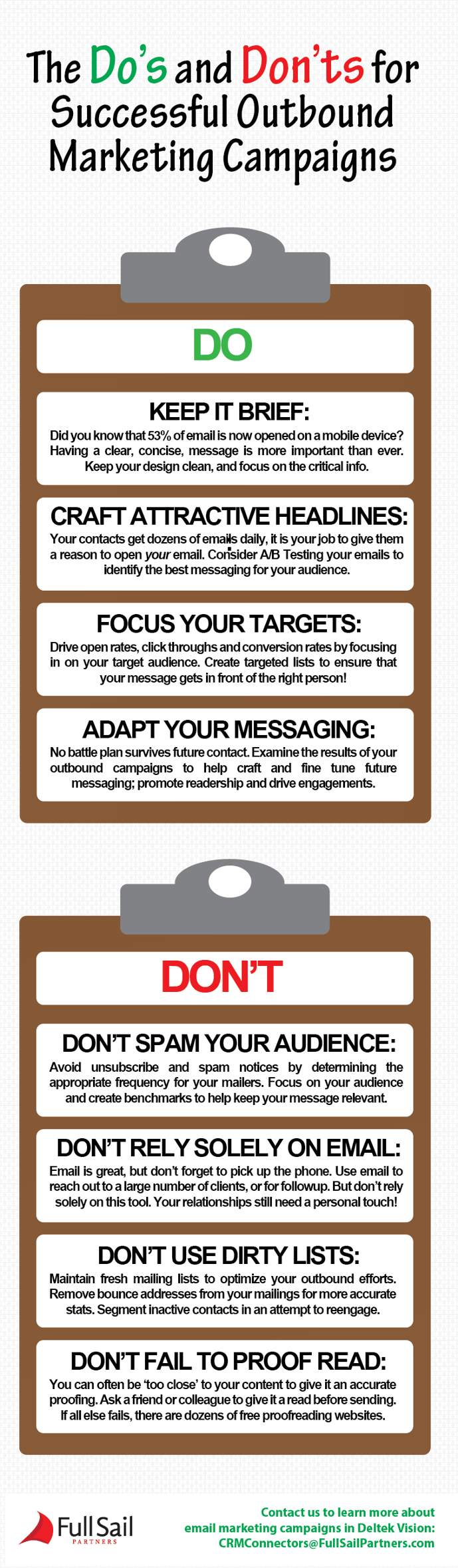
Below is a simple 8-step email marketing guide. Follow this list of do’s (and don’ts!) and start crafting more effective email campaigns!

Do_and_Dont_Marketing_CROPPED.png

How to Manage Email Marketing Campaigns in Vision

Looking to capture all of your email marketing campaign data in your Deltek Vision CRM? Not sure where to get started? Vision Marketing Campaigns are the go-to place to manage all of your campaigns!

The Secret Sauce: Deltek Vision Marketing Campaigns

Posted by Jennifer Renfroe on Mar 16, 2016, 12:00:00 AM

MARKETING_CAMPAIGNS.pngLast week while attending a conference I had the chance to talk to dozens of Deltek Vision CRM users. These advanced users wanted to discuss everything from user adoption to InDesign integrations with custom proposals. I was stoked, these Vision rock stars were making my job easy. However, very few of these users said that they use Deltek Vision Marketing Campaigns. WHAT?! I couldn't believe this:  How are all of these marketers surviving without utilizing Marketing Campaigns? Marketing Campaigns are the lifeblood of my marketing efforts!

So when I got back to my room I quickly did a google search, "Deltek Vision Marketing Campaigns". Results were limited. Well… what better place to get the conversation started than this blog?

Let’s jump right in!

What are Deltek Vision Marketing Campaigns?

Any marketing effort can be created in to a Marketing Campaign. From client mailers to sponsoring a trade association event - these efforts are all marketing campaign worthy!

Think of Vision Marketing Campaigns as the central repository for all of your marketing intelligence. Campaigns enable you to:

  • Document pertinent campaign information ranging from critical dates to revenue targets
  • Track lead and customer involvement with your promotion
  • Assign activities to team members or document interactions with contacts
  • Organize document and track critical event specific tasks
  • Store campaign documents and graphics
  • Schedule contact follow-ups with members of your organization

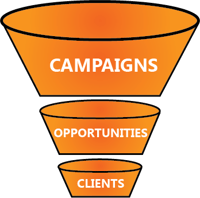
Looking for a way to track your marketing pipeline and track your customer lifecycle? Associate leads, opportunities and projects to your Marketing Campaigns to better understand the value of your marketing efforts.

3 Examples of Marketing Campaigns for Professional Services Firms.

The targeted list | Let’s say you want to go after a targeted list of municipalities to target in an upcoming content marketing effort. Utilize Vision’s advanced search functionality to drill down in your CRM system to identify the pertinent contacts for your campaign. Track the effectiveness of your marketing efforts among this group. Doing so will allow you to refine your messaging over time and identify opportunities generated from your efforts.

Throw a world class client appreciation event | Building on top of the previous example, why don’t we target our top clients and throw a special event for them? It can often be crazy to plan this type of event – You’ll constantly wonder if your staff has followed up with their clients, and your staff will constantly wonder if their clients have responded. Eliminate all the unneeded confusion by creating a central information hub for your event! By creating a Marketing Campaign for this type of effort we are able to track our labor and expenses tied to the event.

Become a conference super star | Do you ever wonder what to do with all of those business cards you collect at conferences and networking events? Enter these contacts directly in to your Deltek Vision Marketing Campaign. Enroll these contacts in a lead nurturing campaign to start creating further interest among this group.

Pro tip: If you create your marketing campaign before the conference, you can start with a leg up on the competition and start reaching out to attendees in advance. Schedule meetings, send out a pre-event email and start creating a game plan before the conference begins!

Ready to Learn More?

Now that you are familiar with the basics of Deltek Vision Marketing Campaigns, it’s time to go out and start equating more value to your marketing efforts! I hope by utilizing these campaigns you are able to concentrate on the efforts that move the needle for your professional services company.

Interested in learning more? Register for our webinar The 411: Deltek Vision Marketing Campaigns.

Topics:  
CRM

Full Sail Partners Bolsters Resource Planning and Deltek Vision Consultling Services with Addition of Michael Kessler as Principal Consultant

Posted by Jennifer Renfroe on Oct 8, 2015, 12:00:00 AM

michael kessler   CroppedFull Sail Partners, a Deltek Premier Partner, announces that Michael Kessler has joined the firm as a Principal Consultant. Mr. Kessler’s hire bolsters the Full Sail Partners’ team to 25 professionals focused on accounting and technology solutions. Michael’s extensive knowledge of the Deltek product set and proven consulting expertise will be an ideal match to help clients streamline business processes and achieve greater efficiency from their Deltek Vision ERP system.

As Principal Consultant, Michael brings 30 years of experience working in and around project-based accounting in both the Government Contracting and Professional Services industry. His extensive background includes overseeing accounting, auditing and finance operations.

“I am really looking forward to the opportunity to work with such a diverse set of clients,” said Michael Kessler. “I have a passion for helping finance departments utilize Deltek Vision and Resource Planning to their fullest capabilities to reach maximum productivity. I believe that processes designed under the guide of best practices, which work in tandem with system configuration, result in meaningful reporting and the ability to evaluate key performance indicators.”

Michael Kessler has spent the past nine years actively involved in the Deltek community as a member of the Deltek Direct team where he assisted hundreds of US and international clients with system implementations and application support. His keen understanding of the Deltek Vision product, previous industry experience, and his passion for helping clients brings a strong player to the Full Sail Partners consulting arsenal.

“We are honored to have Michael join the Full Sail Partners’ team,” said Scott Seal, Full Sail Partners’ Vice President of Consulting. “Michael’s vast knowledge of Deltek Vision ERP and Resource Planning adds additional depth and expertise to our collaborative Consulting Team. Michael has a proven track record with offering exceptional client services and we are excited to have him help our clients better leverage their Deltek Vision systems.”

For more information, please email Full Sail Partners’ Marketing Communications Department. Interested in learning more about the Full Sail Partners' team? Check out our crew!


Latest Posts