Welcome to the second installment of our Deltek Vision How-To Video Series. Today we will review how to increase efficiency when adding companies/contacts across Info Centers. This video will help save time and increase productivity.
Check out additional how-to videos by clicking here.
Welcome to our first Deltek Vision How-To Video Series. Today we will learn about Deltek’s Vision Info Center Help section. This video will answer some common questions asked by clients are:
Do you have a complete list of the fields in Vision?
Do you have a help guide so I can learn about the fields available?
Check out additional how-to videos by clicking here.
It looks like the world will not come to an end! So back at it campers. Let's learn some quick tips about Deltek Vision.
As the first of our Deltek Vision Tips & Tricks Series we would love to hear if you find the information helpful. Recently I came across a question about how to know who modified a record. Of course the audit reports can provide this information, but there are two easier ways to get this information.
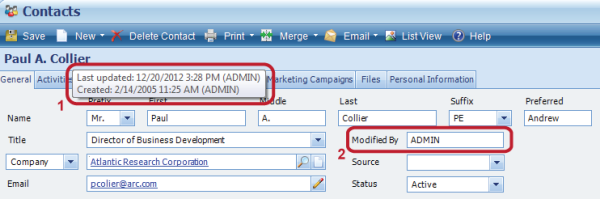
In every info center you can hover over the name of the record at the top of the record. It will tell you who created the record and on what date. Additionally, it will tell you who last modified the record and on what date. So in the image below for item #1, the mouse is hovering over the word Paul A. Collier in blue. If you need to know what field was modified then you would need to run an audit report.
Additionally, you could set-up a field that displays who modified the record. This is accomplished through a workflow. First create a new character field. (Note: An employee field will not work.) In this example it is named Modified By. See image item #2 above.
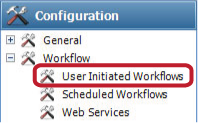
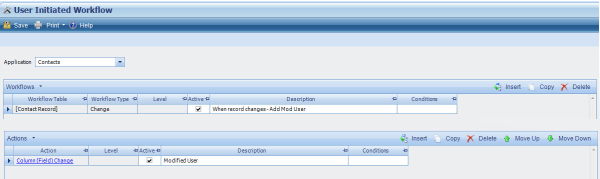
Then set-up a User Initiated Workflow. Choose the Application, which in this instance will be the Contacts. Click Insert on the Workflows grid. The Workflow Table will be Contact Record and the Workflow Type will be Change. This simply means every time the contact record is changed, the workflow will trigger.
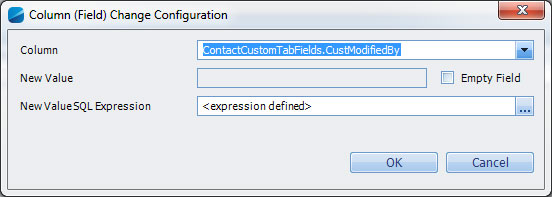
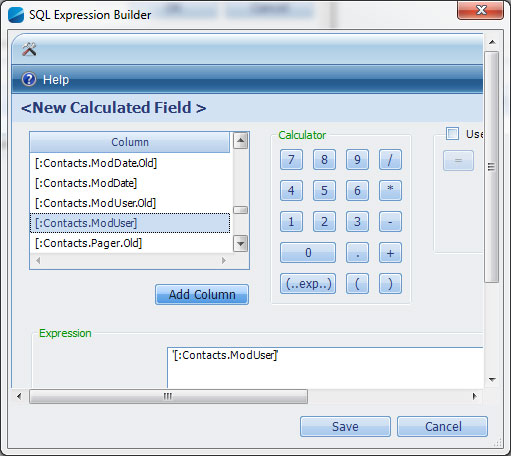
Now on the Actions grid click Insert to add an action. Choose Column (Field) Change for the Actions column. Next, choose the field to update. In this case it is ContactCustomTabFields.CustModifiedBy. Then set-up a SQL Expression. The expression is simply, a field that already exists: [:Contacts.ModUser]. Find that code and click Add Column. Then click Save. Be sure to add descriptions so you know what the workflow is related to and then Save the workflow. To test it, change something on a Contact record. You should see the users login name filter in.
Check back in 2013 for new blog entries related to Deltek Vision tips. Let us know if you learned something new by leaving a comment. Wishing you a wonderful 2013!
When a request for a custom solution is received, be it a report, workflow, or external data automation, many clients are surprised the first items we review are the standard functions available in the particular system they are looking to customize. “Are you trying to talk us out of having you perform the programming work?” I had one client ask me incredulously, after I had shown her a way to accomplish getting the information she had wanted in a custom report within the native Vision Reporting system.
My response is always the same. We would love to work with your firm on a custom initiative; however our top priority as your Consultant is to ensure that you receive the best value for any work we perform. There are times where custom programming is going to be the best path forward, but if we can accomplish the same (or relatively the same) results natively, in less time – you’re going to be happier as our client, and we may have an opportunity to work with you on a customization effort that will truly be valuable for your organization in the future. As your consultant, we are ultimately advocates and partners in helping you be successful and getting the most out of your system.
Sometimes the native functionality is not quite enough for an organization and so customization is the right step to make. In some circumstances, it’s natural to start to look at custom programming to help overcome those hurdles. Those might include:
Cultural requirements in the organization to have data represented a certain way
Manual processes require a tremendous amount of repetitive effort
It takes two or more reports to get one set of information the organization requires
Additional systems that are used in the organization may require a duplication of effort
Information is stored in house and in the cloud, and you wish to simplify the effort of keeping these separate silos of data up to date
Aesthetics of a particular report or information set may not match with the firms brand or be overly complex for the information needed
When evaluating if engaging a consultant on a custom programming effort makes sense for your firm, here are some key questions to ask your internal team:
Have we identified the motivating factors for requiring the custom programming effort?
How much time is spent manually today to get our desired result?
How much of this time will be saved by incorporating the custom programming?
Have we explored the native Vision system capabilities and found we cannot reproduce what we need?
Have we considered how close we can get using the native capabilities in Vision and can we operate within those parameters, or is this a definitive organization need?
As you embark on asking a colleague or consultant to customize your system, here are some questions to ask prior to having them moving forward:
Do you have advanced knowledge of Transact SQL?
Have you worked with the structure of the Vision database and functionality of the Vision application? (I can’t emphasize this point enough!)
In developing this report, will we be able to reconcile the custom work to native Vision reports? (Whether through a single report or a combination of multiple reports)
Is there a way to already accomplish something similar with the native functionality of Vision?
Do you have experience writing web services for Deltek Vision and
?
I have an example of what I’m looking for, do you see any issues with providing it in this format or with this information and do you have any suggestions for how we may be able to do this more effectively.
Our library of custom solutions continues to grow every day. Some of these solutions can be purchased at a flat fee and utilized as is or further customized. This is a great way to minimize costs and get results quickly. We welcome you to reach out and find out if something similar has already been created. We are committed to helping you find the right solution to fit your unique needs.
Collaboration. One of those buzz words that marketers and business executives so often love to use. Project teams often claim that the internet has provided them with new level of collaboration that was unparalleled in previous generations. This is true. However, if your primary means of collaboration is email, then you are not experiencing the level of collaboration that this generation is enjoying.
I would like to review some tools that make the collaboration process easier. Before we begin, let’s start with defining the subject at hand:
Collaborate (verb): To work jointly with others or together especially in an intellectual endeavor
Essentially, collaboration is the process of teaming with others to achieve a common objective. Over the past few decades there has been a strong emphasis placed on teamwork in the work place. While the majority of the 1900’s boasted a work mentality of me first, the 2000’s have been defined by companies like Facebook and Google that promote a team first environment. Most people are familiar with the acronym TEAM: Together Everyone Achieves More.
Most business is now done in a virtual environment. The United States has over 78% of its population plugged in on-line. Unfortunately, many people struggle with the social awkwardness of the internet: Email is a great source of communicating an idea, but a terrible medium for conveying emotion or tone. What can be meant as a friendly reminder, can be interpreted as harsh criticism.
To avoid some of the communication pitfalls of the traditional internet, I have recently started using a tool called ‘Kona’. Kona is a free communication and collaboration tool from Deltek that helps teams get connected, get organized, and get things done together.
I have been able to use Kona to help better plan projects. Kona gives me the ability to work with my project team in a seamless cloud environment. With a project team based out of multiple locations, Kona gives us the ability to interact with each other in a way never done before on the internet.
We all juggle multiple tasks in our professional and personal lives. Kona recognizes this by giving the end user as ‘spaces’ to work in. Perhaps you coach your sons baseball team, have three projects due at work next month, and also are in the process of building a man cave. No problem! With Kona, simply set up a ‘work space’ for each of these responsibilities, and start knocking off project tasks.
For the purpose of this blog, I have identified a few of my favorite features of Kona:
A smart calendar! The calendar on Kona is by far one of the best collaboration tools out there. Gone are the days of forgetful project staff leaving an important event off of their calendars. Through the use of smart scheduling, the Kona system allows members of the project team to assign and schedule tasks to other group members. Not only can you add locations, attendees, files, and notes to a calendar item, but you are also able to have a ‘smart’ conversation…
The conversations module on Kona is my favorite internet based tool that I have found since I discovered Google Docs. Kona allows users to hold separate conversations on each task of the project. Notice that an important detail was left off of the calendar for tomorrow’s meeting? No need to open up your email to contact the event host, simply update the event, and you are free to comment on the conversation to let others know of the change. This condensing of communication in to one multi-faceted medium allows for a clear and effective message, enabling project staff to focus on completing the project, and not talking about it.
The files module. How many times have you emailed someone a file, only to be told later that they never received it? Many people cannot receive emails larger than 2mb – a data size that is nothing in today’s media rich web. While programs like Outlook have made it easier to manage attachments, email was create in the late 80’s and was never intended to be a storage database for large, detailed files.
Kona’s file system allows users to avoid many of the pitfalls of modern day data sharing. Not only can users store large data files, organized by file type, but also share important website links. This simple, easy to use file sharing system allows project teams to organize all of their project data in one location. By sharing your data in the cloud environment, not only do you create an easier to use file sharing system, but you also protect your data by storing it in an offsite location. Additionally, you will please your IT manager by reducing the number of multiple copies of the same file throughout your network system.
Please note: Kona offers 1GB of space with all accounts. While this is a decent chunk of free space, it is not meant to be the end-all-be-all storage area for your files. Simply, it is meant to be a means for sharing information quickly in a cloud environment. I encourage you to use this file sharing system to share files between project team members, not to store your files for long term access.
I could continue to go on about the features I love about Kona, but I think it would be best for you to go and sign up for Kona, and try it yourself! The interface is extremely intuitive, and you should be up and running in no time. I hope this free, yes free – as in, it doesn’t cost anything, collaboration tool helps your project teams to start working more effectively!
To learn more about how you and your firm can start using Kona today, check out the video below:
As we come into the holiday season many of us in accounting face the coming season, not only with the joy of family and friends coming together, but with a sense of impending dread – YEAR END and TAX SEASON are looming – ugh - have another drink.
W-2s- 1099s- journal entries- checking and double checking each number! Auditors- shareholder meetings- endless explanations’ of what the results mean (even though you have been saying for the past 6 months) - Oh the joy of the season.
As we go through the year end process there are mistakes we (and others) make that are easy to recover from like entering the 15 page depreciation journal entry “backwards” at midnight sitting in your semi dark office chugging your 15th pot of coffee. Some are more difficult – like removing all the lower levels of your work break-down structure (did that once – glad our backups worked). So outside of deleting the database, what are some of the items in Vision year end processing that are hard to recover from: 1099 Initialization
When to run After the final check run for the current year, but before the first check run of the next year. Also, this utility SHOULD BE RUN before you process your 1099s.
What the process does This utility in Deltek Vision “resets” your 1099 tracking for the next year. This utility is run from the Utilities menu item in Navigation. As you process payments for current year, Vision stores the sum of these payments in a field called “Paid This Year”. This process takes the amount in this field and stores it in a separate field called “Paid Last Year” (both fields can be found in the Vendor Info Center). When you run 1099s for the year (for example 2012 1099s must be mailed before January 31, 2013), Vision pulls the 1099 amount from the “Paid-Last-Year” field.
Implications If you fail to run this process correctly, the amount paid recorded on your 1099s for the prior year and the current year will need to be updated – manually Open New W-2 Quarter
When to run After the final payroll run for the current year, but before the first payroll run of the next year. Also, this utility SHOULD BE RUN before you process your W-2.
What the process does For companies using Vision to process payroll ‘in-house’, opening a new W-2 quarter changes where Vision stores payroll information for payrolls processed after opening the quarter. This one is easier to remember as you are already in the process of opening a new quarter during the year. Opening the quarter at year end is JUST like what you do every quarter, except the warning message appears scarier.
Implications If you fail to run this process correctly, the amount paid for the quarter/year will be incorrect for the last year and the current one. You will have to manually adjust employees’ payroll history to correct the error for each item paid and withheld. This meets my definition of a “bad time”. Deltek Vision Payroll Update (Software update)
When to INSTALL After the final payroll run for the current year, but before the first payroll run of the next year. Also, this utility SHOULD BE RUN before you process your W-2s.
What the process does For companies using Vision to process payroll ‘in-house’, the Year-End payroll update updates the tax tables for the new year. This is a system update. You will need to work with your IT staff to ensure this update is run at the appropriate time
Implications If you fail to install this prior to running the first the payroll in the new year, it isn’t a huge deal (believe it or not). Deltek Vision calculates the tax due on the year to date earnings and subtracts what has been withheld in prior payrolls to come up with the current withholding amount. HOWEVER, while you do not have to manually adjust each person’s withholding, it is NOT fun to explain to your staff why their withholdings varied from payroll to payroll. Open New Benefit Year
When to run After the last Timesheet has been posted and Benefit Accrual has been run for the prior year, but BEFORE the first Timesheet posting and benefit Accrual has been run for the current period.
What the process does Running this changes where the accrual information is stored for PTO, Vacation, sick, etc. – any “time” related benefit provided to your employees. Every month/timesheet/payroll (depending on your policy) you run an accrual for your “time” related benefits. You see this accrual as “current year accrued” on reports. As you post timesheets, time taken against the accruals show as “Current Year Taken”. Running this utility resets the system to -0- for the current year. If you do NOT track your PTO/Sick/Vacation etc. in Vision – this utility does NOT need to be run. This utility is run from the Utilities menu item in Navigation.
Implications If you fail to run this process correctly, the current year Taken and Accrued will not show correctly. You will need to manually modify the current year taken/accrued for each employee.
Open New Period
When to run Before you process the first transaction for the new year.
What the process does This opens a new period for processing. You typically do this every month. The only difference between your period opening during the year and the opening at year-end is the scary message. After opening the period, you will still be able to process transactions in the prior year (assuming you have the appropriate security) or the new year - you just have to be careful to select the correct period. This utility is also run from the Utilities menu item in Navigation.
Implications Failing to open a new period causes you to not be able to process transactions in the new year. If you process transactions in the prior period you can either un-post them (depending on the transaction) and repost them in the correct period or manually reverse the entries and reenter them in the new period. Not great fun, but it could be worse. If you fail to run any or all of the above utilities, you can recover by manually updating the system. However, with all the other things going on in January with tax filings, audits, year-end financial presentations, who has the time to spare? Here are some tips that will help to remove some of the worry:
Ensure each employee in the accounting/payroll department understands these processes and what they do and the implications – They will help you remember as they often are the ones that have to do the tedious time consuming recovery process
Set a calendar with the date of the last processing of the prior year, the date the above utilities should be run and the date of the process of the new year. Review this calendar with the accounting/payroll staff
Assign a person to run the utility and a person to help them remember.
Share the calendar with your IT staff and let them know when you must have the payroll update installed and running
So, plan ahead, set your calendar, train the staff now, sit back and have another cup of eggnog and smile – you have set yourself up for a less stressful January.
For more information regarding a stress free year end, please check out our
recorded webinar sessionon this topic.
Posted by Rick Childs on Nov 27, 2012, 12:00:00 AM
Everyone is talking about “Going Green” these days but like the weather, who really does anything about it? One way to Go Green using Vision is to take advantage of Vision’s ability to email invoices to clients. This process can save your company time and money while saving the planet!
Here’s how it works:
Once you get your drafts back from the Project Managers, go into Interactive Billing and make your adjustments for held time, changes in percent complete for billing fees, writing-off expenses, etc. Preview your invoices to make sure that each is ready to send to the client, but do not “Accept” the invoice at this point.
Make sure your invoice template includes images from your letterhead so that the emailed invoice will look like the one that you would mail. Adding images to invoices is really not very difficult and is definitely worth the effort. You can have multiple invoice templates – one for printing on letterhead, one for emailing and one for draft invoices, for example.
Once the invoices are ready for production, go into Batch Billing, select to print for Active Projects, select “Final Run” as the run type and set to use Billing Terms for AR, Backup, etc. This will produce the invoices according to each project’s billing terms. In the Invoice Template field, select your Email Invoice Template, which includes images discussed above. Then, select to email the invoices to the Billing Contact.
Try this with a small group of invoices to start until you get the hang of it. Then expand to include all your invoices. This method not only saves you time and money (printing and mailing costs) in producing final invoices, but it also gets your invoice to your client sooner which can reduce your cash cycle days.
Taking Green Invoicing to the next level:
To personalize your invoicing, think about setting up user ID’s tied to your project managers. This will allow you to send the invoices and have it appear to the client that the project manager is the one that sent the invoice.
Follow-up with the clients to ensure that delivery was successful. Now that you have reduced the time it takes to deliver invoices, use some of that saved time to give a call to your clients to make sure that they received the invoice. This gives you the opportunity to get some “personal time” with your client and to solidify the process
Add additional email addresses where clients need to have the invoice delivered to multiple recipients.
Create email templates to personalize the email, give the client additional information and to save time when producing the emails.
Give “Green Invoicing” a try. Save time, money and the planet!
Deltek, Inc. recently announced at the Deltek Insight 2012 Conference that Full Sail Partners and its client, Wiss, Janney, Elstner Associates, Inc. (WJE), have been selected for the Partner Award for Deltek’s 2012 Project Excellence Awards Program. The Partner Award recognizes a Deltek partner, and customer, that together have delivered an exceptional Deltek solution implementation.
Full Sail Partners assisted Wiss, Janney, Elstner Associates, Inc., a prominent A/E/C firm ranked on Engineering News-Record's list of the Top 500 Design Firms in America, with the implementation of Deltek Vision across its business. Full Sail Partners built numerous workflows in Deltek Vision such as conflict checking, project initiation, billing, and project status report. As a result, WJE realized an annual savings of about $1.8 million and a reduction in DSOs of 45 days. The cost to purchase and implement Deltek Vision paid for itself over 30 times in just one year.
“As the leader in solving the world’s most challenging construction-related problems, WJE works on more than 7,000 projects a year. Our project management, time, and accounting systems must not let us down,” said WJE Associate Director of Finance and Controller, Steven Schmit. “We are honored to receive this award recognizing the partnership between WJE and Full Sail Partners, whose expert guidance and support has been so critical to the successful implementation and ongoing operation of Deltek Vision within our firm.”
Since the awards program started in 2008, Deltek has recognized some of the most innovative, market-leading companies in the world. The Project Excellence Awards program, a key component of the annual Deltek Insight User Conference, was designed to highlight and honor unique achievement among Deltek's more than 14,500 customers worldwide. The goal of this award program is to recognize outstanding Deltek customer and partner success in improving business processes and performance, increasing profitability and winning new business.
“We are very proud to be honored with the Project Excellence Partner Award with WJE. We loved the challenge as presented by Steve and WJE” said Kevin O’Connor, President of Full Sail Partners. “The automation created by WJE and the FSP team brought forward a game changing level of efficiency. The implementation provided increased functionality, reduction of manual processes through automation, and timelier reporting and distribution which resulted in significant time savings. WJE has been a true partner with our firm and the close integration of the work we did is a testament to both or team’s commitment to excellence.”
In my day-to-day conversations with companies I am often discussing IT support issues surrounding their firms’ backup plan for their firms’ key financial and marketing data. As I speak to these firms I inquire about steps they are taking to protect this critical data. I often pose this simple question “How long could your firm survive without access to this critical data?” Most firms indicate that they could not afford to be without access to this data for more than a day or two. Yet most have not taken precautions to have a 1-2 day restoration plan/ disaster recovery plan. In many cases these IT support issues seem to be a direct correlation to the firms’ reduction in IT support staff (internal & external) over the last several years. In many of these discussions it is often discovered that there is no backup plan for the firm’s critical data, no testing of backups to verify the integrity of the backups and no off-site backup storage. Two fairly typical conversations have occurred over the last couple months (names omitted to protect the guilty).
The first required assistance to move their financial database from a crippled failing server to a new server. In the process Full Sail Partners’ Consultant requested to have the firms IT support to provide a backup of the Live Date. Upon restoring the backup provided it was discovered that the firm had been backing up a sample database for over a year and had never backed up their “Live” database. Thankfully disaster was avoided when Full Sail Partners’ Consultant was able to successfully make a backup up of their “Live” database on the dying server and restore it onto the new server (before failure happened), prepare accurate backup plan and validate the backup to verify that it was actually the “Live” database. Not sure they know how lucky they were to still be in business.
The second conversation was not quite as fortunate. This conversation started after they had their production server crash in a fluke lightning storm. Full Sail Partners Consultant was able to get the firm back up and running in less than 3 hours. However, after several attempts to recover their database, it was determined that the most recent valid database backup was over 3 months old due to not having regular off-site backups.
Often times firms hear these stories and ask how can they help their firm from becoming another story. I typically tell them that they need to make sure that their IT support either internal or external need to be verifying the integrity of the their database backups and also need to be storing these backups off-site. For those firms that may not have the desired level of IT support, Full Sail Partners now has both Hosted Solutions as well as On-Premise solutions for Deltek Vision to protect your firm’s critical data.
View our past webinar to learn more about what your firm can do to protect your data and ensure you have a back-up checklist.
Year-end is always a stressful time of year, but it doesn’t have to be. As with everything else in the world of Accounting, planning and preparation is the key to a successful and stress-free year end.
Here are just a few tips to make your year-end close just a little easier:
Communication – It is vital to communicate to the rest of the firm that year end is approaching and the important dates that they should be aware of: final timesheet due date, final expense report due date, etc.
Create a calendar – Your calendar should contain all of your year-end deadlines: final AP check run, final timesheet due, final bank rec are all dates you may want to add to your year-end calendar.
Create a year-end manual – Given that year-end procedures change very little from year to year, create a manual. With a manual to refer to, you no longer have to rely on your memory or cryptic notes you may have taken in years past.
Reconcile on a monthly basis - Stay on top of your monthly reconciliations. Nothing adds to the stress of year end more than performing several months of reconciliations that could be done monthly.
Recurring transaction files – If there are yearly JE’s or other transactions that you only post once a year, consider creating a recurring transaction file. Each year those files will already be in place so you don’t have to re-create them from year to year.
Order year end forms well in advance - Why wait until the last minute to order your 1099 and W-2 forms? By ordering your forms in advance you know they are on hand when you are ready to process.
In addition to the tips above, Deltek publishes the Year End Bulletin each year. This is an excellent resource for year end preparation of your Deltek Vision System.
Just remember to stay focused and keep organized and along with the tips outlined above, you will be surprised at how easy and stress free year end will be!


 When evaluating if engaging a consultant on a custom programming effort makes sense for your firm, here are some key questions to ask your internal team:
 The conversations module on Kona is my favorite internet based tool that I have found since I discovered Google Docs. Kona allows users to hold separate conversations on each task of the project. Notice that an important detail was left off of the calendar for tomorrow’s meeting? No need to open up your email to contact the event host, simply update the event, and you are free to comment on the conversation to let others know of the change. This condensing of communication in to one multi-faceted medium allows for a clear and effective message, enabling project staff to focus on completing the project, and not talking about it.
 The files module. How many times have you emailed someone a file, only to be told later that they never received it? Many people cannot receive emails larger than 2mb – a data size that is nothing in today’s media rich web. While programs like Outlook have made it easier to manage attachments, email was create in the late 80’s and was never intended to be a storage database for large, detailed files.
  As we come into the holiday season many of us in accounting face the coming season, not only with the joy of family and friends coming together, but with a sense of impending dread – YEAR END and TAX SEASON are looming – ugh - have another drink.
 When to run
 Try this with a small group of invoices to start until you get the hang of it. Then expand to include all your invoices. This method not only saves you time and money (printing and mailing costs) in producing final invoices, but it also gets your invoice to your client sooner which can reduce your cash cycle days.
 Full Sail Partners assisted Wiss, Janney, Elstner Associates, Inc., a prominent A/E/C firm ranked on Engineering News-Record's list of the Top 500 Design Firms in America, with the implementation of Deltek Vision across its business. Full Sail Partners built numerous workflows in Deltek Vision such as conflict checking, project initiation, billing, and project status report. As a result, WJE realized an annual savings of about $1.8 million and a reduction in DSOs of 45 days. The cost to purchase and implement Deltek Vision paid for itself over 30 times in just one year.
  In my day-to-day conversations with companies I am often discussing IT support issues surrounding their firms’ backup plan for their firms’ key financial and marketing data. As I speak to these firms I inquire about steps they are taking to protect this critical data. I often pose this simple question “How long could your firm survive without access to this critical data?” Most firms indicate that they could not afford to be without access to this data for more than a day or two. Yet most have not taken precautions to have a 1-2 day restoration plan/ disaster recovery plan. In many cases these IT support issues seem to be a direct correlation to the firms’ reduction in IT support staff (internal & external) over the last several years. In many of these discussions it is often discovered that there is no backup plan for the firm’s critical data, no testing of backups to verify the integrity of the backups and no off-site backup storage. Two fairly typical conversations have occurred over the last couple months (names omitted to protect the guilty).
 Year-end is always a stressful time of year, but it doesn’t have to be. As with everything else in the world of Accounting, planning and preparation is the key to a successful and stress-free year end.