

Deltek Kona: 'Spaces' for all Shapes and Sizes!
 "The road to hell is paved with good intentions." This saying could never be truer than when talking about collaboration. We as humans have an intrinsic need to work together. Unfortunately it seems that at times as humans we also have a need to butt heads! More often than not in the business world, this butting of heads is a result of how we communicate. Luckily, Deltek has recognized these faults with collaboration and has introduced a solution that you may or may not of heard of by now – Deltek Kona!
Since the release of Kona there have been many upgrades to the platform. If you are a long time user, you have probably recognized some of these changes. Well, now it is time to identify some of the most important changes made to Kona spaces, and how these changes impact your professional services firm:
Organizing Deltek Kona Spaces
If you’re reading this, chances are you are using Deltek Kona frequently and have been added to a number of Kona spaces.
The Deltek Kona team has developed some tools that allow you to categorize your spaces. You can then use the classifications you’ve created just for you to adjust what you see and what content is emailed to you.
Space Categories
After assessing the types of spaces you are involved in, you may find that there are multiple spaces for different objectives such as Billable projects, Internal Work Groups, or Company Initiatives. Create a category for multiple spaces so they can be grouped together and used as filters. The categories you create are just for you and can be changed any time.
To create categories, go to Manage under the Spaces pane and then Add Category. To assign spaces to the new category, simply enter the space and choose edit, then assign it to the desired category.
$5 Tip: Don’t go make categories now. Read on to find alternative thought processes on creating categories.
Space Favorites
With or without using Space Categories, you can also use the Favorite tool to mark one or more spaces as a Favorite. This is helpful for spaces where there is a lot of activity or information that you refer to frequently. Like categories, the list of Favorites can be used as a filter to narrow what you see in your Deltek Kona session.
To mark a Kona space as a favorite, go to the space in the list of spaces and click the down arrow to the right of the space name and choose Favorite.
$10 Tip: You can also hide spaces. The only way to find the hidden spaces is to use the filter drop-down. (See below.)
Positioning Spaces
Spaces are natively organized first by Network, then Favorites, then everything else alphabetically. Perhaps there is a space that you don’t want to mark as a favorite, but would like to see in your space view without scrolling or you have spaces that are at the top of the list but don’t need to be seen immediately. This is often helpful for personal or reference spaces that don’t have a lot of new conversation content but need to be easily accessed
To reposition a space, simply click in the middle of the space name and drag it to its new position
Filtering Space Views
Once you’ve assigned spaces to categories or have marked them as favorites, you can begin to use the Space Filter tool in a more advanced way. To access the filters, look for the down arrow just below the space search box and above the first space. The dropdown will reveal the standard categories, favorites, and categories you’ve created.
$25 Tip: The filter selection remains even after you log out of Deltek Kona. If upon logging in again, you cannot find the space you’re looking for, go to the filters and reset to All.
Using Categories and Favorites in Email Settings
Once you’ve organized your Deltek Kona spaces on a more granular level, you might want to revisit the Notifications area in your profile. One of the most exciting features in Deltek Kona this summer, is the ability to turn on the Conversation Digest for only one category or only for Favorites. Furthermore, you can choose to mark the conversations as read once they are emailed in the Digest.
$1,000 Tip: If you are not inclined to choose just one category for your Deltek Kona spaces, considering creating a category for spaces that you just don’t care that much about. Then, tell Kona that you’d like to receive a periodic Conversation Digest for that category and that you’d like to mark the conversations as read. This will still let you know what you’ve missed in a compact format, but will also keep your Kona view cleaner for all that you do wish to digest from within the application.
If the ability to filter your Deltek Kona spaces doesn’t seem useful to you, then you have not been properly introduced to the “Kona Life”, let us help you discover how Kona can make yours and the lives of your group members easier:

If you are intrigued by the mention of Billable Projects as a space filter, ask about Kona business and integration with Deltek Vision Projects and Opportunities, and with Project Navigator
 In soccer, while the right players, good equipment, and positive fan support are unquestionably important parts of the team’s success, the keystone to an effective soccer team is, in fact, the coach. The coach’s job is to balance each player’s strengths against the combined team’s goal of winning.
 Choosing the wrong ERP consultant or software solution can lead to significant issues penalizing you in dollars, time and public relations. Following are only two examples of many instances of what happens when ERP implementations fail:
 Becoming a champion of project management is as easy as solving a puzzle. The puzzle is rather complex and requires specialized training with a very specific kind of expertise, but a puzzle nonetheless. So what does it mean to be a project based firm? What do project managers do? What do project KPI’s have to do with project management? As with all puzzles, the best way to solve is to take the puzzle apart, piece by piece, and decode it.
 Business communication continues to change with each generation. The quantity and speed of information has exploded and firms are seeking new ways to handle the pressure of information overload. Are business collaboration tools the answer? We predict that these 5 reasons demonstrate why collaboration tools are the way of the future.
 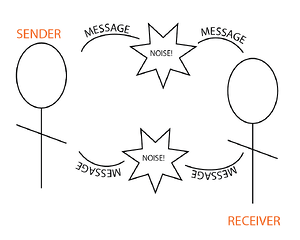 Have you ever tried to communicate a thought or idea to a group or team, and yet no matter how hard you try, you cannot get your point across? Like it or not, we have all been there. The cause for this breakdown in communication could be many different factors, but many times this breakdown is caused by a failure of fundamental best practices for team communication.
 When you improve project collaboration, you improve your organization’s ability to develop innovative products and processes. What are some specific strategies you should employ to get to a more collaborative environment?
 Over the years, I’ve managed or participated in
  The answer is, Edison was not only working on the various inventions for which he’s well-known, but also on the emerging discipline of R&D itself. Even as he and his team were cranking out one technological marvel after another, one of Edison’s ongoing areas of interest was in improving collaboration in the workplace.
  Not all business buzzwords are created equal. For example, “collaboration” is red-hot among buzzwords today — but unlike other momentarily popular topics, the concept has been around a long time, but is now being addressed via technology designed to leverage the Internet. Collaboration apps and platforms typically take advantage of the Internet to enable the sharing of documents, ideas, calendars and more with colleagues. In fact, the more one embraces collaboration, the more implications one can find for teamwork, innovation and growth.