Full Sail Partners Blog | Sarah Gonnella

Posts by Sarah Gonnella:

5 Signs Your Organization Needs an ERP Tune-Up

Posted by Sarah Gonnella on February 05, 2026


2026-02-204 ERP Tune Up_banner

Enterprise Resource Planning (ERP) systems play a crucial role in managing business processes in an integrated manner. When functioning optimally, they streamline operations, enhance decision-making, and improve productivity. However, as organizations evolve and their needs change, so too must their ERP systems. Here are five signs that indicate it may be time for an ERP tune-up.

1. Slow System Performance

A noticeable decrease in performance speed is one of the first indicators that your ERP system may need attention. When your ERP system becomes sluggish, it can lead to significant delays in transaction processing, hampering sales and customer service responses. Users may encounter longer load times for reports and dashboards, resulting in frustration and decreased productivity.

Slow performance is a clear sign your ERP needs a tune-up. For Deltek Vantagepoint clients, consider checking if routine database maintenance is being overlooked—re-indexing and updating statistics can prevent queries from scanning large tables. Additionally, purging or archiving oversized audit-trail tables and ensuring proper SQL Server configuration (including memory allocation, throttling, query plans, I/O, and lock monitoring) are essential steps. Setting report servers and transactional databases to the Simple Recovery model can also help alleviate log-file write issues. Moving to the cloud can address many on-premise bottlenecks, as modern cloud ERPs often automate indexing and statistics updates, scale resources on demand, and manage recovery, allowing your system to remain fast without extensive manual tuning.

2. Integrations Fail Quietly

Another critical sign that your ERP may require a tune-up is the quiet failure of integrations. Although systems may connect seamlessly, jobs run, and dashboards look green, warning signs often reveal underlying issues when:

  • Data requires double-checking.
  • Numbers are reconciled in spreadsheets.
  • There’s an uneasy feeling about accuracy.

When automation seems to work but lacks trust, the problems often stem from earlier decisions that weren’t clearly defined, such as data ownership during disagreements, responses to broken timing assumptions, and the lack of practical error handling. Over time, companies develop compensatory mechanisms, which can lead to the emergence of spreadsheets and the normalization of manual checks.

Most integration failures are rooted not in technical issues, but in decision-making failures that manifest later as data inconsistencies. To improve integration outcomes, organizations should focus on proactively designing solutions for ambiguity, failure, and change. This approach fosters trust in the systems from the outset. If your ERP doesn't provide a unified view of operations, it can result in misinformation and hinder effective decision-making. Deltek Vantagepoint offers one source of truth throughout the project lifecycle for finance, project managers, marketing, and sales. Meanwhile, Full Sail Partners’ Blackbox Connector solutions are pre-built but configurable to adapt to your firm’s unique data needs.

3. User Adoption Challenges

If your employees are reluctant to use the ERP system or struggle with its features, it may indicate that the software requires an update or a comprehensive tune-up. User adoption is vital for any ERP system's success. When users find the system difficult to navigate, they may revert to outdated practices or manual processes, undermining the advantages of an integrated approach.

Gathering user satisfaction through surveys and feedback can provide invaluable insights. Enhancing training and support resources is essential to ensure a more user-friendly experience. After all, continuous training is imperative. Full Sail Partners addresses this by offering monthly events, including mini demonstrations, client stories, webinars, and livestreams, to keep clients informed about the latest features and trends.

4. Inaccurate Reporting

Inaccurate or inconsistent reporting signals that your ERP system may be experiencing underlying issues that need attention. A dependable ERP should generate reports reflecting real-time data to enable informed decision-making. Frequent discrepancies can lead to poor strategic choices and wasted resources.

Most reporting inaccuracies stem from data entry errors or gaps in data. Implementing workflows can alert employees to the need for additional data as a project progresses, ensuring critical information is added in a timely manner. Firms that assign individuals to oversee data entry are more likely to maintain accurate reporting. Regular audits of your data and reporting processes can help identify and rectify these issues, equipped with the aim of providing decision-makers with the most accurate insights possible.

In the future, we can envision AI assisting with this manual process, ultimately enhancing the quality and reliability of reports, which is crucial for maintaining the integrity of your organization’s decision-making processes.

5. Increased Manual Processes

An increased reliance on manual processes or spreadsheets is a significant sign that your ERP might be falling short. This reliance often arises not from carelessness but from a system that fails to align with reality. When integrations can’t handle exceptions, timing mismatches, or “almost right” data, employees create spreadsheets not to undermine the system but to protect it.

These spreadsheets act as a buffer between the ideal world the system presents and the actual workflow. The real danger arises when these manual tools quietly become the source of truth. If a spreadsheet is trusted more than the ERP itself, it indicates deeper design flaws rather than just a tooling problem.

Continuous reliance on manual interventions signals that the ERP isn’t meeting the team's needs effectively, leading to errors, inefficiencies, and unnecessary strain on your workforce. Furthermore, if employees lose faith in the ERP's capabilities, the implications for productivity and morale can be significant.

Instead of asking, “How do we get rid of spreadsheets?” organizations should focus on understanding the essential work these tools perform that the system doesn’t currently support. By identifying these gaps and limitations within your ERP, you can enhance workflow and improve overall operational efficiency.

Empower Your Organization

Recognizing these signs early empowers organizations to take swift action in addressing limitations in their ERP systems. If any of these indicators resonate within your organization, consider consulting with a professional for a Navigational Analysis.

Full Sail Partners offers consulting services tailored to identify and address ERP challenges. Our expert team can assist you in optimizing your ERP system, ensuring it effectively meets your organization’s evolving needs. Don’t let inefficiencies linger, reach out to Full Sail Partners today to discuss your ERP requirements and how we can help!


Unlocking Insights: New Dashboard Features in Deltek Vantagepoint

Posted by Sarah Gonnella on January 29, 2026

2026-01-22 Insights_banner

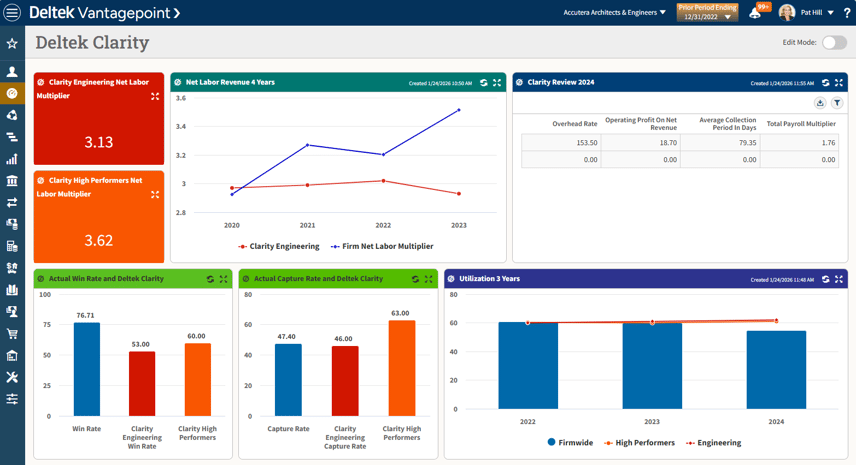
In today's rapidly advancing project management landscape, effective decision-making hinges on the availability of critical insights and data. Deltek, a leader in project-based solutions, has recognized this necessity and is excited to introduce enhanced dashboard functionalities within its Vantagepoint platform, particularly in version 2025.3. These innovative features aim to empower users with deeper insights into their operations and optimize performance through the integration of the annual Deltek Clarity Report.

For the first time, key metrics from the Deltek Clarity Architecture & Engineering Industry Study are now accessible directly within Vantagepoint dashboards. This groundbreaking enhancement allows users to benchmark their key performance indicators (KPIs) against industry standards, ensuring that their operations remain aligned with best practices. By incorporating Clarity benchmarks into daily workflows, organizations can identify opportunities for optimization and growth, driving improved decision-making and strategic outcomes.

The Importance of Dashboards in Project Management

Dashboards are more than just visual aids; they are integral to a project manager's toolkit. By consolidating key metrics and performance indicators into a single, comprehensible view, dashboards transform complex data into actionable insights. The latest enhancements in Deltek Vantagepoint enable users to access tailored insights that are essential for effective project management.

User-Defined Hubs: Customization at Its Finest

One of the standout features in this latest update is the introduction of User-Defined Hub Dashpart Bases. This functionality allows users to craft customized dashparts tailored to their specific needs. Here's a closer look:

  1. Enable the Right Modules:
    First, users must enable the Accounting and CRM Plus modules to access user-defined dashparts.
  2. Creating Dashparts:
    Users can select a user-defined hub in the Dashpart Base field within the Add New Dashpart dialog box, allowing for flexible configurations as tables, charts, or KPIs.
  3. Editing and Configuring:
    The Dashpart Designer provides full access to essential functions, enabling effortless customization according to distinct requirements.
  4. Role-Based Access Rights:
    To enhance data security, users can configure role-based access rights on the Access Rights tab, determining who can view or interact with these customized dashboard components.

New Predefined Dashparts

Deltek is also enhancing user experience with several new predefined dashparts that further enrich dashboard functionality. When the relevant modules are enabled, users gain immediate access to critical financial metrics, such as:

  • Accounts Payable Detail by Vendor: Displays invoices for all active vendors, simplifying expense tracking.
  • AP Outstanding: Provides a snapshot of the total outstanding balance for vendor invoices.
  • AP Overdue Invoices: Quickly identifies overdue invoices, aiding workflow management.
  • Payables Due Next 30 Days: Highlights outstanding invoices due within the next month, assisting teams in prioritizing payments.
  • Vendor Invoice Aging: Visualizes unpaid invoices by days outstanding to enhance cash flow management.

redefined dashparts streamline data management by eliminating manual entry while offering clear, critical insights into accounts payable information.

Expanded Project Dashpart Base

Significant upgrades to the Project Dashpart Base now include new columns that facilitate sorting and grouping dashparts. These enhancements deliver vital metrics for tracking projects throughout their lifecycle, which can significantly aid future forecasting and analysis:

  • Year Opened
  • Year Won/Lost
  • Year Won
  • Year Lost
  • Quarter Opened
  • Quarter Won/Lost
  • Quarter Won
  • Quarter Lost
  • Month Opened
  • Month Won/Lost
  • Month Won
  • Month Lost

Predefined Dashboards: Instant Access to Insights

This update also features new predefined dashboards designed to streamline access to essential accounts payable and key metrics sourced from the Deltek Clarity Study:

  • AP Detail Dashboard: This dashboard consolidates all accounts payable data, featuring various predefined dashparts such as AP Outstanding and Vendor Invoice Aging.
  • Deltek Clarity Dashboard: Users can view key metrics from the latest Deltek Clarity Study, fostering critical industry comparisons. Depending on enabled modules, the dashboard displays performance metrics such as average collection periods and utilization rates.

Key Performance Indicators: Measuring Success

In addition to the predefined dashparts, new Deltek Clarity predefined KPI dashparts now provide users with insights from the latest Deltek Clarity Study. These critical metrics include:

  • Clarity Average Collection Period
  • Clarity Capture Rate
  • Clarity Net Labor Multiplier
  • Clarity Operating Profit on Net Revenue
  • Clarity Overhead Rate
  • Clarity Total Payroll Multiplier
  • Clarity Utilization Rate
  • Clarity Win Rate

With these KPIs, firms can benchmark their performance against industry standards, allowing for strategic adjustments as necessary. This latest update, based on 2024 fiscal year data, streamlines the process of integrating industry benchmarks into dashboards. The dashpart's format is also future-proof, utilizing the Deltek Clarity Year date range option to ensure real-time updates with minimal effort.

Conclusion

The new dashboard functionalities in Deltek Vantagepoint represent a significant leap forward in enhancing visibility and operational efficiency for project managers. By combining customizable user-defined hubs, predefined dashparts, and vital metrics from the Deltek Clarity Study, Deltek equips organizations with the necessary tools to excel in a competitive business landscape.

As technology advances, adapting and leveraging these new dashboard features is essential for project management teams. By embracing these insights, firms can foster improved decision-making, drive better performance, and achieve their operational goals more effectively. Whether you're focusing on financial metrics, managing vendor relationships, or assessing project performance, the enriched data provided through these dashboards will undoubtedly lead to enhanced success in today's project-based environment.

deltekclarity_newimage


January Reflection: Operational Efficiency for Project-Based Firms

Posted by Sarah Gonnella on January 22, 2026

2026-01-22 January Reflection_banner

As we kick off 2026, it's the ideal time to reflect on enhancements in operational efficiency for project-based firms through Deltek Vantagepoint. Ful Sail Partners has identified the most viewed blogs over the past year to highlight trends and insights that our clients found most valuable. This recap aims to provide you with strategies to optimize your processes and overcome common challenges, ultimately setting the tone for a productive year ahead.

1. Solve Common Problems with Deltek Vantagepoint AP Voucher Lookup

In her insightful blog, Senior Consultant Rhiannon Schaumburg highlights the essential function of the Accounts Payable (AP) voucher in tracking supplier invoices. Many accounting professionals frequently encounter challenges, such as duplicate entries and incorrect amounts, leading to multiple vouchers for a single invoice. To mitigate these issues, Deltek Vantagepoint’s Voucher Lookup feature allows users to edit existing vouchers, thus correcting errors without the need to recreate them. This feature simplifies vendor reviews and streamlines payment processing, making accounts payable far more efficient.

For a deeper dive into this topic, check out Rhiannon’s blog: Solve Common Problems with Deltek Vantagepoint AP Voucher Lookup.

2. Understanding Project Budgets in Deltek Vantagepoint

Principal Consultant Matt McCauley offers a detailed overview of updates to the Deltek Vantagepoint Project Budgeting tool in his blog. The tool has been moved to the Project Hub as a standalone menu item, with a new look that maintains core functionalities. Matt emphasizes the importance of a more streamlined drop-down menu for cost and billing options, along with customizable Grid Settings for personalization.

The Project Budget itself is crucial, serving as the manager's estimate for total spending that encompasses labor, expenses, and consultants, which underscores the importance of regular budget updates. The enhanced capabilities of the Project Planning and Resource Management module are also discussed, facilitating improved financial tracking and strategic staffing insights.

For full insights, read Matt’s blog: Understanding Project Budgets in Deltek Vantagepoint.

3. The Ultimate Checklist for a Smooth Vision to Vantagepoint Upgrade

In her informative blog, Relationship Manager Cate Phillips stresses the significance of proper preparation for firms making the transition from Deltek Vision to Vantagepoint. The blog provides a comprehensive checklist aimed at ensuring a seamless upgrade. Key steps include exploring resources available on Full Sail Partners’ website, scheduling consultations, obtaining personalized readiness reports, and reviewing necessary system requirements.

Cate emphasizes critical actions such as data cleansing, backing up the current system, testing in a sandbox environment, and training teams on the new system. Leveraging expert support during the live upgrade and adhering to best practices afterward are also recommended for maximizing operational efficiency.

Check out Cate’s insights: The Ultimate Checklist for a Smooth Vision to Vantagepoint Upgrade.

4. Underused Accounting Features of Deltek Vantagepoint

Senior Consultant Jenny Labranche elaborates on several underutilized applications within Deltek Vantagepoint in her blog. Key features such as Labor Cross Charge, Consultant Accruals, and Overhead Allocation can significantly fortify project health assessments and enhance overall firm performance.

Jenny explains how Consultant Accruals account for the discrepancies between what firms bill clients and what subconsultants invoice. Meanwhile, Overhead Allocation helps assign indirect costs to revenue-generating projects, allowing for more accurate profitability measurement. Understanding these features is critical for maximizing investment in Vantagepoint.

Explore Jenny's perspective here: Underused Accounting Features of Deltek Vantagepoint.

5. Deltek Vantagepoint’s Versatile Billing System: Streamlined Invoicing Solutions

In her engaging blog, Senior Consultant Cynthia Fuoco emphasizes the importance of efficient project billing for project-based firms. She outlines the adaptable billing system within Deltek Vantagepoint, which facilitates multiple billing formats without necessitating numerous invoice templates. This flexibility includes formats such as Fixed Fee, Percentage of Completion, and Hourly billing consolidated into a single invoice.

Cynthia discusses the potential pitfalls of this flexibility, such as lengthy and complex invoices, and presents a streamlined invoice format developed by Full Sail Partners that combines various billing types into a single block. Ultimately, this approach enhances efficiency and readability while maintaining necessary billing details.

Read more about this innovative approach in Cynthia’s blog: Deltek Vantagepoint’s Versatile Billing System: Streamlined Invoicing Solutions.

6. How These Microsoft Office Integrations Make Deltek Vantagepoint Even More Powerful

In her insightful blog, Senior CRM Consultant Stephanie Socha explores how integrations between Deltek Vantagepoint and Microsoft Office—especially Outlook and Teams—can enhance project management. She introduces the Vantagepoint Connect Add-in for Outlook, which streamlines tasks such as adding contacts, logging emails as activities, and scheduling meetings directly from the inbox.

Furthermore, Stephanie discusses Teams integration, which facilitates real-time communication and collaboration by enabling users to initiate chats directly from the records they’re working on in Vantagepoint. These integrations not only save time and reduce email clutter but also ensure data integrity by documenting all project interactions within Vantagepoint.

Discover these powerful integrations in Stephanie’s blog: How These Microsoft Office Integrations Make Deltek Vantagepoint Even More Powerful.

7. 5 Ways Deltek Vantagepoint Simplifies Billing, Time, Expense, and Transaction Entries

Principal Consultant Lisa Ahearn investigates various process efficiencies offered by Deltek Vantagepoint in her blog. She highlights features such as a user-friendly time entry system that allows flexibility through multiple submission methods. The enhanced expense entry process utilizes Intelligent Character Recognition (ICR) for quicker submissions, and automated Accounts Payable invoice approvals help alleviate paper shuffling.

Lisa also discusses how the Accounts Receivable process can accelerate billing and cash flow by generating draft invoices and streamlining communication with clients. She encourages the utilization of tools like ICR and Vantagepoint Connect to automate data entry and enhance efficiency across workflows.

For further insights, check out Lisa’s blog: 5 Ways Deltek Vantagepoint Simplifies Billing, Time, Expense, and Transaction Entries.

8. The Ultimate Vantagepoint Efficiency Toolkit: 15 Features You’re Probably Not Using—But Should Be

In her blog, Principal Consultant Lisa Ahearn also discusses how Deltek Vantagepoint can significantly enhance efficiency for project-based firms by highlighting 15 essential features designed to streamline workflows and automate repetitive tasks. She emphasizes tools such as the Outlook Add-in, bulk updates for multiple records, auto-population of timesheets, and the AI assistant Dela, which makes project data management easier.

Lisa also addresses the significance of dashboards for real-time insights, urging users to dive into these features to reclaim valuable time in their daily operations. She even invites readers to attend her on-demand webinar to witness these functionalities and learn tips for maximizing Vantagepoint’s utility.

For a comprehensive review, read Lisa’s blog: The Ultimate Vantagepoint Efficiency Toolkit: 15 Features You’re Probably Not Using—But Should Be.

Leveraging Insights

As we move forward into 2026, leveraging the insights shared in these blogs can be instrumental in fine-tuning your firm's operational efficiency and addressing common pain points. By exploring the capabilities of Deltek Vantagepoint, your firm can not only optimize performance but also set the foundation for sustained growth.

Here’s to a productive New Year filled with new efficiencies! 🎉

New Year, New Efficiency: Recap of 2025's Top Landing Pages

Posted by Sarah Gonnella on January 08, 2026

2026-01-08 Top Mini-Demos_banner

As we embark on a new year, it’s the perfect time to optimize processes and enhance productivity. With January's theme of "New Year, New Efficiency," we’ve realized that not everyone stays updated on our content. To help you catch up on last year's new features, Full Sail Partners analyzed our website to identify the most visited landing pages on our website. These pages highlight the tools and insights most sought after by our clients. Here’s a recap of the top 10 landing pages that exemplify our dedication to enhancing efficiency and streamlining workflows for project-based firms.

1. Smarter Project Docs in Minutes with Vantagepoint’s New Document Automation

Creating polished, client-ready documents has never been easier. With Deltek Vantagepoint’s Document Automation, users can eliminate tedious copy-pasting between multiple applications. In a mini-demo led by Senior CRM Consultant Wesley Witsken, viewers learned how to:

  • Build compelling case studies in Word.
  • Generate boilerplate agreements and proposals.
  • Access team matrices to track contributions by Team members.
  • Produce on-brand project documents in mere minutes.

This feature significantly reduces manual effort while maintaining high-quality standards in documentation.

Revisit this mini-demo here. 

2. Mastering Vantagepoint Connect Add-In for Outlook CRM Success

Led by Senior CRM Consultant Stephany Socha, this demo highlights how the Vantagepoint Outlook Connect Add-In enhances CRM functionality directly within Outlook. Users discovered how to:

  • Gain visibility of firms, projects, and activities in their inbox.
  • Manage contacts with ease to eliminate duplicate entries.
  • Log activities and set reminders effortlessly.
  • Synchronize calendars between Outlook and Vantagepoint.

This integration promises to streamline workflow and foster better communication within teams.

Watch it again here. 

3. From Pursuit to Award Without the Handoff Hassle

Winning new work is just the start. Presented by Principal Consultant Matt McCauley, in this demo, attendees were shown how Deltek Vantagepoint simplifies the transition from pursuit to award with project planning tools. Key features include:

  • Seamless conversion from generic roles to named resources.
  • Automatic assignment pushes to employee timesheets.
  • Alert and dashpart activation to eliminate handoff challenges.

This functionality ensures that teams remain informed and aligned from day one. You can find it here. 

4. From Pursuit to Project: A Custom Vantagepoint Solution for Master Agreements

Managing Master Service Agreements (MSAs) efficiently is crucial. Principal Consultant Amanda Roussel led a walkthrough of a custom Vantagepoint hub designed to simplify MSA management, featuring:

  • Tracking of MSAs, bonds, and associated projects.
  • Linking pursuits to parent agreements.
  • Real-time metrics on revenue and contract status.

This solution streamlines complex contracts, enhancing transparency for operations and project management teams.

See it in action here

5. What’s New in Deltek Vantagepoint 2025.3

Terri Agnew, Principal Consultant, unveiled the latest updates in Deltek Vantagepoint 2025.3, focusing on usability and efficiency improvements. Highlights include:

  • Enhanced contract tracking features.
  • New dashboard insights with user-defined hubs.
  • Simplified billing management processes.

These upgrades empower users with greater control and insight, enhancing overall efficiency.

Learn more here

6. Upgrades, Imports, & Mergers – Navigating Data Migrations with Confidence

Data migration can make or break an ERP implementation. Join Jennifer Stevland as she covers the four types of migrations, sharing key insights on:

  • Best practices for smooth data transitions.
  • The importance of hiring expertise to avoid pitfalls.

This session serves as a valuable resource for firms planning upgrades or optimizing data management.

Watch it here

7. How HR Green Unified Marketing with HubSpot and Deltek Vantagepoint

Discovering ways to unify marketing and CRM systems is vital for seamless operations. This webinar featured a mini-demo on the new Blackbox Connector for HubSpot presented by Senior CRM Consultant, Wesley Witsken within Deltek Vantagepoint. Then Partner, Sarah Gonnella interviewed Gail Maldonado, CRM Database Manager at HR Green to highlight the game-changing impact the Deltek Vantagepoint HubSpot Connector had on HR Green’s marketing and CRM processes. Key benefits include:

  • Targeting contact lists in Vantagepoint to sync with HubSpot.
  • Tracking email campaign metrics in real-time.
  • Enhancing visibility into marketing activities for project teams.

This integration enables a closed-loop marketing system that enhances collaboration.

8. Seamlessly Sync Employee Data Between Deltek Vantagepoint and ADP Workforce Now

The ADP Workforce Now Connector simplifies employee data management by eliminating duplication and errors. Joel Slater, Client Solutions Manager, showcased this powerful connector, emphasizing:

  • Automated data sync between systems.
  • Simplified onboarding processes for new hires.
  • Enhanced reliability and accuracy for employee information.

This tool significantly reduces manual data entry efforts.

Learn more about this integration here.

9. Deltek Vantagepoint’s Timesheet Assistance

Managing timesheets can be cumbersome, but the Timesheet Assist feature in Deltek Vantagepoint 7.0 offers timely suggestions to help users stay on track. Presented by Consultant Amanda McClain and Senior Consultant Jenny Labranche, this mini-demonstration focuses on how Vantagepoint empowers firms to make data-driven decisions effortlessly. With real-time insights and robust analytics, organizations can pivot quickly and respond to challenges effectively.

This demo demonstrated how Timesheet Assist:

  • Provides reminders based on past projects.
  • Allows quick additions of suggestions to timesheets.
  • Helps ensure accurate timekeeping across business processes.

Watch the 5-minute demo here.

10. How Deltek Dela Is Revolutionizing the Entire Project Lifecycle

Deltek Dela™ is an AI-powered assistant within Vantagepoint that transforms how project-based firms operate. Jake Lucas, AI Developer, presented how Dela:

  • Provides smart summaries for quick insights.
  • Answers questions instantly with "Ask Dela."
  • Utilizes prediction tools to identify potential issues early.

This tool aids various teams, enhancing efficiency and project outcomes.

Watch again to start using it today.

Conclusion

As we kick off 2026, these top landing pages not only highlight what clients are interested in but serve as a reminder of the importance of efficiency in project management. Deltek Vantagepoint continues to evolve, offering innovative solutions that empower firms to work smarter, not harder. By integrating these tools and insights, organizations can position themselves for success in the year ahead.

Why Having a Marketing Strategy is Non-Negotiable

Posted by Sarah Gonnella on June 12, 2025

2025-06-12 Marketing Strategy Banner

In today’s relentless business environment, a strong marketing strategy isn’t just a “nice-to-have.” It’s the cornerstone of real, measurable growth.

And here’s the kicker—we’re a consulting firm that sells, configures, and trains on CRM systems, and even we will tell you: a killer system means nothing without a smart strategy to back it up.

Tools are just tools. Your CRM won’t magically generate demand, build relationships, or close deals on its own. That’s where a strategic marketing approach comes in—giving your tools direction, your messaging purpose, and your entire growth engine momentum.

Below, we’re diving into five strategic elements professional services firms should prioritize to build a bold, results-driven marketing plan.

1. Balancing Operations and Creativity

Marketing is a balancing act—a mix of analytical rigor and creative expression.

It’s not just about operations and logistics, and it’s not just about eye-catching visuals or clever taglines. The real magic happens when creative ideas are paired with structured systems and supported by insightful analysis.

Compelling messaging, thoughtful targeting, consistent branding, automated processes, and performance tracking—these all need to come together in harmony. Without that balance, marketing either becomes disorganized chaos or stale corporate noise.

🛠 Pro Tip: Make room for creative thinking, but ground it in strategy and data. That's how you move from busy work to impactful work.

2️. Prioritize Speed and Clarity—Not Perfection

Let’s be honest: the pursuit of perfection is often the enemy of progress. The firms winning today are the ones who are agile—moving fast, testing ideas, getting feedback, and making adjustments on the fly.

Launch that campaign before it’s “perfect.” Ask for feedback through surveys or focus groups. Test messaging with different segments. Use what you learn to refine, optimize, and iterate.

With the right tracking in place, you can monitor performance in real time. Which campaigns are generating leads? Which ones are getting short-listed? What’s your win rate?

These insights allow you to pivot quickly, amplify what works, and cut what doesn’t. Perfection is overrated. Clarity and action? That’s where the ROI lives.

3. Foster Cross-Functional Alignment

Want better marketing results? Tear down the silos.

The best marketing strategies are built on collaboration—especially between marketing, business development, and technical experts (a.k.a. your seller-doers). In professional services firms, these roles often overlap—but each brings unique value to the client journey:

Marketing

Objective: Build brand awareness and generate leads

Focus:

  • Identify and segment target audiences
  • Create educational and value-driven content
  • Maintain brand consistency across channels
  • Drive traffic and engagement through campaigns
  • Conduct market and client research to inform strategy

Business Development

Objective: Build relationships and identify growth opportunities

Focus:

  • Network and engage with potential clients and partners
  • Explore strategic partnerships and industry involvement
  • Identify future project opportunities
  • Collaborate with marketing and technical teams on pursuit strategies and proposals

Technical Experts / Seller-Doers

Objective: Deliver expertise, build trust, and help close the deal

Focus:

  • Participate in early-stage conversations with prospects
  • Provide technical insight and solutions during pursuit phases
  • Collaborate on proposals, presentations, and interviews
  • Build long-term client relationships through successful project delivery
  • Identify additional client needs and opportunities for future work

Each team has a distinct role, but the magic happens when they align—sharing insights, speaking the same language, and working together toward common business goals. When marketing, BD, and technical experts collaborate, your firm becomes more responsive, more strategic, and way more successful at winning the right work.

4. Use Marketing Attribution for Smarter Decisions

Attribution isn’t just about patting yourself on the back for a conversion. It’s about learning.

When you can identify which messages, campaigns, or touchpoints lead to action—whether that’s a meeting request, a site visit, or a proposal request—you unlock a feedback loop for continuous improvement.

Smart attribution helps you:

  • Understand what’s working (and what’s not)
  • Allocate budget more efficiently
  • Align teams around proven strategies
  • Improve cross-sell and upsell opportunities

Plus, when teams work from a shared data set, collaboration becomes easier—and marketing becomes more cost-efficient without compromising on quality.

5. Maximize ROI: Focus on Repeat Audiences While Still Growing New Ones

Here’s a secret not enough firms talk about: sometimes the best new opportunities come from people who already know you.

Targeting repeat audiences—past clients, partners, proposal reviewers, and warm contacts—often yields higher conversion rates. These audiences are already familiar with your brand and more likely to engage with personalized messaging.

Even better? It’s more cost-effective than constantly chasing new leads.

That said, growth still requires expanding your reach. So, balance is key. Continue reaching out to new prospects through campaigns, events, and content while maintaining strong follow-up strategies for past and current clients.

Short-term ROI comes from repeat audiences.
Long-term growth comes from reaching new ones.
You need both to sustain success.

The Bottom Line: Strategy First, Tools Second

Let’s face it—your marketing strategy is the fuel that powers your CRM, your email campaigns, your proposals, and your BD team’s efforts. Without it? You’re just throwing spaghetti at the wall and hoping for ROI.

A smart marketing strategy aligns creativity with operations, embraces experimentation over perfection, breaks down silos between teams, tracks performance with purpose, and balances client retention with outreach.

If your firm is still shooting in the dark with disconnected tactics or just "doing what you’ve always done," it might be time to hit pause—and start building a better game plan.

🎯 Need a strategic partner to guide the way?

At Full Sail Partners, we help professional services firms align their marketing strategy with the right tools, processes, and insights. From CRM configuration to campaign execution—we’ve got you covered.

👉 Let’s Talk Strategy

Clean Your Dirty Data and Improve Data Integrity

Posted by Sarah Gonnella on April 10, 2025

04-10 Clean Your Dirty Data and Improve Data Integrity_Banner

You can smell it in the air—spring is here. And while most people are reaching for dusters and donation boxes, we’re over here thinking about a different kind of mess: your data. Yep, we’re talking about those outdated contact records, confusing project statuses, and duplicate entries multiplying like rabbits in your ERP system. 🐇

We get it. Data management isn’t the most glamorous task. But it is one of the most important—because clean data powers accurate reporting, better decisions, and ultimately, a more profitable firm.

Let’s dig into why data gets dirty (no judgment here), and more importantly, what your team can do to clean it up—and keep it clean.

Why Data Gets Dirty (Even When You're Trying Your Best)

Your firm isn’t doing anything wrong—data just naturally decays over time. People change jobs. Projects wrap up. Opportunities stall out. And if you’re using a system like Deltek Vantagepoint, where multiple team members can enter or edit data, those inconsistencies can stack up fast.

Some common culprits:

  • Contacts that left the company three years ago (but you’re still emailing them… awkward)
  • Projects marked “active” that haven’t had billable time since 2022
  • Custom fields created with good intentions but never used consistently
  • Multiple definitions of statuses like “inactive,” “on hold,” or “archived” floating around your team like urban legends

Sound familiar? Yeah, we thought so. Let’s fix it. 🔧

Step 1: Define Decision Points 🔍

Before you start cleaning, take a minute to figure out what needs attention and how you’ll make decisions. Otherwise, you’ll waste time spinning your wheels—or worse, accidentally delete important info.

Start by identifying the fields you want to review. Let’s take project records, for example. You might want to evaluate:

  • Project Status
  • Last billed date
  • Assigned project manager
  • Client contact information

Ask yourself:

  • What makes a project “dormant” vs. “inactive”?
  • Should we dormant projects that haven’t had activity in over 12 months?
  • What criteria can we search by to build a clean-up list?

Example: Run a search for all active projects that haven’t had time billed in the past 90 days. That’ll give you a short list of projects to investigate. Maybe some need to be marked as inactive or maybe even dormant. Maybe others are still technically open but should’ve been closed out months ago. Whatever the case, narrowing the list makes it manageable.

Step 2: Standardize Everything ✏️

Inconsistent data doesn’t just look messy—it creates reporting nightmares. Imagine running a report on “Dormant Projects,” but half the team labeled them as “Inactive.” That data’s not helpful—it’s confusing.

So, this is your opportunity to:

  • Clean up dropdown options that aren’t in use
  • Create a shared glossary of field definitions
  • Use tooltips in Vantagepoint to help users enter data correctly

💡 Pro Tip: Review custom fields and user-defined labels. If something hasn’t been used in a year—or if it’s being used inconsistently—either standardize it or remove it.

Also, talk to your teams. Ask them how they actually use the system. Sometimes the data structure doesn’t match real-world workflows, and that’s where inconsistencies creep in.

Step 3: Automate Where You Can 🤖

Once the clean-up is done, set up some automation to help keep things tidy moving forward. In Deltek Vantagepoint, that could mean:

  • Workflows that trigger an alert when a project hasn’t been updated in 6 months
  • Dashboards that highlight missing key fields like contact phone numbers or opportunity stage
  • Scheduled reports that flag records needing review—like unassigned project managers or expired client emails

Example: Let’s say you want project managers to review project statuses quarterly. Create a workflow that sends a reminder on the first of each quarter to check and update their projects. Boom—ongoing accountability without manual chasing.

Step 4: Assign a Cleanup Crew 🧽

Let’s be honest—if everyone owns data integrity, no one really owns it. Designate specific people or roles to be your data gatekeepers. This doesn’t mean they do all the work, but they’re the ones ensuring standards are followed and reviews are happening.

Ideas for building a data integrity plan:

  • Assign a Data Champion for each department (Marketing, Accounting, Project Management)
  • Create a monthly or quarterly data audit checklist
  • Host a “Data Day” once a quarter—throw in some snacks and make it a team effort 🍩

And yes, this might mean investing time and people up front, but the payoff is massive: more trust in your data, faster reporting, and less stress when leadership asks for a metric yesterday.

Bonus Tip: Start with What Hurts the Most 😣

You don’t have to fix everything at once. Start with the areas that cause the most frustration:

  • Is your CRM full of dead contacts? Start there.
  • Struggling to run accurate pipeline reports? Review opportunity stages.
  • Marketing getting bouncebacks from email blasts? Clean up email addresses.

Small wins lead to momentum—and momentum leads to lasting change.

Final Thoughts: Clean Data = Clear Decisions

If your data is a hot mess, you're not alone—but you can do something about it. By defining clear decision points, setting standards, automating what you can, and assigning real people to own the process, you’ll give your ERP system a much-needed refresh.

And hey, if your team needs help figuring out where to start or how to set up those automations in Deltek Vantagepoint—we’ve got your back.

📩 Let’s clean up that hot mess together. Contact us to schedule a data integrity consult with one of our friendly experts.

Because nothing feels better than a database that’s as fresh and clean as your spring wardrobe. ✨

Running an Effective Meeting: 4 Key Strategies for Productive Collaboration

Posted by Sarah Gonnella on January 04, 2024

01-04-24 MARKETING MEETING - Banner


In today's fast-paced professional services firms’ environments, meetings play a crucial role in fostering collaboration, aligning teams, and achieving organizational goals. However, ineffective meetings can be a drain on productivity and morale. To ensure that meetings are valuable and efficient, it is essential to follow certain best practices. In this blog post, we will explore four key aspects of running an effective meeting: setting clear objectives and goals, planning the meeting and agenda, employing a skilled facilitator, and having a diligent note-taker.

1. Objective and Goals of the Meeting:

The success of any meeting hinges on having a clear objective and well-defined goals. Before scheduling a meeting, it is crucial to determine how it aligns with the broader growth efforts and yearly goals of both the team and the organization. By doing so, the meeting becomes a strategic tool for progress. Participants can better understand the purpose of the gathering and how their contributions fit into the larger picture.

For example, the goal of a marketing, business development, or sales-oriented meeting is to ensure you are accomplishing the goals set out in your yearly business plan. Within the Architectural, Engineering, and Construction (AEC) industry, that includes ensuring you know what is going on with your project pursuits. Key objectives in bi-weekly meetings would include knowing recently won/lost pursuits, new pursuits and managing follow-up on upcoming proposals, along with understanding resource forecast projections. An example core objective in a quarterly meeting would be evaluating where you are against your goals.  

2. Meeting and Agenda:

To run a productive meeting, careful planning is essential. The meeting should involve the relevant team members and decision-makers who can contribute to the agenda items. The agenda itself should be thoughtfully structured, with a focus on deadlines and the outlined steps needed to meet them. By sharing the agenda in advance, participants have time to review and prepare, ensuring a more engaged and productive discussion. Balancing chit-chat time and getting down to business is important, as it fosters team cohesion while still maintaining a professional atmosphere. Coming out of the meeting, attendees should know their action items and tasks to accomplish.

3. A Good Facilitator:

A skilled facilitator plays a vital role in guiding the meeting towards its objectives while ensuring active participation and collaboration. The facilitator should encourage open discussion, allowing all voices to be heard. Additionally, the facilitator should review outstanding items from previous meetings to track progress, providing context for the current discussion.

Staying focused and time-conscious is crucial, as it helps keep the meeting on track and ensures that all agenda items are addressed. If new topics arise that are not on the agenda, the facilitator can suggest moving them to a "parking lot" list, to be covered either if there is enough time or in the next meeting. A good facilitator is like a good train conductor who sees the path ahead and knows when to slow down and when to speed up to accomplish the items that are most impactful to keep the department or company running smoothly.

4. Note-Taker:

An often-underestimated role in meetings is that of the note-taker. The note-taker should diligently document meeting minutes, capturing important discussions, decisions, and action items. By doing so, a reliable record of the meeting is created which ensures that information is not lost. Clear documentation of action items, next steps, and responsible parties is crucial for accountability and follow-up.

Furthermore, sharing the meeting minutes afterward is essential to keep all participants informed and ensure that everyone is on the same page. With the advent of AI, note-taking might become a thing of the past. I know our team has been exploring software that will assist with analyzing the content, offering summaries, outlining tasks with due dates, and even providing insights based on the discussion.

Follow Key Strategies to Ensure Productive Meetings

Running an effective meeting requires careful planning, active facilitation, and diligent note-taking. By setting clear objectives and aligning the meeting with broader goals, you create a purpose-driven environment. Thoughtful planning, involving the right people, and sharing the agenda in advance help participants prepare and contribute effectively. A skilled facilitator encourages collaboration, keeps the meeting on track, and addresses outstanding items. Lastly, a diligent note-taker documents important insights and ensures that action items are clearly defined. By following these strategies, you can transform meetings into productive spaces that drive progress and foster teamwork at your professional services firm.

New call-to-action

Key Performance Metrics for Architecture and Engineering Firms

Posted by Sarah Gonnella on August 17, 2023

08-17-23 Key Performance Metrics for AE Firms Banner

How does your firm measure up? That is the vital question many architectural and engineering (AE) firms should be asking themselves. It is challenging to manage what you are unable to measure! There are several key performance metrics that an AE firm should use to determine its current status. These measurements are important to not only keep you abreast of the condition of your company, but they also allow you to examine the past, so you can plan for the future. Let’s look at a few of the significant performance metrics. 

Proposal Win Rate

When we talk about Proposal Win Rate, we're essentially looking at how effective your business development efforts are at turning potential leads into actual projects. It's like keeping score on how well you're playing the business game! By tracking this rate, you gain valuable insights into what strategies are paying off and which ones might need a little tweaking. 

Even the tiniest improvement in your win rate can have a huge impact on your bottom line. Think about it – landing just a few more projects out of every ten proposals can make a significant difference in your profitability.  

In the fiercely competitive world of AE firms, the ability to gain new business is like having a superpower. It's what sets successful firms apart from the rest. So, honing your business development skills and consistently improving your win rate is critical to your success. 

Here's a pro tip: When analyzing your Proposal Win Rate, pay attention to the reasons behind both your wins and losses. Learning from both successes and setbacks is the secret sauce to continuous improvement. You might discover patterns that can help you replicate your victories or identify areas that need some extra attention. 

Profit

Profit is a crucial metric for any AE firm’s success. It tells you how well your firm is doing financially. It's the money left over after deducting all expenses from your gross income. Profitability metrics help AE firms figure out which projects are worth pursuing. It shows you if you're making enough money to keep your operations going and growing. 

Analyzing your profit helps you make smart decisions about where to focus your efforts and resources. It's like a report card for your financial performance. Being profitable is essential for your firm's sustainability and growth. It allows you to invest in your business and attract top talent. 

But don't get too fixated on profit alone. Keep in mind that different projects may have different profit margins and timelines. 

By keeping a close eye on your profit over time and comparing it to your goals, you can spot areas for improvement and make informed decisions for a prosperous future. 

Labor Utilization

Labor utilization is a metric that helps you measure your team's efficiency. It ensures you have the right number of employees for optimal performance. By analyzing labor utilization, you can identify both high and low performers, enabling you to take targeted actions for improvement. 

To maintain an effective labor utilization rate, review both billable (direct) and non-billable (indirect) hours. Monitoring this metric allows you to make data-driven decisions and allocate resources wisely for maximum productivity. 

A well-utilized team leads to a happy and productive work environment, driving your firm's success. Keep an eye on labor utilization for a thriving team and business! 

Net Revenue/Operating Income

Net revenue and operating income are like a dynamic duo that keeps your business running smoothly and efficiently. Let's take a closer look at these essential metrics and understand why they're crucial for your AE firm's financial success. 

First up, net revenue is the lifeblood of your business. It's the total revenue your firm generates after deducting any discounts, returns, or allowances. Think of it as the fuel that keeps your business engine roaring. Without sufficient net revenue, your firm's growth and sustainability could hit a roadblock. 

Operating income, on the other hand, measures your business's capacity to take on new projects while covering all operating expenses. It's like a litmus test of your firm's operational efficiency. By subtracting your operating expenses from your net revenue, you get a clear picture of how much profit you're generating from your core operations. 

Now, here comes the interesting part: net revenue also sheds light on your firm's relationship with subcontractors. It shows how much of your revenue goes to paying them for their services, leaving you with the revenue that your firm retains for its own services. Understanding this breakdown helps you gauge the impact of subcontracting on your profitability. 

By carefully tracking net revenue and operating income, you can make informed decisions about pricing, resource allocation, and investment opportunities. It's like having a compass that points you in the direction of profitability and growth. 

For example, if you notice that your net revenue is high, but your operating income is lagging, it could signal inefficiencies in your operations or excessive costs that need addressing. On the other hand, if your operating income is strong, but net revenue is low, it might be time to revisit your pricing strategies or explore new revenue streams. 

In a nutshell, net revenue and operating income are two sides of the same coin. Together, they provide valuable insights into your business's financial health, helping you steer it toward prosperity. 

So, pay close attention to this financial power duo. Regularly monitor their performance, set targets, and use the insights gained to fine-tune your business strategies. With net revenue and operating income on your side, you'll be well-equipped to navigate the waters of profitability and keep your AE firm thriving! 

Backlog

The backlog metric is your firm's project navigator, keeping you on course within your budget. By tracking both ongoing projects and potential wins, it provides a clear picture of your workload and budget needs. This insight helps you plan ahead, allocate resources effectively, and deliver top-notch results to your clients. Regularly keeping an eye on your backlog ensures you stay on track and sail smoothly toward success! 

Client Loyalty

For any AE firm to grow and continue to be successful, client loyalty is a necessity. It is important for both word-of-mouth referrals and repeat business. Meeting client expectations, proactively engaging in client feedback, and acting on areas that need improvement are all essential to keeping loyalty. 

Cost of New Business

When it comes to growing your AE firm, new business opportunities can lead the way. But expanding also means there are costs involved. Measuring these costs helps you choose which opportunities are worth pursuing and if the potential gains are worth the investment. Remember, calculated risks can lead to profitable growth. So, keep an eye on the cost of new business and set your company on a path of strategic expansion! 

Measuring Up the Firm

Keeping a close eye on key performance metrics is the secret sauce to your AE firm's ongoing success. We've explored some noteworthy metrics today, but there's a whole world of data waiting to be discovered. It's up to you to decide which metrics align best with your firm's goals. 

To see how your firm measures up with these KPIs and gain valuable insights into the A&E industry, we encourage you to download the latest Annual Deltek Clarity A&E Industry Study by clicking the image below. This study contains valuable information to aid your decision-making and stay ahead of the competition. 

Remember, the path to prosperity starts with data-driven decision-making. Equip your firm with the right metrics, ensure your team understands the goals, and set sail toward a brighter, more successful future! 🚀 

New call-to-action

Eleven Reasons Vantagepoint's Project-Based ERP is Right for Your Firm

Posted by Sarah Gonnella on March 23, 2023
03-23-23 11 Factors When Selecting Project Accounting Software - Banner rev

How do you know when it is time for your professional services firm to move to enterprise project management tools or ERP? There are many factors to consider in your decision. Although you may be familiar with the name Deltek, you might not be aware of its latest solution, Vantagepoint. You might be surprised by all of its new capabilities. Not to mention that Deltek Vantagepoint’s cloud pricing ensures your firm stays up to date with the latest enhancements and reduces the burden on your IT team. We've outlined 11 important items to think about when looking at new project accounting, resource management, and client relationship management (CRM) software tools for your business.   

1) Not Your Mama’s Accounting Software

The first thing you will notice about Deltek Vantagepoint is that it’s very approachable with a modern look and feel. AE firms have come to know Deltek for its robust capabilities, but now users of Vantagepoint are talking more about its intuitive and user-friendly capabilities. This new solution is breaking down silos and getting teams to work more collaboratively because of its new project lifecycle design.  

2) Simplified Access Anywhere, Anytime

Let’s face it, not everyone works from his or her desk these days. Being able to access information anywhere and anytime is no longer a luxury, rather, it is an expectation. Deltek Vantagepoint provides users the ability to enter their time and expense data right from their phone or tablet rather than having to get on a computer and access the system directly. Users with CRM can also view and log Contacts, Activities, and Pursuit information. Deltek Vantagepoint also now includes an integration with Outlook that provides two-way synchronization of your contacts and calendar items within your Outlook email application.  

3) Reduce Manual Entry  

One of the best new features of Deltek Vantagepoint is its Intelligence Character Recognition (ICR) capabilities which simplify and improves the accuracy of expense reporting by reading text from receipts and populating the information into your expense report. This capability is also used to allow users to capture business cards or to create a new contact. The “Hey Deltek” feature allows users to speak directly to Vantagepoint and acts similarly to “Siri,” “Alexa” or “Google.” Users can use the feature to quickly find a record or to quickly add a new contact, pursuit, activity, or reminder.   

4) Streamlined Processes  

When Deltek approached the design of Vantagepoint, it had two decades of providing the gold standard of project-based solutions under its belt. Additionally, feedback and suggestions were received over those years on areas that users wanted to see improved. Some of these key areas included:  

  • Merging Clients/Vendors, Leads/Contacts, and Opportunities/Plans/Projects to reduce redundancy 
  • Ability to manage project performance in one centralized area  
  • Easily assign and reassign resources and redistribute plan hours 
  • Plan for the unpredictable changes - Deltek Vantagepoint allows project managers to control the details of their projects, whether they want to look back at JTD or look forward with ETC 
  • Improved billing tools notify invoice approvers electronically that a draft is ready for review, and approvers can use the draft invoice approval feature to mark up and enter comments using the new PDF editor function 
  • Approvals happen electronically with no more paper approval or emails to keep track of any longer 
  • Email templates are available when sending electronic payment remittances in the Vendor Payments, Employee Payments, and Payroll Payments applications saving accounting users' time. 
  • Automated bank feed improves efficiency with bank reconciliation 

5) Decision Ready Information 

Deltek continues to provide more improvements to filters, dashparts, and dashboards for ease of use for the end user. To get the most out of your software, firms need the ability to easily create, manage, and monitor projects, since projects are at the core of any project-based company. Deltek Vantagepoint delivers just that. Through a streamlined project creation process, using visuals and dashboards, project managers are able to focus on project performance through a centralized project hub. Those using Resource Planning have further capabilities through a highly developed and scalable resource management tool.  

6) Easily Create Automated Routines with Workflows 

Even though Deltek Vantagepoint is purpose-built with professional services firms in mind, firms may still need the ability to further automate processes and functions. With built-in workflows, your firm can automate front-end processes like sending emails, and alerts, updating fields, and running processes or reports automatically. In addition, stored procedures can be customized to automate non-standard processes on the back end.  

7) Integrated Systems 

Many firms have data silos with disparate systems. This separation between team members can increase inefficiencies and keep the firm from reporting on one truth for the company. Many of Deltek’s competitor ERPs are separate systems that have to share data back and forth through integration. Deltek Vantagepoint provides accounting, planning, resource management, and CRM all in one system. Firms can work as a team and build upon each other's data to gain a holistic view of the company and processes.  
 
However, there are times when firms will need to connect separate systems. For example, to their HR or marketing solutions. That is when Deltek Vantagepoint’s open APIs can be utilized. Vantagepoint has a RESTful API service, which is perhaps the most popular approach to building APIs. The RESTful service for Deltek Vantagepoint empowers programmers to build custom applications that interact with Vantagepoint. Integrations help ensure firms get the most out of their investment by sharing data between critical systems. Sometimes firms have in-house programmers that can leverage Deltek Unionpoint, while others prefer a seasoned development team, like the Blackbox Connector team, to build out their solutions.  

8) Work Breakdown Structure 

Enterprise project management accounting software becomes a “must-have” for firms that want to track detailed information around deliverables. How do you know if it is suitable for your firm? Your firm may need the ability to:  

  • Break down a project into manageable work elements by separating out the deliverables for the project 
  • Identify the start and end time of each deliverable 
  • Define the overall budget for the deliverables as well as the entire project 
  • Attach key persons to the project for reporting 
  • Set up work breakdown structures to show the effort required to achieve an objective 

By having the right software for your firm, you gain the ability to track detailed cost estimating and provide guidance for future development and controls. The ability to break a project into manageable work elements, and track the elements, allows firms to better estimate future projects while maintaining the projects that exist today.  

9) Accrual and Cash Capabilities 

Many firms want the ability to run cash books alongside accrual books to get the most accurate view of where the business stands with income and debts. Income and expense tracking is integral to project accounting software. While a cash basis may give you a better idea of where the firm stands with actual cash, the accrual method can show the ebb and flow of the overall business income and debts for the most accurate view of the overall organization and long-term profitability.  

10) Audit Trail 

Many firms require modifications that fit their project-based firm. In QuickBooks and other software, Excel workarounds with manual manipulation are required outside of the software. This can impact the firm’s audit trail. Vantagepoint has the capability of running reports for changes made in key records as well as the ability to see the financial audit trail, which is important for the firm to be compliant with GAAP, IFRS/FASB, or any other requirements.  

11) Security 

Security is one of the most important features of a program because it either allows or restricts employees from seeing sensitive information such as costs or other employees' sensitive information. Your firm will need to be able to provide access to the system for many roles in the company to work holistically with the organization’s needs. Without this ability, there is no visibility, and management of the system and processes becomes very difficult. It is important for all players to have access to the information they require to manage their duties and keep the business running smoothly.   

Gold Standard of Project-based ERP Systems for Professional Services Firms 

If you haven’t seen Deltek Vantagepoint, it is time to talk to a partner like Full Sail Partners to see why Deltek Vantagepoint is the flagship ERP solution when it comes to professional services firms. Whether you’re a 10-person or a 2,000-person firm, Deltek Vantagepoint is designed to help manage the entire project lifecycle better than any of its competitors. This intuitive, powerful solution puts your people and projects at the center of your business so you can be more efficient, productive, and profitable. Be sure to check out our latest mini-demonstration by clicking the image below or reach out to us today


New call-to-action


What to Look for in a CRM Consultant

Posted by Sarah Gonnella on February 09, 2023


02-09-23_CRMConsultant_Banner

The other day I had a prospect call looking for a CRM (Client Relationship Management) software, but what he found was a CRM Consultant vs. a “salesperson.” Don’t get me wrong, I absolutely want to sell software…to the right fitting firm. As with most calls, this caller wanted to set up a time for a demonstration.  

However, without understanding the prospect's challenges, and ultimately how the software will help the client’s marketing strategy, a demonstration is futile. A CRM system isn’t a magic bullet. So, when you are looking for new CRM software, it’s important to also evaluate who will assist you beyond the sale. Below is what to look for in a CRM Consultant: 

A Results-Oriented CRM Consultant Identifies Firm Needs

When speaking to a client or potential client, a CRM Consultant asks probing questions to evaluate the firm’s current processes, its challenges, and ultimately what the client is looking to accomplish. As a CRM Consultant, it’s important to understand the firm’s level of sophistication related to marketing processes and measurement. Just like a growing baby, each firm is at a different growth stage.  

baby growth sm

A baby must learn to roll over, crawl, stand, walk, and then run, and so must a firm. You can’t expect to immediately start running. Some firms’ processes are advanced despite the fact that they have no CRM system. Others have no processes at all. A firm must start somewhere. So as a consultant, it’s important to understand the firm’s marketing maturity before establishing a CRM implementation for that firm.  

During the above-mentioned call, the prospect was a little taken aback when I told him that our system wasn’t the right fit for his needs. Ultimately, he was looking for another type of software. Although it ended up not being a lead, the prospect was thankful for my honesty as I took the time to understand what his firm needed and helped guide him down a better search path. 

A Vigilant CRM Consultant Engages Key Players Throughout Implementation

After establishing needs, it’s important to make sure you have the right players. As outlined in this previous blog article, 8 Reasons for a Successful Implementation, it’s important to ensure executive buy-in during the sales process. Just as important is having the right CRM champion, and with an ERP (Enterprise Resource Planning) system, it’s important to get finance involved.  

All these key players must be a part of not only the implementation but also the sales process. When involvement from any of these roles is lacking, the likelihood of success is lessened. It is the role of the CRM Consultant to make sure that these key players are established from the beginning and do their part through the implementation. These key people play a huge part in the rollout of the system and must also engage other end users to ensure all departments, divisions, markets, and offices are represented. 

It is the Duty of a CRM Consultant to Look to the Future

When going through an implementation, a misconception that many firms have is that once the implementation is complete, so is the development of your CRM. Well, what worked today won’t necessarily work tomorrow. As your marketing strategy and the competitive landscape change, your CRM system must continue to evolve.  

Your CRM Consultant should look to resolve short-term and long-term needs, as well as think about strategic marketing plans. For example, do you plan to open a new office, go into a new market, or start a new service line? A CRM Consultant is there to guide your firm on metrics that would be valuable to access your marketing traction. 

Your CRM Consultant Should Be a Strategic Partner

A CRM Consultant should be more than a trainer or a vendor. Treating one as such is a common mistake made by firms seeking to hire a CRM Consultant. So how do you know if you have a consultant or a vendor?  

If we look at the basic definition of a vendor, “a person or company offering something for sale,” we can see there is no value added beyond the sale. Whereas a consultant is “a person who provides expert advice professionally.” A value-added CRM Consultant should have a background in marketing and be able to help your firm adapt the system to your marketing strategy.  

A consultant will: 

  • Ask strategic questions to better understand your business needs. 
  • Provide best practices and facilitate your company in adapting the system to gain insight into metrics that matter. 
  • Go beyond showing you how to just use the system.
  • Help you learn how to increase user adoption.
  • Look at ways to improve your business and your clients.
  • Understand your industry. 

Bonus: The consultant uses the system in his or her own business. 

Ultimately, your CRM Consultant should be a partner that understands your business needs and be someone you can rely on to help you as new needs arise. If your firm is looking to improve its CRM processes or looking for a CRM system, be sure to check out Full Sail Partners’ CRM resources page. These resources include mini demonstrations, webinars, whitepapers, and more.


New call-to-action


Latest Posts